
iPhone · guide
How to buy more storage on iPhone: the iCloud+ paths and plans
By Alberto Gulotta · Updated · 8 min read
How to buy more storage on iPhone means buying an iCloud+ plan: Apple’s steps differ for iOS 27, 18.4 to 26, 18 and 17 and earlier. Apple’s pages describe iCloud storage only, not the phone’s internal memory. This page sets out the paths, the US prices, what downgrading does and where a forum differs from Apple.
| Question | Answer | Where it comes from |
|---|---|---|
| What can you buy? | An iCloud+ plan: 50GB, 200GB, 2TB, 6TB or 12TB, on top of the free 5GB | Apple |
| Where do you buy it on an iPhone? | Settings, your name, then iCloud or Subscriptions, depending on the iOS version | Apple Support |
| What does it cost? | On Apple’s US page: $0.99, $2.99, $9.99, $29.99 and $59.99 a month | Apple |
| Does it add space to the phone? | Apple’s pages describe iCloud storage only; a forum says the internal storage cannot be bought later | Apple, a forum |
| Can a plan be shared? | Yes, with up to five other family members at no extra cost | Apple |
The steps, by iOS version
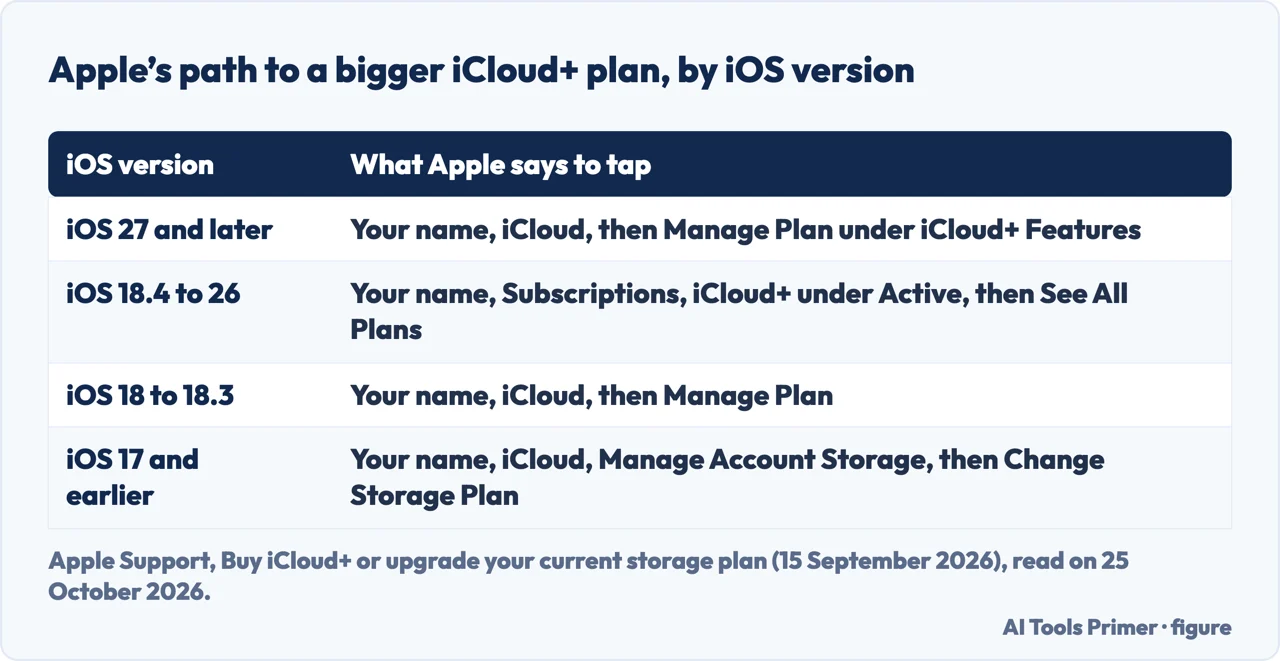
Apple’s support article, published on 15 September 2026, gives different steps for each version. On an iPhone with iOS 27 and later, open Settings and tap the iCloud Storage Almost Full notification, or tap your name, then iCloud and, under iCloud+ Features, Manage Plan; if you are not yet subscribed, tap iCloud, then Storage (or Almost Full), then Get More Storage. With iOS 18.4 to iOS 26, open Settings, tap your name, tap Subscriptions, then iCloud+ under Active and See All Plans; if you are not subscribed, tap iCloud, scroll down and tap Upgrade to iCloud+. With iOS 18 to 18.3, tap your name, iCloud and Manage Plan. With iOS 17 and earlier, tap your name, iCloud, Manage Account Storage and Change Storage Plan. In every case Apple ends with choosing a plan and following the onscreen instructions.
The same article covers the other devices. On a Mac with macOS Sequoia and later, choose Apple menu, System Settings, click your name, click iCloud and, under iCloud+ Features, Manage Plan, or Upgrade to iCloud+ if you are not subscribed. On a Windows PC, open iCloud for Windows, click Change Storage Plan if you already subscribe, choose a plan, click Next, enter your Apple Account password and click Buy. That is how to buy more storage on iPhone in Apple’s words: the account’s plan, changed from the device, not the phone’s own memory.
The plans, and what they include
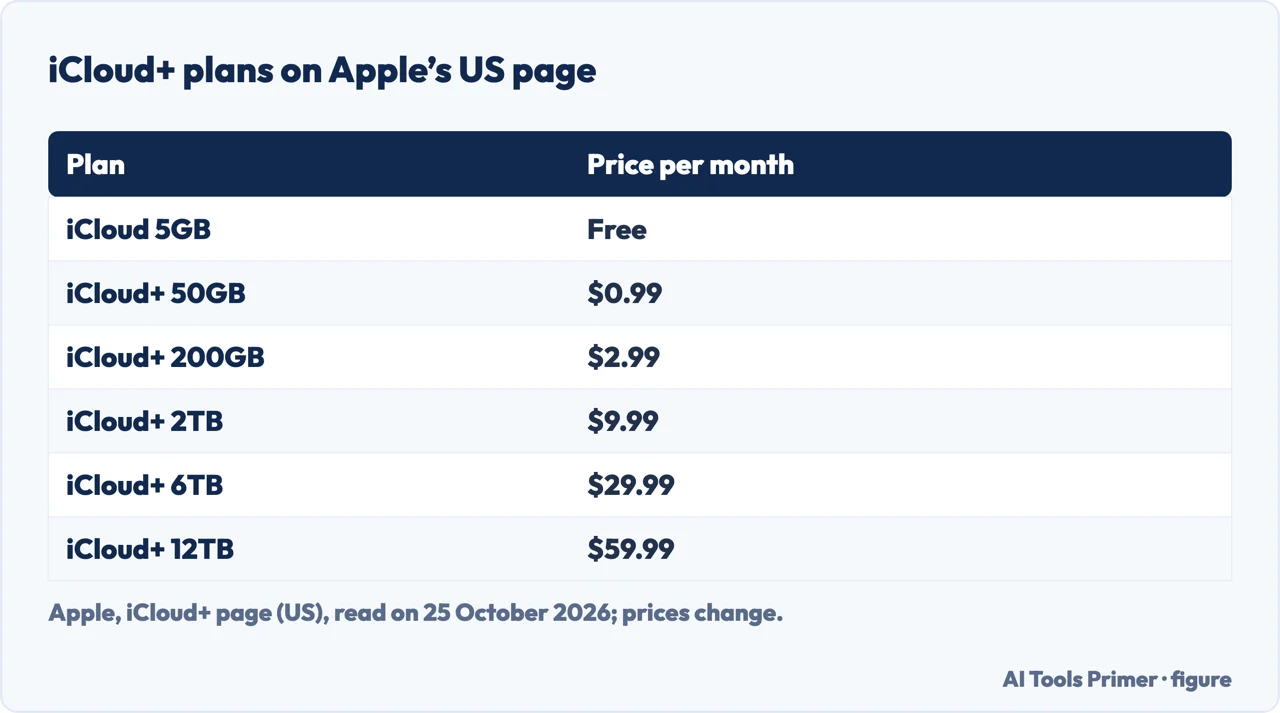
Apple’s iCloud+ page, read on 25 October 2026, says you get 5GB of free iCloud storage the first time you sign in to an iPhone, iPad or Mac with your Apple Account. The paid plans on its US page are 50GB at $0.99 a month, 200GB at $2.99, 2TB at $9.99, 6TB at $29.99 and 12TB at $59.99. The 50GB plan adds iCloud Private Relay, Hide My Email, Custom Email Domain, HomeKit Secure Video recordings for one camera and full access to Apple Invites; the 200GB plan adds recordings for five cameras. Apple says all iCloud+ plans can be shared with up to five other family members at no extra cost, and that iCloud+ is included in all Apple One plans and can be combined with an Apple One subscription for more total storage. Prices differ by country and change; check Apple’s page for yours.
What a plan does not add
Several of the questions people ask on this topic are about the phone’s own memory: whether a 64GB iPhone can become 128GB, or 128GB become 256GB. The three Apple pages we read are about iCloud and say nothing about adding internal storage to an iPhone. A forum thread, which carries no date that we could read, says paying for iCloud does not add physical storage to the iPhone, that you cannot buy more internal storage later because the storage chips are fixed to the board, and that low free space slows an iPhone down. The same reply recommends a cleaning app, whose maker it names, and an external flash drive. Those are the forum’s claims, not Apple’s, and we did not test them. For freeing space on the phone itself see freeing up space on an iPhone.
Going back down, or cancelling
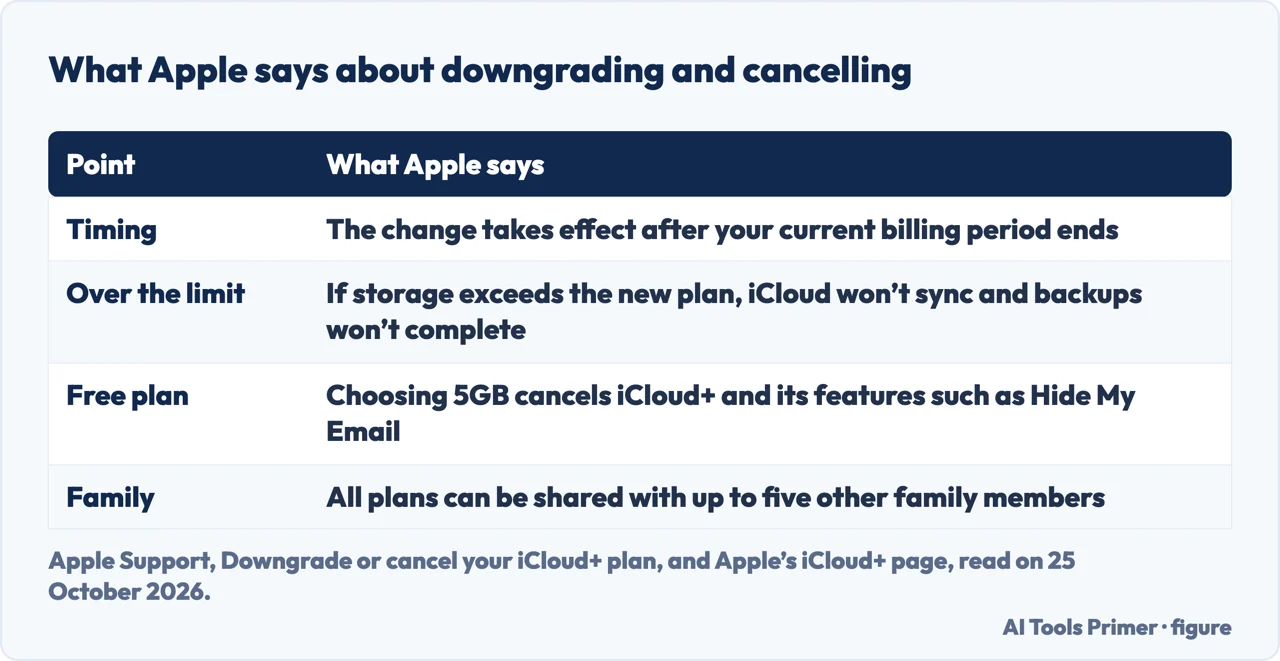
Apple’s article on downgrading or cancelling, also published on 15 September 2026, says to download or remove content that exceeds your new storage amount before you downgrade. On an iPhone with iOS 18.4 and later, open Settings, tap your name, tap Subscriptions, then iCloud+ under Active; tap Cancel Subscription to cancel, or See All Plans to choose a smaller one. The change takes effect after your current subscription billing period ends, and Apple says you should see a blue check next to the new plan. If your iCloud storage exceeds the new plan’s capacity, iCloud won’t sync or update your information and iCloud backups won’t complete, until you increase capacity or delete information. Downgrading to the free plan means you no longer have access to features such as Hide My Email, Private Relay, Apple Invites and HomeKit Secure Video support. For what stops working when iCloud fills, see freeing up iCloud storage, and for the subscription screen, cancelling a subscription on iPhone.
Where to start
Four ways in.
- “Just the taps.”
- The steps — steps
- “What does it cost?”
- Plans and prices — plans
- “For the phone itself.”
- What a plan does not add — internal
- “Going back down.”
- Downgrading — after
iPhone storage and backups
Freeing space, backing up and cancelling.
Questions people also ask
Can I upgrade 128GB to 256GB on my iPhone?
The Apple pages we read cover iCloud only. A forum says internal storage cannot be bought later; an iCloud+ plan adds online storage, not memory in the phone.
Can I upgrade my 64GB iPhone to 128GB?
Same answer: Apple describes iCloud+ plans, and a forum says the phone’s own storage is fixed once bought.
Can you buy extra storage on an iPhone?
You can buy iCloud+ storage, from 50GB to 12TB on Apple’s US page, by opening Settings and tapping your name; the exact path depends on the iOS version.
Can we buy more storage on an iPhone?
Online storage, yes, through an iCloud+ plan that can be shared with up to five family members; internal storage, Apple’s pages do not offer.
Not covered here. We did not buy a plan. The statements come from Apple Support (buying or upgrading iCloud+, and downgrading or cancelling it, both published 15 September 2026), Apple’s iCloud+ page (US prices read on 25 October 2026) and one forum thread without a date, used for what it claims. Prices differ by country and change.
The iCloud.com storage page needs a sign-in, and other forums and a paid question service in the results were not used. The video in the results was not watched.
The search volume and difficulty behind this page were read in Semrush on 29 August 2026.
Sources
- Apple Support — Buy iCloud+ or upgrade your current storage plan (published 15 September 2026) — support.apple.com, read 25 October 2026.
- Apple Support — Downgrade or cancel your iCloud+ plan (published 15 September 2026) — support.apple.com, read 25 October 2026.
- Apple — iCloud+ — www.apple.com, read 25 October 2026.
- Forum — Is There A Way To Buy More IPhone Storage Not iCloud? (no date read) — beginrescueend.com, read 25 October 2026.
Written by Alberto Gulotta
Founder and editor of AI Tools Primer, writing from Palermo, Italy. Thirty-five years of taking computers apart, starting with a Commodore 64 — the long version is on the about page.
Something wrong on this page? Write to aitoolsprimer@gmail.com and it gets fixed.
Written on 25 October 2026.
Independence and limits
No affiliate links and no paid placements anywhere on this site. Nobody pays to appear here, and no company has seen this page before you did.
This is general information, not professional advice. Where a page touches money, health, safety or the law, it names its source and the date it was read — and your situation may still differ. See the privacy page and the cookie policy.