
Software · guide
How to clear cache on Android: apps, the browser and the partition
By Alberto Gulotta · Updated · 8 min read
How to clear cache on Android means Settings, Apps, the app, Storage and Clear cache for one app, and a separate route for the browser and the cache partition. Google says Clear cache deletes temporary data and some apps may be slow afterwards. This page sets out the steps, the difference from Clear storage and where the sources differ.
| Question | Answer | Where it comes from |
|---|---|---|
| How do I clear one app’s cache? | Settings, Apps, the app, Storage, Clear cache; on a Pixel the button is Storage and cache | Samsung, android.com, Pixel Phone Help |
| What does Clear cache do? | Deletes temporary data; some apps may be slow the next time you open them | Android Help |
| And Clear storage? | Permanently deletes all app data; Google says to try to delete the data within the app first | Android Help |
| How do I clear the browser’s cache? | In Chrome: More, History, Clear browsing data, then tick Cached images and files | android.com |
| What is the cache partition? | The system cache, wiped from the recovery menu with Wipe cache partition | Samsung, android.com |
One app’s cache
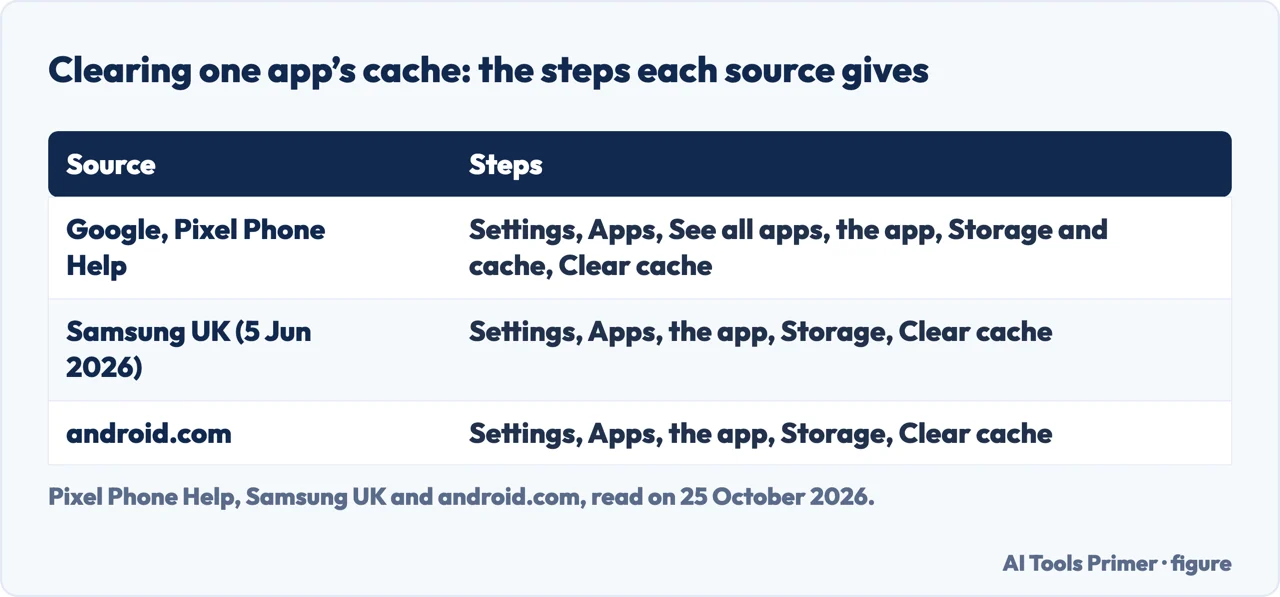
Google’s Android Help page on clearing up space says you can usually clear an app’s cache and data with your device’s Settings app, that Settings can vary by Android device, and that you should get help from your device manufacturer if yours differs. Its older Pixel page gives the path: open Settings, tap Apps, then See all apps, choose the app, tap Storage and cache, then Clear cache or Clear storage. Samsung’s UK page, updated on 5 June 2026, says to go to Settings, tap Apps, select the app, tap Storage and tap Clear cache. The android.com article gives the same path, with Apps or Applications depending on the Android version, and recommends clearing an app’s cache when the device runs slower than usual.
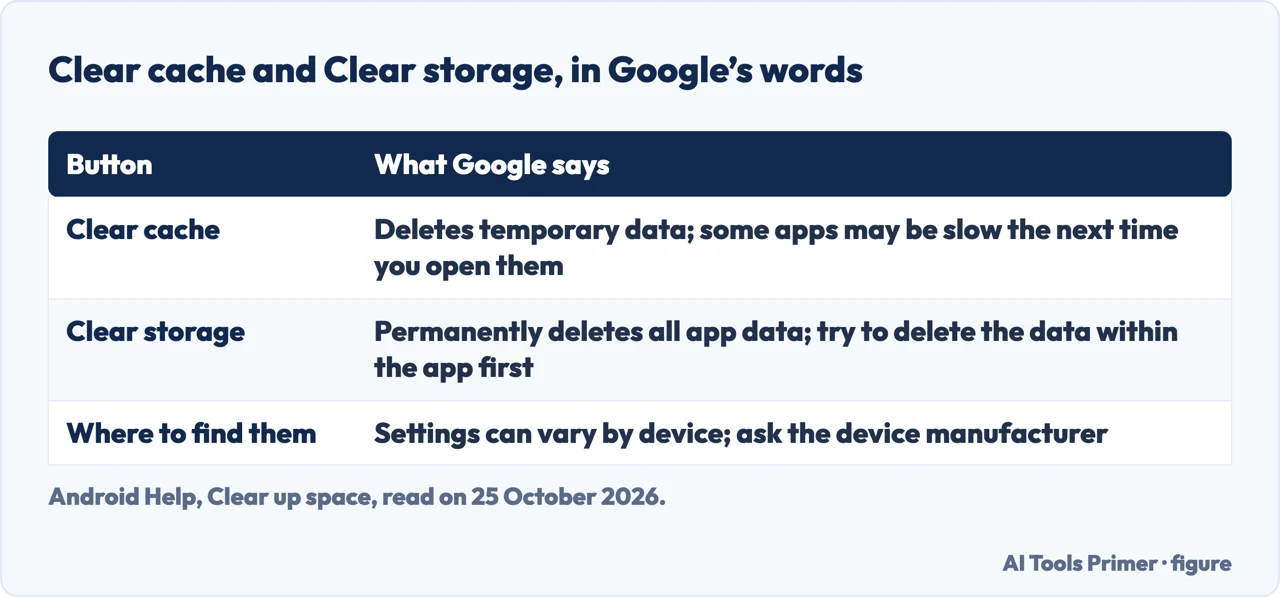
The two buttons are not the same. Google says Clear cache deletes temporary data and some apps may be slow the next time you open them, while Clear storage permanently deletes all app data and you should try to delete the data within the app first. Comodo, a security company, gives the same warning in other words: avoid tapping Clear storage or Clear data unless you want to reset the app completely. That is the whole answer to how to clear cache on Android for one app: the first button, not the second.
The browser’s cache
The android.com article gives six steps for Chrome on an Android phone: open the Chrome app, tap the three dots at the top right, select History and then Clear browsing data, choose a time range from Last hour to All time, tick Cookies and site data and Cached images and files, and tap Clear data. Google’s Account Help page on clearing the cache and cookies shows the Chrome steps for a computer: More, then Delete browsing data, a time range, Cookies and other site data, other items you want to delete, and Delete data.
Google says what follows: some settings on sites get deleted, so if you were signed in you will need to sign in again, and some sites can seem slower because content such as images needs to load again. It lists three reasons to clear them: to resolve website loading or formatting issues, to get the most up-to-date version of a site, and to free up local storage space. The android.com article adds that clearing the cache can speed up your phone and that some websites might load slightly slower at first as the cache rebuilds.
The cache partition, and Samsung’s other route
Samsung’s page gives a first route that is not per app: Settings, Battery and device care, then Optimise now, and Done once it finishes; on older devices the menu is called Device care and the button Fix now. Samsung then describes clearing the whole cache partition from the recovery menu: switch the device off, open the recovery menu with the button combination for your model, use the volume buttons to select Wipe cache partition, confirm with the power button, select Yes, and choose Reboot device. The combination differs by model: Volume Up, Home and Power on a phone with a Home button such as the S6 or S7; Volume Up, Bixby and Power on an S8, S9 or S10; Volume Up and Side on a Note10, Fold or Z Flip.
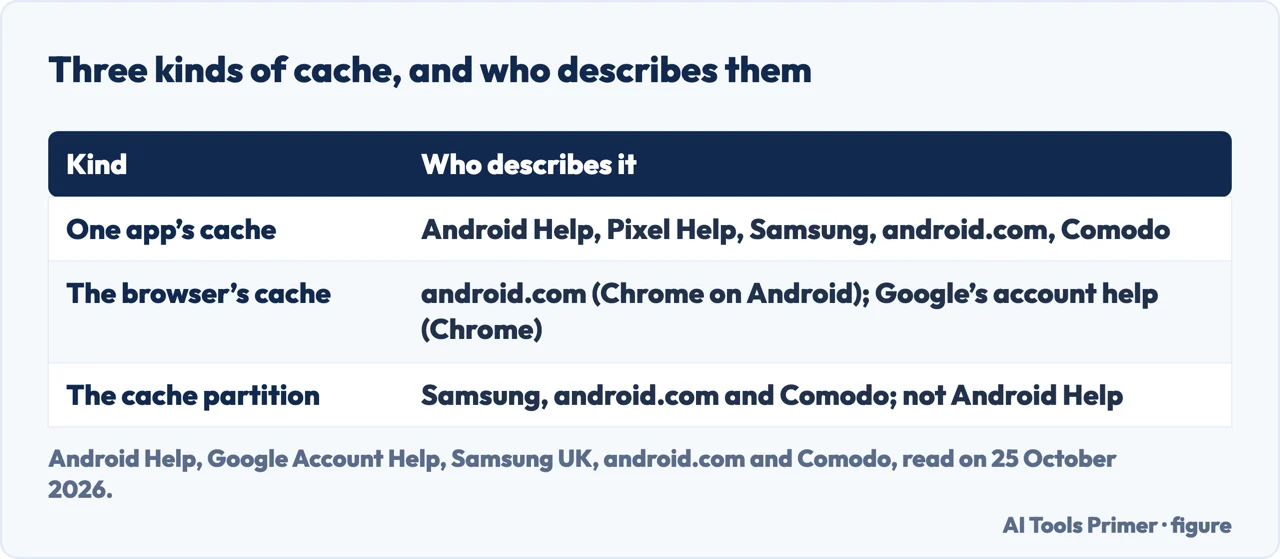
The android.com article describes the same idea in general terms, as booting into recovery mode and selecting Wipe cache partition, and says the way to enter recovery differs between devices. Comodo calls it the system cache and says it is often cleared through recovery mode. Google’s Android Help pages that we read do not mention the cache partition, so how it applies to your phone is a question for your phone’s maker.
Does clearing the cache speed the phone up?
The sources lean different ways. The android.com article says clearing the cache can speed up your Android phone, because it removes outdated files and frees storage. Google’s Android Help page says Clear cache deletes temporary data and some apps may be slow the next time you open them, and lists clearing the cache among ways to clear space, not to speed things up. Comodo says outdated or corrupted cache files may cause apps to crash, freeze or misbehave, and that cached items may retain sensitive information; it sells security software. Samsung says the cache may store unnecessary data and also points to updating Google Chrome and Android System WebView for apps that crash as soon as they are opened. For that case see Android apps crashing; for what each browser says clearing removes, what clearing the cache does.
Where to start
Four ways in.
- “One app.”
- App cache — app
- “The browser.”
- Chrome — browser
- “The system cache.”
- Cache partition — partition
- “Will it speed it up?”
- What the sources say — differ
Caches and apps
The same job on other systems, and what goes wrong.
Questions people also ask
Is it good to clear the cache on Android?
Google lists it among ways to clear space and says some apps may be slow afterwards. android.com says it can speed the phone up. The sources do not agree on speed.
How to clear the cache on Samsung?
Samsung says Settings, Apps, the app, Storage, Clear cache; or Settings, Battery and device care, then Optimise now; or Wipe cache partition in the recovery menu.
What will happen if I clear the cache of all apps?
Google says temporary data is deleted and some apps may be slow the next time you open them. Clearing storage or data is different and resets the app.
How can I clear my system cache?
Samsung and android.com describe Wipe cache partition from the recovery menu; the button combination depends on the model, and Google’s pages we read do not cover it.
Not covered here. We did not clear a cache on a phone. The statements come from Android Help (clearing up space), Pixel Phone Help, Google Account Help (clearing the cache and cookies), Samsung UK (updated 5 June 2026), the android.com article (no date that we could read) and Comodo (11 November 2025), used for what they claim. Settings differ by maker and Android version.
The forums in the results and the UltraMobile page, which was behind a browser check, were not used. Comodo sells security software.
The search volume and difficulty behind this page were read in Semrush on 29 August 2026.
Sources
- Android Help — Clear up space — support.google.com, read 25 October 2026.
- Android Help — Free up storage on your Android device — support.google.com, read 25 October 2026.
- Pixel Phone Help — Free up space on a Pixel phone — support.google.com, read 25 October 2026.
- Google Account Help — Clear cache & cookies — support.google.com, read 25 October 2026.
- Samsung UK — How to clear cache on your Samsung phone (updated 5 June 2026) — www.samsung.com, read 25 October 2026.
- Android — How to Clear Cache and Delete Cookies on Your Phone — www.android.com, read 25 October 2026.
- Comodo — Clear Cache on Android Phone with Ease (11 November 2025) — blog.comodo.com, read 25 October 2026.
Written by Alberto Gulotta
Founder and editor of AI Tools Primer, writing from Palermo, Italy. Thirty-five years of taking computers apart, starting with a Commodore 64 — the long version is on the about page.
Something wrong on this page? Write to aitoolsprimer@gmail.com and it gets fixed.
Written on 25 October 2026.
Independence and limits
No affiliate links and no paid placements anywhere on this site. Nobody pays to appear here, and no company has seen this page before you did.
This is general information, not professional advice. Where a page touches money, health, safety or the law, it names its source and the date it was read — and your situation may still differ. See the privacy page and the cookie policy.