
Code · guide
Cursor vs VSCode: what moves over, what differs, what is paid
By Alberto Gulotta · Updated · 15 min read
Cursor vs VSCode begins with a shared base: Cursor’s pages say it is based on the VS Code codebase, while the VS Code pages we read do not mention Cursor. They differ on extensions, assistants and plans. The pages we read on 5 November 2026 do not rank the two.
| Question | Answer | Where it comes from |
|---|---|---|
| Does Cursor use VS Code? | Cursor says it is based upon the VS Code codebase | Cursor Docs |
| Can both be installed? | Yes: they run as separate applications and can be used on the same projects | Cursor Docs |
| Where do Cursor’s extensions come from? | The Open VSX registry, not the VS Code Marketplace | Cursor Docs |
| Is VS Code free? | Yes, for private or commercial use; the Copilot AI plans are separate | VS Code FAQ, GitHub Docs |
| Which one do the pages say is better? | The pages we read do not compare the two | Cursor Docs, VS Code Docs |
What Cursor says about VS Code, and what VS Code says
Cursor’s migration guide opens with the relation between the two. Cursor is based upon the VS Code codebase, the page says, which lets Cursor concentrate on its AI side while keeping a familiar editing environment. That page is the answer to the question people type first, whether Cursor uses VS Code. It adds that Cursor regularly rebases onto the latest VS Code version to stay current with features and fixes, and that, to ensure stability, Cursor often uses slightly older VS Code versions. The pages we read do not say which VS Code version the current Cursor sits on.
VS Code’s side is told in its FAQ and in the GitHub repository. The repository, microsoft/vscode, called Code - OSS, is where Microsoft develops the product, and its source code is available under the MIT license. Visual Studio Code itself, both pages say, is a distribution of that repository with Microsoft-specific customizations, released under a traditional Microsoft product license. The FAQ adds that VS Code is free for private or commercial use, and that it is more accurate to say VS Code is built on open source than that it is open source, because the distribution includes Microsoft proprietary assets such as icons and features such as Visual Studio Marketplace integration.
The VS Code and GitHub pages we read do not mention Cursor, and the Cursor pages we read do not say how much of the VS Code code Cursor has changed. Each set of pages describes its own product, and the pages we read do not set the two side by side.
Moving settings from VS Code to Cursor
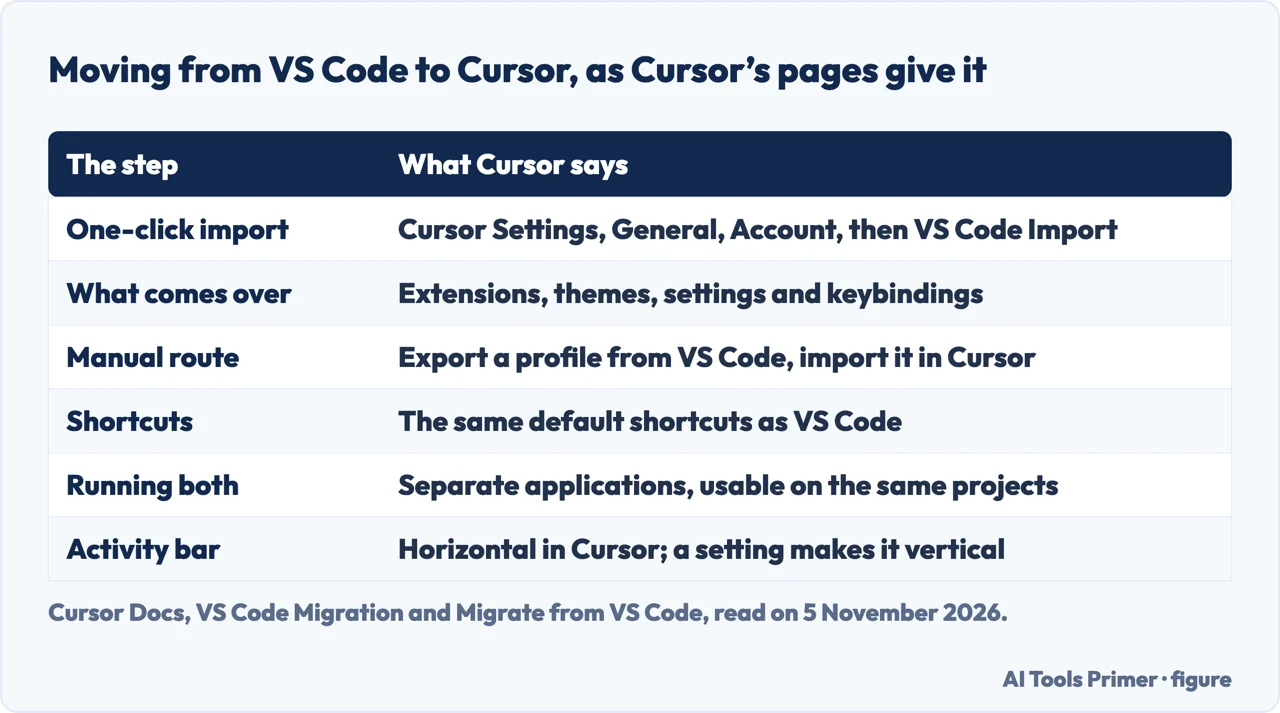
Cursor’s guide offers a one-click import. You open Cursor Settings with Cmd or Ctrl plus Shift plus J, go to General, then Account, and under VS Code Import click the Import button. The page says this transfers your extensions, themes, settings and keybindings. Cursor’s help page gives the same steps and adds that the default keyboard shortcuts are the same as VS Code’s and that custom keybindings transfer when you import your settings.
For a move between machines, or for more control, the guide describes a manual route through profiles. In VS Code you open the Command Palette and search for “Preferences: Open Profiles (UI)”, pick the profile on the left, open its three-dot menu and choose Export Profile, either to your local machine or to a GitHub Gist. In Cursor you run the same command, use the dropdown next to New Profile and choose Import Profile, then paste the Gist URL or select the file, click Import, and finally choose the new profile in the sidebar and click the tick icon to activate it.
The two can sit on the same computer. Cursor’s help page says they run as separate applications and that you can use both on the same projects. The guide also lists two differences you will see on opening Cursor. Cursor Settings and VS Code settings are separate menus: the first is found by typing “Cursor Settings” in the Command Palette, the second with “Preferences: Open Settings (UI)”. And Cursor made the activity bar horizontal to leave room for the AI chat interface; to put it back, search the settings for workbench.activityBar.orientation, set it to vertical and restart Cursor.
Extensions: two registries
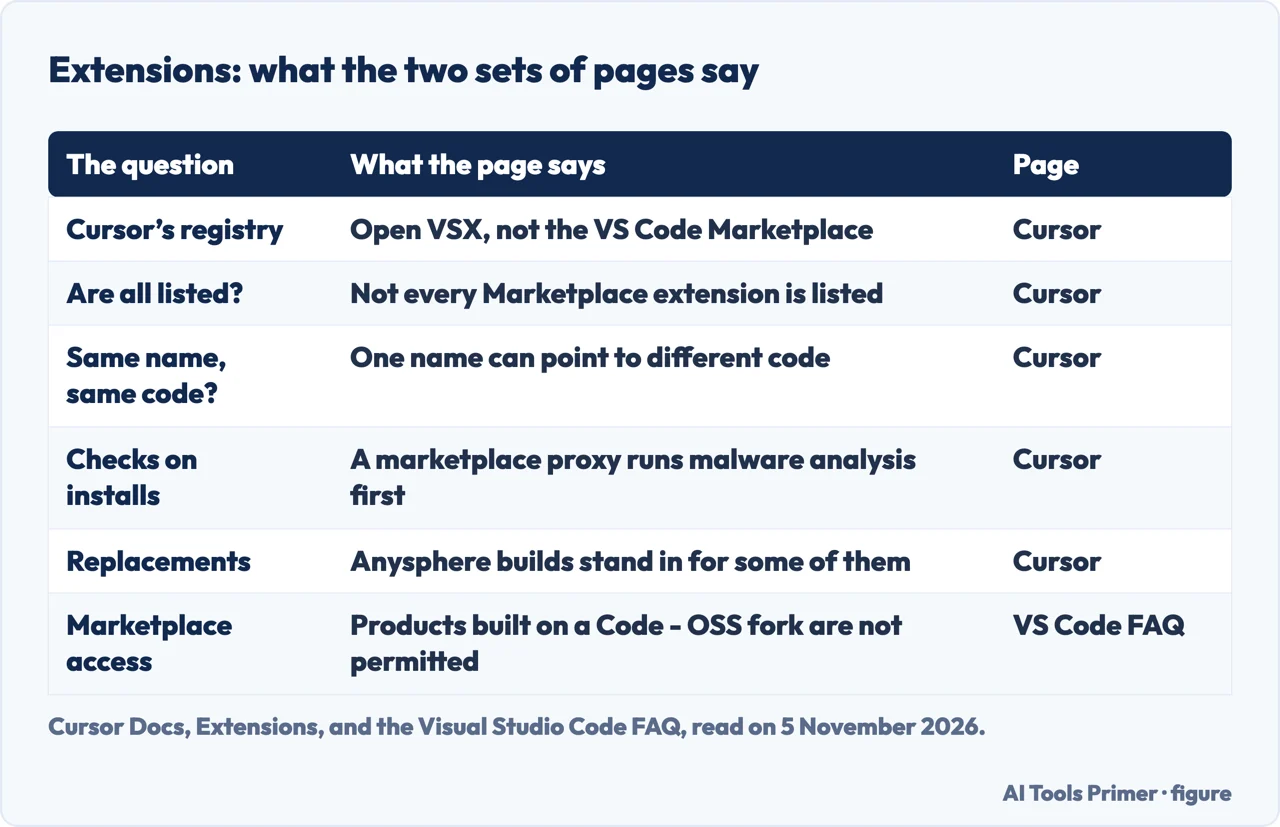
Cursor’s help page says Cursor uses the Open VSX extension registry, not the VS Code Marketplace. Many popular extensions are available, it says, but not all VS Code extensions may be listed or work exactly the same way. Cursor’s extensions page repeats that most popular extensions are on Open VSX and that not every Microsoft Marketplace extension is listed there. It also says Cursor publishes first-party replacements, built by Anysphere, for some extensions that are unavailable on Open VSX.
The same page warns that one publisher.extension name can point to a different publisher or different code on Open VSX than on the Microsoft Marketplace, and tells you to treat extension IDs like dependencies and install from publishers you trust. It describes a safeguard on Cursor’s side: search and downloads go through Cursor’s own marketplace proxy, marketplace.cursorapi.com, which runs automated malware and supply-chain analysis before an extension is shown or served, and extensions that fail review are blocked.
For teams the page lists further controls. An install cooldown, set by team owners and admins in hours, defers installs and updates until a version has been published for that long; its default is 0, which means it is disabled. There are also allowed-extension lists for approved publishers or IDs and an option to require valid Open VSX signatures. The page calls the cooldown and the signature check client-side install controls that complement the marketplace analysis.
VS Code’s FAQ speaks about the Marketplace without naming Cursor. It says Microsoft provides the Visual Studio Marketplace only for the Visual Studio family of products, and that alternative products, including those built on a fork of the Code - OSS repository, are not permitted to access it. The reasons it gives are that the Marketplace vets every extension for security, removes and blocks reported malicious ones, and keeps API compatibility. It also says Microsoft extensions acquired from the Marketplace are not licensed for use outside that family. We set the two registries side by side here because Cursor’s pages name the other one.
The assistant inside each editor
Cursor’s Agent overview describes Agent as Cursor’s assistant for complex coding tasks, able to run terminal commands and edit code, opened in the side pane with Cmd or Ctrl plus I. It is built on three components: instructions, tools and the model you pick. The tools include searching files and folders, searching the web, reading files (images too), editing files, running shell commands, controlling a browser to take screenshots and test applications, generating images and asking clarifying questions. Checkpoints are snapshots of the code that Agent creates before significant changes; they are stored locally, separate from Git, and the page says to use them only for undoing Agent changes and Git for permanent version control. While Agent works, Enter queues your next message and Cmd or Ctrl plus Enter sends it immediately.
Cursor’s Tab page describes a second feature, next-action prediction: multi-line changes, jumps between files and refactors that ripple through a codebase. Tab sees your current task, recent changes and relevant files, and the page calls it a proprietary model built for Cursor and trained with reinforcement learning. A highlight on that page, dated 12 September 2025, gives Cursor’s own figures for a newer Tab model: 21% fewer suggestions and a 28% higher accept rate. We did not measure that.
Cursor’s blog post of 29 October 2025 introduced Cursor 2.0 and Composer, which Cursor calls its first coding model and says is 4x faster than similarly intelligent models; that is Cursor’s claim, not ours. The same post describes an interface built around agents that can run in parallel using git worktrees or remote machines, a native browser tool, and a way to open files or switch back to the classic IDE. Cursor’s Composer 2.5 page, read on 5 November 2026, calls Composer 2.5 Cursor’s own agentic model.
On the VS Code side, the “Build with AI” page, dated 4 November 2026, names three ways of working: inline suggestions as you type, including suggestions for your next edit; an agent in the Chat view beside your code, terminal, tests and debugger; and the Agents window for assigning and managing sessions across projects. It says you can choose models from several providers through GitHub Copilot, bring your own API key or use a supported local model, and pick the Copilot, Claude or Codex agent harness. The AI features cheat sheet lists what each is for: Ask to understand code without changing it, Plan to research a complex change, Agent to build a feature or fix a bug, inline chat for a focused edit, and smart actions for commit messages or renaming symbols. The page marks cloud sessions as experimental and cloud automations as in preview.
Where the model comes from and what it costs
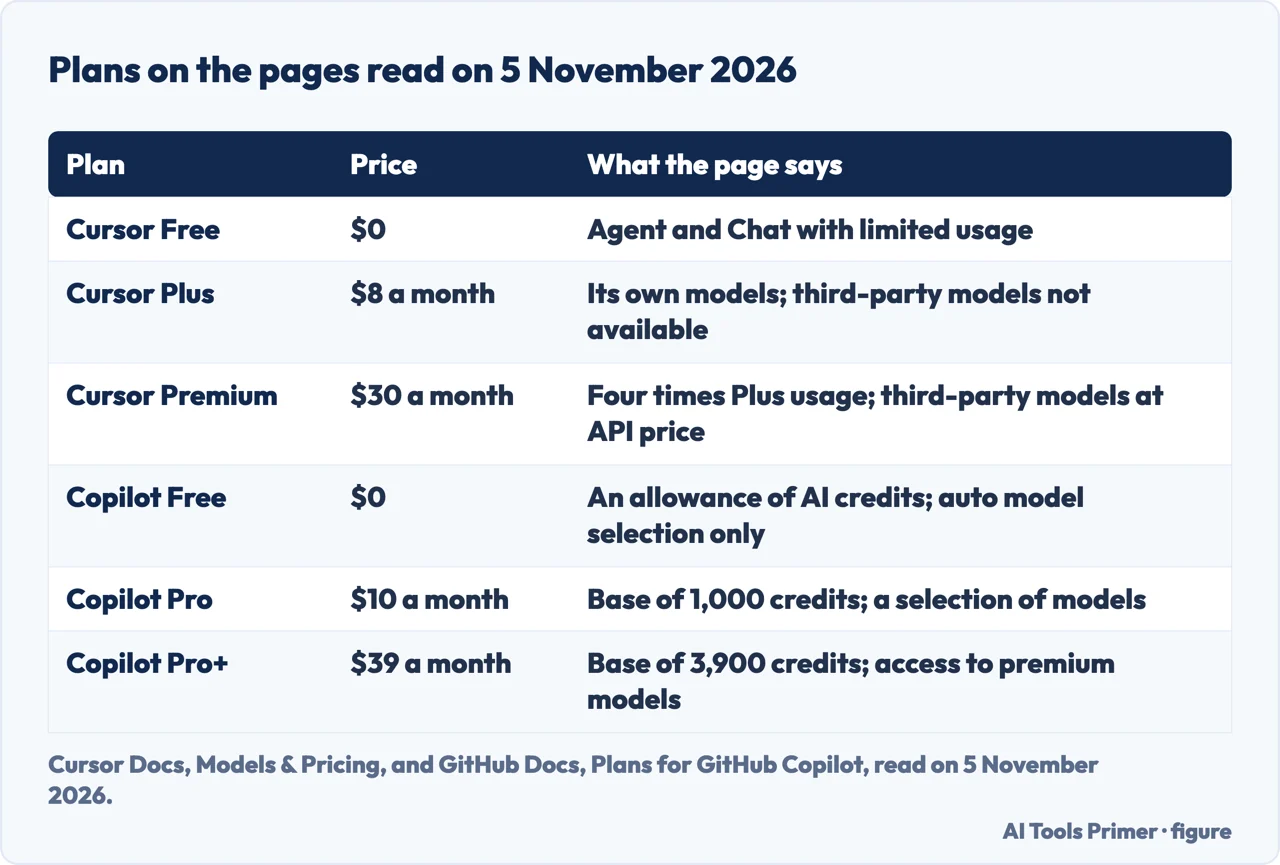
Cursor’s Models & Pricing page, read on 5 November 2026, says Cursor supports models from OpenAI, Anthropic, Google and others, and that Cursor is sold as part of The X Subscription, one subscription for Grok, Cursor and X. It lists Free at $0 with limited usage, Plus at $8 a month, Premium at $30, Super at $100 and Ultra at $200. Paid plans include a weekly pool of usage for Cursor models, with Premium at 4x, Super at 15x and Ultra at 50x the usage of Plus. The page says Plus is limited to Cursor’s own models and does not include Cloud Agents or Automations, which start at Premium. Third-party models such as Claude, GPT and Gemini are not part of that pool: on Premium and above they are available at the model’s API list price, paid from prepaid credit, and Plus and Free do not include them. The page also calls the earlier Pro, Pro+, Ultra and Start plans, and the Teams Standard and Premium seats, legacy plans that keep working as they are. The page also covers other products, so the prices here are as read on that date.
VS Code is free, and its AI comes separately, through a GitHub Copilot plan (Copilot Free costs nothing) or your own key. The FAQ says signing in with GitHub connects VS Code to your GitHub Copilot plan and its models and usage allowances. GitHub’s plans page, read on 5 November 2026, lists Copilot Free with an allowance of AI credits, auto model selection only, and a limit of 2000 completions a month; Copilot Pro at $10 a month with 1,000 base credits; Copilot Pro+ at $39 a month with 3,900 base credits; and Copilot Student, free for verified students. The VS Code agents FAQ says agents consume AI credits from your Copilot plan.
The FAQ also describes a route without a GitHub account or Copilot plan: chat with a bring-your-own-key model. Inline suggestions, semantic search and embeddings depend on the GitHub Copilot service and are not available through bring-your-own-key models. On the models themselves the FAQ says those used by Copilot are licensed separately and that most are from third parties such as OpenAI, Anthropic and Google. It says the GitHub Copilot Chat extension was open sourced under the MIT license while the Copilot backend services remain closed source.
Switching the AI off, reviewing changes, and what the pages leave open
VS Code’s FAQ says you can disable the built-in AI features with the chat.disableAIFeatures setting, at user or workspace level, which disables and hides chat and inline suggestions and disables the Copilot extensions. It adds that if you disable AI functionality or do not log in to your Copilot subscription from VS Code, your data is not sent to the Copilot backend services, and that you do not need an account to install VS Code or use its core editor features. The Cursor pages we read do not describe a setting of that kind.
On review, VS Code’s agents page says AI can produce incorrect code or misunderstand your intent, and that you remain responsible for deciding which changes reach your codebase. It tells you to review the diff and validate the result before you commit or merge, and says a Git worktree keeps code changes separate but is not a security boundary. Cursor’s Agent page offers checkpoints for rolling back Agent’s file changes and points to Git for permanent version control.
The pages we read do not say which of the two is better, faster or more productive, and they offer no measurement that compares them. They do not tell you whether to switch. What they do give is the list above: a shared base that Cursor states, an import path, two extension registries, an AI layer that Cursor sells as part of its plans and VS Code takes from GitHub Copilot or your own key, and settings for the controls each describes.
What we did not use
We tested neither editor. We read Cursor’s pricing page but took plan prices only from its Models & Pricing page, because the pricing page mixes in other products. Our pages on AI code generators and what a coding agent costs cover the assistants in more detail.
Where to start
Four ways in.
- Does Cursor use VS Code?
- What Cursor says about VS Code, and what VS Code says — base
- Can I bring my settings over?
- Moving settings from VS Code to Cursor — moving
- Will my extensions work?
- Extensions: two registries — extensions
- What does each one cost?
- Where the model comes from and what it costs — cost
Coding assistants
The tools that sit in an editor.
Cost, checking and sign-in
What the bill, the output and the account involve.
Questions people also ask
Does Cursor use VS Code?
Cursor’s migration guide says Cursor is based upon the VS Code codebase and that it regularly rebases onto the latest VS Code version, often using slightly older ones for stability. The VS Code pages we read do not mention Cursor.
Should I switch from VS Code to Cursor?
The pages we read do not say whether to switch. Cursor describes a one-click import of extensions, themes, settings and keybindings, says the two run as separate applications on the same projects, and warns that not every VS Code extension is on Open VSX.
Why don’t people like VS Code?
The pages we read do not take up that question. They describe what VS Code is: free for private or commercial use, with its AI features reached through a GitHub Copilot plan (a free one exists) or your own key, and switched off with a setting.
Is Cursor better than VS Code reddit?
The pages we read do not say which is better. Cursor’s pages describe their own tools and plans; VS Code’s pages describe theirs; the pages do not compare the two.
Not covered here. We tested neither editor. The statements come from eight Cursor pages, four Visual Studio Code pages, the microsoft/vscode repository page and GitHub’s Copilot plans page, all read on 5 November 2026.
The search volume (1,900 a month) and difficulty (24) behind this page come from Ubersuggest’s reading of 5 November 2026 (United States); the difficulty is Ubersuggest’s own SEO difficulty, not the Semrush figure, and a Semrush check is still to be made.
Sources
- Cursor Docs — VS Code Migration — cursor.com, read 5 November 2026.
- Cursor Docs — Migrate from VS Code — cursor.com, read 5 November 2026.
- Cursor Docs — Extensions — cursor.com, read 5 November 2026.
- Cursor Docs — Agent overview — cursor.com, read 5 November 2026.
- Cursor — Tab — cursor.com, read 5 November 2026.
- Cursor blog — Introducing Cursor 2.0 and Composer — cursor.com, read 5 November 2026.
- Cursor Docs — Composer 2.5 — cursor.com, read 5 November 2026.
- Cursor Docs — Models & Pricing — cursor.com, read 5 November 2026.
- Visual Studio Code Docs — Build with AI in VS Code — code.visualstudio.com, read 5 November 2026.
- Visual Studio Code Docs — AI features cheat sheet — code.visualstudio.com, read 5 November 2026.
- Visual Studio Code Docs — Frequently asked questions — code.visualstudio.com, read 5 November 2026.
- Visual Studio Code Docs — Agents FAQ — code.visualstudio.com, read 5 November 2026.
- GitHub — microsoft/vscode repository — github.com, read 5 November 2026.
- GitHub Docs — Plans for GitHub Copilot — docs.github.com, read 5 November 2026.
Written by Alberto Gulotta
Founder and editor of AI Tools Primer, writing from Palermo, Italy. Thirty-five years of taking computers apart, starting with a Commodore 64 — the long version is on the about page.
Something wrong on this page? Write to aitoolsprimer@gmail.com and it gets fixed.
Written on 5 November 2026.
Independence and limits
No affiliate links and no paid placements anywhere on this site. Nobody pays to appear here, and no company has seen this page before you did.
This is general information, not professional advice. Where a page touches money, health, safety or the law, it names its source and the date it was read — and your situation may still differ. See the privacy page and the cookie policy.