
Business · guide
Mailchimp free plan: what it allows and what happens at 250
By Alberto Gulotta · Updated · 15 min read
The Mailchimp free plan allows up to 250 contacts and 500 sends a month, with a daily limit of 250, according to Mailchimp's help guide. Past 250 contacts, live and test emails are held. This page sets out what counts toward the limit, what happens at it, and what starts the first charge.
| Question | Answer | Where it comes from |
|---|---|---|
| How big is the Free plan? | Up to 250 contacts and 500 sends a month, with a daily limit of 250 | Mailchimp Help, emailexpert |
| Who counts as a contact? | Subscribed, unsubscribed and non-subscribed contacts; archived, cleaned and deleted ones do not count | Mailchimp Help |
| What happens past 250 contacts? | Live and test emails are held until you upgrade or reduce the total; you can still edit and import | Mailchimp Help |
| What starts the first cost? | Moving to a paid plan, which is immediate and ends the remaining Free sends | Mailchimp Help |
| Can you go back to Free? | Once over the life of the account, from a paid plan | Mailchimp Help |
What the Free plan includes, as the pages state it
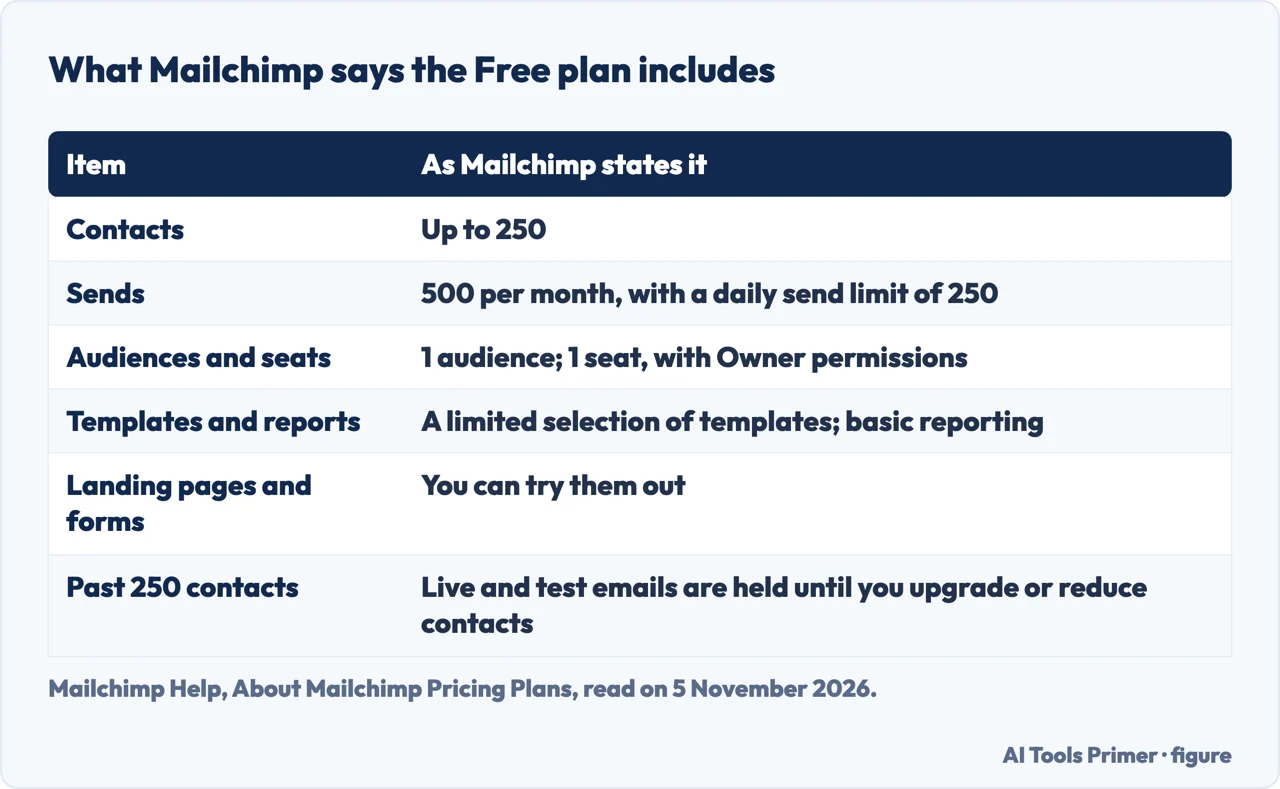
Mailchimp’s help guide to its pricing plans says there are four types of marketing plan: Free, Essentials, Standard and Premium. It describes the Free plan as aimed at beginners who want to grow an audience and create emails while trying some of the tools. The plan includes up to 250 contacts and 500 sends per month, with a daily limit of 250. The guide lists one audience, one seat with Owner permissions, a limited selection of email templates and basic reporting, and says you can also try landing pages and forms. The guide shows no date of last update.
Two more sources add to that list, and they do not always agree with it or with each other. The trade publication emailexpert, in an article of 4 February 2026, repeats the three limits and says the Free plan keeps the Mailchimp branding and has no scheduling. Mailchimp’s guide puts scheduled emails among the Essentials features, which fits, and the Mailchimp guides we read do not mention branding, so that point rests on emailexpert alone. Brevo, a competitor, says in a blog post of 13 January 2026 that Free has seven of 137 templates, that email support lasts only for the first 30 days, and that segmentation is not available. Mailchimp’s guide lists advanced segmentation under Standard and does not mention segmentation in its Free list.
Automation is where the three sources part. Emailexpert says Free includes basic automations, such as a welcome email and an abandoned cart email, but not multi-step flows. The Brevo post says customer journeys can be built and previewed on Free but not run, and sums up that email automations are not available. Mailchimp’s guide lists single email automations and flows of up to 4 steps under Essentials and does not mention automations in its Free list. The sources do not settle the question, so we do not either.
What counts toward the 250, and how a list stays under it
Mailchimp’s guide defines a contact as an individual member of your audience, and says subscribed, unsubscribed and non-subscribed contacts are all included in the contact count. The contact total is the number stored across all of your audiences. Archived, cleaned and deleted contacts do not count toward it. Emailexpert gives examples of what this means for a small list: old imports, synced contacts from a CRM and past unsubscribes all count, and only archived, cleaned or deleted contacts are left out. It says this catches many teams off guard, especially anyone using Mailchimp as a lightweight CRM.
Archiving is the route Mailchimp describes for taking a contact out of the count. Its archive guide says an archived contact leaves the contact table and goes into a separate archived contacts table. You cannot edit the profile or send the contact marketing emails, the data is kept, and archived contacts do not count toward your billing tier. A contact who appears in more than one audience has to be archived from each. The guide also says that for the General Data Protection Regulation, archiving is not a legal substitute for deletion: if an EU contact asks to be removed, the guide says to delete them permanently from every audience that holds their data.
The guide says an archived contact can come back in three ways. You can unarchive from the contacts table, or by an import, which the guide says it does not recommend. A contact can also unarchive when they sign up through your Mailchimp signup form or interact with your connected online store. Someone who unsubscribed before being archived cannot be imported as subscribed, and the guide says to make sure you have permission before adding anyone as a subscribed contact. Emailexpert’s advice is to archive inactive contacts regularly and to manage imports and integrations, and it calls this ongoing work.
Sends have their own definition. Mailchimp says a send is one email to one contact, so one email to 500 contacts equals 500 sends, and test and transactional emails count toward the monthly limit. Emailexpert works the arithmetic for a full Free list: two emails to 250 contacts use up the 500 sends of the month. The pages we read do not say whether unused sends carry over to the next month.
What happens at the limit, on Free and on a paid plan
For the contact limit, Mailchimp’s guide says that if you go over 250 on the Free plan, a hold is placed on sending live emails or test emails until you upgrade to a paid plan or reduce your contact total. It adds that you can still work on your emails and templates and collect and import new contacts. Emailexpert describes the same thing as sending that can stop, live and test emails included, and says there is no grace period for cleaning up afterwards. The Brevo post words it as the account being put on pause. The three sources word it differently: held, stopped or paused.
A paid plan behaves differently, and two Mailchimp guides describe it. If the contact total goes above the contact limit at any point in the billing cycle, the service is not interrupted and an additional charge appears on the bill. Mailchimp says the charge is for an add-on contact block, a smaller set of extra contacts, and that going over by more than one block means more than one is charged. The bill is based on the peak contact total in the period, so it reflects the highest number stored that month even if the total falls. For a permanent increase Mailchimp says to move to a higher pricing tier; for a temporary one, to reduce the audience and keep the lower total for a full billing cycle.
The same guide suggests two ways to keep a paid bill down without changing tier: use segmentation to find contacts who are not interacting with emails or buying in your store and archive them, or send targeted content to smaller segments instead of the whole audience. On paid plans the monthly send limit is a multiple of the contact limit: 10 times on Essentials, 12 times on Standard and 15 times on Premium. The guide says Premium covers the largest lists and that Mailchimp will customize a plan above its ceiling.
What starts the first cost
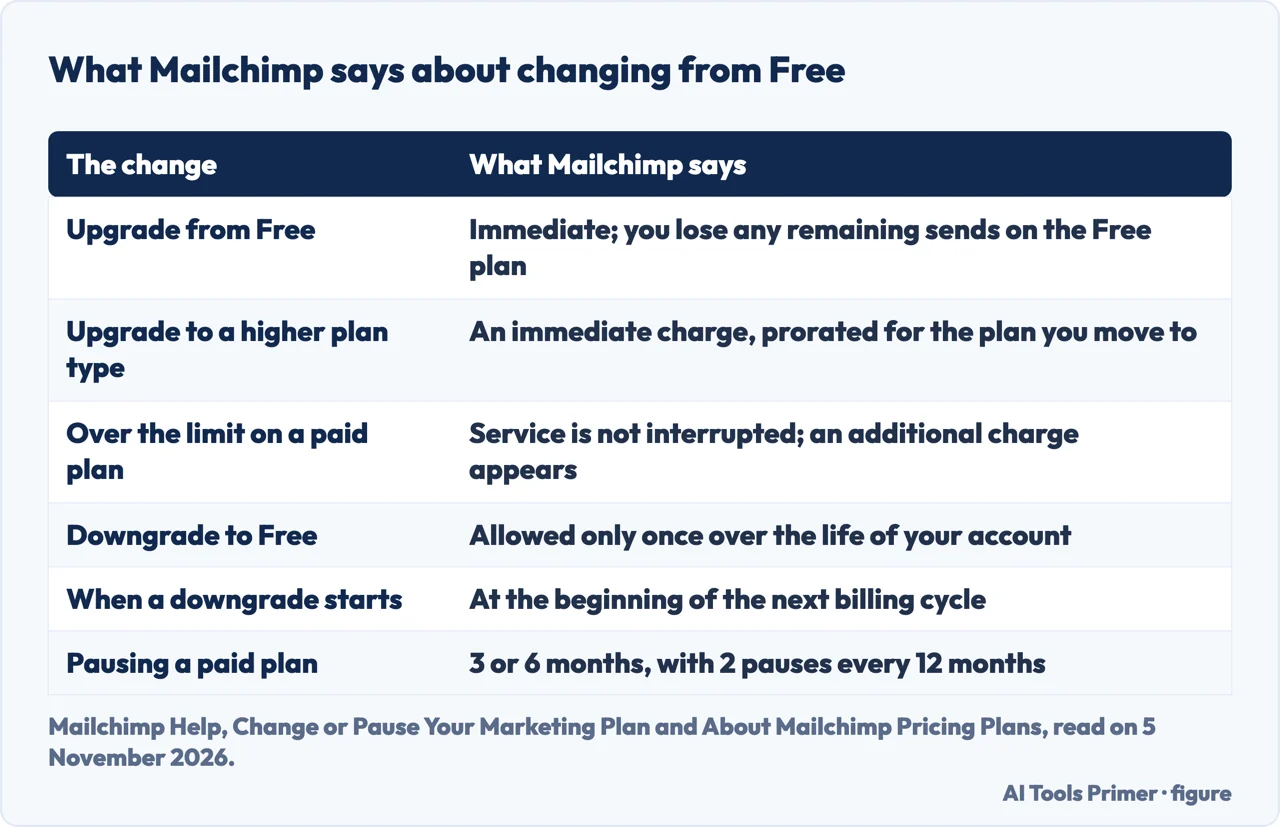
Mailchimp’s guide on changing or pausing a plan says that when you upgrade from a Free marketing plan to a paid one, the upgrade is immediate and you lose any remaining sends you had on the Free plan. An upgrade to a higher plan type results in an immediate charge, prorated for the plan you move to, and the full price of the upgraded plan is billed on the next billing date. An upgrade to a higher pricing tier results in an immediate charge for the difference between the two tiers. What the paid plans add is listed in the pricing guide: Essentials has 3 audiences, 3 seats, single email automations, flows of up to 4 steps, all templates, A/B testing, scheduled emails and 24/7 email and chat support; Standard has 5 audiences, 5 seats, advanced segmentation, custom-coded templates and multivariate testing.
Pay As You Go is the guide’s alternative to a monthly plan. Instead of a recurring charge you buy email credits, one credit for each email sent, with the same features as Essentials. The change guide compares credits to postage stamps. If you downgrade from Pay As You Go to Free, any remaining credits are lost.
Going back to Free has conditions. The guide says you can downgrade from any paid plan to a Free plan only once over the life of your account. A downgrade takes effect at the start of the next billing cycle, and until then you keep your current plan. Before it is confirmed, Mailchimp shows which features you will and will not have afterwards and any changes needed in the account, such as deleting contacts, seats or audiences. If conflicts remain after the downgrade, sending is paused until they are fixed.
A paid plan can also be paused. The guide says you can pause for 3 or 6 months, with 2 pauses every 12 months, and that pausing stops monthly billing and keeps your data. During a pause you can still create and edit emails, view reports and manage your audience. The account unpauses by itself after the period, and the guide says to reactivate automations afterwards. If you gained enough contacts while paused, you may be asked to choose a new pricing tier.
The same limits at MailerLite and Brevo
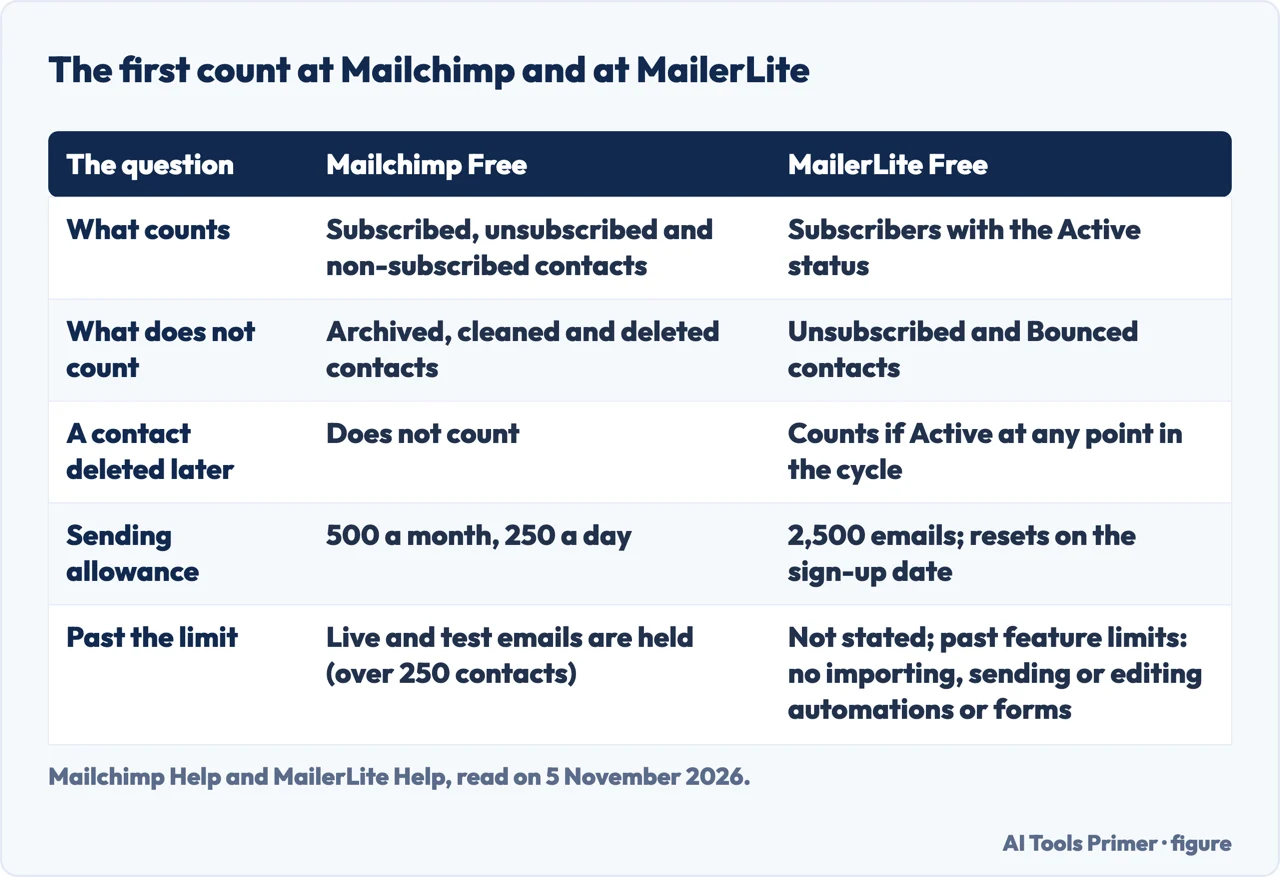
Our page on email marketing tools sets four vendors side by side. This one keeps to the first count, and the other two free plans are described only by their own pages. MailerLite’s help page says the Free plan is applied automatically to every account and covers the first 250 active subscribers and up to 2,500 emails every 30 days. Mailchimp counts unsubscribed contacts in its 250; MailerLite says its limit rests on subscribers with the Active status, and that unsubscribed and bounced contacts do not count.
MailerLite adds a time rule that the Mailchimp guides we read do not mention: the count is cumulative during a billing cycle, so an address that was Active at any point counts even if it is deleted later. The page says that deleting subscribers and uploading new ones to get around the limits breaks its terms of service. For Free accounts the sending limit resets each month on the account registration date. The Free plan also caps active items at three automations, three forms, one landing page, one website of up to five pages and one digital product, and allows two users.
Past the limit, the two vendors differ in what their pages state. MailerLite’s page says that exceeding the feature-use limits does not trigger an automatic upgrade, and that on the Free plan you then cannot import subscribers, send emails or create, activate or edit automations, forms, websites, landing pages or digital products until you reduce your use or upgrade. The page we read does not say separately what happens when a Free account passes 250 active subscribers. Its monthly paid plans upgrade automatically when subscribers or sends go over the plan limit, and for sends the page says the plan returns to the tier that matches the subscriber count at renewal, where Mailchimp adds a charge for extra contacts. MailerLite’s page says Free accounts are pointed to its Self-Service Center, while paid accounts can contact support.
Brevo’s pricing page heads its free option with the words “Free forever, no credit card needed”. Its FAQ says a new account has a Free plan to upload contacts and that, once Brevo approves the account for sending, you can send up to 300 emails per day. The pages we read do not give a contact limit for Brevo’s Free plan, so no direct comparison with the 250 is possible. The three vendors measure in different units: contacts and sends per month at Mailchimp, active subscribers and emails per 30 days at MailerLite, emails per day at Brevo.
What the pages do not say
We opened no account and sent no email. Mailchimp’s own pricing page and its page on free tools came back in Italian when we read them, so we used only its English help guides. The pages we read do not give the dollar price of any Mailchimp plan, and this page gives none. Brevo’s blog post carries a price table, and we left it out because it is a competitor’s table and not Mailchimp’s own statement.
The Mailchimp guides we read show no date of last update, so we cannot say how recent the limits are beyond the day we read them. The pages we read do not say whether unused Free sends carry over, and they do not say what happens to a list that stays over 250 contacts for months. Branding in Free emails and the lack of scheduling come only from emailexpert. Brevo’s help center was not readable for us, so its Free contact limit is open. We took no facts from a Reddit thread or from comparison blogs published by software vendors.
Where to start
Five ways in.
- “What does Free include?”
- What the Free plan includes, as the pages state it — includes
- “What counts as a contact?”
- What counts toward the 250 — counts
- “What happens at 250?”
- What happens at the limit — limit
- “When do I start paying?”
- What starts the first cost — cost
- “How do the others compare?”
- The same limits at MailerLite and Brevo — others
Sending email to a list
Counting, consent and delivery.
Other free plans
Where the limits sit for other business tools.
Questions people also ask
Is Mailchimp free anymore?
Mailchimp’s help guide lists a Free plan among its four marketing plans: up to 250 contacts and 500 sends a month, with a daily limit of 250. Emailexpert, on 4 February 2026, says the plan has been narrowed but not removed.
Why are people leaving Mailchimp?
We found no survey of why people leave. Brevo, a competitor, says price hikes sent users to the free plan. Emailexpert says some Mailchimp materials still cite older, larger limits, such as 2,000 subscribers. A Brevo teaser we did not open says Mailchimp cut its free plan again; we have not checked it.
Can I get a free Mailchimp account?
The pages we read describe choosing and changing plans and do not give sign-up steps. They say the Free plan is for beginners and that a paid account can go back to Free once over the life of the account.
Is there a free alternative to Mailchimp?
MailerLite’s help page describes a Free plan for the first 250 active subscribers and up to 2,500 emails every 30 days. Brevo’s pricing page describes a free option with up to 300 emails per day once sending is approved. Both are the vendors’ own statements, and we compared no performance.
Not covered here. We opened no account and sent no email. The statements come from four Mailchimp Help guides, an emailexpert article, a Brevo blog post and pricing page, and a MailerLite help page, all read on 5 November 2026.
The search volume and difficulty behind this page come from an Ubersuggest reading of 5 November 2026; the difficulty is Ubersuggest’s own figure, not Semrush’s, and has not yet been confirmed with Semrush.
Sources
- Mailchimp Help — About Mailchimp Pricing Plans — mailchimp.com, read 5 November 2026.
- Mailchimp Help — Change or Pause Your Marketing Plan — mailchimp.com, read 5 November 2026.
- Mailchimp Help — About Additional Charges — mailchimp.com, read 5 November 2026.
- Mailchimp Help — Archive or Unarchive Your Contacts — mailchimp.com, read 5 November 2026.
- emailexpert — Mailchimp’s Free Plan Just Shrunk (4 February 2026) — emailexpert.com, read 5 November 2026.
- Brevo blog — What Do You Get With Mailchimp’s Free Plan? (13 January 2026) — www.brevo.com, read 5 November 2026.
- Brevo — Pricing Plans — www.brevo.com, read 5 November 2026.
- MailerLite Help — Everything About Subscription Plan And Billing — www.mailerlite.com, read 5 November 2026.
Written by Alberto Gulotta
Founder and editor of AI Tools Primer, writing from Palermo, Italy. Thirty-five years of taking computers apart, starting with a Commodore 64 — the long version is on the about page.
Something wrong on this page? Write to aitoolsprimer@gmail.com and it gets fixed.
Written on 6 November 2026.
Independence and limits
No affiliate links and no paid placements anywhere on this site. Nobody pays to appear here, and no company has seen this page before you did.
This is general information, not professional advice. Where a page touches money, health, safety or the law, it names its source and the date it was read — and your situation may still differ. See the privacy page and the cookie policy.