
Software · guide
How to fix mouse double clicking when you click once
By Alberto Gulotta · Updated · 9 min read
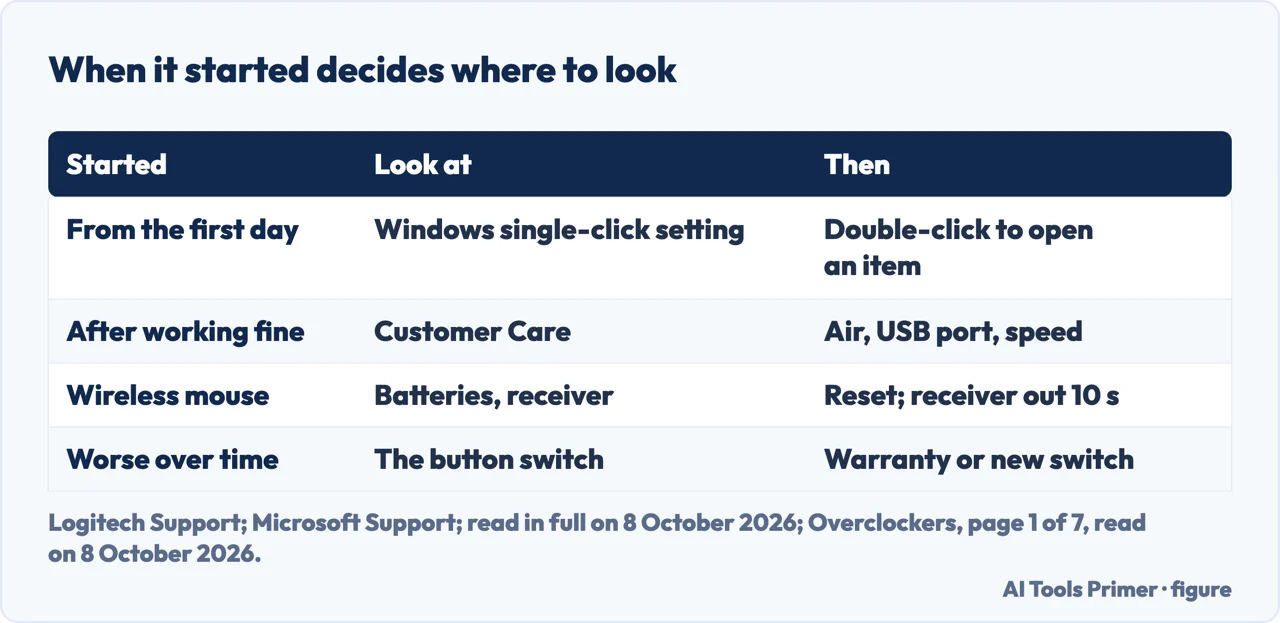
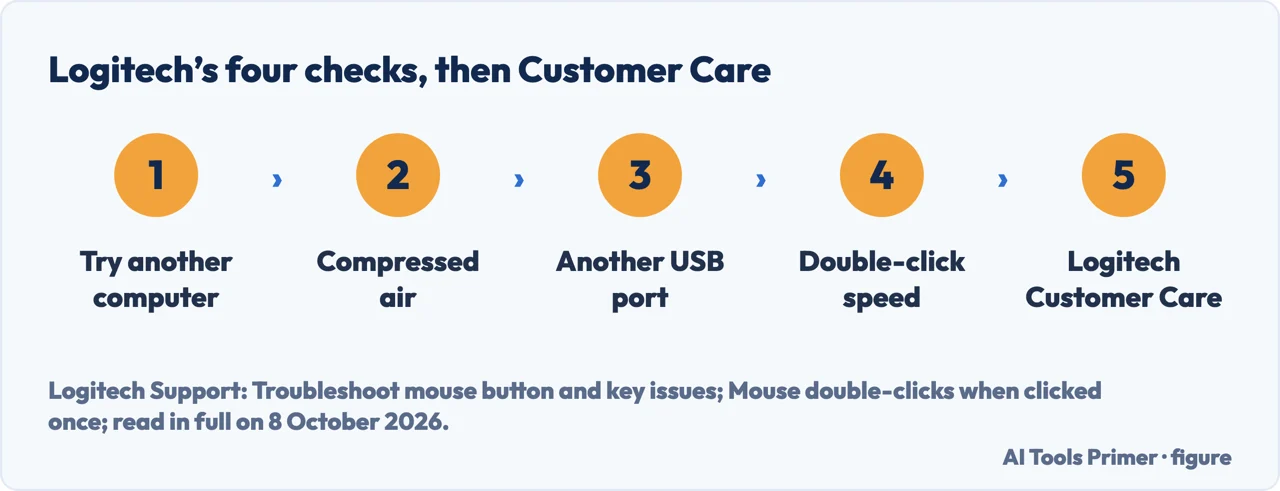
How to fix mouse double clicking starts with when it began. If it was from the first day, Logitech points to the Windows setting Single-click to open an item: choose Double-click to open an item instead. If the mouse worked fine before, Logitech sends you to Customer Care, and another of its pages lists four checks.
| When it started | Where the sources look first | Next steps in the sources |
|---|---|---|
| From the first day | The Windows setting Single-click to open an item | Choose Double-click to open an item |
| After working fine | Logitech Customer Care | Before that, Logitech’s page on button issues: another computer, compressed air, another USB port, the double-click speed |
| A wireless mouse | Batteries and the receiver | Fresh batteries, the Reset button, the receiver out for about 10 seconds (Microsoft) |
| Getting worse over time | The switch under the button | Warranty, or a new switch soldered in (Overclockers) |
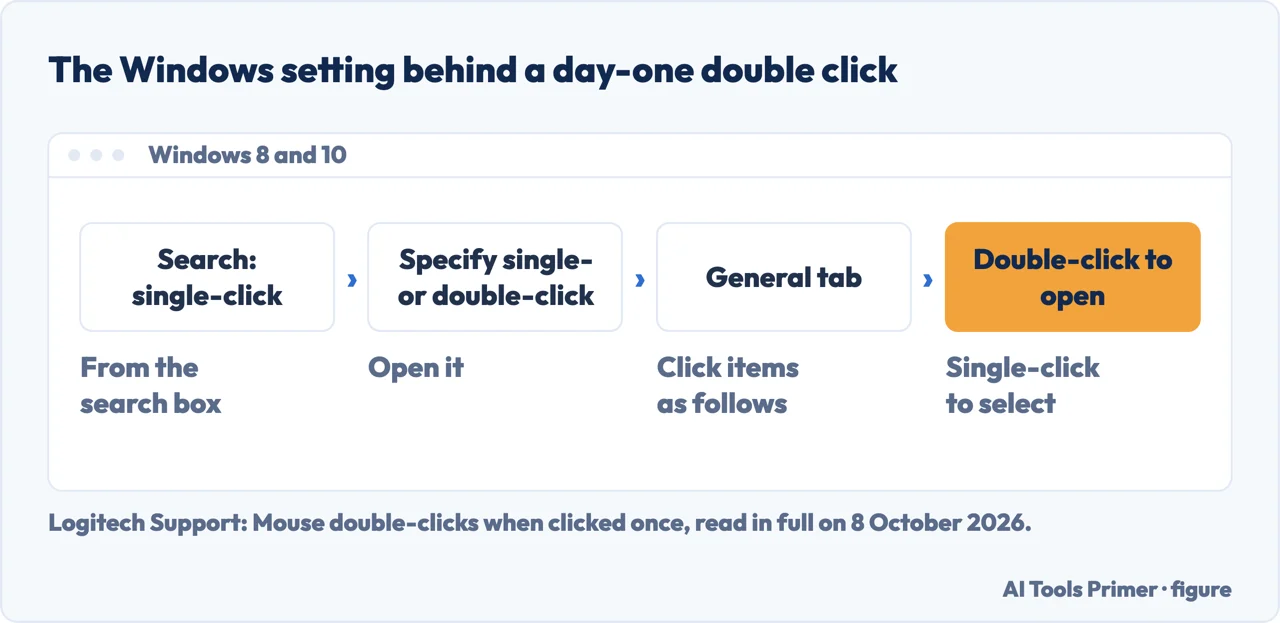
- Check the Windows setting. Logitech says the setting Single-click to open an item makes a single click act as a double click. Its steps for Windows 8 and 10: search for single-click, open Specify single- or double-click to open, and on the General tab choose Double-click to open an item (single-click to select).
- Try the mouse on another computer. Logitech lists this first. Microsoft uses the same test for a device that does not appear to work at all: if it does not work on the other PC, you might need to replace it.
- Clean the button. Logitech’s step: blow on it, or use a can of compressed air. Microsoft asks to make sure no dirt is blocking keys or sensors.
- Plug it, or its receiver, into another USB port. Not through a USB hub or similar device, Logitech says; Microsoft adds that a hub needs power if you keep one.
- Look at the double-click speed. On Windows, Logitech gives Control Panel › Mouse › Buttons and asks to move the slider to the left; on a Mac running macOS 27, Apple’s slider is in System Settings › Accessibility › Pointer Control › Double-click speed.
- If it began recently, contact the maker. On its page about double-clicks, Logitech’s last step, if its Windows steps do not help or the double-clicking is recent, is to contact Logitech Customer Care.
What the double-click speed does
Apple says the slider adjusts “how fast you must click for your Mac to recognize a double-click”. Logitech lists the same setting, on Windows and on a Mac, among its steps for a single press that produces a double click.
Overclockers, a hardware site, calls lowering the double-click speed a stopgap: in its account it does not address the cause, and as a worn switch gets worse, software settings stop compensating. By our reading, the two views sit side by side: the setting changes how the computer reads two clicks; the article is about where the second click comes from.
A worn switch
Overclockers’ article on Logitech mice, by Corey Bodoh, written after the author had gone through at least six mice, puts the fault in the main button switches: after many clicks the switch’s spring loses tension and stops making good contact, which shows as double clicks, items dropped while dragging, or clicks not registering. It says the left button usually goes first, since it is the one used most, and that it makes no difference whether the mouse is wired or wireless.
Its advice comes in order: a mouse still under warranty goes back to Logitech for a replacement, and opening it, the article notes, voids the warranty. Out of warranty, the fix it describes is taking the mouse apart and soldering in new switches, with the warning that a mouse can be damaged beyond repair along the way; it broke one itself while writing. Bending the switch’s metal spring back, it says, fixes the problem only for a while.
A wireless mouse, and Windows itself
Microsoft’s page for Windows 11 and 10 checks the hardware first: unplug the USB cable or receiver, wait, and plug it back in; check that batteries are charged or fresh; look under the mouse for a Reset button, which disconnects and reconnects the wireless link. For a USB receiver, unplugging it for about 10 seconds can be enough.
Then the driver: Windows Update can install one, or Device Manager can update it from the device’s Driver tab. Microsoft notes that there might not be any driver update available.
Other input faults. A keyboard that ignores keys has a Windows setting of its own, in keyboard not typing; a touch screen that ignores taps is in an unresponsive touch screen.
Where to start
Five ways in.
- “Just give me the steps.”
- In order — the steps in order
- “Will the speed slider fix it?”
- Double-click speed — the double click speed
- “It got worse over time.”
- A worn switch — a worn switch
- “It is wireless.”
- Batteries and receiver — a wireless mouse
- “It did it from day one.”
- The Windows setting — the steps in order
More on keyboards, screens and cameras
The other things that stop responding each have a guide of their own.
Questions people also ask
Can mouse double-click be fixed?
When it is the Windows setting, yes: Logitech says choosing Double-click to open an item restores normal clicks. When it started later, Logitech’s pages list compressed air and another USB port, and its Customer Care. Overclockers, writing about worn switches, sends a mouse under warranty back to the maker and describes soldering in new switches for one out of warranty.
Why is my mouse double-clicking by itself?
Logitech separates two cases. A mouse that did it from the first day points to the Windows setting Single-click to open an item. One that started after working fine goes to Logitech Customer Care; Overclockers, on Logitech mice, puts it down to the switch under the button, whose spring loses tension after many clicks.
How to fix a double-clicking key?
Logitech’s page on mouse button and key problems, for a single press that gives a double click: test the device on another computer, clean the button with compressed air, and plug it or its receiver into another USB port, without a hub. Microsoft adds a check that no dirt is blocking keys or sensors.
How to get rid of double-click mouse?
By our reading, the question has two meanings. To open items with one click, Windows has the setting Logitech describes, Single-click to open an item, under Specify single- or double-click to open. If one click gives a double click, choose Double-click to open an item there, then follow the hardware checks.
Not covered here. It does not cover trackpads, or a mouse whose pointer jumps or freezes.
Nor does it walk through opening a mouse: Overclockers does so model by model on later pages, not read here, and notes that it voids the warranty.
Sources
- Logitech Support — Mouse double-clicks when clicked once: from the first day or recently, and the Single-click to open an item setting in Windows 8 and 10, 7 and XP — support.logi.com, read 8 October 2026.
- Logitech Support — Troubleshoot mouse button and key issues: another computer, compressed air, another USB port, and the double-click speed — support.logi.com, read 8 October 2026.
- Logitech Support — Gaming mouse produces a double click when clicked only once in Windows: Folder Options and Double-click to open an item — support.logi.com, read 8 October 2026.
- Microsoft Support — Mouse and keyboard problems in Windows, Windows 11 and 10: USB ports and hubs, batteries, the Reset button, the receiver, and drivers — support.microsoft.com, read 8 October 2026.
- Apple Mac User Guide — Change mouse or trackpad tracking, double-click, and scrolling speed on Mac, macOS 27: Double-click speed under Pointer Control — support.apple.com, read 8 October 2026.
- Overclockers — Corey Bodoh, How To Fix the Infamous Logitech Double Click Problem, page 1 of 7: worn switches, the warranty, and why it replaces the switches — www.overclockers.com, read 8 October 2026.
Written by Alberto Gulotta
Founder and editor of AI Tools Primer, writing from Palermo, Italy. Thirty-five years of taking computers apart, starting with a Commodore 64 — the long version is on the about page.
Something wrong on this page? Write to aitoolsprimer@gmail.com and it gets fixed.
Written on 8 October 2026.
Independence and limits
No affiliate links and no paid placements anywhere on this site. Nobody pays to appear here, and no company has seen this page before you did.
This is general information, not professional advice. Where a page touches money, health, safety or the law, it names its source and the date it was read — and your situation may still differ. See the privacy page and the cookie policy.