
Software · guide
Normal CPU temp: the maker’s number, not a forum’s
By Alberto Gulotta · Updated · 12 min read
Normal CPU temp has no single number. Intel’s temperature FAQ, read on 22 October 2026, says it does not publish typical ranges at all, and the only official figure for each processor is its maximum: between 89 and 110°C on the eight Intel and AMD product pages we read.
Below that, what should my CPU temp be depends on the cooler, the room and the job. AMD’s own example: its Ryzen 7000 desktop chips are meant to sit near 95°C under heavy multi-threaded work, and much closer to 70°C while gaming with a good cooler.
| Processor | Made for | Maximum | Name of the field |
|---|---|---|---|
| Intel Core Ultra 9 285K | Desktop | 105°C | Max Operating Temperature |
| Intel Core i7-13700K | Desktop | 100°C | Max Operating Temperature |
| Intel Core Ultra 7 255H | Laptop | 110°C | Max Operating Temperature |
| Intel Core Ultra 7 258V | Laptop | 100°C | Max Operating Temperature |
| AMD Ryzen 7 9700X | Desktop | 95°C | Max. Operating Temperature (Tjmax) |
| AMD Ryzen 7 7700X | Desktop | 95°C | Max. Operating Temperature (Tjmax) |
| AMD Ryzen 7 7800X3D | Desktop | 89°C | Max. Operating Temperature (Tjmax) |
| AMD Ryzen 9 7940HS | Laptop | 100°C | Max. Operating Temperature (Tjmax) |
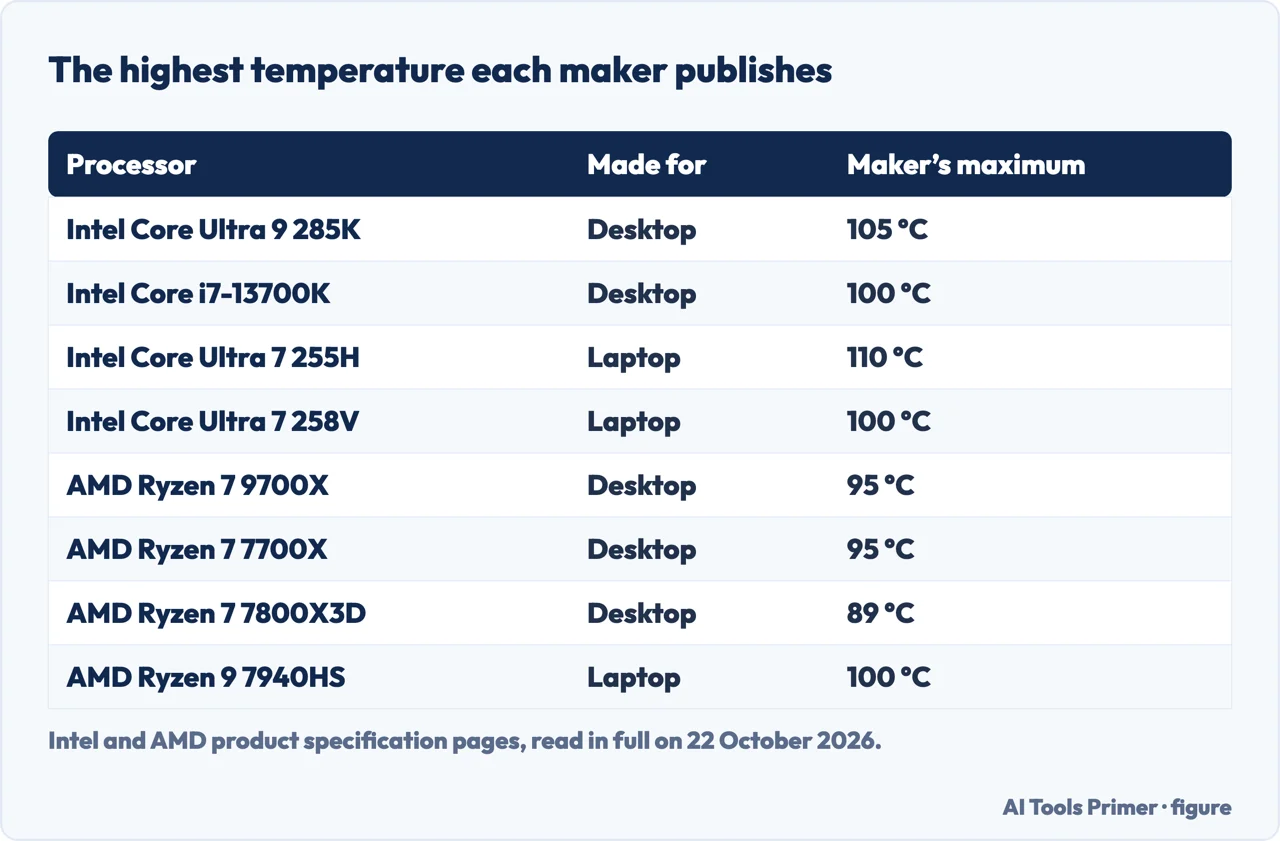
What Intel says, and what it will not say
Intel’s temperature FAQ, last reviewed in February 2025, gives one number per processor: the maximum. It usually lies between 100 and 110°C, and the product page lists it under Package Specifications. Intel adds that the sensors can read above it for short moments, and that a PC maker can configure the highest temperature the chip will reach in its own system.
For everything below the maximum, the FAQ refuses to give a figure: “We do not provide typical temperature operating ranges for each processor or each core”, because they depend on the system design and the workload. So no Intel page we read defines a normal CPU temperature, a good CPU temp or an average CPU temp.
What Intel does describe is what happens near the top. When a core goes past its throttle temperature the processor cuts its power to cool down; if that is not enough, it shuts itself down to prevent permanent damage. Being at the maximum during a long, heavy job is, in Intel’s words, not necessarily cause for concern, and the FAQ goes further: normal operation can put the processor at its maximum, so the temperature alone does not tell you whether the cooling is adequate. For a laptop or a ready-made desktop, Intel sends you to the company that built it.
What AMD says about 95°C
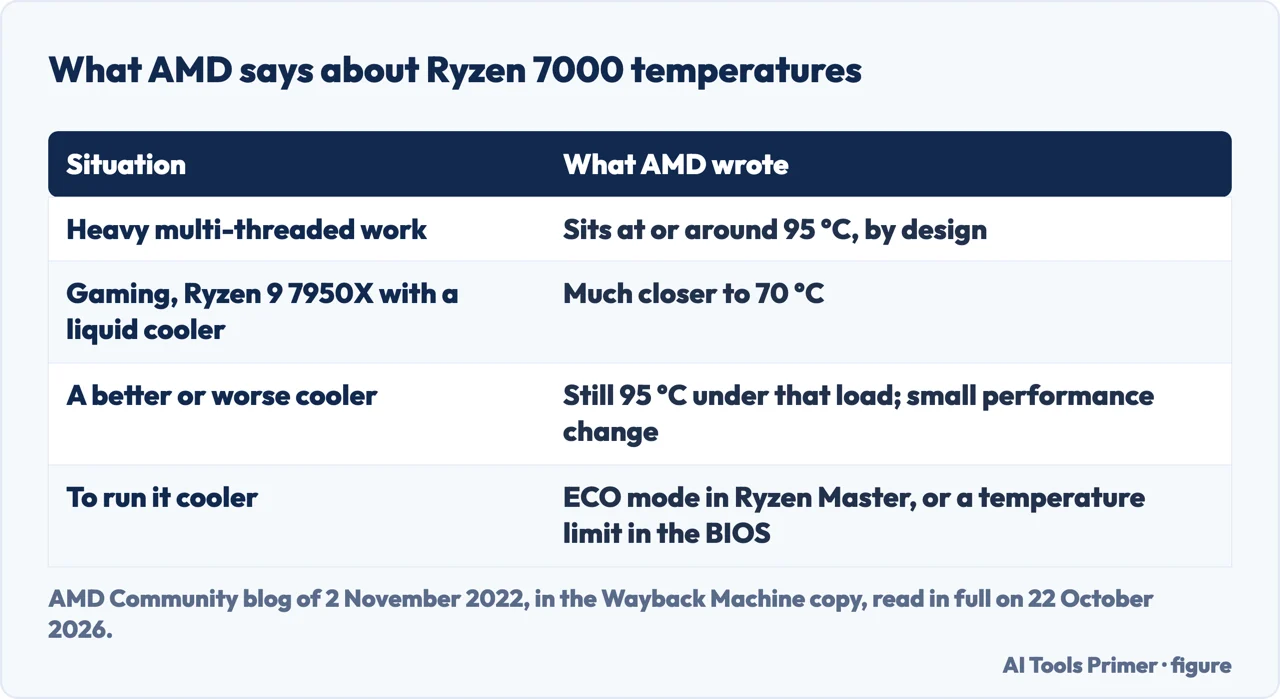
AMD prints a Tjmax on each Ryzen product page we read: 95°C for the Ryzen 7 9700X and 7700X, 89°C for the Ryzen 7 7800X3D. For the Ryzen 7000 desktop chips it went further, in a post on its community blog on 2 November 2022. The post is no longer at its address, which now forwards to a notice about the community moving; we read it in the Wayback Machine’s copy of 17 January 2025.
- All of AMD’s quality analysis for these processors was done at 95°C, and the chip “is engineered to live its life at this temperature with no detriment to longevity or reliability”.
- Under heavy multi-threaded work, such as rendering in Blender, the processor sits at or around 95°C on purpose: it raises its clock until it reaches either its power limit or that temperature.
- A better cooler does not change the 95°C under that load. AMD’s own comparison, from a liquid cooler down to an old boxed air cooler, showed the same temperature and a small difference in performance.
- Gaming is a different load. AMD writes that a Ryzen 9 7950X with an all-in-one liquid cooler should be much closer to 70°C while gaming.
The post also separates two things people mix up: the temperature reading and the heat that warms the room. Heat follows power, so a chip at 85°C drawing more watts heats the room more than one at 90°C drawing fewer. For a cooler PC AMD points to ECO mode in its free Ryzen Master utility, which lowers the power limit, or to a maximum temperature set in the BIOS.
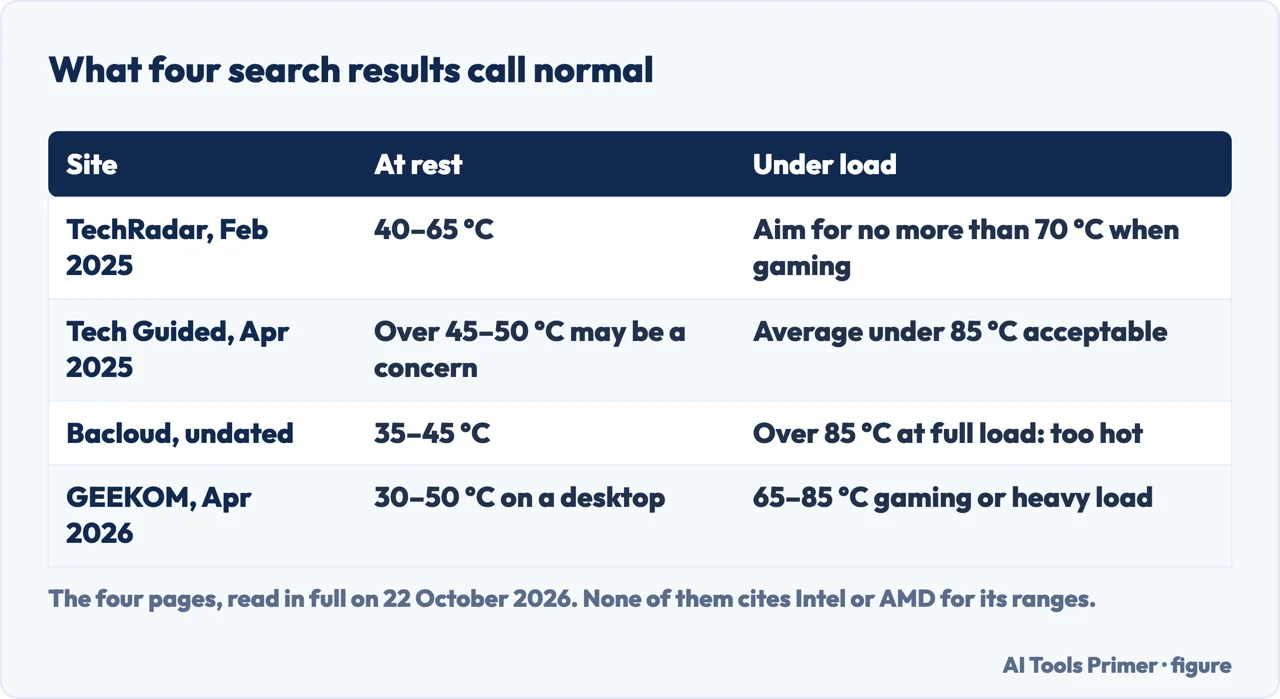
The ranges in the search results do not agree
The four pages we could read among Google’s first results for this question each give a healthy CPU temp range, and they are not the same range. TechRadar, in February 2025, puts idle at 40 to 65°C and tells you to aim for no more than 70°C when gaming. Tech Guided, in April 2025, calls an average under 85°C acceptable, with short spikes over 90°C also being okay. Bacloud’s table marks anything over 85°C at full load as too hot. GEEKOM, a mini PC maker, gives 65 to 85°C for gaming on a desktop.
None of the four cites Intel or AMD for those ranges. Put them next to the makers’ pages and they clash: a Ryzen 7000 processor at 95°C under a long render is too hot by Bacloud’s table and exactly what AMD designed it to do. GEEKOM’s own table lists the Ryzen 9 7940HS with a Tjmax of 95°C, where AMD’s product page for that chip says 100°C.
The only CPU temp range with a maker behind it ends at the maximum on your model’s page. Where your PC sits below it depends on the system and the workload, which is exactly Intel’s reason for not publishing typical ranges.
A normal CPU temp while gaming
The only maker’s figure for gaming we found is AMD’s: around 70°C for a Ryzen 9 7950X with a liquid cooler. Intel publishes none, in line with its FAQ. AMD’s reason is that games are usually limited by latency and single-thread performance rather than by power or temperature, so they run cooler than a render on the same chip.
One page in the results shows its own measurement. Tech Guided’s writer read an Intel Core i7-13700F in Core Temp at about 30°C at rest and 90 to 100°C with most cores at full load, and concluded it was likely throttling. That is one PC with one cooler, not a rule.
If you want a number in Fahrenheit, as TechRadar gives it: 70°C is 158°F, 95°C is 203°F and 100°C is 212°F.
Laptop chips, on the pages we read
The laptop chips in the table above have maximums as high as the desktop ones or higher: 110°C for the Intel Core Ultra 7 255H, 100°C for the Core Ultra 7 258V and the AMD Ryzen 9 7940HS. Intel’s advice for a laptop is to ask its maker, because other parts inside it can reach their own thermal limits independently of the processor.
Apple’s support article on Mac laptop temperatures, read on 22 October 2026, gives no processor figure. It asks you to use them where the room is between 10 and 35°C, on a firm surface that lets air through, and warns that third-party apps do not measure the temperature of the case, which is much lower. If the Mac gets warm when it is not doing heavy work, Apple says to look in Activity Monitor for a process loading the processor.
When the number is worth acting on
On the makers’ own pages, the safe CPU temp limit is your model’s maximum, and the processor guards it itself by slowing down. A processor at that maximum during a long heavy job is behaving as designed. These are the cases the sources treat as signs of a problem:
- the PC shuts down by itself under load, which Intel describes as the last protection after throttling;
- it loses speed in work that used to run fine: Intel says its thermal control can cost performance, and our page on a laptop that overheats explains why;
- it runs hot or the fans spin for a long time while it is doing nothing, the case Apple sends to Activity Monitor.
Dust in the vents is one common cause, covered on cleaning a laptop fan. To read the number in the first place, see our page on how to check CPU temperature, the firmware screen and the programs that show it.
Where to start
Five ways in.
- “Is there an official range?”
- Intel — intel
- “My Ryzen sits at 95°C.”
- AMD — amd
- “Why do the numbers online differ?”
- The ranges — ranges
- “What about while gaming?”
- Gaming — gaming
- “When should I worry?”
- Too hot — too hot
More on heat and speed
The pages next to this one: reading the temperature, the slowdown that protects the processor, and the dust that causes it.
Questions people also ask
Is 90°C too hot for a CPU?
Not by itself under a heavy load: it is below the maximum of seven of the eight processors whose Intel and AMD pages we read, which range from 89 to 110°C. Check your own model’s page: a Ryzen 7 7800X3D is rated 89°C, so 90°C is above its maximum.
Is 80°C hot for a CPU?
For a long render or a game it is within every maker’s limit we read. At rest it is above every idle range the search results give, the highest being TechRadar’s 65°C, and Apple’s advice for a Mac that is warm without heavy work is to look in Activity Monitor for a busy process.
Is 40°C a normal CPU temperature at idle?
TechRadar, Bacloud and GEEKOM all include 40°C in their idle ranges, and Tech Guided treats a reading consistently over 45 to 50°C at rest as a possible concern. None of them cites a maker, and the Intel FAQ we read on 22 October 2026 gives no idle figure.
Is 95°C normal for a Ryzen 7000 processor?
Under heavy multi-threaded work, yes, according to AMD: the chips were qualified at 95°C and target it on purpose. AMD expects a Ryzen 9 7950X with a liquid cooler to be much closer to 70°C while gaming.
What is a normal laptop CPU temperature?
None of the maker pages we read gives one. Laptop chips have maximums of 100 to 110°C on the Intel and AMD pages we read, and Intel says to ask the laptop’s maker about its own system.
Not covered here. We did not measure any processor for this page. Every temperature on it comes from Intel, AMD, Apple or the pages named next to it, read on 22 October 2026.
AMD’s blog post of 2 November 2022 no longer loads at its address; we read the Wayback Machine’s copy of 17 January 2025.
The Reddit, Spiceworks and Intel Community results could not be read, the Facebook post was not opened and the videos were not watched.
The search volume and difficulty behind this page were read in Semrush on 29 August 2026.
Sources
- Intel — Information about Temperature for Intel Processors (article 000005597) — www.intel.com, read 22 October 2026.
- Intel — What Is the Maximum Operating Temperature of My Intel Processor? (article 000094759) — www.intel.com, read 22 October 2026.
- Intel — Intel Core Ultra 9 Processor 285K specifications — www.intel.com, read 22 October 2026.
- Intel — Intel Core i7-13700K Processor specifications — www.intel.com, read 22 October 2026.
- Intel — Intel Core Ultra 7 processor 255H specifications — www.intel.com, read 22 October 2026.
- Intel — Intel Core Ultra 7 Processor 258V specifications — www.intel.com, read 22 October 2026.
- AMD — AMD Ryzen 7 9700X — www.amd.com, read 22 October 2026.
- AMD — AMD Ryzen 7 7700X — www.amd.com, read 22 October 2026.
- AMD — AMD Ryzen 7 7800X3D — www.amd.com, read 22 October 2026.
- AMD — AMD Ryzen 9 7940HS — www.amd.com, read 22 October 2026.
- AMD Community — Ryzen 7000 Series Processors: Let’s Talk About Power, Temperature, and Performance (2 November 2022, Wayback Machine copy of 17 January 2025) — web.archive.org, read 22 October 2026.
- Apple Support — Keep your Mac laptop within acceptable operating temperatures — support.apple.com, read 22 October 2026.
- TechRadar — What is a normal temperature for a CPU? (24 February 2025) — www.techradar.com, read 22 October 2026.
- Tech Guided — Safe CPU Temperature Range (22 April 2025) — techguided.com, read 22 October 2026.
- Bacloud — GPU and CPU Temperature Ranges — www.bacloud.com, read 22 October 2026.
- GEEKOM — CPU Temp Guide: What’s Normal, Safe Limits & How to Fix It (9 April 2026) — www.geekompc.com, read 22 October 2026.
Written by Alberto Gulotta
Founder and editor of AI Tools Primer, writing from Palermo, Italy. Thirty-five years of taking computers apart, starting with a Commodore 64 — the long version is on the about page.
Something wrong on this page? Write to aitoolsprimer@gmail.com and it gets fixed.
Written on 22 October 2026.
Independence and limits
No affiliate links and no paid placements anywhere on this site. Nobody pays to appear here, and no company has seen this page before you did.
This is general information, not professional advice. Where a page touches money, health, safety or the law, it names its source and the date it was read — and your situation may still differ. See the privacy page and the cookie policy.