
Software · guide
How to check CPU temperature when Windows will not show it
By Alberto Gulotta · Updated · 12 min read
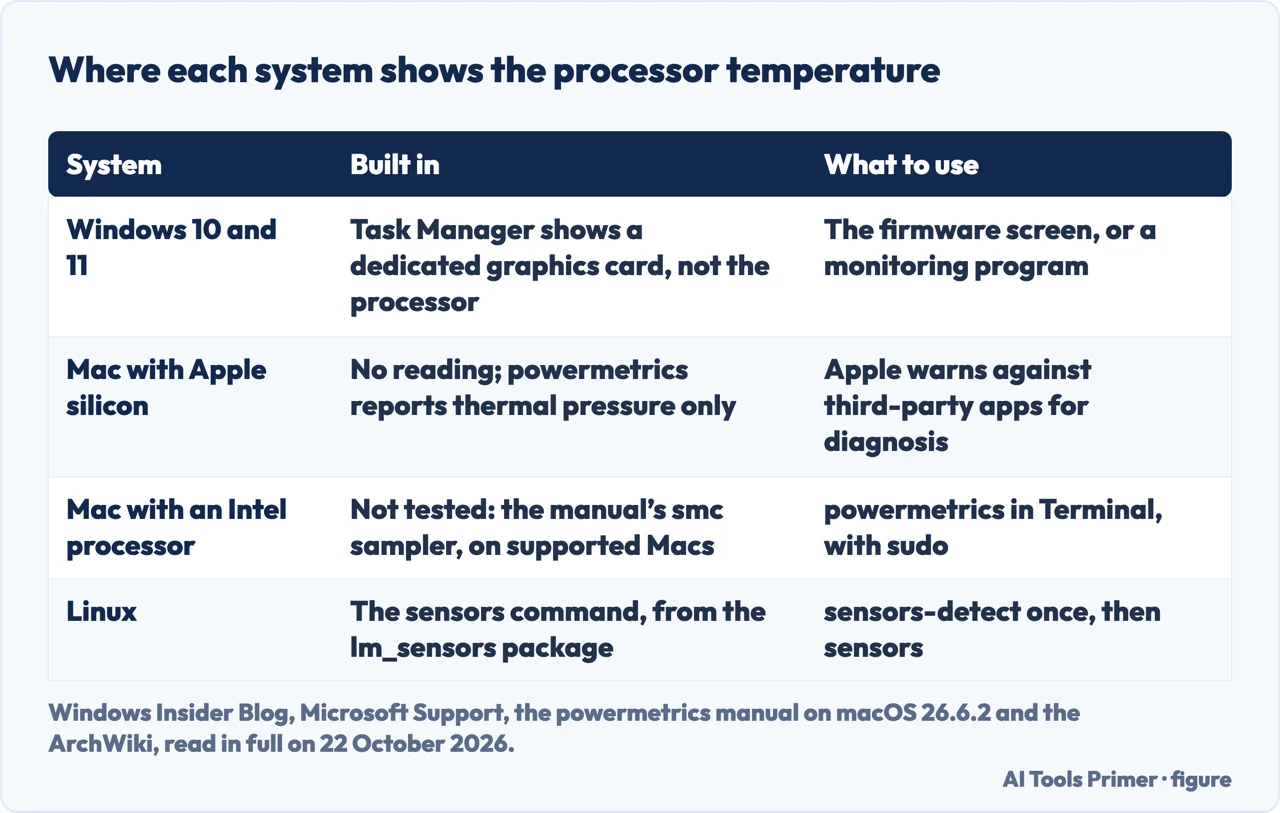
How to check CPU temperature: on Windows, restart into the firmware screen or install a monitoring program, because Windows itself shows no reading for the processor. On Linux the sensors command prints it; on a Mac with Apple silicon we found no built-in number at all.
Then compare what you read with the limit your processor’s maker publishes for that model, not with a number from a forum. Intel’s temperature FAQ, read on 22 October 2026, says it does not publish typical ranges at all.
| System | Built in | Where it is documented |
|---|---|---|
| Windows 10 and 11 | No processor reading; Task Manager shows a dedicated graphics card only | Windows Insider Blog; Microsoft Q&A |
| Any PC, before Windows starts | The UEFI firmware screen, on many machines | Microsoft Support; HP |
| Mac with Apple silicon | No reading; powermetrics reports thermal pressure | Apple Support; the powermetrics manual |
| Linux | The sensors command from lm_sensors | ArchWiki |
On Windows: Task Manager is not the answer
None of the Microsoft pages we read shows a way to see the processor’s temperature in Windows. The answer marked most helpful in Microsoft Q&A, migrated from the old Microsoft Community and posted anonymously in 2017, is one line: “Windows does not have a built-in tool for this function.” The other answer, from 2016, gives the two ways round it: the firmware screen, or a program from someone else.
What Task Manager does have is a temperature for the graphics card. Microsoft announced it in a Windows 10 Insider Preview build on 16 August 2019, calling temperature monitoring one of the longstanding requests for Task Manager, with three limits: a dedicated graphics card only, a graphics driver that supports version 2.4 or higher of the WDDM driver model, and degrees Celsius only. The reading sits next to the graphics card in the Performance tab.
The search results disagree on this point. One of the videos Google shows for this question says Task Manager shows the CPU’s temperature under Performance; another says it shows the GPU’s and not the CPU’s. Microsoft’s own announcement is about the graphics card. We did not open Task Manager on a Windows PC for this page. Our page on opening Task Manager covers what it does show.
The firmware screen, without installing anything
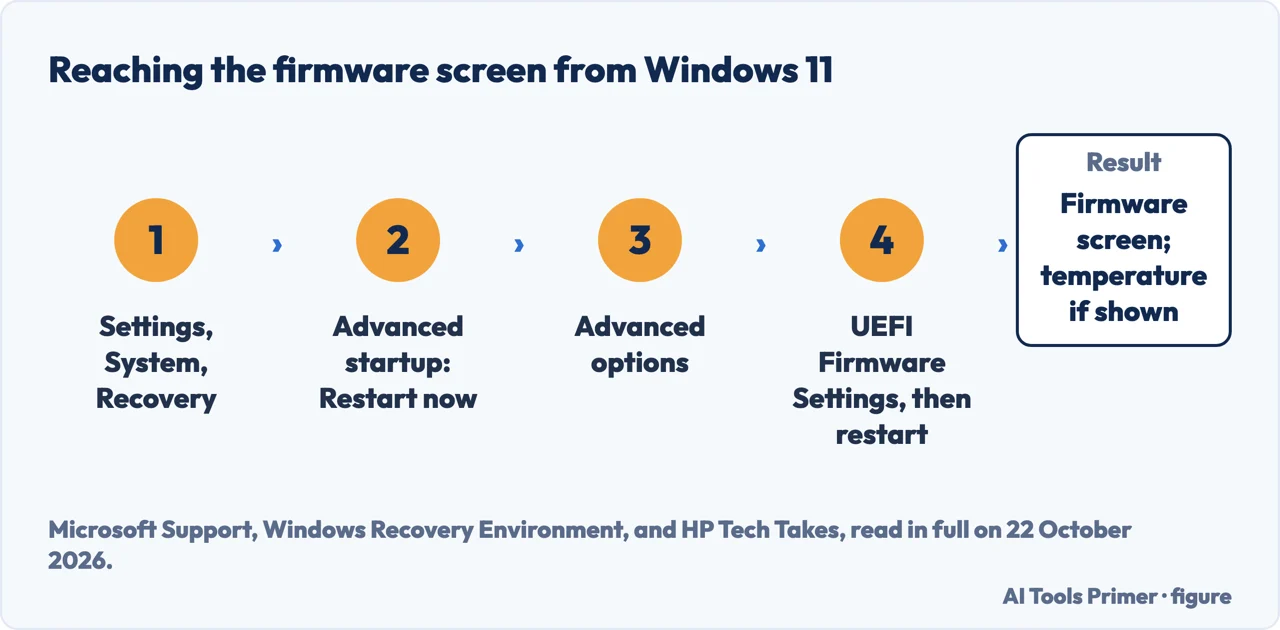
The firmware, called BIOS on older PCs and UEFI on current ones, runs before Windows, and on many PCs its setup screen shows the processor temperature. Microsoft documents the way in from Windows 11, in its article on the Windows Recovery Environment:
- Open Settings and select System, then Recovery. In Windows 10 it is Update & Security, then Recovery.
- Next to Advanced startup, select Restart now.
- In the recovery environment that opens, select Advanced options.
- Select UEFI Firmware Settings. The PC restarts into the firmware screen.
Microsoft describes that screen as the place for boot order, Secure Boot and other hardware settings, and does not mention temperature. That part comes from HP, whose guide says the firmware screen “for many Windows 10 users will include a CPU temperature readout”. Where it sits, and what it is called, depends on the maker of the PC or the motherboard.
HP also lists the drawbacks. The PC restarts twice for one look, and this CPU temperature check gives a single, static reading taken at that screen, not the temperature during the game or the export that made you ask. Change nothing else there: the older Microsoft answer warns that wrong firmware settings can stop a PC from starting properly. Microsoft adds that on an encrypted device some recovery tools ask for the BitLocker recovery key: our page on where the BitLocker key is covers finding it first.
Monitoring programs, and the download that went wrong
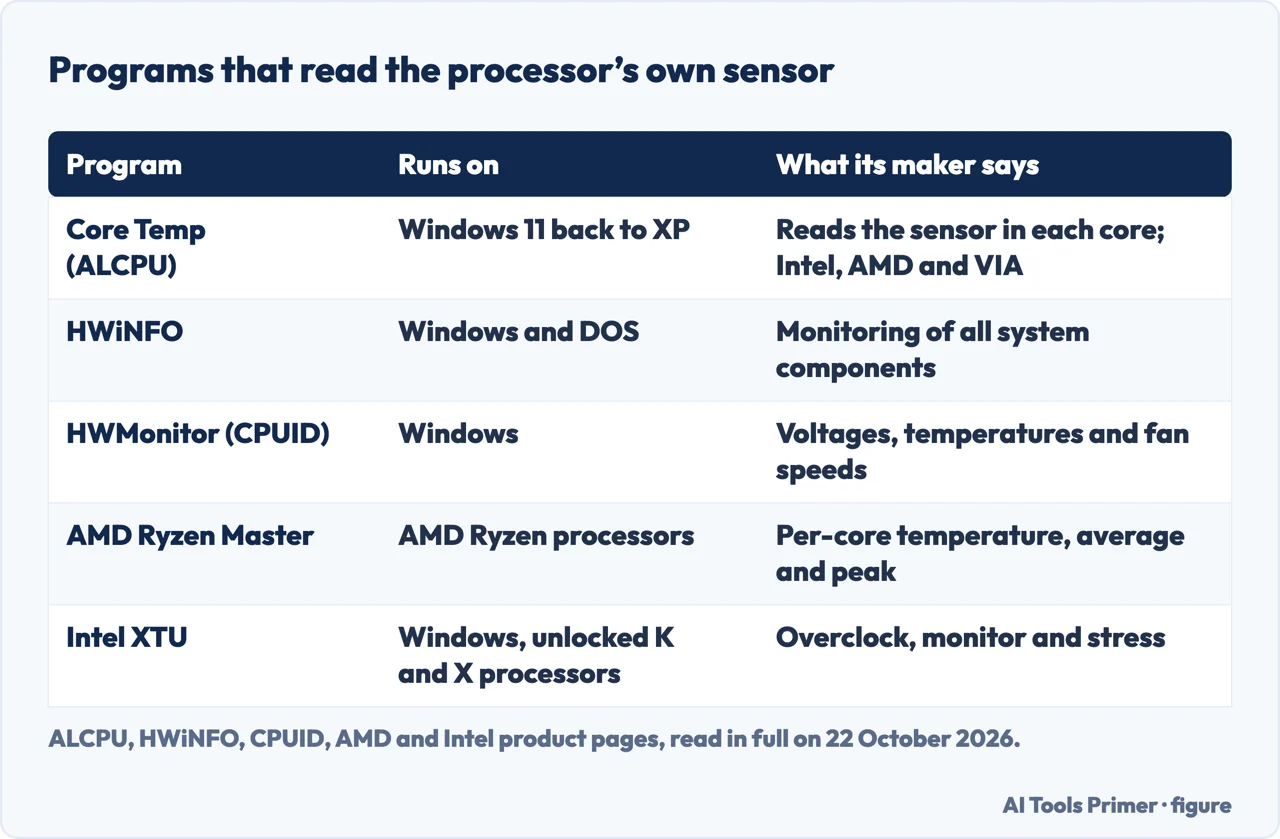
To monitor CPU temp while the PC is working, you need a program that reads the sensor inside the processor: a CPU temperature monitor. Intel says many third-party utilities can monitor this digital thermal sensor to see how close the chip is to its limit. The names in the search results are these:
- Core Temp, from ALCPU, shows a temperature for each core and supports Intel, AMD and VIA processors on Windows 11 back to XP. Version 1.21, released on 3 October 2026, lists a mitigation for vulnerabilities in its legacy 64-bit driver.
- HWiNFO describes itself as hardware analysis, monitoring and reporting for Windows and DOS.
- HWMonitor, from CPUID, reads the main health sensors of a PC: voltages, temperatures, fan speeds.
- AMD Ryzen Master monitors per-core clock rates, temperature and voltages, with average and peak readings. Its main job is overclocking, and AMD’s own page says that “AMD’s product warranty does not cover damages caused by overclocking”. Watching the readings is not overclocking.
- Intel XTU is Intel’s tool to overclock, monitor and stress a system, but its download page says it is supported with unlocked processors only, the K and X models, on a chipset that allows full overclocking.
Where you download it matters. On 9 April 2026 the CPUID website itself was compromised. Kaspersky’s researchers at Securelist report that from about 15:00 UTC that day until about 10:00 UTC on 10 April, the download links for CPU-Z, HWMonitor and Perfmonitor 2 pointed to malicious sites. The installers held the real, signed program plus a malicious file named CRYPTBASE.dll that it loaded, and Securelist counted more than 150 victims, most of them private individuals. Cyderes, which also analysed it, writes that CPUID confirmed a secondary API was breached for about six hours, and that only the 64-bit HWMonitor was affected.
Cyderes describes the breach as remediated. The lesson is to download from the maker’s own page and, where the maker publishes one, compare the file’s checksum: Core Temp’s page lists SHA-256 and MD5 values for its downloads.
On a Mac
As far as we could find, macOS shows no temperature in its own apps. Apple’s support article on laptop temperatures says Mac laptops have sensors that detect temperature changes inside the computer and turn the fans on automatically, and it has two warnings for anyone reaching for an app: third-party apps do not measure the case temperature, which is much lower, and “Never use third-party apps to diagnose possible hardware issues.”
The command-line tool powermetrics ships with macOS, and its manual describes an smc sampler that, on supported platforms, includes information from various temperature sensors. On the Mac with Apple silicon we used, running macOS 26.6.2, the list of samplers printed by powermetrics -h has no smc entry at all. The nearest is thermal, which the manual describes as the current thermal pressure the system is under: a level, not a number of degrees. We have not tried the smc sampler on a Mac with an Intel processor.
On Linux
The ArchWiki gives the route, with the lm_sensors package. Install it, run sensors-detect once as root to find the sensor chips, then run sensors. The output names each sensor chip, coretemp-isa-0000 in the ArchWiki’s example, with a line per core such as Core 0: +35.0°C followed by the critical temperature in brackets.
Two cautions from the same page. Pressing Enter at every prompt of sensors-detect is safe, but some advanced options may damage hardware. And on some K10 processors the k10temp driver reports an unreliable sensor and switches monitoring off: the ArchWiki shows how to force it, and says to confirm first that the sensor is valid.
What to compare the number with
With your processor. Intel and AMD publish a ceiling for their processors model by model, and the processor protects itself when it gets there.
- Intel calls it Tjunction max: the “maximum thermal junction temperature that a processor will allow prior to using internal thermal control mechanisms to reduce power and limit temperature”. It usually lies between 100 and 110°C. Find your model on Intel’s product specification site and open Package Specifications.
- AMD prints Max. Operating Temperature (Tjmax) on each product page: 95°C for the Ryzen 7 9700X, for example.
Intel is explicit, in the FAQ we read on 22 October 2026, about what it does not publish: “We do not provide typical temperature operating ranges for each processor or each core”, because they depend on the system and the workload. It also says that sitting at the maximum during a heavy job is not necessarily a cause for concern: the processor slows down first and shuts down only if slowing is not enough. That slowdown is what our page on a laptop that overheats is about, and dust in the vents, one cause of it, is covered on cleaning a laptop fan.
Where to start
Five ways in.
- “Task Manager shows it, right?”
- Windows — windows
- “Without installing anything.”
- The firmware — firmware
- “Which program?”
- Programs — programs
- “I am on a Mac.”
- Mac — mac
- “Is my number too high?”
- The limit — limit
More on heat and speed
The pages next to this one: what the processor does when it reaches its limit, the dust that gets it there, and the tool for what is keeping it busy.
Questions people also ask
Can I check CPU temperature in Windows 11 without software?
Only through the firmware screen: Settings, System, Recovery, Advanced startup, Restart now, then Advanced options and UEFI Firmware Settings. Many PCs show the temperature there; Windows itself shows no reading for the processor.
Does Task Manager show CPU temperature?
No. Since a 2019 Insider build Task Manager shows a temperature for a dedicated graphics card, in the Performance tab, and Microsoft’s announcement says nothing about the processor.
How can I see CPU temperature on a Mac?
We found no built-in reading in macOS. On a Mac with Apple silicon, powermetrics reports thermal pressure, not degrees, and Apple says never to use third-party apps to diagnose possible hardware issues.
What temperature is too hot for a CPU?
The one your processor’s maker publishes for that model: Tjunction max on Intel’s specification page, usually 100 to 110°C, and Tjmax on AMD’s product page. Intel’s temperature FAQ, read on 22 October 2026, says it does not publish typical ranges.
How to read CPU temp on Linux?
Install the lm_sensors package, run sensors-detect once as root, then run sensors. Each core gets a line with its temperature and, in brackets, the critical temperature.
Is it safe to download HWMonitor?
From CPUID’s own page, today, yes; on 9 and 10 April 2026 its download links served infected installers for several hours, according to Securelist and Cyderes. Compare a checksum where the maker publishes one.
Not covered here. We did not run any of the programs on this page, and did not open Task Manager or a firmware screen on a Windows PC for it. The steps and descriptions are their makers’, read on 22 October 2026; powermetrics was run on one Mac with Apple silicon, on macOS 26.6.2.
The Reddit, Super User and Intel Community results could not be read, and the videos were not watched.
The search volume and difficulty behind this page were read in Semrush on 29 August 2026.
Sources
- Microsoft Q&A — How to check cpu temp Windows 10 — learn.microsoft.com, read 22 October 2026.
- Windows Insider Blog — Announcing a Windows 10 Insider Preview build (16 August 2019) — blogs.windows.com, read 22 October 2026.
- Microsoft Support — Windows Recovery Environment — support.microsoft.com, read 22 October 2026.
- HP Tech Takes — How to Check Your Computer’s CPU Temperature — www.hp.com, read 22 October 2026.
- Intel — Information about Temperature for Intel Processors (article 000005597) — www.intel.com, read 22 October 2026.
- Intel — What Is the Maximum Operating Temperature of My Intel Processor? (article 000094759) — www.intel.com, read 22 October 2026.
- Intel — Intel Extreme Tuning Utility (Intel XTU) download — www.intel.com, read 22 October 2026.
- AMD — AMD Ryzen 7 9700X specifications — www.amd.com, read 22 October 2026.
- AMD — AMD Ryzen Master Utility — www.amd.com, read 22 October 2026.
- ALCPU — Core Temp — www.alcpu.com, read 22 October 2026.
- HWiNFO — Free System Information, Monitoring and Diagnostics — www.hwinfo.com, read 22 October 2026.
- CPUID — HWMonitor — www.cpuid.com, read 22 October 2026.
- Securelist (Kaspersky) — CPU-Z / HWMonitor watering hole infection (April 2026) — securelist.com, read 22 October 2026.
- Cyderes Howler Cell — How CPUID’s HWMonitor Supply Chain Was Hijacked to Deploy STX RAT (April 2026) — www.cyderes.com, read 22 October 2026.
- Apple Support — Keep your Mac laptop within acceptable operating temperatures — support.apple.com, read 22 October 2026.
- ArchWiki — lm_sensors — wiki.archlinux.org, read 22 October 2026.
Written by Alberto Gulotta
Founder and editor of AI Tools Primer, writing from Palermo, Italy. Thirty-five years of taking computers apart, starting with a Commodore 64 — the long version is on the about page.
Something wrong on this page? Write to aitoolsprimer@gmail.com and it gets fixed.
Written on 22 October 2026.
Independence and limits
No affiliate links and no paid placements anywhere on this site. Nobody pays to appear here, and no company has seen this page before you did.
This is general information, not professional advice. Where a page touches money, health, safety or the law, it names its source and the date it was read — and your situation may still differ. See the privacy page and the cookie policy.