
Software · guide
Recently deleted apps: where iPhone and Android keep the list
By Alberto Gulotta · Updated · 9 min read
Recently deleted apps are found through the store account: Apple’s App Store lists them under Not on this device, and Google Play lists them under Not installed. Both lists belong to the account that got the app. This page sets out the steps, why an app may be missing and where the guides differ from Apple and Google.
| Question | Answer | Where it comes from |
|---|---|---|
| Where does Apple list apps no longer on the iPhone? | App Store, then Apps & Purchase History, then Your Apps, then Not on this device | Apple Support |
| And on Android? | Play app, then Profile, then Manage apps & device, then This device, then Not installed | Google Play Help |
| Which account matters? | The same Apple Account or Google Account that got the app | Apple Support, Google Play Help |
| Can in-app purchases be redownloaded? | Apple says no, though some can be restored | Apple Support |
| Does the list show when an app was deleted? | Apple’s page does not say so; a community reply does | Apple Support, Apple Community |
iPhone and iPad: the Not on this device list
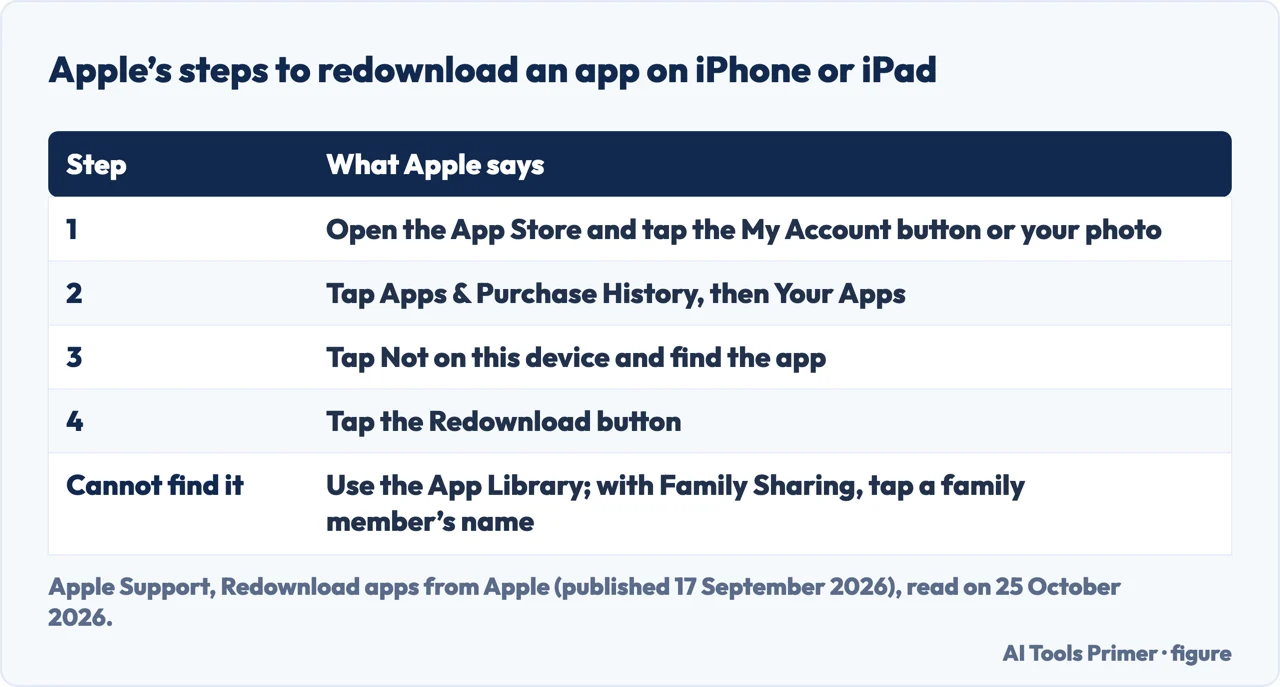
Apple’s support article on redownloading apps, published on 17 September 2026, gives the route for recently deleted apps on an iPhone or iPad: open the App Store, tap the My Account button or your photo at the top of the screen, tap Apps & Purchase History and then Your Apps, tap Not on this device, find the app and tap the Redownload button. If you use Family Sharing, you can tap a family member’s name to see their purchases. If you can’t find the app on your device, Apple says to use the App Library. On Apple TV 4K and Apple TV HD the list is Purchased, then Not on This TV, and on Apple Watch it is Account, then Purchased.
Apple adds three limits. Some apps aren’t available on all devices; an app bought on an iPhone might not have a version for Mac. Games played with an Apple Arcade subscription don’t appear in your purchases, so you search for the game and download it again. You can’t redownload in-app purchases, but you can restore some of them if you used Apple In-App Purchase to buy them.
Android: the Not installed list in Google Play
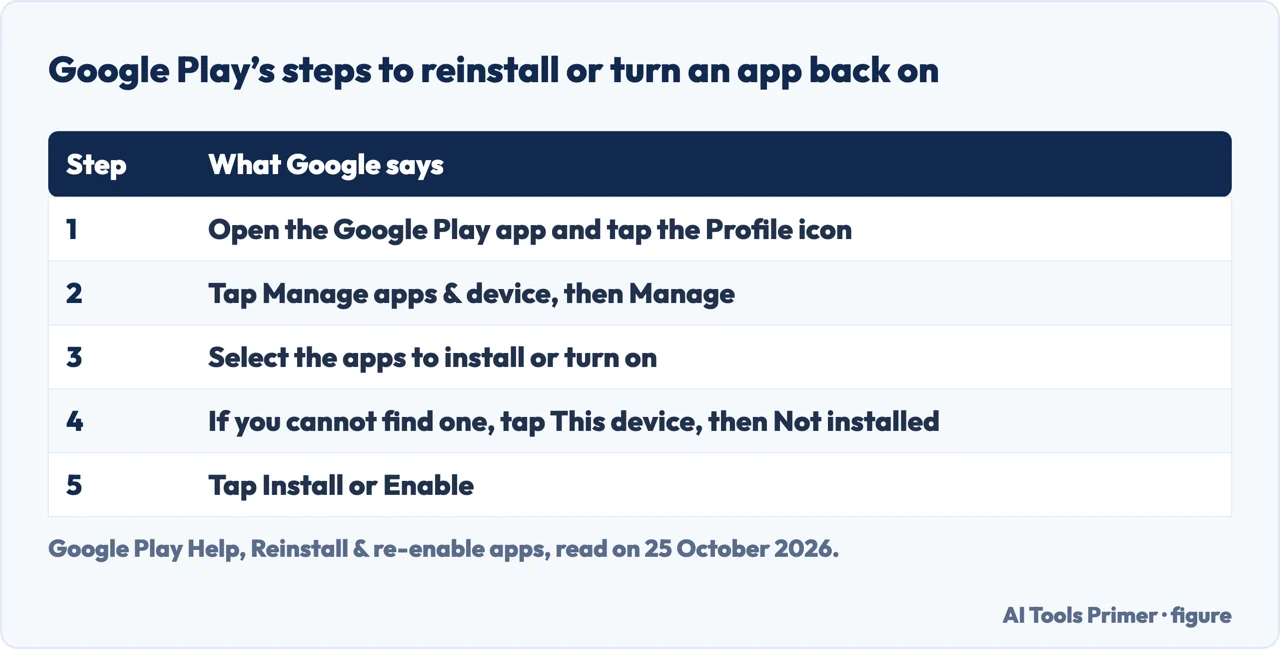
Google Play Help says you can reinstall an app that you bought but deleted, and that apps bought on Google Play work on any Android device signed in to the same Google Account without paying again. The steps are to open the Google Play app, tap the Profile icon, tap Manage apps & device and then Manage, select the apps you want to install or turn on, and, if you can’t find an app, tap This device and then Not installed. Then tap Install or Enable. If you turned off an app that came with your device, Google says you can turn it back on the same way.
If you can’t find an app or are asked to buy it again, Google says to make sure you use the same Google Account you bought it with. If you cannot reinstall at all, its troubleshooting steps are to uninstall and reinstall updates to the Play Store, or to clear the cache and data of the Play Store; Google warns that clearing the data may delete settings such as parental controls and password protection and that the Terms of Service will be asked for again. The help article on a new or another device repeats that you must use the same account on all devices.
When the app is not in the list
Apple’s troubleshooting article, published on 16 September 2024, lists the causes. Check that the item is in the purchase history of your Apple Account, since you might have bought it with a different Apple Account. An app might not be compatible with your device; an app bought for a Mac might not work on an iPhone or Apple Watch. The purchase might be hidden, and Apple points to a page on redownloading hidden apps. A family member’s purchase needs Family Sharing. If you see items but can’t redownload them, Apple says to report a problem, and a message that the device is associated with another Apple Account may mean waiting a number of days.
The HONOR UK blog lists similar causes on the Android side: the app may have been removed from Google Play, installed using a different Google account, hidden by device settings, or no longer compatible with the phone. It also warns that third-party recovery tools often require root access. A blog by PandaOffice, updated on 21 October 2026, which promotes its own file-recovery program, says that neither the App Store list nor the Google Play list is a reliable deletion log, because an item may have been purchased elsewhere or never installed on this phone.
Where the guides and the makers differ
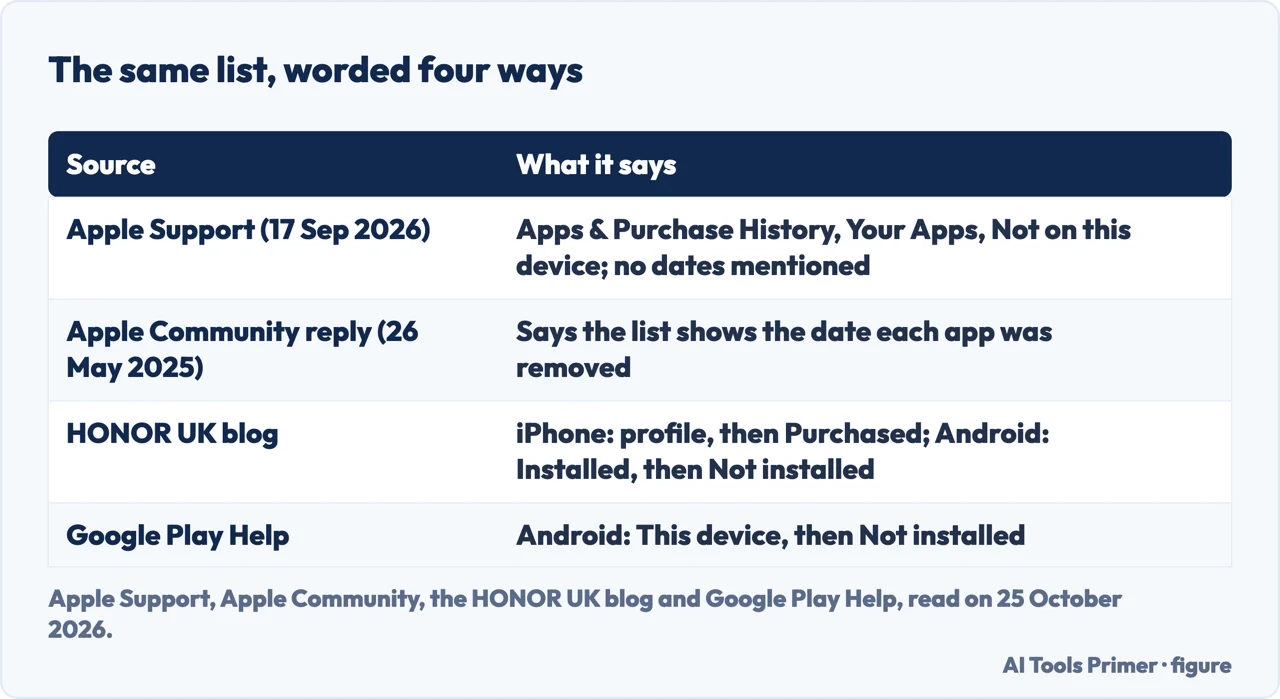
The label is not the same everywhere. Apple’s page of 17 September 2026 says Apps & Purchase History, then Your Apps. The HONOR UK blog sends iPhone users to their profile and then Purchased, and PandaOffice says current App Store screens place redownloads under Apps & Purchase History, Your Apps, while older versions use Purchased. For Android, Google says This device, then Not installed, and HONOR says Installed, then Not installed.
The date of deletion is the other difference. In a thread in Apple’s community, a reply dated 26 May 2025 says that choosing Not on this iPhone lists the apps that have been removed with the date they were removed, and Google’s AI answer for this query repeats that. Apple’s support article does not mention a date, and we did not test it on an iPhone. For deleting an app on purpose, see deleting apps on an iPhone; for apps that are hidden rather than deleted, unhiding apps.
Where to start
Four ways in.
- “On an iPhone.”
- Not on this device — iphone
- “On Android.”
- Not installed — android
- “It isn’t there.”
- When it is missing — missing
- “Do the guides agree?”
- Where they differ — guides
Apps: delete, hide, restore
Deleting, hiding and finding apps.
Questions people also ask
How to recover deleted apps on iPhone?
Open the App Store, tap your photo, then Apps & Purchase History, Your Apps and Not on this device, and tap Redownload next to the app, as Apple describes.
How do I find recently deleted on my iPhone?
Apple describes a Not on this device list of apps tied to your Apple Account, not a Recently Deleted folder for apps.
How do you see when you deleted an app on an iPhone?
Apple’s support article does not say the list shows a date. A community reply dated 26 May 2025 says it does; we did not test it.
Where are uninstalled apps stored?
On Apple and Google, the list is tied to your account, as Apple’s purchase history and Google Play’s app list; PandaOffice adds that neither is a reliable deletion log.
Not covered here. We did not delete or restore an app on a phone. The statements come from Apple Support (redownloading apps, published 17 September 2026, and the troubleshooting article, published 16 September 2024), Google Play Help (reinstalling and re-enabling apps), a reply in Apple’s community dated 26 May 2025, the HONOR UK blog (no date that we could read) and a PandaOffice blog updated on 21 October 2026 that promotes its own recovery tool. Menus change between versions.
The Samsung community thread, the kismac forum and the Play Store listing in the results were not used. Recovering the data inside a deleted app is outside this page.
The search volume and difficulty behind this page were read in Semrush on 29 August 2026.
Sources
- Apple Support — Redownload apps from Apple (published 17 September 2026) — support.apple.com, read 25 October 2026.
- Apple Support — If there’s an issue when you redownload apps (published 16 September 2024) — support.apple.com, read 25 October 2026.
- Google Play Help — Reinstall & re-enable apps — support.google.com, read 25 October 2026.
- Google Play Help — Reinstall apps on a new or another device — support.google.com, read 25 October 2026.
- Apple Community — How do I find list of recently deleted apps on my iPhone? (reply of 26 May 2025) — discussions.apple.com, read 25 October 2026.
- HONOR UK — Guide to Restoring Recently Deleted Apps on Your Devices — www.honor.com, read 25 October 2026.
- PandaOffice — How to Find Recently Deleted Apps on iPhone & Android (updated 21 October 2026) — drecov.pandaoffice.com, read 25 October 2026.
Written by Alberto Gulotta
Founder and editor of AI Tools Primer, writing from Palermo, Italy. Thirty-five years of taking computers apart, starting with a Commodore 64 — the long version is on the about page.
Something wrong on this page? Write to aitoolsprimer@gmail.com and it gets fixed.
Written on 25 October 2026.
Independence and limits
No affiliate links and no paid placements anywhere on this site. Nobody pays to appear here, and no company has seen this page before you did.
This is general information, not professional advice. Where a page touches money, health, safety or the law, it names its source and the date it was read — and your situation may still differ. See the privacy page and the cookie policy.