
Software · guide
Sticky keys: what they do and where Windows and Mac keep them
By Alberto Gulotta · Updated · 9 min read
Sticky keys let you press the keys of a shortcut one at a time instead of holding them together. Microsoft and Apple both put the switch in Accessibility settings, and both name five presses of Shift as a shortcut. This page gives the routes on Windows and Mac, and shows where one glossary in the results contradicts them.
| Question | Answer | Where it comes from |
|---|---|---|
| What do they do? | Let you press a shortcut’s keys one at a time instead of holding them together | Microsoft; Apple |
| Where is the switch on Windows? | Windows logo key + U, then Keyboard; also the Accessibility Flyout (Windows logo key + A) | Microsoft |
| Where is it on a Mac? | System Settings, Accessibility, Keyboard | Apple |
| What does Shift five times do? | Windows: turns Sticky Keys on or off; Mac: an option you can set | Microsoft; Apple |
| Is it a fault? | The pages describe it as an accessibility setting, not a fault | Microsoft; Apple |
What they do, in four sources
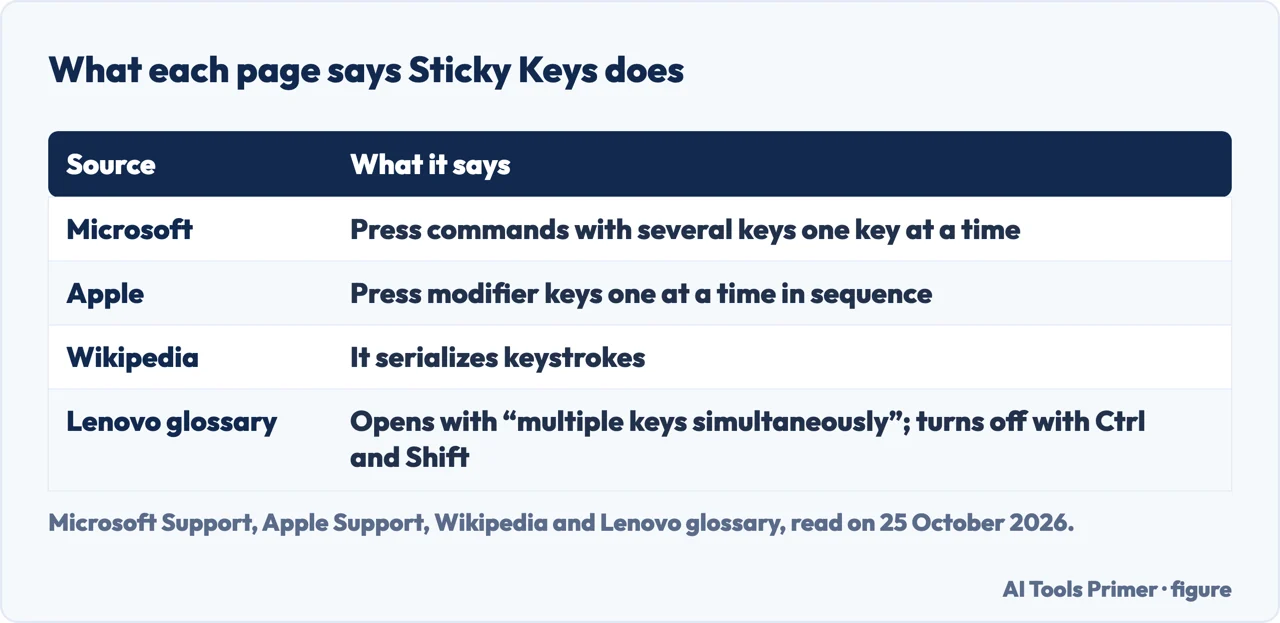
Microsoft’s page on making the keyboard easier to use says to turn on the Sticky keys switch if you have trouble pressing two keys at the same time, and that it lets you press commands that use multiple keys, such as Ctrl + S, “one key at a time”. The page on the Windows Accessibility Flyout adds that it is also for people who want to avoid accidental keystrokes. Apple’s page says to press a set of modifier keys one at a time in sequence instead of all at once, and gives the example of entering Option-Command-F5 by pressing each key in sequence.
Wikipedia’s article, which is marked as a stub, says the feature serializes keystrokes: instead of pressing several keys at a time, you press and release a modifier key such as Shift, Ctrl, Alt or the Windows key, and it stays active until the next key. It lists Windows, macOS, ChromeOS and KDE Plasma as having it, and says it can help people with physical disabilities or reduce repetitive strain. The existing page on a keyboard that will not type covers Sticky Keys as one of the Windows settings that can look like a broken keyboard.
On Windows
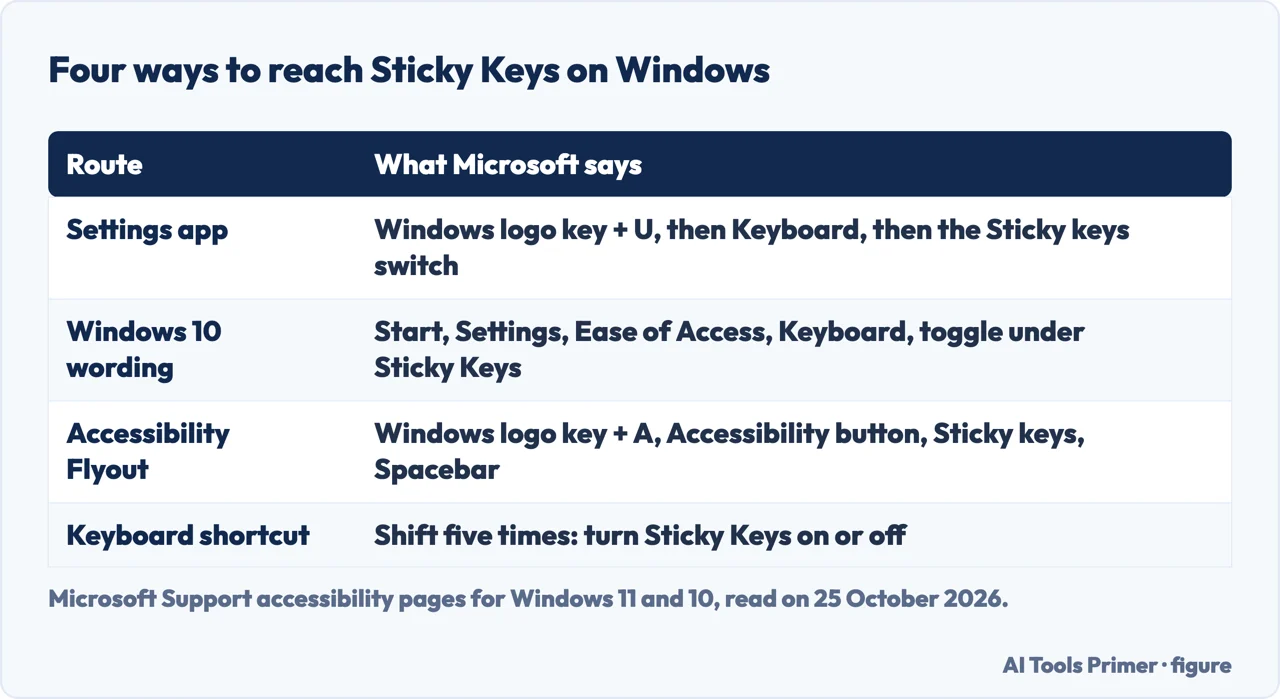
Microsoft gives three routes. In the Settings app, press the Windows logo key + U or go to Start, Settings, Accessibility, select Keyboard and turn on the Sticky keys switch; Windows 10 wording on the same page is Start, Settings, Ease of Access, Keyboard, then the toggle under Sticky Keys. The Accessibility Flyout is the second route: press the Windows logo key + A to open quick settings, navigate to the Accessibility button, open the flyout, go to the Sticky keys toggle and press Spacebar. The third is the shortcut: Microsoft’s list of accessibility shortcuts, given separately for Windows 11 and Windows 10, includes pressing Shift five times to turn Sticky Keys on or off.
The Microsoft pages we read describe the switch mostly in terms of turning it on. They do not say how to stop the five presses of Shift from offering it. Microsoft Q&A threads about that appear in search results, but they are community answers and we did not read them.
On a Mac
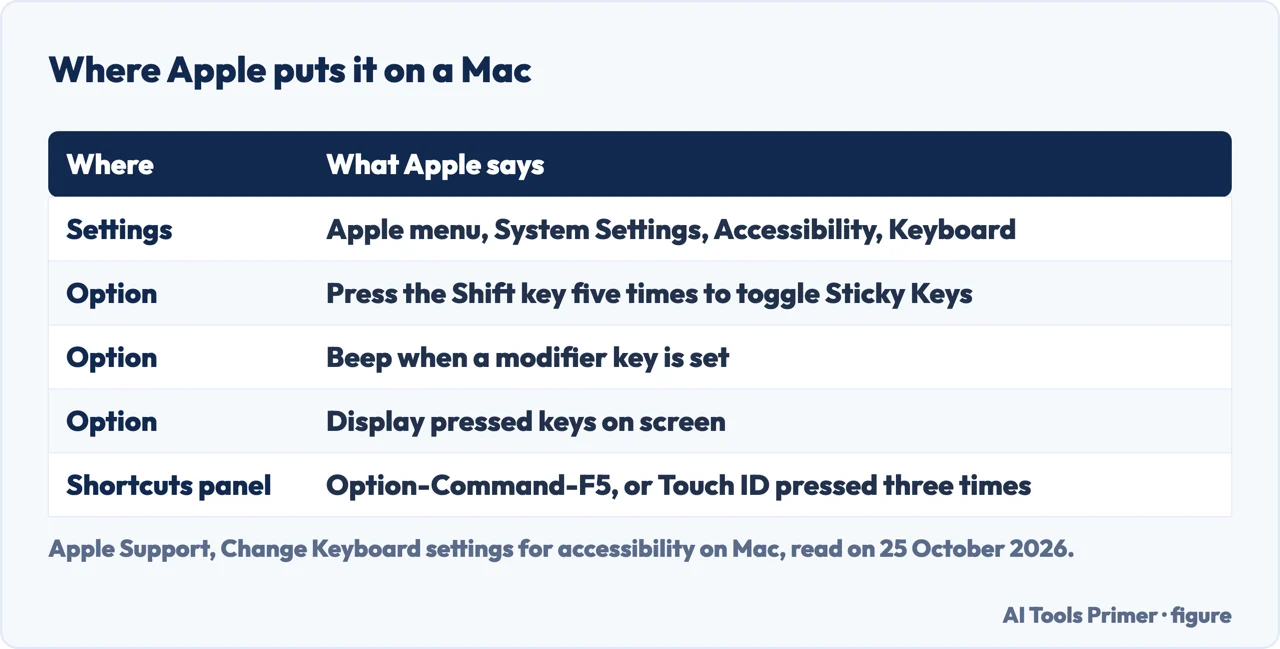
Apple’s page puts it with the other keyboard settings for accessibility: choose Apple menu, System Settings, click Accessibility in the sidebar, then click Keyboard, and you may need to scroll down. Sticky Keys has options you reach with the info button: press the Shift key five times to toggle Sticky Keys, have the Mac beep when a modifier key is set, display the pressed keys on screen, and choose the screen area for that display.
The same page describes a quick way to turn Sticky Keys on or off with the Accessibility Shortcuts panel: press Option-Command-F5, or, if your Mac or Magic Keyboard has Touch ID, quickly press Touch ID three times. You choose which options the panel offers under Accessibility, then Shortcut.
What five presses of Shift do
On Windows, Microsoft’s lists for Windows 11 and Windows 10 both say Shift five times turns Sticky Keys on or off. On a Mac, Apple lists it as an option you can set under Sticky Keys, and describes it as a way to use your keyboard to turn the feature on or off. Lenovo’s glossary says an icon appears on screen to show that Sticky Keys are enabled.
That is the question the people-also-ask box raises, and the answer in both companies’ pages is the same: five presses of Shift are a documented way to switch the feature on or off, on Windows, and on a Mac when that option is set.
The glossary that says it backwards
Lenovo’s glossary page, second in the results, opens by saying the feature lets you press “multiple keys simultaneously”, which is the opposite of what Microsoft and Apple describe. It also says to turn Sticky Keys off by pressing the Ctrl and Shift buttons together until the icon disappears, which neither Microsoft’s shortcut list nor Apple’s page gives as a Sticky Keys shortcut. The same page does say the feature is activated by pressing Shift five times and that it does not disable the keyboard.
AssistivLabs tells the history: in the 1980s, it says, the feature was invented twice, by researchers in Wisconsin and by a writer in Tennessee. The iFixit page in the results has a title and address that suggest it is about keys that physically stick, a different problem; its page returned almost nothing to us, so we do not describe it.
Where to start
Four ways in.
- “What do they do?”
- Four sources — what
- “Where do I turn them off on Windows?”
- Three routes — windows
- “And on a Mac?”
- One sidebar — mac
- “It popped up when I pressed Shift.”
- Five presses — shift
Keyboards and keys
When it types nothing, or the wrong thing.
Questions people also ask
How do I turn off Sticky Keys?
On Windows, Microsoft names the Sticky keys switch under Accessibility, Keyboard, the Accessibility Flyout toggle, and five presses of Shift as the shortcut to turn it on or off. On a Mac, Apple puts it under System Settings, Accessibility, Keyboard.
What do Sticky Keys do?
Microsoft and Apple both say they let you press the keys of a shortcut one at a time rather than together, for example Ctrl + S on Windows.
What happens if you press Shift 5 times?
On Windows, Microsoft’s lists say it turns Sticky Keys on or off. On a Mac it is an option under Sticky Keys that you can set, according to Apple.
How to fix Sticky Keys in a keyboard?
The Microsoft and Apple pages are about the accessibility feature, which is a setting rather than a fault. A key that physically sticks is a different problem, which the pages we read do not cover.
Not covered here. We did not test the feature on a computer. The statements come from three Microsoft Support pages (Windows keyboard shortcuts for accessibility; Make your mouse, keyboard, and other input devices easier to use; the Windows Accessibility Flyout) and Apple Support’s page on keyboard settings for accessibility on Mac, read on 25 October 2026, and from Wikipedia (last edited 14 September 2026), the Lenovo glossary and AssistivLabs, used only for what they claim. Menu names change with the Windows and macOS version.
The iFixit and Reddit pages in the results were not read. Chromebooks, Linux, phones and tablets, and keys that physically stick, are not covered.
The search volume and difficulty behind this page were read in Semrush on 29 August 2026.
Sources
- Microsoft Support — Windows keyboard shortcuts for accessibility — support.microsoft.com, read 25 October 2026.
- Microsoft Support — Make your mouse, keyboard, and other input devices easier to use — support.microsoft.com, read 25 October 2026.
- Microsoft Support — Use a screen reader and keyboard to navigate the Windows Accessibility Flyout — support.microsoft.com, read 25 October 2026.
- Apple Support — Change Keyboard settings for accessibility on Mac — support.apple.com, read 25 October 2026.
- Wikipedia — Sticky keys — en.wikipedia.org, read 25 October 2026.
- Lenovo — Sticky Keys Solution - Get Rid of Annoying Key Sticking — www.lenovo.com, read 25 October 2026.
- AssistivLabs — The History of Sticky Keys — assistivlabs.com, read 25 October 2026.
Written by Alberto Gulotta
Founder and editor of AI Tools Primer, writing from Palermo, Italy. Thirty-five years of taking computers apart, starting with a Commodore 64 — the long version is on the about page.
Something wrong on this page? Write to aitoolsprimer@gmail.com and it gets fixed.
Written on 25 October 2026.
Independence and limits
No affiliate links and no paid placements anywhere on this site. Nobody pays to appear here, and no company has seen this page before you did.
This is general information, not professional advice. Where a page touches money, health, safety or the law, it names its source and the date it was read — and your situation may still differ. See the privacy page and the cookie policy.