
VPN · guide
VPN for smart TV: the app, the stick or the router
By Alberto Gulotta · Updated · 16 min read
VPN for smart TV setup depends on the TV's system. NordVPN says Android TV and Fire TV take native VPN apps, while Tizen, webOS, SmartCast and Roku TV need a router, a shared computer connection or a hotspot. A streaming stick plugged into the HDMI port runs the app instead, and SmartDNS is not a VPN.
| Question | Answer | Where it comes from |
|---|---|---|
| Which TVs take a VPN app? | Android TV and Fire TV; NordVPN lists Tizen, webOS, SmartCast and Roku TV as needing another route | NordVPN |
| What if the TV takes no app? | A streaming stick on the HDMI port, a VPN on the router, or a connection shared from a computer | NordVPN, Surfshark, ZDNET |
| Does the router always work? | NordVPN says many routers do not support a VPN, so check before relying on it | NordVPN, Surfshark |
| Is SmartDNS a VPN? | NordVPN says it is not: it does not encrypt and works only with preset DNS locations | NordVPN |
| How do I check it worked? | Compare the IP address before and after, and test for DNS leaks | ZDNET |
Which TVs take an app and which do not
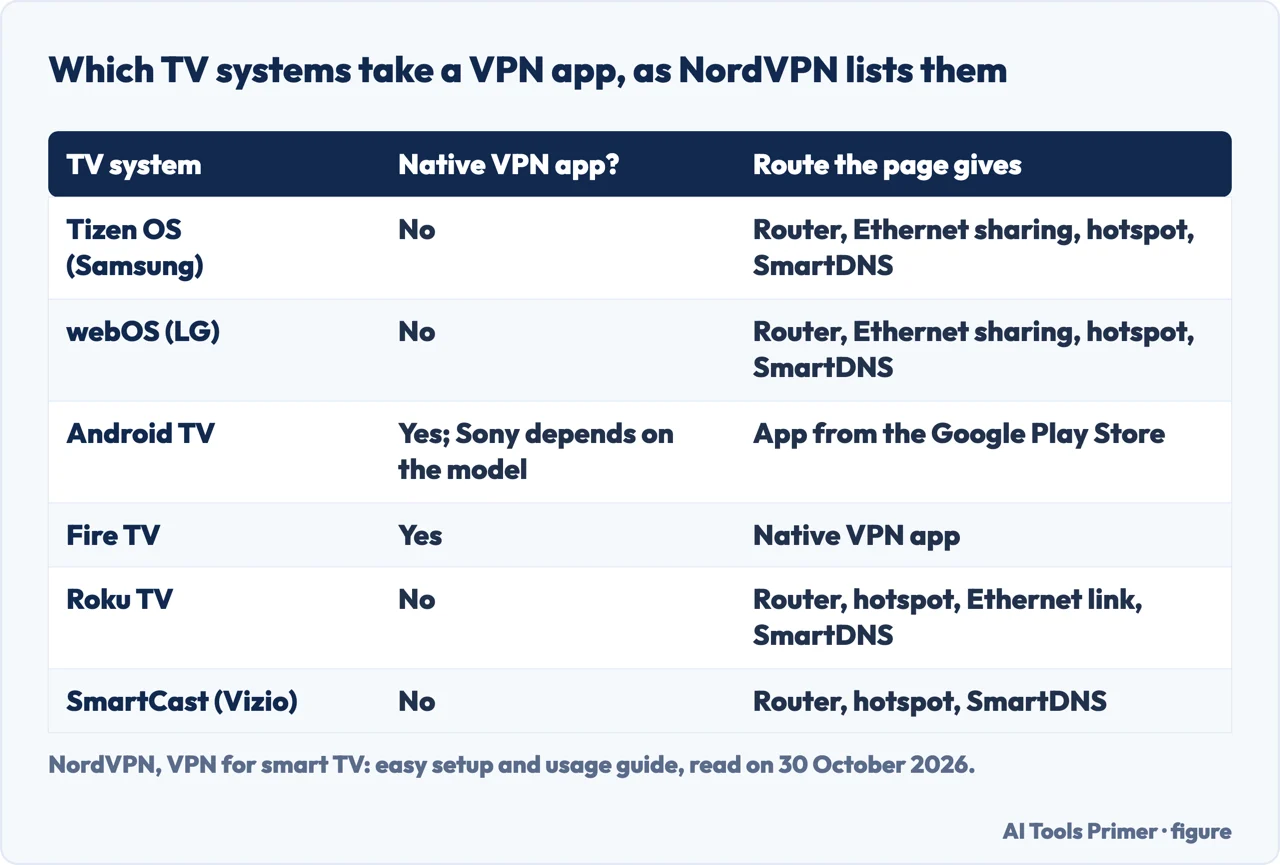
NordVPN, which sells a VPN service, goes brand by brand and names the operating system under each. Its guide says Android TV and Fire TV support native VPN apps, while “most other smart TV systems” need setup through a router, Ethernet sharing or a Wi-Fi hotspot, and it names Tizen OS, webOS, SmartCast, Roku TV, VIDAA OS and Saphi. The system matters because one brand can ship more than one: the guide lists Hisense with Android TV, Roku TV and VIDAA OS, and Vizio with SmartCast and Fire TV. In its comparison table Samsung and LG answer No, Sony’s Android TV answers Yes with the note that it depends on the model, and Hisense, TCL and Sharp answer Yes for their Android TV sets and No for their Roku TV sets.
For Samsung, NordVPN says Tizen OS does not let you install a VPN app, so there can be no VPN connection on the TV itself, and the usual routes are the router, Ethernet sharing from a computer or a phone hotspot. For LG it says webOS does not install VPN apps from an app store, with the same routes. For Android TV it says apps come from the Google Play Store as long as the model supports app downloads and has store access, and that some Sony models have limited app options, so the exact model is worth checking.
ZDNET reaches the same outline in its FAQ. It says most smart TV models, including those from Samsung, do not offer VPN services out of the box, and that Tizen OS is unlikely to have VPN apps. Its routes are an app from an Android TV hub, a VPN on the router, or a device such as a Fire TV Stick connected to the TV. It adds that Samsung devices have Knox, a built-in VPN client that it calls best suited to business use because it needs manual configuration and is extremely basic. Surfshark, another seller, lists direct apps on Fire TV, Amazon’s Vega OS, Google TV, Android TV and Apple TV with tvOS 17 or later, and sends Samsung Tizen and LG webOS to the router.
Samsung’s own support page that we read is about something else. Updated on 7 June 2022, the Samsung UK page asks how to add a VPN to a device and answers for mobile devices: Settings, Connections, More connection settings, VPN. It gives no step for a television.
Way one: put the VPN on a streaming stick
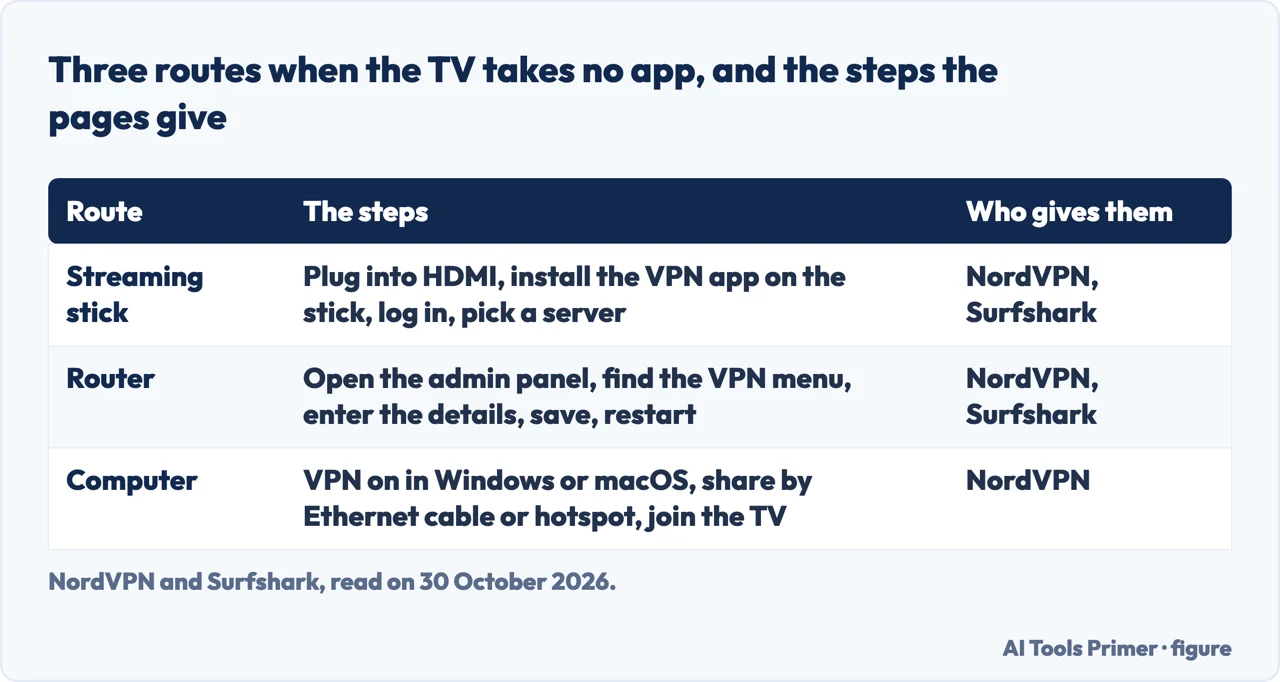
NordVPN says streaming devices such as Chromecast, Fire TV Stick and Apple TV can run VPN apps even when the television cannot. Its steps are to connect the device to an HDMI port on the TV, install a VPN app on the device, log in and connect to a server. The page says the VPN runs on the streaming device and that all traffic from it is protected, which describes what passes through the stick. Surfshark gives the same route for a Fire TV Stick in four moves: plug in the device and turn on the TV, open the app store and search for Surfshark, download the app and log in, then connect to a server.
ZDNET describes the login. After installing the app from the TV’s app repository, you sign in with the username, email and password from your subscription, and some VPNs also allow a QR code or a one-time passcode. Then you pick a country or a server. It says the most common TV operating system with native apps is Android TV, and that you can often use a VPN on a Fire TV Stick or an Apple TV.
The Fire TV Stick has a catch that ZDNET spells out. Standard sticks that run Fire OS are typically fine with a VPN, and many providers have native Fire OS apps. Newer sticks run Vega OS, which ZDNET says comes with restrictions that Fire OS lacks and does not support VPNs in the same way as Android; at the time of writing, it says, only a few providers had built compatible apps. It names NordVPN and IPVanish as providers with a Vega app, and says ExpressVPN has apps for Apple TV, Android TV and Fire TV but not for Vega OS, yet. The NordVPN page we read does not mention Vega OS.
Apple’s page is a different kind of source. The VPN overview in its guide to deploying Apple devices lists tvOS among the systems that support the IKEv2 protocol, and says tvOS also supports L2TP over IPsec and Cisco IPsec. If an organization supports those protocols, the page says, no additional network configuration or third-party apps are needed to connect the devices to its private network. It adds that the Network Extension framework lets developers build custom VPN solutions for tvOS, and that several providers have apps to configure Apple devices. The page is written for organizations connecting to corporate networks, and it does not name a VPN app for home viewing or give a tvOS version for one. The version, tvOS 17 or later, comes from Surfshark.
Way two: put the VPN on the router
A router that runs the VPN covers whatever connects to it. NordVPN says this protects every device on the home network, including TVs that cannot run VPN software, and that it does not need a separate app on the TV. The steps it gives are to log in to the router’s admin panel in a browser, open the VPN configuration menu and enter the VPN details, save and reboot the router, then connect the TV by Wi-Fi or Ethernet. Surfshark gives nearly the same list: type the router’s IP address in the browser’s address bar to reach its control panel, find the VPN tab, enter the provider’s details, save and restart, then connect the TV to that network.
Both pages attach a warning to the first step. NordVPN says to check whether the router supports VPN installation, because “many models don’t”, and Surfshark says to check that the router can run a VPN before subscribing. ZDNET puts the route last in line: if the VPN you want is not available for your TV, you may have to set one up on the router, and most providers have FAQ pages describing a manual setup. In its NordVPN entry it mentions a router with the VPN pre-installed, the Privacy Hero 2, and in its ExpressVPN entry an Aircove router with that VPN built in. Our page on the VPN router covers server and client modes and the cost in speed.
NordVPN lists a pitfall among its common mistakes: not turning on a kill switch or leak protection can leave data exposed if the VPN disconnects unexpectedly. Its advice is to choose a VPN with a kill switch and to check your IP address regularly to see that the real one is not showing. Our page on the kill switch explains what it blocks and how to test one.
Way three: share a VPN from a computer
NordVPN offers a third route for a TV that cannot run apps and a router that does not support a VPN. Turn the VPN on in a Windows or macOS computer, share the computer’s network connection through an Ethernet cable or a Wi-Fi hotspot, and connect the TV to the shared network. The TV’s traffic then passes through the VPN running on the computer. The page says the method works well with most non-smart TVs and needs no change to the router’s settings. In another place it calls the shared connection a practical option when router setup is not possible, or a temporary solution.
ZDNET lists the same idea for IPVanish, which it says can be installed on a router or used by sharing an internet connection from a PC or a mobile hotspot that has the VPN installed. NordVPN also names it for a Samsung TV, along with the router and the phone hotspot, because Tizen does not accept an app. The pages we read do not say how the shared connection affects speed.
SmartDNS is not a VPN, and where the pages differ
NordVPN mentions SmartDNS under most TV brands and says plainly that SmartDNS is not a VPN. It does not encrypt traffic or secure the connection, and it works only with preset DNS locations. The steps it gives are to open the TV’s network settings, type in the SmartDNS addresses from the service, save and restart network services if needed. The page calls it more of a usability tool than a security feature, and in its FAQ says it can be a good choice for fast, simple streaming but offers less protection because it does not hide the IP address. ZDNET describes the same kind of service from ExpressVPN, called MediaStreamer, which it says improves streaming but does not give the protection of a VPN.
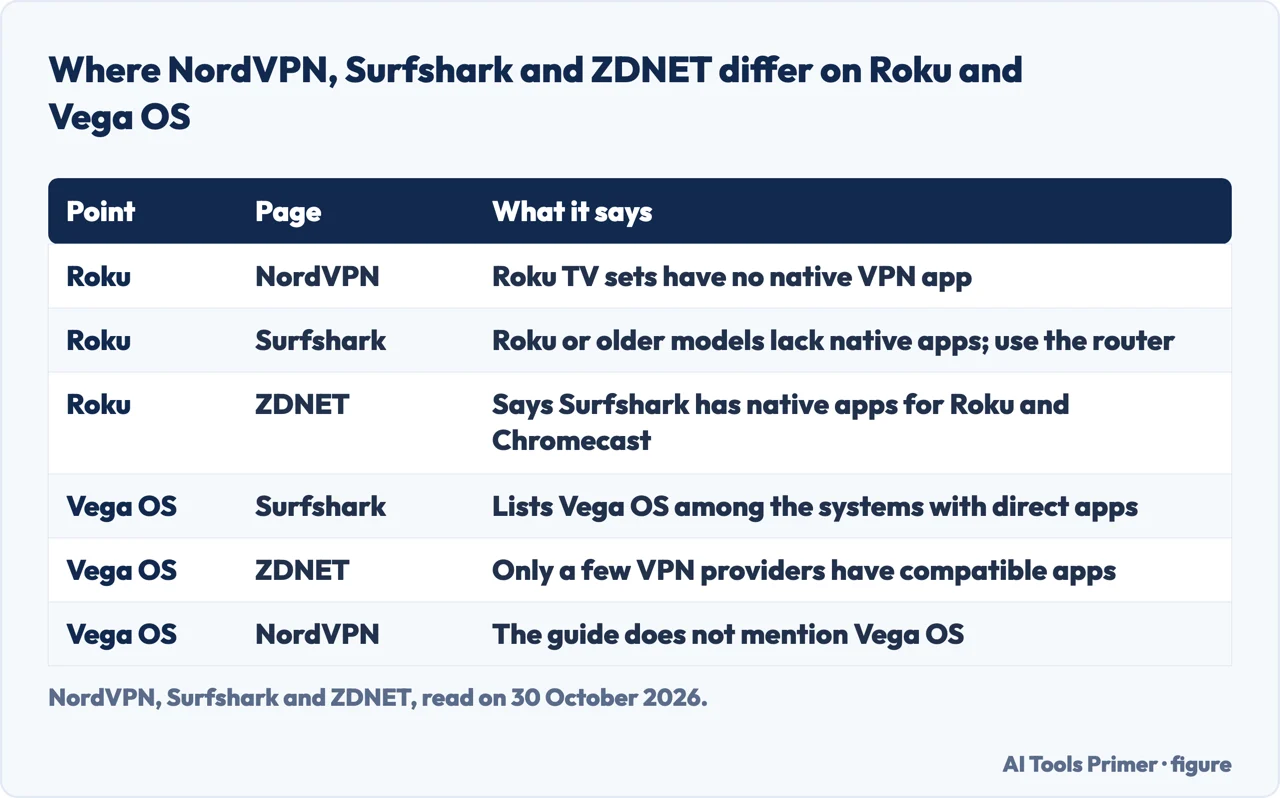
The three pages that name TV systems do not agree on every one. On Roku, NordVPN says Roku TV sets have no native VPN app. Surfshark says Roku or older models do not support native VPN apps, so the router is the route. ZDNET, in its entry for Surfshark, says native apps are available for Android TV, Apple TV and Fire TV outside Vega OS, as well as Roku and Chromecast. We cannot tell from the pages which is current, so the figure below sets them side by side.
The same happens with Vega OS. Surfshark lists it among the systems with direct apps, ZDNET says only a few providers have built compatible apps and that Surfshark’s Fire TV app is outside Vega, and NordVPN’s page is silent on it. Apple TV differs in a smaller way: Surfshark gives tvOS 17 or later, while Apple’s deployment page gives protocols and no such number for consumer apps.
Some figures come from the sellers themselves and are claims. NordVPN lists privacy, access to usual content while travelling, a way round local restrictions and less throttling by the internet provider as reasons to use a VPN on a TV. Surfshark says one account gives unlimited simultaneous connections. On speed, Surfshark says a VPN can in theory cause a slight dip in base speed that is usually unnoticeable, and NordVPN says streaming quality can change with your internet speed and the VPN’s servers. ZDNET reports one measurement, from its February testing: NordVPN gave 704.11 Mbps download against 776.47 Mbps at the start, without saying on which device.
How to check it worked, and what a VPN does to streaming
ZDNET’s test is to compare your IP address before and after turning the VPN on. You can find the address in the device’s settings, typically under Wi-Fi, or at whatismyipaddress.com, and if both show the same address, it says, the VPN may not be working properly. It also suggests visiting dnsleaktest.com while connected, because a DNS leak it detects could be a sign that information is leaking. Both checks are written for a general device; the pages we read do not give a TV-specific version.
On streaming services, ZDNET says a VPN can be used to see another country’s libraries, but that this is a legally gray area and may break a streaming service’s terms of service, and that some services limit libraries to universally licensed content when they detect a VPN. NordVPN says a VPN is for content you have legally paid for and that users should obey the laws of their country. ZDNET also says legality varies by country and tells readers to check local law.
On free VPNs, the sellers and the review site lean the same way. NordVPN says free VPNs on a smart TV often mean slow speeds, limited bandwidth and overloaded servers. Surfshark advises against them for the TV, citing data caps, slow speeds and limited servers, and says many free providers track and sell viewing habits. ZDNET says most free plans come with heavy restrictions and that it would not recommend one if streaming is the aim; the only free services it recommends trying are Proton VPN and Windscribe, with the limits of a free plan.
What we did not use
We tested nothing on a TV. We read the NordVPN, Surfshark and ZDNET pages for the TV systems and the setup steps. We did not read other VPN review sites, forum threads or shop blogs. The ExpressVPN page came back with a notice that its content was not available, so we used nothing from it. Apple’s page and the Samsung page were found separately. The pages we read give no measurement of a VPN’s slowdown taken on a TV, and the Samsung page says nothing about televisions. They also do not say whether a TV behind a router VPN shows the same catalog, how many VPN apps exist for Tizen or webOS beyond “none”, or whether consoles such as PlayStation and Xbox have apps (ZDNET only calls IPVanish good for console gamers); no TV maker’s page tells how to use a VPN on a television. NordVPN and Surfshark sell the services they describe, and we used their pages for how each TV system handles apps and for their setup steps, not for any claim about their own speed or price.
Where to start
Four ways in.
- “Does my TV take an app?”
- Which TVs take an app and which do not — systems
- “Can I use a stick?”
- Way one: put the VPN on a streaming stick — stick
- “What about the router?”
- Way two: put the VPN on the router — router
- “Did it work?”
- How to check it worked, and what a VPN does to streaming — check
The router and the switch
The pieces a TV setup leans on.
What a VPN is for
The reasons, and the services behind them.
Questions people also ask
Can I put a VPN on a smart TV?
NordVPN says Android TV and Fire TV support native VPN apps, so there you install one from the app store, sign in and pick a server. For Tizen, webOS, SmartCast and Roku TV it gives the router, a connection shared from a computer, or a phone hotspot. A streaming stick on the HDMI port is a fourth way.
What is the best VPN for TV?
The pages we read do not settle it. ZDNET calls NordVPN its favorite VPN for smart TVs and also profiles ExpressVPN, Surfshark and IPVanish, with different notes on Vega OS; it discloses that IPVanish is owned by Ziff Davis, ZDNET’s parent company. NordVPN and Surfshark sell their own services. We tested none of them.
Which VPN is free for smart TV?
ZDNET says the only free services it recommends trying are Proton VPN and Windscribe, with the limits of a free plan, and would not suggest one for streaming. NordVPN and Surfshark warn about slow speeds and caps.
Do TVs have built-in VPN?
ZDNET says most smart TV models, including Samsung’s, do not offer VPN services out of the box, and that Samsung devices have Knox, a basic client suited to business use. Apple’s deployment page lists protocols that tvOS supports, written for organizations.
Not covered here. We tested nothing on a TV. The statements come from NordVPN, Surfshark, ZDNET, an Apple Support deployment guide and a Samsung UK Support page, all read on 30 October 2026.
The search volume and difficulty behind this page come from a Semrush reading of 29 August 2026, older than the 60 days the site normally allows.
Sources
- NordVPN — VPN for smart TV: easy setup and usage guide — nordvpn.com, read 30 October 2026.
- Surfshark — VPN for smart TV: simple app or router setup — surfshark.com, read 30 October 2026.
- ZDNET — The best smart TV VPNs of 2026 — www.zdnet.com, read 30 October 2026.
- Apple Support — VPN overview for Apple device deployment — support.apple.com, read 30 October 2026.
- Samsung UK Support — What is a VPN and how do I add one to my device? — www.samsung.com, read 30 October 2026.
Written by Alberto Gulotta
Founder and editor of AI Tools Primer, writing from Palermo, Italy. Thirty-five years of taking computers apart, starting with a Commodore 64 — the long version is on the about page.
Something wrong on this page? Write to aitoolsprimer@gmail.com and it gets fixed.
Written on 30 October 2026.
Independence and limits
No affiliate links and no paid placements anywhere on this site. Nobody pays to appear here, and no company has seen this page before you did.
This is general information, not professional advice. Where a page touches money, health, safety or the law, it names its source and the date it was read — and your situation may still differ. See the privacy page and the cookie policy.