
Temp mail · guide
Facebook Marketplace scams: payments, codes and what to do
By Alberto Gulotta · Updated · 17 min read
Facebook Marketplace scams can reach buyers and sellers, Meta says, and the FTC describes the seller side in detail: a fake payment notice, a check for too much, and a text code that a supposed buyer asks to have read back. This page sets Meta, the FTC and a VPN company's article side by side.
| Question | Answer | Where it comes from |
|---|---|---|
| Who can be targeted? | Buyers and sellers; some listings can also be scams | Meta |
| What does a fake buyer ask for? | A payment screenshot taken as proof, a refund, a check above the price, or a text code | Meta, FTC |
| Does money showing in the account make a check good? | No: the FTC says it can take weeks for the bank to find a fake check | FTC |
| What does Purchase Protection cover? | Eligible purchases made with checkout on Facebook; cash and person-to-person payments are not eligible | Meta |
| What do I do if I see a scam? | Stop communicating and report it to Facebook; the FTC also takes reports at ReportFraud.ftc.gov | Meta, FTC |
What Meta and the FTC say, side by side
Meta’s Help Center says scams on Marketplace can happen to both buyers and sellers, and that some listings may also be scams. If you see something you think is a scam, it says to stop communicating with the buyer or seller and report the suspected scam to Facebook. Its Scam Protection Center sorts the scams to recognize into four groups: overpayment or refunds, off-platform contacts, phishing of sensitive information, and defective or fake items.
The Help Center also lists what to avoid when you talk to a buyer or seller. One is private contact outside Facebook and Messenger, such as WhatsApp, phone, text or email, especially early in a conversation, because Meta says that routing makes scams hard to detect. Others are requests to contact other people, for example relatives of the seller who are not the true owner of the account, and messages or emails from the seller saying something is wrong with your payment. The last is pressure to finish a sale in a hurry, which Meta describes as a possible attempt to get around normal safe practices.
The FTC’s consumer alert of 27 July 2022 starts from the other side of the screen: it names Craigslist and Facebook Marketplace, among others, as places that attract a lot of buyers and scammers, and it describes three ways of cheating a seller. They are fake payments with bogus refund requests, a fake check sent as an overpayment, and a fake verification code. The FTC’s page on buying from an online marketplace, from November 2024, covers the buyer’s side. NordVPN, a company that sells a VPN, published a longer list on 11 May 2026 that adds fake receipts, bait-and-switch listings, shipping tricks, advance deposits, rentals and QR codes. We attribute to it only what it says itself.
The pages differ in what they stress. Meta tells you to check your own account for every payment and ties its Purchase Protection to checkout on Facebook. The FTC’s alert says many sites recommend selling to a local buyer and accepting only cash, and its marketplace page says, for buyers, paying by credit card or inside the marketplace’s own system. Both treat the verification code as something to keep private, but only the FTC explains what the scammer does with it.
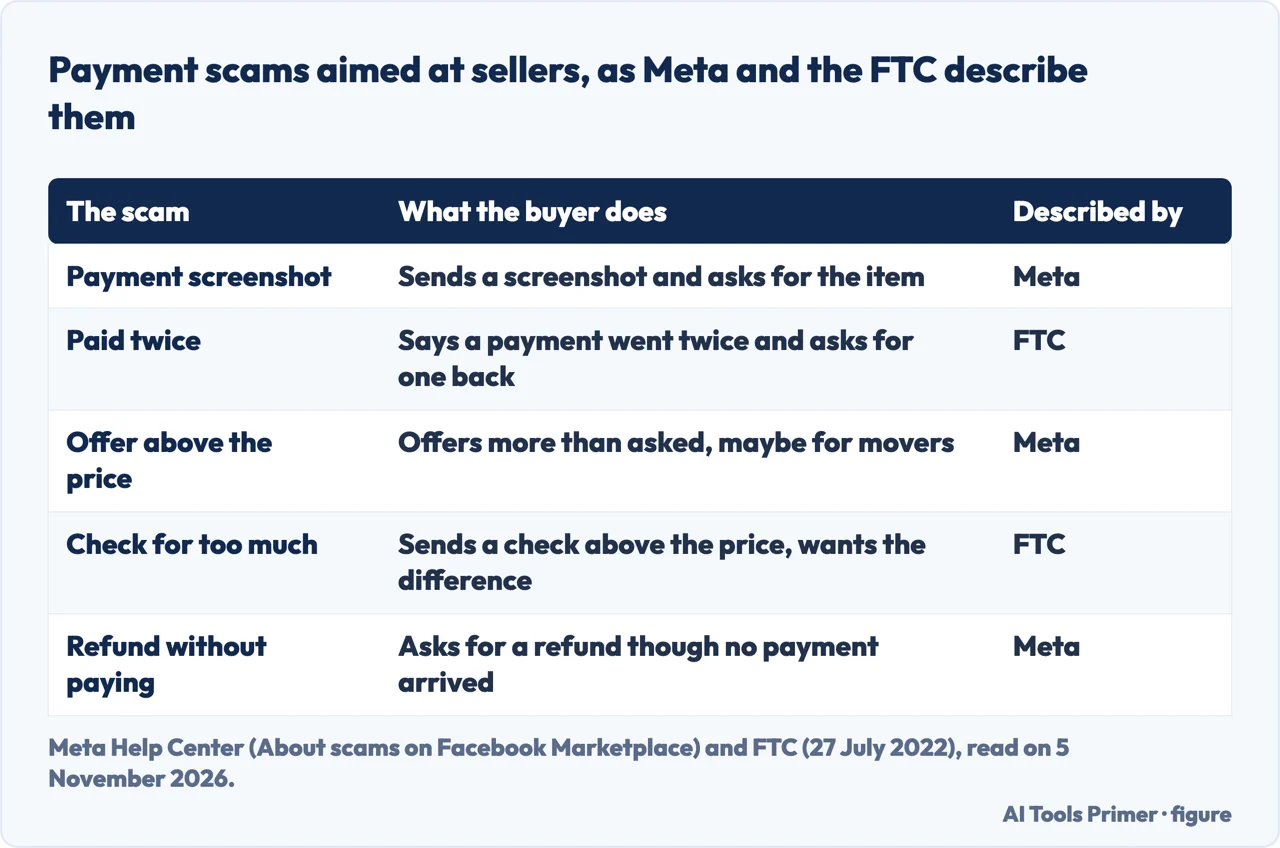
Payment scams aimed at sellers
Meta lists five common payment scams. A buyer sends a screenshot of a payment and asks for the item because they say they have already paid, and Meta says a screenshot should never be trusted as confirmation. Another buyer claims to have overpaid by accident and asks for the difference back. A third offers more than the asking price and may say the extra covers third-party movers, which Meta calls a possible sign of a scam. A fourth asks for a refund without having paid, and a fifth is a payment request asking you to pay with a gift card. For the refund cases Meta says to check your account to confirm payment before giving anything back. Its Scam Protection Center adds that if you are unsure, you can reach out to the support team of your payment app.
Meta also warns about fake emails that appear to come from payment apps such as Zelle or Venmo. They ask you to upgrade the account or pay a fee before you can accept a payment. NordVPN’s article describes a related trick, a forged payment confirmation email sent from a free address such as Gmail or Hotmail and made to look like a message from PayPal or a bank.
The FTC describes a version in which the buyer insists on paying through a mobile payment app, sends a fake payment notification, and hopes the item goes out before the seller notices. Or the buyer says a payment went through twice and asks for one of the two to be sent back. The FTC’s advice is short: do not accept a mobile payment from someone you do not know.
The most expensive version in these pages is the check. The FTC says the scammer offers a check for more than the selling price and asks the seller to deposit it and send the difference back. The check is fake, but it shows up in the account balance, because banks must make deposited money available quickly, which the alert puts at usually about two days. The FTC’s page on fake checks adds that these checks generally look just like real ones, even to bank employees, that they may be printed with the names of real banks, and that some are real checks drawn on the account of someone whose identity was stolen.
That is why a cleared check proves little. The FTC says a bank saying the check cleared does not mean it was a good check, and that it can take weeks for the bank to find out. By then the item and the money sent back are gone, and the bank takes the money from the fake check out of the seller’s account. The FTC puts the rule in one line: do not accept a check for more than the selling price.
A car is the case the FTC singled out in an alert of 27 February 2025. The supposed buyer says they are not local and cannot look at the car in person, then sends a check as a deposit to hold it, for more than the seller expected. The buyer says it was an accident and asks for the extra to be sent back. For a car sold online, the FTC says to consider an escrow or online payment service.
The verification code and the number it creates
Meta’s phishing list includes requests for verification codes sent to your phone or email, and its example is a two-factor authentication code such as a Google Voice code. The Help Center does not say what a scammer does with one, and the Scam Protection Center does not either. The same Meta list also names account details such as an email address and password, and says a link that asks you to log in with a username and password is likely a scam; it names link manipulation (a link to a phony site that looks like the official business) and off-platform links meant to get credit card or banking details. The Scam Protection Center calls a link that asks for a login or password an immediate red flag.
The FTC does. In its 2022 alert, a scammer posing as a buyer says they have heard about fake online listings and wants to check that the seller is a real person. A text arrives with a Google Voice verification code, and the scammer asks for it. If you hand it over, the FTC says the scammer uses it to create a Google Voice number linked to your phone number, and the scammer could then use that number to rip off other people. The alert explains why that works for the scammer: tracing the Google Voice number leads back to the victim’s real phone number, which the FTC says is how the scammers conceal their identity.
NordVPN’s article describes the same scam, aimed at sellers, and gives its own reason: it says Google requires a real number to verify the account, so the code hands the scammer exactly that. The FTC’s advice does not depend on the reason. Do not share your Google Voice verification code, or any verification code, with someone you do not know.
The pages we read do not describe a second number, a shared number or a number-masking app as a way to sell more safely. They give one instruction about the code itself. If you want to see how shared numbers receive texts and who else can read a code that lands there, our page on receiving texts online covers it. NordVPN also lists fake QR codes, saying a scammer may ask you to scan one to complete a payment or verify a listing.
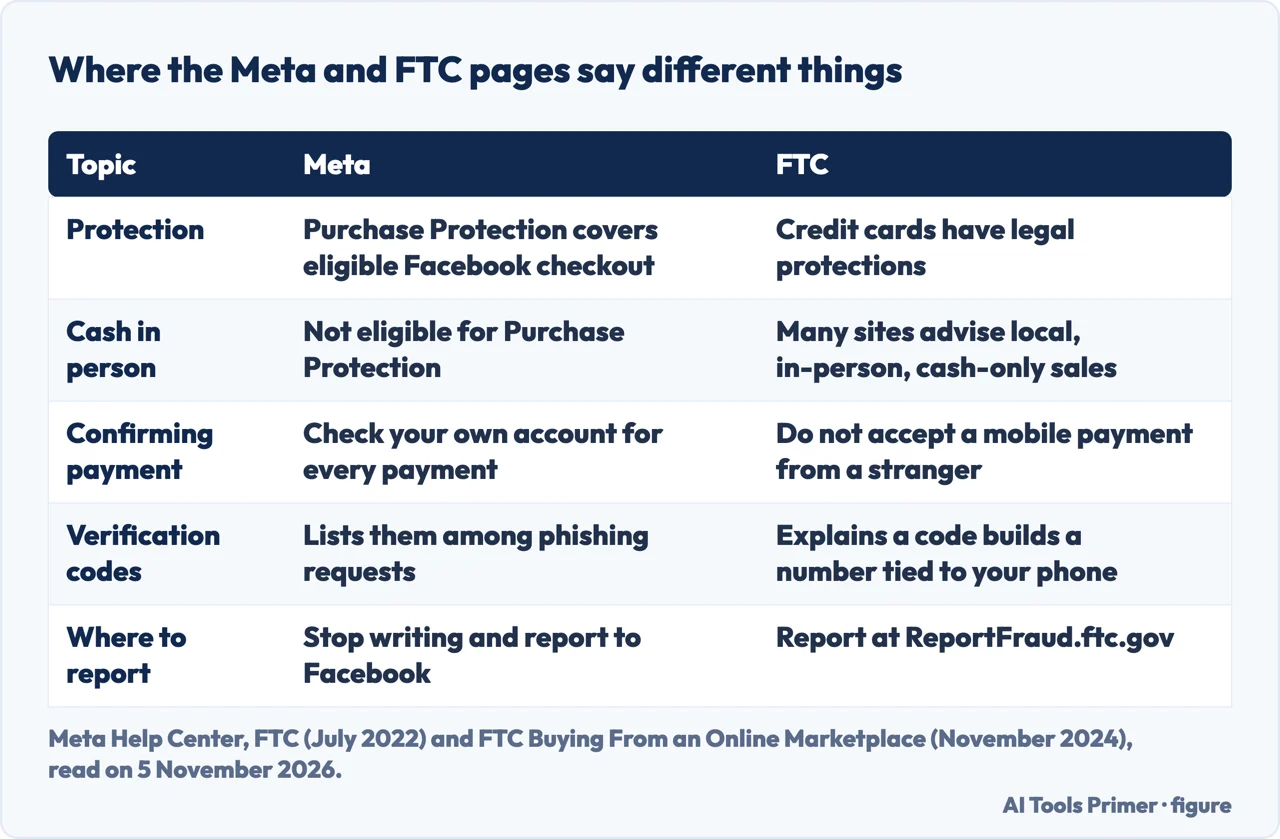
Buying: price, deposits and what is protected
For buyers, Meta’s Help Center starts with the price. It says to double-check deals that seem too good to be true, and that listings significantly underpriced compared to market value can lure buyers into purchasing defective or fake items. The FTC says much the same: an expensive item listed at a very low price might be fake, and the photos should show the actual item, not stock pictures. The Scam Protection Center adds sellers who rush you into a decision or are unclear about an item’s history.
On deposits, Meta says not to send them for high-value items such as apartments and cars without confirming the item is real. Where possible, it says, confirm the item exists and who owns it, either in person or over a video chat, and gives a car’s pink slip as its example. It also says to verify tracking numbers on the shipping company’s own website, to check that the delivery address is right, and to review the seller’s profile, where you can see ratings and reviews, friends you have in common, other listings and Marketplace activity. For a purchase in person, Meta says to inspect the item closely before finishing the transaction.
Protection is where the pages split most. Meta says eligible purchases made with checkout on Facebook are covered by Purchase Protection, and that items exchanged in person with cash or other person-to-person payment methods are not eligible. The FTC does not name Facebook’s program. It says different marketplaces offer different protections, that some leave payments, returns and refunds entirely to buyers and sellers, and that you should read a site’s policies to see whether and how it helps with refunds. It also says to use a safer payment method like a credit card, which has legal protections.
The FTC lists payments that make money hard to get back: wire transfers through companies like MoneyGram or Western Union, gift cards, cash reload cards and cryptocurrency, which it compares to sending cash. It adds that buying from anyone who wants payment outside the marketplace’s payment system means losing any protection the site offers. NordVPN’s article makes a similar point about PayPal: it says the option for paying for an item or service has a dispute and refund process and the option for sending to a friend has none. The FTC also advises keeping copies of messages with the seller and the site, and keeping track of deadlines for returns and refund requests.
Meta also tells buyers to pay nothing in advance and to avoid sellers who ask for payment before providing the item, and to see valuable items in person before sending money.
If it has already happened
Meta’s first step is the same before and after: stop communicating with the buyer or seller, and report the suspected scam to Facebook. The Scam Protection Center splits reporting into four routes. A buyer can be reported for behavior such as asking for personal information, inappropriate content or offering an overpayment. A seller can be reported for not following Meta’s Commerce Policies or Community Standards. For a listing showing signs of suspicious activity, Meta says to cancel the transaction right away and report the listing or the person. For something you cannot see, for example because someone blocked you, Meta says a friend may need to help you report it.
The FTC’s marketplace page gives an order for problems with a purchase. Contact the seller immediately, then the marketplace to report the seller. If you paid by credit or debit card, file a dispute with the card company and withhold payment while it investigates. If you think the business is dishonest, report it to the FTC at ReportFraud.ftc.gov and to your state attorney general.
Money already sent is harder. The FTC’s page on fake checks gives a step for each method, drawn in the third figure. For a gift card, tell the company that issued it right away and say it was used in a scam; the FTC says that if you act quickly enough the company might be able to get the money back, and to tell the store where the card was bought. For a wire transfer, call MoneyGram or Western Union and ask for the transfer to be reversed, which the FTC calls unlikely to happen but important to ask. For a money order, contact the issuer to see whether payment can be stopped, and the U.S. Postal Inspection Service if it went by U.S. mail. For cryptocurrency, tell the company you used that it was a fraudulent transaction and ask to have it reversed, if possible. The FTC says to report a fake check scam to the FTC, the Postal Inspection Service and your state attorney general.
The pages we read do not promise a refund in any of these cases. The FTC says gift cards, cryptocurrency and wire transfers work like cash, so that it is almost impossible to get the money back.
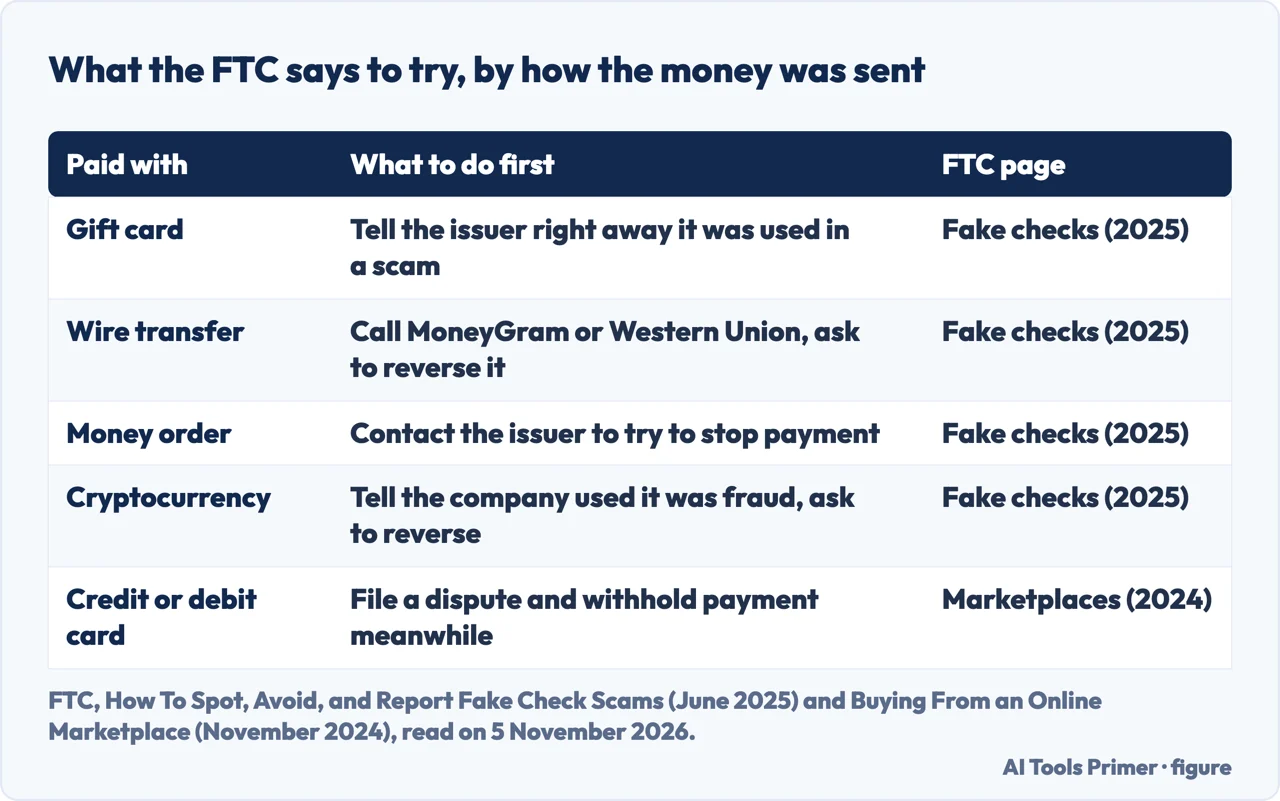
What we did not use
We tested nothing on Facebook and used no account. The statements here come only from the seven pages listed under Sources. A credit union’s page was opened, but the text we could extract was menus only, so we left it out. NordVPN’s article is from a company that sells a VPN, so we kept to the statements above and left out a rental figure and a car case it gives that we could not check at the source.
We did not find a Meta page about the Google Voice case. The pages also do not say how often scams happen on Marketplace. Meta says they can reach both buyers and sellers, and its Scam Protection Center says off-platform scams are “most common in the vehicle, rental and home goods”, but “not limited to these categories”.
Where to start
Four ways in.
- “What do Meta and the FTC say?”
- What Meta and the FTC say, side by side — sources
- “Is the buyer paying me for real?”
- Payment scams aimed at sellers — payments
- “Why is a buyer asking for a code?”
- The verification code and the number it creates — code
- “What if I already paid?”
- If it has already happened — after
Texts and verification codes
A shared number, a second number and the code a stranger asks for.
Other scams and where to report
Messages, gift cards and who to tell after paying.
Questions people also ask
How to tell if a buyer is scamming you on Facebook Marketplace?
Meta lists private contact outside Facebook and Messenger, messages saying something is wrong with your payment, pressure to finish fast, payment screenshots, overpayment offers and refund requests without payment. NordVPN’s article adds a brand-new profile with no reviews and short deadlines such as “I need it today”.
What are the latest Facebook Marketplace scams?
The newest page we read is NordVPN’s, from 11 May 2026. It lists fake receipts, overpayment, counterfeit items, bait-and-switch listings, shipping tricks, advance deposits, rentals, payment apps, gift cards, cars, the Google Voice code, giveaways and QR codes. The FTC pages we read are dated July 2022, November 2024, February 2025 and June 2025.
What are 5 of the most current scams?
The pages we read do not rank scams by how recent they are. Five that appear on them are the fake payment screenshot, the check for too much, the Google Voice verification code, the advance deposit (Meta) and the fake QR code (NordVPN).
Is it common to get scammed on Facebook Marketplace?
The pages we read do not say how many scams happen. Meta says scams can happen to both buyers and sellers, and its Scam Protection Center says off-platform scams are “most common in the vehicle, rental and home goods”.
Not covered here. We tested nothing on Facebook. The statements come from two Meta pages, four FTC pages and one NordVPN article, all read on 5 November 2026.
The search volume and difficulty behind this page come from an Ubersuggest reading of 5 November 2026; the difficulty is Ubersuggest’s own figure, not Semrush’s, and has not yet been confirmed with Semrush.
Sources
- Meta Help Center — About scams on Facebook Marketplace — www.facebook.com, read 5 November 2026.
- Meta Scam Protection Center — Trust and safety on Facebook Marketplace — www.meta.com, read 5 November 2026.
- FTC Consumer Advice — Selling stuff online? Here’s how to avoid a scam (27 July 2022) — consumer.ftc.gov, read 5 November 2026.
- FTC Consumer Advice — Buying From an Online Marketplace (November 2024) — consumer.ftc.gov, read 5 November 2026.
- FTC Consumer Advice — How To Spot, Avoid, and Report Fake Check Scams (June 2025) — consumer.ftc.gov, read 5 November 2026.
- FTC Consumer Alert — Fake check scam targets online car sellers (27 February 2025) — consumer.ftc.gov, read 5 November 2026.
- NordVPN — Facebook Marketplace scams: How to spot and avoid them (11 May 2026) — nordvpn.com, read 5 November 2026.
Written by Alberto Gulotta
Founder and editor of AI Tools Primer, writing from Palermo, Italy. Thirty-five years of taking computers apart, starting with a Commodore 64 — the long version is on the about page.
Something wrong on this page? Write to aitoolsprimer@gmail.com and it gets fixed.
Written on 6 November 2026.
Independence and limits
No affiliate links and no paid placements anywhere on this site. Nobody pays to appear here, and no company has seen this page before you did.
This is general information, not professional advice. Where a page touches money, health, safety or the law, it names its source and the date it was read — and your situation may still differ. See the privacy page and the cookie policy.