
Scams · guide
Facebook Messenger scam from a friend: what the FTC and others say
By Alberto Gulotta · Updated · 16 min read
A Facebook Messenger scam can arrive from a friend's own account, hacked or copied. The FTC says not to reply to a message asking for money or personal information, even from a friend, and to call to check. Identity Guard says to use a channel other than Facebook; Consumer Reports, in 2020, says to block and report the account.
| Question | Answer | Where it comes from |
|---|---|---|
| Can a scam message come from a friend? | Yes: the FTC says that even a message that looks like a friend’s may come from a hacked account | FTC |
| What do I do first? | The FTC says to call the friend; Identity Guard says to use a channel other than Facebook | FTC, Identity Guard |
| Should I pass on a sign-in code? | Identity Guard says never to give anyone your authentication code; the FTC pages we read do not say it in these words | Identity Guard |
| What if I already replied or paid? | Change the password, sign out of other sessions, turn on two-factor; Identity Guard adds a credit freeze and a report to the FTC | Identity Guard, FTC |
| Does Messenger warn me? | Meta said in March 2026 that it warns about chats with new contacts that show common scam patterns | Meta |
The message may come from a real friend’s account
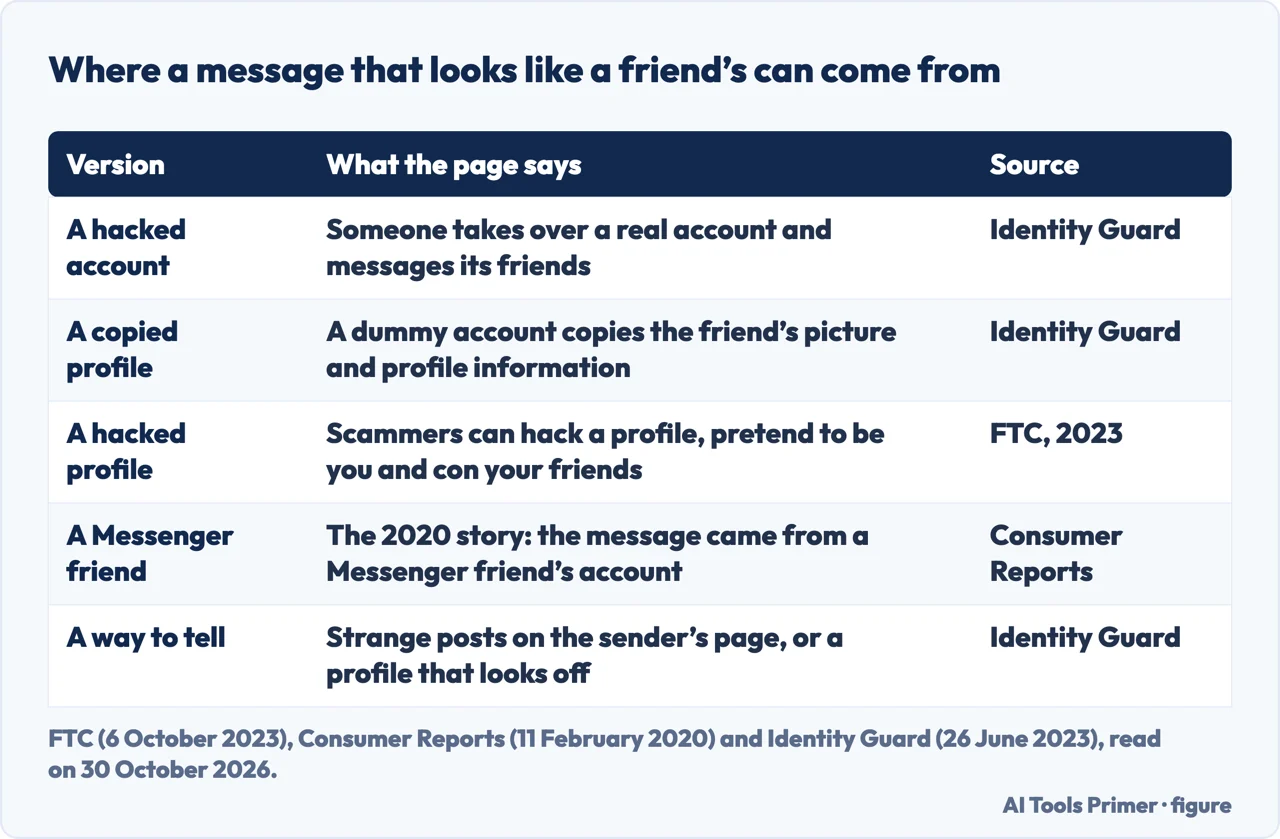
The pages we read describe two different ways a friend’s name can reach you. Identity Guard, a seller of identity protection, says scammers either hijack someone’s Facebook account or create a dummy account that copies the friend’s profile picture and profile information. The FTC describes the first kind in plainer words: scammers can hack your profile, pretend to be you and con your friends. SAFE Federal Credit Union, a credit union, lists both, saying some scammers use hacked accounts belonging to real people you know and others create fake profiles that look nearly identical to those of trusted businesses, financial institutions or even family members.
Consumer Reports opens a story of 11 February 2020 with a Florida woman who received a message from an account belonging to one of her Facebook Messenger friends. The two had chatted before, so there was no reason to suspect a scam. The message said the friend had won a large grant and had seen her name on a list of people who qualified. Consumer Reports quotes security experts who say Messenger is a particularly bad place for this because the scammers appear to be people victims know and trust, and it quotes the woman saying that a total stranger would have been ignored.
The scale is large. In an alert dated 6 October 2023 the FTC says that since 2021 people have reported losing $2.7 billion to scams that started on social media, and it describes that as far more than for any other contact method. The alert is about social media in general, not Messenger alone.
Which of the two versions you are looking at is not settled by the pages we read. Identity Guard suggests looking at the sender’s page: strange posts on the wall could mean the account was taken over, and a profile where something is off could mean a duplicate. The pages we read do not say how to tell the two apart with certainty, and the step that follows, checking with the friend, is the one they give for both.
Check it with your friend, not with the message
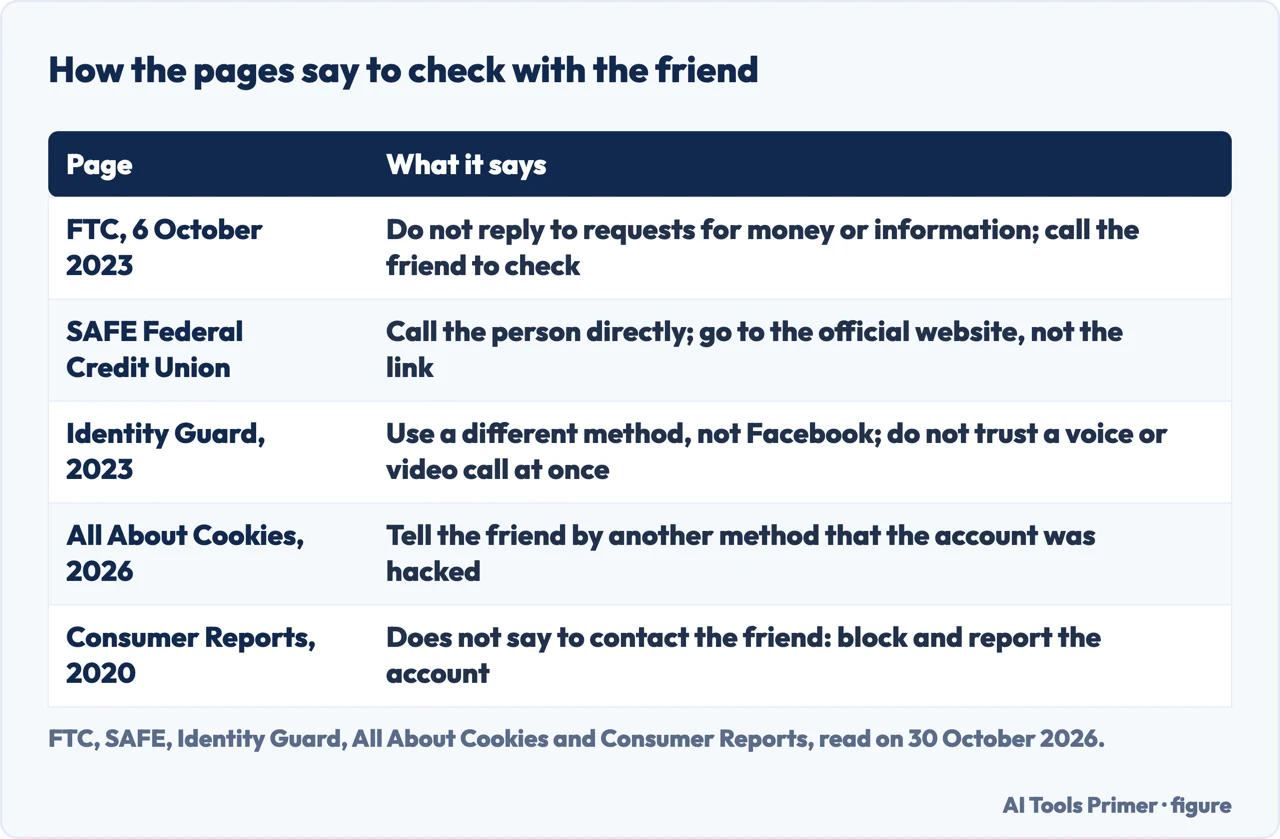
On this point the pages agree on the idea and differ on the channel. The FTC alert of 6 October 2023 says not to reply to messages that ask for money or personal information and that even a message that looks like it is from a friend or family member may come from a hacked account: “Call them to check.” SAFE says, in its list of what to do when something feels off, to slow down and call the person directly, and to go to a company’s official website yourself instead of clicking a link. Identity Guard says to contact the friend by a different method, not via Facebook, and for a request for money to verify it through a different communication channel, contacting the friend on another platform.
Identity Guard also warns against trusting a call or video at once. Its example is a Michigan resident who received a message from a Facebook friend urgently asking for a $200 CashApp transfer. After a reply came a short Facebook video call in which the person looked exactly like the friend, though the sound could not be heard. Identity Guard reports the case from a source it does not name in its text, and says scammers use the latest technology to trick people into sending money. Its advice is to wait until you can contact the friend directly if something feels off.
Consumer Reports, in 2020, takes another line. It does not say to contact the friend. For a person who thinks they may have dealt with a scammer, it says to block the account and report it to Facebook at an e-mail address given in the story. We do not repeat that address, because we did not check today that it still works. All About Cookies, updated on 4 June 2026, says of the grant message that the reader should delete it and let the friend know by another method that the account was hacked.
SAFE adds a point about who asks. It says that legitimate businesses, itself included, will not ask for passwords, security codes, debit card numbers or online banking credentials through social media apps. That is the credit union’s statement about its own practice and about the businesses it has in mind, not a rule the FTC pages we read repeat.
The messages the pages describe, and what each one asks for
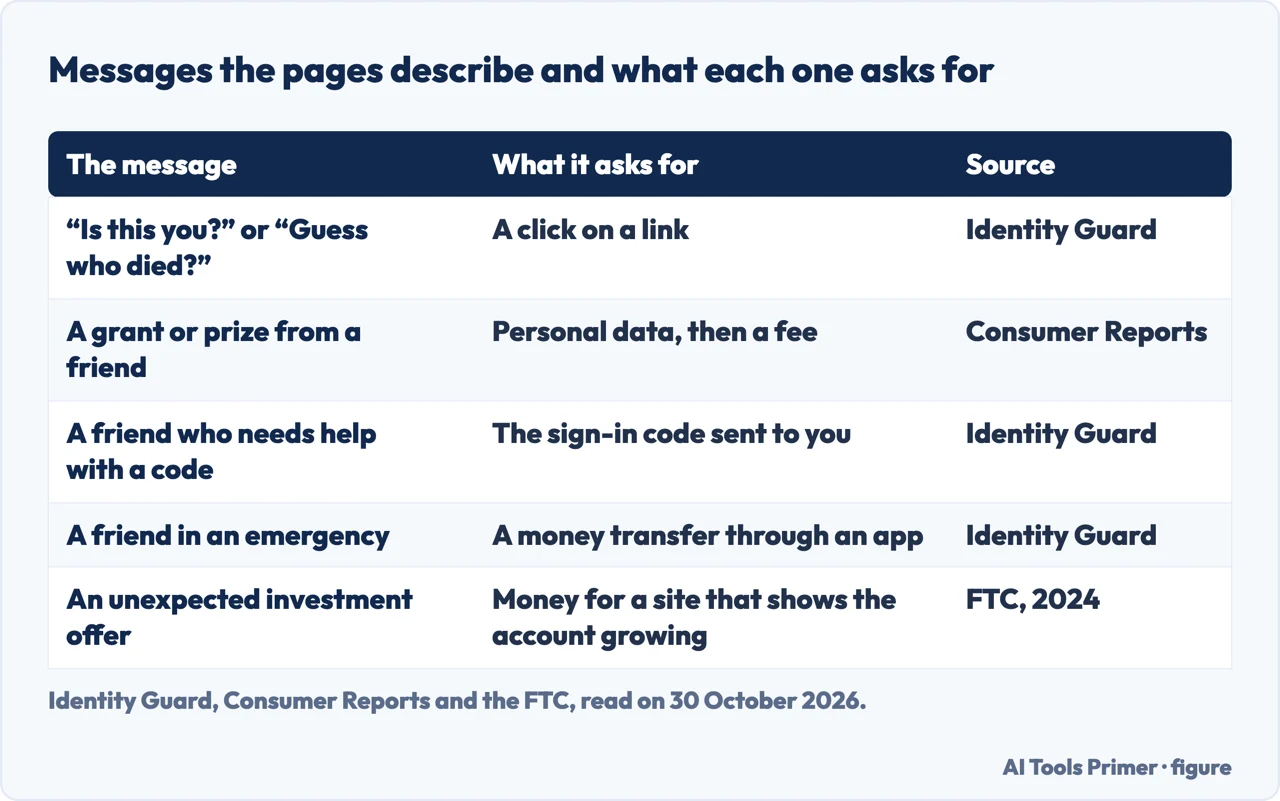
Identity Guard lists seven kinds and All About Cookies twelve. They overlap, and between them they show a short set of requests behind many openings.
- A link, behind a shock. Identity Guard gives “Is this you?” followed by a link, and “Guess who died?”. SAFE gives “Is this you in this video?”. Identity Guard says the links lead to fake login pages or to malware. All About Cookies calls its version “Look Who Died” and says the point is to get you to click.
- A grant or a prize. In the Consumer Reports story, the number given in the message led to a request for personal data: full name, the mother’s full name, home address, age, gender, marital status, phone number, e-mail address and whether the person was employed or on disability. Then came a demand for $1,500 to release the funds, and the woman backed off. Global Greengrants Fund, the real organisation whose name was used, told Consumer Reports that the scammers are in no way related to it. Identity Guard tells of a Denver woman who was asked for $5,000 in taxes on a prize and found out only after paying that the friend’s account had been hacked. It adds that a message offering free money through a government program means the friend’s account has been cloned or hacked.
- A code. Identity Guard describes a scammer posing as a friend who needs help getting into an account and wants a two-factor code sent to you. In its account the scammer already has the username and password and needs only the code. It says a code is meant for you only, and that a code you did not trigger means someone else is trying to get into your account, so you should report it and change your passwords. All About Cookies lists requests for authentication codes too, but does not use those words. The FTC pages we read do not mention this request.
- Money for an emergency. Identity Guard calls a friend in need the oldest Messenger scam and gives the CashApp case above.
- An investment. The FTC, in an alert of 28 June 2024, says an unexpected social media message about investing is almost always a scam, naming Facebook among the places it arrives. If you reply, it says, the scammer sends a link to a site or app where the account appears to grow, then shuts it down and vanishes. It points to ReportFraud.ftc.gov and to the SEC. Identity Guard calls the mix of romance and investment “pig butchering”; our pages on the romance scam and on pig butchering go further.
- A Marketplace sale. All About Cookies says too-good prices, payment in gift cards and a request to move the conversation off Messenger point to a scam. Our page on gift card scams covers the payment.
- A quiz. The same site says that quiz answers about a childhood street or a first pet can match the security questions of an account.
Identity Guard also lists signs in the message itself: spelling and grammar errors, a person you have not spoken to in a long time, a suspicious link, an urgent tone, and a request to move the conversation to e-mail or text or to hand over your phone number. All About Cookies is updated in 2026 and receives compensation from products it mentions; Identity Guard sells identity protection and its page dates from 26 June 2023. We use both for the shape of the messages, not for figures.
If you replied, clicked or paid
Identity Guard gives the longest list. Change the Facebook password and update the recovery e-mail or phone number. Open the “Security and login” settings and log out of sessions you do not recognise. Turn on two-factor authentication. Freeze your credit with Experian, Equifax and TransUnion. Report to the FTC at ReportFraud.ftc.gov and IdentityTheft.gov. Contact your bank and card issuer to try to cancel payments. The credit freeze is the advice of a seller of identity protection, and its list ends by recommending its own service, so we give it as Identity Guard’s advice.
The Consumer Reports story of 2020 is about a person who gave away personal data without paying. Security experts in it say a thief could use that data to arrange a SIM card swap, take over the phone number and request a password reset on a bank account. The advice they give is to set up credit monitoring, change passwords and turn on two-factor authentication. That article is six years old, so the steps are best read as what experts said then.
Before blocking and reporting, Identity Guard says to take screenshots of the messages, so that proof exists if an identity theft claim is needed. To report, it says to click the downward arrow next to the sender’s name and tap “report”; the same menu blocks the sender. For where reports go beyond Facebook, our page on reporting scams lists the forms. If the account that sent the message is also yours to recover, our page on a hacked Facebook account covers the route.
The pages we read do not say what Facebook does with a report about a hacked friend’s message, or how long it takes. The Facebook and Messenger help pages on reporting could not be used, so there is no first-hand text from Meta on reporting here.
If your own account is the one sending messages
The FTC page on recovering a hacked e-mail or social media account, last dated August 2023, lists the signs. You cannot log in. You get a notification about a change to your username or password that you did not make. You get a notification about a login from a device you do not recognise or a place you are not at. Friends or family report getting messages from you that you did not send, sometimes with random links or fake pleas for help or money. The page covers accounts in general, and the steps we read do not name Messenger.
To get back in, the FTC says to make sure computer security software is up to date, run a scan, delete any suspicious software the scan finds, restart, and follow the provider’s account recovery instructions; it links a list of providers that starts with Facebook. After that: change the password, sign out of all devices, turn on two-factor authentication, which can mean a PIN or a one-time code by text, e-mail or app, and check that the recovery e-mail addresses and phone numbers are yours. It also says to check social media for messages the hacker sent from your account and for new friends you do not recognise. Last, it says to tell contacts, by e-mail, text or a post, not to click links in messages from you and to ignore pleas for help or money.
Meta describes what Messenger does today in an announcement of 11 March 2026. It said it was rolling out advanced scam detection on Messenger to more countries that month. When a chat with a new contact may contain patterns of common scams, such as suspicious job offers, Messenger warns and asks whether you want to share recent chat messages for an AI scam review. If a possible scam is detected, you get information on common scams and suggested actions, including blocking or reporting the account. Meta also said it was testing warnings on Facebook for suspicious friend requests, such as an account with few mutual friends or a different country in its profile.
Our page on a hacked Facebook account covers the same FTC recovery steps in more depth. Both Meta features are about new contacts. The pages we read do not say whether the Messenger warning covers a message from the hacked account of an existing friend. Meta’s announcement is also the only text from Meta that we read, and it is about a rollout, not a promise that every user sees it.
What we did not use
We tested nothing on an account and contacted no one. The Facebook help page on scam detection in Messenger and the Messenger help pages came to us as menus and cookie notices without an article, so we used Meta’s announcement instead. We did not read two Reddit threads or a Quora question about Messenger scams. Identity Guard attributes a loss figure for 2022 and a rise in account takeovers to other bodies; we could not confirm either at the source, so we use neither, and take the loss figure from the FTC alert. No statement on this page rests on an AI-generated summary.
Where to start
Four ways in.
- “Is it really my friend?”
- The message may come from a real friend’s account — friend
- “Should I call them?”
- Check it with your friend, not with the message — check
- “I replied or paid.”
- If you replied, clicked or paid — replied
- “My account is sending them.”
- If your own account is the one sending messages — yours
Scams that start in a message
Romance, investment and gift cards.
After the message
A hacked Facebook account, its password and where to report.
Questions people also ask
Is there a scam going on with Facebook Messenger?
The FTC says that since 2021 people have reported losing $2.7 billion to scams that started on social media. Consumer Reports described fake grants, loans, lottery winnings and donation requests on Messenger in 2020; Identity Guard lists seven kinds and All About Cookies twelve.
How to tell a scammer on Facebook Messenger?
Identity Guard lists spelling errors, a friend you have not spoken to in a long time, strange posts on the sender’s page or a profile that looks off, a suspicious link, an urgent tone, free money and a request to leave Messenger. The FTC says to call the friend to check.
What are the signs that your Messenger is hacked?
The FTC lists being unable to log in, a notice of a username or password change you did not make, a login from an unknown device or place, and friends reporting messages you did not send. Its page covers accounts in general and does not name Messenger in those steps.
Can you get scam messages on Messenger?
Yes. Consumer Reports described a grant message sent from a Messenger friend’s account. Meta said in March 2026 that it is expanding scam detection on Messenger, which warns about chats with new contacts that show common scam patterns.
Not covered here. We tested nothing on an account. The statements come from three FTC pages, a Consumer Reports story of 2020, a Meta announcement of March 2026 and pages from Identity Guard, SAFE Federal Credit Union and All About Cookies, all read on 30 October 2026.
The search volume and difficulty behind this page come from a Semrush reading of 29 August 2026, older than the 60 days the site normally allows.
Sources
- FTC — That friend request could be from a scammer (6 October 2023) — consumer.ftc.gov, read 30 October 2026.
- FTC — How To Recover Your Hacked Email or Social Media Account — consumer.ftc.gov, read 30 October 2026.
- FTC — Unexpected messages on social media about investing are almost always scams (28 June 2024) — consumer.ftc.gov, read 30 October 2026.
- Consumer Reports — How to Avoid Facebook Messenger Scams (11 February 2020) — www.consumerreports.org, read 30 October 2026.
- Meta — Meta Launches New Anti-Scam Tools (11 March 2026) — about.fb.com, read 30 October 2026.
- Identity Guard — Facebook Messenger Scams (26 June 2023) — www.identityguard.com, read 30 October 2026.
- SAFE Federal Credit Union — How to detect Social Media Messenger Scams — www.safefed.org, read 30 October 2026.
- All About Cookies — Facebook Messenger Scams 2026 (updated 4 June 2026) — allaboutcookies.org, read 30 October 2026.
Written by Alberto Gulotta
Founder and editor of AI Tools Primer, writing from Palermo, Italy. Thirty-five years of taking computers apart, starting with a Commodore 64 — the long version is on the about page.
Something wrong on this page? Write to aitoolsprimer@gmail.com and it gets fixed.
Written on 3 November 2026.
Independence and limits
No affiliate links and no paid placements anywhere on this site. Nobody pays to appear here, and no company has seen this page before you did.
This is general information, not professional advice. Where a page touches money, health, safety or the law, it names its source and the date it was read — and your situation may still differ. See the privacy page and the cookie policy.