
Tor · guide
How to stay anonymous online: Tor Project, EFF and FTC
By Alberto Gulotta · Updated · 18 min read
How to stay anonymous online starts with a limit: the Tor Project says perfect anonymity is generally impossible, even with Tor. What it describes instead is where identity leaks, from web forms and torrents to downloaded documents. EFF adds the phone number behind SMS codes, and the FTC explains how sites track you.
| Question | Answer | Where it comes from |
|---|---|---|
| Can you be perfectly anonymous? | The Tor Project says that is generally impossible, even with Tor; EFF says no option is perfect for security | Tor Project, EFF |
| Where do you start? | With six questions about what you protect and from whom, and a plan you revisit | EFF |
| Does private browsing do it? | No: it clears local traces but does not block online tracking or hide your activity | Tor Project, FTC |
| What does the Tor Project say can give you away while you use Tor? | Forms, sign-ins, torrent apps, add-ons and downloaded documents; and for HTTPS, the encryption to the final site depends on the site | Tor Project |
| Can a phone number undo a pseudonym? | It can: with SMS codes the service holds the number, even if you use only Tor or a VPN, and if compelled by a court it can link the account to you | EFF |
The short answer: anonymity comes in degrees
The Tor Project’s support page puts the question in its own heading: “Am I totally anonymous if I use Tor Browser?” Its answer is that Tor Browser includes many privacy protections but cannot guarantee perfect anonymity. The page says that it is generally impossible to have perfect anonymity, even with Tor, though some practices improve anonymity while you use Tor and offline. It frames its list as a way to reduce risks and stay safer online.
EFF’s Surveillance Self-Defense guide reaches the same kind of conclusion from the security side. Its page on security plans says that trying to protect all your data from everything all the time is impractical and exhausting, and that security is a process. Later it says that no option is perfect for security, because people differ in priorities, concerns and resources. The page does not use the word anonymity; it is about threats in general.
That is the frame for the rest of this page. We read six pages: two support pages from the Tor Project, three guides from EFF and one article from the FTC. The Tor Project pages describe the habits that undo anonymity. EFF supplies the planning method, an explanation of fingerprinting and a warning about phone numbers. The FTC page describes how sites and apps track people, and it is written about advertising, not anonymity, so we use it only for what it says about tracking and about private browsing. For the same ground told as one person’s routine, see opsec in plain words.
Start with who you are hiding from
EFF’s guide begins before any tool. It says security begins with understanding the unique threats you face, and that you counter them by working out what you need to protect and from whom. It gives six questions for a security plan:
- What do I want to protect?
- Who do I want to protect it from?
- How bad are the consequences if I fail?
- How likely is it that I will need to protect it?
- How much trouble am I willing to go through to try to prevent potential consequences?
- Who are my allies?
The guide calls the thing you protect an asset and the person or entity that threatens it an adversary. Its examples of adversaries are your boss, law enforcement, your former partner, your business competition, your government and a hacker on a public network. It adds that the list can include people you would otherwise trust who might accidentally compromise your assets by being careless with their own security plans.
It also separates two ideas that are easy to run together. Capability is what an adversary could do: EFF notes that a mobile phone provider has access to all your phone records and that a government might have stronger capabilities. Risk is how likely a particular threat against a particular asset is to happen, and the same page says the risk of a phone provider posting your private data online to harm your reputation is low. The guide says assessing risk is a personal and subjective process, and that the answers are judgments about what you value and how likely a threat is.
The practical result, in EFF’s words, is balance: your risk assessment lets you plan a strategy that weighs convenience, cost and privacy. The page compares an attorney on a national security case, who may go to greater lengths such as encrypted email, with a family member who emails funny cat videos. It ends by saying the plan can change as your situation changes, and that revisiting it frequently is good practice: pick a date in the future and check whether the plan still fits.
The Tor Project makes a related point about the crowd rather than the plan. It says that the more Tor users there are near you, and the more diverse their interests, the less dangerous it is that you are one of them. The pages we read do not rank the threats for you; the six questions above are where EFF leaves that judgment. Read together, the pages name these steps, in no order that the sources give: write the plan; use a browser built for the job and leave plugins, add-ons and torrents out of it; be careful what you type into forms and which account details you hand over, a phone number included; and do not count on private tabs, ad blockers or cleared cookies to hide you. Where the pages name no step, as for keeping two identities apart, we say so at the end.
Where you are seen: the connection and the browser
The first place to look is what a tool covers. The Tor Project says Tor does not protect all of your computer’s Internet traffic when you run it: Tor only protects applications that are properly configured to send their traffic through Tor. Hence its advice to use Tor Browser and software specifically configured for Tor.
Even then, the page draws a line between what is hidden and what is not. Tor tries to prevent attackers from learning which destination websites you connect to. By default, though, it does not prevent somebody watching your Internet traffic from learning that you are using Tor. The page says you can reduce that risk by configuring Tor to use a bridge instead of connecting directly to the Tor network; our page on bridges and censorship covers how. For the question of who sees your address and your destination with a VPN, see Tor or VPN.
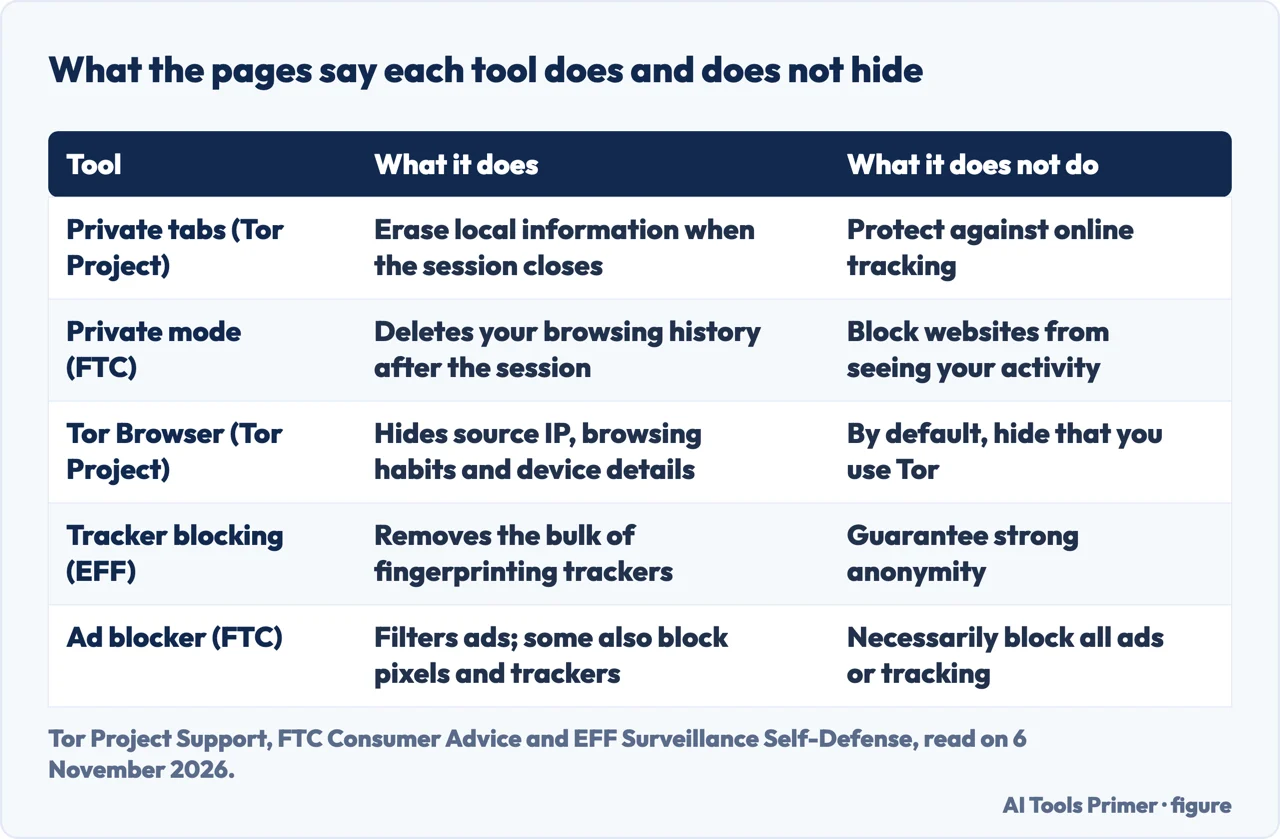
Private tabs are the next common assumption, and two sources answer it. The Tor Project says that despite the names, “Incognito mode” and “private tabs” do not make you anonymous on the Internet. In Chrome and Firefox they erase local information about a session when it is closed, but they give no protection against online tracking and have no measures to hide your activity or digital fingerprint, so an observer can collect your traffic as easily as from a regular browser. The FTC says the same in its own terms: some browsers have a private mode that deletes your browsing history after the session, but it does not block websites from seeing your online activity. The Tor Project adds that Tor Browser provides the same forgetting features and also hides your source IP address, your browsing habits and details about a device that can be used to fingerprint activity. Our page on incognito mode goes through what it deletes.
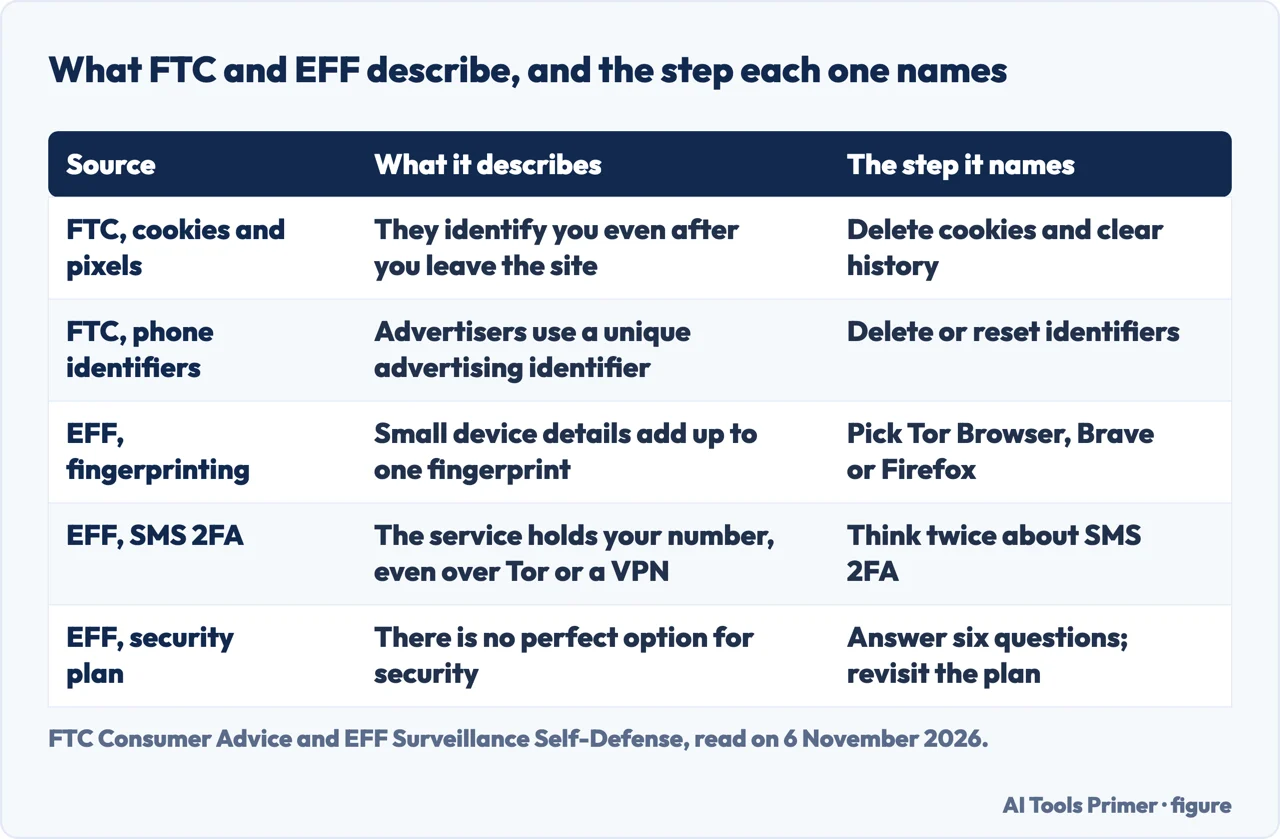
The FTC page explains what the sites are doing. Websites may track activity with a cookie or pixel that identifies you even after you leave the site, or with device fingerprinting, which uses your browser’s configurations and settings. On a phone, advertisers may use a unique advertising identifier, and companies may follow your activity across devices such as a laptop and a smartphone. The page separates first-party tracking, when the site you visit tracks you, from third-party tracking, when it lets another company do so, and says third-party companies can follow you across the websites you visit.
The FTC’s remedies are about ads. It suggests deleting cookies and your browsing and search history, and deleting or resetting identifiers on a phone; adjusting the privacy settings in your browser, which it says vary by browser; turning off unnecessary app permissions; considering an ad blocker; opting out of personalized ads on each device and browser; and reviewing cookie notices. It states that ad blockers do not necessarily block all ads or tracking. For the browser and phone privacy settings that control personalized ads, it says you will still see ads, but they will not be personalized based on your browsing history. That is a smaller promise than anonymity, and the page does not claim more.
The fingerprint cookies cannot cut
EFF’s page on fingerprinting says why settings alone fall short; our page on the browser fingerprint sets the same EFF page beside other sources, so what follows is only the part that bears on staying anonymous. Fingerprinting gathers small pieces of information about a machine, such as screen resolution, time zone, operating system version and remaining battery life, and puts them together into a unique picture of the device. EFF compares browsing history to a string joining pins on a board: clearing cookies cuts the string into segments, while a fingerprint is a string that cannot be cut, because it is a new persistent identifier built from the characteristics themselves and stores nothing on your machine.
The page says fingerprinting works for a tracker only if it is persistent and unique. If two or more users share a fingerprint, the tracker cannot single one out. It names two strategies for tools. The first removes one or both of those two criteria: some tools randomize certain characteristics to break persistence, and browsers can make every instance look the same, which is the method adopted by Tor Browser. The second keeps a list of known trackers and blocks them, as many add-ons do, such as EFF’s Privacy Badger. EFF calls blocking highly effective but says it does not completely block fingerprinting: trackers not yet identified, and fingerprinting done directly by the site you visit, will generally get through, and blocking known fingerprinters does not guarantee strong anonymity.
The page also warns against doing it by hand. Customizing settings on your own rarely gets the intended outcome, it says. Its example is the user-agent string: changing it to the most common one can make you more fingerprintable, because it may no longer fit the other details of your browser. To blend in, EFF says, you have to join a “privacy pool” of users with the same fingerprint across all metrics, and the safest bet is to choose something like Tor Browser, Brave or Firefox, which use techniques to make all instances of their browser relatively common. Our page on the browser fingerprint covers the signals sites read.
Put side by side, the FTC and EFF pages differ in what they treat as the problem. The FTC treats tracking as a question of personalized ads and of settings you adjust. EFF says individual settings are not enough against fingerprinting, and points to a group of identical browsers as the defense. The Tor Project’s statement about private tabs sits between them and agrees with the FTC on that one point.
Where you give yourself away
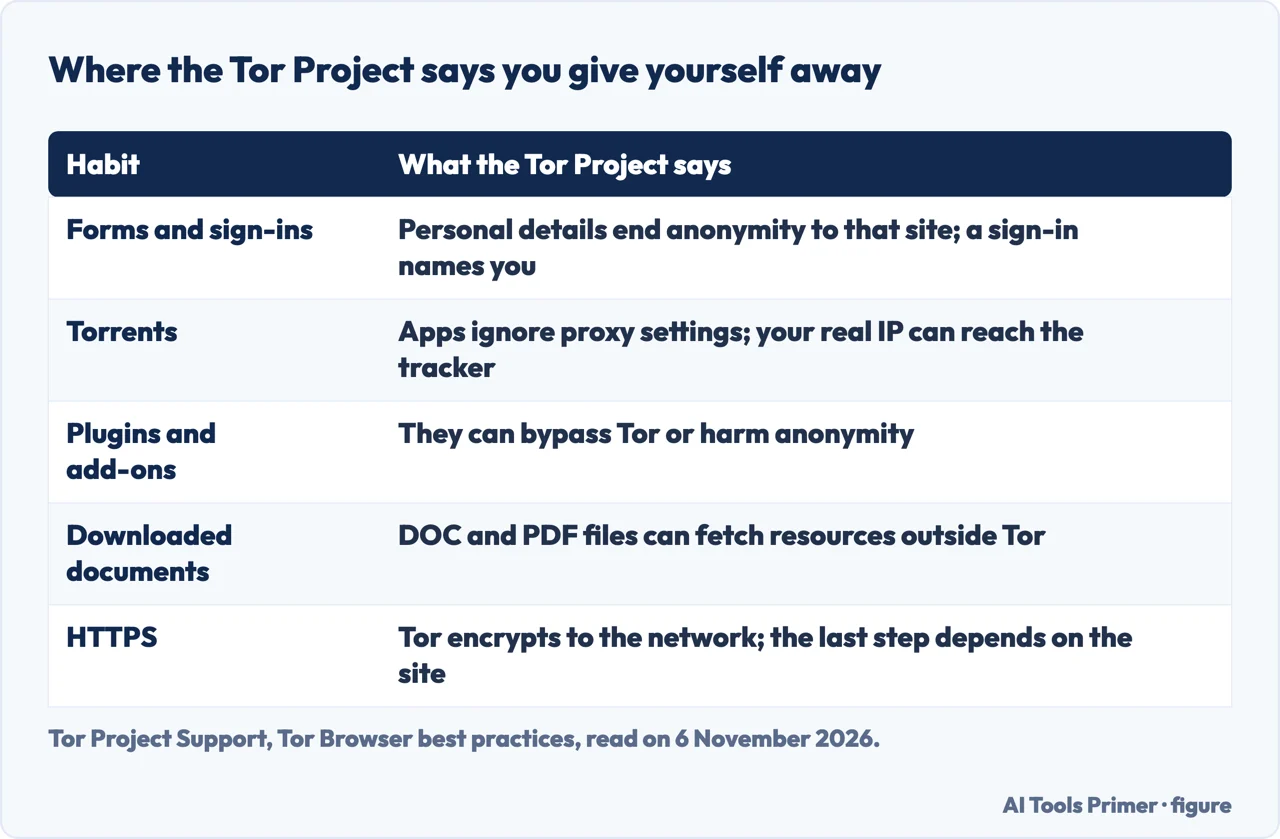
The Tor Project’s best-practices page is, in large part, a list of ways the person undoes the tool’s work. Our page on whether Tor Browser is safe goes through that page item by item; here is the short version, kept because EFF’s phone-number warning further down belongs with it. Its first is the simplest. If you visit a website with Tor Browser, the site does not know who you are or your true location. But many sites ask for more personal information than they need through web forms. If you sign in, the page says, they still do not know your location but they know who you are. If you provide your name, email, address, phone number or any other personal information, you are no longer anonymous to that website. Its advice is to be vigilant and extremely cautious when filling out web forms.
The second is torrents. The page says torrent file-sharing applications have been observed to ignore proxy settings and make direct connections even when told to use Tor. Even if the application connects only through Tor, you will often send your real IP address in the tracker request, because that is how torrents work. That deanonymizes the torrent traffic and your other simultaneous Tor web traffic, and it slows down the whole Tor network. The page returns to this in its paragraph on documents, where it says that under no circumstances is it safe to use BitTorrent and Tor together.
The third is add-ons. Tor Browser blocks plugins such as Flash, RealPlayer and Quicktime, which the page says can be manipulated into revealing your IP address. It also does not recommend installing additional add-ons or plugins in Tor Browser, because these may bypass Tor or otherwise harm your anonymity and privacy.
The fourth is the last step of the journey. The page says Tor encrypts your traffic to and within the Tor network, but the encryption between the network and the final website depends on that website. Tor Browser includes HTTPS-Only Mode to force HTTPS with websites that support it. The page still tells you to watch the address bar when you give a site sensitive information: look for a padlock or onion icon, https:// in the URL and the proper expected name for the website. Our page on whether Tor Browser is safe takes up the same habits.
The fifth is files. Tor Browser warns before automatically opening documents handled by external applications, and the page says “DO NOT IGNORE THIS WARNING”. Documents downloaded through Tor, especially DOC and PDF files unless you use the PDF viewer built into Tor Browser, can contain Internet resources that the application opening them will download outside of Tor, which reveals your non-Tor IP address. For files you must work with, the project strongly recommends a disconnected computer or dangerzone to make safe PDF files. What a photo file carries inside is a separate matter; see photo metadata.
EFF carries the same principle to accounts. In its page on two-factor authentication it says that SMS 2FA means you may be handing over more information to a service than you are comfortable with. Its example is a TikTok account opened with a pseudonym: even if you avoid giving the service identifying information, and even if you reach it only over Tor or a VPN, turning on SMS 2FA means the service will necessarily have a record of your mobile number. If compelled by a court, EFF says, it can link the account to you through that number. The page adds that this may not matter if you already use your legal name on the service, but that if maintaining your anonymity is important, you should “think twice about using SMS 2FA”.
The same page keeps the security side in view. It says SMS 2FA is better than nothing and the lowest level of security, and that where possible you should use an authenticator app, a passkey or a security key instead of SMS. We read this as two separate considerations on one page, one about account safety and one about anonymity, and EFF does not tell you which to put first. The Tor Project and EFF pages agree on the principle: what identifies you is what you hand over, and a network does not hide it.
What the pages do not say, and what we did not use
The pages we read do not explain how to keep two identities apart, such as an email address, a photo and a username, from start to finish. We tried to fetch an EFF page on protecting yourself on social networks, an EFF glossary entry on pseudonyms and an FTC page on protecting your privacy online, but the copies we got were only empty shells of a few words, so we did not use them and cannot say what they contain. The pages we read also do not say how much time or how many steps it takes for two identities to be linked.
The four questions in the common-questions section are our own wording, written from the sources listed below. The two Tor Project pages carry no date. The EFF pages were last reviewed on 27 October 2023, 11 March 2024 and 27 August 2024, and the FTC article is dated September 2023, so some details may have moved on.
Each statement on this page is traced to the sources listed below, and the quotations were matched word for word against them.
Where to start
Four ways in.
- “Can you be completely anonymous?”
- The short answer: anonymity comes in degrees — short
- “Where do I start?”
- Start with who you are hiding from — who
- “Does incognito make me anonymous?”
- Where you are seen: the connection and the browser — seen
- “How does a pseudonym still lead back to me?”
- Where you give yourself away — given
Habits and what Tor does not hide
Opsec, the files you carry and the choice between Tor and a VPN.
What a browser gives away
Private tabs, fingerprints and the network around the browser.
Questions people also ask
Can you be completely anonymous online?
The Tor Project says it is generally impossible to have perfect anonymity, even with Tor. EFF says no option is perfect for security and that a plan should balance convenience, cost and privacy.
Does incognito mode make you anonymous?
The Tor Project says it does not: private tabs erase local information when the session closes but give no protection against online tracking. The FTC says private mode deletes your history but does not block websites from seeing your activity.
Does Tor Browser make you anonymous?
The Tor Project says it cannot guarantee perfect anonymity. It protects only applications configured to use Tor, and forms, sign-ins, torrents, add-ons and downloaded documents can all reveal who you are.
How can a pseudonym still lead back to you?
EFF says that if you turn on SMS 2FA for an account opened with a pseudonym, the service holds your mobile number, even if you use only Tor or a VPN, and a court can compel it to link the account to you.
Not covered here. The statements come from two Tor Project support pages, three EFF Surveillance Self-Defense guides and an FTC consumer article, all read on 6 November 2026. The Tor Project pages carry no date.
The search volume and difficulty behind this page come from an Ubersuggest reading of 5 November 2026 on its free plan; the difficulty is Ubersuggest’s own score, not a Semrush figure, and it has not yet been confirmed with Semrush.
Sources
- Tor Project Support — Tor Browser best practices — support.torproject.org, read 6 November 2026.
- Tor Project Support — Tor Browser and Incognito mode — support.torproject.org, read 6 November 2026.
- EFF Surveillance Self-Defense — Your Security Plan (last reviewed 27 October 2023) — ssd.eff.org, read 6 November 2026.
- EFF Surveillance Self-Defense — How to: Enable Two-factor Authentication (last reviewed 11 March 2024) — ssd.eff.org, read 6 November 2026.
- EFF Surveillance Self-Defense — What Is Fingerprinting? (last reviewed 27 August 2024) — ssd.eff.org, read 6 November 2026.
- FTC Consumer Advice — How Websites and Apps Collect and Use Your Information (September 2023) — consumer.ftc.gov, read 6 November 2026.
Written by Alberto Gulotta
Founder and editor of AI Tools Primer, writing from Palermo, Italy. Thirty-five years of taking computers apart, starting with a Commodore 64 — the long version is on the about page.
Something wrong on this page? Write to aitoolsprimer@gmail.com and it gets fixed.
Written on 7 November 2026.
Independence and limits
No affiliate links and no paid placements anywhere on this site. Nobody pays to appear here, and no company has seen this page before you did.
This is general information, not professional advice. Where a page touches money, health, safety or the law, it names its source and the date it was read — and your situation may still differ. See the privacy page and the cookie policy.