
VPN · guide
VPN for Netflix: the rule, the error and what to try
By Alberto Gulotta · Updated · 16 min read
A VPN for Netflix can change what the catalogue shows. Netflix’s Help Center says you may only be shown titles it has worldwide licensing for, and that Live events and ad-supported plans are not supported. Proton VPN, ExpressVPN and Security.org add what to try when a server is blocked.
| Question | Answer | Where it comes from |
|---|---|---|
| What does Netflix show with a VPN on? | Netflix says you may only be shown titles it has worldwide licensing for | Netflix Help Center |
| Which uses does Netflix not support? | Live events and ad-supported plans | Netflix Help Center |
| How do I tell whether a VPN is on? | Open fast.com, choose Show more info and read the country next to Client | Netflix Help Center |
| Do free servers work? | Proton says Netflix often blocks its free servers; Security.org says its free plan never worked in its test | Proton VPN, Security.org |
| What if a server stops working? | Security.org says to keep trying other servers; ExpressVPN lists a server order for US users, for servers in the country where the user is | Security.org, ExpressVPN |
What Netflix says a VPN does
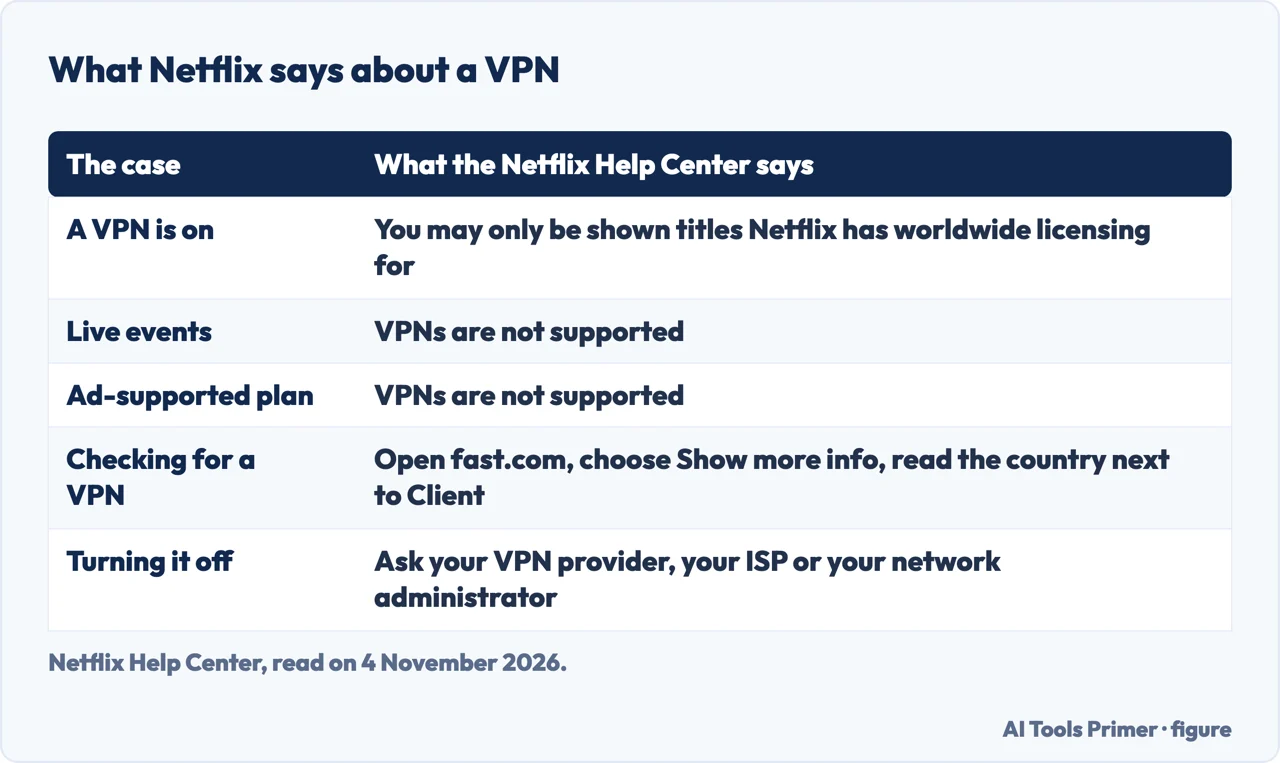
Netflix’s Help Center page on VPNs says that connecting through a VPN can make a device or a network look as if it is connecting from somewhere other than its physical location. With a VPN, it says, you may only be shown the TV shows and movies Netflix has worldwide licensing for, and you may need to turn the VPN off to see the titles that are available in your region. A separate Netflix page, on changing the country of an account, says the same thing in other words: a VPN hides your region and lets you see only the titles available to all regions globally. That page adds that Netflix is available in over 190 countries, that each has its own catalogue of originals and licensed titles, and that the country on an account cannot be changed unless you move to a new one.
Netflix states two limits as a note on its VPN page and again on its page about the VPN error: VPNs are not supported for watching Live events on Netflix, or if you are on an ad-supported experience. The pages we read carry no date, so we give the day we read them, 4 November 2026.
The same page explains how to find out whether a VPN is on. Open a web browser on a device on the same network as the device with the problem, go to fast.com, wait for the connection test to stop, choose Show more info and note the country next to Client. If the country does not match your location, Netflix says your device or network likely has a VPN turned on, and you should turn it off and try again. It also notes that some antivirus software comes with a VPN that might be turned on. As for how to turn one off, Netflix says its Customer Service cannot help, because the steps are different for each VPN or service; you contact your VPN provider, your internet service provider or your network’s administrator.
Why a title can be missing, with or without a VPN
Netflix has a page on why a show or movie may be available in one country or region and not another. It lists regional popularity, which it illustrates by saying that what is popular with members in the United States may not be in the United Kingdom, even though both are English-speaking. It lists titles with more than one studio or distributor owning the rights, and titles whose rights are not for sale or are exclusive to another streaming platform. Even for originals, Netflix says it owns the worldwide rights to most of them but that some are still unavailable in a country or region, because the title was created before Netflix could acquire exclusive rights or because other companies hold the rights for that region.
A second page, “Netflix thinks I’m in a different country”, covers the case where titles are missing in your language, or where other people in your area can see titles you cannot. Netflix says it may think you are in a different country, and that if you use a VPN or proxy you should try turning it off. For members who signed up in one EU country and watch in another, it points to a page on using Netflix outside your home, which we did not read.
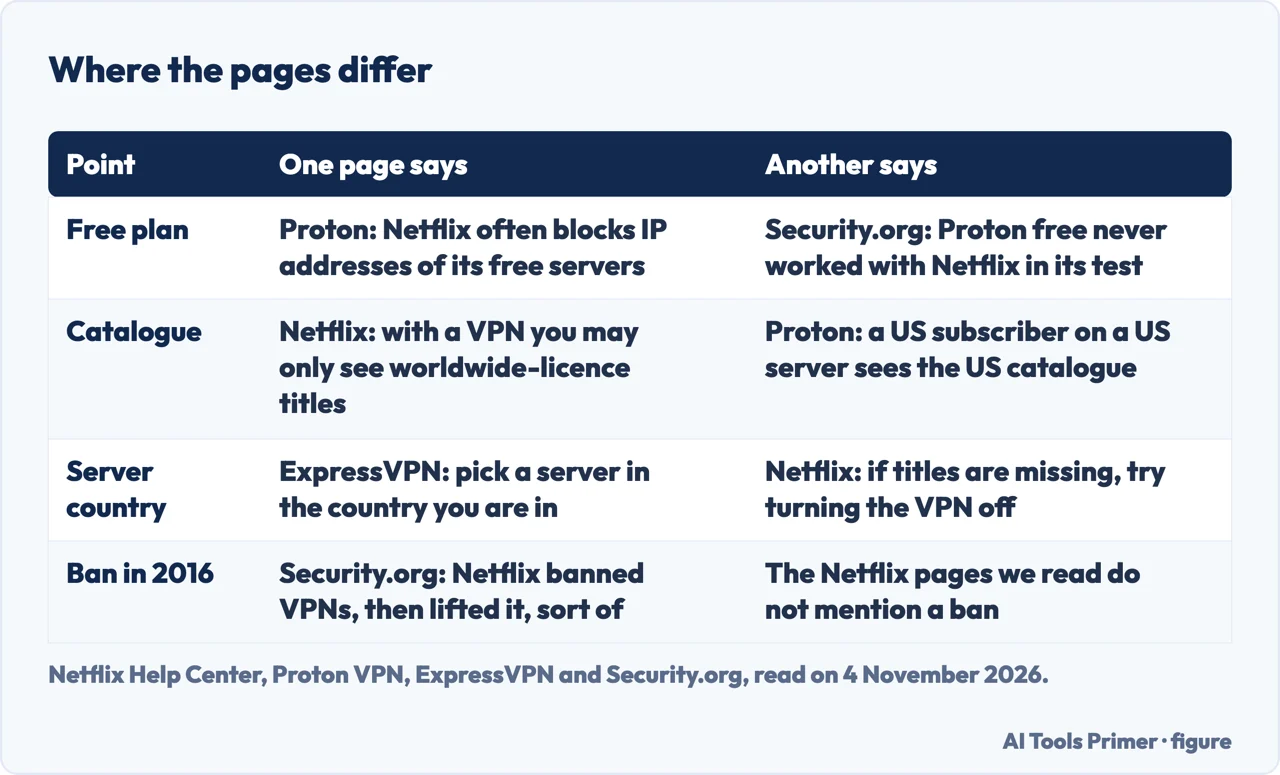
Proton VPN’s Netflix page describes the same catalogue difference from the seller’s side. It says Netflix’s catalogue varies by country because of distribution rights, and that with Proton VPN your public-facing IP address will match the location you choose, so a US-based subscriber connected to a US server sees the catalogue meant for US audiences. Connect to a server outside the US, it says, and the content you see may change. Proton adds that European data portability laws may affect how Netflix shows content to subscribers in the EU and points to a support guide, which we did not read. The two companies describe different setups: Netflix writes about a VPN that changes where you appear to be, Proton about a server in the subscriber’s own country. The pages we read do not say whether Netflix treats the two the same way.
Why a server can work and then stop
Security.org’s page on the best VPNs for Netflix, updated on 24 August 2026, which says it may earn compensation from some providers, says its writers tested 15 of their highest-rated VPNs and picked six for unblocking ability and speed. It says some of the VPNs worked intermittently, while others were blocked immediately. Its explanation is that Netflix keeps a list of known VPN IP addresses, so even a top streaming VPN can be detected. As an example it gives a Private Internet Access server in the Netherlands: the first one it connected to was detected by Netflix, and the Dutch library opened on the second try.
If a VPN’s address has been blacklisted, Security.org says you cannot fix it on your end and suggests trying other servers until one works. It also suggests a dedicated IP address. With an ordinary VPN, it says, you share one address with many other users, which is one of the ways Netflix detects VPN addresses; an address only you can use is not shared, so it says the risk of being flagged is lower. Before any of that, it suggests checking that the VPN changes your address at all: note your device’s IP address with the VPN off, connect, and look again. If the two are the same, the VPN has not changed it.
Security.org also makes two claims that the Netflix pages we read do not. It says Netflix banned VPNs in 2016 and has since lifted the ban, in its words “sort of”: instead of blocking every VPN address, it says, Netflix shows only the titles it has worldwide rights to. And it says downloading is still not allowed with a VPN. The Netflix pages we read mention neither a ban nor downloads, so we give both as Security.org’s statements.
ExpressVPN’s page about DNS codes, a separate method that some sites offer for watching American Netflix, calls it probably the least reliable and least secure way to watch, and says such codes usually stop working almost immediately after they are published. That page reached us only in part, so we use only its opening sentences and headings.
What the providers tell you to try
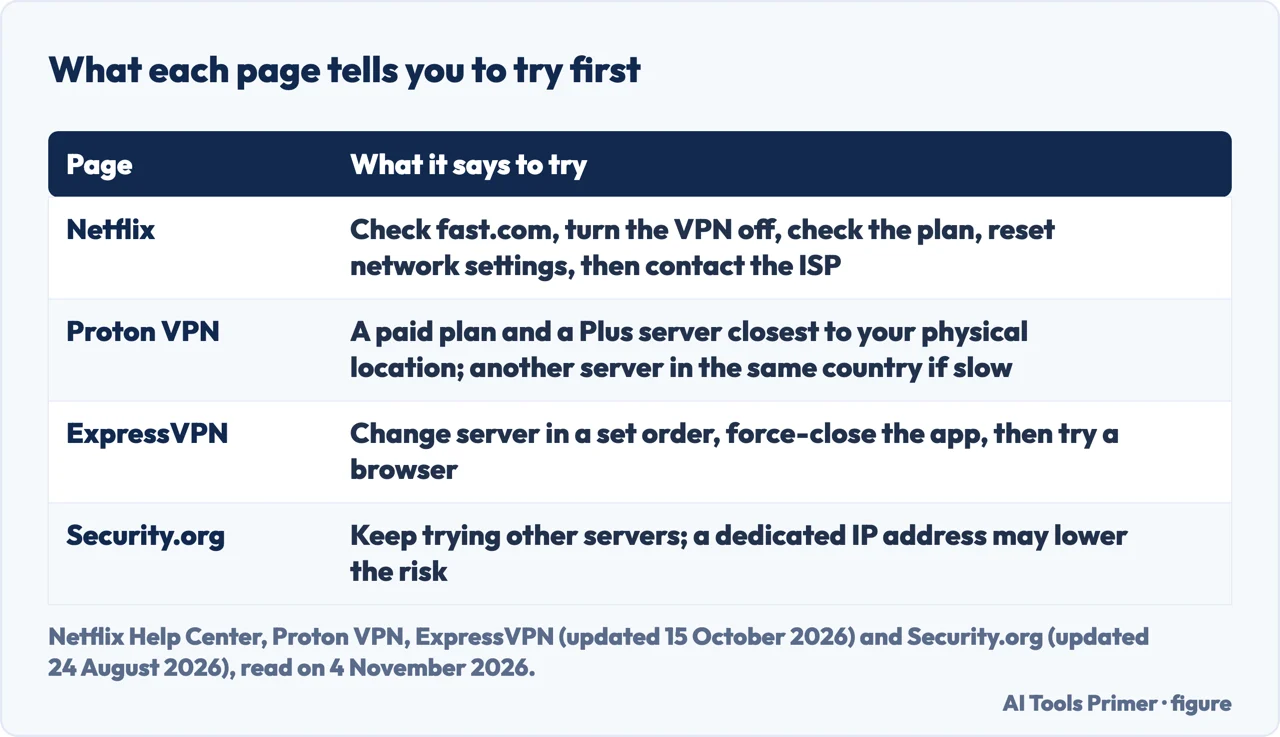
ExpressVPN’s troubleshooting page for Netflix, updated on 15 October 2026, is written for people who have trouble streaming while connected. It says that to comply with the Netflix Terms of Use and its own terms, you should connect to a server location that matches the country where you are. For US users it lists server locations to try in this order: Washington DC, San Francisco, New York, New Jersey - 3, Los Angeles - 3 and Denver. If you use the Netflix app, it says to force-close and reopen the app each time you change location. Next it asks you to sign out of the app, restart the device and sign back in; then to try Netflix in a browser at netflix.com, with the ExpressVPN browser extension and the same server order, or in a different browser; and finally to contact its support team. It adds that manual VPN configurations are not optimized for streaming and recommends its app or MediaStreamer.
Proton VPN says it does not block users of its Free plan from streaming Netflix, but that Netflix often blocks the IP addresses of its free servers, which it calls beyond its control. For streaming services it says you need a paid plan, and a valid Netflix subscription as well. It advises connecting to a Plus server closest to your physical location and, if the stream is slow, trying a different server in the same country. Proton also says some networks, such as those in offices, schools or hotels, block streaming services entirely, and that internet providers sometimes slow streaming traffic. Security.org tested the free Proton plan with Netflix in 2026 and says it never worked. The two statements are not the same claim: one says the free servers are often blocked, the other reports one test that failed.
Both ExpressVPN and Proton are VPN sellers, so their pages describe their own products. On the rules, Proton says VPN use is completely legal in most countries but that its service is not meant as a means of copyright circumvention, and it points to its terms and to those of the streaming service. ExpressVPN says that using its service to circumvent geographic restrictions set by content providers is a breach of its terms of service. The Netflix help pages we read do not say whether using a VPN breaks the Netflix Terms of Use, and we did not read those terms. Our pages on ExpressVPN, Proton VPN and free VPNs look at what each says about logs and safety, which is a different question.
The error message and what Netflix asks you to do
Netflix’s page for the VPN error says you may see the code E106 or a message that begins “You seem to be using a VPN or proxy” and asks you to turn off any such service and try again. It says VPN apps or services can make a device or network look as if it is somewhere other than its physical location, which can cause this error or other issues, and that if the problems continue it recommends turning them off and trying Netflix again.
If you are still having trouble, the page gives steps in this order. First, check whether a VPN is on, with the fast.com test described above. Second, check your plan: VPNs are not supported on an ad-supported experience, and the page sends you to your account page to see which plan you are on. Third, reset your network settings, trying Netflix again after each step: turn the VPN off if you use one, reset the network settings on the device, and restore your modem or router to its default settings.
If that does not help, Netflix says to contact your internet service provider. Before you call, use a computer or phone on the same network, go to fast.com, choose Show more info and note the country and the IP address next to Client. Tell the provider what you have tried, share the country and the address, and ask them to confirm that these match the location and address assigned to your home. If they match, the provider has to work with Netflix directly. If they do not, ask the provider to confirm your connection uses its DNS server; if it does not, ask for help switching to it and then restart the Netflix app.
What the pages do not say
The Netflix, Proton VPN, ExpressVPN troubleshooting and Security.org pages we read do not say how long a server stays usable once it works, how many addresses Netflix blocks, or how Netflix recognises a VPN address (the ExpressVPN DNS-code page reached us only in part, so we cannot say what its missing part contains); the only explanation we found is Security.org’s, that Netflix keeps a list of known VPN addresses. They do not say whether a VPN can lead to action against an account: the Netflix help pages we read describe the catalogue limit, the unsupported uses and the E106 message, and do not mention suspending an account. Security.org says Netflix banned VPNs in 2016, a claim the Netflix pages we read do not repeat.
On televisions, Security.org says VPN apps are available on Chromecast with Google TV, Android TV and Google TV, and Fire TV. For a Samsung smart TV running Tizen, an Apple TV or a Roku, it says the VPN has to be set up on the router, and it also describes sharing a Windows laptop’s Wi-Fi hotspot with the TV. Our page on a VPN for a smart TV goes through those routes.
We tested no VPN and no server. We did not read the Netflix Terms of Use, Netflix’s pages on using Netflix outside your home and on how titles are licensed, the Proton support guide on data portability, a Reddit thread, or the pages from thebestvpn.com, ProPrivacy, AllAboutCookies and VeePN (rankings and a seller page). We give no ranking and no prices, because the pages we read are about how Netflix treats VPNs, and the pages we read do not agree on whether the free Proton plan works with Netflix: Proton says its free servers are often blocked, Security.org says the plan never worked in its test.
Where to start
Four ways in.
- “What does Netflix say?”
- What Netflix says a VPN does — netflix
- “Why did it stop working?”
- Why a server can work and then stop — blocked
- “What do I try?”
- What the providers tell you to try — try
- “It shows an error.”
- The error message and what Netflix asks you to do — error
Who sells the VPN
The providers behind the pages, and the free kind.
The screen and the basics
The television, and what a VPN is for.
Questions people also ask
Will Netflix ban me if I use a VPN?
The Netflix help pages we read do not mention suspending an account. They say a VPN can limit you to worldwide-licence titles, that Live events and ad-supported plans are not supported, and that the E106 message asks you to turn it off. Security.org says Netflix banned VPNs in 2016 and lifted the ban, in its words “sort of”.
Does the Netflix VPN trick still work?
The pages describe different setups. Netflix says a VPN may leave you with worldwide-licence titles only. Proton says a server in your own country shows that catalogue. Security.org says some VPNs it tested worked intermittently and others were blocked immediately. The pages we read do not say how long a server stays usable.
Can Netflix detect a VPN?
Netflix’s E106 message begins “You seem to be using a VPN or proxy”, and the page says VPN apps or services can cause this error. Security.org says Netflix keeps a list of known VPN IP addresses. The pages we read do not explain how Netflix detects them.
Is Netflix blocking VPNs now?
Netflix says VPNs are not supported for Live events or on ad-supported plans. Proton says Netflix often blocks the IP addresses of its free servers. Security.org says some of the VPNs it tested were blocked immediately. The Netflix, Proton and Security.org pages we read do not say how many addresses are blocked.
Not covered here. We tested no VPN. The statements come from the Netflix Help Center, Proton VPN, ExpressVPN and Security.org, all read on 4 November 2026.
The search volume and difficulty behind this page come from a Semrush reading of 29 August 2026, older than the 60 days the site normally allows.
Sources
- Netflix Help Center — Watching TV shows and movies through a VPN — help.netflix.com, read 4 November 2026.
- Netflix Help Center — Netflix says, ‘You seem to be using a VPN or proxy.’ — help.netflix.com, read 4 November 2026.
- Netflix Help Center — Netflix thinks I’m in a different country — help.netflix.com, read 4 November 2026.
- Netflix Help Center — Why isn’t a TV show or movie available in your country? — help.netflix.com, read 4 November 2026.
- Netflix Help Center — Changing the country of your account — help.netflix.com, read 4 November 2026.
- Proton VPN — Netflix VPN: How to stream securely anywhere — protonvpn.com, read 4 November 2026.
- ExpressVPN — Troubleshooting steps for streaming Netflix (updated 15 October 2026) — www.expressvpn.com, read 4 November 2026.
- ExpressVPN — Why Free American Netflix DNS Codes Are Bad for Streaming — www.expressvpn.com, read 4 November 2026.
- Security.org — The Best VPNs for Netflix in 2026 (updated 24 August 2026) — www.security.org, read 4 November 2026.
Written by Alberto Gulotta
Founder and editor of AI Tools Primer, writing from Palermo, Italy. Thirty-five years of taking computers apart, starting with a Commodore 64 — the long version is on the about page.
Something wrong on this page? Write to aitoolsprimer@gmail.com and it gets fixed.
Written on 4 November 2026.
Independence and limits
No affiliate links and no paid placements anywhere on this site. Nobody pays to appear here, and no company has seen this page before you did.
This is general information, not professional advice. Where a page touches money, health, safety or the law, it names its source and the date it was read — and your situation may still differ. See the privacy page and the cookie policy.