
Web · guide
What a 500 internal server error means, for visitors and site owners
By Alberto Gulotta · Updated · 10 min read
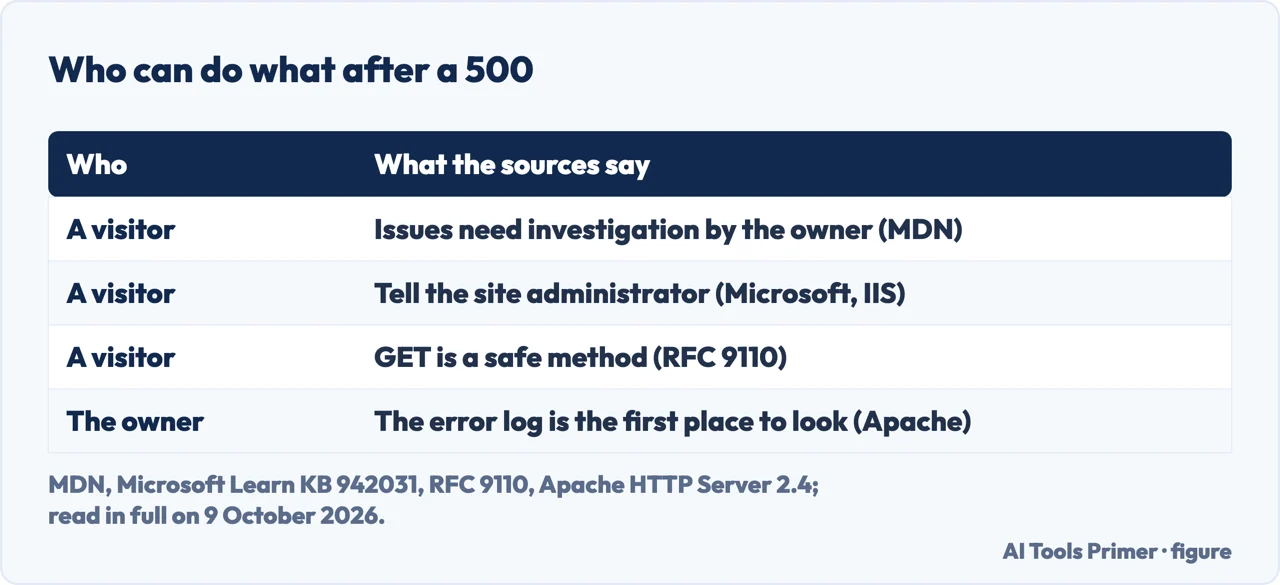
A 500 internal server error means, in the HTTP standard’s words, that the server encountered an unexpected condition that prevented it from fulfilling the request; MDN calls the code a catch-all. A visitor can tell the site’s administrator, as Microsoft’s IIS article says; on the server side, Apache calls the error log the first place to look.
| Code | What RFC 9110 says it indicates |
|---|---|
| 5xx, the class | The server is aware that it has erred or is incapable of performing the requested method |
| 500 Internal Server Error | The server encountered an unexpected condition that prevented it from fulfilling the request |
| 502 Bad Gateway | The server, acting as a gateway or proxy, received an invalid response from an inbound server it accessed |
| 503 Service Unavailable | The server is currently unable to handle the request due to a temporary overload or scheduled maintenance; it may send a Retry-After header |
| 504 Gateway Timeout | The server, acting as a gateway or proxy, did not receive a timely response from an upstream server |
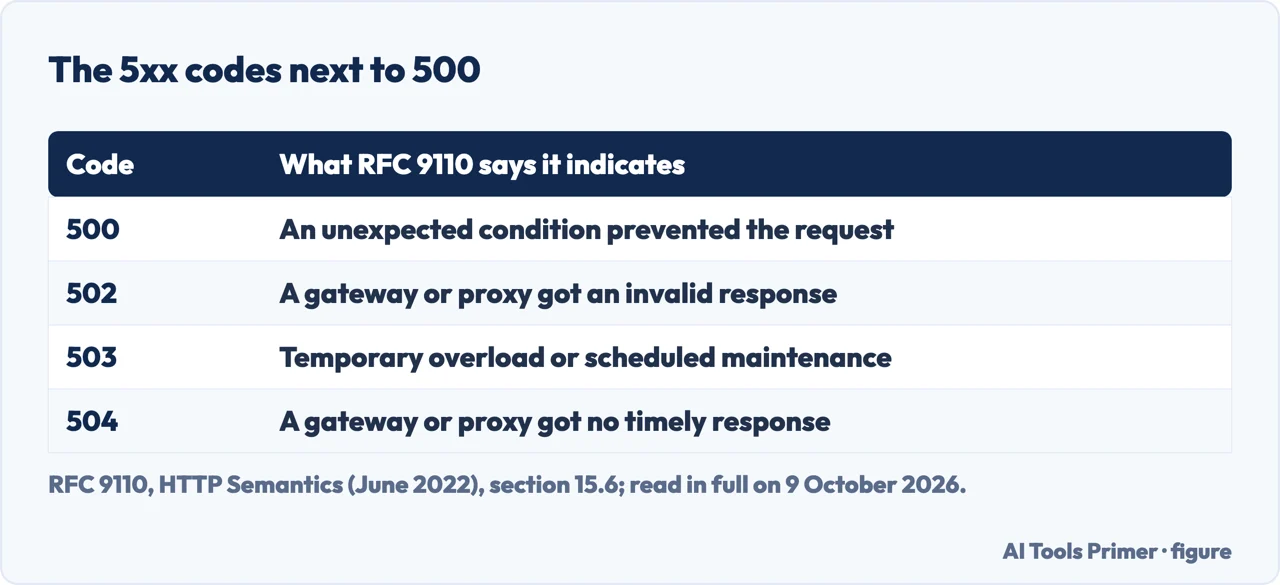
Two readers. If the error is on someone else’s site, the part for you is the visitor section below, and it is short. If the site is yours, the order is further down. The difference between HTTP and HTTPS is a separate question, in HTTP and HTTPS.
What the code says, and what it leaves out
The standard. RFC 9110, the HTTP Semantics specification of June 2022, defines 500 in one sentence: the server encountered an unexpected condition that prevented it from fulfilling the request. For the whole 5xx class it asks the server, except for a HEAD request, to send an explanation of the error situation and whether it is a temporary or permanent condition, and the browser to display it. The reason phrase, “Internal Server Error”, is only a recommendation: RFC 9110 says it can be replaced by a local equivalent or left out.
A catch-all. MDN calls 500 a generic catch-all response, sent when the server can’t find a more appropriate 5xx code. Among the causes it lists improper server configuration, out-of-memory issues, unhandled exceptions and improper file permissions. The code names none of them. RFC 9110 asks the server to explain the error situation in its response, and Apache says its error log will often contain details of what went wrong.
Not the same as a page that won’t load. A 500 is a status code the server sends. A site that gives no answer at all is in this site can’t be reached, and a browser warning about the connection is in your connection is not private.
If you are visiting the site
Who investigates. MDN says that a visitor seeing 500 errors on a page is looking at issues that require investigation by the server’s owners or administrators, and Microsoft’s article on HTTP Error 500.0 in IIS says end users who see those errors should notify the site’s administrator.
Reloading. RFC 9110 defines GET as safe and idempotent; POST is neither, and the standard says a client should not automatically retry a non-idempotent request unless it knows the request is actually idempotent. In our reading, opening a page is a GET and a submitted payment usually a POST, so reloading a page after a 500 is low-risk and resubmitting a payment may not be. Check the order or the account before paying twice.
Cache and cookies. Google’s help says clearing them can resolve website loading or formatting issues, and that some settings on sites get deleted: if you were signed in, you’ll need to sign in again. None of the pages read here ties a 500 to the browser’s cookies. In Chrome on a computer: More, then Delete browsing data, a time range, Cookies and other site data and any other items, and Delete data. In Firefox: Settings, Privacy & Security, Clear Data, When set to Everything, with only Temporary cached files and pages checked, then Clear.
For the site owner: where to look
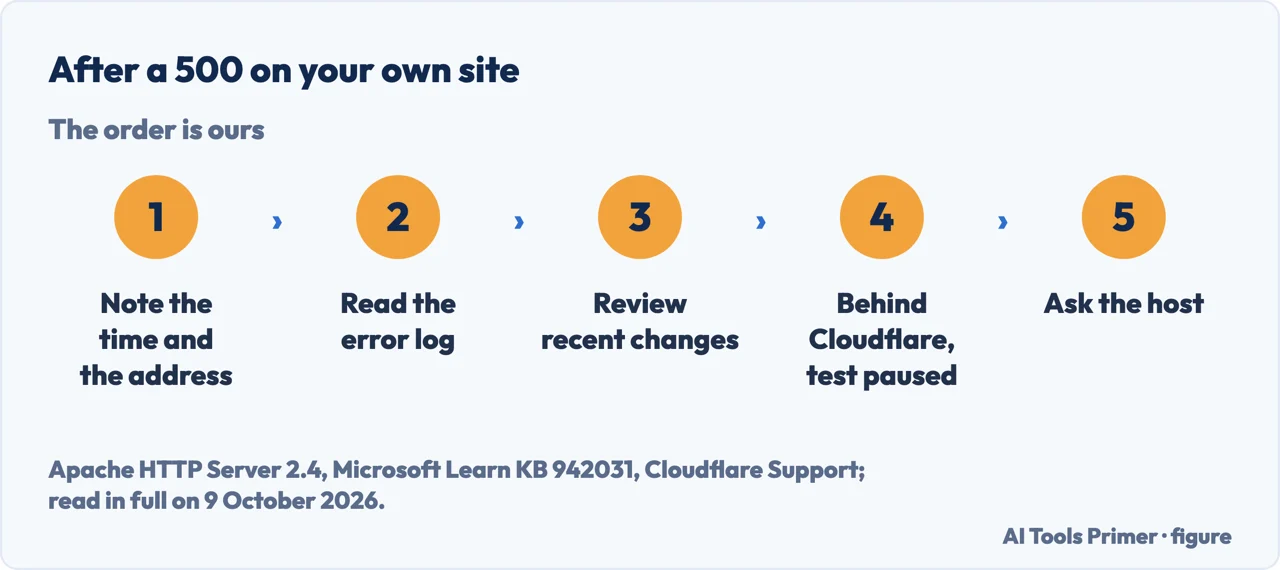
The order below is ours, put together from Apache’s documentation, Microsoft’s IIS article and Cloudflare’s page on Error 500; each step says whose it is.
- Note the time and the address. For a 500 that names Cloudflare in the response body, Cloudflare support asks for the domain, and the time and timezone of the error; MDN shows a request ID in the error page as a method that may help administrators narrow down the cause.
- Read the error log. Apache calls its error log the most important log file and the first place to look when a problem occurs; it is usually error_log on Unix and error.log on Windows, set by the ErrorLog directive. On IIS, Microsoft says to check the Application event log, or your own custom Application log, for any exception thrown from the web application code.
- Review recent changes. Behind Cloudflare, its troubleshooting steps start with reviewing recent changes to Page Rules, Transform Rules or Workers.
- Behind Cloudflare, test without it. Cloudflare says the error indicates a problem with the origin web server, and to contact Cloudflare support if the response body contains cloudflare or cloudflare-nginx; its steps include pausing Cloudflare temporarily to see whether the issue is origin-related.
- Then the host. For most 5xx errors Cloudflare’s first step is the hosting provider or the site administrator, with the error details.
What the logs and the error pages say
Apache. In Apache’s typical log message, a line gives the date and time, the module and the severity, the process ID and, if appropriate, the thread ID, the client address and the message; the ErrorLogFormat directive sets what is logged. Anything a CGI script writes to stderr goes into the error log as it is, and a %L token in both the error log and the access log gives the two entries the same ID. Apache says that in httpd 2.4 some messages once logged at error level moved to info, and don’t appear with the default LogLevel of warn.
IIS. Microsoft’s article for HTTP Error 500.0 is intended for web site administrators, its procedures must be performed by a member of the administrator group on the server, and it goes by HRESULT code. One of them is a server that can’t access the configured root directory of the requested location. 0x8007000d: the IsapiModule is missing from the site’s modules list. 0x800700c1: a script mapping isn’t valid. Several of its fixes are made in IIS Manager, opened with inetmgr.exe.
Cloudflare. Its page calls “Error establishing database connection” a common 500, typically from the origin server, and says Error 500 can also occur when using Cloudflare Workers, for example when a Worker throws a runtime JavaScript exception, with the logs in the Workers dashboard. For a 500 that names Cloudflare in the body, its support wants the domain, the time and timezone, and the output of /cdn-cgi/trace from the browser that saw the error.
Which versions. RFC 9110 dates from June 2022 and is the standard that defines the codes; MDN’s page was last modified on 22 June 2026. The Apache page is for HTTP Server 2.4, the IIS article is Microsoft article 942031, last updated 8 January 2025, and Cloudflare’s page was last updated on 23 April 2026. A slow answer rather than an error is a different problem, in slow DNS lookup.
Where to start
Five ways in.
- “What does 500 mean?”
- What the code says — what it says
- “It’s someone else’s site.”
- If you are visiting — if you are visiting
- “It’s my site.”
- The order — if it is your site
- “Where is the cause?”
- The logs — what the logs say
- “Is it 502, 503 or 504?”
- The table — first
Other errors a browser shows
No answer at all, a certificate the browser refuses, and a slow name lookup.
Questions people also ask
How to fix internal server 500 error?
On your own site, in our order: the error log, which Apache calls the first place to look (on IIS, Microsoft points to the Application event log); recent configuration changes, which Cloudflare says to review; the hosting provider, Cloudflare’s first step for most 5xx errors. On someone else’s site, MDN says it needs investigation by the server’s owners.
Is 500 server error my fault?
As a visitor, the standard puts it on the server: RFC 9110 says a 5xx code means the server is aware that it has erred or is incapable of performing the requested method, and MDN says a 500 needs investigation by the server’s owners or administrators. Microsoft’s IIS article tells end users to notify the site’s administrator.
Does a 500 error mean the site is down?
Not necessarily: the server answered, and RFC 9110 says a 500 means an unexpected condition prevented it from fulfilling the request. Whether the rest of the site works the code doesn’t say, and MDN’s causes include improper server configuration. An overloaded server may send 503, and RFC 9110 notes that some servers might simply refuse the connection.
Is error 500 temporary?
The code doesn’t say, in our reading of RFC 9110: it asks the server to explain, in the error page, whether the condition is temporary or permanent, and defines 503 for a temporary overload or scheduled maintenance, with an optional Retry-After header.
Not covered here. It does not cover debugging a specific application framework, nginx, or any hosting control panel.
Sources
- RFC 9110, HTTP Semantics (June 2022) — sections 9.2.1, 9.2.2, 10.2.3, 15.1 and 15.6 — www.rfc-editor.org, read 9 October 2026.
- MDN Web Docs — 500 Internal Server Error — developer.mozilla.org, read 9 October 2026.
- Apache HTTP Server 2.4 documentation — Log Files — httpd.apache.org, read 9 October 2026.
- Microsoft Learn — HTTP Error 500.0 Internal Server Error when you open an IIS webpage (article 942031) — learn.microsoft.com, read 9 October 2026.
- Cloudflare Support docs — Error 500 — developers.cloudflare.com, read 9 October 2026.
- Google Account Help — Clear cache & cookies (computer) — support.google.com, read 9 October 2026.
- Mozilla Support — How to clear the Firefox cache — support.mozilla.org, read 9 October 2026.
Written by Alberto Gulotta
Founder and editor of AI Tools Primer, writing from Palermo, Italy. Thirty-five years of taking computers apart, starting with a Commodore 64 — the long version is on the about page.
Something wrong on this page? Write to aitoolsprimer@gmail.com and it gets fixed.
Written on 9 October 2026.
Independence and limits
No affiliate links and no paid placements anywhere on this site. Nobody pays to appear here, and no company has seen this page before you did.
This is general information, not professional advice. Where a page touches money, health, safety or the law, it names its source and the date it was read — and your situation may still differ. See the privacy page and the cookie policy.