
Breach · guide
How to check if your email has been hacked: signs and settings
By Alberto Gulotta · Updated · 14 min read
How to check if your email has been hacked: the FTC lists four signs, from a login you did not make to messages your contacts say you sent. Microsoft shows 30 days of sign-ins, and the FTC and Mimecast name forwarding rules and sent mail as places to look, while only Mimecast names connected apps.
| Question | Answer | Where it comes from |
|---|---|---|
| What are the signs? | The FTC lists four: no login, a change notice you did not make, an unknown login, messages you did not send | FTC |
| Where is the sign-in history? | Microsoft’s Recent activity page shows the last 30 days, with the IP address and device when you open an entry | Microsoft Support |
| What changes quietly? | Forwarding rules, the sent and deleted folders, recovery details and connected apps | FTC, Mimecast |
| Does a leaked address mean a hacked inbox? | The Have I Been Pwned page describes breaches an address appeared in, not a sign-in to the mailbox | Have I Been Pwned |
| What comes first once you are in? | The FTC says a new password, then signing out of all devices, then 2FA | FTC |
Is it your inbox or just a leaked address?
A lookup tool answers a narrower question than the one in the title. The home page of Have I Been Pwned asks you to check whether your email address is in a data breach and shows one of two results: a “Good news” message that the address was not found in any of the breaches loaded into the service, or a message that it was found in multiple breaches, with a timeline of them to review. Both results are about where an address appeared. The page we read does not describe a sign-in to the mailbox. Our page on whether Have I Been Pwned is safe covers what the service does with the address you type.
Avast’s Hack Check works the same way from a company’s side. Avast says it checks whether data linked to your email has been involved in a data leak and sends the report to your inbox, and its page states that reports expire after 24 hours. If passwords turn up, it tells you to change them, and to change any other account where you reused them. It is a vendor’s page, and it does not say what to look at inside the mailbox itself. For how a leaked password is tried on other websites, see our page on credential stuffing.
The FTC explains why the mailbox gets its own check. If someone gets into your email account, it says, they can request a password reset link for any of your other accounts, take the link from your inbox, change the password and lock you out. That is the reason the rest of this page is about what happens inside the mailbox, not whether an address is on a list.
The signs, as the pages list them
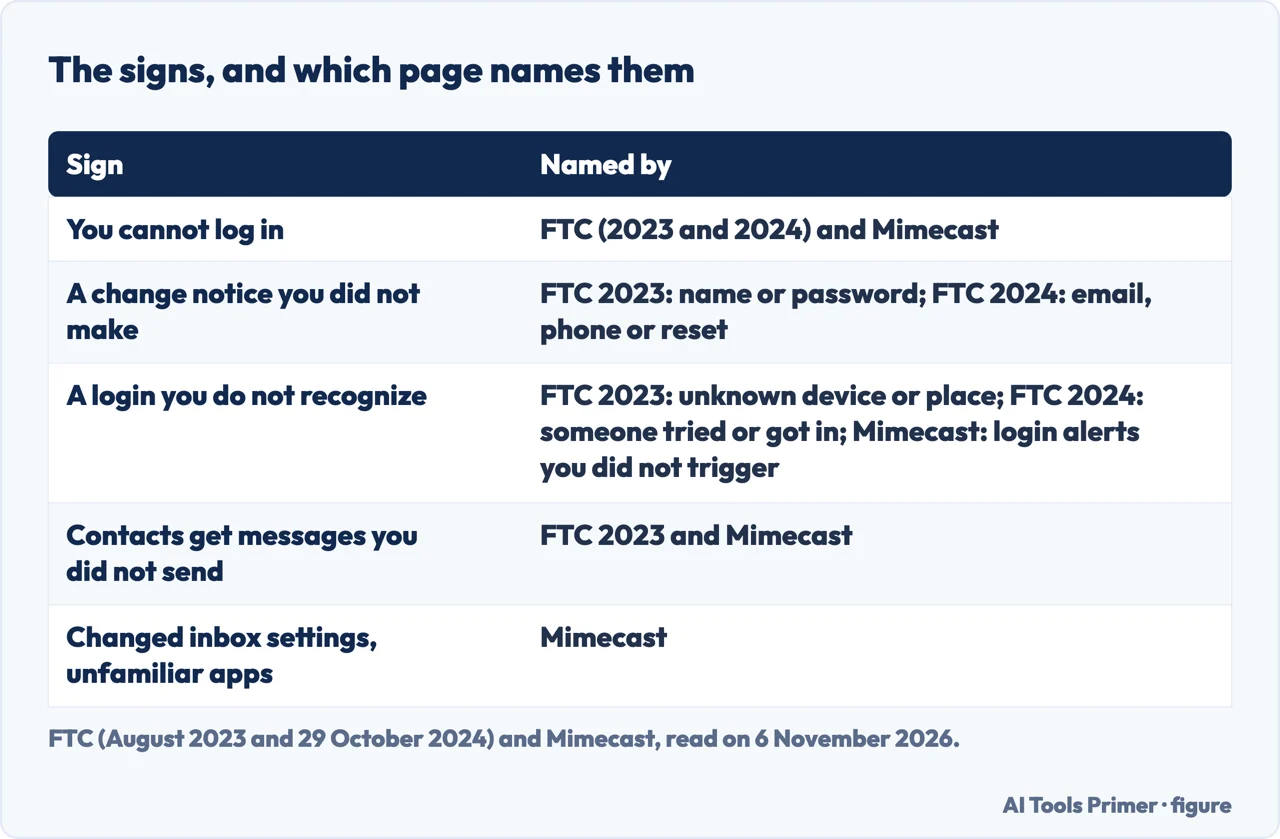
The FTC’s guide to recovering a hacked email or social media account, dated August 2023, lists four signs. You cannot log in. You get a notification about a change to your username or password that you did not make. You get a notification that someone logged in from a device you do not recognize or a place you are not at. Or friends and family report emails or messages you did not send, sometimes with random links or fake pleas for help or money.
The FTC’s consumer alert of 29 October 2024 phrases it differently. It lists a notification that your email address or phone number changed, or that your password was reset, when you made no such change; a message that someone tried to log in, or did, and it was not you; and being unable to log in. The two pages overlap but are not the same list, and the older one does not mention a changed phone number or a password reset.
Mimecast, a company that sells email security to businesses, gives eight signs in one article. Besides the ones above, it names unfamiliar messages in the Sent or Outbox folder, login alerts you did not trigger, unexpected password resets or multi-factor prompts, changed inbox settings, unfamiliar app connections, and an antivirus program or IT team reporting unusual network behavior. It calls repeated sign-in prompts a “push fatigue” attack, where the person is asked again and again to approve in the hope that they give in. We use Mimecast only for what it lists, since it also promotes its own product.
Microsoft’s own alerts add one way to check a message. If you get an email about unusual activity and are not sure it comes from Microsoft, Microsoft says you can sign in to your account without clicking the links in the email. It gives account-security-noreply@accountprotection.microsoft.com as the address the account team writes from.
The sign-in history, with Microsoft’s page as the example
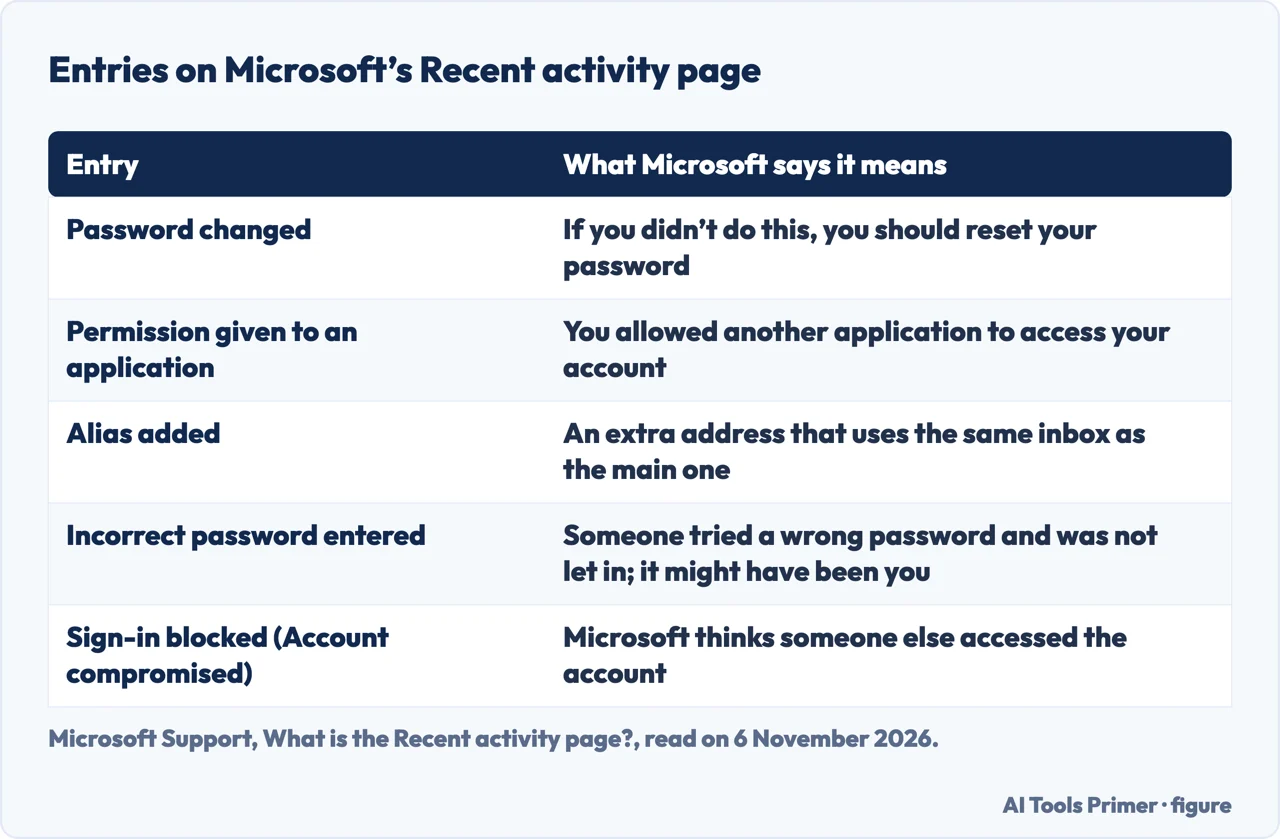
Microsoft’s Recent activity page shows when and where you used your Microsoft account within the last 30 days. You can open any entry to see location details and how the account was accessed, whether by web browser, phone or another method. For each entry Microsoft lists the date, time, location and type of activity, and on opening one you also see the IP address of the device, a map, the type of device or operating system, and the browser or app. Microsoft adds that mobile phone services route activity through different locations, so a sign-in can look as if it came from somewhere other than where you were.
The page has two sections, and the buttons differ. In an Unusual activity section, opening an entry shows the buttons This was me and This wasn’t me, and Microsoft says they appear only there. It tells you to choose the second if the activity was not yours or you are not sure, and says you will then be asked to change your password and update your security info. Microsoft also says it may mark activity as unusual when you use the account on vacation, get a new device or let an app sign in as you, so a flagged entry can be your own. For a suspicious entry in the Recent activity section, such as several sign-in attempts or profile changes you did not make, it says to select Secure your account. If the page shows only a Recent activity section, Microsoft says you do not need to confirm anything.
The history is not complete. Microsoft states that it does not show all account activity: you will usually just see significant events that could affect account security, and that if you use the same device in the same place several times in a row you might see only the first sign-in. The page also does not reach past 30 days, while the FTC pages we read put no time limit on what to check. For a Google account, Google's help page about securing a hacked Google Account sat behind an anti-robot check and we did not read it, so this page gives no Gmail menu paths. Yahoo and Apple were not read either.
What gets changed without a sign
The FTC’s steps for after you are back in include looking at things that do not announce themselves. Check your email settings for rules that forward emails, and delete any you did not set up, so your messages are not forwarded to someone else’s address. Check the sent folder for emails the hacker sent from your account, and the deleted folder for emails the hacker may have read and then deleted. The 2024 alert repeats the forwarding point and says hackers might create such rules to send your emails to another address.
Mimecast goes further on the same ground. It says rules and filters can be set up to delete evidence of outgoing messages, and that changed inbox behavior, such as missing messages or folders rearranged, may point to unauthorized activity. Its steps are to check all filters, forwarding addresses and recovery options, and to disable unknown rules. It also names connected apps: it says people link their email to productivity apps and other services, and that attackers can use OAuth tokens, which give access without the password. Mimecast says this lets an attacker keep access after you change your password, and tells you to review connected apps in the provider’s security dashboard and revoke the ones you do not know. The FTC pages we read do not mention connected apps.
Microsoft lists the same changes as entries on its activity page. A “Permission given to an application” entry means you allowed another application to access your account. Alias, alternate email, phone number and authentication app entries show security info added or removed, and an alias is an extra address that uses the same inbox and settings as the main one. A “Password changed” entry comes with the line that if you did not do this, you should reset your password. Of the pages we read, only Microsoft’s mentions aliases. The pages we read do not say where Outlook.com keeps its forwarding rules.
Closing it, in each page’s order
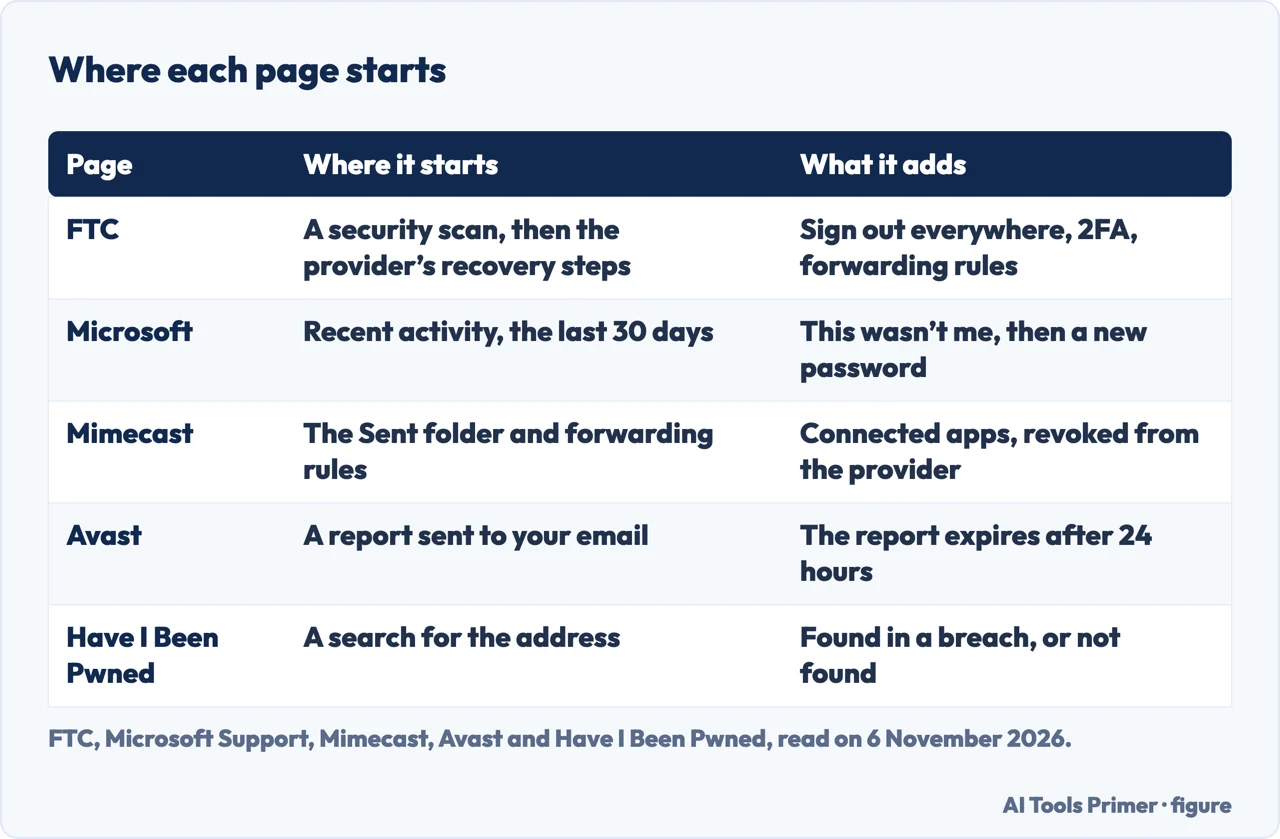
The FTC starts before the password. If you cannot get in, it says to make sure your computer’s security software is up to date and run a scan, delete anything suspicious it finds, restart, and then follow the provider’s account recovery instructions. Once you are back in, it says to change the password, sign out of all devices so anyone logged in elsewhere is kicked out, turn on two-factor authentication, and check that the recovery email addresses and phone numbers listed are ones you entered and can reach. The 2024 alert asks for a password of 12 to 15 characters or a passphrase, a series of words separated by spaces, and says that if you believe someone stole your personal information you can report it at IdentityTheft.gov. The 2023 guide also says to tell your contacts not to click links in emails from you.
Microsoft starts from its own pages. On Security basics, Review activity opens the Recent activity page and Change password comes next. If someone else changed your password and you cannot sign in, it says to try the reset, and if that fails to choose Forgot my password and then I think someone else is using my Microsoft account. It also says you can remove all trusted devices. Microsoft states that its support agents are not allowed to send password reset links or change account details. For Gmail, our page on resetting a Gmail password covers getting back in.
Mimecast’s version is shorter: change the password from a device you know is secure, turn on multi-factor authentication, preferably through an authenticator app rather than text messages, review sent messages, forwarding rules and connected devices, and tell contacts to disregard suspicious messages. The pages differ most in where they begin. The FTC begins with the computer, Microsoft with the sign-in history, and Mimecast with the Sent folder.
What the pages leave out
This page rests only on the pages listed under Sources, read on 6 November 2026. The Google Account help page on securing a hacked account was blocked by an anti-robot check, so the Gmail settings for forwarding, device activity and app access are not described here; our page on what to do if your email is hacked compares the FTC, Google and Microsoft and covers the settings Google lists for Gmail. The Microsoft pages we read do not say where Outlook.com keeps forwarding rules. The pages we read do not say how long a connected app keeps access after a password change; Mimecast says in general that it can last, and does not name a provider. They do not describe how to see connected apps for any one provider either, and they give no figure for how often accounts are hacked through forwarding rules.
The Yahoo and Apple account help pages were not read, so this page makes no claim about their settings.
Where to start
Four ways in.
- “Is my address in a breach?”
- Is it your inbox or just a leaked address? — address
- “What are the signs?”
- The signs, as the pages list them — signs
- “Who signed in?”
- The sign-in history, with Microsoft’s page as the example — history
- “What did they change?”
- What gets changed without a sign — quiet
Addresses and passwords in a breach
Three checks that look up an address or a password.
After the break-in
Getting back in and closing what was reused.
Questions people also ask
How can I tell if my mail has been hacked?
The FTC lists four signs: you cannot log in, you get a change notice you did not make, you get a login alert from an unknown device or place, or contacts get messages you did not send. Microsoft’s Recent activity page shows 30 days of sign-ins, and the FTC says to check the sent folder.
What does a hacked email look like?
The FTC and Mimecast describe messages in the sent folder that you did not write, contacts reporting odd emails from you, and notices that your password, email address or phone number changed. The FTC and Mimecast also name forwarding rules you did not set up.
Can you tell if someone is accessing your email?
Microsoft’s Recent activity page lists when and where the account was used in the last 30 days, with IP address and device on opening an entry. Microsoft says it does not show all activity. The Google equivalent was not read.
How do I unhack my email account?
The FTC says to run a security scan, then follow the provider’s recovery steps. Once in, change the password, sign out of all devices, turn on 2FA, check the recovery details, and delete forwarding rules you did not set up.
Not covered here. The statements come from two FTC pages, two Microsoft Support pages, Mimecast, Avast and Have I Been Pwned, all read on 6 November 2026.
The search volume and difficulty behind this page come from an Ubersuggest reading of 5 November 2026 (United States), which gives search volume and its own SEO difficulty score, not Semrush’s; a Semrush check is still to be made.
Sources
- FTC — How To Recover Your Hacked Email or Social Media Account (August 2023) — consumer.ftc.gov, read 6 November 2026.
- FTC — Email or social media hacked? Here’s what to do (29 October 2024) — consumer.ftc.gov, read 6 November 2026.
- Microsoft Support — What is the Recent activity page? — support.microsoft.com, read 6 November 2026.
- Microsoft Support — What happens if there’s an unusual sign-in to your account — support.microsoft.com, read 6 November 2026.
- Mimecast — 8 Signs Your Email Has Been Hacked (a security vendor) — www.mimecast.com, read 6 November 2026.
- Avast — Hack Check (a security vendor) — www.avast.com, read 6 November 2026.
- Have I Been Pwned — home page — haveibeenpwned.com, read 6 November 2026.
Written by Alberto Gulotta
Founder and editor of AI Tools Primer, writing from Palermo, Italy. Thirty-five years of taking computers apart, starting with a Commodore 64 — the long version is on the about page.
Something wrong on this page? Write to aitoolsprimer@gmail.com and it gets fixed.
Written on 6 November 2026.
Independence and limits
No affiliate links and no paid placements anywhere on this site. Nobody pays to appear here, and no company has seen this page before you did.
This is general information, not professional advice. Where a page touches money, health, safety or the law, it names its source and the date it was read — and your situation may still differ. See the privacy page and the cookie policy.