
Chat · guide
Is Copilot free, and where the free one stops
By Alberto Gulotta · Updated · 17 min read
Is Copilot free? There is a free version, and Microsoft calls it limited. Its support article names three versions of Copilot: the free one, the one in individual Microsoft 365 plans and the one in business plans. The pages we read give no figure for the free limit, and four paid plans, from $9.99 to $99.99 a month, raise it.
| Question | Answer | Where it comes from |
|---|---|---|
| Is there a free version? | Yes: Microsoft calls it limited and says it depends on available capacity | Microsoft Copilot pricing page |
| Do I need an account? | Signing in is not required, but a personal account adds chat history, images, longer conversations and voice | Microsoft Support |
| How many messages does it allow? | The pages we read give no figure | Microsoft pricing and support pages |
| Is Copilot in Word and Excel free? | It comes with a paid Microsoft 365 plan, and only the subscription owner gets it | Microsoft pricing page, Microsoft Support |
| Is Copilot Pro still sold? | Microsoft said on 1 October 2025 that it would stop selling it | Microsoft Copilot blog |
| Is GitHub Copilot the same thing? | It is a separate product with its own plans, and a Free plan limited to 2000 completions a month | GitHub Docs |
Short answer, and the word that hides three products
Microsoft’s pricing page for individuals puts the question as its first frequently asked one, “Is Copilot free?”, and answers yes: Microsoft offers a limited free version of Copilot, subject to available capacity and limits, and when you hit a limit you can choose to upgrade to a paid option or come back later. The same answer adds that Copilot is included with eligible Microsoft 365 subscriptions for deeper use in Word, Excel, PowerPoint and Outlook, with additional features and larger AI usage allowances.
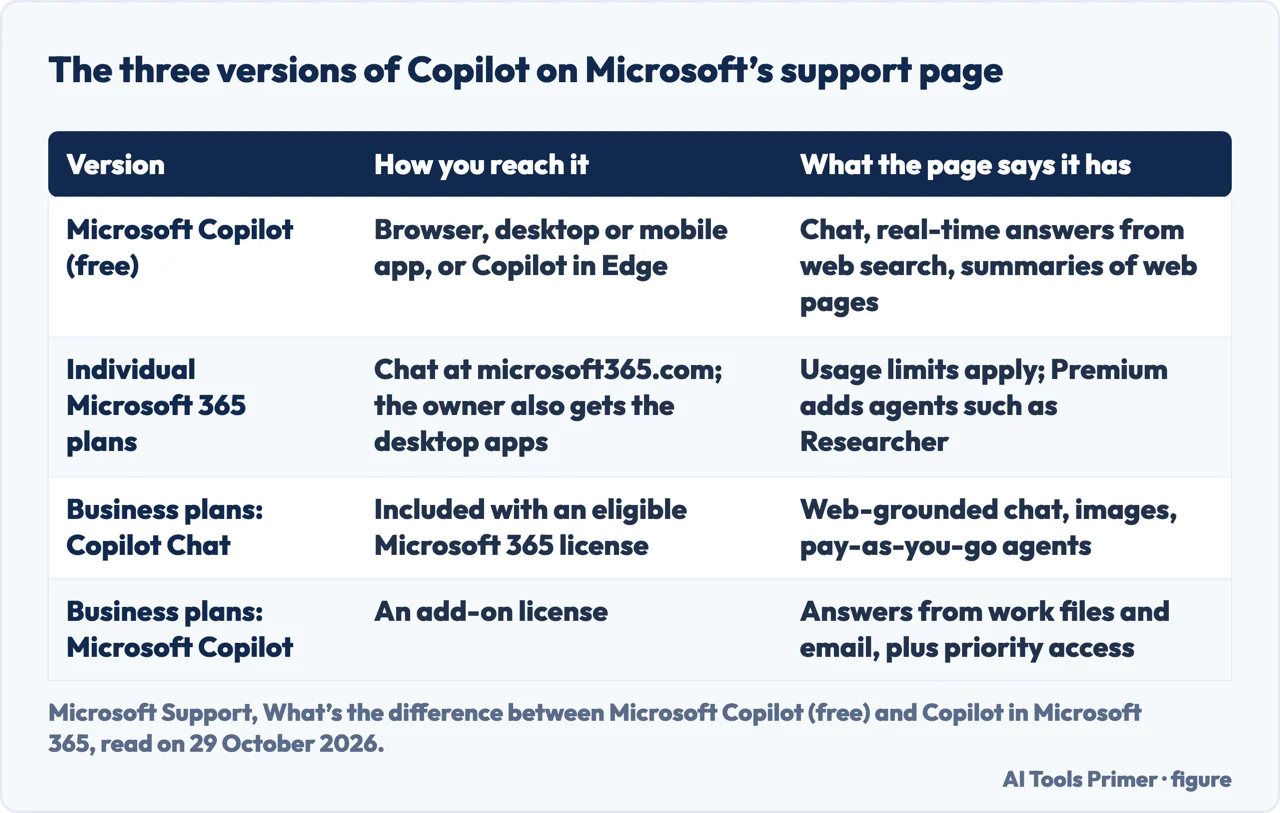
The word “Copilot” covers more than one thing. Microsoft’s support article on the difference opens by naming three: Microsoft Copilot (free), Copilot in eligible individual Microsoft 365 plans, and Copilot in Microsoft 365 business plans. It describes the free one as available free of cost and suited to general questions and answers, to people trying AI for the first time, and to web-based tasks. The table below puts the three side by side as that article describes them. The article carries no date in its text, so we give the day we read it.
We opened no account and tested no limit. Every statement on this page is what a page says, with the day we read it, and the prices are the ones in the United States on 29 October 2026. A fourth thing with the same name, GitHub Copilot for programmers, is a separate product that we come to at the end.
What the free one does, with and without an account
The support article says the free version can be used in a web browser at copilot.cloud.microsoft, downloaded as an app on a desktop or mobile device, or used directly in Copilot in Edge. It lists Windows, macOS, iOS and Android, and the header of Microsoft Edge. Signing in is not required. Signing in with a personal account, the article says, gives access to chat history, image creation, longer conversations, voice interactions and other Copilot features. So an account does not cost anything on that page, and it opens more than using the tool without one.
The article lists three things the free version lets you do: chat with AI for help with writing, brainstorming, summarizing and more; get real-time answers based on web search; and use Copilot in Edge for summaries and insights on a web page. A tip on the page adds that Copilot features, functionality and availability may vary by region.
A second description comes from Sally, a company that sells tools for meeting notes, in an article marked as updated in July 2026. We use it only for facts. It lists chat, answers from the web, writing, brainstorming, summaries of documents and websites, image creation, voice input and chat history, all with a Microsoft account. It also says the free tier does not work inside the Office desktop apps, which matches the table in Microsoft’s own blog post of 1 October 2025: in the Free column, Copilot in Word, Excel, PowerPoint, Outlook and OneNote is marked “No”, and the Personal, Family and Premium columns are marked “Yes”.
The pages do not agree on the address. Microsoft Support gives copilot.cloud.microsoft, and Sally writes copilot.microsoft.com. We do not say which one is the right one; we say which one each page we read gives.
Where the free one stops: limits and credits
For the free version the only description of the ceiling is the pricing page’s: limited, subject to available capacity and limits. The pages we read do not say how many messages or images a free account gets, in a day or in a month. Microsoft Support’s article on the individual plans says that usage limits apply to them, and it links to a page on AI credits and limits, which is the one that has a table.
That page, marked “Last updated: October 2026”, covers Microsoft 365 Personal, Family, Premium and Pro. It says these plans include AI features, that some have limits on the number of times they can be used in a specific period, and that others need AI credits. It separates the two: feature limits are the total number of times you can use a feature within a timeframe, and AI credits are monthly allotments you can spend as you go in Microsoft 365 and Windows applications. Usage is tracked in apps such as Copilot, Designer, Photos, Paint, Notepad, Word and Excel, and Microsoft’s frequently asked questions add Outlook, Forms and OneNote. You can see your usage in your Microsoft account under Services & subscriptions, and the product warns you when you approach or reach a limit.
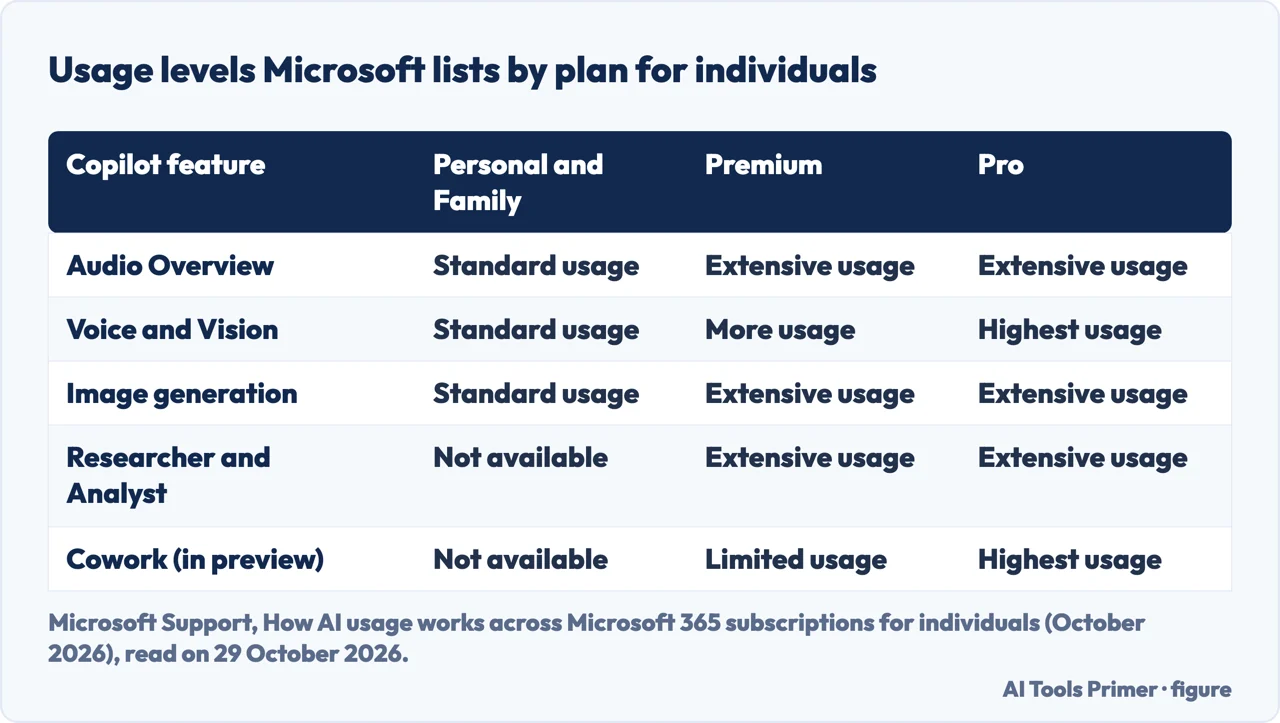
The table on that page rates each feature by plan, in words. Chat, deep reasoning and Pages read “Extensive usage” on all four plans, and priority access is marked yes on all four. The rest differ, and Personal and Family read the same on every row.
When a limit is reached, the pricing page says the feature may be unavailable until your allowance resets. The credits page adds that limits may vary with the feature, the entry point and system conditions, and may change over time as new AI models become available. The pages we read do not give a number of credits for any plan, and they do not say whether more can be bought.
The two Microsoft pages do not describe chat the same way. The pricing page calls the chat on Personal and Family advanced Copilot chat with “higher usage than free”, while the credits page lists chat as extensive usage on every plan, Premium and Pro included. Neither page says how the two fit together, so we give both. What the credits page does separate is audio, voice, vision, images, agents and Cowork, the feature Microsoft marks as in preview and available only in the United States and Canada.
What a subscription adds, and who in the family gets it
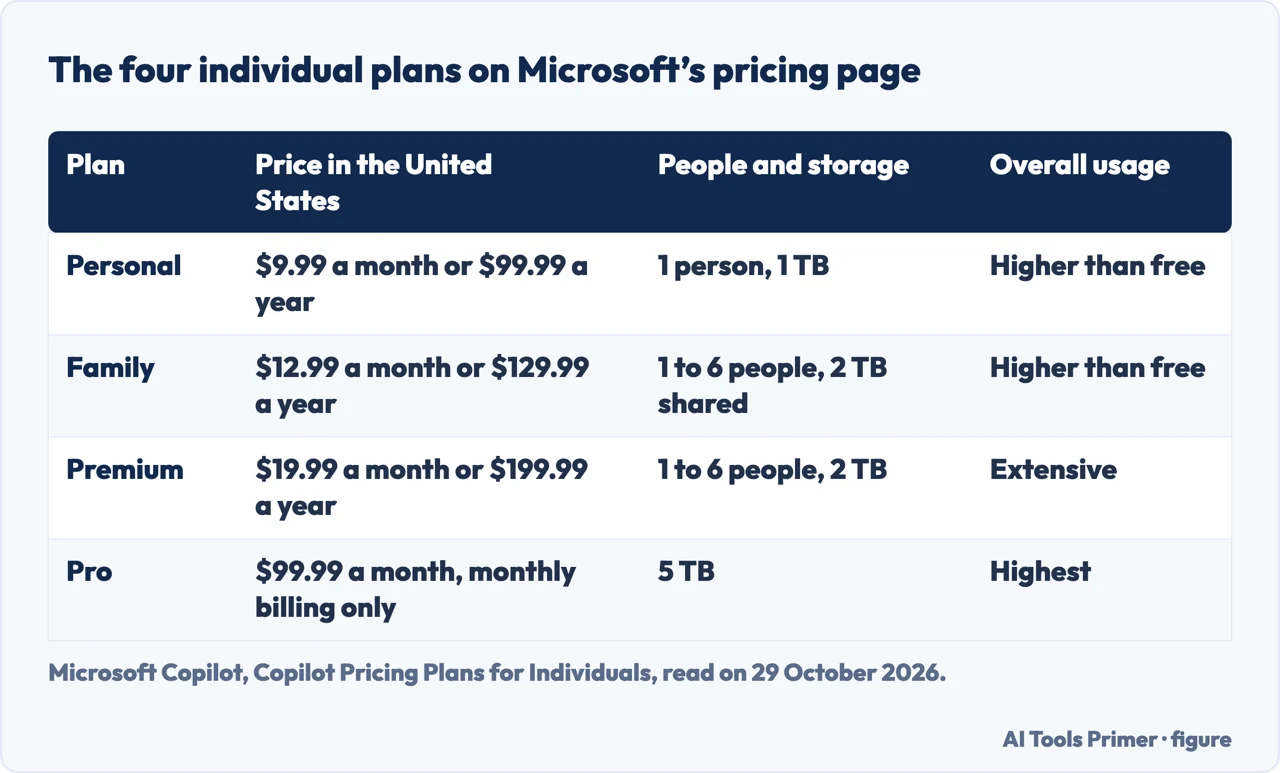
Microsoft’s pricing page lists four plans for individuals. Personal is $9.99 a month or $99.99 a year for one person with 1 TB of storage. Family is $12.99 a month or $129.99 a year for one to six people with 2 TB shared. Premium, which the page labels “Best for AI & productivity”, is $19.99 a month or $199.99 a year for one to six people with 2 TB. Pro is $99.99 a month, with monthly billing only and 5 TB. Subscriptions renew automatically unless cancelled in the Microsoft account. The usage row of its comparison table reads “Higher than free” for Personal and Family, “Extensive” for Premium and “Highest” for Pro, and the row for image generation reads the same.
Personal, Family and Premium show “Try free for 1 month” next to the price; Pro shows Buy now and no trial button. In its frequently asked questions, Microsoft says the one-month trial covers Personal, Family and Premium, and that availability, duration, eligibility and whether payment details are needed vary by offer and region.
All four plans list Copilot in the Word, Excel, PowerPoint and Outlook desktop apps, with a note that the AI features are only available to the subscription owner and cannot be shared, and that usage limits apply. The support article adds OneNote. Premium is the plan that, in the support article, has exclusive access to agents such as Tasks, Analyst and Researcher. The pages differ on that: the pricing page gives Premium limited usage for agentic AI, including advanced research and analytics, and the credits page marks Researcher and Analyst as extensive usage for Premium and Pro and as not available on Personal and Family.
On the family, the pricing page says Family benefits such as the apps and OneDrive storage can be shared with up to five people, but Copilot in Word, Excel, PowerPoint and Outlook is only for the subscription owner. The support article adds that someone who is given Family or Premium through sharing can still use Chat at microsoft365.com by signing in with the Microsoft account of that subscription. Copilot in Excel, the frequently asked questions say, needs AutoSave switched on, which means the file must be saved to OneDrive.
Two more conditions appear in those questions. AI features in the Word, Excel, PowerPoint, Outlook and OneNote apps are disabled for users under certain ages, which depend on the region and are listed on a page we did not open. The page also says you cannot turn off Copilot features in Designer, Notepad or Paint, and that parents who want to limit AI in Paint and Notepad can use Windows Family Safety controls.
The October 2025 blog post says the same plans can be used at work in a limited way. With Personal, Family or Premium, you can use select Copilot features on files saved in your organization’s OneDrive or SharePoint, and administrators decide whether that is allowed. The frequently asked questions say that if an employer has multi-account access turned on, the personal subscription can be used at work and permissions stay tied to the work account. The blog post, and the pricing page in its frequently asked questions, also mention the Frontier program of experimental features for individual subscribers.
Copilot Pro is gone, and older pages still say $20
On 1 October 2025, Microsoft’s Copilot blog, in a post by Yusuf Mehdi, introduced Microsoft 365 Premium at $19.99 a month as a plan that combines everything in Microsoft 365 Family and Copilot Pro. In the same post Microsoft says it will no longer sell Copilot Pro, and that Copilot Pro subscribers can switch to Premium. Sally says Copilot Pro was retired in late 2025; the Microsoft post gives the day, 1 October.
An article from 2024 predates that. UC Today, in a piece by Rebekah Carter dated 6 May 2024, describes Copilot Pro at $20 a month per user, on top of a Microsoft 365 subscription it prices at $6.99 for one person and $9.99 for a family, for a total it puts at around $26.99 to $29.99 a month. Today’s pricing page shows $9.99 and $12.99 for those two plans. The article also says Bing Chat and Bing Chat Enterprise were rebranded to Microsoft Copilot. This is a matter of dates rather than of quality: the article is a reminder to look at the date before taking a price from any page.
The numbers inside Microsoft’s own pages have moved too. The blog table of October 2025 gave Family and Premium “Up to 6 TB (1 TB per person)” and put Premium usage at “Highest”. The pricing page of 29 October 2026 gives 2 TB shared on Family and 2 TB on Premium, and “Extensive” for Premium usage, with “Highest” now on Pro. Sally, in July 2026, writes 6 TB of shared storage for Family. We give each number with its page and date.
Work licenses, and the other Copilot
For organizations the support article describes two things. Microsoft Copilot Chat is included automatically with an eligible Microsoft 365 license: web-grounded chat, research, summaries of documents and web pages, image creation and pay-as-you-go agents, with standard access to file upload, image generation and models. Microsoft Copilot is an add-on license that includes all of that and adds answers from work data such as files, emails, chats and people, agents built on that data, Researcher and Analyst, advanced features in the apps, meeting summaries in Teams where available, more security and compliance tools, and priority access for faster responses. The article gives no price for the add-on. Sally, which sells meeting-note software, puts it at about $30 per user per month; that is a vendor’s figure and we give it as such.
GitHub Copilot is a different product with the same name, documented on GitHub’s own site. Its page on individual plans lists Free, Student for verified students, Pro at $10 a month, Pro+ at $39, Max at $100, and Business at $19 and Enterprise at $39 per seat. Copilot Free has limited access to a selection of features, an allowance of GitHub AI Credits, limited agents, automatic model selection only and up to 2000 completions a month. The page says Free is only available to individual developers who do not have access to Copilot through an organization or enterprise. We have not read anything that says how a GitHub plan and a Microsoft 365 plan relate, so we say only that they are two plans on two pages.
Two of the questions people ask are about ChatGPT. The Microsoft pages we read do not name ChatGPT, OpenAI or any model for the free version. The pricing page says Copilot brings together capabilities from AI models selected by Microsoft within a single experience, and the blog post names OpenAI and Anthropic only for Microsoft 365 Copilot for organizations. Nor do the pages we read compare the safety of the two. For the same question about the other assistant, see our pages on whether ChatGPT is free and on whether ChatGPT is safe.
Not used or not read: we did not use the Microsoft Q&A answer from a community volunteer dated 20 September 2025, and we did not read the Microsoft privacy page the frequently asked questions link to. The frequently asked questions say that Copilot in the apps for home use is covered by the Microsoft Services Agreement and the Copilot Terms of Use. The pages we read do not say what Microsoft does with conversations in the free version.
Where to start
Four ways in.
- “Is Copilot free?”
- Short answer, and the word that hides three products — short
- “Is there a limit to Copilot free?”
- Where the free one stops: limits and credits — limits
- “What does a paid plan add?”
- What a subscription adds, and who in the family gets it — plans
- “Is it the same as ChatGPT?”
- Work licenses, and the other Copilot — work
The same question for other assistants
Free plans and paid tiers of Claude, ChatGPT and Gemini, read the same way.
Safety, ownership and tiers
What the services say about themselves.
Questions people also ask
Is Copilot the same as ChatGPT?
The pages we read do not say. Microsoft’s pricing page describes Copilot as bringing together capabilities from AI models selected by Microsoft, and neither it nor the support article names ChatGPT or a model for the free version. Our page on ChatGPT covers what OpenAI says about its own free plan.
Is Copilot safer than ChatGPT?
The pages we read do not compare them. Microsoft says Copilot in Microsoft 365 apps for home use is covered by the Microsoft Services Agreement and the Copilot Terms of Use, and the pages do not say what happens to free conversations. Our page on whether ChatGPT is safe sets out what OpenAI’s documents say.
Is there a limit to Copilot free?
Yes. Microsoft calls the free version limited and says it depends on available capacity and limits, and that a feature may be unavailable until the allowance resets. The pages we read give no number of messages or credits.
What is the difference between Copilot free and paid version?
Microsoft Support says the free version covers chat, web answers and Copilot in Edge, while a Microsoft 365 plan adds Copilot in the desktop apps for the subscription owner and higher usage. The limits page rates audio, voice, vision, images and agents by plan, and business licenses add work data and priority access.
Not covered here. We opened no account and tested no limit. The statements come from five Microsoft pages, the GitHub documentation, an article by Sally, a company that sells meeting-note tools, and an article by UC Today of May 2024, all read on 29 October 2026. Sally is used only for facts, and UC Today only as an example of a page with prices that have since changed.
The search volume and difficulty behind this page come from a Semrush reading of 29 August 2026, older than the 60 days the site normally allows.
Sources
- Microsoft Support — What’s the difference between Microsoft Copilot (free) and Copilot in Microsoft 365 — support.microsoft.com, read 29 October 2026.
- Microsoft Copilot — Copilot Pricing Plans for Individuals — www.microsoft.com, read 29 October 2026.
- Microsoft Support — How AI usage works across Microsoft 365 subscriptions for individuals (October 2026) — support.microsoft.com, read 29 October 2026.
- Microsoft Support — Frequently asked questions about Copilot in Microsoft 365 subscriptions — support.microsoft.com, read 29 October 2026.
- Microsoft Copilot blog — Meet Microsoft 365 Premium (1 October 2025) — www.microsoft.com, read 29 October 2026.
- GitHub Docs — Plans for GitHub Copilot — docs.github.com, read 29 October 2026.
- Sally — Is Copilot AI Free in 2026? Free vs Paid Explained — www.sally.io, read 29 October 2026.
- UC Today — Is Microsoft Copilot Free? The Complete Guide to Copilot Pricing (6 May 2024) — uctoday.com, read 29 October 2026.
Written by Alberto Gulotta
Founder and editor of AI Tools Primer, writing from Palermo, Italy. Thirty-five years of taking computers apart, starting with a Commodore 64 — the long version is on the about page.
Something wrong on this page? Write to aitoolsprimer@gmail.com and it gets fixed.
Written on 29 October 2026.
Independence and limits
No affiliate links and no paid placements anywhere on this site. Nobody pays to appear here, and no company has seen this page before you did.
This is general information, not professional advice. Where a page touches money, health, safety or the law, it names its source and the date it was read — and your situation may still differ. See the privacy page and the cookie policy.