
Code · guide
GitHub Copilot: what GitHub and Microsoft pages say
By Alberto Gulotta · Updated · 20 min read
GitHub Copilot is described in GitHub Docs as an AI assistant that suggests code as you type, answers questions about a codebase, reviews your changes and works on tasks you assign it. This page sets its plans, code ownership, data use and indemnity side by side, as GitHub and Microsoft pages state them, read on 5 November 2026.
| Question | Answer | Where it comes from |
|---|---|---|
| What is it used for? | Suggesting code as you type, answering questions about a codebase, reviewing changes and working on tasks you assign | GitHub Docs |
| Is there a free plan? | Copilot Free for individuals, limited to 2,000 completions a month; Student is free to verified students | GitHub Docs, GitHub product page |
| Who owns what it writes? | GitHub says it does not claim ownership; whether an output can be owned depends on several factors | GitHub Trust Center |
| Does it train on my code? | For individual subscribers GitHub may use interaction data, with an opt-out; for Business and Enterprise it says it does not | GitHub Trust Center |
| Does it copy code? | GitHub says it does not copy and paste, and that matches with public code are rare, under 1% by its research | GitHub Trust Center |
| Is the indemnity settled? | The two pages we read describe the duplicate filter differently | GitHub Trust Center, Microsoft Learn |
What GitHub says it is, and who can get it
The About page in GitHub Docs opens by calling Copilot an AI assistant that helps you write, understand and ship software. It lists four things the assistant does: it suggests code as you type, answers questions about a codebase, reviews your changes and works on tasks you assign it. GitHub’s product page uses a different phrase for the same product, an AI coding agent. Both pages say Copilot is built into GitHub, so it works inside the issues, pull requests and repository automations people already use. The About page describes a change that can start as an issue, be picked up by an agent, return as a pull request, be reviewed for quality and security, and be merged.
The About page sorts what Copilot can do into four categories. Assistive means it responds while you work, and you review and apply each suggestion. Agentic means you describe a goal and Copilot can work through several steps: it researches a repository, proposes a plan, edits files, reviews pull requests, runs tools and prepares tasks for your review. For that category the page says you remain responsible for reviewing and approving. Customizations covers instructions, reusable prompts, repository context, external tools, agent skills and custom agents. The fourth category is external AI agents, models and tools, including MCP servers from other providers; the page says third-party coding agents are subject to the same security protections, mitigations and limitations as Copilot. It adds that what you can use depends on your plan, the client you use and your organization’s policies.
On languages and places, GitHub’s product page says Copilot is trained on all the languages that appear in public repositories. It lists editors including Visual Studio Code, Visual Studio, JetBrains IDEs, XCode, Vim, Neovim, Zed and Eclipse, and says Copilot is also available in the terminal, in a desktop app, on the web, on mobile, in Slack and in Teams, with a session that can start on one surface and continue on another.
On access, the About page separates people by role. Individuals can try Copilot Free with no paid plan, subscribe to a paid plan for premium features, more access to models and a higher monthly allowance of AI credits, or get free access if they are eligible: students, teachers and open source maintainers may qualify. Members of an organization need more than a license: the page says an administrator must assign you a seat, even if the right to use Copilot is included with your enterprise license. Administrators then decide which members have access, set policies for which features are available, exclude files Copilot should not see, and review usage data and audit logs. The Plans page adds a note that Copilot is not currently available for GitHub Enterprise Server. The name also appears on our page about the free Copilot and Microsoft 365 plans; that page is about Microsoft’s product, not GitHub’s.
Plans and the credit allowance, as of 5 November 2026
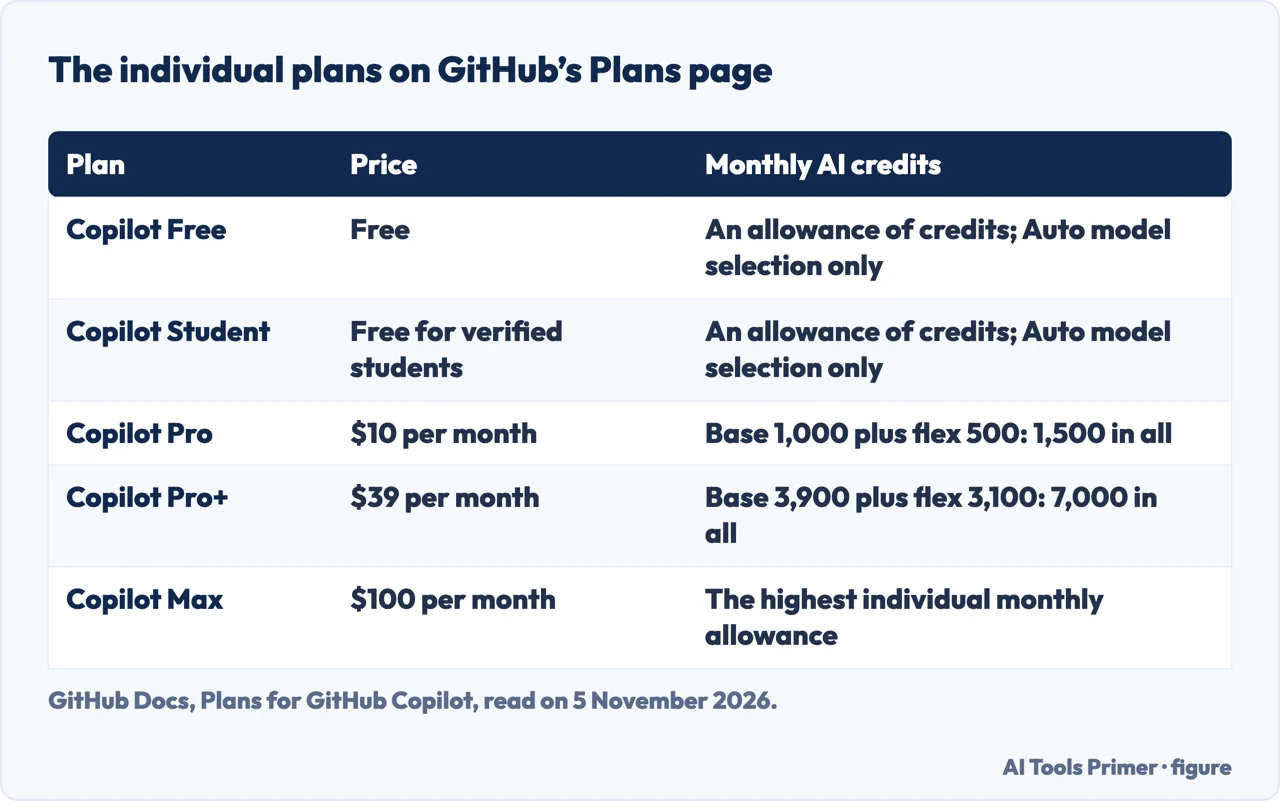
Prices and allowances change, so every figure here is as the GitHub Docs Plans page and the GitHub product page read on 5 November 2026. For individuals the Plans page lists Copilot Free, Copilot Student (free to verified students), Copilot Pro at $10 a month, Copilot Pro+ at $39 a month and Copilot Max at $100 a month. It describes Pro+ as including everything in Pro with a higher monthly allowance of AI credits, and Max as including everything in Pro+ with the highest individual allowance. Its allowance table gives Pro a base of 1,000 credits plus a flex allotment of 500, 1,500 in all, and Pro+ a base of 3,900 plus 3,100, 7,000 in all. Free and Student both have an allowance of credits and, on the Plans page, access to models through Auto model selection only. The page also says the free plans are only for individual developers who do not have access through an organization or enterprise, and that verified teachers and maintainers of popular open source projects may be eligible for free access to Pro.
On the free plan the two GitHub pages word one limit differently. The Plans page says Copilot Free is limited to 2,000 completions a month, while the product page’s FAQ says Free users are limited to 2,000 completions and access to entry-level models each month. The FAQ also says code completions and next edit suggestions do not use credits and stay unlimited with every paid plan; in its section on organizations the Plans page says inline suggestion features are available in all plans and do not consume credits, even when a user has a $0 budget.
The product page’s FAQ explains the unit: one GitHub AI Credit is $0.01, and credits are used when you chat with Copilot and work with agents, in a number that depends on the model you choose and the complexity of the task. When the monthly allowance runs out, the FAQ gives three options: wait for the next cycle, set a dollar budget for extra use (it says credits draw down at $0.01 each, so a $10 budget covers 1,000 credits), or switch to a less expensive model. On Business and Enterprise it says administrators set the limits and decide whether paid extra use is allowed; if not, Copilot pauses until the next cycle. Alerts come at 75%, 90% and 100% of any configured budget.
For organizations the Plans page lists Copilot Business at $19 a granted seat per month with 1,900 credits per user, and Copilot Enterprise at $39 with 3,900. Those credits go into a shared pool, and use beyond the pool is charged at $0.01 per credit. A third option, Copilot access, costs $0 a seat for users with a GitHub Enterprise Cloud license or $10 per user per month as Copilot Standalone; it includes no credits, and metered use is billed from the first use. The page says an enterprise must choose one billing model, and that Copilot access cannot sit alongside Business or Enterprise seats in the same enterprise. The page also lists models by name, among them ones starting Claude, Gemini, GPT, Grok and Kimi, and we do not copy that list because it changes.
A second GitHub page, on requests, describes an older regime. It says it applies only to Pro and Pro+ subscribers on an existing annual plan who stayed on legacy premium request billing after 1 June 2026, and that from that date each Copilot code review consumes 13 premium requests. The Plans page speaks of credits instead, so two billing regimes appear in GitHub’s documents, and we do not give one count of requests that fits every plan.
Whose code is the generated code
The Trust Center FAQ answers the ownership question in a short answer with three points. GitHub says it does not determine whether an output is capable of being owned, and that it is clear GitHub does not claim ownership of an output. Whether an output generated by an AI model can be owned, it says, depends on many factors, and it names the intellectual property law of the relevant country, the length of the output and how far the output is functional rather than expressive. It also says two unrelated users who start new files to code the quicksort algorithm in Java will likely get the same output, and that GitHub does not claim ownership regardless. The pages we read do not say who owns a particular output or how a court would treat one.
The same FAQ says Copilot generates outputs with probabilistic AI models that synthesize from general patterns learned in training, not by copying from code or a database. It then adds that in rare instances, less than 1% based on GitHub’s research, an output may match examples of code used to train the model. Matches are most likely in two situations, it says: when the editor gives Copilot little or no context, and when the match is a common approach or method. It compares the risk of using a matching output to copying code from an online source or reusing a library, and says a match does not by itself decide whether copyright or open source concerns arise. It notes that open source licenses can require attributing the author, disclosing source code or distributing code under certain licenses, and that each organization is responsible for setting its own open source policies. The product FAQ says responsible organizations and developers recommend code scanning policies to identify and evaluate matching code.
On quality, the Trust Center says its experiments showed outputs of the same or better quality than the average developer, then adds that it cannot give any assurance the code is bug free and that Copilot may sometimes output insecure code. It recommends the precautions you take with code written by your engineers: linting, code scanning and IP scanning. The product page says Copilot has filters that block or notify users of insecure patterns, aimed at common ones such as hardcoded credentials, SQL injections and path injections, and says to use Copilot together with testing, code review and security tools. The Trust Center says the tool is not intended to replace developers, that it is called “Copilot” not “Autopilot”, and that you should make sure your editor does not automatically compile or run generated code before you review it. For checking code a model wrote, our page on AI code review covers what GitHub, Endor Labs, IBM and Wiz say.
One more limit comes from the product FAQ: GitHub says it cannot guarantee Copilot will never output personal data, and says that in its tests some suggestions resembled personal data but were typically synthesized and not tied to real individuals.
What happens to your prompts and code
The Trust Center describes the flow. Copilot gives output based on the context of what you are working on in the editor, which means temporarily sending an ephemeral copy of that context to the model host’s servers. The input can include the file you are editing and neighboring or related files, and the URLs of repositories or file paths that identify relevant context. GitHub says the transmitted data is encrypted in transit and at rest. For the agent features, it says the agent’s context is by default limited to the Git contents of its repository plus other metadata in that repository such as issues and other pull requests, and that it reaches outside the repository only when authorized through the firewall configuration or an installed MCP server, with network access blocked by default.
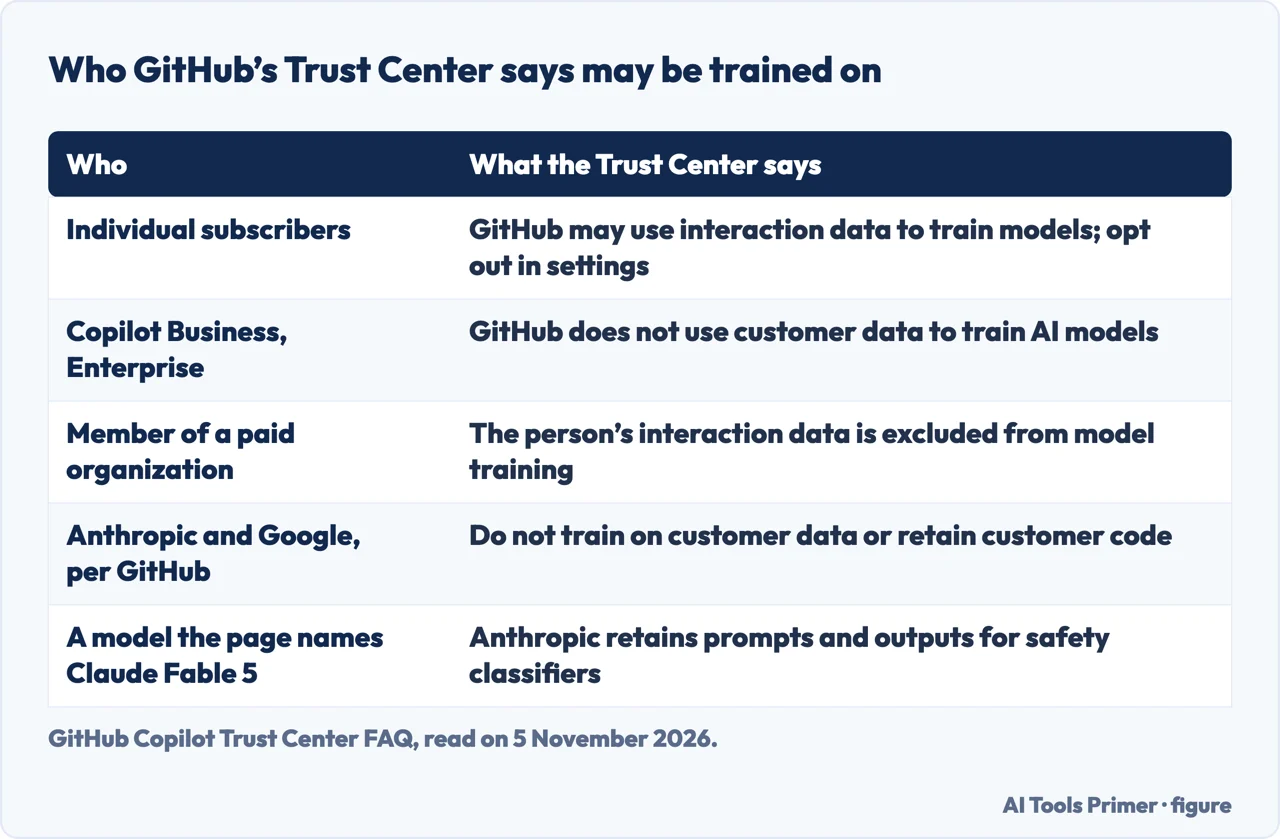
Training is where the plans differ. For Business and Enterprise, GitHub says it does not use customer data to train AI models, and that this data is covered by its Data Protection Agreement. For individual subscribers, it says it may use interaction data, including prompts, suggestions and code snippets from Copilot sessions, to train and improve models; those subscribers can opt out in their settings, and the page says opting out does not affect access to Copilot features. For someone who uses a personal license inside an employer’s codebase, the FAQ says GitHub does not train on the contents of any paid organization’s repositories, and that if a user’s GitHub ID is a member or outside collaborator of a paid organization, their interaction data is excluded from training. The product FAQ repeats the individual and Business points.
Retention depends on how Copilot is reached. For Business and Enterprise customers, under the heading access through an IDE for chat, code completions, the Copilot app and the Copilot CLI, the Trust Center says inputs and outputs are not retained by default, user engagement data is kept for two years and feedback data as long as its purpose needs; for other access it says inputs and outputs are retained for the life of the account. In both cases it says GitHub may retain data in a targeted, time-limited way to investigate confirmed violations of its policies or to protect security.
The Trust Center says the contracts a customer already has with GitHub or Microsoft continue to apply to third-party models, with no new terms, and that the model providers are existing subprocessors of GitHub. It says providers such as Anthropic and Google do not train models on customer data or retain customer code, with one exception written on the page: for a model it names Claude Fable 5, Anthropic retains prompts and outputs to operate safety classifiers that detect harmful use. That is GitHub’s statement as read on 5 November 2026, and model lists change.
Which terms apply depends on how Copilot was bought. For individuals on Free, Pro, Pro+ or Max, the page lists the GitHub Terms of Service, the General Privacy Statement and the Acceptable Use Policies. For Business or Enterprise bought from GitHub it lists the GitHub Customer Agreement, a modular stack that includes Generative AI Services Terms covering code ownership, indemnity and data use. For orders through Microsoft it says the terms are substantively the same but appear in other places in Microsoft’s contract stack, and it notes that the Microsoft Data Protection Agreement does not apply to GitHub’s online services.
The duplicate filter and code referencing
Two features deal with output that matches public code, and GitHub describes them separately. The first is the duplicate detection filter. The Trust Center calls it optional: the administrator of an enterprise can enable it for all organizations in the enterprise or hand control to individual organizations. With it on, Copilot checks code against public code on GitHub for matches or near-matches of “65 lexemes or more”, which the page puts at 150 characters on average. If there is a match, the page says the output will not be shown to the user. The Trust Center adds that Copilot also scans outputs for vulnerable code.
The second is code referencing. The Trust Center says that when an output matches public code, Copilot gives an alert with links to the repositories holding the matching code and any available license information, and logs it, so the user can judge whether the output is suitable. The GitHub Docs page on referencing fills in the limits. The public-code index does not include private repositories or code hosted outside GitHub, and it is refreshed periodically, so it may omit recently added code or point to code that has since moved or been deleted. For inline suggestions the check compares the potential suggestion and about 150 characters of surrounding code with the index, and only suggestions you accept without changing them are checked in that way, with details such as matching file URLs and detected licenses recorded. In chat, a matching response can show a reference beneath it if you or your organization allow suggestions matching public code; in agent sessions, the session logs link to the details. The page says matches typically occur in less than one percent of inline suggestions, so you should not expect many references.
A separate GitHub Docs page on finding matching code says references are only generated if you use a product that does not support Block mode, or if Copilot is set to allow suggestions that match public code, in personal or organization settings. The product FAQ says matching code does not necessarily mean copyright infringement and that it is up to the user to decide whether to use a suggestion and what to attribute.
Indemnity: what two pages say
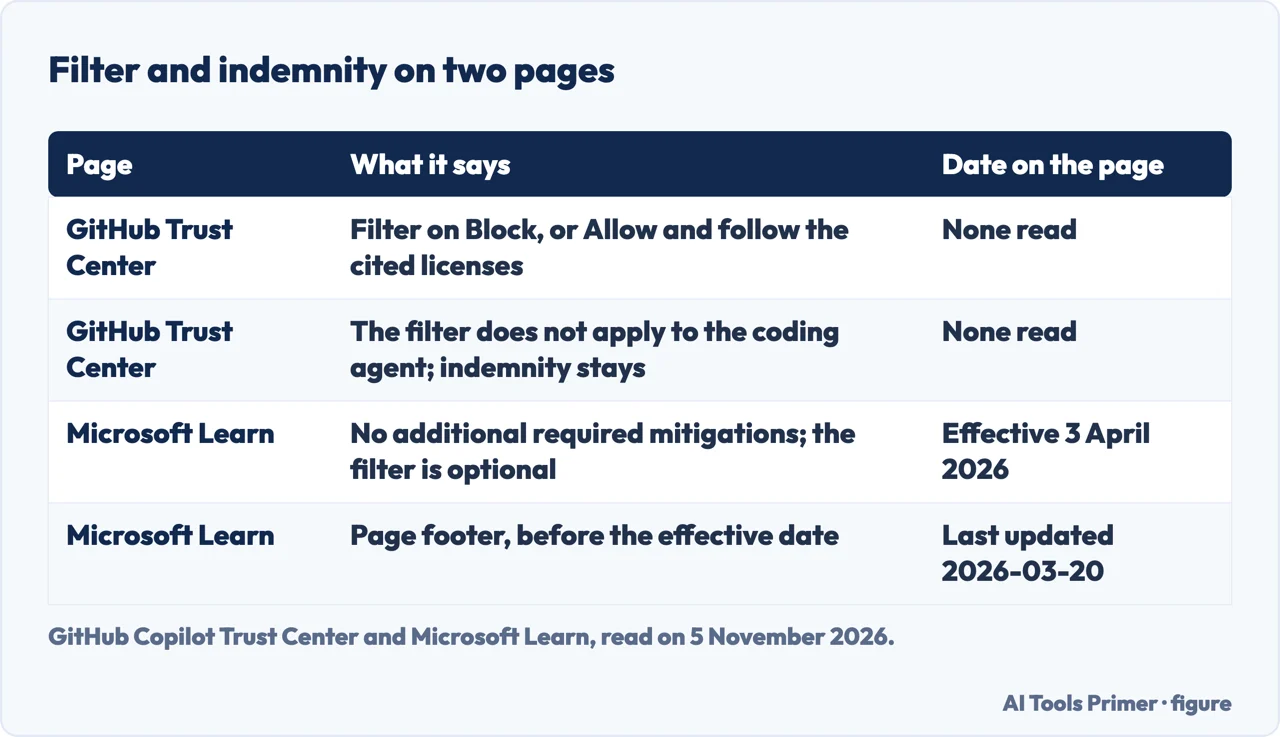
The Trust Center says Copilot Business and Enterprise customers are entitled to IP indemnification for responses provided by Copilot. In its FAQ on the requirements it says the customer is entitled to uncapped indemnification for unmodified outputs when it complies with Microsoft’s required mitigations for GitHub offerings, linking to a Microsoft Learn address (a different path from the page we read, which we did not check is the same document). For most features it then gives two ways to secure it. The first is to set the “Suggestions matching public code” filter to Block. The second is to set it to Allow, in which case Copilot provides details of the matching code and, if you comply with any cited licenses, you remain eligible. It adds an exception: the filter does not apply to the Copilot coding agent, and customers are still covered for unmodified code the agent generates. It also says Business and Enterprise customers are covered when they use third-party models.
The Microsoft Learn page is titled Customer Copyright Commitment Required Mitigations. It describes the commitment as a provision in the Microsoft Product Terms that sets out Microsoft’s obligation to defend customers against certain third-party intellectual property claims relating to output content. Its section on GitHub offerings says that as of April 3, 2026, there are “no additional required mitigations”, that use of the Duplicate Detection filter is no longer required for coverage, and that the feature remains available for optional use. The page footer shows it was last updated on 2026-03-20, a date before the effective date it states.
Read side by side, the Trust Center text we read still presents the Block setting, or Allow with the cited licenses, as the way to secure indemnity, while the Microsoft page says the filter is no longer required. The Trust Center text does not give a change date, and it links to a Microsoft Learn address for the required mitigations itself. The pages we read do not say which of the two governs. We give no legal advice here, and the detail sits in contract documents: the Trust Center says the GitHub Generative AI Services Terms cover code ownership, indemnity and data use for Business and Enterprise, and that for individuals the Terms of Service incorporate AI terms on code ownership and data use. The pages we read mention indemnity for Business and Enterprise customers; they do not mention it for the individual plans.
Where to start
Four ways in.
- “Is it free, and what do the plans cost?”
- Plans and the credit allowance, as of 5 November 2026 — plans
- “Who owns the code it writes?”
- Whose code is the generated code — own
- “Does it train on my prompts and code?”
- What happens to your prompts and code — data
- “Am I covered if it copies code?”
- Indemnity: what two pages say — indemnity
Coding assistants, side by side
What the tools say they keep, cost and check.
Terms, free tiers and limits
Sign-ins and what the free version includes.
Questions people also ask
What is GitHub Copilot used for?
GitHub Docs calls it an AI assistant that suggests code as you type, answers questions about a codebase, reviews your changes and works on tasks you assign it. It groups its features as assistive, agentic, customizations, and external agents, models and tools.
Is GitHub Copilot free now?
GitHub’s Plans page lists Copilot Free for individuals, limited to 2,000 completions a month, and Copilot Student, free to verified students. Copilot Pro is listed at $10 a month. Teachers and open source maintainers may qualify for free Pro access. Read on 5 November 2026.
Is Copilot as good as ChatGPT?
The pages we read do not compare Copilot with ChatGPT. GitHub’s Trust Center says its experiments showed outputs of the same or better quality than the average developer, and that it cannot give any assurance the code is bug free.
Is GitHub Copilot owned by Microsoft?
The pages we read do not say who owns GitHub. They do put Microsoft in the picture: the Trust Center says Business and Enterprise can be bought from GitHub or through Microsoft, and Microsoft’s Learn page has a section on GitHub offerings.
Not covered here. We did not use Copilot. The statements come from seven GitHub pages (the About page, the Plans page, the Trust Center FAQ, the two pages on matching public code, the product page and a legacy page on requests) and one Microsoft Learn page, all read on 5 November 2026. We did not read the Wikipedia article, the extension listing or the documentation index.
The search volume and difficulty behind this page are an Ubersuggest reading of 5 November 2026, and the difficulty is Ubersuggest’s own measure, not the Semrush figure; the earlier Semrush reading, of 29 August 2026, is older than the 60 days the site normally allows.
Sources
- GitHub Docs — About GitHub Copilot — docs.github.com, read 5 November 2026.
- GitHub Docs — Plans for GitHub Copilot — docs.github.com, read 5 November 2026.
- GitHub Copilot Trust Center — FAQ — copilot.github.trust.page, read 5 November 2026.
- GitHub Docs — GitHub Copilot code referencing — docs.github.com, read 5 November 2026.
- GitHub Docs — Finding public code that matches GitHub Copilot suggestions — docs.github.com, read 5 November 2026.
- GitHub — GitHub Copilot (product page with FAQ) — github.com, read 5 November 2026.
- GitHub Docs — Requests in GitHub Copilot (legacy billing) — docs.github.com, read 5 November 2026.
- Microsoft Learn — Customer Copyright Commitment Required Mitigations — learn.microsoft.com, read 5 November 2026.
Written by Alberto Gulotta
Founder and editor of AI Tools Primer, writing from Palermo, Italy. Thirty-five years of taking computers apart, starting with a Commodore 64 — the long version is on the about page.
Something wrong on this page? Write to aitoolsprimer@gmail.com and it gets fixed.
Written on 5 November 2026.
Independence and limits
No affiliate links and no paid placements anywhere on this site. Nobody pays to appear here, and no company has seen this page before you did.
This is general information, not professional advice. Where a page touches money, health, safety or the law, it names its source and the date it was read — and your situation may still differ. See the privacy page and the cookie policy.