
Code · guide
A no code app builder: what it builds and where it stops
By Alberto Gulotta · Updated · 17 min read
A no code app builder is software for making apps in a visual editor instead of written code. Microsoft, Bubble, Baserow and Coursera say what it builds, where it stops and what you can take away: Power Apps has a 500-record default for some queries, and Bubble says its apps run only on Bubble.
| Question | Answer | Where it comes from |
|---|---|---|
| What is it? | Software for making apps with a visual editor instead of written code | Microsoft Power Apps |
| What can it build? | Mobile apps, web apps and internal business apps; Bubble adds SaaS products and marketplaces | Microsoft, Bubble |
| Where does it stop? | At the platform’s own blocks; Microsoft says users cannot add their own code or custom data sources | Microsoft Power Apps |
| Is there a record limit? | In Power Apps, 500 records by default for a query that cannot be delegated, raised to a maximum of ten thousand | Microsoft Learn |
| Can I take the app with me? | Bubble says no export as code; Baserow is open source and can be self-hosted | Bubble Docs, Baserow |
| Does it replace developers? | Microsoft says complex apps will still need developers with custom code | Microsoft Power Apps |
What the pages say a no-code app builder is
Microsoft’s Power Apps page, which comes from the company that sells Power Apps, defines a no-code app builder as development software that lets users create apps without needing to know how to write code. It says the approach was originally crafted for teammates without coding experience and that anyone can create a working app through a simple visual editor.
The page explains how it works with a comparison to drawing on paper how an app or a webpage should look. In a declarative interface you drag and drop pre-coded elements where you want them, and the code follows. Microsoft puts it this way: “It’s not that code isn’t there”, it says, but the elements have already been built behind the scenes and you only tell them where to go. It adds that the data can sit in a cloud spreadsheet such as Excel, Google Sheets or Airtable, with your own idea of how to display it. Coursera uses a different picture: building a bed frame or a bookshelf from pre-cut pieces and clear instructions, instead of milling the wood and drilling the holes yourself. The result, it says, may be less customized, but it functions well and typically saves time and money.
Bubble’s home page draws the line in another place. Its FAQ contrasts Bubble with AI coding tools, which it says generate code, and describes its own apps as fully visual, including the logic, the data and the privacy rules. That is the seller’s description of itself, and the Microsoft and Coursera pages we read do not make the same comparison.
Microsoft also separates no-code from low-code. Low-code has the same drag-and-drop, what-you-see-is-what-you-get builder, it says, but needs someone with at least a basic understanding of code to finish the building and deploying.
What the pages say you can build
Microsoft lists three kinds of app. No-code mobile apps are for meeting customers where they are. No-code web apps are dynamic websites, landing pages, forms and other customer-facing web-based applications. No-code internal business apps help teams get their work done, and Microsoft names data organization, technical support and sales funnels as examples. Its FAQ gives more examples that businesses use today: apps for onboarding employees, tracking production, automating workflows and engaging event attendees. It adds that because no-code apps are simple, businesses often use many at once, and each one solves a single problem.
Coursera’s list is close to Microsoft’s. It says you can use no-code app builders to automate workflows and business processes, create internal or customer-facing apps, manage data, and build prototypes to test new ideas. It singles out rapid prototyping, taking an idea to a prototype or a minimum viable product quickly so that a business can collect feedback sooner. It also says traditional methods typically average four to nine months from planning to deployment and that no-code tools can cut that to days or weeks. That comparison is Coursera’s statement, and the page does not show how the figures were measured. It cites a market estimate as well, from about five billion dollars in 2024 to about twenty-four billion in 2030, which we did not check.
Bubble’s FAQ answers the same question with SaaS products, marketplaces and internal tools, and says the platform covers web and native mobile. It says hosting, a built-in database, security and auto-scaling infrastructure are included. On cost, the FAQ says you do not pay until you launch, that generating an app does not use AI credits, that every plan including the free one comes with a monthly allowance for its AI agent, and that editing in the visual editor never uses credits. These are statements on the seller’s home page. We did not read Bubble’s plan pages and give no prices.
Coursera also names tools by what they are good at, and says so as its own view: Adalo for geolocation, Bubble for full-stack visual development, Glide for connecting to Google Sheets. Among free options it lists Budibase, which it calls open source, and SAP Build Apps, which it says may be ideal for existing SAP users. Zapier’s roundup, updated in October 2026, gives each of its five platforms a different label: Softr for complete beginners, Bubble for a balance of power and ease, Momen for building AI features into an app, WeWeb for generating with AI and editing without code, and FlutterFlow for building for multiple platforms. Zapier says it built a very simple CRM app on each platform, with contacts, deals and a small dashboard, before writing about it. It also says that Zapier is not a standalone app builder but sells the automation that connects these apps to other tools.
Where the wall is, according to the sellers
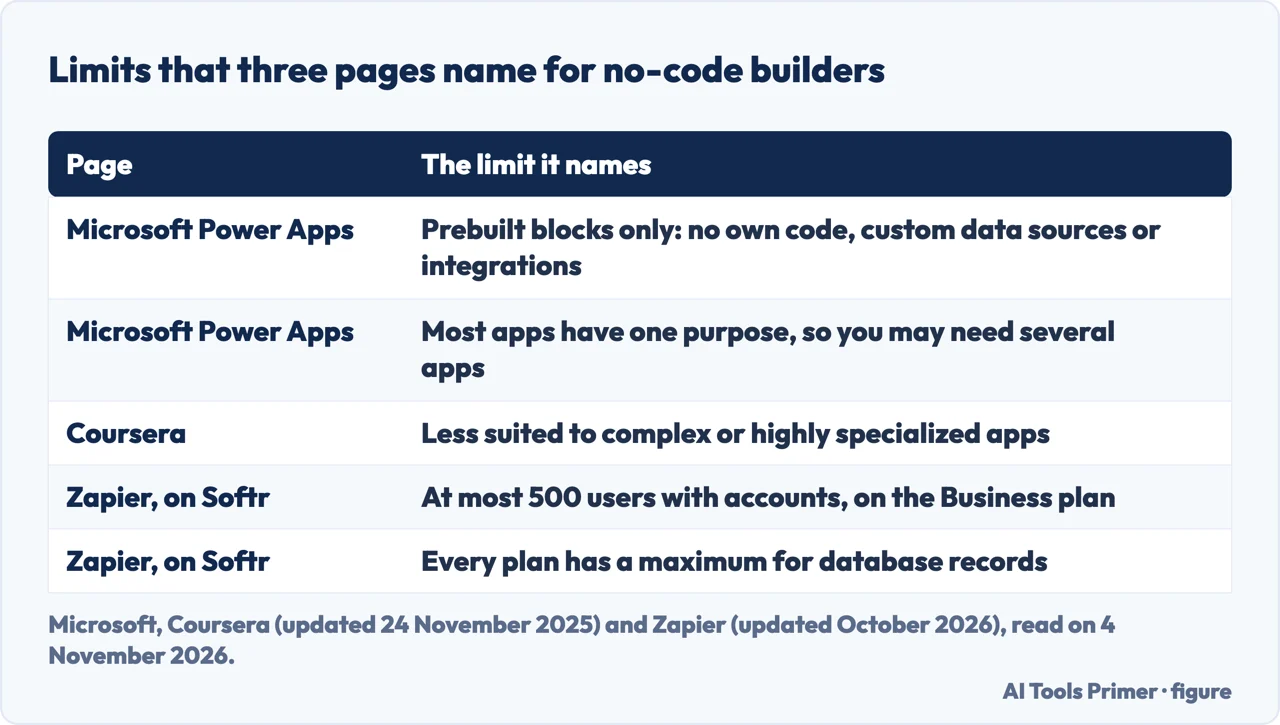
The Microsoft page is direct about the limit of the category. No-code tools use prebuilt blocks, it says, so users cannot input unique code, connect to custom data sources or create integrations with other systems. In its FAQ, the main disadvantage of a no-code app builder is that you are usually limited to the blocks and features the platform includes. Most no-code apps are narrow in focus, so you may have to build several apps instead of one robust app. And because every no-code app is built on a platform, the page says, your experience depends on the organization that built the platform, and any changes could negatively affect your apps or process. Coursera agrees on the main point: no-code builders typically lack the ability for extensive customization, which makes them less suited to complex or highly specialized apps, and inexperienced builders may overlook the user experience.
The Bubble Docs ownership page describes the edge in different terms. Because Bubble is built on JavaScript and can be extended with code and API integrations, it says, you will “essentially never hit a hard limit”. Microsoft says a no-code tool cannot take your own code; Bubble says its tool can be extended with code. The pages do not reconcile the two: they describe the edge of different platforms. Zapier gives a platform-by-platform example. For Softr it says visitors who are not logged in are unlimited, but the number of users with accounts tops out at 500 on the Business plan, and every plan has a maximum for database records. Zapier calls that the reason Softr is not a good match for a SaaS product.
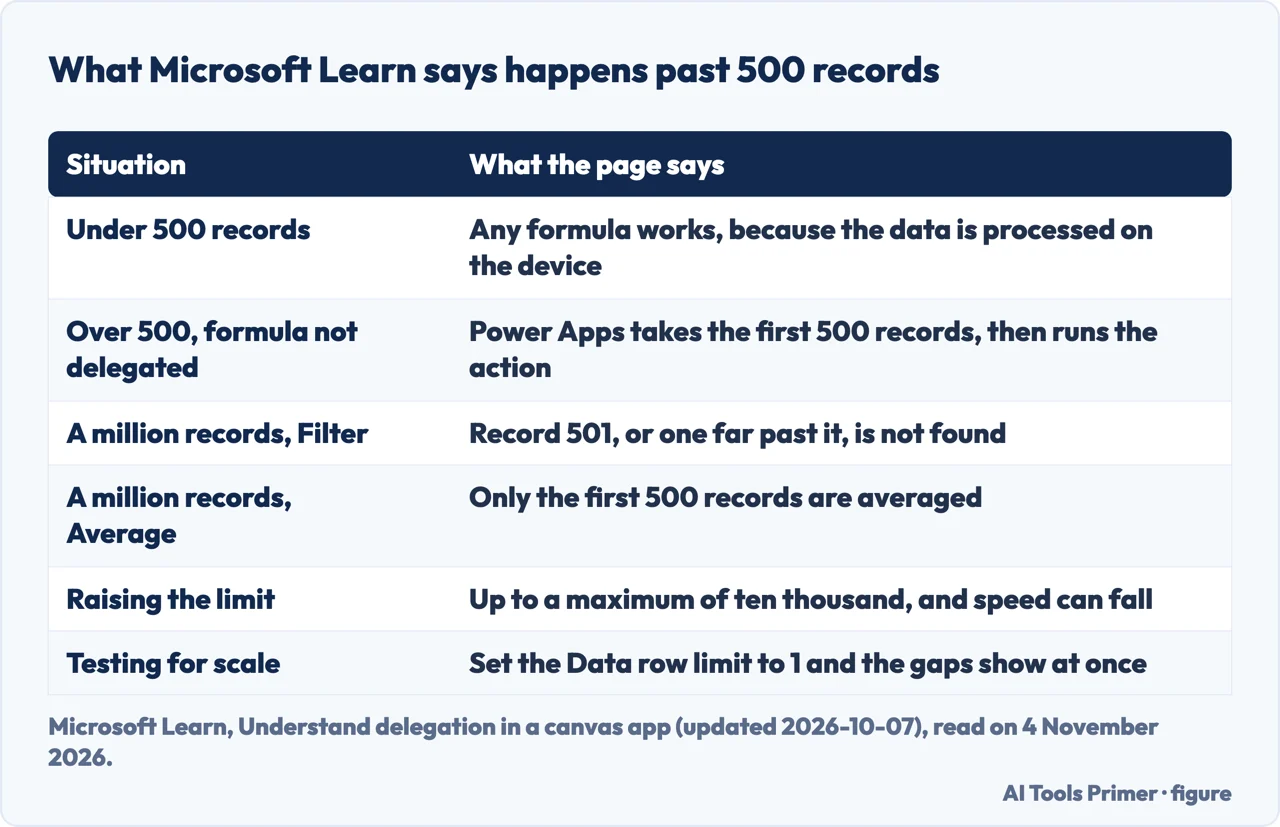
The most precise wall in the pages we read is on Microsoft Learn, in a page on delegation in Power Apps canvas apps, updated on 2026-10-07. Power Apps works best when a query fully translates into one that the data source can run itself, so the source filters the data and returns only the matching rows. If any part of a query cannot be translated, Power Apps delegates no part of it. It fetches the first 500 records from the data source and runs the actions on those. You can change that limit up to a maximum of ten thousand. Microsoft’s own example is a source with ten million records and a query for family names starting with Z that uses a function that cannot be delegated: you only get the records up to the data row limit, so the result is wrong.
The page explains why this matters. With a Filter over a source of a million records, if the record you want is number 501 or one far beyond it, Filter does not find it. Average over the same source would average only the first 500 records, and, the page says, a user might take that partial answer for the complete one. Under 500 records any formula works, because the data is processed on the device. Above that, a formula that cannot be delegated gets a warning, a yellow triangle and a blue underline. Filter, Search, First and LookUp can be delegated. With, UpdateContext and Set create in-memory collections internally, which cannot be delegated, and there the page says you see no warning at all. Raising the limit can make the app slower, especially for wide tables. To see the gaps while building, the page suggests setting the data row limit to 1, so anything that cannot be delegated returns a single record.
Who owns the app and the data
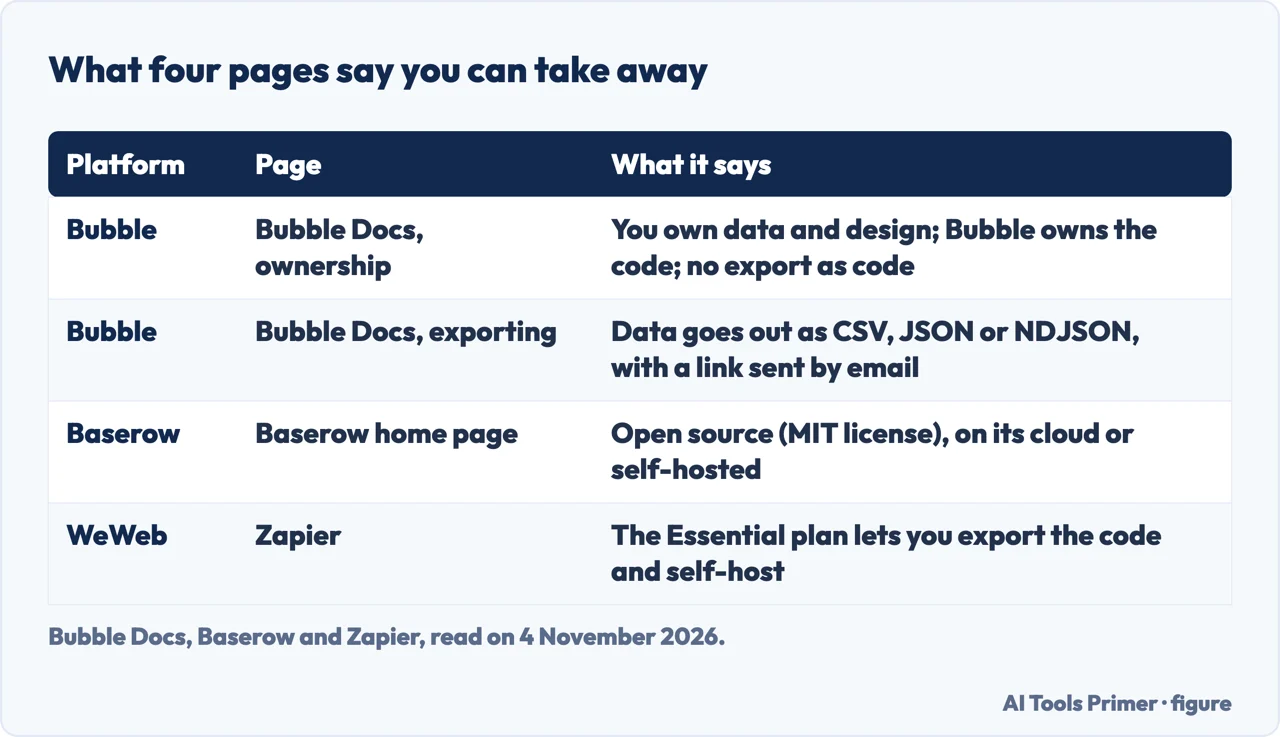
The Microsoft and Coursera pages we read do not mention exporting, so the answer comes from the platforms’ own pages. Bubble’s ownership page says you own your data, which it defines as your app’s design and any data your users upload. Bubble keeps the underlying code that powers the app, and the page compares that to Microsoft owning Word without claiming the documents you write in it. The page adds that Bubble apps can only run on the Bubble platform and that there is no way to export the application as code. If you move off, you rebuild the application logic, though Bubble says it can help you export the design. The page carries a disclaimer that Bubble’s official terms prevail, and when we read it on 4 November 2026 it said it was last updated three years ago.
For data, the same page says Bubble supports exporting user-created data as CSV files, and that its API lets you write scripts to reach the data in a more automated way. A separate Bubble Docs page, on exporting data and marked as updated five months before we read it, lists three formats: CSV, JSON and newline-delimited JSON. You go to Data and then App data, choose the data type, set the view to the list you want, press Export and pick the format. Bubble then sends an email with a link to download the file. The page warns that the export runs on the same scheduler as API workflows, so a large number of scheduled tasks can delay it. It also lists a known issue: a date interval is exported as descriptive text, such as 2 days, while an import still expects a number of milliseconds.
Bubble also says that, if it were ever discontinued, its source code would be made available under an open-source license, so you could keep an app on a self-hosted Bubble server. That is a promise on the seller’s page, and we could not check it.
Baserow answers the same question another way. Its home page calls Baserow a no-code open source database and application builder, with a database builder, an application builder and automations. It lists the license as MIT, offers a cloud version and a self-hosted one, and says you can self-host and keep full control of your data. It also says you can customize and extend it with plugins. The page also sets Baserow against competitors in a comparison panel of its own; the MIT line and the plugin line above come from the list that panel gives for Baserow, and we did not use its rows about competitors.
Zapier’s roundup gives a third answer for WeWeb. It says the Essential plan lets you export the code and self-host, which it explains as handling the infrastructure yourself, and that full hosting is bought separately. Put side by side, the pages give three different answers to what you can take away. Bubble lets you take data and design but not the app as code. Baserow is itself open source. WeWeb, as Zapier describes it, lets you export the code on a paid plan.
When a developer is needed
Microsoft’s FAQ asks whether no-code is going to replace developers and answers that it will not. No-code apps are built from templated components with limited customization options, so any organization that wants complex apps will need developers to build them with custom code. It adds that introducing a no-code platform frees developers’ time for more complex work. Its guide to choosing says to pick a no-code platform if you have limited resources, need simple applications as quickly as possible and accept the functional limits, and to pick low-code if your applications are simple but have complexities that might need additional developers, or if you want to speed up both professional developers and business users.
Zapier’s author adds a warning about the work involved. Be prepared, the roundup says, to develop new skills and to get into the programmer mindset when you use these builders. It compares no-code with vibe coding, where AI generates a whole application from a prompt. No-code is slower by comparison, at least at first, it says, but lowers the entry barrier and has guardrails against bugs. For someone with no idea how code works, Zapier says AI coding tools are not a good idea for a first product and a no-code builder is the better start. That advice is Zapier’s. Our page on an AI code generator covers what coding assistants see of a project and how to check what they write.
If the thing you want is a website more than an app, the question is different. Our pages on AI website builders and on how to build a website cover that ground, including credits and whether the code can leave. The pages we read for this one do not say how many users or records an app built on a no-code platform will hold up in general. The limits they give belong to named platforms: the Power Apps record limits and the Softr user cap above.
What we did not use
We tested nothing on a platform. We did not use the roundups from Zite and Choicely, the page from YouWare or a Reddit discussion thread, because they are lists or pages written by sellers, or a discussion thread. Google’s own help pages for AppSheet came back as little more than a shell, so the pages we read do not say what Google’s no-code app builder is beyond Coursera naming Google among the companies that provide such platforms. Prices appear on the Coursera and Zapier pages, and we did not check them on the sellers’ own pages, so we give none. The Bubble home page loads its text with scripts, so we read it in a headless browser.
Where to start
Four ways in.
- “What can I build with one?”
- What the pages say you can build — build
- “Where does it stop?”
- Where the wall is, according to the sellers — wall
- “Can I take the app with me?”
- Who owns the app and the data — own
- “Do I still need a developer?”
- When a developer is needed — developer
Coding tools beside this one
Assistants and automation between apps.
Building a website
Builders, hosted platforms and how to start a site.
Questions people also ask
Is there an app builder that doesn't require coding?
Microsoft’s FAQ says yes: prebuilt blocks and a declarative interface let you drag and drop to build mobile, web and internal business apps. Bubble’s FAQ says everything on Bubble is fully visual. Both are sellers describing their own tools.
What is the best no-code app builder?
The pages we read do not agree on one. Coursera says the best is the one that meets your needs. Zapier names Softr for complete beginners and Bubble for a balance of power and ease, among five platforms.
What is Google's no-code app builder?
The pages we read do not name one. Coursera lists Google among the companies that provide no-code app platforms, and Microsoft’s page mentions Google Sheets as a place for data.
Is there a no-code open source app builder available?
Baserow calls itself a no-code open source database and application builder under the MIT license, with cloud and self-hosted versions. Coursera lists Budibase as an open-source app builder among its free options.
Not covered here. We tested nothing on a platform. The statements come from a Microsoft Power Apps page, a Microsoft Learn page, three Bubble pages (the home page, the ownership page and the exporting page), the Baserow home page, a Coursera article and a Zapier roundup, all read on 4 November 2026. Bubble’s ownership page was last updated three years before that.
The search volume and difficulty behind this page come from a Semrush reading of 4 November 2026, inside the 60 days the site normally allows.
Sources
- Microsoft Power Apps — No-code app builders: what you need to know — www.microsoft.com, read 4 November 2026.
- Microsoft Learn — Understand delegation in a canvas app — learn.microsoft.com, read 4 November 2026.
- Bubble — Build web & mobile apps (home page) — bubble.io, read 4 November 2026.
- Bubble Docs — Application and data ownership — manual.bubble.io, read 4 November 2026.
- Bubble Docs — Exporting data — manual.bubble.io, read 4 November 2026.
- Baserow — No-code open source database & application builder — baserow.io, read 4 November 2026.
- Coursera — What Are No-Code App Builders? — www.coursera.org, read 4 November 2026.
- Zapier — The 5 Best No-Code App Builders in 2026 — zapier.com, read 4 November 2026.
Written by Alberto Gulotta
Founder and editor of AI Tools Primer, writing from Palermo, Italy. Thirty-five years of taking computers apart, starting with a Commodore 64 — the long version is on the about page.
Something wrong on this page? Write to aitoolsprimer@gmail.com and it gets fixed.
Written on 4 November 2026.
Independence and limits
No affiliate links and no paid placements anywhere on this site. Nobody pays to appear here, and no company has seen this page before you did.
This is general information, not professional advice. Where a page touches money, health, safety or the law, it names its source and the date it was read — and your situation may still differ. See the privacy page and the cookie policy.