
Web · guide
AI website builders: the first version, the credits, the exit
By Alberto Gulotta · Updated · 13 min read
AI website builders turn a prompt or a few answers into a first version of a site, and the pages we read differ on time, credits and exit. Wix says a few minutes, Cybernews measured 3 to 15, and Zapier's writer found one tool took about 20. What happens after the first version is where they split.
| Question | Answer | Where it comes from |
|---|---|---|
| How long does the first version take? | Wix says a few minutes; Cybernews measured 3 to 15; Zapier’s writer found 10Web took about 20 | Wix, Cybernews, Zapier |
| Do edits cost credits? | On Hostinger, AI chat requests do and direct edits you save yourself are free | Hostinger Documentation |
| Can the site leave the builder? | Wix says it must run on its servers; Hostinger says the code exports as a ZIP; Cybernews says Base44 does not allow manual code edits | Wix Help Center, Hostinger, Cybernews |
| What does a domain of your own need? | Wix says a Premium Plan, which also brings a voucher for a free domain for one year | Wix |
| Is the first version finished? | Cybernews calls 10Web’s result a usable draft; Zapier’s writer says a legitimate site needs some customising | Cybernews, Zapier |
What the first version is
Wix’s product page puts the idea in one line: create a website with AI by describing what you want, then customise it by hand or with Aria, its built-in AI agent. Its FAQ says the AI generates a complete site structure with relevant pages, layout and on-brand copy. Squarespace’s blog post, written by a Squarespace product manager, starts from questions instead: answer a few about the business and Blueprint AI generates a multi-page website with starter content, imagery and a visual direction. The post lists a choice of brand personality, pages, colours and fonts, and says the result is then edited by dragging in Fluid Engine. Hostinger’s documentation describes a chat in which the AI writes the code, sets up the database and server logic, and shows a live preview. Its projects use a React front end styled with Tailwind CSS, a Node.js server and a built-in database with user sign-in and file storage.
Those are three vendors describing their own products. The two reviews are more specific about the output. Cybernews says 10Web asks a few questions and generates a WordPress site with sections, text and stock images in place, and it calls the result a usable draft, not a finished website. Zapier’s writer tested more than 50 tools and says very few were usable. The same writer names four things the review looked for: a site that looks good, one that is real and can be maintained, one that is truly custom, and a good experience to use. On the first version itself, Zapier’s writer says a legitimate site cannot be launched without some customising by the person who owns it.
How long it took, and who says so
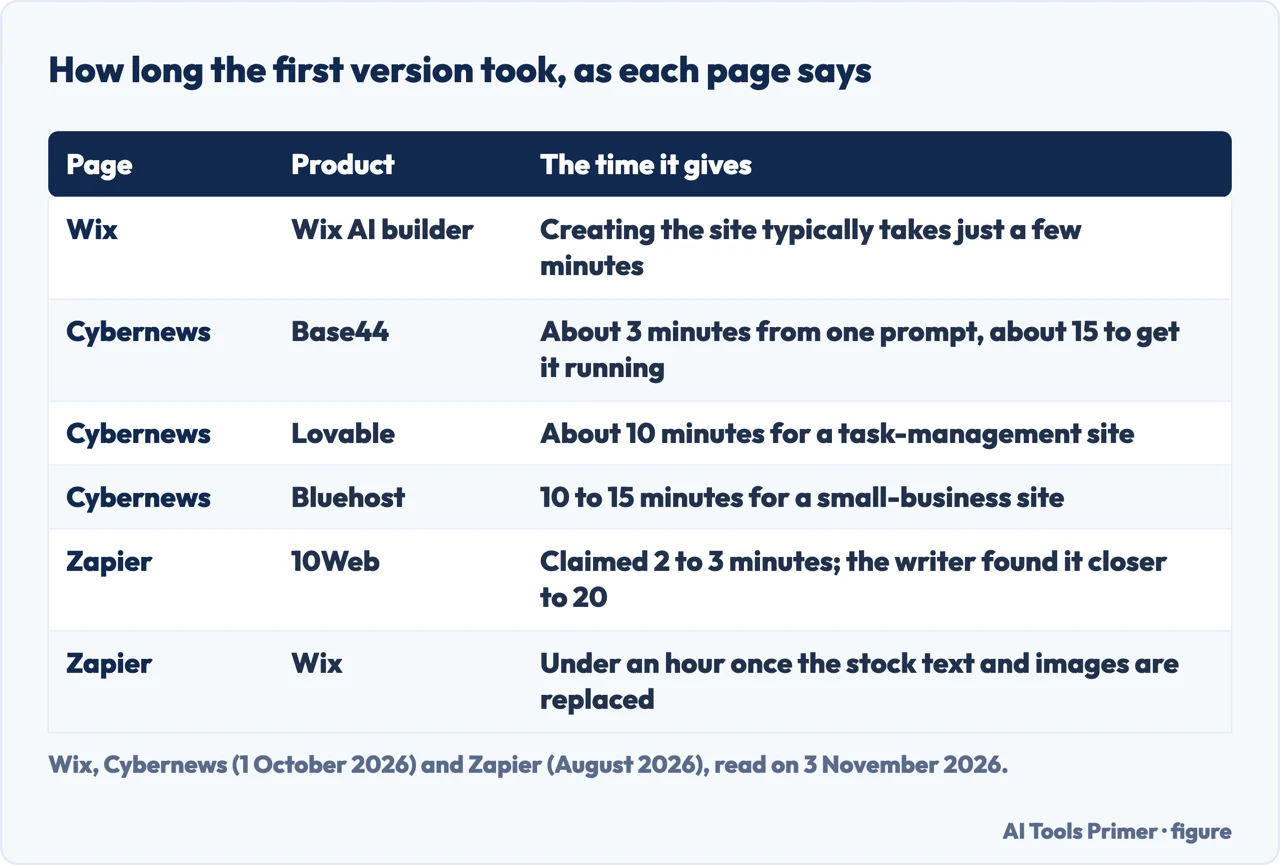
The pages disagree partly because they measure different things. Wix’s FAQ says creating a site with AI typically takes just a few minutes, which is the vendor describing its own product. Cybernews gives times from its own tests: about 3 minutes for Base44 to produce a working website from a single prompt, then around 15 minutes to get it up and running after some adjustments; about 10 minutes for a task-management site on Lovable; about 10 minutes for a restaurant site on Hostinger; and 10 to 15 minutes for a small-business site on Bluehost. For Base44, Cybernews adds that more complex functions, such as a separate sign-in and account creation flow, take more time and adjustments.
Zapier’s writer reports that 10Web claimed two to three minutes for the first site and took closer to 20. On Wix, the same writer says that once the stock text and images are replaced with your own, a site can be up in less than an hour. These figures do not describe the same job. A restaurant site, a task manager, a small-business page and a WordPress site are different builds, and the pages we read do not say how long each tool takes once your own text and photos go in. They also do not mention a test in which one prompt was given to every tool, so the numbers sit side by side here and are not a ranking.
After the first version: edits and credits
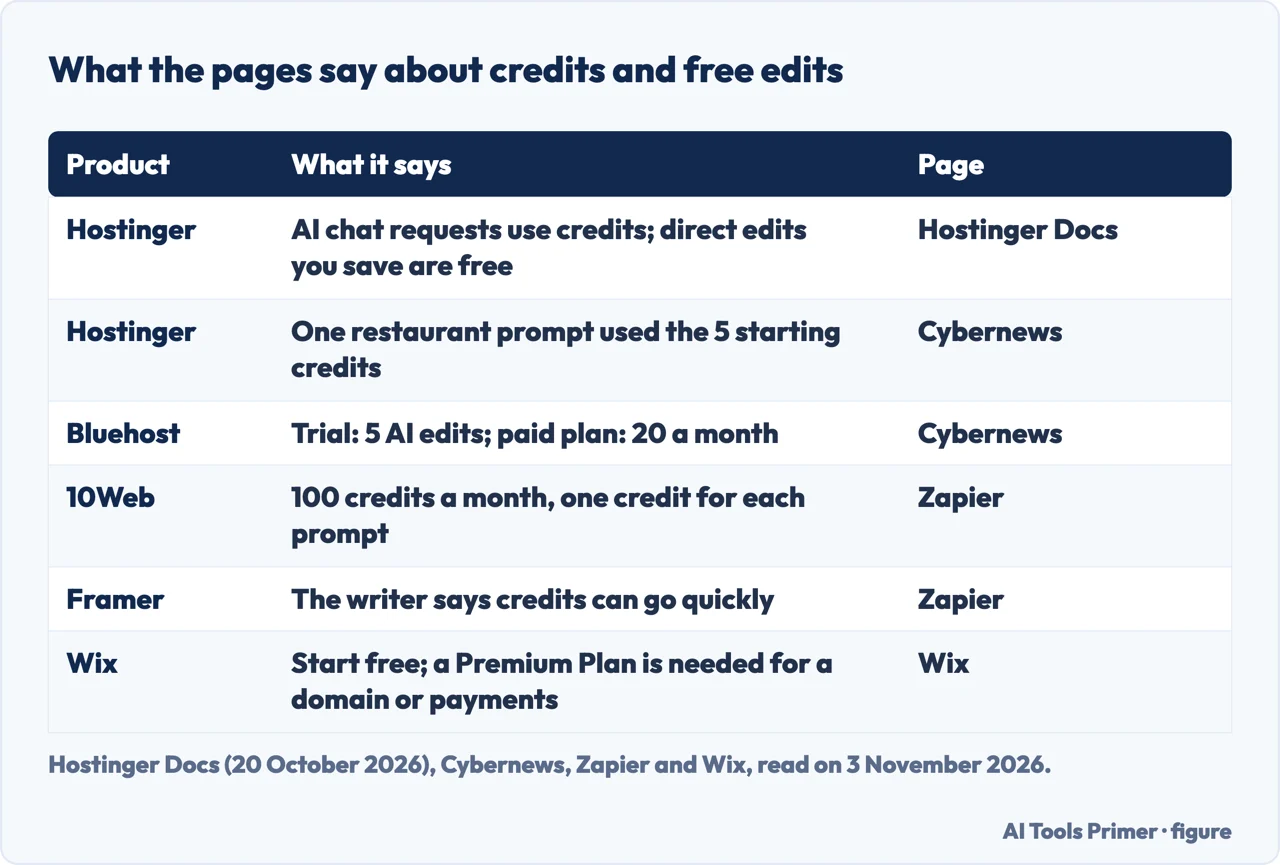
The first version is where most of the pages stop, and the edits after it are counted in different units. Hostinger’s documentation says chat messages the AI acts on consume AI credits, with the cost depending on how complex the request is, while direct text, image and code edits that you save yourself are free. It adds a free 7-day trial, with no publishing until you have a plan, and says plans differ in how many websites and AI credits they include. The overview page we read gives no credit numbers for the plans. In its test, Cybernews says the restaurant site on Hostinger used up the initial 5 credits, and that continuing would mean buying credits.
Cybernews says Bluehost has a 3-day free trial with no credit card, that the trial included 5 AI edits, and that the paid plan includes 20 AI edits a month plus 10 bonus credits in the first month. Further heavy editing would need more credits or a wait until the next month. Zapier says 10Web gives 100 credits a month, one for each prompt, and notes that making every change through the AI instead of the visual editor could use them up. For Framer, the same writer says the AI can burn through credits quickly and suggests trying a few mockups before launching.
On Wix, the product page says you can start building with AI for free, and that connecting a domain of your own, collecting payments or using additional features needs a Premium Plan. The page we read does not say how many prompts the free start allows. The Squarespace post we read does not mention credits or limits at all.
Who holds the site
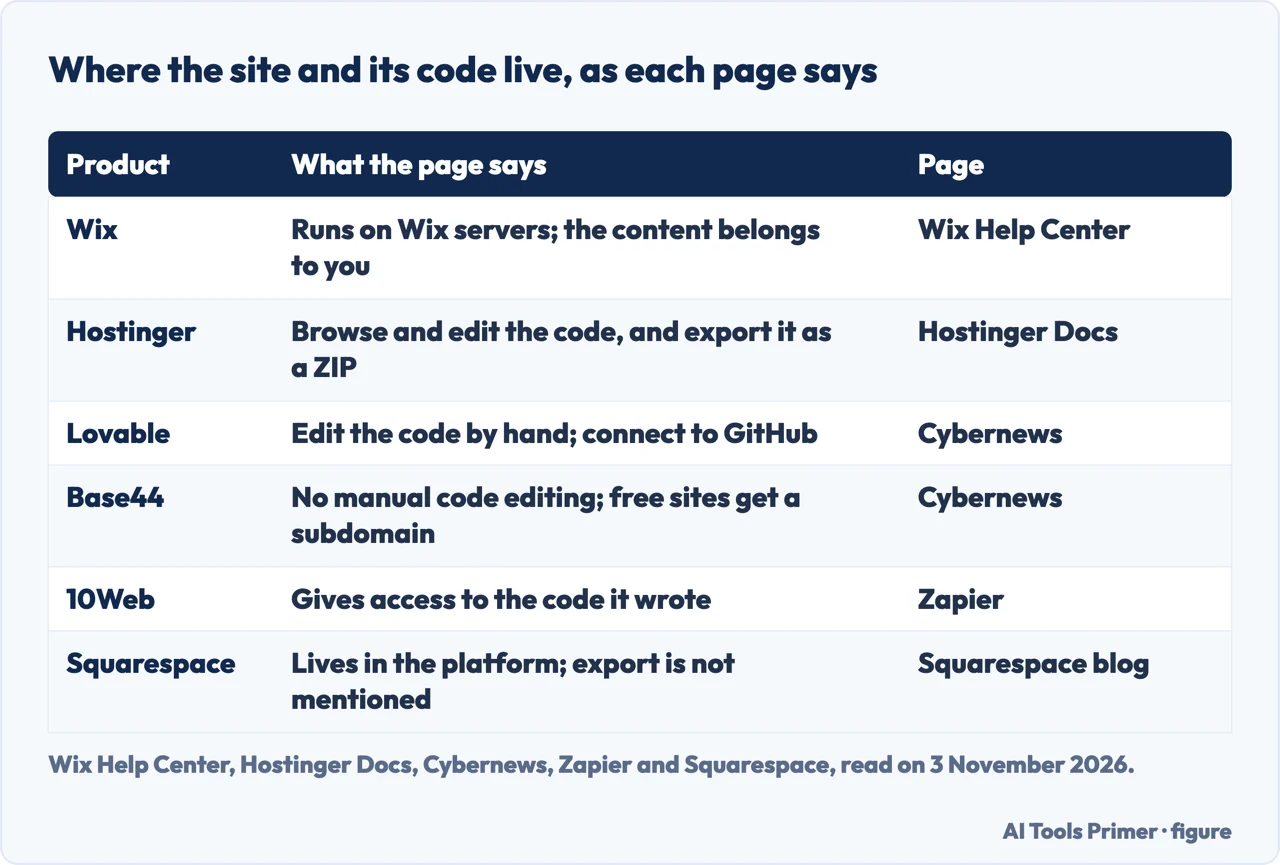
Wix’s Help Center article is the plainest on this. It says a Wix site is a standard HTML5 site built with Wix’s technology and that, for it to work, it needs to be hosted and operated on Wix’s servers. The content belongs to you, it says, citing the Terms of Use, but another host cannot be used, and a domain bought elsewhere can be connected. If a site is embedded somewhere else, Wix says it cannot give support and that Google Analytics and search engines may not work properly. The article carries no date in the text we read, so it may not be current. Our page on Wix against Squarespace goes further into exporting and plan tiers.
Hostinger’s overview says the code can be browsed and edited and exported as a ZIP, and that publishing is one click with SSL, a CDN, daily backups and a free subdomain. We did not read its Code Editor & Export page, so what the ZIP contains is not verified here. Cybernews says Lovable lets you access and edit the underlying code and connect the project to GitHub, and that with Base44 you cannot edit the code manually, while its free site has a Base44 subdomain. Zapier says 10Web gives access to the code it wrote and works through a dedicated WordPress theme, so it will not work with a custom theme you already have. For Squarespace, the post says a site lives inside the full platform, with no static mockup or separate codebase to maintain; the page we read does not mention export.
Zapier’s writer states a preference: WordPress, Ghost or another framework with an AI coding tool, which the writer says avoids being tied to one platform. For the simplest route, the review points to Wix or 10Web, and says the code-based approach is the more technical one. It also calls launching a site in 30 seconds from a written prompt a party trick, which is the writer’s opinion and is attributed as such. If you are weighing where the site will live, our page on free hosting shows what each free plan asks in return.
What the pages say it costs
Prices here are the ones the reviews print, with their dates, and we did not check them on the sellers’ own pages. Zapier, updated in August 2026, says Wix is free with Wix branding and a Wix domain and starts at $17 a month for the Light plan, which includes a custom domain for one year. It gives 10Web as $20 a month for the Basic plan with one website and 100 AI credits a month. For Framer, its text says $15 a month for Basic, while its at-a-glance table says from $10 a month for each site, a lower figure that the page does not reconcile. Cybernews, updated on 1 October 2026, says typical plans run from $12 to $50 a month and that some, such as Hostinger’s entry level, start at $2.24 a month.
Wix’s own pages add two points. Any Premium Plan brings a voucher for a free domain for a year, and the product page also says a free domain for a year comes with any annual website plan. Hostinger says its AI Builder is included with its hosting plans. Both reviews say they may earn a commission on links, Zapier in a note near the top and Cybernews in a line on the page, so the lists they print are ones that can earn their publishers money. Zapier also says Wix announced a cut of 20 percent of its staff and a restructuring around Wix Vibe, and that its core products had not changed as of the writing. When the domain is the question, our page on choosing a domain covers lengths and extensions.
What we did not use
We tested no builder, and every statement above is a page’s claim or a reviewer’s result, with the page named. Wix and Squarespace pages are the sellers’ own and we used them only for what the product does. Aria and Wix’s Harmony are described only as Wix describes them. We did not open the vendors’ own pages for Lovable, Base44, Bluehost, 10Web or Framer, so what each of them says about itself is not here. The pages we read do not say how many AI-built sites pass a quality check, and Squarespace’s post cites a survey of small businesses that we did not trace back to its source.
Where to start
Four ways in.
- “What do I get first?”
- What the first version is — first
- “How long does it take?”
- How long it took, and who says so — time
- “What do edits cost?”
- After the first version: edits and credits — credits
- “Can I take the site with me?”
- Who holds the site — hold
Where the site lives
Builders, free plans and the phone version.
The address
Choosing a name and moving it later.
Questions people also ask
What are the top 10 AI website builders?
We do not rank them. Cybernews reviews nine and Zapier says it tested more than 50 and picked three: Wix, Framer and 10Web. The sections above set out what each page says about time, credits and who holds the site.
Can ChatGPT build a website?
Zapier’s writer says ChatGPT and Claude both have features for publishing something quickly on the web, and adds that it is not exactly a marketing site for a small business or an artist’s portfolio.
How much do AI website builders cost?
Cybernews says typical plans run from $12 to $50 a month, with some from $2.24. Zapier gives Wix from $17 and 10Web from $20 a month. These are the reviews’ figures, read on 3 November 2026.
Are AI website builders any good?
Zapier’s writer says very few of the more than 50 tools tested were usable. Cybernews calls 10Web’s result a usable draft and says AI sites suit a portfolio or simple business page, with WordPress better for long-term growth.
Not covered here. We tested no builder. The statements come from six pages: Wix’s AI builder page and Help Center, Hostinger Documentation, a Squarespace blog post, Zapier and Cybernews, all read on 3 November 2026.
The search volume and difficulty behind this page come from a Semrush reading of 29 August 2026, older than the 60 days the site normally allows.
Sources
- Wix — Free AI Website Builder — www.wix.com, read 3 November 2026.
- Wix Help Center — Exporting or Embedding Your Wix Site Elsewhere — support.wix.com, read 3 November 2026.
- Hostinger Documentation — AI Builder Overview (updated 20 October 2026) — docs.hostinger.com, read 3 November 2026.
- Squarespace — Build a Website From Your Idea With Squarespace’s AI Website Builder — www.squarespace.com, read 3 November 2026.
- Zapier — The 3 Best AI Website Builders in 2026 (August 2026) — zapier.com, read 3 November 2026.
- Cybernews — 9 Best AI Website Builders (updated 1 October 2026) — website-builders.cybernews.com, read 3 November 2026.
Written by Alberto Gulotta
Founder and editor of AI Tools Primer, writing from Palermo, Italy. Thirty-five years of taking computers apart, starting with a Commodore 64 — the long version is on the about page.
Something wrong on this page? Write to aitoolsprimer@gmail.com and it gets fixed.
Written on 4 November 2026.
Independence and limits
No affiliate links and no paid placements anywhere on this site. Nobody pays to appear here, and no company has seen this page before you did.
This is general information, not professional advice. Where a page touches money, health, safety or the law, it names its source and the date it was read — and your situation may still differ. See the privacy page and the cookie policy.