
Web · guide
What is WordPress, and how it differs from WordPress.com
By Alberto Gulotta · Updated · 16 min read
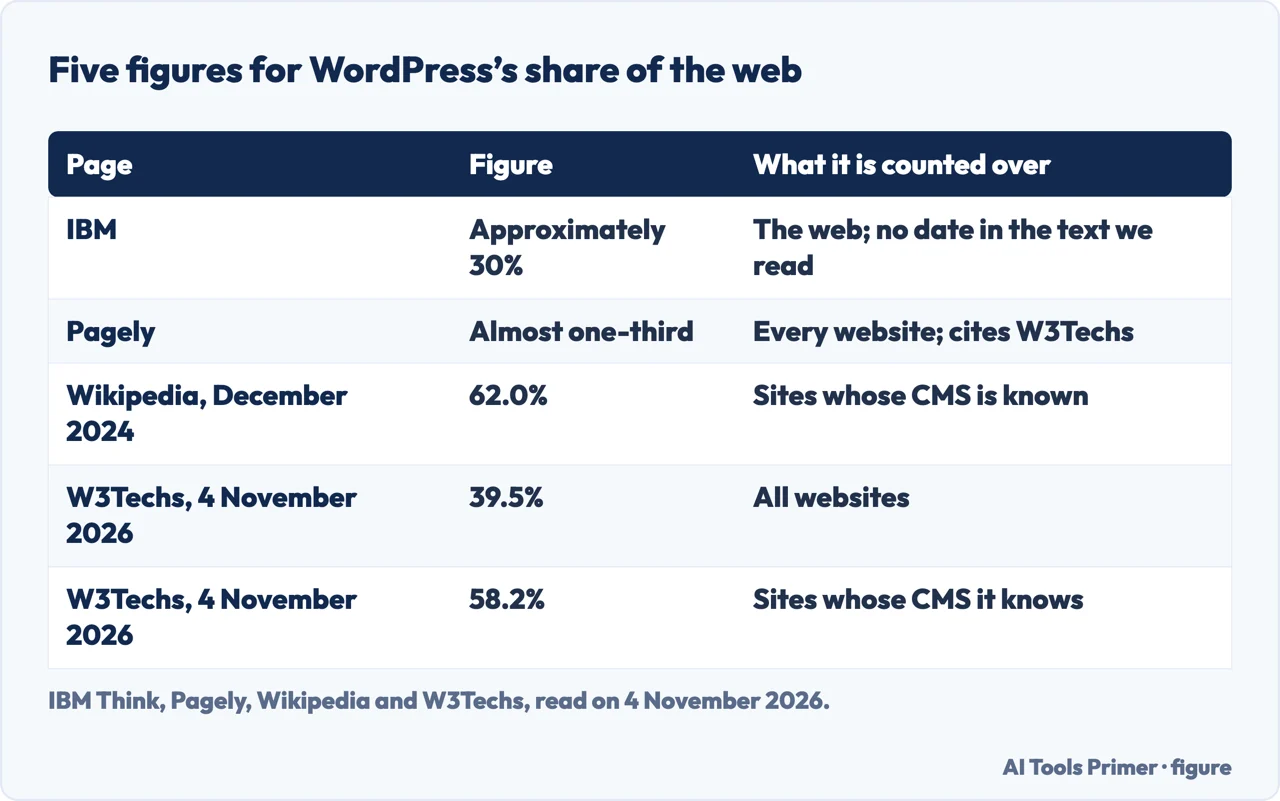
What is WordPress, according to the pages we read: free, open source software for building websites, started in 2003 and built on PHP, kept apart from the WordPress.com hosting service, with a share of the web that those pages put at about 30% of all sites or 62% of those with a known system.
| Question | Answer | Where it comes from |
|---|---|---|
| What is it? | Free, open source software for building websites, started in 2003, built on PHP and MariaDB | WordPress.org |
| Is WordPress.com the same thing? | No: a commercial service owned by Automattic that runs the same software | WordPress.com Support, Pagely |
| What does a host need? | WordPress.org recommends PHP 8.3, MariaDB 10.11 or MySQL 8.0, and HTTPS | WordPress.org |
| How much of the web? | 39.5% of all websites and 58.2% of those with a known CMS, on 4 November 2026 | W3Techs |
| What does a site cost in all? | The pages we read do not add it up; they give parts of it | Our reading |
What WordPress is, and where it came from
WordPress.org’s About page says WordPress started in 2003, when Mike Little and Matt Mullenweg created a fork of b2/cafelog, and that today it is built on PHP and MariaDB and licensed under the GPLv2. Wikipedia gives 27 May 2003 as the first release and says b2/cafelog was estimated to be installed on approximately 2,000 blogs as of May 2003. Wikipedia describes WordPress as written in PHP and paired with a MySQL or MariaDB database. The About page states the mission as to “democratize publishing”.
The licence, the About page says, carries four freedoms: to run the program for any purpose, to study how it works and change it, to redistribute it, and to distribute copies of your modified versions to others. The same page says people with limited tech experience can use WordPress “out of the box”, and that more tech-savvy people can customize it.
Pagely, a company that sells managed WordPress hosting, explains the category. WordPress is a content management system, which Pagely describes as a code-free interface for creating content, controlling how it looks to visitors, editing existing content and managing other settings; WordPress then outputs those decisions as code for visitors. Wikipedia says WordPress was originally created as a tool to publish blogs, and Pagely says it started as a platform for blogging. Both then list wider uses. Wikipedia names traditional websites, mailing lists, forums, media galleries, membership sites, learning management systems and online stores. Pagely names eCommerce stores, portfolio sites, online courses, forums, and social networks or other online communities.
On size, Pagely answers that WordPress is not only for small websites and gives three examples of sites it says use it: Whitehouse.gov, the AMC television network and Harvard.
As to who looks after it, Pagely says WordPress is maintained by a team of contributors rather than owned by a single corporation. A September 2018 post on the WordPress.org Marketing team’s site says it is created and maintained by a network of volunteers around the world. Wikipedia adds that the WordPress Foundation, a non-profit organization, owns WordPress and related trademarks, and that WordPress is “closely associated” with Automattic, the company founded by Matt Mullenweg. Wikipedia also records that from September 2024 Mullenweg engaged WordPress, WordPress.com and Automattic in a dispute that led to a lawsuit with the hosting company WP Engine, which it says caused widespread community concern. We did not read further on that dispute.
WordPress.org and WordPress.com are two different things
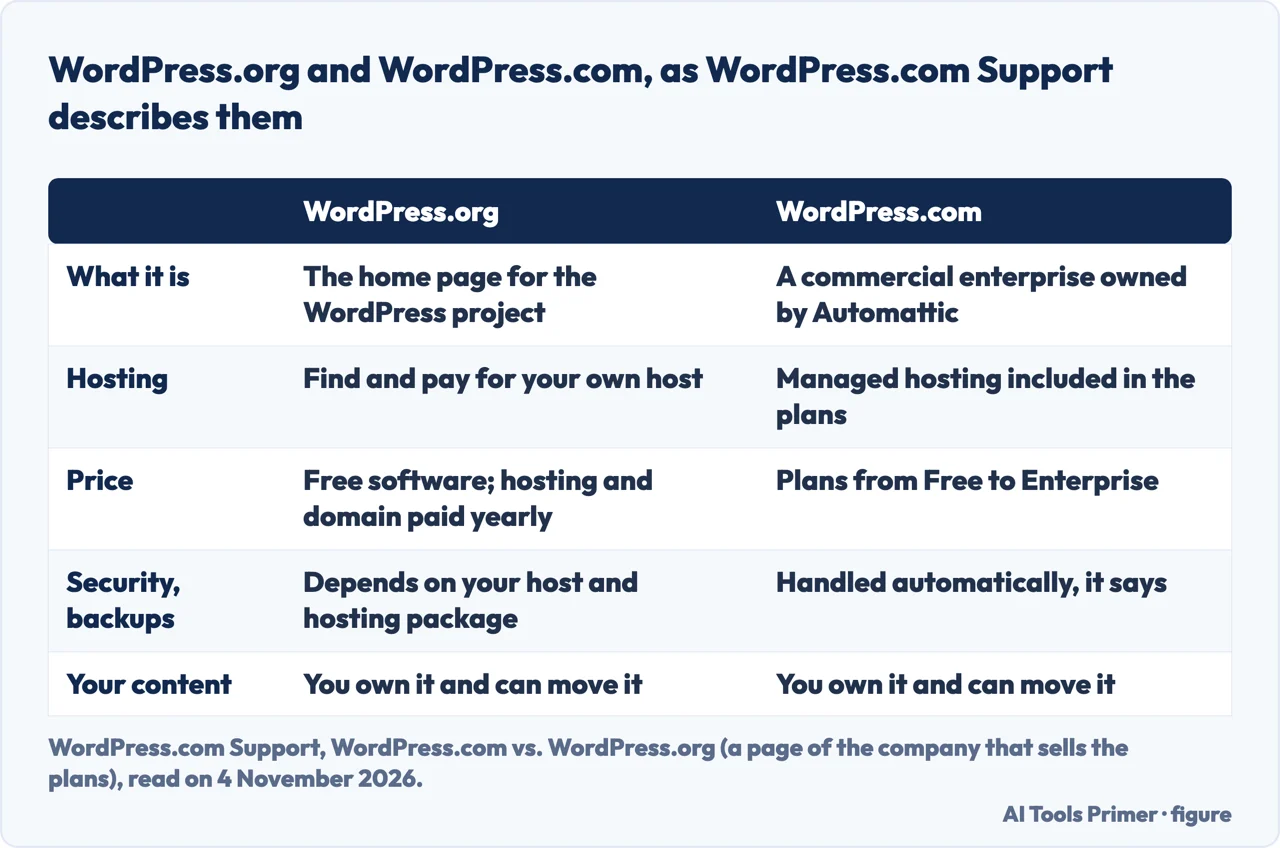
Pagely says that if you search for “WordPress” you will find both WordPress.org and WordPress.com and that, despite the similar names, they are separate things. It describes WordPress.org as the open-source software and WordPress.com as run by a for-profit company, Automattic, founded by Matt Mullenweg, who it says is also a co-founder of the open-source project. WordPress.com Support puts it the same way: WordPress.org is the home page for the WordPress project, and WordPress.com is a commercial enterprise owned by Automattic. The 2018 Marketing post calls WordPress.org the place where the software can be downloaded and WordPress.com a hosted solution that is “free to start”.
WordPress.com Support says the same software powers both and that one of the main differences is how the site is hosted. WordPress.com includes managed hosting. With WordPress.org you download the source code for free and upload it with a hosting provider of your choice, which that page calls self-hosting, and you find and pay for that hosting yourself. WordPress.com Support is a page of the company that sells the plans, so what follows is what it says, not something we checked.
- Price. WordPress.com lists plans called Free, Personal, Premium, Business, Commerce and Enterprise; the 2018 Marketing post says the free plan gives an address of the form yourexamplename.wordpress.com with limited features, whereas self-hosted WordPress needs a host and a domain you pay for. For WordPress.org it says the software is free but you pay annual fees to a third-party host for hosting and a domain.
- Security and backups. For WordPress.com it says updates, backups and a free domain SSL are handled automatically. For WordPress.org its table says the answer depends on your host and hosting package.
- Plugins and themes. It says you can install plugins and custom themes on the paid plans it names: Personal, Premium, Business and Commerce. For self-hosted WordPress.org it says you have great technical freedom, including custom code changes that may or may not be possible on WordPress.com, and changes to the PHP environment.
- Support. It says support, forums and videos are free on any WordPress.com plan and that 24/7 support comes with paid plans; for WordPress.org it lists the forums or your hosting provider.
- Your content. It says you own your content on both and can migrate a site to or from WordPress.com wherever it is hosted.
The 2018 post on the WordPress.org Marketing team’s site agrees on the direction of the security point: self-hosted WordPress typically leaves security and backups with the user, while managed hosting and managed WordPress, including WordPress.com, can take care of them. It adds that WordPress.com typically offers no access to code editing other than CSS. That post is from 2018 and the plan names on the WordPress.com page are from a page last reviewed on 21 October 2026, so we give the 2018 points only as that post’s own.
What it runs on, and a guide with older numbers
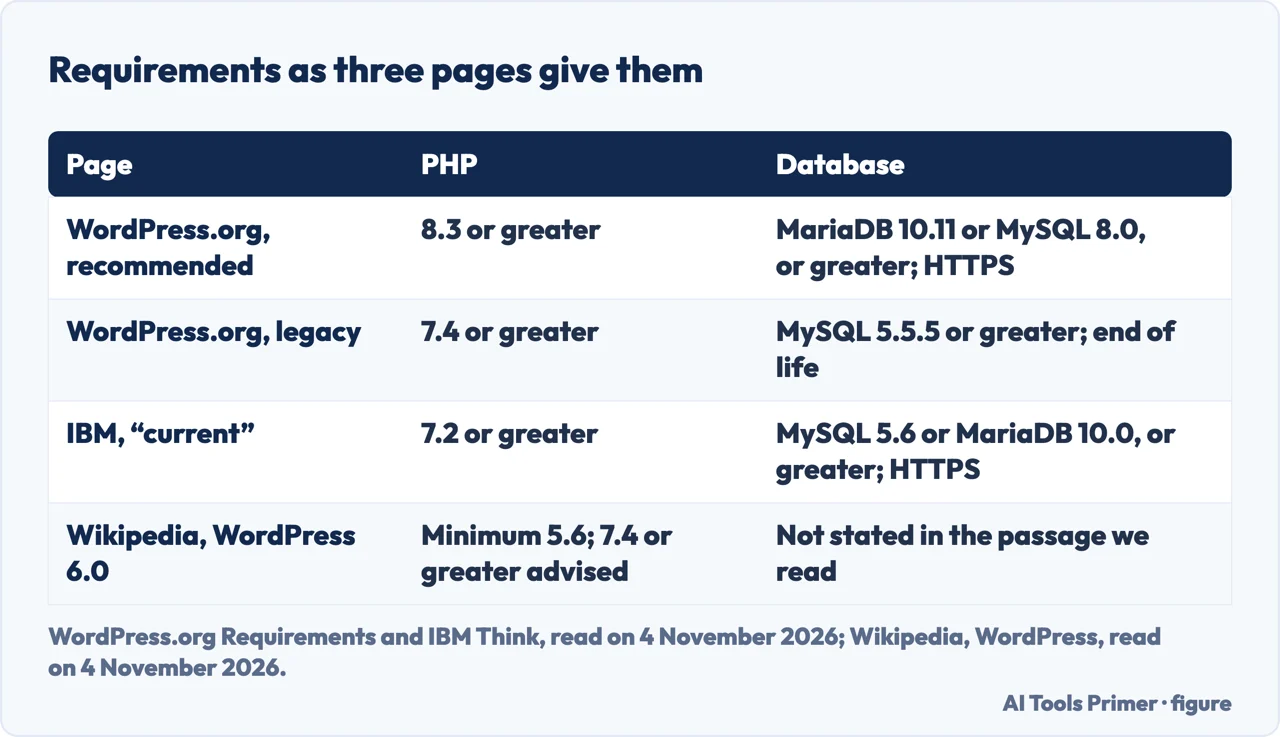
The WordPress.org requirements page says it is recommended your host supports PHP version 8.3 or greater; MariaDB version 10.11 or greater, or MySQL version 8.0 or greater; and HTTPS. It recommends Apache or Nginx, and says any server that supports PHP and MySQL will do. It adds a note for a legacy environment: WordPress also works with PHP 7.4 or greater and MySQL 5.5.5 or greater, but those versions have reached their official end of life and may expose a site to security vulnerabilities. The page also says, as not required but recommended, that hosting is more secure when PHP applications run under your account’s username instead of the server’s default shared username.
Three pages give four sets of numbers, counting the legacy note on the WordPress.org page. IBM’s page lists, under the heading “Current WordPress requirements”, PHP 7.2 or greater, MySQL 5.6 or greater or MariaDB 10.0 or greater, and HTTPS. Wikipedia says that as of WordPress 6.0 the minimum PHP version is 5.6 and that WordPress recommends 7.4 or greater. The IBM page shows no date in the text we read, so we cannot say when its numbers were current. We took the WordPress.org page, read on 4 November 2026, as the one to follow.
IBM describes installing WordPress through a web hosting provider that supports recent versions of PHP and MySQL plus HTTPS. For an enterprise it names two other routes, a LAMP-based virtual server or a Kubernetes container, and says that beyond the platform you need access to the web server, the ability to create MySQL databases, a text editor, an FTP client and a web browser.
On the kind of host, Wikipedia names two primary types of WordPress hosting. Shared hosting is a budget-friendly option where multiple websites reside on a single server and share resources. Managed hosting includes technical support, security and performance optimization, often with higher server resources, and comes at a higher price. The 2018 Marketing post says hosting ranges “from a couple of dollars per month” to tens of thousands, which is old enough that we give it only as that post’s statement. Our guide to the kinds of web hosting sets the types side by side.
Themes, plugins and keeping it updated
Wikipedia lists a plugin architecture and a template system known as themes among WordPress’s features, and says it has included a block-based editor, Gutenberg, since 2018. IBM describes themes as downloadable folders that contain the PHP files, style sheets and other files you need to get started, many free and some with a paid version that has more capabilities. It lists what plugins can do: add a contact form, automate thumbnail images, improve SEO, bolster security and generate site reports, with many free and paid premium options. Pagely compares a theme to a website’s clothing, changing its outward appearance without changing the content underneath, and says plugins are about functionality, from a contact form to turning a site into an eCommerce store or an online learning platform.
The two pages that count plugins differ. Pagely puts the free plugins at WordPress.org in the tens of thousands, with no date in the text we read on a page marked as updated two years ago. Wikipedia says that as of December 2021 WordPress.org had just under 60 thousand plugins available. The two counts carry different dates, and the pages we read do not explain the difference.
On upkeep, IBM suggests assigning an IT administrator to update the WordPress core application and the themes and plugins in use. It says the popularity of WordPress has made it “a target for hackers”, and that keeping the application, themes and plugins up to date is vital for reducing vulnerabilities. IBM also says you probably should not edit the core application files. Wikipedia records a May 2007 study which found that 98% of the WordPress blogs being run were exploitable because they were running outdated and unsupported versions, and says WordPress made updating a one-click process in version 2.7, released in December 2008. That is old evidence, and it is Wikipedia’s account of a study we did not read.
What the pages we read do not settle
The total cost of a site. The pages we read give parts of it. WordPress.com Support says WordPress.org means paying yearly fees to a host for hosting and a domain, and that WordPress.com plans vary by need and budget. It also warns about introductory pricing: many hosts display a lowest price that it says is valid for one billing cycle, and many of those hosts will double or triple the price at the next payment. That warning comes from a company that sells hosting, and the page does not name the hosts. The 2018 Marketing post says hosting can include extras such as the domain name. The pages we read do not add these into one figure.
How hard it is to learn. The pages we read do not measure it, and they point in different directions. IBM says content creators can quickly learn to assemble new pages or posts, and that with the visual editor no HTML or other coding is required. Pagely says WordPress can be used without special technical knowledge. WordPress.com Support says customization, maintenance and configuration of a WordPress.org site require “intermediate technical knowledge”. These are statements by a technology company, a hosting company and a company that sells plans, not tests of how long learning takes.
The downsides. The pages we read do not collect them in one place. The nearest statements are IBM’s on updates and attacks, WordPress.org’s on end-of-life PHP and MySQL, and WordPress.com Support’s that, for a self-hosted site, security and backups depend on the host. Wikipedia’s account of the WP Engine dispute is a different kind of concern, about the project’s community.
What we did not use. We tested nothing on a site. We did not read the American Eagle agency guide or a Reddit thread on what WordPress does. We read WordPress.com’s home page, which is a sales page, and took nothing from it, and we took nothing from images.
Where to start
Four ways in.
- “What is WordPress for?”
- What WordPress is, and where it came from — what
- “Is WordPress.com the same thing?”
- WordPress.org and WordPress.com — orgcom
- “What does my host need?”
- What it runs on — requirements
- “How much of the web uses it?”
- Five figures that do not match — share
Other ways to build a site
Builders, hosted or static, set beside the software.
Hosting and names
Where the site runs and what it is called.
Questions people also ask
What is WordPress used for?
Wikipedia says it was created to publish blogs and now supports traditional websites, forums, media galleries, membership sites, learning management systems and online stores. Pagely adds portfolio sites and online courses, and says it started as a platform for blogging.
Is it hard to learn WordPress?
The pages we read do not measure it. IBM says content creators can quickly learn to assemble pages and posts; WordPress.com Support says customization and maintenance of a WordPress.org site require intermediate technical knowledge.
What is the downside of WordPress?
The pages we read do not list the downsides together. IBM says popularity has made it a target for hackers, so updates matter; WordPress.com Support says security and backups on WordPress.org depend on your host.
Can I learn WordPress in 3 days?
The pages we read do not give a learning time. The WordPress.org About page says people with limited tech experience can use it out of the box, and does not say how long learning takes.
Not covered here. We tested nothing on a site. The statements come from WordPress.org, WordPress.com Support, W3Techs, IBM, Pagely, Wikipedia and a 2018 post of the WordPress.org Marketing team, all read on 4 November 2026. WordPress.com Support and Pagely sell plans or hosting.
The search volume (8,100 a month) and the difficulty (75) behind this page come from an Ubersuggest reading of 4 November 2026; Ubersuggest’s score is not the Semrush difficulty, and it has not yet been confirmed with Semrush.
Sources
- WordPress.org — About — wordpress.org, read 4 November 2026.
- WordPress.org — Requirements — wordpress.org, read 4 November 2026.
- WordPress.com Support — WordPress.com vs. WordPress.org — wordpress.com, read 4 November 2026.
- WordPress.org Marketing — What is the difference between WordPress.org and WordPress.com? (14 September 2018) — make.wordpress.org, read 4 November 2026.
- W3Techs — Usage statistics and market share of WordPress — w3techs.com, read 4 November 2026.
- W3Techs — Usage statistics and market shares of content management systems — w3techs.com, read 4 November 2026.
- IBM Think — What is WordPress? — www.ibm.com, read 4 November 2026.
- Pagely — What Is WordPress? A Beginner-Friendly Introduction — support.pagely.com, read 4 November 2026.
- Wikipedia — WordPress — en.wikipedia.org, read 4 November 2026.
Written by Alberto Gulotta
Founder and editor of AI Tools Primer, writing from Palermo, Italy. Thirty-five years of taking computers apart, starting with a Commodore 64 — the long version is on the about page.
Something wrong on this page? Write to aitoolsprimer@gmail.com and it gets fixed.
Written on 4 November 2026.
Independence and limits
No affiliate links and no paid placements anywhere on this site. Nobody pays to appear here, and no company has seen this page before you did.
This is general information, not professional advice. Where a page touches money, health, safety or the law, it names its source and the date it was read — and your situation may still differ. See the privacy page and the cookie policy.