
Web · guide
What is a static website? The definition and where guides differ
By Alberto Gulotta · Updated · 17 min read
What is a static website? It is made of pages that the server delivers to the browser exactly as stored, rather than assembling each one for the visitor. Wikipedia, MDN and four vendor guides share that core. They differ on speed, ranking, scaling and cost, and GitHub’s documentation shows what one free static host allows.
| Question | Answer | Where it comes from |
|---|---|---|
| What makes a page static? | It is delivered to the browser exactly as stored, not generated for each visit | Wikipedia, CloudCannon |
| Does static mean no interaction? | Contentful says no: the word describes how files are delivered, and client-side JavaScript or APIs can add forms and search | Contentful |
| What is it made of? | HTML, CSS and JavaScript, plus fonts, images and JSON files | Contentful, Figma, Strapi |
| How is it built? | A static site generator turns templates and content into finished files in a build step | Wikipedia, Contentful, CloudCannon |
| Where do the pages disagree? | On ranking, scaling, updates, security and cost | CloudCannon, Contentful, Figma, Strapi |
| Can one be hosted free? | GitHub Pages hosts static sites, with stated limits and a rule against running an online business | GitHub Docs |
What the term means
Wikipedia’s entry on the static web page defines it as a page delivered to a web browser “exactly as stored”, in contrast to dynamic pages, which are generated by a web application. The entry draws one consequence from that: a static page shows the same information to all users, subject to a web server’s ability to choose a language or content type where several versions exist and the server is set up to do so. CloudCannon, which sells a content management system, words it almost the same way: a collection of pre-built HTML pages delivered exactly as they are stored, serving the same pre-rendered content to every visitor. Strapi, another vendor of such a system, adds that the content only changes when a developer updates the source code, and its example is a photographer’s portfolio, whose work samples change infrequently.
MDN, Mozilla’s web documentation, comes at the word from the server side. It says “static” means “served as-is”. A static web server, in its description, is a computer with an HTTP server, the software that understands web addresses and the protocol browsers use. A dynamic web server is that plus extra software, most commonly an application server and a database, and it is called dynamic because the application server updates the hosted files before the content goes to the browser.
Does static mean a site that cannot do anything? Contentful treats that as a common misconception. It says the word refers to how files are delivered, not to what users can do, and that a static site can still include animations, forms, search or personalization through client-side JavaScript, APIs or edge logic. Wikipedia sees the same fact from the other side: a page’s JavaScript can introduce dynamic functionality that may make the static page dynamic, and it calls the need to run any personalization or interactivity on the client restricting. The entry also warns that a web address ending in “.html” is not always static, and that looser readings of the term include pages kept in a database, or formatted with a template and served through an application server, as long as the page served is unchanging and presented essentially as stored. The entry carries a notice, dated February 2008, saying it needs more citations, so we read it beside MDN and the vendor guides.
On what a static site is made of, the pages agree. Contentful names HTML for the structure of the content, CSS for the look and JavaScript for interactivity in the browser, with fonts, images, JSON files and other media produced in the build. Figma lists the same three, and Strapi says static sites run on three core technologies.
How a static site is built and served
Contentful describes the request in two steps. The browser asks for a specific page; the server, or the hosting platform, finds the matching pre-built file and returns it, with no database to query and nothing to assemble at that moment. CloudCannon draws the contrast with a dynamic site, where the server gets the content from a database and builds the page in real time for each visitor, and says that is why static pages appear near-instantly while a typical dynamic site can take seconds. That is a vendor’s statement and it gives no timings. MDN describes the same step for any web server: the HTTP server checks whether the requested address matches an existing file and, if so, sends the content back; if not, it checks whether it should generate a file for the request, and failing both it returns an error, most commonly 404 Not Found.
The tools that make this practical at scale are static site generators. Wikipedia defines them as applications that compile static websites, typically filling HTML templates in a predefined folder and file structure with content in a format such as Markdown or AsciiDoc, and says maintaining large numbers of static pages as files can be impractical without automated tools of this kind. The three lists of names overlap without matching. Wikipedia names Jekyll, which it says powers GitHub Pages, along with Middleman, Hugo, Next.js, Astro, Pelican and Franklin. Contentful names Astro, Hugo, Next.js, SvelteKit and Jekyll. CloudCannon names Astro, Hugo, which it calls known for its build speed, and Eleventy.
What the generators share is a build. CloudCannon says the build pre-renders all of the pages, and that any time content or source files change, its system rebuilds the site and generates an entirely new static website. Contentful adds that a build often applies optimizations such as minification and image handling, and gives an example of cache-busting, a file name that carries a unique hash so browsers fetch the latest version. It also says that when content is updated in a CMS, a webhook can trigger a rebuild, so fresh content is published without manual deployment steps.
The delivery side is the next layer. Wikipedia says static files can be cached by content delivery networks (CDNs) and other intermediate caches, which reduces page load times for the user and reduces the load on the origin server. Contentful says a static site can be served from a basic web server but that CDNs are the usual route, caching files across edge servers so a page comes from a nearby location. Wikipedia lists a cost of this as well: after an update, some or all users may see an old version until it is flushed from the CDNs and caches.
MDN gives the case that goes the other way. Sites like MDN or Wikipedia have thousands of webpages, and it says such sites are typically composed of only a few HTML templates and a giant database, rather than thousands of static HTML documents, a setup that makes the content easier to maintain and deliver.
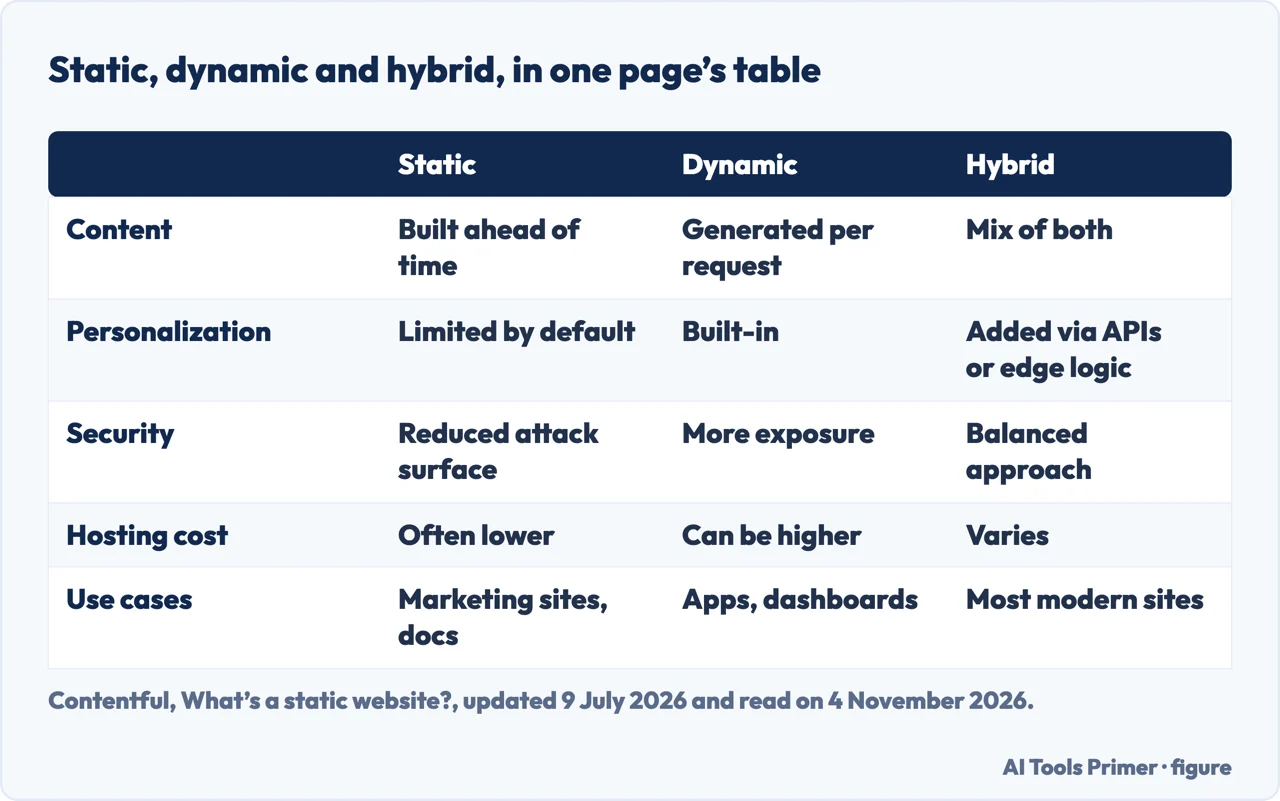
Static, dynamic and hybrid
Contentful puts the three side by side in a table, which the first figure reproduces, and says they are often presented as opposites although modern architectures usually combine them. In its wording a hybrid approach uses static delivery where possible and dynamic rendering where needed, and it observes that many production websites use static front ends connected to APIs.
Figma describes the dynamic side. It says dynamic websites are built with server-side scripting languages such as PHP, Python or Ruby along with databases, which allows features such as user logins, dynamic forms, content management systems, e-commerce and search, and its examples are online stores, social media platforms, news sites and forums.
Strapi lists what it calls the limits of the static approach. Dynamic features need JavaScript or external services, for forms and comments among others. Updating content often means rebuilding and redeploying the whole site. Live data, such as stock tickers or dashboards, is a poor fit. Managing hundreds or thousands of pages can become complex. Personalized or authenticated content is difficult to serve without extra infrastructure. Wikipedia lists a similar disadvantage in one line, that dynamic functionality must be performed on the client side.
The pages differ on how fixed those limits are. Strapi and Contentful both say a static site can reach services through APIs, and Strapi names form services and serverless functions for payments, authentication or email. Figma sets a firmer line: if you need to collect and analyze data from your visitors, it says, you need a dynamic website, and a dynamic site offers more flexibility for third-party services such as payment gateways.
Where the pages disagree
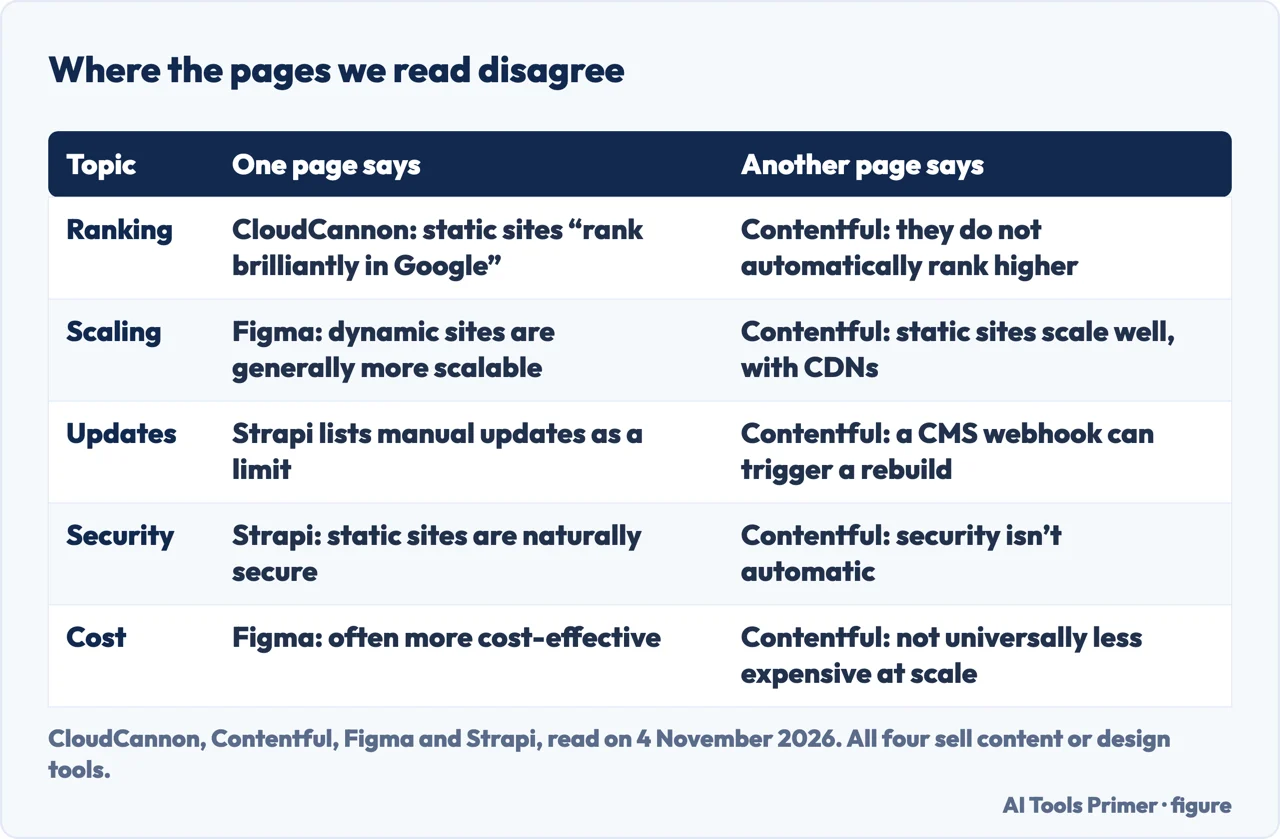
Four of the guides read for this page come from companies with something to sell: CloudCannon, Contentful and Strapi sell content management systems, and Figma sells design tools. Wikipedia is a fifth source of a different kind, and it carries the notice about citations. Read together, they agree on the definition and part company on the benefits, as the second figure sets out.
Speed and ranking. Figma says static sites are generally faster. Contentful says they can load quickly and may improve Core Web Vitals, the measures it names as LCP, CLS and INP, but that large JavaScript bundles, unoptimized images or third-party scripts reduce the gain. On ranking, CloudCannon says static sites “rank brilliantly in Google” and are by and large easier to rank, because Google favors a fast experience. Contentful says they can support strong SEO by delivering crawlable, pre-rendered HTML but do not automatically rank higher, since SEO still depends on content quality, structure, metadata and overall performance.
Security. Wikipedia lists improved security over dynamic websites, noting that dynamic sites are at risk of web shell attacks if a vulnerability is present. Strapi calls static websites naturally secure, because there are no databases or server-side processing to attack. Contentful says static sites reduce certain attack surfaces, then adds that security isn’t automatic: APIs, client-side code, dependencies and build pipelines still need safeguards.
Scaling. Here two pages say opposite things. Contentful says static sites scale well because the same files can be served repeatedly, and that CDNs let them handle large traffic spikes. Figma says dynamic websites are generally more scalable, because server-side technologies can add servers to share the load when traffic surges.
Updates. Strapi puts manual updates among the disadvantages. Contentful describes a CMS with a webhook as a way to publish updates without manual deployment, and says that although static sites are often associated with infrequently updated content, CMS-triggered builds also support regularly updated blogs, resource hubs and marketing content.
Cost. Figma calls static sites often more cost-effective, and Strapi says many platforms offer free or low-cost static hosting. Wikipedia lists cost savings from using cloud storage in place of a hosted environment. Contentful says static sites often need fewer server resources, then warns that at larger scale costs can rise through bandwidth, build times, image optimization or edge features, so static hosting is not universally less expensive. We timed and priced no site, so each of these remains the pages’ own claim.
Who it suits
The lists of uses overlap. Figma names personal portfolios and resumes, marketing landing pages, documentation and “Coming Soon” pages, and small business brochure sites. Strapi names blogs, portfolios, documentation and landing pages, and gives restaurants, law firms and service providers as local businesses the approach can cover. Contentful names portfolio and personal sites, small business websites, marketing landing pages, documentation and knowledge bases, and campaign microsites, and says static delivery in an enterprise is typically one part of a larger system.
Figma turns the choice into five steps: determine your goal, consider your content, factor in budget and time, evaluate your technical knowledge, and focus on scalability. Under content, it says a static site can be a cost-effective option when information rarely needs to change, and that a dynamic one fits content that changes frequently. Under budget and time, it says a static site may be the better choice if you have little of either, with the caution that it might not be able to do everything you want. MDN, writing about web servers and not about choosing a design, says static websites are the easiest to set up and suggests making a first site a static one.
Wikipedia mentions another route. It says cloud-based website builders, including Wix, Weebly and Duda, offer no-code platforms for creating static and dynamic web pages through graphical interfaces. Our own pages cover that ground: AI website builders and Wix and Squarespace are compared there.
Hosting one for free: GitHub Pages
GitHub’s documentation describes GitHub Pages as a static site hosting service that takes HTML, CSS and JavaScript files straight from a repository, optionally runs them through a build process, and publishes a website. It comes in two kinds. A user or organization site must live in a repository named after the account, is limited to one per account, and sits by default at the owner’s github.io address. A project site is stored in a folder of the repository holding the project’s code, is limited to one per repository, and sits at the same address followed by the repository name. A custom domain is possible instead. The feature is available in public repositories with GitHub Free.
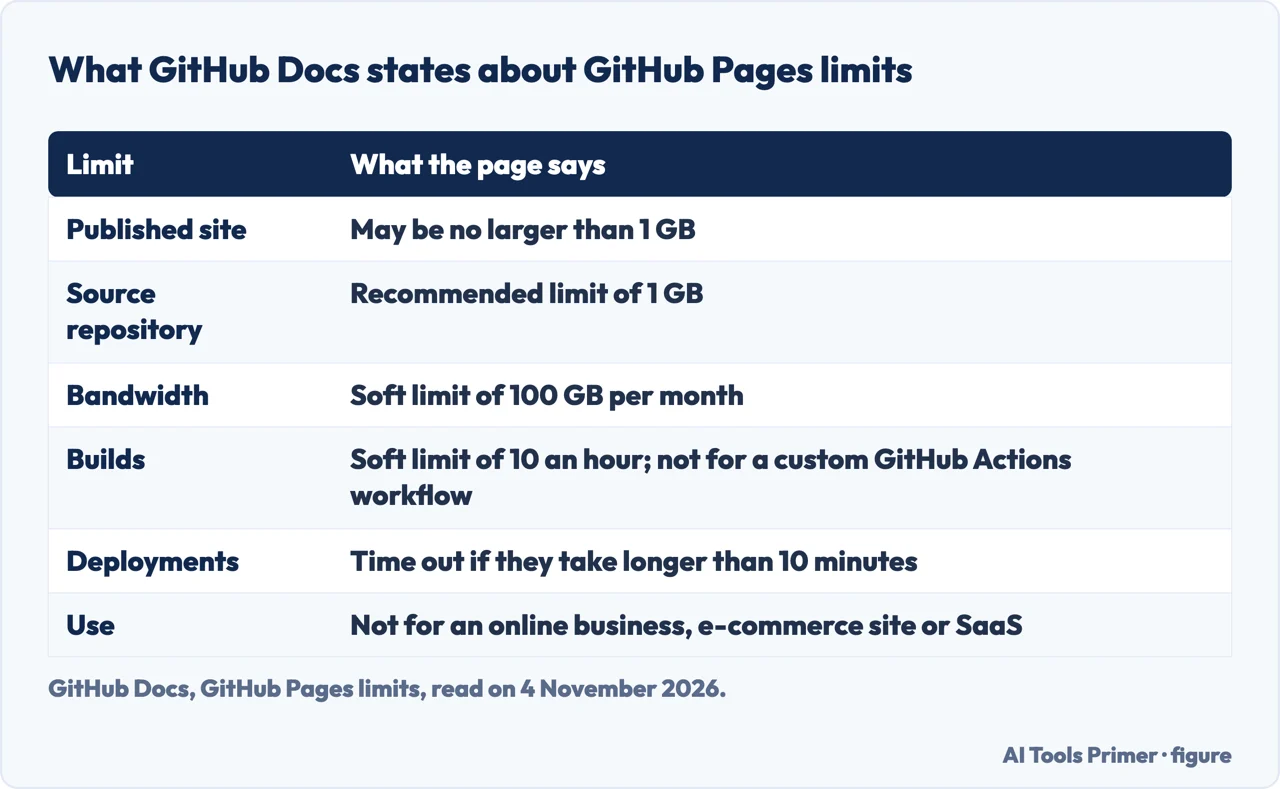
The limits are on a separate page, shown in the third figure. The size, bandwidth, build and deployment caps (a 1 GB published site and soft limits of 100 GB a month and 10 builds an hour, among others) are set out in the third figure; our free hosting page already walks through each of them beside the Cloudflare Pages and Netlify limits. If a site exceeds its quotas, GitHub says it may not be able to serve it, or may send a polite email suggesting ways to reduce the load, among them a third-party CDN in front of the site. Rate limits may also apply, and a request that triggers one receives an HTTP status code of 429.
The rule that matters most to a business is a different one. GitHub says Pages is not intended for or allowed as a free web-hosting service to run an online business, an e-commerce site or any other site primarily directed at commercial transactions or commercial software as a service, and that sites should not be used for sensitive transactions such as sending passwords or credit card numbers. Its documentation also says that when a Pages site is visited, the visitor’s IP address is logged and stored for security purposes, whether or not the visitor is signed into GitHub.
Strapi names Netlify, Vercel and Cloudflare Pages as platforms that handle the build, deploy and deliver flow. We covered the limits and conditions of Netlify and Cloudflare Pages, and of other free offers, on our free hosting page, and repeat none of them here.
What we did not use
We built and measured no website. We did not read a Reddit discussion on the subject, and the Google AI box was not read. The answers under the four questions near the end are our own, written from the pages above, because only the questions could be read from Google. MDN’s page was not among the six results; we added it for the definition of a static server. The Wikipedia entry carries its citations notice, and four of the guides come from vendors, so we used them for statements and set the differences side by side. The pages we read do not describe a way to check whether a live site is static or dynamic.
Where to start
Four ways in.
- “What does static mean?”
- What the term means — meaning
- “How does one get built?”
- How a static site is built and served — served
- “Is static better?”
- Where the pages disagree — disagree
- “Can I host one free?”
- Hosting one for free: GitHub Pages — free
Where a site can live
Free plans, hosting types and the builders that include it.
Making it and finding it
Builders, the address and the phone version.
Questions people also ask
What’s the difference between a static and dynamic website?
Wikipedia says a static page is delivered exactly as stored, while a dynamic page is generated by a web application. MDN says a static server sends files as-is, and a dynamic one adds an application server and a database that update the files first. Contentful’s table: built ahead of time versus generated per request.
What are the 5 examples of static websites?
Contentful lists five: portfolio and personal sites, small business websites, marketing landing pages, documentation and knowledge bases, and campaign microsites. Figma adds resumes and “Coming Soon” pages, and Strapi adds blogs.
Can you host a static website for free?
GitHub Pages is a static site host available in public repositories with GitHub Free. GitHub states a 1 GB limit on the published site and a soft 100 GB monthly bandwidth limit, and says Pages is not allowed for running an online business or e-commerce site. Strapi says many platforms offer free or low-cost static hosting.
How do I know if my website is static or dynamic?
The pages we read do not describe a way to check a live site. They define the difference by what the server returns: a stored file as-is (MDN, Wikipedia), or a page an application assembles from a database (MDN, Figma). Wikipedia adds that an address ending in .html does not settle it.
Not covered here. We tested nothing on a live site. The statements come from CloudCannon, Contentful, Wikipedia, Strapi, Figma, MDN and two GitHub Docs pages, all read on 4 November 2026.
The search volume and difficulty behind this page come from an Ubersuggest reading of 3 November 2026 (United States), which gives search volume and its own SEO difficulty score, not Semrush’s.
Sources
- Contentful — What’s a static website? How they work and when to use them (updated 9 July 2026) — www.contentful.com, read 4 November 2026.
- Wikipedia — Static web page — en.wikipedia.org, read 4 November 2026.
- CloudCannon — What is a static website? — cloudcannon.com, read 4 November 2026.
- Strapi — What Is a Static Website? Definition, Benefits, and Examples — strapi.io, read 4 November 2026.
- Figma — Static vs. dynamic websites: Which website is right for you? — www.figma.com, read 4 November 2026.
- MDN — What is a web server? — developer.mozilla.org, read 4 November 2026.
- GitHub Docs — What is GitHub Pages? — docs.github.com, read 4 November 2026.
- GitHub Docs — GitHub Pages limits — docs.github.com, read 4 November 2026.
Written by Alberto Gulotta
Founder and editor of AI Tools Primer, writing from Palermo, Italy. Thirty-five years of taking computers apart, starting with a Commodore 64 — the long version is on the about page.
Something wrong on this page? Write to aitoolsprimer@gmail.com and it gets fixed.
Written on 4 November 2026.
Independence and limits
No affiliate links and no paid placements anywhere on this site. Nobody pays to appear here, and no company has seen this page before you did.
This is general information, not professional advice. Where a page touches money, health, safety or the law, it names its source and the date it was read — and your situation may still differ. See the privacy page and the cookie policy.