
Web · guide
How to build a website: builder, WordPress or by hand
By Alberto Gulotta · Updated · 15 min read
How to build a website comes down to four routes: a hosted builder, WordPress, hand-written code or a free publishing tool. Wix, MDN, Canva and Squarespace quote different prices for domains and plans. MDN recommends GitHub Pages to start, while Wix says a builder is the easiest way for most beginners.
| Question | Answer | Where it comes from |
|---|---|---|
| What do I need to know first? | MDN says its course assumes no prior knowledge of web technologies, and suggests starting small | MDN |
| Is a domain the same as a site? | Wix says the domain is the address, and the name has to be connected to a hosted site before anything is published | Wix |
| What does a domain cost? | MDN says $5-15 a year, Canva $10-20, Squarespace from $14 | MDN, Canva, Squarespace |
| Can it be free? | With limits: a Wix or Canva free plan, or GitHub Pages in a public repository | Wix, Canva, GitHub Docs |
| When does it show up in Google? | Google says a new site can take a few weeks to be noticed | Google Search Central |
Four routes, drawn from what the pages list
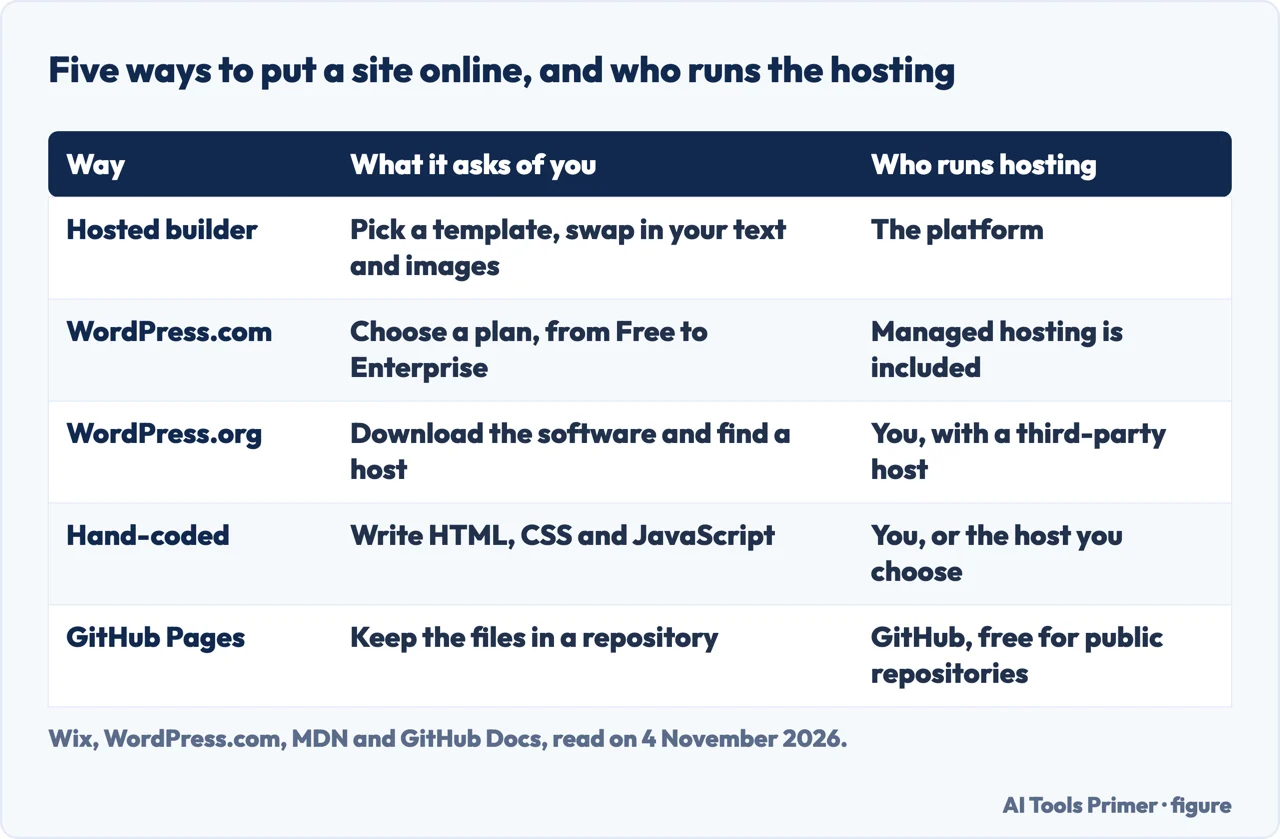
Wix’s guide lists eight ways to build a website: a builder with templates, an AI website builder, an AI chat assistant, vibe coding and AI coding tools, a content management system, hand-coding, a headless setup and hiring a professional. It says they differ in how much you build yourself, the skills you need and who looks after hosting and security, and that for most beginners a builder or an AI builder is the quickest way to start. Wix sells a builder, so we read that as its view and not as a finding. For this page we group the ways into four routes: a hosted builder, WordPress, writing the code by hand and a free publishing tool. The chat assistant, vibe coding, headless and hired-professional rows are on Wix’s list and we do not follow them further.
Before the routes, Wix keeps three things apart. The domain is the address, hosting is what makes your files available online, and the website is the pages, content and features visitors use. It says registering a domain only buys the address; the name has to be connected to a hosted site before anything is published. With a builder, it says, hosting is usually bundled, so that step may already be done; for a site built in code, you choose hosting once you know what the site needs. Wix then walks through ten steps: define the purpose, choose the builder or build method, pick and register a domain, choose hosting, design the site, build its structure, add useful pages, create the content, test and launch, and maintain and promote the site.
MDN sets out the order for the hand-coded route: plan the site, write the HTML, style it with CSS, add JavaScript, then publish. The pages also differ on which route to start with, since MDN recommends GitHub Pages for beginners and Wix points to a builder. The next sections give each route as the page that describes it puts it.
A hosted builder: what three vendors say
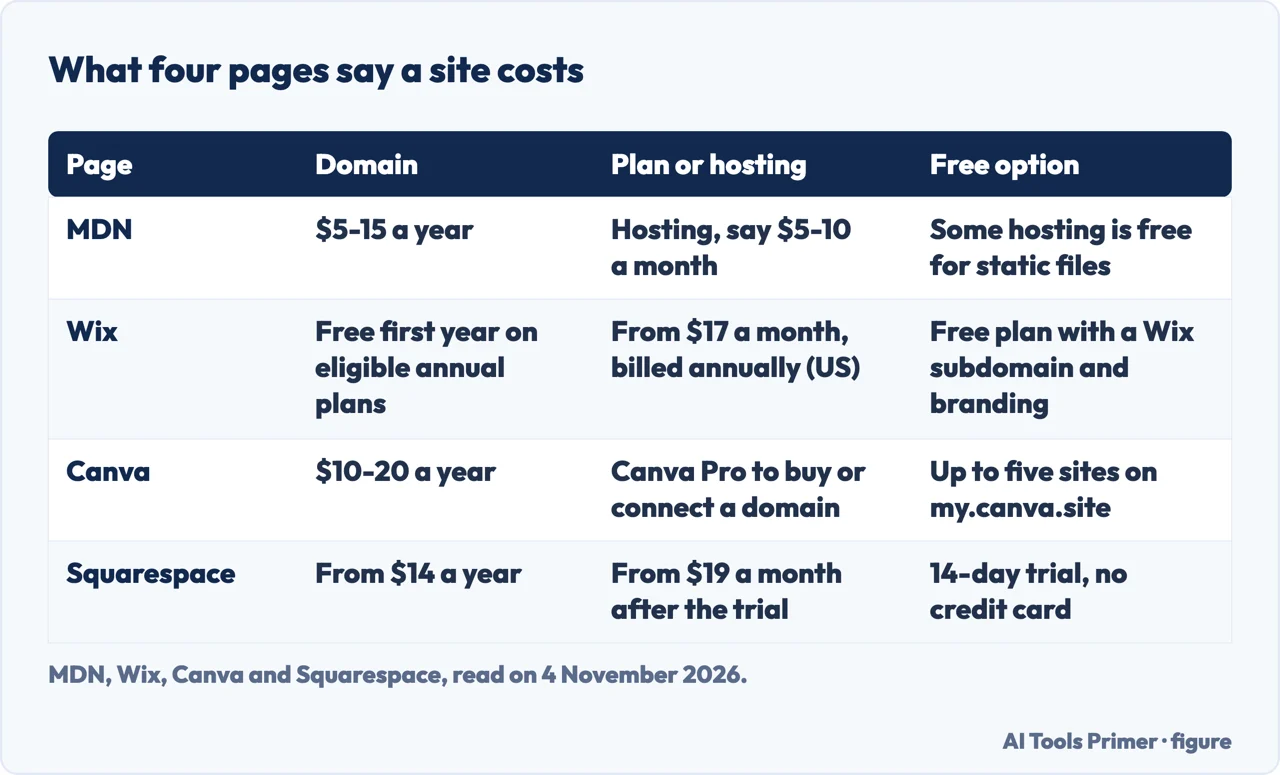
Wix says you can create and publish a website with its Free plan, which includes hosting, a Wix subdomain and Wix branding. A custom domain and the removal of the branding need a paid plan. Its paid plans start at $17 a month in the US when billed annually, with the subscription paid upfront, and it says they include hosting and that eligible annual plans include a free domain for the first year. Wix adds that prices vary by location and billing period and points readers to its pricing page for current rates. In its domain step it also tells readers to check the renewal price after the first year, since it is often different from the opening price.
Canva says its websites are free to publish under a xyz.my.canva.site address, and that Canva Free users can have up to five live websites on that free domain. Buying a domain inside Canva or linking an existing one is, in its words, available when you upgrade to Canva Pro. It puts the cost of a domain of your own at between $10 and $20 per year. Squarespace says there is a free 14-day trial with no credit card required, subscriptions that start at $19 a month afterwards, a domain name starting at $14 annually, and one year of free custom domain registration on new annual website subscriptions.
All three pages are written by companies that sell the product they describe, and every price above is theirs, read on 4 November 2026. On the AI part of the route, Wix says an AI-generated site is a starting point and not the finished product, and that you should plan time to edit the generated copy, swap in your own photos and adjust the layouts. The Wix, Canva and Squarespace pages we read do not mention exporting a site to another host, so the cost of leaving a builder is not something we can report from them.
WordPress, hosted or self-hosted
WordPress.com’s support page says WordPress.com and WordPress.org both run on the same WordPress software and that the main difference is hosting. WordPress.com includes managed hosting; WordPress.org requires you to find and manage your own. The company behind WordPress.com wrote the page, so it is also describing its own service. On price it lists six WordPress.com plans, Free, Personal, Premium, Business, Commerce and Enterprise, and says the WordPress.org software is free to download but that you pay annual fees to a third-party hosting provider for hosting and a domain. We did not read the prices of the WordPress.com plans.
On skill, the page calls WordPress.com easy to use for complete beginners and experienced professionals alike, and says that with WordPress.org customization, site maintenance and configuration are more hands-on and need intermediate technical knowledge. It says self-hosting gives great technical freedom, including changes to the PHP environment that it describes as relevant mainly to developers, and lets you choose the type and quality of hosting and how much technical maintenance you take on. Custom themes and plugins can be installed on the paid WordPress.com plans: Personal, Premium, Business and Commerce. The page also says you can move a WordPress site to or from WordPress.com wherever it is hosted, and that you always own your own content, so you can move to self-hosted WordPress later.
MDN lists WordPress among free services, next to Neocities and Google Sites, and says such services can be limited in scope but are good enough for initial experiments. Wix puts a content management system at low to medium skill, and says that with a self-hosted setup you take on more responsibility for hosting, updates and maintenance, while a hosted platform handles more of the technical work.
By hand, and free to publish
MDN says its course assumes no prior knowledge of web technologies, but that you should be comfortable with your operating system, including the file system, and with browsing the web, and have a code editor and several web browsers installed. It says creating a professional website is a lot of work and encourages anyone new to web development to start small. The steps are the ones above: plan the information, fonts and colors, write the HTML that structures the page, style it with CSS, add interactivity with JavaScript, and put the files online. Wix puts hand-coding at a high skill level and says it is a good path if you want to learn web development as a skill, but rarely the fastest way to launch a business site. It adds that you own responsiveness, accessibility and performance.
On publishing, MDN names three approaches: buying hosting and a domain name, using a web-based IDE such as CodePen, and using an online publishing tool. Hosting is rented file space on a company’s web server; some services are free for basic static files and others cost a small amount per month, say $5-10. A web-based IDE is free for basic features and hosts the rendered page at a unique address, but MDN says its features are limited and such tools often do not provide hosting space for assets such as images. MDN names GitHub Pages and Netlify as publishing tools that host static sites from a repository, generally free with a limited feature set. If you are just getting started, MDN recommends GitHub Pages for its ease of use. MDN says it does not promote specific hosting companies or registrars.
GitHub’s own quickstart says Pages is available in public repositories with GitHub Free. For a user site you create a repository named username.github.io, open Settings, choose Pages and select Deploy from a branch under Source. The content is written in the README.md file, and GitHub says changes can take up to 10 minutes to publish after you push them. The theme and title are set in a _config.yml file, which in GitHub’s example contains the line jekyll-theme-minimal. Our pages on free hosting, static websites and choosing a domain go further on each piece.
What it costs, and who says so
The pages give different prices for the same two items. For a domain, MDN says $5-15 per year, Canva $10-20 and Squarespace from $14, while Wix and Squarespace both say a free first year comes with an eligible or new annual plan. For hosting or a plan, MDN says rented hosting can cost a small amount per month, say $5-10, Wix says its paid plans start at $17 a month on annual billing, and Squarespace says subscriptions start at $19 a month. The figures are not like for like: MDN is speaking of hosting alone, and Wix says its plans include hosting. Wix says a builder or an AI builder is the quickest way to start for most beginners, but the pages we read give no measured launch time for any route.
MDN also says why domain prices differ. Top-level domain registries set fees for registrars, and some countries use them as a revenue stream, while popular endings such as .io and .ai can cost much more than .com. A registrar can add its own markup, and premium names, especially short ones, can cost more. Some registrars offer a promotional price in the first year that goes up after renewal. If hosting and the domain come from separate companies, MDN says you have to point the domain at the right server by adding an A record or a CNAME record in the DNS settings.
Wix gives a table of what each build method typically pays for. A builder or AI builder is a monthly or yearly plan that usually bundles hosting, security and support, with a free plan to start on many platforms. A content management system is hosting, a domain, premium themes and plugins, plus ongoing maintenance time. Hand-coding is hosting and a domain, plus your time or a developer’s fees. Wix tells readers to budget for ongoing costs too, among them domain renewals, business email, premium apps or plugins and payment processing fees.
Before you call it finished
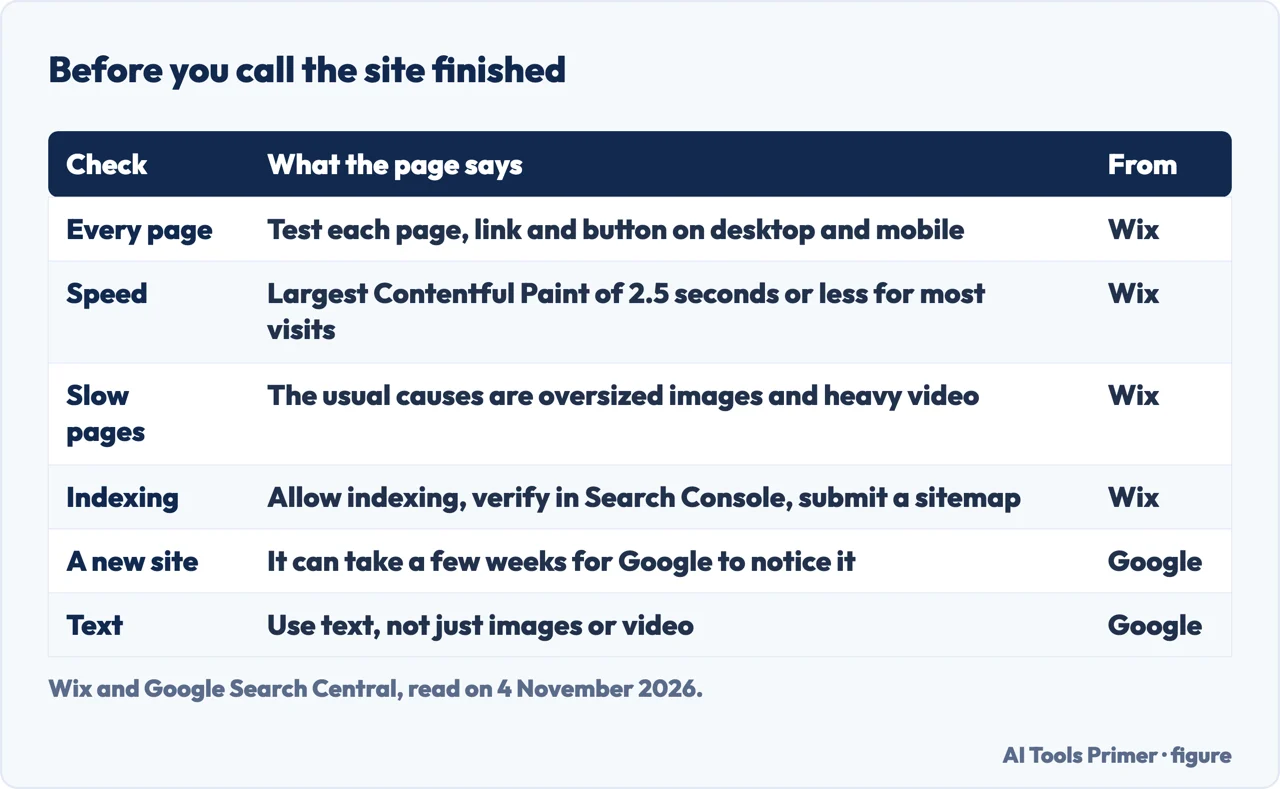
Wix’s test list asks you to try every page, link, button and embedded video on desktop and mobile, submit each form to confirm the messages arrive, check that the domain connects with a secure https connection and make sure analytics records visits. It also asks for a check on browsers such as Chrome, Firefox and Safari. On speed it says there is no single pass or fail load time, but that Google’s Core Web Vitals give benchmarks, and that Largest Contentful Paint, the moment the main content appears, should be 2.5 seconds or less for most visits. It says to test on a mobile connection rather than office Wi-Fi, with a free tool such as PageSpeed Insights, and names oversized images and heavy video as the usual causes of slow pages.
After publishing, Wix says to confirm your settings allow indexing, verify the site in Google Search Console, submit a sitemap and watch the Page Indexing report. It adds that Google can find sites on its own, and that these steps do not guarantee indexing or rankings, which can take time. Google’s page agrees on the wait: it says it can take a few weeks for Google to notice a new site, and lists reasons a site can be missed. One is that no other site links to it, and Google asks readers not to pay for links, which it says could violate its spam policies. Another is a design that makes crawling hard, and Google’s advice there is to use text, not just images or video. It says that if you are feeling adventurous you can add the site to Search Console.
What we did not use
We built no website for this page. We did not read the Reddit thread, the Spiceworks thread, the hosting company’s forum post or the Claude Academy course that Google listed. The Mailchimp guide reached us in Italian, so we left it out. MDN’s article on creating the content was read but not used. The Google AI box was not opened. The Wix, Canva and Squarespace pages sell their own builders, and we used them only for what they say about plans, domains, testing and the ways to build. We did not read the prices of the WordPress.com plans or the limits of any free plan beyond what is stated above.
Where to start
Four ways in.
- “Which route should I take?”
- Four routes, drawn from what the pages list — ways
- “What will it cost?”
- What it costs, and who says so — cost
- “Can I do it for free?”
- By hand, and free to publish — byhand
- “Is it ready to launch?”
- Before you call it finished — finish
Ways to build
Hosted, AI-made and static sites.
Hosting and the address
Where the files live and what the name costs.
Questions people also ask
Can I build my website myself?
MDN says its course assumes no prior knowledge of web technologies, but you should be comfortable with your operating system and have a code editor and several browsers installed. Wix lists no skills needed for a template builder and a high skill level for hand-coding, so the answer depends on the route.
Can I build my own website for free?
With limits. Wix says its Free plan includes hosting, a Wix subdomain and Wix branding, and Canva allows up to five live sites on its free domain. GitHub says Pages is available in public repositories with GitHub Free. A domain of your own is not free on either builder’s free plan.
Is it free to own a website?
Not always. MDN says a domain usually costs $5-15 a year, and hosting is free for basic static files on some services and about $5-10 a month on others. WordPress.com says the WordPress.org software is free but hosting and a domain are paid to a third party.
Can ChatGPT create a website?
Wix says an AI chat assistant can create or edit a site when it is connected to a website platform; without that connection it may generate code that you need to publish separately. Wix also says an AI-generated site is a starting point, and that editing the copy and photos takes time.
Not covered here. We built no website. The statements come from Wix, MDN, GitHub Docs, WordPress.com, Canva, Squarespace and Google Search Central, all read on 4 November 2026.
The search volume and difficulty behind this page come from an Ubersuggest reading of 4 November 2026 (United States), which gives search volume and its own SEO difficulty score, not Semrush’s.
Sources
- Wix — How to create a website from scratch (beginner’s guide for 2026) — www.wix.com, read 4 November 2026.
- MDN — Your first website — developer.mozilla.org, read 4 November 2026.
- MDN — Publishing your website — developer.mozilla.org, read 4 November 2026.
- GitHub Docs — Quickstart for GitHub Pages — docs.github.com, read 4 November 2026.
- WordPress.com Support — WordPress.com vs. WordPress.org — wordpress.com, read 4 November 2026.
- Canva — Website Builder — www.canva.com, read 4 November 2026.
- Squarespace — Website Builder — www.squarespace.com, read 4 November 2026.
- Google Search Central — How to get information on Google — developers.google.com, read 4 November 2026.
Written by Alberto Gulotta
Founder and editor of AI Tools Primer, writing from Palermo, Italy. Thirty-five years of taking computers apart, starting with a Commodore 64 — the long version is on the about page.
Something wrong on this page? Write to aitoolsprimer@gmail.com and it gets fixed.
Written on 4 November 2026.
Independence and limits
No affiliate links and no paid placements anywhere on this site. Nobody pays to appear here, and no company has seen this page before you did.
This is general information, not professional advice. Where a page touches money, health, safety or the law, it names its source and the date it was read — and your situation may still differ. See the privacy page and the cookie policy.