
Code · guide
Google Sheets as a database: what Google and Microsoft count
By Alberto Gulotta · Updated · 17 min read
Google Sheets as a database comes with limits that Google and Microsoft publish as numbers. Google counts 20 million cells or 100MB per spreadsheet, 300 API reads and 300 writes a minute per project, and 100 people working on one file at once. Microsoft counts rows and columns and, for its API, recommends one request at a time per workbook.
| Question | Answer | Where it comes from |
|---|---|---|
| How much can a spreadsheet hold? | Up to 20 million cells or 100MB in Google Sheets; Excel counts rows and columns instead | Google Drive Help, Microsoft Support |
| How often can a program ask? | 300 reads and 300 writes a minute per project, 60 of each per user, on the Sheets API | Google for Developers |
| How many people can work at once? | Up to 100 on a Google file; 256 on an Excel workbook shared the legacy way | Google Learning Center, Microsoft Support |
| Is QUERY the same as SQL? | Google describes a Visualization API query language run inside a formula | Google Docs Editors Help |
| When does a sheet stop being enough? | The pages we read do not give a row count or a user count for that | All the pages read |
The question behind the search
The search “Google Sheets as a database” puts a promise next to a measure. The promise is that a spreadsheet can hold records the way a database does. The measure is how much it can hold, how often a program may read or write it, and how many people can use it at once. Softr, a company that sells an app builder and a relational database of its own, publishes a guide with that title, and we read it.
Softr’s guide, updated in April 2026, says that for some small to mid-sized cases Google Sheets works well as a lightweight database, and that it will not replace a full relational database for complex applications. It also says Sheets can run into performance issues with very large datasets, and it gives no figures for that. The figures are on documentation pages from Google and Microsoft, which we read for this page. The Google pages on limits that we read do not use the word database: they speak of spreadsheets and files. Microsoft’s page on Excel limits does not use it either.
So this page does not rank Sheets against a database. It sets out the numbers each company publishes, what each number counts, and where the pages differ. By database we mean the plain sense of the search: data that a program or several people read and write. That is our reading of the question, not a definition from Google or Microsoft.
How much a sheet holds
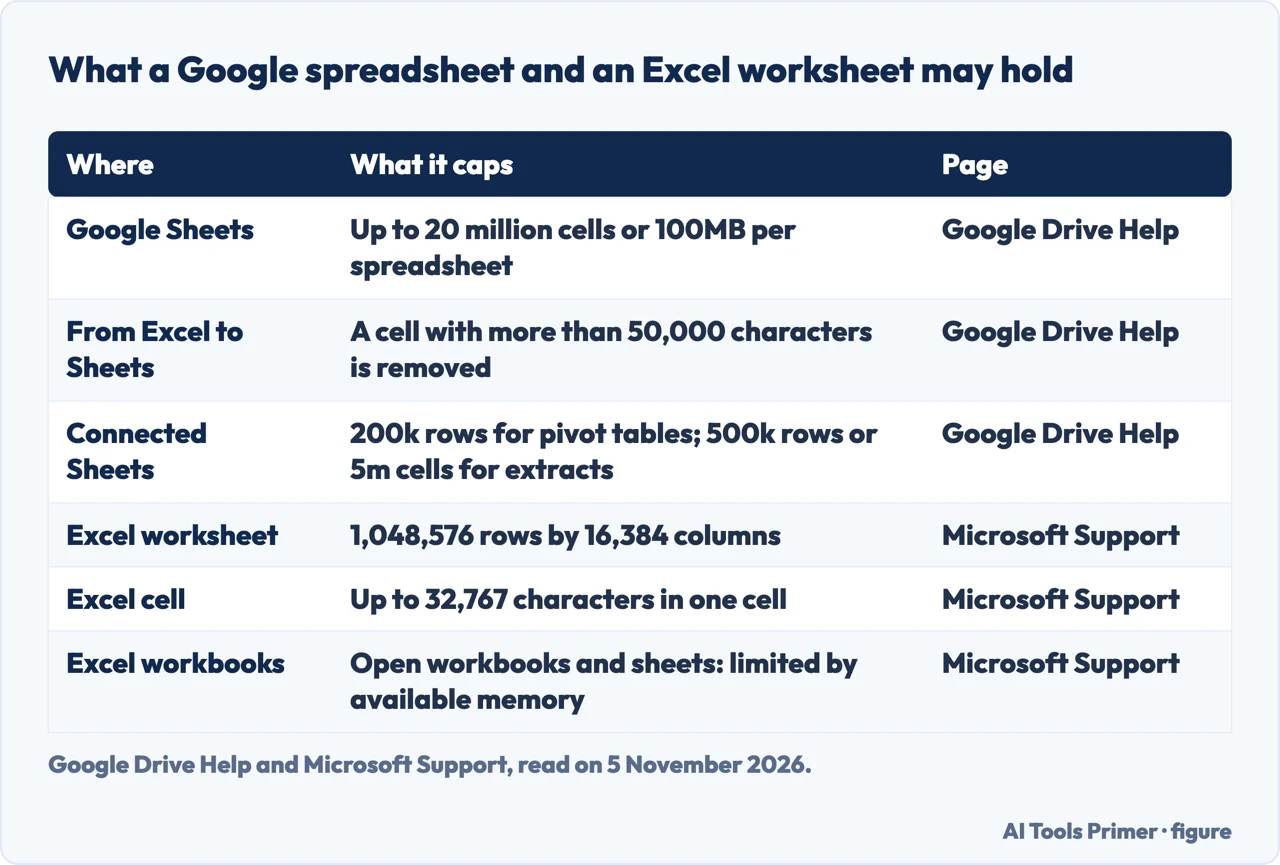
Google’s Drive Help page says a spreadsheet created in or converted to Google Sheets can hold up to 20 million cells or 100MB. It adds that when a document is converted from Excel to Google Sheets, any cell with more than 50 thousand characters is removed. For Connected Sheets, the same page lists up to 200k rows for pivot tables and up to 500k rows or 5m cells for extracts.
The cell limit moved recently. A post on Google Workspace Updates, dated 10 September 2026, says Google increased the cell limit in Google Sheets from 10 million cells to 20 million, and that the limit applies to new, existing and imported files. The rollout was gradual, taking up to 15 days to show, and it started on 10 September for Rapid Release domains and on 28 September for Scheduled Release domains. The post also says Google plans to raise the file byte size limit for imported spreadsheets, and it gives no date. A figure quoted from before the change would be the earlier one of 10 million.
Microsoft Support counts a worksheet by its grid: just over a million rows by about 16 thousand columns, with a cell that can hold just under 33 thousand characters. The exact figures are in the first figure below. For the number of sheets in a workbook and the number of open workbooks, the page says only that each is limited by available memory.
The two units do not compare directly. Google counts cells and megabytes, while Microsoft counts rows and columns and leaves the rest to memory. Multiplying Microsoft’s two grid figures, which is our own arithmetic, gives about 17 billion positions in an empty worksheet. That is the size of the grid, not a measure of what a workbook can hold in use, and Microsoft’s page does not give a cell total to set beside Google’s 20 million.
How often a program may ask
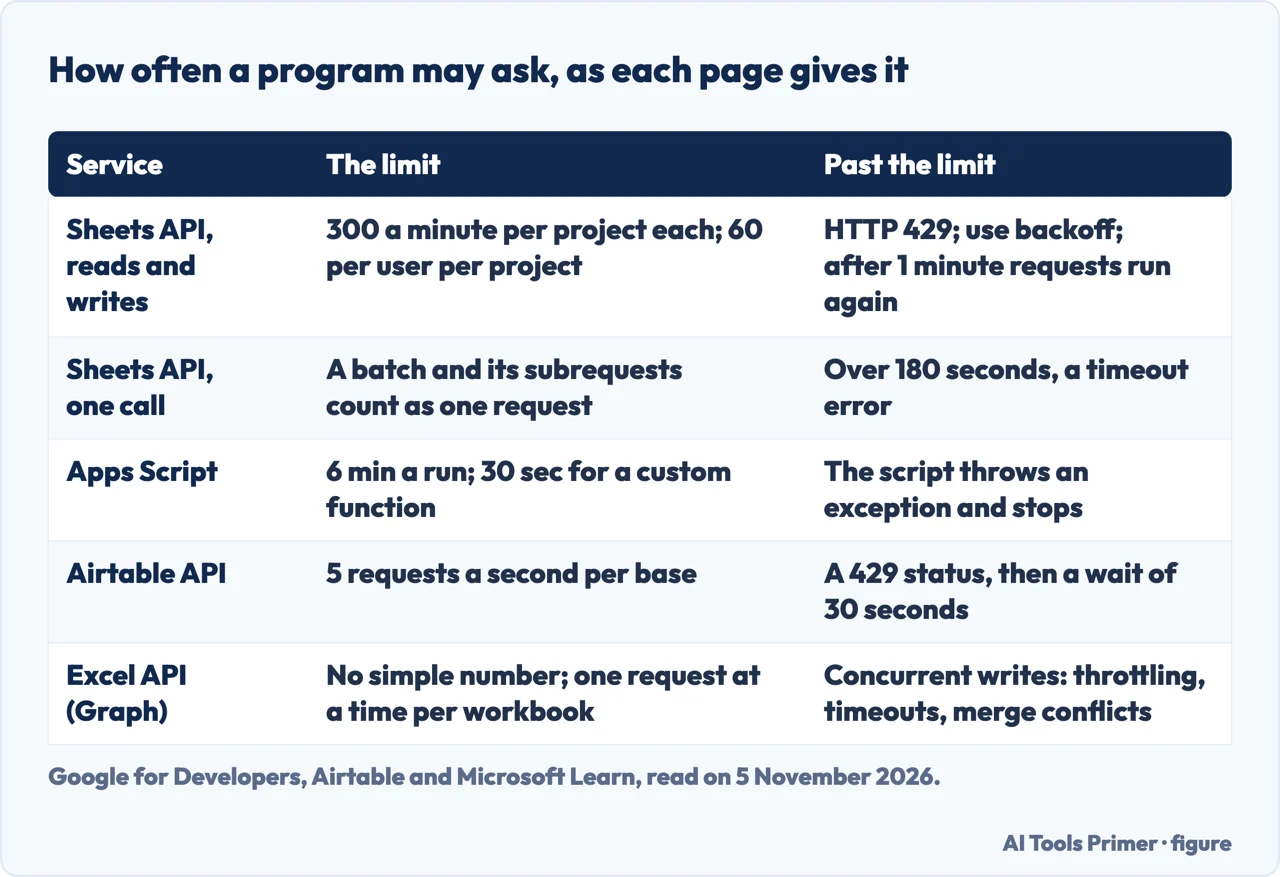
Google for Developers sets quotas on the Sheets API, and the page says they are refilled every minute. A read request is a call to a method that retrieves data, such as get or search, and a write request is a call that changes a spreadsheet, such as update, clear or copyTo. For each there are 300 requests per minute per project and 60 per minute per user per project. The page gives an example: an app that sends 350 read requests in a minute has 50 that exceed the quota, and those get an HTTP 429 status, Too many requests. Google says to use an exponential backoff algorithm, and that after 1 minute you can run requests again.
Three rules in the same page change how the count works. A batch request, subrequests included, counts as one API request toward the limit. All Sheets requests are applied atomically: if any request is not valid, the entire update is unsuccessful and the potentially dependent changes are not applied. The page does not extend this to a series of separate calls. And a request that Sheets processes for more than 180 seconds returns a timeout error. The page also says there is no hard size limit for a request but recommends a payload of 2 MB at most, and that as long as you stay within the per-minute quotas, the number of requests per day is not limited.
On price, the page says all standard use of the Sheets API is available at no additional cost, and that exceeding the quota is planned to incur charges to a Google Cloud billing account later in 2026. It also says you can ask for a quota increase, that calls by a service account count as one account, and that applying does not guarantee approval.
Google’s Apps Script page sets limits for code that runs inside Google’s own services, and it splits them between consumer accounts such as gmail.com and Google Workspace accounts. A script may run for 6 minutes per execution and a custom function for 30 seconds, on both kinds of account. Daily figures differ: triggers may run for 90 minutes a day on a consumer account and 6 hours on Workspace, URL Fetch calls are capped at 20 thousand a day against 100 thousand, and spreadsheets created at 250 a day against 3,200. The page says quotas are per user, reset 24 hours after the first request, and can change at any time without notice. One error it describes, that a script was invoked too many times per second for the Google user account, most often hits custom functions called repeatedly in a single spreadsheet; Google says to write them so they are called once per range of data.
How many people at once
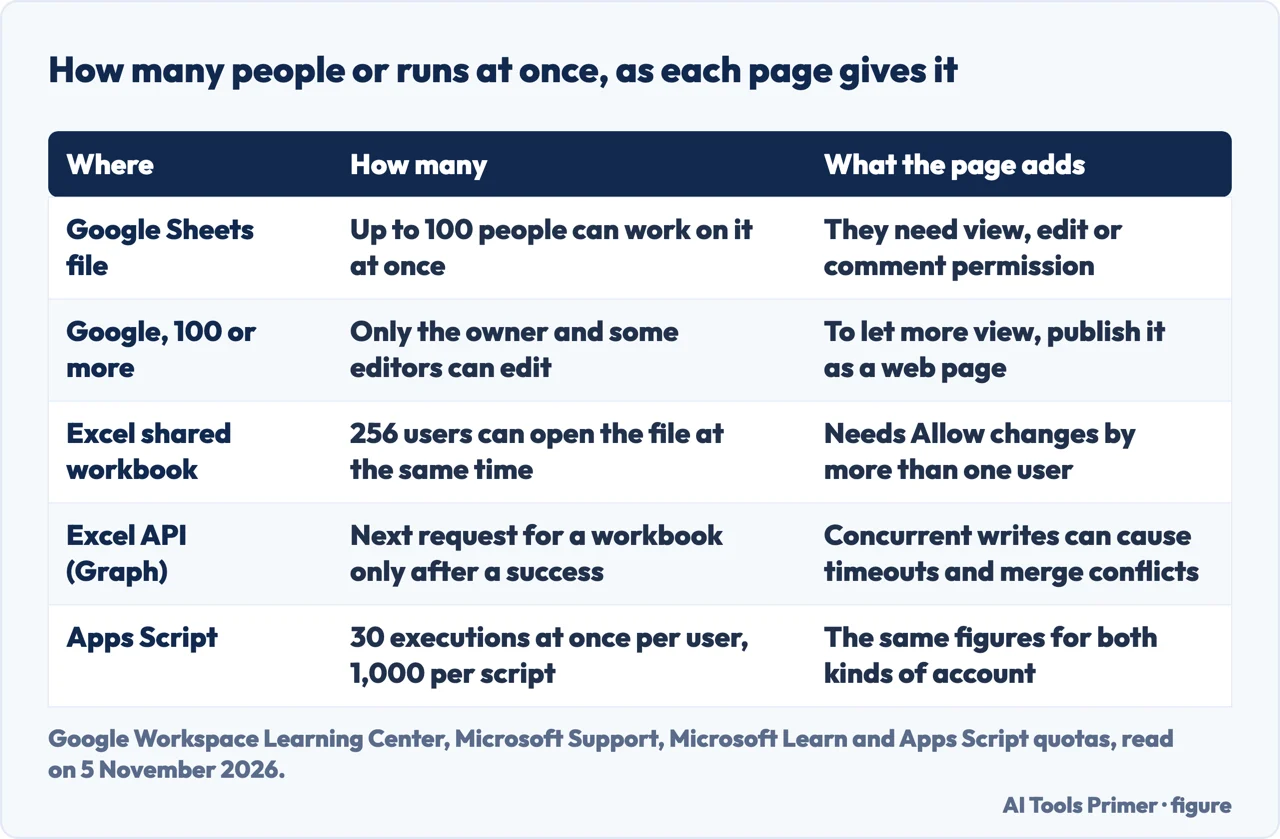
Google’s Learning Center page says up to 100 people with view, edit or comment permission can work on a Docs, Sheets or Slides file at the same time. When 100 people or more are accessing a file, it says, only the owner and some users with editing permission can edit. The page does not say which editors keep that right. To let more than 100 people view the file at once, Google says to publish it as a web page instead.
Microsoft Support gives one concurrency figure on its Excel limits page, and it belongs to an older feature. For a workbook with the setting “Allow changes by more than one user” turned on, 256 users can open the file at the same time. The page says that in newer versions of Excel the Share Workbook button is hidden, and it lists the steps to bring it back as Share Workbook (Legacy). It does not give a figure for the newer way of working together on a file, so we give none.
For programs, Microsoft Learn has a page of best practices for the Excel API in Microsoft Graph, last updated on 23 July 2025. It recommends creating a session when you have more than one call to make, and passing the session ID in a header with each request. It says throttling for these APIs is not defined with simple and universal limit numbers, and it advises against raising concurrency, especially for write requests: for each workbook, it says, send the next request only after the current one has succeeded. Concurrent writes to the same workbook do not usually run in parallel, it says, and are often the cause of throttling, timeouts and merge conflicts. They also make errors harder to handle, because after a failure there is no way to confirm the status of the other pending requests. If a throttling response carries a Retry-After header, the page says to respect its value.
The two companies answer different questions. Google states how many people may work on a file and how many requests a project may send in a minute. Microsoft states how many users may open a legacy shared workbook and, for its API, recommends one request at a time without giving a number.
Asking questions of the rows
Google Docs Editors Help describes the QUERY function as running a Google Visualization API Query Language query across data. The syntax is QUERY(data, query, [headers]), and the page’s example is QUERY(A2:E6,"select avg(A) pivot B"). Each column of the data can hold only boolean, numeric or string values, where numeric includes dates and times. If a column mixes types, the majority type decides what the column is for the query, and the minority values count as null. The optional headers argument gives the number of header rows, and if it is left out the value is guessed from the content.
Softr’s guide calls QUERY a way to perform SQL-like queries; Google’s page does not use the letters SQL. On these pages, then, the answer to SQL in Google Sheets is a query language that runs inside a formula, not a SQL database that sits behind the sheet.
For the shape of the data, Softr’s guide starts with a table in which each column is a kind of information, such as names, dates or amounts, and each row is a new entry. To link two sheets it uses unique identifiers such as customer IDs. It adds data validation rules, so a cell accepts only dates, numbers in a range or choices from a drop-down list, and protection for whole sheets or ranges. Looking up a value across sheets is where it names VLOOKUP, HLOOKUP and QUERY; our page on VLOOKUP in Google Sheets covers the first of those, and the one on protecting cells in Sheets covers the protection step. Softr lists the Sheets API, Apps Script, Zapier and Make as ways to automate the sheet.
The pages we read do not describe transactions that span several requests, row locks or referential integrity in Sheets or Excel. Softr says Sheets lacks built-in user authentication and does not support the granular access control a true database offers, and it presents its own product as the way to add them.
When a sheet is enough and when it is not
The pages we read do not say at how many rows or users a sheet stops being enough. What they give are ceilings, and a ceiling can be set against your own case. The figures below were read on 5 November 2026, and Google’s Apps Script page says quotas and limits can change at any time without notice, so they are worth reading again before you rely on them.
- Size. Count your cells, rows times columns, against Google’s 20 million cells or 100MB, or your rows against Microsoft’s grid.
- Program traffic. The Sheets API allows 300 reads and 300 writes a minute per project and 60 of each per user; a batch counts as one request.
- People. Up to 100 can work on a Google file at once, and from 100 up only the owner and some editors can edit.
- Scripts. An Apps Script run lasts up to 6 minutes, and a custom function up to 30 seconds.
Airtable is one alternative we read, and it states its limits in other units. Its Web API documentation says the API is limited to 5 requests per second per base, and to 50 requests per second for all traffic using personal access tokens from one user or service account. Above that you get a 429 status and must wait 30 seconds. Its help page adds monthly call limits for two plans: 1,000 calls on the Free plan, with a 30-day grace period that is available only once, and 100 thousand on the Team plan, after which calls slow to 2 requests a second until the month resets. It says Business and Enterprise Scale plans include unlimited calls. It also says batching handles up to 10 records per request.
Five requests a second is 300 a minute, which is our arithmetic and the same figure as Google’s per-project quota. The scopes differ, though, since Airtable counts per base and Google per project, so the two are not the same measure. Softr, which sells a relational database, describes Sheets as a starting point for small and mid-sized cases. If the sheet is to sit behind an app, our page on no-code app builders covers what Microsoft, Bubble, Baserow and Coursera say, and the one on automation between apps covers what Zapier, Make and n8n count and the free options.
Where to start
Four ways in.
- “Will my data fit?”
- How much a sheet holds — size
- “How often can my app call it?”
- How often a program may ask — requests
- “How many of us can edit together?”
- How many people at once — people
- “Is QUERY the same as SQL?”
- Asking questions of the rows — query
Building on top of the sheet
No-code builders and automation between apps.
Sheets in practice
Looking up, summarizing and protecting data in a sheet.
Questions people also ask
Can I use Google Sheets like a database?
Softr, which sells a relational database, says Sheets works as a lightweight database for some small to mid-sized cases. Google’s pages give limits: 20 million cells or 100MB per spreadsheet, 300 API reads and 300 writes a minute per project, and 100 people on a file at once. The pages we read do not say when that stops being enough.
How to create a Google Sheet database?
Softr’s guide starts with a table where each row is an entry and each column a kind of information, uses an ID such as a customer ID to link sheets, then adds data validation and protected cells. It names VLOOKUP and QUERY for finding data, and the Sheets API, Apps Script, Zapier or Make for automation.
Can I do SQL in Google Sheets?
Google describes the QUERY function as running a Google Visualization API Query Language query across data, written as QUERY(data, query, [headers]). Softr calls it SQL-like. Each column holds one type, and in a mixed column the majority type decides. It is a query language inside a formula, not a SQL database behind the sheet.
Can you use a spreadsheet as a database?
Microsoft Support counts an Excel worksheet at just over a million rows by about 16 thousand columns, and 256 users on a workbook shared the legacy way. For its API, Microsoft Learn recommends one request at a time per workbook. The pages we read do not describe transactions, row locks or referential integrity in Excel or Sheets.
Not covered here. We opened no spreadsheet and sent no request to Google Sheets, Excel or Airtable. The statements come from pages of Google, Microsoft, Airtable and Softr, all read on 5 November 2026; the multiplications marked as ours are our own arithmetic. We did not open the Reddit thread, the Google community thread, the LinkedIn post, the Medium article or the ClickUp, Latenode and Sheetify CRM pages that Google listed, and the Google AI box was read only in part and not used. The Softr guide is a vendor page and is used only for what it says.
The search volume and difficulty behind this page come from an Ubersuggest reading of 5 November 2026, within the 60 days the site normally allows. Its difficulty is Ubersuggest’s SEO difficulty and not the Semrush KD, and a Semrush check is still to be made.
Sources
- Google for Developers — Usage limits (Google Sheets API) — developers.google.com, read 5 November 2026.
- Google Drive Help — Files you can store in Google Drive — support.google.com, read 5 November 2026.
- Google Workspace Updates — Doubled cell limits in Google Sheets now generally available — workspaceupdates.googleblog.com, read 5 November 2026.
- Google Workspace Learning Center — Share & collaborate on a spreadsheet — support.google.com, read 5 November 2026.
- Google Docs Editors Help — QUERY function — support.google.com, read 5 November 2026.
- Google for Developers — Quotas for Google Services (Apps Script) — developers.google.com, read 5 November 2026.
- Microsoft Support — Excel specifications and limits — support.microsoft.com, read 5 November 2026.
- Microsoft Learn — Best practices for working with the Excel API (Microsoft Graph) — learn.microsoft.com, read 5 November 2026.
- Airtable — Rate limits (Web API) — airtable.com, read 5 November 2026.
- Airtable Help — Managing API call limits in Airtable — support.airtable.com, read 5 November 2026.
- Softr — How to use Google Sheets as a database — www.softr.io, read 5 November 2026.
Written by Alberto Gulotta
Founder and editor of AI Tools Primer, writing from Palermo, Italy. Thirty-five years of taking computers apart, starting with a Commodore 64 — the long version is on the about page.
Something wrong on this page? Write to aitoolsprimer@gmail.com and it gets fixed.
Written on 6 November 2026.
Independence and limits
No affiliate links and no paid placements anywhere on this site. Nobody pays to appear here, and no company has seen this page before you did.
This is general information, not professional advice. Where a page touches money, health, safety or the law, it names its source and the date it was read — and your situation may still differ. See the privacy page and the cookie policy.