
Devices · guide
What GrapheneOS changes on a Pixel, and what it asks you to give up
By Alberto Gulotta · Updated · 16 min read
GrapheneOS is a mobile operating system built on Android code, which its project calls private and secure. It runs on the Pixel phones the project lists and leaves Google’s apps out by default. The project lists a sandboxed Google Play with some functions missing, banking apps as a problematic class and no anti-theft lock; two reviews disagree about Android Auto.
| Question | Answer | Where it comes from |
|---|---|---|
| What is it? | A mobile operating system built on Android’s open source code, which the project calls private and secure | GrapheneOS features page |
| Which phones? | Pixel phones from the 6 to the 10a; the project recommends the 8 and later | GrapheneOS FAQ |
| Does it come with Google apps? | No; Google Play can be installed afterwards as an ordinary sandboxed app | Features page, usage guide |
| What does it cost? | Wikipedia calls it free and open source and the project says it is entirely funded by donations; the other cost is a supported Pixel, and we did not read phone prices | Wikipedia, GrapheneOS FAQ |
| Do banking apps and Android Auto work? | The reviews disagree: one says they mostly do, the other says they were near-impossible | Android Authority, TechRadar |
What GrapheneOS is, and who is behind it
The features page of the project opens by calling GrapheneOS a private and secure mobile operating system. It says the system starts from the Android Open Source Project, known as AOSP, and takes care not to increase the attack surface or hurt Android’s security model. Google’s apps and services are not included or used by default. The page says they can run as regular sandboxed apps, without special access or privileges, and that they are left out to give users an explicit choice about whether to use them and in which profiles.
Wikipedia gives the history. The system was first released in 2016. Its main developer, Daniel Micay, co-founded and worked on CopperheadOS until he was dismissed from Copperhead Limited in 2018, and the work he continued as the Android Hardening project was renamed and announced as GrapheneOS in April 2019, described as the “true successor” to CopperheadOS. The nonprofit GrapheneOS Foundation was founded in Toronto, Canada, in March 2023. Wikipedia adds that the components are mostly published under permissive licenses, such as the MIT License or Apache License 2.0, with some under GPL-2.0.
On money, the project’s FAQ says GrapheneOS is entirely funded by donations. On review, the same FAQ says the code is reviewed by external security researchers, companies and organizations on a continuous basis, and then adds that this is not something to take for granted because a project is open source. The FAQ says most of the results of that review can be seen in the public pull requests and issue trackers.
Which phones run GrapheneOS, and for how long
The FAQ lists “official production support” for twenty-one Pixel models: the 6, 6 Pro, 6a, 7, 7 Pro, 7a, Fold, Tablet, 8, 8 Pro, 8a, 9, 9 Pro, 9 Pro XL, 9 Pro Fold, 9a, 10, 10 Pro, 10 Pro XL, 10 Pro Fold and 10a. Wikipedia, in a sentence dated March 2026, says the system is officially compatible with Pixel devices released between 2021 and 2025, from the Pixel 6 through the Pixel 10, the Fold, the Tablet and the “a” models. We used the FAQ for the list because it runs to the 10a. The FAQ also says that many other devices are supported only at a source level, and that for most of them the hardware and firmware prevent a reasonably secure device whatever work is put in.
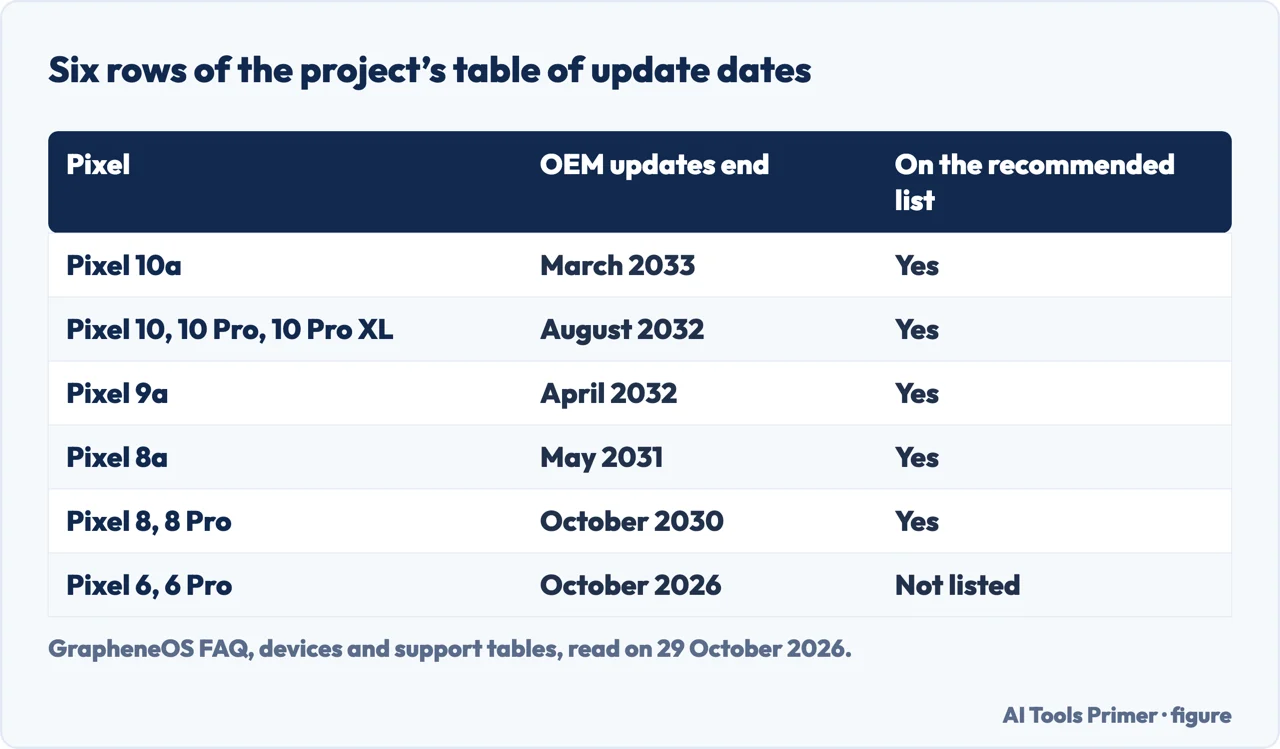
The project recommends only some of them. It strongly recommends buying only the Pixel 8 and later, up to the 10a, for better security and a long minimum support guarantee from launch. The FAQ gives 7 years for the 8th generation and later, against 5 years before, and says those Pixels support hardware memory tagging because of their ARMv9 processor cores. Its table of dates gives the month when the phone maker stops its updates: March 2033 for the Pixel 10a, May 2031 for the 8a, October 2030 for the 8 and 8 Pro, May 2028 for the 7a, October 2027 for the 7 and 7 Pro, July 2027 for the 6a and October 2026 for the 6 and 6 Pro, which is the month in which we read it. The Fold and the Tablet are listed for June 2028.
Two buying warnings come from the FAQ. Devices sold in partnership with carriers may be locked by the carrier, which prevents installing GrapheneOS; it says this is primarily an issue with US carriers and is not common elsewhere, and advises either not buying a carrier device or making sure it can be unlocked. And a phone is not a candidate just because it runs Android: the FAQ says the project chooses devices on their merits, and that broad device support goes against its aims, because much of its work is specific to each device.
That may change a little. Wikipedia reports that the partner announced at Mobile World Congress in March 2026 is Motorola Mobility, that in August 2026 the project said it plans to support the Motorola Razr Fold, the Razr Ultra and one unnamed regular device, and that, in a statement Wikipedia dates to October 2025, the first flagship devices were expected in the fourth quarter of 2026 or the first quarter of 2027. The FAQ list we read has only Pixels.
What happens after the date is also in the FAQ. Official updates for Pixels typically end shortly after the end of the guaranteed period, and the project may provide temporary extended support releases for harm reduction; those releases cannot carry full security patches and should be used only as a last resort while planning to get a new device. The FAQ describes them as a stopgap for moving to current phones.
What it changes on the phone every day
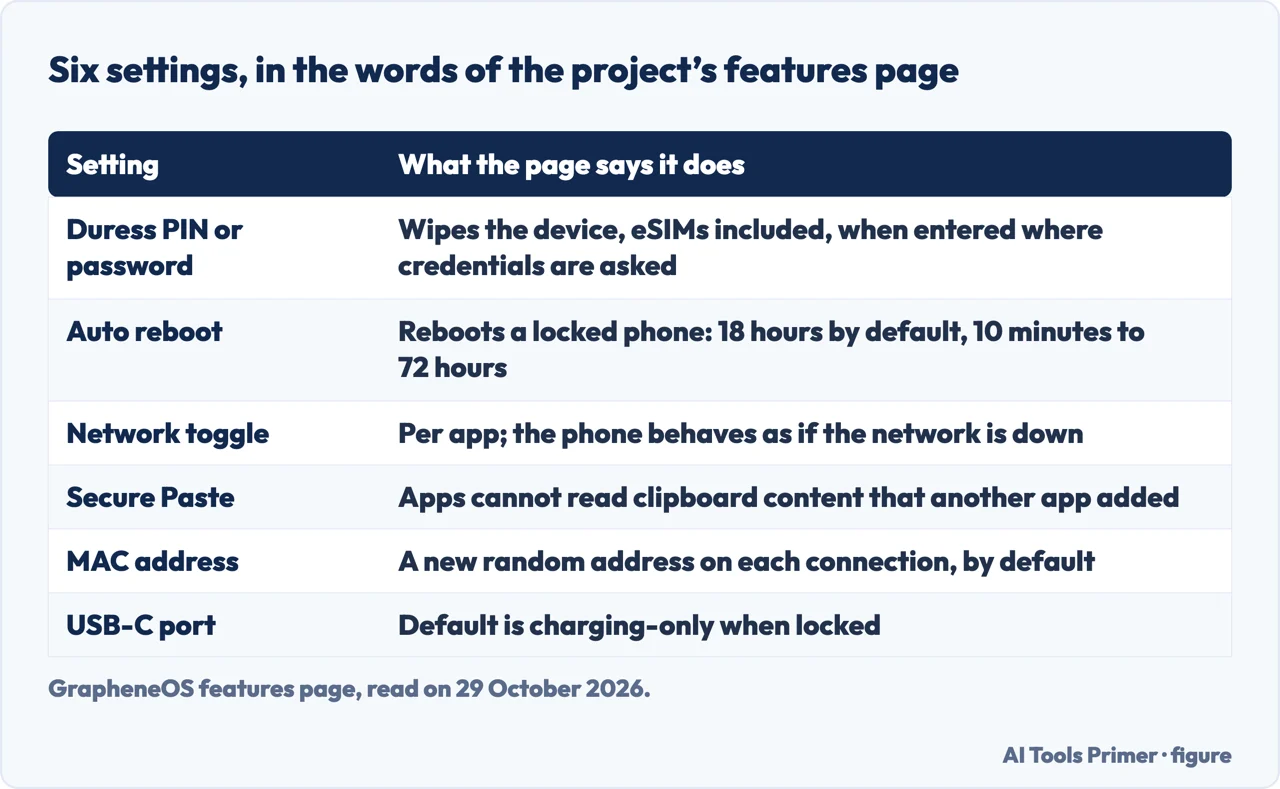
The project describes its additions on the features page, and the list below follows that page, with the usage guide for two settings. It is the project’s own account of what each feature does; the pages we read do not give a test of any of them on a phone.
Duress PIN or password. A second PIN and password that irreversibly wipe the device, installed eSIMs included, when entered anywhere the device credentials are requested. The page says the wipe does not need a reboot and cannot be interrupted, that it is set in Settings, Security & privacy, Device unlock, Duress Password, in the owner profile, and that both a PIN and a password are needed. If the duress code is the same as the real unlock, the real unlock always wins and nothing is wiped. It also wipes when entered as the PIN of the two-factor fingerprint unlock, but the page says not currently when entered as the SIM PIN. Android Authority describes it as the answer to being in danger and forced to hand over an unlocked device.
Auto reboot. A locked phone reboots after a set time, which puts the data at rest. The timer is 18 hours by default, can be set between 10 minutes and 72 hours or turned off, and any profile that is unlocked cancels it. It does not apply before the first unlock. The usage guide mentions a different, opt-in “Automatic reboot” for updates, which is a separate setting.
Network and Sensors toggles. Each app gets a Network switch that blocks direct and indirect access, the device-local network included. The page says the phone then pretends the network is down, so apps handle it as an outage instead of a revoked permission, and that, unlike a firewall, it also stops an app from using the network through the operating system or other apps in the same profile. A Sensors switch covers the accelerometer, gyroscope, compass, barometer and the like. Both are on by default so that Android apps keep working.
Storage Scopes and Contact Scopes. The app believes it has the permission and sees only what you add; by default Contact Scopes acts as if the contacts list is empty.
Secure Paste. A clipboard that, when on, stops apps from reading content that another app put there, while letting them read what they set themselves. The page contrasts it with stock Android, which shows a notice only after the clipboard has been read. Our page on the clipboard on Android covers where the stock clipboard sits.
MAC address, USB-C and the rest. A new random MAC address is generated on each connection by default, where stock Android keeps one random address per network; the setting is per network, under Network & internet. The USB-C port defaults to charging-only when locked, which the page says blocks new connections at once, at the controller and kernel level, and turns off the alternate modes, DisplayPort included. PIN scrambling is an optional toggle for the lock screen and SIM PIN. Vanadium, a hardened variant of Chromium, is both the system web view and the default browser. And the FAQ says the system makes remote connections by default only to GrapheneOS services and the network’s DNS resolvers, with no analytics or telemetry; the servers see the generic model and the OS version.
What you give up
Google Play is the first trade. The usage guide says it is installed from the GrapheneOS App Store, in a user or work profile, and works only there; the simplest approach it gives is to use only the owner profile. It calls the result “close to being fully functional”, with a small subset of privileged functions unavailable. Signing in to a Google account is optional, but the Play Store needs it to install apps or make in-app purchases.
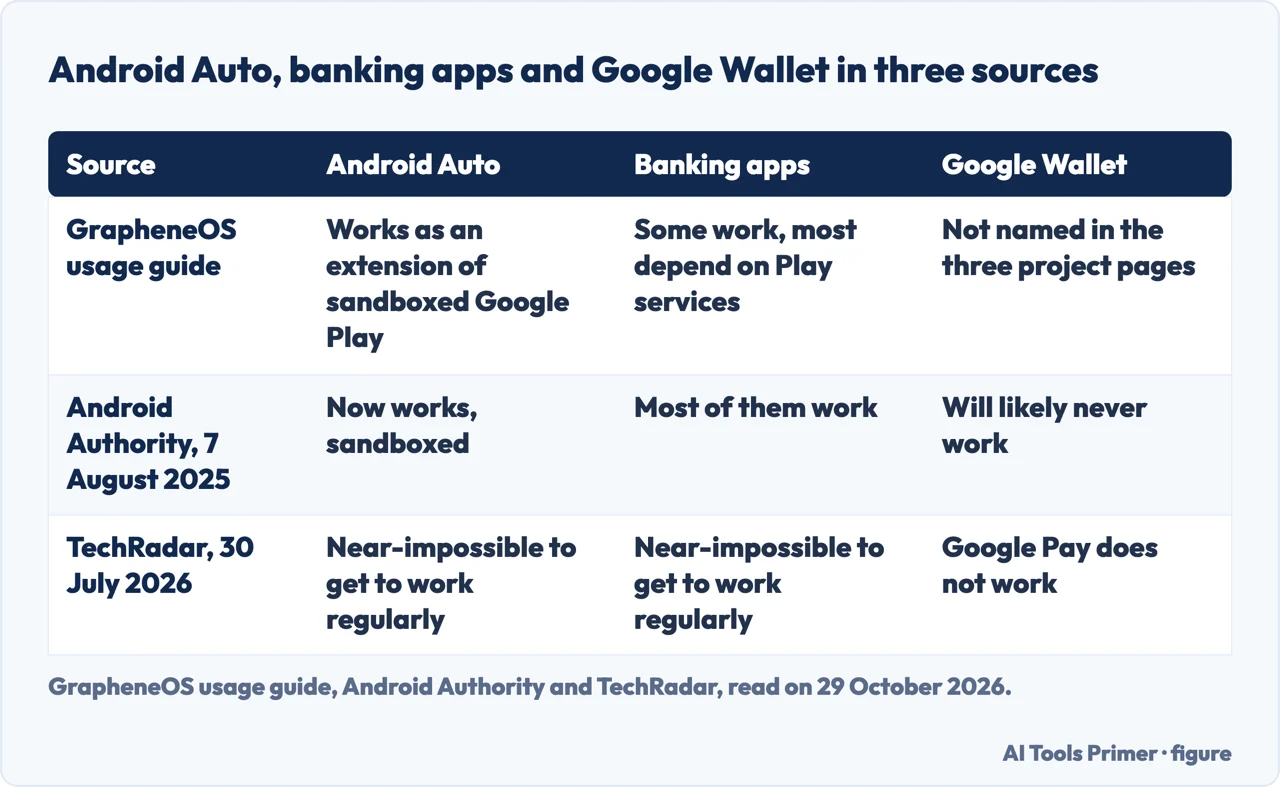
Android Auto and banking apps, where the reviews disagree. The usage guide says Android Auto needs privileged access, so it works as an extension of the sandboxed Play layer, is installed from the GrapheneOS App Store and not the Play Store, and is set up under Settings, Apps, Sandboxed Google Play; wired needs far less access than wireless. Wikipedia dates its support to December 2023. For banking, the guide says apps are a particularly problematic class: some work with any configuration, most depend heavily on Play services, and the system passes the basicIntegrity check but fails ctsProfileMatch because Google has not certified it. It says it does not try to bypass the checks, and points to a community list kept by PrivSec.dev, with no guarantee of its validity.
Two reviewers read this differently. Android Authority, on 7 August 2025, wrote that Android Auto now works in a completely sandboxed manner and that most banking apps work. TechRadar, on 30 July 2026, after a month with a Pixel 8 Pro, wrote that banking apps and Android Auto were near-impossible to get to work regularly. The dates differ and so do the writers, and only TechRadar says which phone it used, a Pixel 8 Pro; the pages do not say which reading holds for yours, and the project gives no numbers. Our page on Android Auto not working has the checks for the stock system.
Payments, notifications and the rest. The project’s pages we read do not name Google Wallet. Android Authority says it will likely never work, and that contactless payments remain possible through a bank’s own app or a wearable such as a Pixel Watch; TechRadar says Google Pay does not work and suggests Curve or a paired smartwatch. On notifications, the FAQ says they work for apps that do not depend on Google Play services, while apps with no background service of their own can lose background notifications; it names Signal and FairEmail as apps doing it the right way. Android Authority lists Circle to Search, Now Playing and Call Screening as features it missed, and says hardware features such as Pro Camera controls and the Pixel Pro thermometer still work. TechRadar reports no drop in battery life or performance, and still ends with a personal “no”.
One more entry is on the project’s side. The FAQ says GrapheneOS does not provide Factory Reset Protection, which it calls a theft deterrent and not a security feature, because the standard version needs the phone tied to an online account.
Installing it and living with it
The FAQ names two installation methods: a WebUSB installer, which it recommends, and a command-line guide aimed at technical users. Android Authority adds that most of the process happens in a browser and needs only a computer and a USB cable, that the bootloader is unlocked for the install and is supposed to be locked again, and that GrapheneOS does not use root.
Updates are automatic. The usage guide says the system checks about every six hours, downloads in the background, uses incremental updates when one is available and asks for a reboot at the end; if the new version fails to boot it rolls back. The Auditor app checks the authenticity of the firmware with hardware attestation, and the FAQ recommends setting it up after a factory reset of a phone bought with the system already on it. For a second profile, the FAQ says an end session button purges its encryption keys and puts it back at rest, which cannot be done for the owner profile without rebooting.
Phones sold with GrapheneOS already installed are covered too. The FAQ says the project is not affiliated with or endorsing any company selling them, and that its recommendation is to buy a supported device and install it yourself; if you buy one anyway, it says to avoid an end-of-life model, verify the verified boot key hash, factory reset from recovery and then set up Auditor.
Where the claims stop
The features page describes what each feature does, and the pages we read do not mention a promise of absolute security. That matters for the question that runs through the duress PIN: Wikipedia reports that in July 2026 the United States Department of Justice accused a man of destruction of evidence after he gave his duress PIN to an officer during a border search, and the officer entered it, wiping the phone. Wikipedia calls it a first-time high-profile case involving GrapheneOS. We read only Wikipedia’s account, not the news reports it cites.
The pages do not say whether police can get into a GrapheneOS phone. They describe pieces of the answer: a locked phone reboots by default after 18 hours, the USB-C port defaults to charging-only when locked, and the duress code wipes the phone. The pages we read do not quantify the risk of typing the duress code by mistake, and the reviews do not either.
What we did not use: we tested nothing on a phone. We did not read the home page of the project, its profile on X, the Reddit thread, the TechSpot download page or the Google AI box that appeared in the results. We did not open the community list of banking apps, and we did not read prices for Pixel phones, so the page gives none. The two reviews are one person’s experience each.
Where to start
Four ways in.
- “What phones run GrapheneOS?”
- Which phones run GrapheneOS, and for how long — phones
- “What are the downsides?”
- What you give up — giveup
- “Is it really safe?”
- What it changes on the phone every day — daily
- “Can police get into it?”
- Where the claims stop — limits
What leaves the phone
Messages, mail and the clipboard.
Android in daily use
Car, hidden apps and viruses.
Questions people also ask
What phones run GrapheneOS?
The FAQ lists Pixel 6 through the Pixel 10a, including the Fold and the Tablet, and recommends only the Pixel 8 and later. Wikipedia says a Motorola partnership was announced in March 2026.
What are the downsides of GrapheneOS?
The project says Google Play runs sandboxed with a small subset of functions missing, banking apps are a problematic class, and there is no Factory Reset Protection. The reviews disagree about Android Auto and banking. Android Authority says Google Wallet will likely never work, and TechRadar says Google Pay does not work.
Is GrapheneOS really safe?
The project describes what its features do and says the code is reviewed by outside researchers on a continuous basis, while warning that open source alone is not enough. The pages we read do not mention a promise of absolute security.
Can police get into GrapheneOS?
The pages we read do not say. They describe a duress PIN that wipes the phone, an 18-hour auto reboot and a charging-only USB-C port when locked. Wikipedia reports a July 2026 border case in which a duress PIN wiped a phone.
Not covered here. We tested nothing on a phone. The statements come from three pages of the GrapheneOS project, Wikipedia, Android Authority and TechRadar, all read on 29 October 2026.
The search volume and difficulty behind this page come from a Semrush reading of 29 August 2026, older than the 60 days the site normally allows.
Sources
- GrapheneOS — Features overview — grapheneos.org, read 29 October 2026.
- GrapheneOS — Usage guide — grapheneos.org, read 29 October 2026.
- GrapheneOS — FAQ — grapheneos.org, read 29 October 2026.
- Wikipedia — GrapheneOS — en.wikipedia.org, read 29 October 2026.
- Android Authority — The Pixel’s most powerful privacy tool doesn’t come from Google — www.androidauthority.com, read 29 October 2026.
- TechRadar — I spent a month testing GrapheneOS, and it almost made me ditch my Android phone — techradar.com, read 29 October 2026.
Written by Alberto Gulotta
Founder and editor of AI Tools Primer, writing from Palermo, Italy. Thirty-five years of taking computers apart, starting with a Commodore 64 — the long version is on the about page.
Something wrong on this page? Write to aitoolsprimer@gmail.com and it gets fixed.
Written on 29 October 2026.
Independence and limits
No affiliate links and no paid placements anywhere on this site. Nobody pays to appear here, and no company has seen this page before you did.
This is general information, not professional advice. Where a page touches money, health, safety or the law, it names its source and the date it was read — and your situation may still differ. See the privacy page and the cookie policy.