
Software · guide
Android Auto not working? The phone first, then Google’s checks
By Alberto Gulotta · Updated · 9 min read
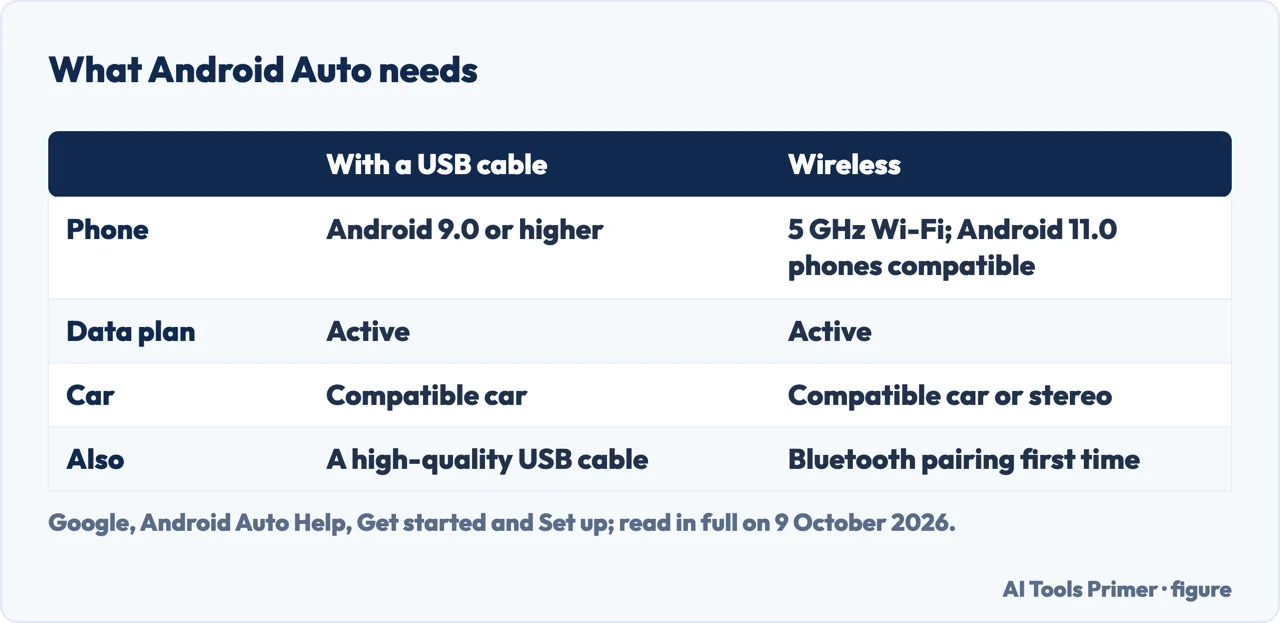
Android Auto not working? Google’s help page first asks for a phone with Android 9.0 or later and a data plan, then checks the car, the USB cable, the car’s own system and, for a second car, the phone’s settings. If it had worked properly before and has stopped, Google says a new USB cable will likely fix it.
| Case | Phone | Car and cable |
|---|---|---|
| With a USB cable | Android 9.0 (Pie) or higher, with an active data plan | A compatible car; a high-quality USB cable |
| Wireless | A compatible phone with an active data plan and 5 GHz Wi-Fi support; Google adds that wireless projection is compatible with any phone with Android 11.0 | A compatible car or stereo |
| Not supported | Devices that run Android (Go edition) | — |
| Where | 46 countries listed; outside them most features won’t work | |
Built in. Google says Android Auto is integrated into the phone and does not need to be downloaded, and that most features won’t work outside the countries it lists; we counted 46 on its page. For an iPhone in the car, see CarPlay not working.
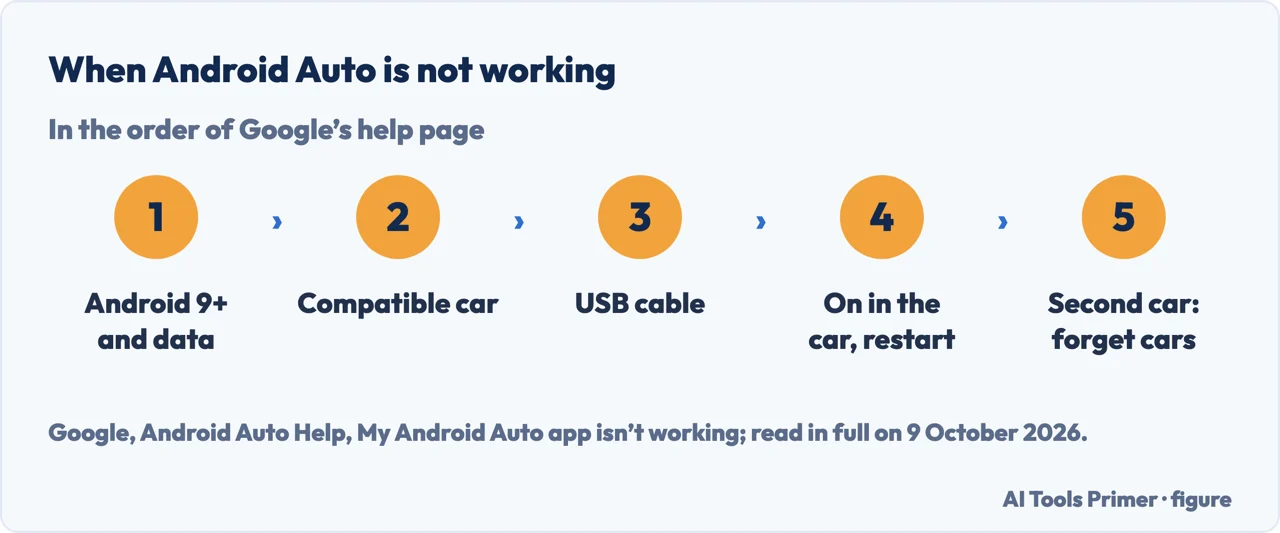
The checks, in Google’s order
- Check the phone first. Before its checks, Google says to make sure the phone runs Android 9.0 or later with a data plan, and for best performance it recommends the latest version of Android. Android Auto is built into the phone; there is no separate app to install.
- Check that the car is compatible. A USB port is not enough: Google says Android Auto won’t work on every car that has one, and points to its list of manufacturers or to the car maker.
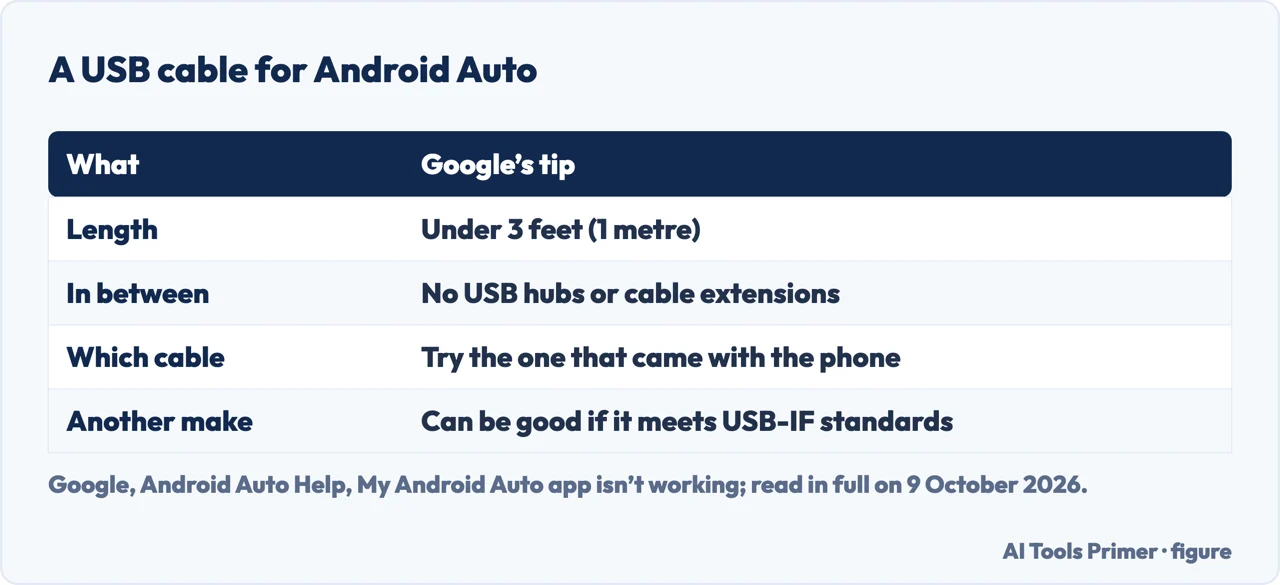
- Change the USB cable. Google says to try a high-quality USB cable, and that if Android Auto had worked properly before and has stopped, replacing the cable will likely fix it. Its tips: under 3 feet (1 metre), without hubs or extensions; try the cable that came with the phone; a cable from another maker can be a good choice if it meets USB Implementers Forum standards, and you can check whether it has been certified within the past two years.
- Check the car or the receiver. Make sure Android Auto is turned on in the infotainment system and restart it. With an aftermarket unit such as Pioneer or Kenwood, look for a firmware update on the maker’s website.
- A second car. If the trouble is connecting to a second car, Google says: unplug the phone, then select Menu > Settings > Connected devices > Connection preferences > Android Auto > Previously connected cars, tap the menu at the top right, tap Forget all cars, and plug in again.
Why the cable matters. Google says not all USB cables will work with all cars; its examples of cables that should work well are the Pixel cable with a Pixel and the Samsung cable with a Galaxy. A phone that won’t charge is covered in phone not charging.
Wireless Android Auto
When the wireless connection is the problem
The first time. Google says that the first time you connect wirelessly you need to pair the phone and the car over Bluetooth: open the Bluetooth menu in the phone’s Settings, then press and hold the voice command button on the steering wheel to open the car’s pairing menu. For best results, keep Bluetooth, Wi-Fi and Location Services turned on during setup, with the car in park and the infotainment system on. Android Auto should start within a few seconds of pairing; if not, you may need to tap it on the car display.
The phone. Wireless needs 5 GHz Wi-Fi support, which Google says to check with the phone maker. In the EU, the phone must also meet extra regulatory requirements to use 5 GHz in the car; Google says Pixel 3 and newer models comply.
The car. Whether a model has wireless Android Auto is a question for the car dealer or maker, Google says. For a wireless connection on its own vehicles, Chevrolet says to make sure the vehicle is equipped with wireless Android Auto, that the Android Auto app is enabled in the vehicle Settings menu, and that Bluetooth and Wi-Fi are enabled on the phone.
Android Auto on a Galaxy phone
On a Samsung Galaxy phone
Restart, then clear the cache. Samsung’s steps: restart the phone from the Quick panel’s Power icon; then Settings > Apps > Android Auto > Storage > Clear cache; then Settings > Software update. Samsung notes that screens and settings may vary by carrier, software version and phone model.
The Bluetooth switches. In Settings > Connections > Bluetooth, tap the gear next to the car and make sure Calls and Audio are on. If a switch won’t turn on, Samsung says to unpair the car and pair it again from the Available devices list. A car that pairs and then stays silent is the subject of Bluetooth not connecting to the car, where the switches are Google’s and carry different labels.
The car’s side
What a car maker adds: Chevrolet’s steps for its cars
A grey icon. When the Android Auto icon is greyed out on the centre display, Chevrolet lists five steps: enable Bluetooth and Wi-Fi on the phone and in the car; update the phone and, if applicable in the vehicle, the car (Settings, the System tab, Vehicle Software); use the cable that came with the phone or a high-quality compatible one; make sure Android Auto is enabled in the vehicle’s settings; and restart the phone and the car.
A full restart of phone and car. Its sequence: turn the car off, turn the phone off and on, open and close the driver’s door, wait for the OnStar light on the overhead console to go out, which may take 5 to 15 minutes depending on the vehicle, open and close the door again, restart the car, let it run for 15 to 20 seconds and reconnect. These are steps from Chevrolet’s US site for its own vehicles.
Messages that don’t show. Chevrolet says to check that notifications are on for messaging apps, in the phone and in the car’s Android Auto settings, that the phone is not on Do Not Disturb, and that the app is the default for text messages. In a separate answer, on deleting and re-pairing the connection, it gives both sides: forget the phone in the car’s settings and the car in the phone’s Bluetooth settings, or tap Forget This Car in the phone’s Android Auto settings, then restart both and set up again.
When the phone is the problem. Apps that close on their own are in apps crashing on Android, and a phone that has slowed down in fixing a slow Android phone.
Where to start
Four ways in.
- “It worked yesterday.”
- The cable — google checks
- “Wireless won’t connect.”
- Wireless — wireless
- “I have a Galaxy.”
- Samsung’s steps — galaxy
- “The icon is grey in the car.”
- The car’s side — car maker
Phones and cars
The other ways a phone and a car stop talking.
Questions people also ask
How do I reset my Android Auto?
For trouble connecting to a second car, Google says: unplug the phone, select Menu > Settings > Connected devices > Connection preferences > Android Auto > Previously connected cars, tap Forget all cars in the menu at the top right, then plug the phone in again. On a Galaxy, Samsung’s steps include clearing the Android Auto cache.
How to force Android Auto to connect?
None of the Google pages read here has a command to force it. Their checks: Android 9.0 or later with a data plan, a compatible car, a high-quality USB cable, and Android Auto turned on in the car’s system. The first time you connect wirelessly, pair over Bluetooth; you might need to tap Android Auto on the car display.
Why isn’t Android Auto showing up on my car screen?
After the phone, Google’s checks are the car and the cable: Android Auto won’t work on every car with a USB port, and not every cable works with every car. Check that Android Auto is turned on in the infotainment system and restart it. For a greyed-out icon, Chevrolet’s first step is turning on Bluetooth and Wi-Fi on both sides.
Why does my phone suddenly not connect to my car?
When Android Auto had worked properly before and stops, Google says replacing the USB cable will likely fix it. On a Galaxy, Samsung adds a phone restart, clearing the Android Auto cache, a software update, and checking that Calls and Audio are on for the car in Bluetooth settings.
Not covered here. It does not list compatible car models, cover Android Automotive OS, or troubleshoot third-party apps on the car screen.
Sources
- Google, Android Auto Help — My Android Auto app isn’t working — support.google.com, read 9 October 2026.
- Google, Android Auto Help — Set up Android Auto — support.google.com, read 9 October 2026.
- Google, Android Auto Help — Get started with Android Auto — support.google.com, read 9 October 2026.
- Samsung US — Android Auto not connecting on Galaxy phone — www.samsung.com, read 9 October 2026.
- Chevrolet — How to resolve Android Auto problems — www.chevrolet.com, read 9 October 2026.
Written by Alberto Gulotta
Founder and editor of AI Tools Primer, writing from Palermo, Italy. Thirty-five years of taking computers apart, starting with a Commodore 64 — the long version is on the about page.
Something wrong on this page? Write to aitoolsprimer@gmail.com and it gets fixed.
Written on 13 October 2026.
Independence and limits
No affiliate links and no paid placements anywhere on this site. Nobody pays to appear here, and no company has seen this page before you did.
This is general information, not professional advice. Where a page touches money, health, safety or the law, it names its source and the date it was read — and your situation may still differ. See the privacy page and the cookie policy.