
Devices · guide
Lockdown Mode iPhone: what Apple says it limits, and for whom
By Alberto Gulotta · Updated · 17 min read
Lockdown Mode on iPhone is an optional Apple setting that blocks or limits message attachments, link previews, some web technologies and FaceTime calls from people you have not called, aimed at the very few people who might be personally targeted by mercenary spyware; Apple says most people never will be.
| Question | Answer | Where it comes from |
|---|---|---|
| Who is it for? | Apple says the very few people who might be personally targeted by sophisticated threats | Apple Support |
| Where is the switch? | Settings, Privacy & Security, Lockdown Mode, Turn On Lockdown Mode, then Turn On & Restart | Apple Support |
| Do phone calls still work? | Yes, and so do plain text messages; emergency features such as SOS calls are not affected | Apple Support |
| Can I make exceptions? | For a website, an app or a contact, and Apple says each one reduces the protections | Apple Support |
| What if Apple sends a threat notification? | Apple suggests Lockdown Mode and expert help, such as the Access Now helpline, open 24 hours a day | Apple Support |
| Does it remove spyware already there? | Bitdefender says it does not clean infections already on a device | Bitdefender |
What Lockdown Mode is, and who Apple says it is for
Apple’s support page calls Lockdown Mode an optional, extreme protection designed for the very few individuals who, because of who they are or what they do, might be personally targeted by some of the most sophisticated digital threats. Apple adds that most people are never targeted by attacks of this nature. The page says that with the mode on a device will not work as it typically does: to reduce the attack surface that highly targeted mercenary spyware could exploit, certain apps, websites and features are strictly limited, and some experiences might not be available at all.
On versions, Apple says Lockdown Mode is available in iOS 16 or later, iPadOS 16 or later, watchOS 10 or later and macOS Ventura or later, with additional protections starting in iOS 17, iPadOS 17, watchOS 10 and macOS Sonoma. For a complete set of protections it says to update your devices to the latest software before turning the mode on. Engadget, in an article of 26 October 2026, says the feature has been around since 2022 and is well hidden in the Settings app.
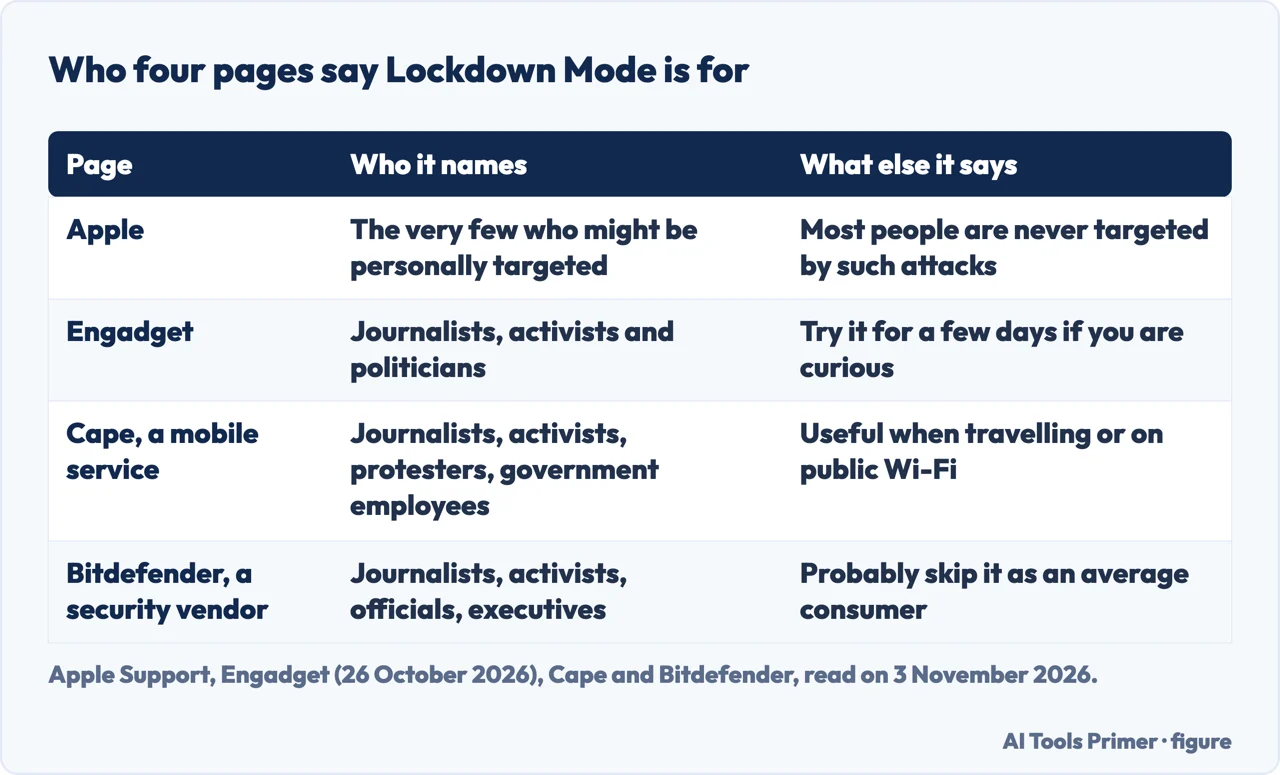
Apple’s iPhone User Guide says to use it only if you believe you might be targeted by a highly sophisticated cyberattack, and gives as its example a private company developing state-sponsored mercenary spyware. Engadget says journalists, activists and politicians are among the potential targets of commercial spyware such as NSO’s Pegasus, and that for most people there is no need to use Lockdown Mode. Cape, whose page also promotes its own mobile service, lists journalists, activists, human rights workers, protesters, government employees and defense contractors, and adds that it is particularly useful when travelling to regions with increased digital surveillance or connecting to public Wi-Fi. Bitdefender, which sells security software, names journalists, activists, government officials, executives and anyone who believes they could be targeted. The figure below sets the four side by side.
What changes on the phone
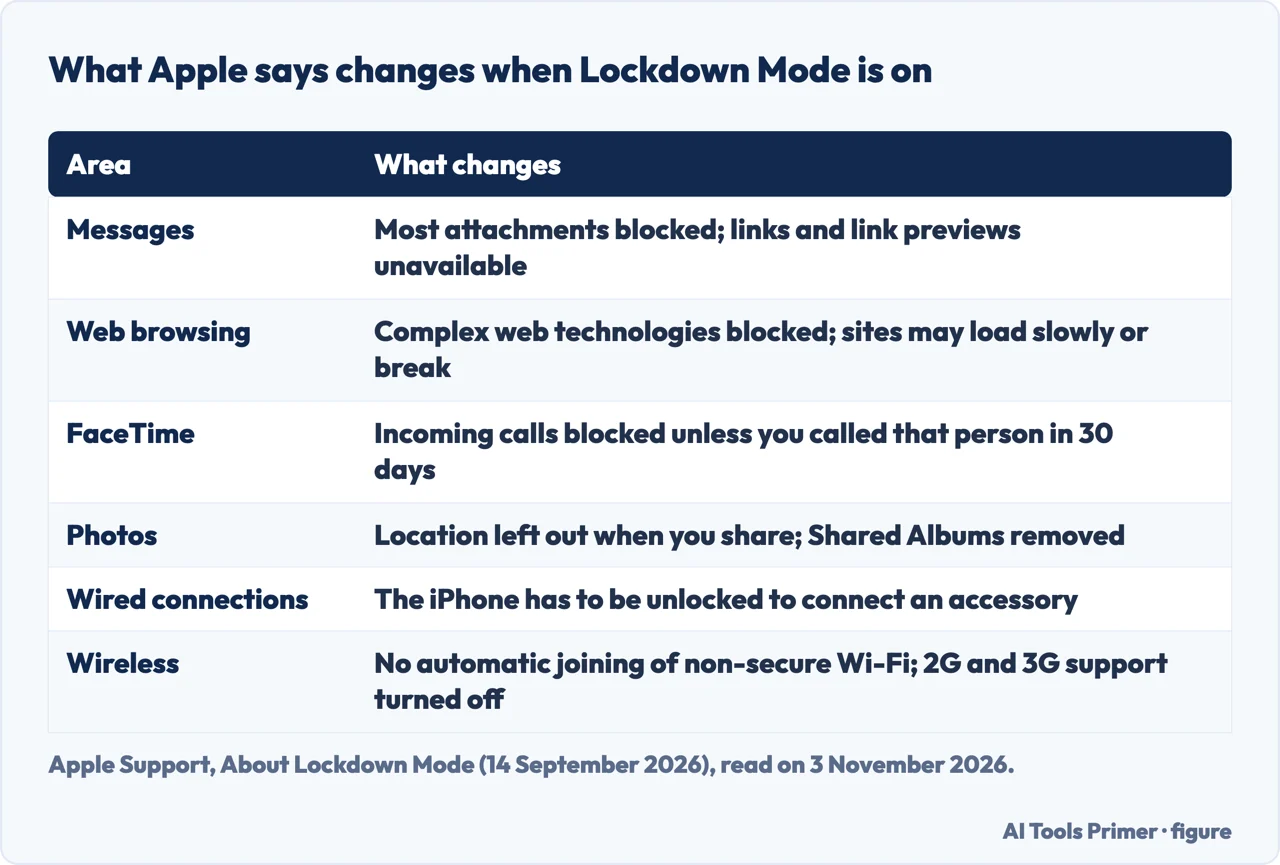
Apple’s page lists the changes by area. In Messages, most attachment types are blocked other than certain images, video and audio, and features such as links and link previews are unavailable. In web browsing, certain complex web technologies are blocked, which might make some websites load more slowly or not operate correctly; web fonts might not appear, and images might be replaced with a missing image icon. FaceTime blocks incoming calls unless you have called that person or contact within the past 30 days, and SharePlay and Live Photos are unavailable. Apple’s iPhone User Guide also lists FaceTime Continuity Handoff and Shared Albums among the things that are not available.
For Apple services, incoming invitations, such as an invitation to manage a home in the Home app, are blocked unless you have invited that person before; Focus and any related status will not work as expected, and Game Center is disabled. For Photos, location information is excluded when you share, Shared Albums are removed from the app and new invitations are blocked, although Apple says you can still view those albums on other devices that do not have the mode turned on.
Two rows concern the connection to the outside. For device connections, Apple says the iPhone needs to be unlocked to connect to an accessory or another computer, and its iPhone guide adds that some connections are permitted for a short time after the mode goes on. Engadget describes the same limit as wired connections being disabled while the device is locked. For wireless connectivity, Apple says the device will not automatically join non-secure Wi-Fi networks, will disconnect from one when you turn the mode on, and has 2G and 3G cellular support turned off. Engadget adds that those networks were discontinued in the US years ago. The figure below collects six of these areas.
Some things keep working. Apple says phone calls and plain text messages continue to work and emergency features such as SOS emergency calls are not affected, although incoming calls will not ring on a paired Apple Watch. Cape, the mobile service, repeats the Watch point, and Engadget says the same of call notifications on the Watch. Last on Apple’s list are configuration profiles, which cannot be installed while the mode is on; that item gets its own paragraph below.
Turning it on and off, and making exceptions
Apple gives the steps for an iPhone or iPad: open Settings, tap Privacy & Security, scroll down, tap Lockdown Mode, then tap Turn On Lockdown Mode, tap it again, tap Turn On & Restart and enter your device passcode. Engadget and Bitdefender give the same path. Apple says the mode has to be turned on separately for an iPhone, an iPad and a Mac; turning it on for an iPhone also turns it on for a paired Apple Watch, and turning it on for one device brings prompts to do the same on the other supported devices. While it is on you might receive notifications when an app or feature is limited, and a banner in Safari shows that the mode is on.
The Apple page we read does not describe turning it off. Cape gives the same menu with Turn off Lockdown Mode and then Turn Off & Restart, and Bitdefender says to tap Turn Off Lockdown Mode and restart when prompted, after which it says the restricted features return to normal. Engadget says the option to disable it is in the same place as the switch.
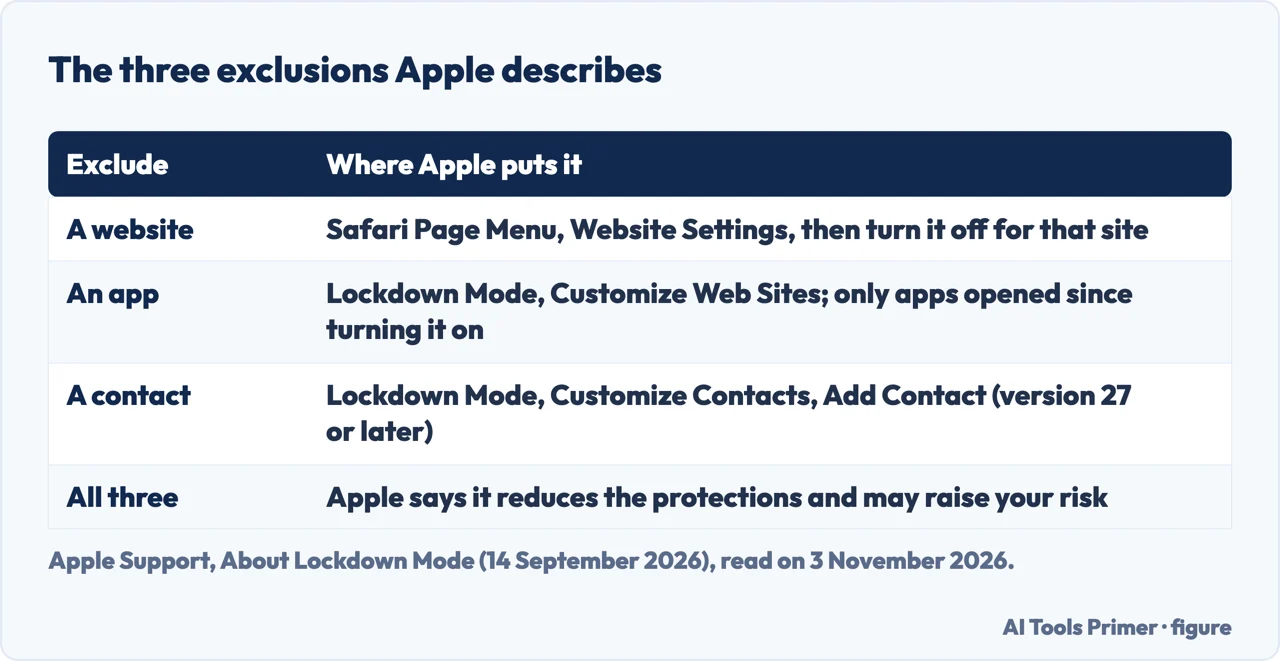
Apple describes three kinds of exclusion, which appear only when the mode is on. For a website, tap the Page Menu button in Safari, scroll down to Website Settings and turn the mode off for that site; the list sits under Settings, Privacy & Security, Lockdown Mode, Customize Web Sites, Excluded Safari Websites. For an app, the same Customize Web Sites screen lists the apps you have opened since turning the mode on and which have limited functionality, and you turn off the one you want to exclude. For a contact, Apple says the option requires version 27 or later of iOS, iPadOS or macOS: tap Customize Contacts, then Add Contact, and messaging limits are turned off for that contact. If the contact’s phone number or email address changes, the limits return and a notification arrives. Cape names the website and app screen Configure Web Browsing, where Apple calls it Customize Web Sites.
Apple’s warning is that excluding a website, app or contact reduces the protections and may increase your security risk, so it says to exclude only trusted ones and only if necessary. Engadget says that excluding a contact lets family still send videos or documents, and that loosening the restrictions leaves the device a little more vulnerable. The figure below sets out the three exclusions.
Configuration profiles follow their own rule. Apple says new profiles cannot be installed and the device cannot be enrolled in Mobile Device Management or supervision while the mode is on; to install one you turn the mode off, install the profile and turn it back on if needed. A device enrolled before the mode was turned on remains managed, and Apple says administrators can still install and remove profiles on it. Apple also says Lockdown Mode is not a configurable option for Mobile Device Management.
What reports say it has stopped
The Apple pages we read describe what the mode limits and do not report a case in which it stopped an attack. Three of the pages we read come closest. The Freedom of the Press Foundation’s newsletter of 18 February 2026, citing 404 Media’s report on court documents, says investigators who raided the home of a Washington Post reporter were unable to pull data from the reporter’s iPhone, and that it appears they were blocked by Lockdown Mode. The newsletter says the mode also disables some accessories and physical connections while the device is locked, which in this case means the forensic tools typically connected through USB. It adds that the incident shows the feature may also be a defense against someone with physical control of a device, even though Apple positions it against remote mercenary spyware, and suggests iPhone users try it, noting that it may occasionally block messages from unfamiliar phone numbers. The newsletter says up-to-date Android devices now have a similar feature called Advanced Protection; we did not read a page on that.
Engadget makes a second claim, whose underlying research we did not read. It writes that in 2023 an exploit known as Blastpass used iMessage to install Pegasus on Apple devices, and that researchers found devices in Lockdown Mode were completely immune. It also writes that Apple offers a 100 percent bonus on top of the regular reward in its Security Bounty program to anyone who finds a way around the feature, which Engadget takes as a sign of how much the company trusts it. We did not read the research behind the Blastpass statement, so it stands here as Engadget’s account.
The third page is a case where the outcome is not stated. On 2 September 2026 the Citizen Lab, working with the SHARE Foundation, reported that the iPhone of a member of Serbia’s student protest movement was infected with NSO Group’s Pegasus through an iMessage zero-click exploit, after the person received an Apple threat notification. It reports high-confidence indicators of infection across December 2025 to January 2026, and says it believes the exploit has since been patched by Apple as of iOS 18.4.1. In the same brief it urges anyone who believes they may be targeted because of who they are or what they do to turn on Lockdown Mode, which it says seriously increases the security of the device, and to keep every device updated. The page we read does not say whether the infected iPhone had the mode on.
If Apple sent a threat notification
Apple’s page of 13 August 2026 says its threat notifications are high-confidence alerts that a user has been individually targeted by a mercenary spyware attack. Apple says it has sent them multiple times a year since 2021 and has notified users in over 150 countries in total, and that it cannot say what causes it to issue one, because that could help attackers evade detection. Apple lists three ways they arrive: an alert on the iPhone, on the Lock Screen and in Settings; an email to the addresses linked to the Apple Account, which as of 2026 comes from threat-notifications@email.apple.com; and a banner at the top of the Apple Account page after signing in to account.apple.com. Bitdefender’s page of 13 October 2025, which describes the notice as arriving by email or iMessage and on appleid.apple.com, differs from Apple’s own wording, so we follow Apple’s.
Apple says a genuine notification never asks you to click a link, open a file, install an app or profile, or give an Apple Account password or verification code by email or on the phone. To check one, it says to sign in to account.apple.com, where a notification Apple sent is clearly visible at the top of the page. Apple says the notification recommends steps, including enabling Lockdown Mode, and that it strongly suggests recipients enlist expert help, such as the rapid-response emergency security assistance of the Digital Security Helpline at the nonprofit Access Now, reachable 24 hours a day, seven days a week through its website. For readers who have not had a notification but have good reason to believe they are individually targeted, Apple says they can enable the mode anyway.
Access Now’s FAQ describes the Helpline as a 24/7, free-of-charge resource for civil society, with a mandate to assist activists, researchers, media organizations, journalists, bloggers and human rights defenders. It says to email, that it replies within the first two hours to set up a secure channel, and that a vetting process comes first; someone unsure whether their issue qualifies can still write and be told. The FAQ says the focus is digital security only: legal counsel, physical safety, medical expenses and evacuation are outside its scope. The Citizen Lab goes further than Apple on the next step, saying a notification should be treated as presumed-infected and that recipients should immediately seek expert assistance, and also asking recipients to make sure close contacts such as family and collaborators seek spyware screening.
What it does not do, and what we did not check
Bitdefender, whose page also promotes its Ultimate Security product, says Lockdown Mode does not clean infections already on a device and will not catch typical scams, social engineering or password reuse, and that it is meant for highly targeted attacks rather than everyday phishing or common malware. Cape writes that it does not make a phone resistant to hacking but notably reduces the chances of an attack, and calls it a trade-off that is generally not worth it for most people. Engadget ends the same way: it says the inconveniences are probably not worth an extreme level of protection that few people need, and that if you are curious you can try it for a few days. The Apple pages we read do not mention an infection that is already present. For everyone, Apple’s threat page lists ordinary steps: update to the latest software, use a passcode, Touch ID or Face ID, use two-factor authentication and a strong Apple Account password, turn on Stolen Device Protection, install apps from the App Store, and avoid links and attachments from unknown senders.
Those steps have pages of their own here. iPhone privacy settings places Lockdown Mode among the other iPhone settings, passcodes covers the lock itself, losing the phone covers a theft, is my phone hacked covers the signs and removing a virus from an iPhone covers cleanup. Our page on iMessage is the one for the app whose attachments and links the mode limits.
We did not try any of this on an iPhone, so every menu path comes from Apple, Engadget, Cape and Bitdefender as written. We did not read the research behind the Blastpass statement or the reports from 404 Media. The pages we read do not list which websites stop working. We left out the Mac steps that Apple also gives.
Where to start
Four ways in.
- “What does it switch off?”
- What changes on the phone — changes
- “How do I turn it on, or off?”
- Turning it on and off, and making exceptions — onoff
- “Has it stopped anything?”
- What reports say it has stopped — record
- “Apple sent me a notice.”
- If Apple sent a threat notification — notice
Spyware and hacked phones
Where Lockdown Mode sits among the other checks.
Locks, loss and messages
The passcode, a stolen phone and the app the mode limits most.
Questions people also ask
What does Lockdown Mode actually do to keep you safe from spyware?
Apple says it reduces the attack surface that mercenary spyware could exploit by strictly limiting certain apps, websites and features: most message attachments, link previews, complex web technologies, FaceTime from people you have not called and configuration profiles. The Apple pages we read do not count attacks it has stopped.
What happens when your iPhone is on lockdown mode?
Apple says the device does not function as it typically does. Phone calls and plain text messages keep working, incoming calls do not ring on a paired Apple Watch, emergency features such as SOS calls are not affected, and a banner in Safari shows the mode is on.
Should I turn Lockdown Mode on?
Apple says it is for the very few people who might be personally targeted, and that someone with good reason to believe so can turn it on without a threat notification. Engadget says most people have no need and suggests a few days of trying it if you are curious.
Is Lockdown Mode worth it?
The pages weigh it differently. Bitdefender and Engadget say the inconvenience is not worth it for most people, and the Citizen Lab urges anyone who thinks they may be targeted to use it. The Apple pages we read do not put it in terms of worth.
Not covered here. We tested nothing on an iPhone. The statements come from two Apple Support pages, Apple’s iPhone User Guide, Engadget, the Freedom of the Press Foundation, the Citizen Lab, Access Now, and the pages of two vendors, Cape and Bitdefender, used only for facts, all read on 3 November 2026.
The search volume and difficulty behind this page come from a Semrush Keyword Overview reading of 3 November 2026 (United States database).
Sources
- Apple Support — About Lockdown Mode — support.apple.com, read 3 November 2026.
- Apple iPhone User Guide — Harden your iPhone from a cyberattack with Lockdown Mode — support.apple.com, read 3 November 2026.
- Apple Support — About Apple threat notifications and protecting against mercenary spyware — support.apple.com, read 3 November 2026.
- Engadget — iPhone Lockdown Mode: The pros and cons of enabling Apple’s security feature — www.engadget.com, read 3 November 2026.
- Freedom of the Press Foundation — In raid on journalist, Apple’s Lockdown Mode blocks FBI — freedom.press, read 3 November 2026.
- The Citizen Lab — Pegasus Spyware Infection of Serbian Pro-Democracy Student Activist — citizenlab.ca, read 3 November 2026.
- Access Now — Digital Security Helpline FAQ — www.accessnow.org, read 3 November 2026.
- Cape — Lockdown Mode on iPhone: What Is It & How To Use It — www.cape.co, read 3 November 2026.
- Bitdefender — What Is Lockdown Mode on iPhone and Mac? — www.bitdefender.com, read 3 November 2026.
Written by Alberto Gulotta
Founder and editor of AI Tools Primer, writing from Palermo, Italy. Thirty-five years of taking computers apart, starting with a Commodore 64 — the long version is on the about page.
Something wrong on this page? Write to aitoolsprimer@gmail.com and it gets fixed.
Written on 4 November 2026.
Independence and limits
No affiliate links and no paid placements anywhere on this site. Nobody pays to appear here, and no company has seen this page before you did.
This is general information, not professional advice. Where a page touches money, health, safety or the law, it names its source and the date it was read — and your situation may still differ. See the privacy page and the cookie policy.