
Devices · guide
What to do if your phone is stolen: the order four pages give
By Alberto Gulotta · Updated · 19 min read
What to do if your phone is stolen starts with the lock on Apple’s page and on Android’s: Mark as Lost on an iPhone, Secure device on Android. The FCC and Wirecutter order the police report and the carrier call differently. Some protections have to be on before the theft.
| Question | Answer | Where it comes from |
|---|---|---|
| What do Apple and Android put first? | Locking the phone: Mark as Lost on an iPhone, Secure device on Android | Apple Support, Android |
| Can I lock it from another device? | Yes: iCloud.com/find needs no verification code, and Find Hub takes the Google Account | Apple Support, Android |
| What has to be on before the theft? | Find My and Stolen Device Protection on an iPhone; Remote Lock, Theft Detection Lock and Offline Device Lock on Android | Apple Support, Android |
| Who else gets told? | The carrier, which can suspend service, and the police, who may ask for the serial number or IMEI | Apple Support, Android, FCC |
| When do I erase it? | Last, after everything else has been tried: both pages treat it as a last resort | Apple Support, Android |
The first hour: lock it, and leave Find My alone
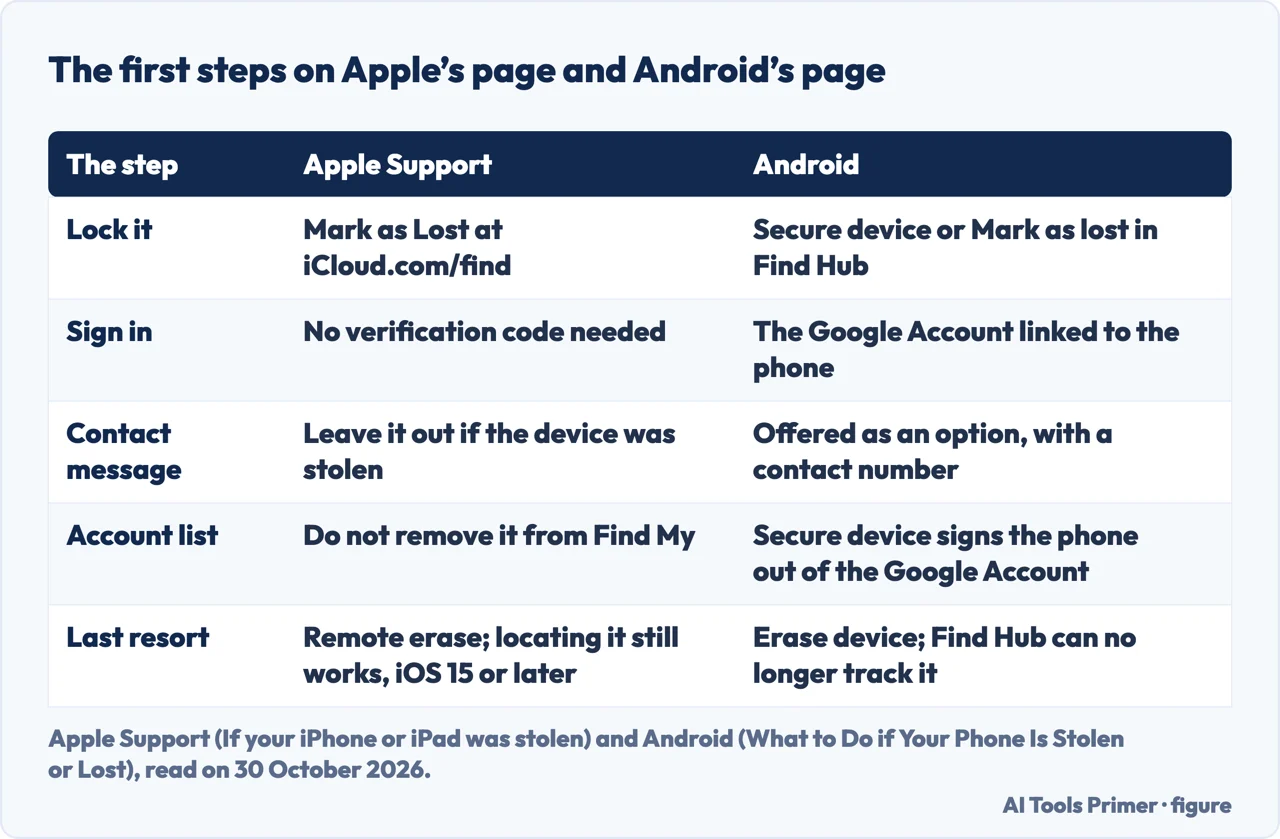
Apple’s page says that if an iPhone or iPad was stolen, you should put it in Lost Mode as quickly as possible. Lost Mode locks the device with its passcode, which Apple says prevents the thief from accessing it and from making changes to your Apple Account. The page sends you to iCloud.com/find, where you do not need a verification code to sign in, so you can mark the device as lost even if your trusted device was the one stolen. Under All Devices you select the phone and choose Mark as Lost.
Android’s page puts it in the same place. If the phone has been stolen or lost somewhere you cannot reach, it says, the priority shifts to security, and the first step is to lock it. In the Find Hub app, or at android.com/find with the Google Account linked to the phone, you choose Secure device or Mark as lost. That locks the phone with your PIN, pattern or password and signs it out of your Google Account.
Two details differ between the pages. Apple says not to include your contact information if the device was stolen, because the thief might use it for social engineering schemes; the number and message are useful when a phone is only lost. Android offers a lock-screen message with a contact number in case the device is found, as an option, and does not separate the stolen case from the lost one. Apple also says not to remove the device from Find My, because that removes Activation Lock and makes it easier for the thief to erase and resell it. And if the phone shows up on the map somewhere you do not recognize, Apple says not to try to recover it yourself and to contact local law enforcement instead. Apple adds that it will never contact you to say the device has been found, and that you should not share your passcode or other account information with anyone.
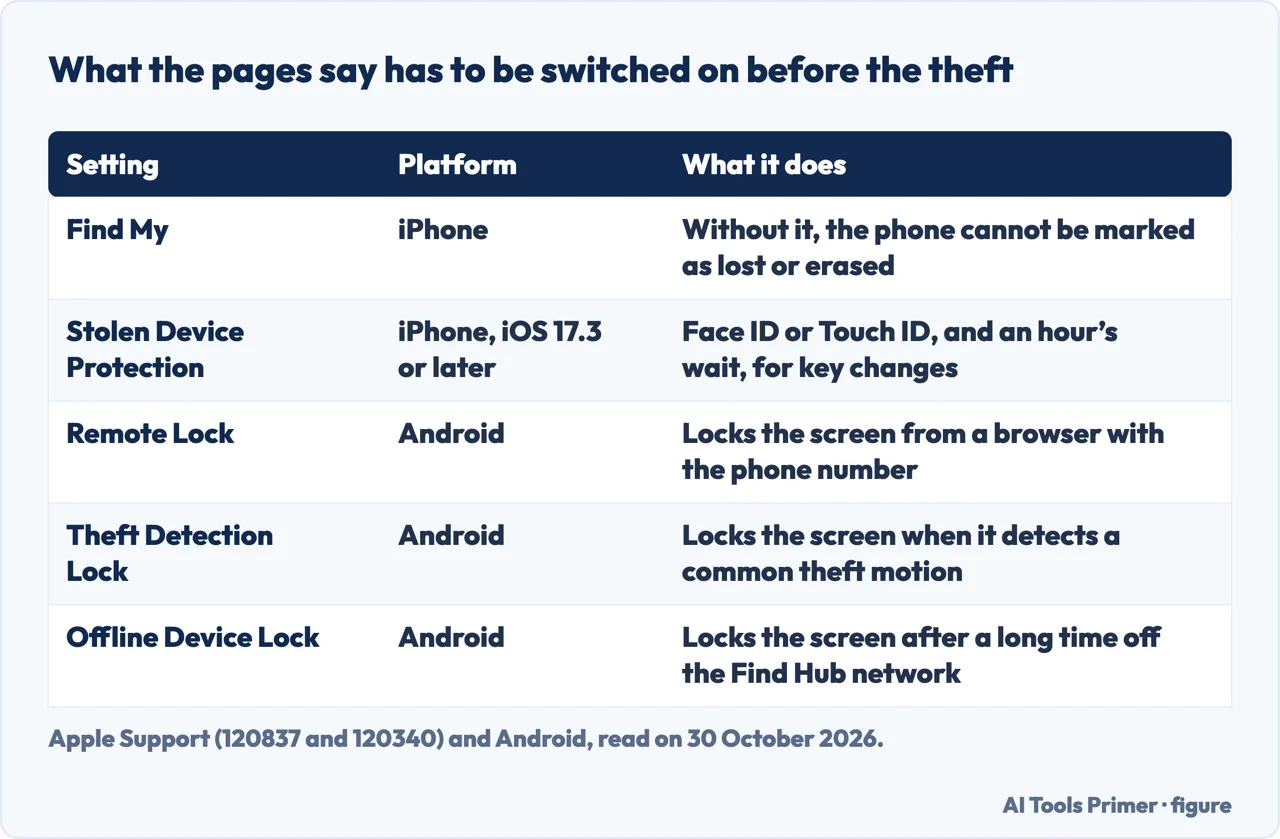
The order is not the same on every page. Apple and Android both start with the lock. The FCC’s list starts with trying to locate the device by calling it or by using anti-theft software, then locking it with that software if you installed it, and only then reports the theft to the police and the service provider. Wirecutter, updated on 26 June 2025, lists the police report and the carrier first and the remote lock second. The pages we read do not say why they order the steps differently. The search for the phone itself, as opposed to securing it, has its own page: how to find a lost iPhone.
What Apple’s Stolen Device Protection adds, and for how long
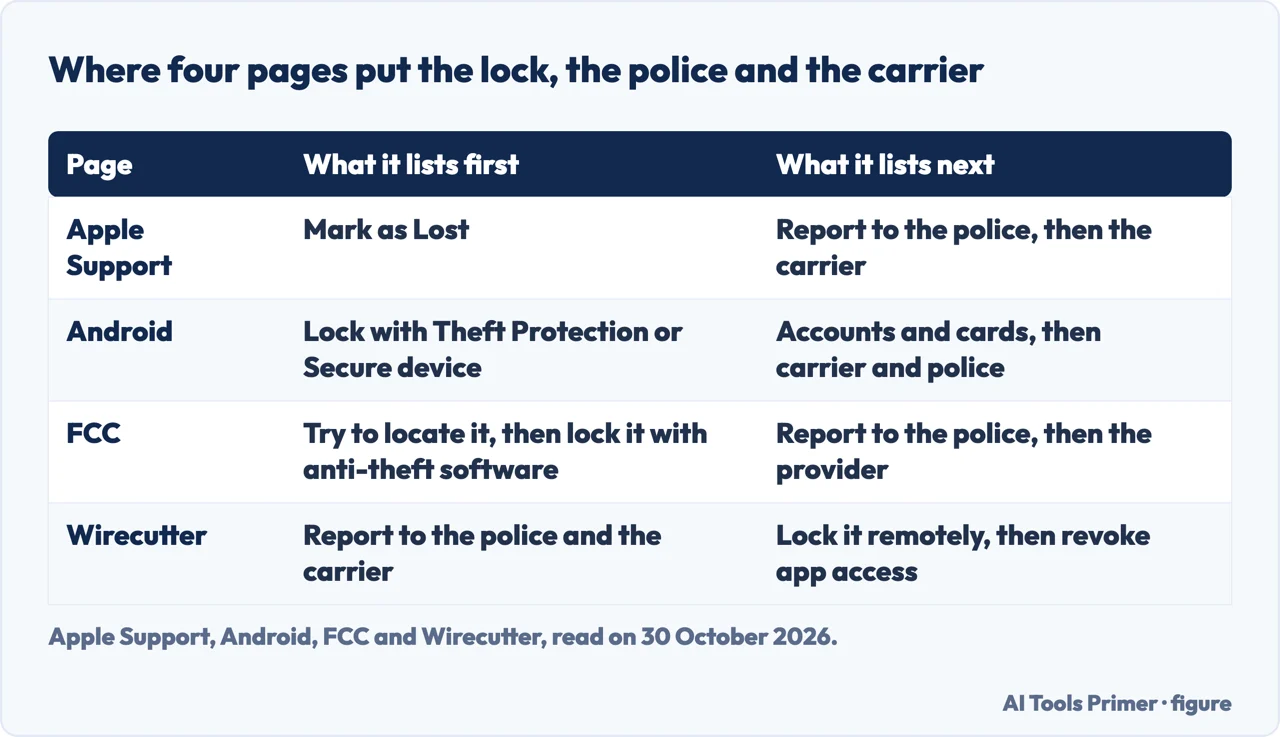
Apple has a separate page for Stolen Device Protection, updated on 22 October 2026. It describes a layer of security that applies when the iPhone is away from familiar locations such as home or work, and it says the feature is available with iOS 17.3 or later and must be turned on before the device is lost or stolen. It has two parts.
The first is Face ID or Touch ID with no passcode fallback. Away from a familiar location, Apple lists actions that need it, including using passwords or passkeys saved in Keychain, using payment methods saved in Safari, turning off Lost Mode, opening a locked app, erasing all content and settings, applying for a new Apple Card, and setting up or transferring an eSIM. The second is the Security Delay: you authenticate with Face ID or Touch ID, wait an hour, and authenticate again. Apple lists these actions under it: changing the Apple Account password, signing out of the Apple Account, changing account security settings such as a trusted device, Recovery Key or Recovery Contact, adding or removing Face ID or Touch ID, changing the passcode, Reset All Settings, enrolling in Mobile Device Management and turning off Stolen Device Protection. Apple says the delay is designed to give you time to mark the device as lost and secure your Apple Account. The iPhone may end the delay early once it detects that you have arrived at a familiar location.
Apple’s theft page adds a limit. Even with Stolen Device Protection, it says, the extra safeguards “last only for a period of time,” and the best way to protect the iPhone and the Apple Account is to mark the stolen device as lost quickly. The pages we read do not say how long that period is. Apple’s theft page also says that if you or someone else used the iPhone to try to change the Apple Account password at an unfamiliar location, it might not appear on the map at iCloud.com/find, and that you can still mark it as lost to lock it. The protection page says only that, if you change the Apple Account password from the iPhone, the location of your devices may not be visible at iCloud.com for a period of time.
To turn it on, Apple lists two-factor authentication for the Apple Account and, on the iPhone, a passcode, Face ID or Touch ID, and Significant Locations, plus Find My, which cannot be turned off while Stolen Device Protection is enabled. The page says the feature might be turned on by default; if it is not, the switch is under Settings, Face ID & Passcode. Under Require Security Delay, choosing Always applies the delay and the biometric-only rule even at home. A restore from an iCloud backup, or a direct transfer to a new iPhone, brings the setting along, though there may be a delay before the new phone recognizes familiar locations. Apple says to turn it off before selling, giving away or trading in the iPhone. If Find My was off before the theft, Apple’s theft page says the phone will not appear and cannot be marked as lost or erased, and that you should change the Apple Account password right away.
What Google’s tools do on Android
Android’s page, dated 17 August 2026, starts the search in Find Hub. In the app or at android.com/find you select the device to see its last known location on a map. By default, it says, an Android device stores its encrypted recent locations with Google through Find Hub, and if the phone has run out of battery or is offline you can see where it was before it went offline. If the phone is nearby, Play Sound makes it ring at its loudest volume for five minutes, even in silent mode.
For a theft, the page names three locks and says plainly that “you will need to enable these ahead of time.” Remote Lock works from google.co.uk/android/find/lock in any browser: you type in the phone number, complete any additional security measures, and the screen locks immediately. Theft Detection Lock uses AI and the phone’s sensors to detect whether it has been taken from you, and locks the screen when it detects a common theft motion. Offline Device Lock locks the screen if the phone has been disconnected from the Find Hub network for an extended period. The pages we read do not say how long that period is.
Wirecutter mentions a related feature, Google’s Identity Check, which it describes as similar to Apple’s Stolen Device Protection and available “for some Android phones.” Android’s own page does not use that name.
After the lock, Android’s page turns to accounts and money. Secure device can sign the phone out of the Google Account, which it says cuts off access to email, photos and other personal data, and can remove credit or debit cards from Google Wallet. From another device you open the Google Account security settings, review recent activity and check whether anyone else has accessed the account. For any cards linked to Google Wallet, the page says to contact the bank or card company, which can freeze or cancel them to help prevent fraudulent purchases.
Side by side, the two platforms ask for different preparation. Apple’s pages name Find My and Stolen Device Protection; Android’s name Find Hub and the three locks above. Android’s privacy menus are covered on the Android privacy settings page.
The carrier, the paperwork and the accounts
Five of the six pages ask for a call to the carrier. Apple says to contact your wireless carrier, ask them to suspend your account and file a claim if the iPhone is covered under your plan. Android says the carrier can suspend service to prevent unauthorized calls or data use, and can block the device’s IMEI so that it cannot be used on the network even with a different SIM card. The FCC says to report the theft or loss immediately because “you may be responsible for any charges” made before you report it, to ask the provider to disable the device and block access to the information on it, and to ask for written confirmation that the device was reported missing and disabled. Wirecutter says many carriers ask for a previously established PIN, then freeze the number until you add a new phone and block the old phone’s serial number. Kaspersky, a security software vendor, adds that disabling the SIM stops others from impersonating the owner or receiving one-time passwords.
The police report comes with identifiers. Apple says the police might request the serial number, which you can find even without the device. The FCC says to report with the make, model, serial number and IMEI, MEID or ESN, and notes that some service providers require proof that the device was stolen, which a police report provides. Android says a report is often necessary for an insurance claim and gives the box or the Google Dashboard as places to find the serial number or IMEI. Kaspersky says the police may not do much to recover a phone, that banks may want the report to reverse fraudulent charges, and that in some cases the police handle stolen phones only, not lost ones.
Then the accounts. Apple says to review them on another trusted device: under Settings and your name you can remove the stolen phone from the device list without removing it from Find My, and remove any device you do not recognize. Under Sign-In & Security you check the email addresses, phone numbers and Recovery Methods, and if anything looks unfamiliar you update it and change the Apple Account password. On a new device, Apple says, there may be a waiting period before you can change security settings. Wirecutter adds a step for people whose phone might be unlocked: revoke access to apps and remove the phone as a multi-factor authentication device if message previews were not turned off, the passcode is easy to guess, or the phone line is not frozen yet. Kaspersky’s advice, after the phone is erased, is to change the passwords stored on it, including the master password of a password manager. If the problem moves from a lost device to someone using your details, the next page is the identity theft page.
If the phone was covered, Apple says AppleCare+ with Theft and Loss allows a replacement claim and is not available in all countries and regions.
Erasing it, and what you can still get back
Both Apple and Android treat the erase as the last step. Apple says to make sure you have tried everything else first, because erasing the device “can’t be undone.” It is done from the Find My app on another device or at iCloud.com/find. Android’s Erase device in Find Hub performs a factory reset and permanently deletes all the data, and the page says it should be used only as a last resort.
On what happens afterwards, the pages give different answers. Apple says that on iOS 15 or later, iPadOS 15 or later, you can still use Find My or iCloud.com/find to locate the device after you erase it, and that if the device is offline the erase begins the next time it is online. Android says that after the erase, Find Hub will no longer be able to track the device. Wirecutter writes that both Apple and Google let you wipe a phone “while still being able to track it,” which reads differently from Android’s own page; the two texts are reported separately here. Apple and Wirecutter agree on one point: do not remove the device from Find My or from the account, because Apple says that removes Activation Lock, and Wirecutter says it would allow the thief to set the phone up as new.
What you can recover depends on what was saved. Wirecutter says that unless the phone’s data was backed up, security experts told it that retrieving information from a lost or stolen phone is nearly impossible for the average person. Apps that keep their data in the cloud, such as Instagram or a to-do list, come back; settings, wallpapers, the arrangement of apps and files saved locally return only if they were backed up before. Android’s list of things to do now includes regular backups of photos, contacts and data.
Wirecutter also reports a limit on all of this. Dave Lewis, global chief information security officer at 1Password, told it that the average criminal might not be able to get past facial recognition or a fingerprint reader and will most likely sell the device on for parts, and that for an attacker with technical skill and physical access it is “game over.” That is one expert quoted by one outlet.
What the pages say to set up before that day
Most of the useful switches are ones the pages say must already be on. Gathered from the six pages, the lists are short.
- On an iPhone. Find My on; Stolen Device Protection on, under Settings, Face ID & Passcode (Apple); the serial number, which Apple says can be found even without the device.
- On Android. A strong screen lock with a fingerprint, face or complex PIN; Find Hub enabled; Remote Lock, Theft Detection Lock and Offline Device Lock switched on; regular backups of photos, contacts and data; and Private Space for sensitive apps (Android).
- On either. Note the make, model, serial number and IMEI, MEID or ESN, and read the warranty or service agreement to see what happens if the phone is stolen (FCC). Turn off message previews and lock Control Center access, because message previews can show two-factor codes to a thief, and use a password manager, which lets you deauthorize the device (Wirecutter). Set a PIN on the SIM card where the provider allows it, and use an authentication app instead of codes by text where you can (Kaspersky).
Wirecutter also lists automatic backups as one of its five steps before a loss. The passcode itself, and the delays that follow wrong guesses, are on the passcodes page; what Find My does when you turn it off is on its own page; and the two kinds of iPhone backup are on the backup page.
What the pages do not say
We tested nothing on a phone. We did not read the SoftMaker blog, the Reddit thread, the Dropbox page or the Quora question, and we used Kaspersky’s page, a security vendor’s, only for statements attributed to it. The pages we read do not say how long Apple’s extra safeguards last, how long Android’s Offline Device Lock waits, how often police recover stolen phones, or what share of iPhones have Stolen Device Protection on. They do not give the steps of individual carriers: Wirecutter points to the pages of AT&T, T-Mobile and Verizon, which we did not read. Google’s own help page on Theft Protection was not among the pages we read, and neither was the Microsoft tool Wirecutter mentions alongside Find My.
Where to start
Four ways in.
- “What do I do first?”
- The first hour: lock it, and leave Find My alone — first
- “What does Apple add?”
- What Apple’s Stolen Device Protection adds — extra
- “Who do I call?”
- The carrier, the paperwork and the accounts — accounts
- “Should I erase it?”
- Erasing it, and what you can still get back — erase
Finding it and backing it up
The search, the Find My switch and the copy that makes a lost phone survivable.
The lock and the phone under it
The passcode, the Android menus and what can be done with the pieces already public.
Questions people also ask
Can someone use my phone if it's stolen?
Apple says that only if Stolen Device Protection was on before the theft, and only away from familiar places, a person who knows your passcode still needs Face ID or Touch ID to turn off Lost Mode and waits an hour before key account changes. The safeguards last only for a period of time.
What do thieves do when they steal a phone?
Wirecutter’s 1Password source says the average criminal will most likely sell the device on for parts. Kaspersky lists what a thief with access could try, from purchases with saved cards to locking the owner out of accounts, and Apple warns that contact details left on a stolen phone could be used for social engineering schemes.
How do I block my phone if it's stolen?
On an iPhone, mark it as lost at iCloud.com/find; on Android, use Secure device in Find Hub, or Remote Lock if you switched it on beforehand. Android adds that the carrier can block the IMEI, and the FCC says to ask the provider to disable the device.
What is the first thing you should do if your phone is stolen?
Apple and Android say to lock it, quickly. The FCC says to report the theft to the police and the provider immediately, and adds that even if you think you may have only lost the device you should remotely lock it to be safe; Wirecutter lists the police report and the carrier first and the remote lock second.
Not covered here. We tested nothing on a phone. The statements come from two Apple Support pages, the Android guide, the FCC guide, Wirecutter and Kaspersky, all read on 30 October 2026; each carries its own publication or review date in the text above.
The search volume and difficulty behind this page come from a Semrush reading of 29 August 2026, older than the 60 days the site normally allows.
Sources
- Apple Support — If your iPhone or iPad was stolen — support.apple.com, read 30 October 2026.
- Apple Support — About Stolen Device Protection for iPhone — support.apple.com, read 30 October 2026.
- Android — What to Do if Your Phone Is Stolen or Lost — www.android.com, read 30 October 2026.
- FCC — Protect Your Smart Device — www.fcc.gov, read 30 October 2026.
- Wirecutter — Your Phone Is Stolen. Your Laptop Gets Lost. Here’s What to Do. — www.nytimes.com, read 30 October 2026.
- Kaspersky — What to do if your phone is lost or stolen — www.kaspersky.com, read 30 October 2026.
Written by Alberto Gulotta
Founder and editor of AI Tools Primer, writing from Palermo, Italy. Thirty-five years of taking computers apart, starting with a Commodore 64 — the long version is on the about page.
Something wrong on this page? Write to aitoolsprimer@gmail.com and it gets fixed.
Written on 3 November 2026.
Independence and limits
No affiliate links and no paid placements anywhere on this site. Nobody pays to appear here, and no company has seen this page before you did.
This is general information, not professional advice. Where a page touches money, health, safety or the law, it names its source and the date it was read — and your situation may still differ. See the privacy page and the cookie policy.