
Images · guide
AI image prompts compared across four tool makers
By Alberto Gulotta · Updated · 14 min read
AI image prompts come with advice from the makers of the tools, and the six pages we read agree on some of it and differ on the rest. They agree on naming the subject and visible detail. They differ on length, on negatives and on words that work in only one tool.
| Question | Answer | Where it comes from |
|---|---|---|
| What do the guides ask you to name? | The subject, what the image is for, and visible details such as materials, light, color and medium | Google, OpenAI, Midjourney, Adobe |
| Short prompt or long one? | Midjourney leans short; Adobe and Google lean toward more detail; OpenAI says to pick the format that reads best | Midjourney, Adobe, Google, OpenAI |
| How do you say what you do not want? | Google and Midjourney say to describe the wanted scene; Midjourney also has a no parameter, and OpenAI lists exclusions as constraints | Google, Midjourney, OpenAI |
| Do camera terms and “8K” work? | OpenAI calls camera specifications cues for appearance; its archived recipe says they often steer realism more reliably than generic quality labels | OpenAI |
| Is there a word that works everywhere? | The pages differ: Google suggests opening with create an image of, while Adobe says to avoid create and generate | Google, Adobe |
What the guides ask you to name
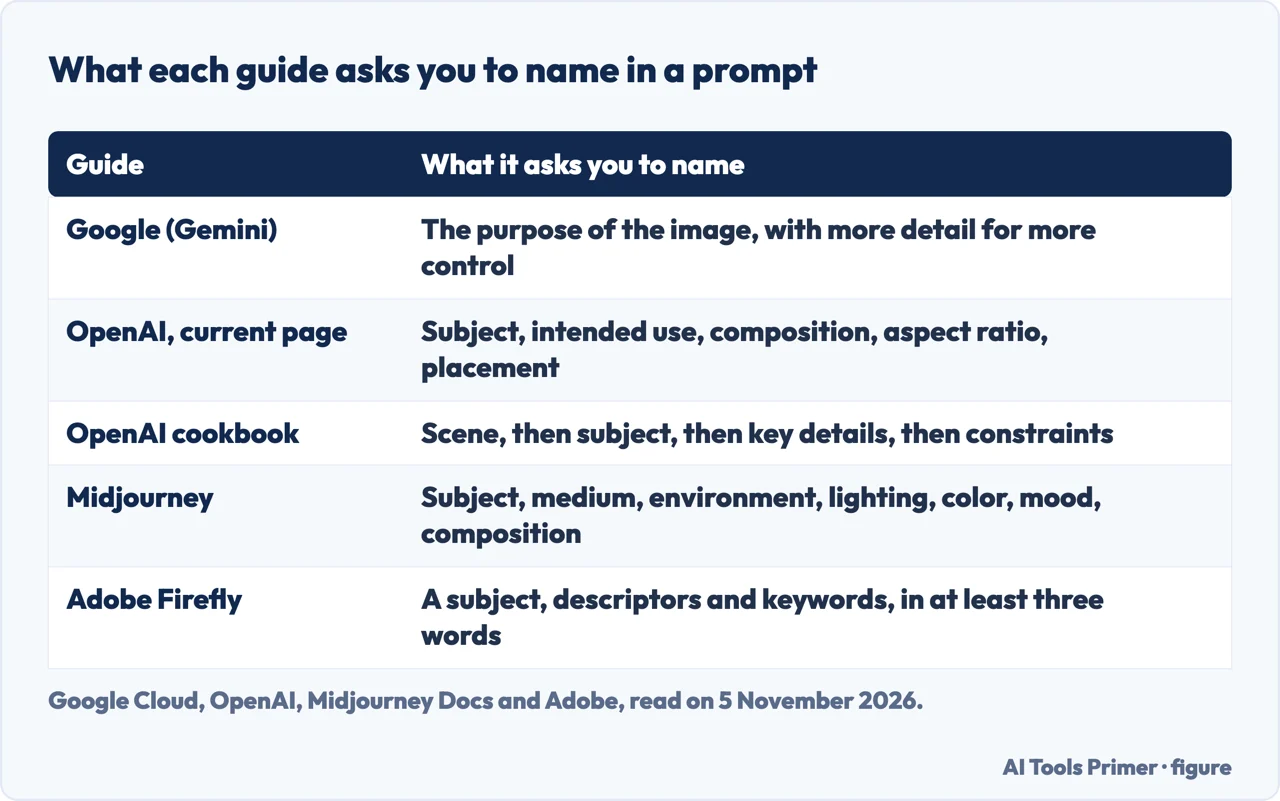
Google Cloud’s page on Gemini image generation starts its list with detail: more details, it says, give you more control, and it sets the bare words “fantasy armor” against a longer prompt for ornate elven plate armor etched with silver leaf patterns, with a high collar and pauldrons shaped like falcon wings. Its next item is purpose. Explaining what the image is for helps the model understand the context, and the page contrasts a request for a logo for a high-end, minimalist skincare brand with a request for just a logo.
OpenAI’s current image prompting page begins in the same place. It says to name the subject and the intended use, such as a product photograph, an advertisement or a diagram, and then the composition, the aspect ratio and any placement that matters. For a complex request it suggests four labeled sections: scene, subject, details and constraints. The archived cookbook recipe for GPT Image 1.5, dated 16 December 2025, gives an order of background or scene, then subject, then key details, then constraints, and says that stating the intended use, an ad, a UI mock or an infographic, sets the level of polish.
Midjourney’s Prompt Basics page gives a checklist instead of an order. It lists the areas to be clear about when they matter to you: subject, medium, environment, lighting, color, mood and composition. Adobe’s page asks for at least three words in simple, direct language with a subject, descriptors and keywords, and it shows one idea growing. A blue-colored toy truck gets a ladder and psychedelic textures of neon red and yellow, and then a road surrounded by tall trees. The same page suggests adding feeling, style and lighting, and says that words like love, gentle and playful can help produce a heartwarming image.
In these guides the detail that is asked for is detail you could see in the picture: the subject, the setting, the light, the material, the medium and the framing. The pages we read do not say how much each of these changes the result.
Camera words, quality words and the “8K” question
The Google page recommends photographic vocabulary, and the OpenAI page treats camera wording as a cue for appearance, so the two frame it a little differently. Google’s page says to control the camera with photographic and cinematic terms, and its examples are “wide-angle shot”, “macro shot” and “low-angle perspective”. OpenAI’s current page says to request “photorealistic” or “real photograph” explicitly when that is the goal, to describe framing and texture, and to treat camera specifications as cues for appearance, not a guarantee of exact physical simulation. For wide, cinematic, low-light, rainy or neon scenes it adds that you should specify scale, atmosphere and color instead of relying on mood words alone, whereas Adobe’s page suggests mood words such as love, gentle and playful; the pages do not say how the two pieces of advice fit together.
The archived OpenAI recipe goes a step further. It says that camera and composition terms, meaning lens, aperture feel and lighting, often steer realism more reliably than generic labels such as “8K” or “ultra-detailed”. That sentence belongs to a recipe the page itself marks as archived, which may reference outdated models or APIs, and the current OpenAI page does not repeat the comparison. For photorealism the recipe also says to prompt as if a real photo is being captured in the moment, to ask for real texture such as pores, wrinkles and fabric wear, and to avoid words that imply studio polish or staging.
The pages we read do not report a measurement of how much a lens term, a texture request or a label like “8K” changes a picture. These are the makers’ recommendations, and the one explicit comparison comes from a recipe dated 16 December 2025.
Short or long
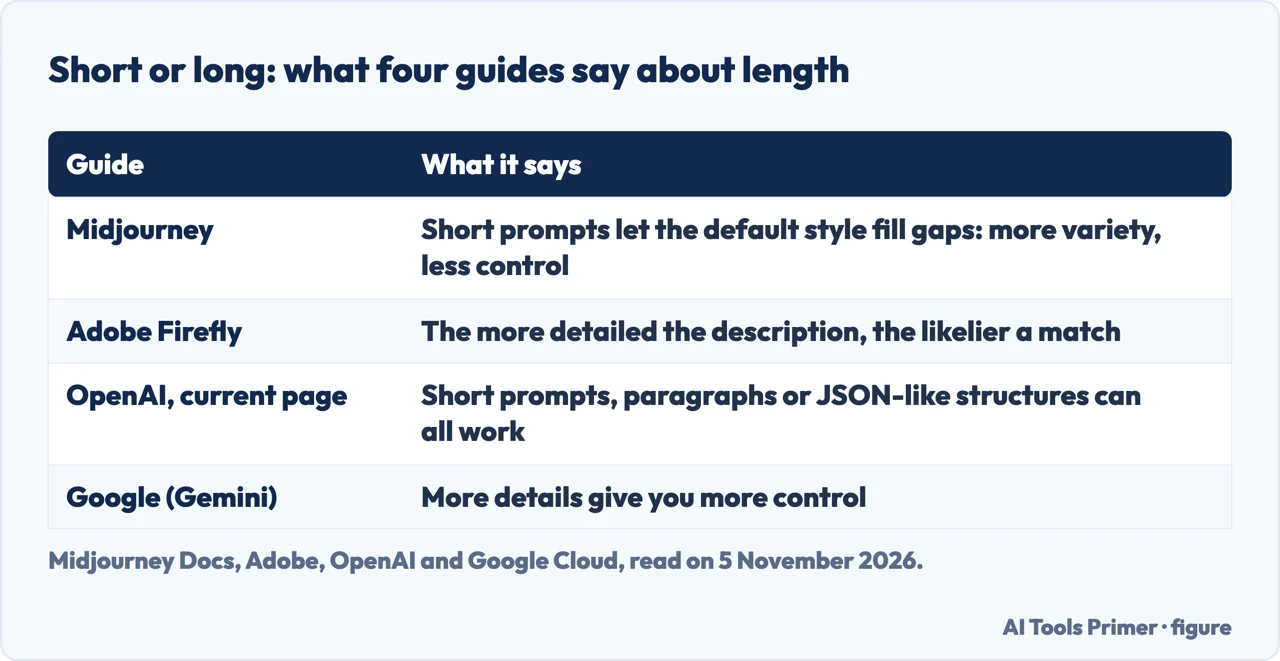
Midjourney and Adobe point in different directions. Midjourney’s Prompt Basics page says that short and simple prompts typically generate the best images with Midjourney, and that long lists and detailed instructions can confuse the process. It explains the trade: a short prompt lets the default Midjourney style fill in the gaps, so fewer details mean more variety but less control, and if specific elements are important to you the page says to include them. Even a single word or an emoji works, it adds.
Adobe’s page leans the other way. It says that the more detailed your description, the more likely you are to get images that match your vision, and its examples add a medium, a number of colors, a window setting and a shallow depth of field to a plain request for a cat. Google’s page is closer to Adobe’s on this point, with its line that more details give you more control.
OpenAI’s current page treats length as a question of format. It says that short prompts, descriptive paragraphs, JSON-like structures, instructions and tags can all express the same intent, and to choose the one that makes the requirements easiest to read and update, rather than relying on special syntax. The pages do not compare the tools with one another, so we cannot say which advice fits which model beyond what each page says about its own.
Midjourney also asks for precise words, and its examples are small. Instead of “big” it suggests “huge”, “gigantic” or “enormous”; instead of the plural “cats” it suggests a number such as “three cats”, or a collective noun like “flock of birds”.
Saying what you do not want, and words that belong to one tool
Google and Midjourney give the same advice about negatives: describe what you want. Google’s example replaces “no cars” with an empty, deserted street with no signs of traffic. Midjourney warns that if you mention a party with “no cake”, a cake might still appear, and for excluding items it points to its no parameter. Its Multi-Prompts and Weights page says that parameter is the same as a weight of minus 0.5, so “--no red” matches “red::-0.5”, and that negative weights are allowed as long as the total of all weights in the prompt stays positive.
OpenAI’s current page treats exclusions as constraints. For edits it says to write “change only X” and list the details to preserve, and to state exclusions such as unwanted text, logos or watermarks. For text inside a picture it says to put the wording in quotes, describe its position and typography, ask for no extra text, and then check spelling and legibility; for small text, dense information or multiple fonts it says to compare medium and high quality. The pages put negatives in different places: the wanted scene, a parameter, and a list of constraints.
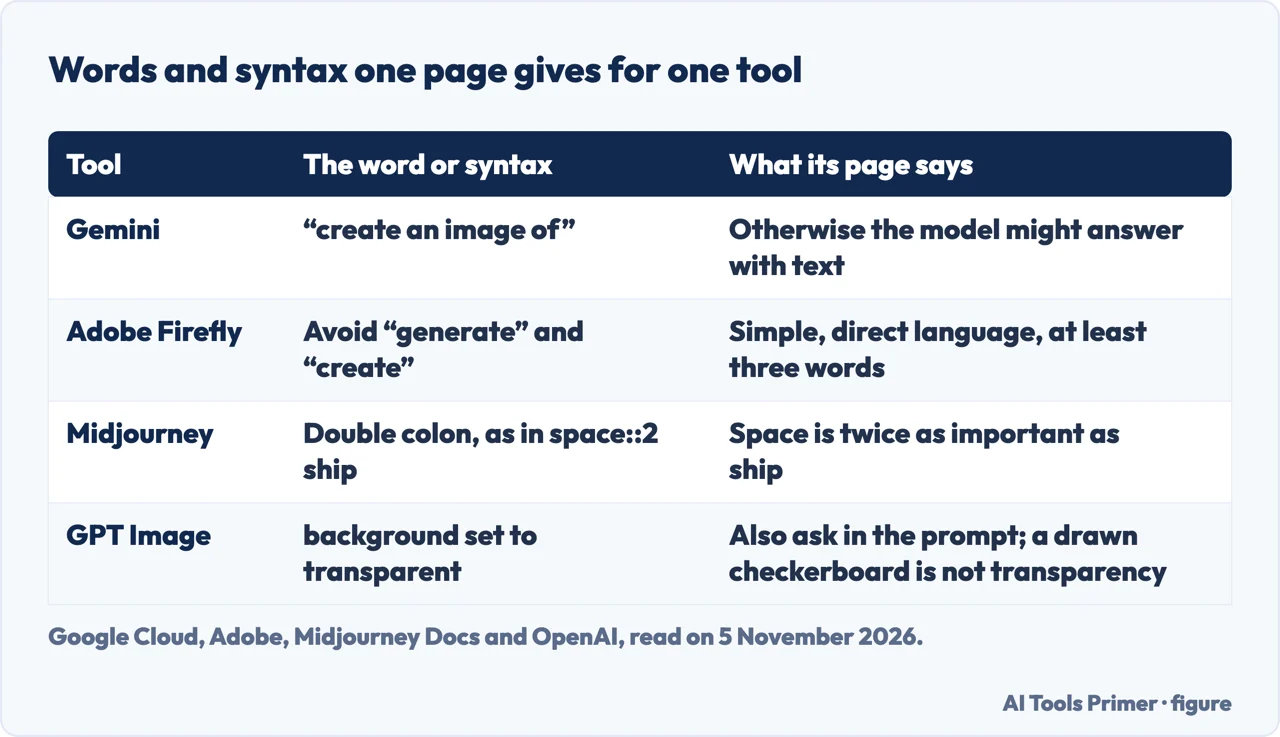
Some words belong to one tool. Google’s page says to describe the intent with a phrase such as “create an image of” or “generate an image of”, because otherwise the multimodal model might respond with text instead of the image. Adobe’s page says the opposite about those verbs: avoid words like generate or create. The two pages are about different products, and we did not test either. Midjourney’s double colon splits a prompt into separate ideas and “space::2 ship” makes space twice as important as the ship; the page lists the versions it works with, from 1 to 6.1, and links to a Version article about V8.2 without listing that version. Midjourney adds that parameters go at the end of the prompt. And for a transparent background, OpenAI says to ask for an isolated subject in the prompt and to set background to transparent in the API, because a drawn checkerboard is not transparency.
Changing one thing at a time
The pages agree that a first attempt is a draft. Google says not to expect a perfect image on the first attempt and to use follow-up prompts for small changes, for example making the lighting warmer or the character’s expression more serious. For a complex scene it says to split the request into steps: a background, then a foreground, then an object placed in it. Adobe says that if you do not like the results, you should reword your prompt to get closer to what you want, and its cat, toy truck and clay-art examples each grow in stages.
OpenAI’s current page is the most specific about how to iterate. It says to pass the previous output on as the next edit input, request one change, and repeat the details to preserve. A reference such as “same style as before” can carry context, it says, but critical constraints should be restated if the result drifts. The same page asks you to compare results before adding more instructions. Adobe adds a step after the prompt: it points to its image editor and to Photoshop and Illustrator for refining by hand.
What the pages do not say, and how old they are
These pages are instructions from the makers of the tools, and the ones we read do not carry a test showing how much one element changes a result. The ages differ too. Google’s page says it was last updated on 4 November 2026 and Adobe’s on 16 June 2026. OpenAI’s current page and the two Midjourney pages carry no date that we could read, and the OpenAI recipe on GPT Image 1.5 is dated 16 December 2025 and archived. The OpenAI page names GPT Image 2.6, 2.5, 2 and 1.5 and marks GPT Image 1 as retired, so advice tied to a model name can move as the models do.
| Page | Date shown | What it covers here |
|---|---|---|
| Google Cloud, Gemini image generation best practices | Last updated 4 November 2026 | Detail, purpose, steps, positive wording, camera terms |
| Adobe, Writing effective text prompts | Last updated 16 June 2026 | Three words, descriptive and emotional wording |
| OpenAI, Image prompting | No date we could read | Sections, format, camera cues, exact text, iteration |
| OpenAI Cookbook, GPT Image 1.5 | 16 December 2025, archived | Order of a prompt, the “8K” comparison |
| Midjourney, Prompt Basics and Multi-Prompts | No date we could read | Short prompts, checklist, no parameter, weights |
We did not read Meta’s guide to AI photo prompts. The pages we read do not mention prompt phrases such as “trending on ArtStation” or “masterpiece”, so we say nothing about them. We generated no pictures to test any of this.
Where to start
Four ways in.
- “Should the prompt be short or long?”
- Short or long — length
- “Do camera words and 8K help?”
- Camera words, quality words and the “8K” question — camera
- “How do I leave something out?”
- Saying what you do not want — negatives
- “What do I change after the first try?”
- Changing one thing at a time — iterate
Making pictures
Where generated images come from.
Changing pictures
Editing and retouching.
Questions people also ask
Any tips for writing detailed image gen prompts?
Google says more details give you more control, and OpenAI says to name materials, lighting, colors and the visual medium. Midjourney lists subject, medium, environment, lighting, color, mood and composition. For a complex request OpenAI suggests labeled sections for scene, subject, details and constraints.
How to generate a realistic AI image prompt?
OpenAI’s current page says to request “photorealistic” or “real photograph” explicitly and to treat camera specifications as cues for appearance. Its archived recipe adds real texture such as pores, wrinkles and fabric wear, and avoiding words that imply studio polish.
What are some good prompts for AI photos?
The pages we read give advice more than lists of prompts. Adobe grows “Image of a cat” into a cat with bold stripes, digital painting and shallow depth of field. Google sets a logo for a minimalist skincare brand against a bare request for a logo. Google also suggests camera terms.
What are the 5 P’s of prompting?
The pages we read do not mention a five-P scheme. Midjourney names seven areas to be clear about: subject, medium, environment, lighting, color, mood and composition. Adobe asks for a subject, descriptors and keywords. OpenAI suggests scene, subject, details and constraints.
Not covered here. We generated no pictures and tested nothing. The statements come from two OpenAI pages, two Midjourney pages, an Adobe page and a Google Cloud page, all read on 5 November 2026.
The search volume and difficulty behind this page come from an Ubersuggest reading of 5 November 2026 (United States), which gives search volume and its own SEO difficulty score, not Semrush’s; a Semrush check is still to be made.
Sources
- Google Cloud — Gemini image generation best practices — docs.cloud.google.com, read 5 November 2026.
- Adobe — Write effective text prompts for Adobe Firefly — helpx.adobe.com, read 5 November 2026.
- OpenAI — Image prompting — developers.openai.com, read 5 November 2026.
- OpenAI Cookbook — Gpt-image-1.5 Prompting Guide (archived) — developers.openai.com, read 5 November 2026.
- Midjourney Docs — Prompt Basics — docs.midjourney.com, read 5 November 2026.
- Midjourney Docs — Multi-Prompts & Weights — docs.midjourney.com, read 5 November 2026.
Written by Alberto Gulotta
Founder and editor of AI Tools Primer, writing from Palermo, Italy. Thirty-five years of taking computers apart, starting with a Commodore 64 — the long version is on the about page.
Something wrong on this page? Write to aitoolsprimer@gmail.com and it gets fixed.
Written on 6 November 2026.
Independence and limits
No affiliate links and no paid placements anywhere on this site. Nobody pays to appear here, and no company has seen this page before you did.
This is general information, not professional advice. Where a page touches money, health, safety or the law, it names its source and the date it was read — and your situation may still differ. See the privacy page and the cookie policy.