
Images · guide
Uploading a selfie to an AI headshot generator: what five pages say
By Alberto Gulotta · Updated · 13 min read
An AI headshot generator turns one selfie into a styled portrait, but the five providers we read differ on what follows the upload. Adobe and HeadshotPro rule out training on your photo (Adobe, unless you submit it to Stock), Canva ties it to your settings, and HeadshotPro deletes photos after 24 hours or 30 days.
| Question | Answer | Where it comes from |
|---|---|---|
| What goes in? | A selfie; Canva asks for a well-lit photo with the face centered and clear | Canva |
| Is any of it free? | Each page sets its own limit; Aragon calls itself a paid product | Canva, Adobe, HeadshotPro, NoteGPT, Aragon |
| Can the photo train models? | Adobe and HeadshotPro say no; Canva says it depends on your privacy settings | Adobe, HeadshotPro, Canva |
| How long is it kept? | HeadshotPro gives 24 hours or 30 days, depending on the product | HeadshotPro |
| Is a face photo biometric data? | Only HeadshotPro uses the word, and says its photos are not | HeadshotPro |
What the generators ask for and what they give back
Every page we read starts from the same thing: a photo of your face that you upload. Canva’s page says its generator turns candid selfies into polished photos. In the Canva editor you open Apps, search for ProfilePhoto, upload the selfie with Choose file, choose female, male or non-binary, and can switch on a toggle that preserves your facial expression before you click Generate. The result downloads to your device as a high-resolution JPG or PNG file. Canva also says what to upload: a clear, well-lit photo with the face centered, and no hats, scarves or sunglasses in the way. If you have no good selfie, its page suggests asking a friend to take your photo.
Adobe’s Firefly page works differently. You upload a photo and use Prompt to Edit to describe the changes you want, and the page says Firefly analyzes facial features, lighting and composition in the photo. The upload box accepts JPEG, PNG or WEBP files of up to 100MB, takes one file at a time, and an error message on the page gives 512 x 512 pixels as the smallest size. HeadshotPro’s free tool takes one selfie in JPG, PNG or HEIC and says the styles arrive in 5 to 10 minutes. NoteGPT’s tool takes selfies or portraits as PNG, JPG, JPEG or WebP files of up to 20MB, and lets you choose styles. Aragon’s page gives the size of what you get back: 896 x 1088 pixels for its Basic and Standard packages, 1792 x 2176 for Executive.
What is free, as each page states it
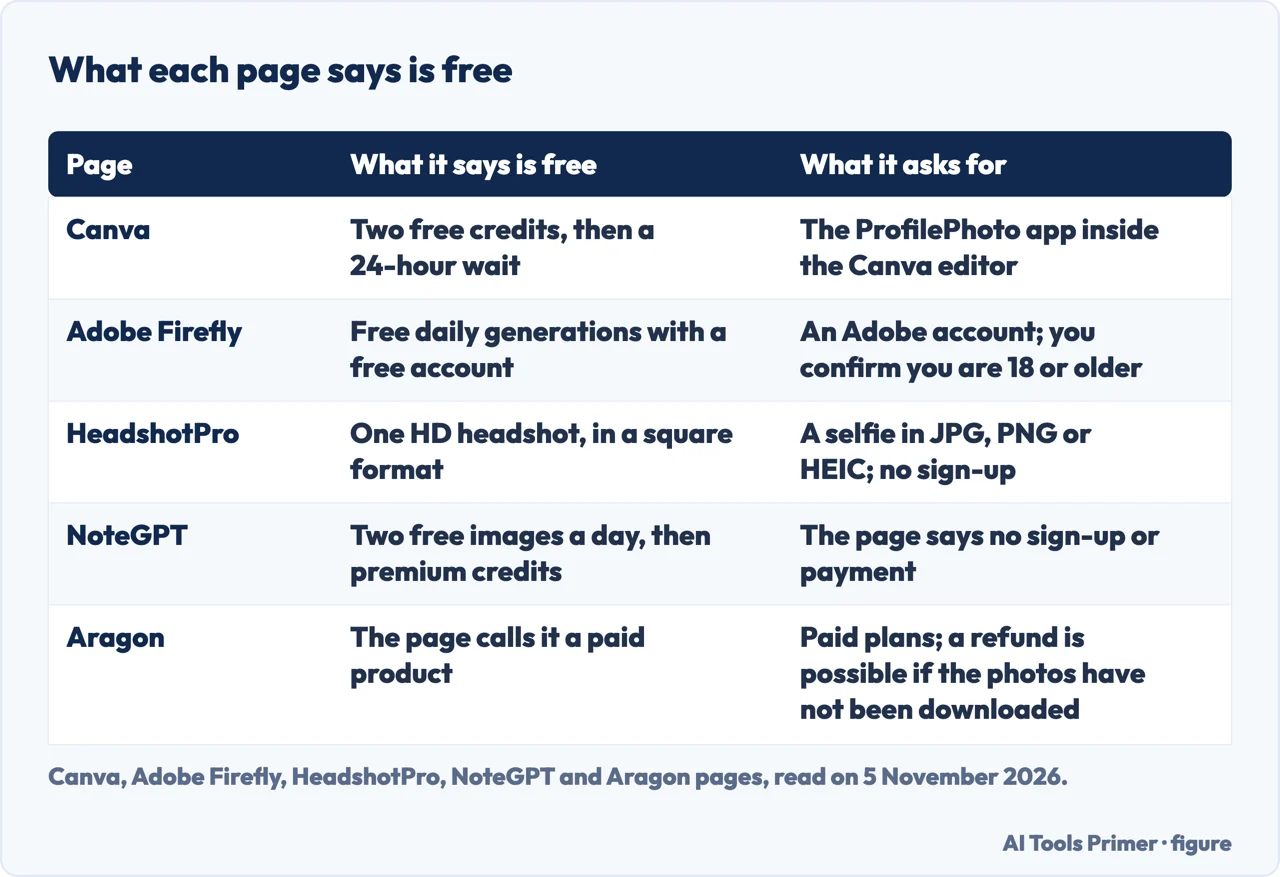
The five pages use the word free in five ways, and the figure below sets them side by side. Canva gives two free credits; once both are used you wait 24 hours before generating more for free, and more credits can be bought. Adobe says the generator is free with an Adobe account, with free daily generations, and points to paid plans for higher-volume generations and more partner models. The partner models it names are Gemini Nano Banana, GPT Image and FLUX. HeadshotPro’s free version is one HD headshot in a square format, with no sign-up. NoteGPT’s page says “2 free image daily”, then 6 premium credits per image, and says you need neither to sign up nor to pay. Aragon is the exception: its page describes its service as a paid product and says a refund is possible if you have not downloaded your photos.
These are the limits the pages stated on the day we read them, 5 November 2026. We quote no prices, because the figures and the plans behind them are the part of these pages most likely to change.
What they say about training on your photo
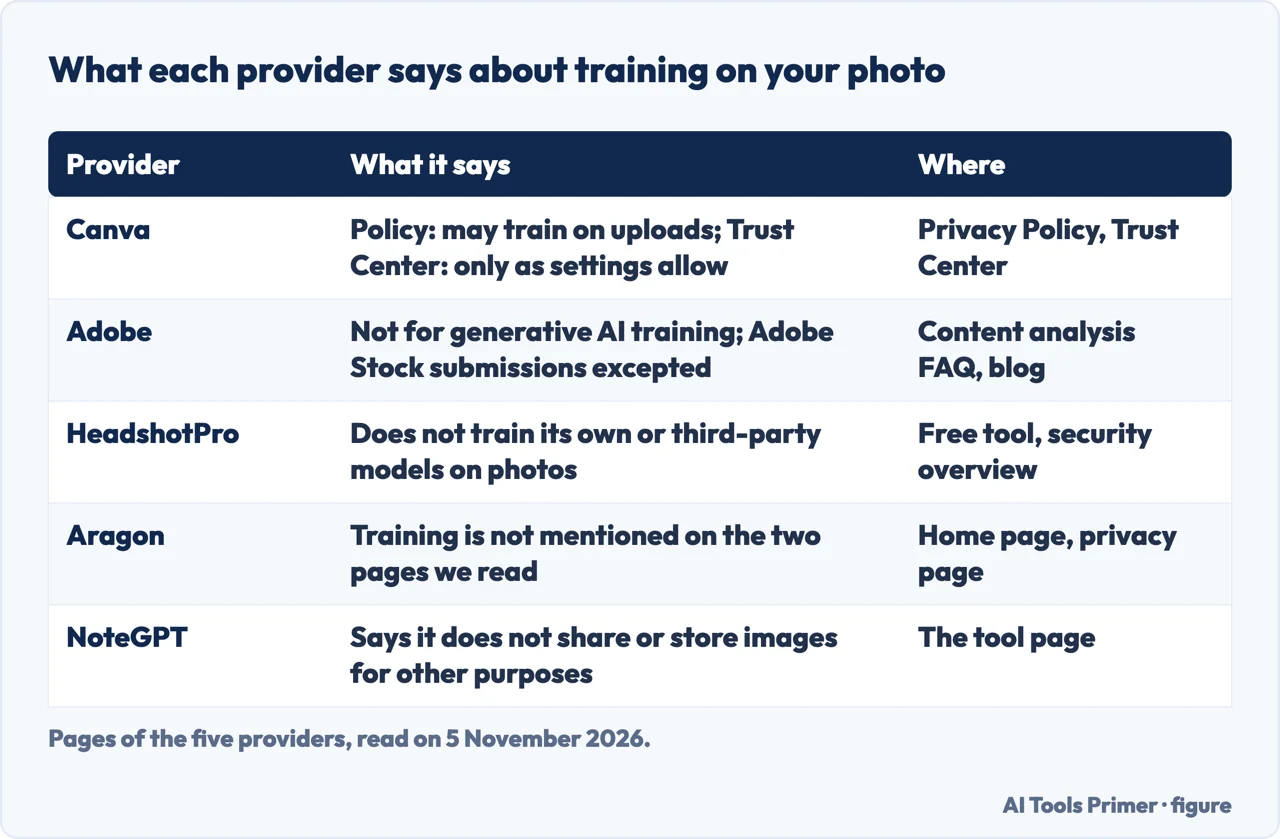
Canva words it in two places, and the two pages say it from different sides. Its privacy policy, updated on 2 November 2026, says Canva may analyze your activity, content and media uploads to train its algorithms, models and AI products using machine learning, and that you can manage the use of your data for AI training in your privacy settings. Its Trust Center says Canva will not use your content to improve AI-powered features unless that is consistent with your privacy settings, which you can review and update at any time. For Canva Education users the page says the settings are disabled and Canva does not use their content for this. For Business and Enterprise accounts it says the control in the Privacy Settings page is disabled, that the ability for Business, Teams and Enterprise admins to opt in is coming soon, and that for now Canva does not use their business, team or enterprise content to improve AI-powered features. The same Trust Center page also says its privacy settings do not apply to third-party apps available at canva.com/apps: for those, the third party’s own terms and privacy policy apply. The headshot tool is opened as an app (ProfilePhoto) from the editor’s Apps panel, and the pages we read do not say whether it counts as a third-party app, so we cannot say which policy governs an uploaded selfie there.
Adobe says in its content analysis FAQ that it does not analyze your content to train generative AI models, unless you choose to submit content to the Adobe Stock marketplace. The same FAQ says the Firefly models were trained on licensed content, such as Adobe Stock, and on public domain content. An Adobe blog article dated 18 March 2025 goes further for partner models: whichever model you choose, the content you generate and upload in Adobe apps will never be used to train generative AI models, and the article calls this a requirement in its partnership agreements.
HeadshotPro says on its free tool page that it never uses your selfies or generated headshots to train AI models and never sells, shares or licenses them to third parties. Its security overview adds that photos are processed only to deliver the service, and that it does not use customer content to train its own or any third-party generative models. NoteGPT says its tool does not share or store your images for other purposes. Aragon’s home page refers to its Terms and Privacy Policy for what it does with data, and its privacy page says your uploaded and generated images are not visible to other users unless you use its sharing feature. The two Aragon pages we read do not mention training.
How long photos stay, and how to remove them
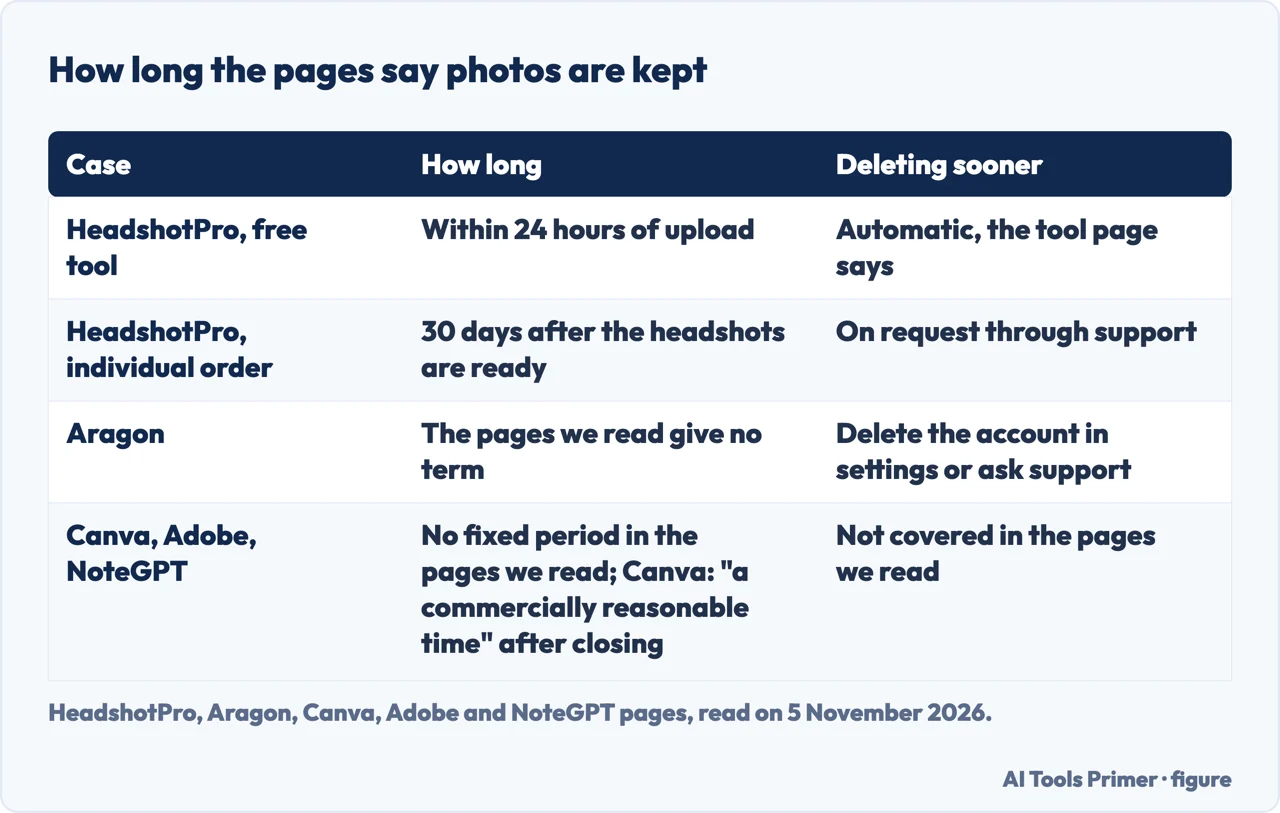
The clearest numbers come from one provider, and they are not the same for every product. HeadshotPro’s free tool page says every photo you upload is deleted from its servers within 24 hours. Its security overview gives a different term for individual orders: the selfies and the generated headshots are deleted 30 days after the headshots are ready, with a warning email 7 days before. For team orders the overview says shoots stay as long as the organization keeps them, and an admin can switch on automatic deletion after 30 days. Earlier deletion can be requested through support at any time, and deleting an account triggers erasure of personal data within 14 days of confirmation. HeadshotPro’s privacy policy, updated on 22 October 2026, also gives 14 days from a confirmed request.
Aragon gives no term for individual photos in the pages we read. Its privacy page says you can delete your account from the Account Settings page at any time, or ask support to help, and that team plans have a Data Retention feature that deletes headshots and uploaded data after a retention period the team chooses. Its home page adds that data is encrypted with AES-256. The pages we read for Canva, Adobe and NoteGPT give no fixed number of days or hours for uploaded photos, so we give none either. Canva’s privacy policy, which we read only in part, says that after an account is closed it keeps profile information and user content for a commercially reasonable time and for as long as it has a valid purpose.
Biometric data and other people’s faces
Only one of the five uses the word biometric in the pages we read. HeadshotPro’s security overview says photographs are processed as “image data, not biometric data” under Article 9(1) of the GDPR, because they are not processed to identify a natural person uniquely. That is the company’s own position, not a ruling by a regulator. The Canva, Adobe, Aragon and NoteGPT pages we read do not use the word. Adobe, for its part, says on its Firefly page that Firefly analyzes facial features, lighting and composition in the photo you upload.
On consent, the only requirement we found is Adobe’s: uploading means you agree to its Terms of Use and Privacy Policy and confirm you are 18 or older. The pages we read do not mention other people’s faces in an uploaded photo, or ask for their permission. We did not rely on any regulator’s guidance, because we could not open the one we tried, so what the law requires is outside this page.
What the pages let you check before you upload
- Which product you are on. HeadshotPro’s free tool and its individual orders have different deletion terms: 24 hours against 30 days.
- Which account type. Canva says the AI training control is disabled for Education, Business, Teams and Enterprise accounts and that their content is not used. For other accounts it points to the privacy settings page.
- Whether a term is written down. For Canva, Adobe, Aragon’s individual photos and NoteGPT, the pages we read give no fixed retention period (Canva’s policy says only “a commercially reasonable time” after an account is closed). Aragon sends readers to its Terms and Privacy Policy, which we did not read in full.
- What the picture is for. Adobe says content from Firefly models is “safe for commercial use”, while for partner models it says the user decides whether the content is appropriate, and its page adds that partner models may have different usage terms.
- Who is in the photo. Canva suggests a clear, centered face, and Adobe asks you to confirm you are 18 or older. The pages we read do not mention other people in the frame.
What we did not use
We tested no generator and uploaded no photo, so everything above is what the pages say. We read Canva’s long privacy policy only in the passages on training and managing data, and we read only Aragon’s privacy summary page, not its full policy. We opened the headshots.com comparison of generators but took no facts from it: it is published on the site of a headshot seller. We did not open the Briefcase Coach review or the HeadshotMaster page, or Canva’s help page on credits.
Where to start
Five ways in.
- “What do I have to upload?”
- What the generators ask for and what they give back — make
- “What is actually free?”
- What is free, as each page states it — free
- “Will it train on my photo?”
- What they say about training on your photo — training
- “How long do they keep it?”
- How long photos stay, and how to remove them — keep
- “Is my face biometric data?”
- Biometric data and other people’s faces — biometric
Making and editing pictures with AI
How the generators work, and where the free ones stop.
Your photo and what travels with it
The file, the face and the search results.
Questions people also ask
Is there a free AI headshot generator?
Four of the five pages we read state a free allowance: Canva two free credits, Adobe free daily generations with an Adobe account, HeadshotPro one HD headshot, NoteGPT two free images a day. Aragon describes its service as a paid product. The limits are those stated on 5 November 2026.
Can ChatGPT make you a headshot?
The pages we read are from headshot providers, and they do not mention ChatGPT. For how ChatGPT edits an image you upload, see our page on editing with AI.
What AI is best for headshots?
We do not rank them. The pages we read are providers describing themselves, and they differ on free limits, on training and on how long a photo is kept, as the figures above show.
How to make an AI-generated headshot?
Canva: open the ProfilePhoto app in the editor, upload a selfie, choose a gender identity and click Generate. Adobe: upload a photo and use Prompt to Edit to describe the changes. HeadshotPro: upload one selfie and wait for the styles. NoteGPT: upload photos, choose styles and download.
Not covered here. We tested no generator and uploaded no photo. The statements come from pages of Canva, Adobe, HeadshotPro, Aragon and NoteGPT, all read on 5 November 2026.
The search volume and SEO difficulty behind this page are an Ubersuggest reading of 5 November 2026 for the United States (not the Semrush KD), and a Semrush check is still to be made.
Sources
- Canva — AI Headshot Generator — www.canva.com, read 5 November 2026.
- Canva — Privacy Policy (updated 2 November 2026) — www.canva.com, read 5 November 2026.
- Canva — Trust Center, privacy — www.canva.com, read 5 November 2026.
- Adobe — Firefly AI headshot generator — www.adobe.com, read 5 November 2026.
- Adobe — Content Analysis FAQ — helpx.adobe.com, read 5 November 2026.
- Adobe Blog — Partnering to bring customers choice in AI models (18 March 2025) — blog.adobe.com, read 5 November 2026.
- HeadshotPro — Free AI headshot generator — www.headshotpro.com, read 5 November 2026.
- HeadshotPro — Security and compliance overview — www.headshotpro.com, read 5 November 2026.
- HeadshotPro — Privacy policy (updated 22 October 2026) — www.headshotpro.com, read 5 November 2026.
- Aragon — Home page — www.aragon.ai, read 5 November 2026.
- Aragon — Privacy page — www.aragon.ai, read 5 November 2026.
- NoteGPT — AI Headshot Generator — notegpt.io, read 5 November 2026.
Written by Alberto Gulotta
Founder and editor of AI Tools Primer, writing from Palermo, Italy. Thirty-five years of taking computers apart, starting with a Commodore 64 — the long version is on the about page.
Something wrong on this page? Write to aitoolsprimer@gmail.com and it gets fixed.
Written on 5 November 2026.
Independence and limits
No affiliate links and no paid placements anywhere on this site. Nobody pays to appear here, and no company has seen this page before you did.
This is general information, not professional advice. Where a page touches money, health, safety or the law, it names its source and the date it was read — and your situation may still differ. See the privacy page and the cookie policy.