
Images · guide
AI image generator free: how each page words its limit
By Alberto Gulotta · Updated · 15 min read
On the pages of an AI image generator free to try, the word free means something different each time. Bing Image Creator gives guests a daily limit and signed-in users 10 Fast creations. Adobe writes free daily generations, Pixlr gives new users 20 credits, and OpenAI gives image generation a separate limit without a number.
| Question | Answer | Where it comes from |
|---|---|---|
| Do the pages word “free” alike? | No: a daily guest limit, one-time credits, daily generations, a separate limit and a monthly allowance all appear | Bing, Pixlr, Adobe, OpenAI, DeepAI |
| Which pages give a number? | Bing (10 Fast creations after sign-in) and Pixlr (20 credits, 250 in a trial) for free use; DeepAI and CapCut give numbers only for their paid Pro plans | Bing, Pixlr, DeepAI, CapCut |
| Which pages leave out the number? | The Adobe, OpenAI, Canva and Leonardo pages we read do not state a free image count | Adobe, OpenAI, Canva, Leonardo |
| Can the limit change? | OpenAI and Adobe both say so on the pages we read | OpenAI Help Center, Adobe Help |
| Are the pictures usable commercially? | Canva, Pixlr, DeepAI and Leonardo say yes, each with conditions | The four pages |
| Who owns the copyright? | Canva calls the law unclear and Pixlr calls it an open question; DeepAI says the images are public domain with no owner | Canva, Pixlr, DeepAI |
“Free” is worded differently on each page
The generator pages we read all use the word free, and each one attaches a different limit to it. Microsoft’s Bing Image Creator page shows a message that today’s guest creation limit has been reached, and a line that says “Guest limits reset daily.” After sign-in it lists “10 free creations in Fast mode”, “Unlimited creations in Standard mode” and “Free upgrades with Microsoft Rewards”. Adobe’s help page says free users of Firefly, Express, Stock, Photoshop on the web, Acrobat and its mobile apps get free daily generations across the generative features, on a curated set of models, and it gives no number. OpenAI’s ChatGPT Free Tier FAQ says free users have unlimited everyday text chats, subject to abuse-prevention safeguards, while image generation has its own separate usage limits, and the page does not give a figure for them.
Pixlr writes it as credits. For a new user it says “generating 20 images using 20 credits”, and it adds a free trial of 250 credits. DeepAI’s page says sign-up is not required, and describes a Pro plan with a monthly allowance. CapCut’s pricing page lists a Free plan at EUR 0 with free templates and basic editing tools, and puts its image and credit numbers on the Pro plan. Leonardo’s page says “Free to try” and Canva’s asks you to log in or sign up when you press the button that starts a generation. Those are eight pages, and the limit comes in several units: days, credits, a monthly allowance and a separate limit.
The question Is the ChatGPT image generator free? has a short answer on OpenAI’s page: its list of what Free tier users can do includes creating images in ChatGPT, with usage limits of their own. The question Is there any 100% free AI? has no single answer in the pages we read, because each page defines free in its own terms, as the figure below sets out.
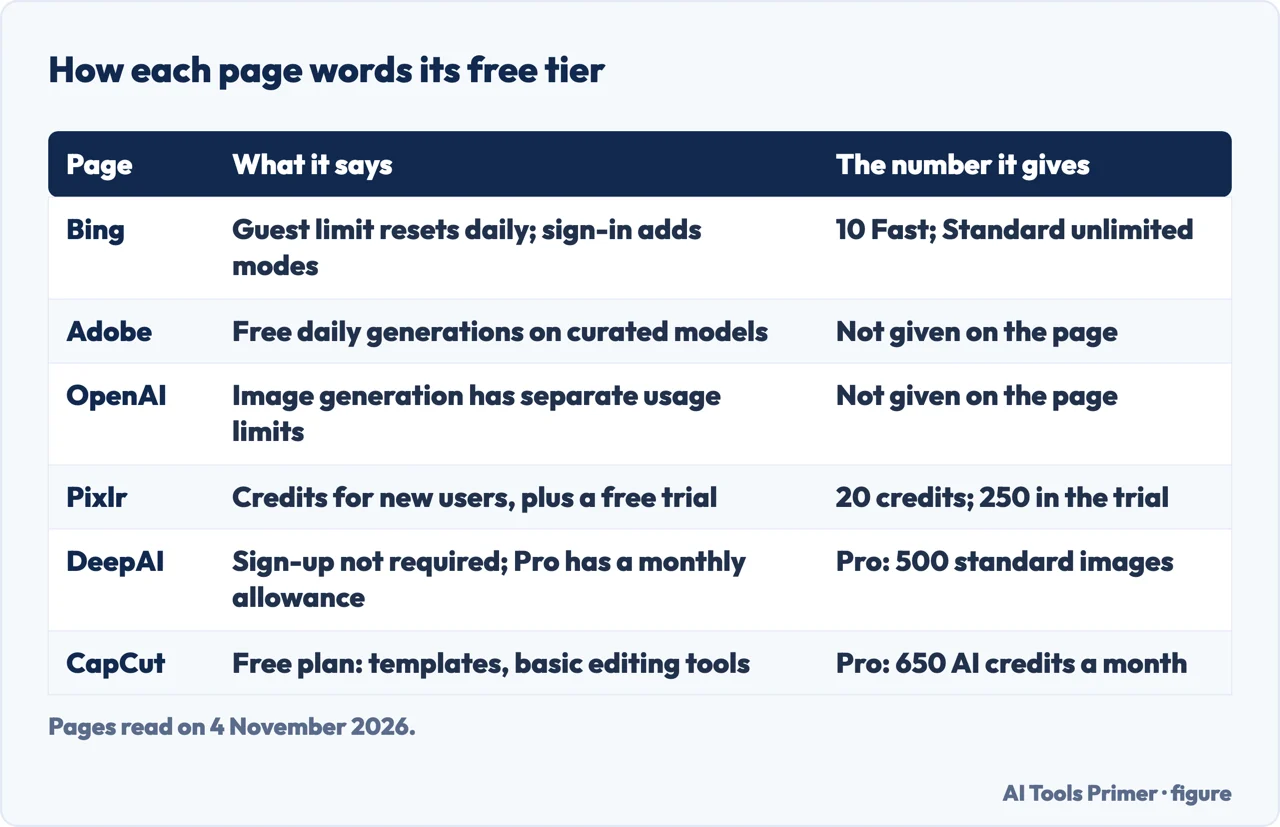
Daily limits at Bing and Adobe, and OpenAI’s separate limit
Bing Image Creator. What we read is the text of the page’s interface, not a Microsoft help article, so we describe what the page shows. It carries a guest message saying today’s guest creation limit has been reached, with the line that guest limits reset daily, and it offers a sign-in to create more and unlock additional models. After sign-in, the page says, the watermark can be turned on or off in Settings for the images you create. The same text holds messages for the other states: one says the fast creations for the day are used up, new creations may take a few minutes and faster speeds return tomorrow; another says you are out of creations and can earn more through Microsoft Rewards or wait for the daily refresh. The options listed are two modes, Vivid and natural and MAI-Image-2.5-Flash, five aspect ratios, and a quantity of 1, 2 or 4.
Adobe. The Generative credits FAQ describes the free plan twice, and the two descriptions use different rhythms. Under access for free users without a plan, it says the limited number of free daily generations refreshes each day, and that the numbers of generations, features and models are subject to change. Further up the same page, under when credits renew, it says that on free plans generative credits are allocated upon first use of a Firefly feature and expire one month from the allocation. The page does not say which of the two sentences applies to a free account today, so we set them side by side and do not choose between them. It also describes a trial for Creative Cloud plans without premium generative features, with an example of 2 free video generations that it says are currently offered. That is a trial for subscribers, not the free plan.
OpenAI. The Free Tier FAQ says free users have unlimited everyday text chats, subject to abuse-prevention safeguards, while file uploads, image generation, voice, data analysis and other tools have separate usage limits. ChatGPT, it says, notifies you when you reach an applicable limit, and for GPTs it says the reset timing is shown in the product. For the tools with their own limits, including creating images, the page says that after reaching a rate limit you will need to wait for a later time to use any of these tools. It adds that the limit resets when you upgrade to Plus, Pro or Business, and its opening lines say the default model and available limits can change over time.
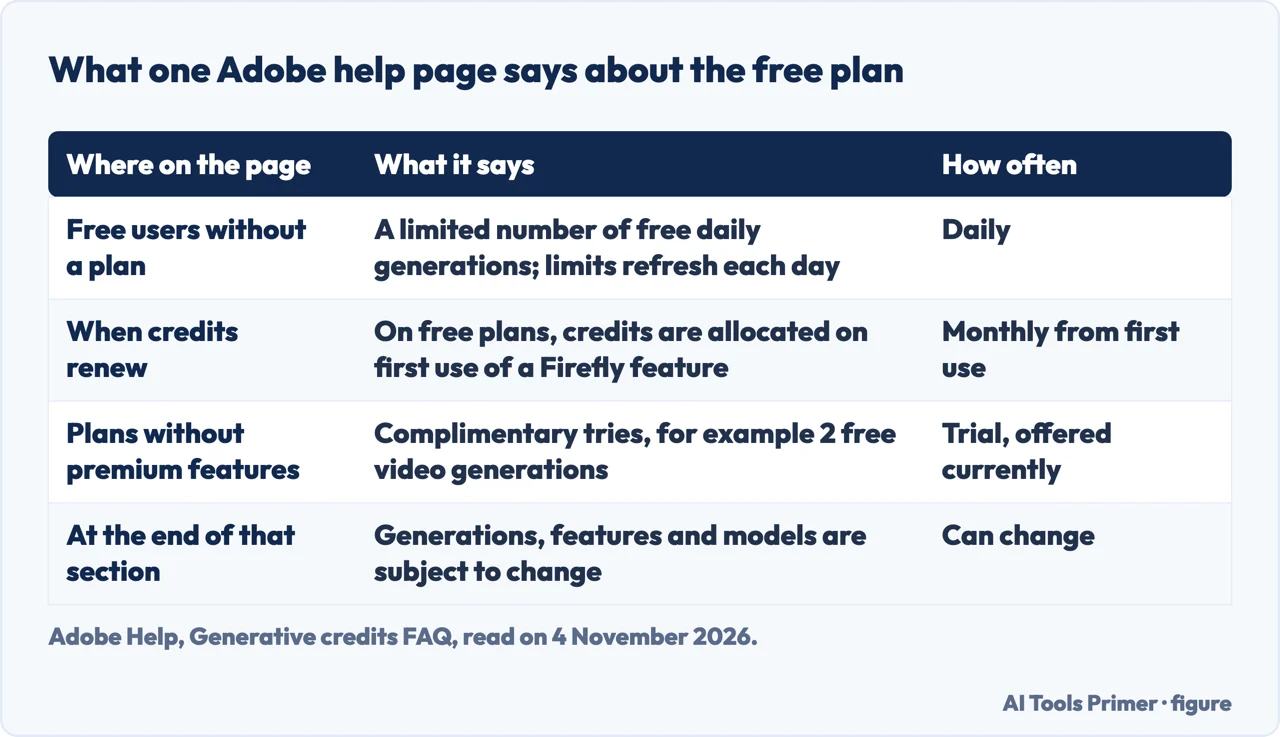
New-user credits and monthly allowances
Pixlr. The page answers the question “Is the Image Generator Free?” with a complimentary tier and the sentence about 20 images using 20 credits for a new user, then adds a free trial of 250 credits. Elsewhere it says you can choose to generate up to 8 images at once, and it lists the models Flux Schnell, Flux Dev, Flux Dev Ultra, Stable Diffusion XL and Nano Banana 2. The page does not say what happens after the credits are used.
DeepAI. The text opens with the offer of free AI art and says no sign-up is required. The numbers on the page belong to the Pro plan: its first 500 standard images, 60 Genius Mode images and 10 Super Genius 2K images are included each month, and after that extra images cost 1 cent per standard image, 8 cents per Genius Mode image or 25 cents per Super Genius 2K image. The page also has an Add credits option, described as a one-time purchase added to a wallet after payment, and an “Out of credits” message that offers it. The text we read does not give a count for the free use.
CapCut. The page names two models, Seedream 5.0 by ByteDance and Nano Banana Pro by Google. Its Free plan at EUR 0 lists free templates and basic editing tools, with no AI credit count, while the Pro plan at EUR 29.99 a month lists up to 240 images per month, with a note that output may vary by model, resolution and region, and 650 monthly AI credits. Its FAQ answers its own question about whether the generator is free to use by saying that availability, included credits and tools can vary by account, region and product surface, and that you should check the generator for current options.
Leonardo.ai and Canva. Leonardo’s page says “Free to try” and has a heading about generating AI images for free, with no number for the free level. Canva’s page walks through choosing a style and aspect ratio and pressing Generate AI image, and says to log in or sign up when prompted. Its questions section does not say how many images are free.
What the pages say about using the pictures
Four of the pages answer the commercial-use question, and they answer yes with conditions. Canva says you can use the images for any purpose, including personal or commercial projects, as long as you follow its AI Product Terms and Terms of Use. It then warns that you may not have exclusive rights to AI-generated images, that it is your responsibility to check an image suits commercial use, and that Canva does not guarantee the output is cleared for use, particularly if it looks like someone else’s work. Pixlr says you can, that it keeps no copyright in the generations, and that you should follow its terms and guidelines. DeepAI says commercial use is permitted for any legal purposes and points to its Terms of Service. Leonardo says its images can be used commercially and points to its commercial usage guide and its terms.
On ownership, Canva and Pixlr say the law is unsettled, while DeepAI answers differently: its FAQ says the generated images are considered public domain with no owner and are not subject to copyright. Canva says it is currently unclear who owns the copyright in AI-generated content, that Canva makes no copyright claim over what you generate, and that between you and Canva you own the designs, subject to its Terms. Pixlr calls it an open question, says it asserts no copyright claim and says it cannot license or grant usage rights for the output. Its legality answer adds that AI-generated artwork itself cannot be copyrighted or attributed to a specific individual, and that the artwork used to train generators is often copyrighted, so there is a potential for infringement. Those are the sentences of a vendor, not a ruling.
The U.S. Copyright Office keeps a page on Copyright and Artificial Intelligence. It says Part 2 of its report was published on 29 January 2025 and addresses the copyrightability of outputs created using generative AI. We read that index page and not the report itself, so we do not report what the report concludes. Canva’s page adds two practical lines: it asks you to tell viewers that content contains AI-generated images, and it says it does not recommend generating a celebrity or a recognizable character or brand, because those can be protected and Canva cannot give that permission.
If the job is to change a picture you already have, rather than to make a new one, our page on a ChatGPT photo editor covers the editing routes and the free limits OpenAI states for them.
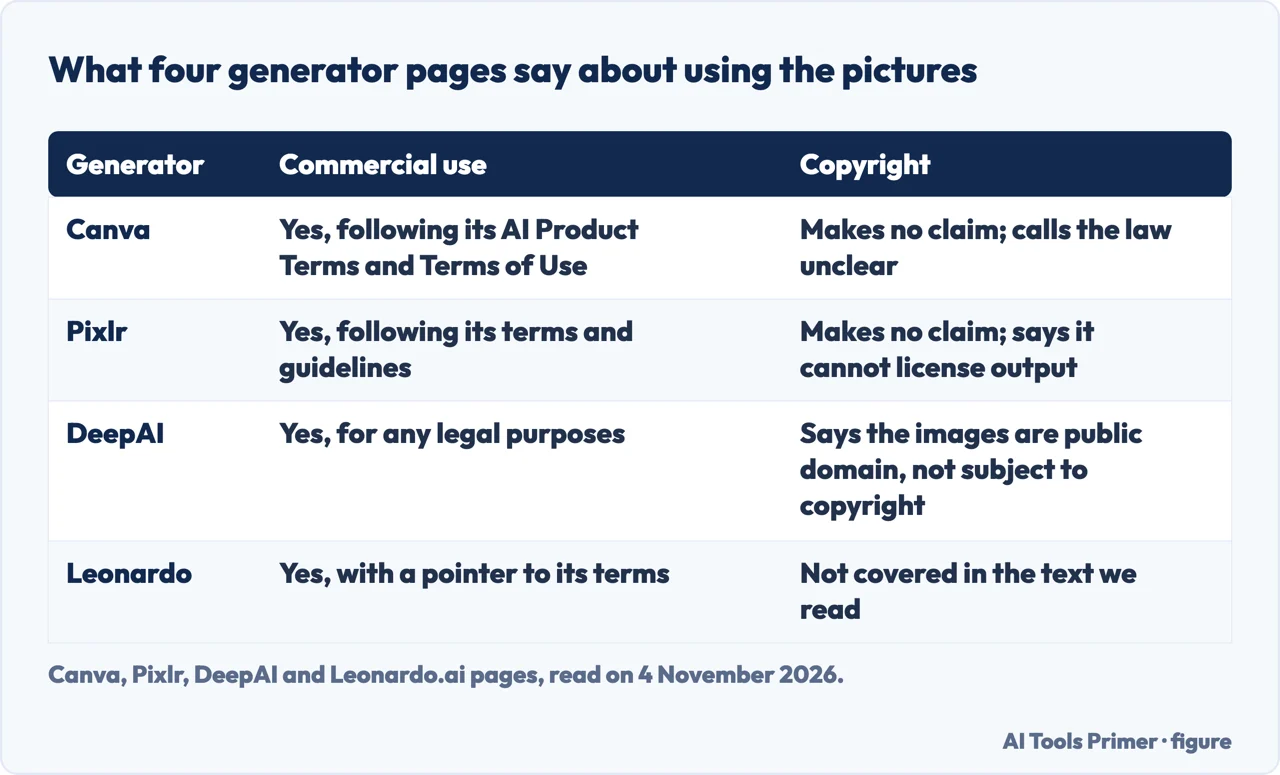
What the pages leave to the product screen
Read together, the nine pages leave several questions to the generator itself. The pages we read do not state how many images the free level gives at Adobe, OpenAI, Canva or Leonardo. They do not give the largest size of a free image; the only size stated is DeepAI’s Super Genius mode, which renders in 2K and is included with DeepAI Pro. They do not mention a watermark on free images, except Bing, which puts it in Settings after sign-in. Only OpenAI and Adobe say the limits may change. The pages do not set their limits beside a competitor’s, which is why the figures in this page come from nine separate sources.
Where a page does point to the product, it says so itself. OpenAI says ChatGPT notifies you when you reach an applicable limit, and that for GPTs it shows the reset timing in the product. Bing shows its guest and out-of-creations messages on the page. CapCut says to check the generator for current options. Each of those is the vendor telling you that the live screen, not the help text, holds the current figure.
- Daily limits appear at Bing (guest and Fast mode) and Adobe; OpenAI states a separate limit for image generation, with the reset timing shown in the product, and does not call it daily.
- New-user credits appear at Pixlr, and a trial of 250 credits comes with them.
- A monthly allowance appears at DeepAI Pro, CapCut Pro and, in one sentence, Adobe’s free plan.
- The text we read does not give a free count for Canva, Leonardo or CapCut’s Free plan.
What we did not use
We generated nothing and tested no free tier. We did not open the Felo and NoteGPT pages, because they are vendor pages and we took the limits from the pages of the generators named above. Perchance and Adobe’s Firefly product page loaded as near-empty shells, so we did not cite them, and we used Adobe’s help pages instead. We did not open ChatGPT’s product page; its limits come from OpenAI’s help page. The Bing page is interface text, and we did not read a Microsoft help article, so Microsoft Rewards is described only as the page words it. The Copyright Office report is a PDF that we did not read. We do not rank these generators, and the page carries no affiliate links.
Where to start
Four ways in.
- “What does free mean on these pages?”
- “Free” is worded differently on each page — meaning
- “How many pictures a day?”
- Daily limits at Bing and Adobe, and OpenAI’s separate limit — daily
- “Are there credits or a monthly cap?”
- New-user credits and monthly allowances — credits
- “Can I use the pictures commercially?”
- What the pages say about using the pictures — rights
Editing and retouching pictures
What to do with a picture once it exists.
Fixing and tidying a file
The file behind a picture, and what travels with it.
Questions people also ask
Is there any 100% free AI?
The pages we read do not use that wording. Bing shows a daily guest limit and, after sign-in, 10 Fast creations; Pixlr gives new users 20 credits and a 250-credit trial; DeepAI says sign-up is not required and puts its numbers on a Pro plan. Each page sets its own limit.
Which free AI is better than ChatGPT?
The pages we read do not compare generators, and we did not test any of them. What they state is a limit each: OpenAI gives ChatGPT image generation separate usage limits, Bing offers unlimited Standard mode after sign-in, and Adobe offers free daily generations on a curated set of models.
What AI has no restrictions and is free?
The pages we read do not describe a generator without restrictions. Canva asks you to follow its AI Product Terms and Terms of Use, Pixlr says to follow its terms and guidelines, and Bing shows messages for blocked prompts and for suspended access after content policy violations.
Is the ChatGPT image generator free?
OpenAI’s Free Tier FAQ lists creating images in ChatGPT among what Free tier users can do, and says image generation has separate usage limits. It does not give a number of images, and it says the limits can change over time.
Not covered here. We generated nothing and tested no free tier. The statements come from nine pages: Bing Image Creator, Canva, Adobe Help, the OpenAI Help Center, Pixlr, DeepAI, CapCut, Leonardo.ai and the U.S. Copyright Office, all read on 4 November 2026.
The search volume and difficulty behind this page come from a Semrush reading of 29 August 2026, older than the 60 days the site normally allows.
Sources
- Bing Image Creator — Free AI Image Generator (text of the page) — www.bing.com, read 4 November 2026.
- Canva — Free AI Image Generator: Text to Image — www.canva.com, read 4 November 2026.
- Adobe Help — Generative credits FAQ — helpx.adobe.com, read 4 November 2026.
- OpenAI Help Center — ChatGPT Free Tier FAQ — help.openai.com, read 4 November 2026.
- Pixlr — Free AI Image Generator — pixlr.com, read 4 November 2026.
- DeepAI — AI Image Generator — deepai.org, read 4 November 2026.
- CapCut — Free AI Image Generator — www.capcut.com, read 4 November 2026.
- Leonardo.ai — AI Image Generator — leonardo.ai, read 4 November 2026.
- U.S. Copyright Office — Copyright and Artificial Intelligence — www.copyright.gov, read 4 November 2026.
Written by Alberto Gulotta
Founder and editor of AI Tools Primer, writing from Palermo, Italy. Thirty-five years of taking computers apart, starting with a Commodore 64 — the long version is on the about page.
Something wrong on this page? Write to aitoolsprimer@gmail.com and it gets fixed.
Written on 4 November 2026.
Independence and limits
No affiliate links and no paid placements anywhere on this site. Nobody pays to appear here, and no company has seen this page before you did.
This is general information, not professional advice. Where a page touches money, health, safety or the law, it names its source and the date it was read — and your situation may still differ. See the privacy page and the cookie policy.