
Malware · guide
How do computers get viruses? The doors four pages list
By Alberto Gulotta · Updated · 18 min read
How do computers get viruses? Microsoft lists six ways in, CISA says viruses spread primarily by email, Fortinet says the internet, and the FTC names phishing, fake software ads and risky downloads. This page sorts those doors by what you do: open, choose, or only visit.
| Question | Answer | Where it comes from |
|---|---|---|
| What are the ways in? | Microsoft lists six: spam email, Office macros, removable drives, bundled software, compromised webpages and other malware | Microsoft Support |
| Which one is the main one? | CISA says email, Fortinet says the internet, Microsoft does not rank its six | CISA, Fortinet, Microsoft Support |
| Does a virus need me to do something? | CISA says viruses often need a user action, such as opening an attachment, and calls a worm a type of virus that can spread without human interaction | CISA |
| Can a webpage alone do it? | Microsoft says a site can try to use a browser vulnerability, whether it is malicious or hacked | Microsoft Support |
| Is a worm a virus? | CISA calls it a type of virus; Fortinet writes that it is not | CISA, Fortinet |
| What if I already clicked? | Stop logging in to accounts, update security software, scan, change passwords and turn on two-factor authentication | FTC Consumer Advice |
Four pages, four lists
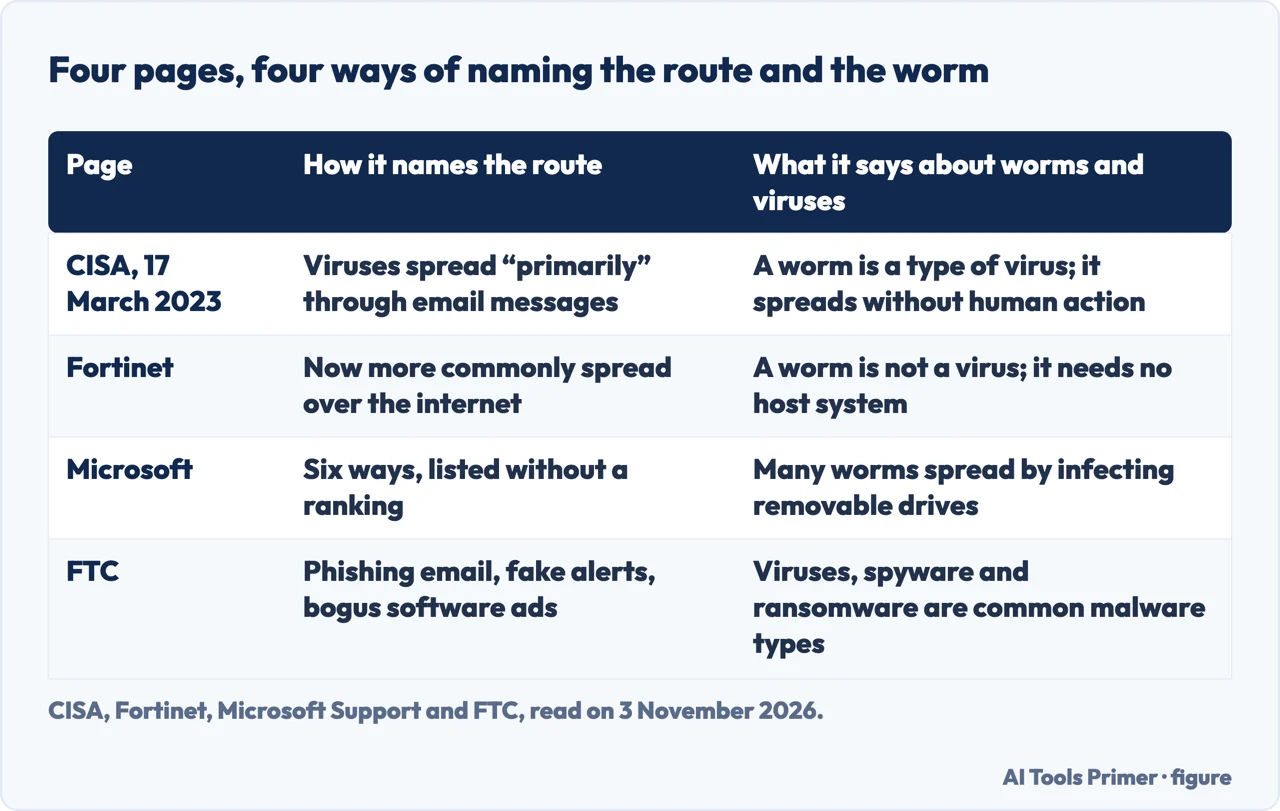
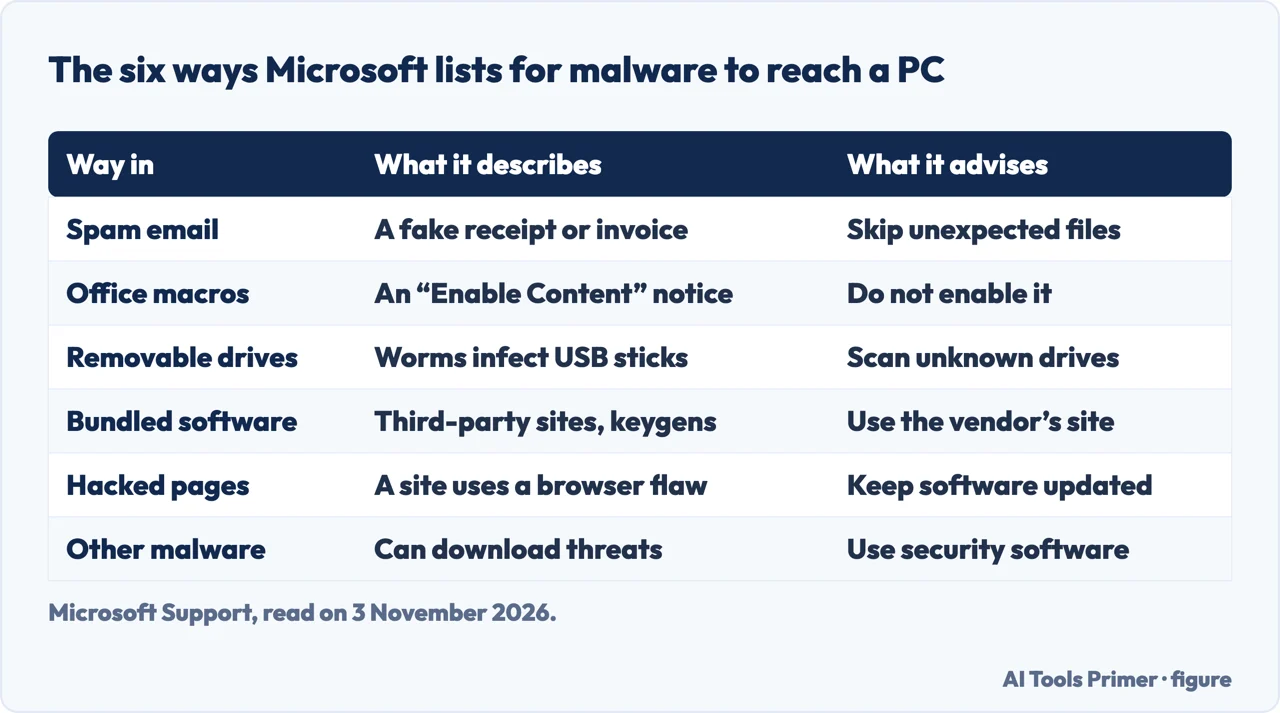
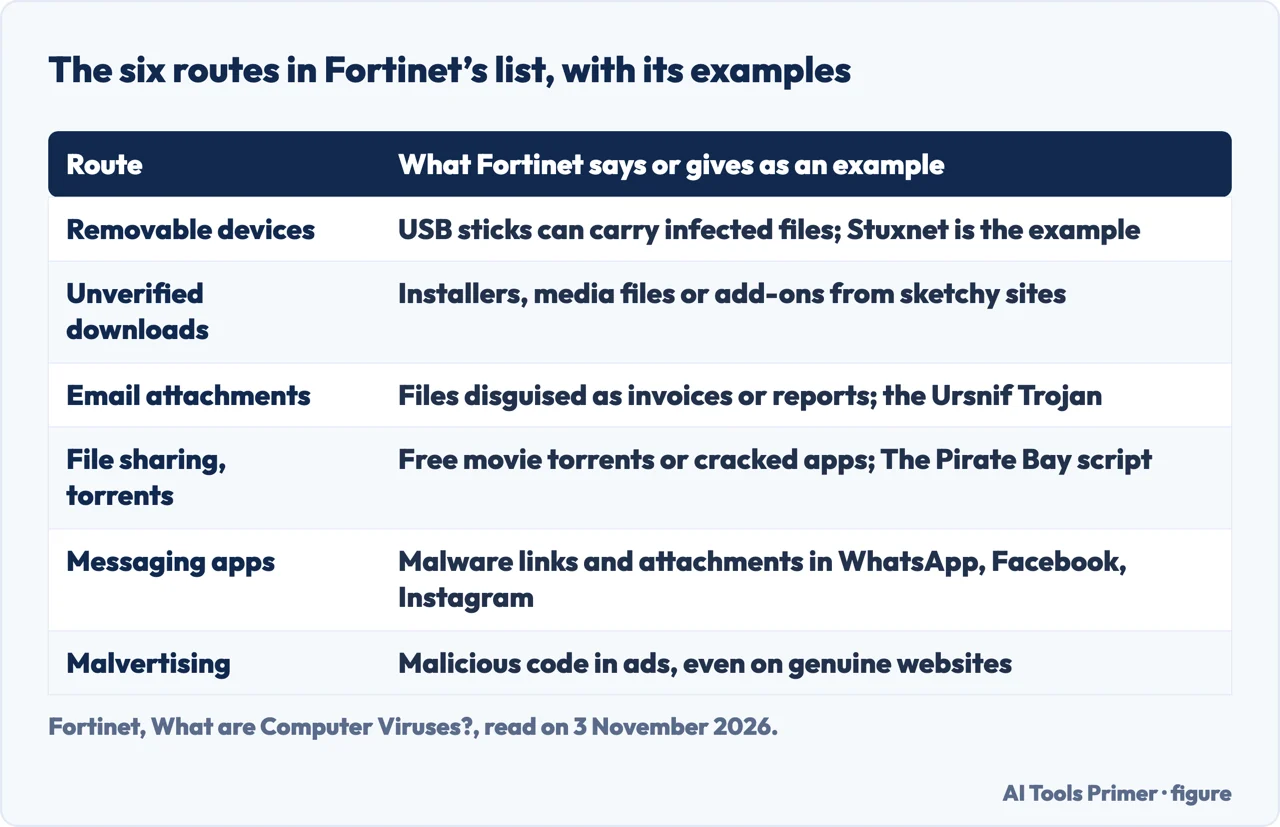
Microsoft Support lists what it calls some of the most common ways a device can get infected with malware: spam email, malicious Office macros, infected removable drives, software bundled with other programs, hacked or compromised webpages, and other malware. The FTC does not number its list. Its consumer page on malware names phishing emails that carry a link or an attachment, fake security warnings that give a phone number to call, and bogus ads for software on social media sites and search engines, and then adds a short list of things to avoid. Fortinet’s glossary page has a section on what causes computer viruses to spread, with six routes of its own: removable devices, unverified downloads, email attachments, file-sharing and torrent sites, messaging apps and malvertising. It adds that old or unpatched systems give viruses an easy entry point.
The words differ along with the lists. Microsoft and the FTC write about malware in general, and CISA and Fortinet write about viruses in particular. CISA’s Virus Basics page, released on 17 March 2023, says viruses used to spread when people shared floppy disks and other portable media and are now primarily spread through email messages. Fortinet also begins with floppy disks, but says viruses are now more commonly spread over the internet. Those are two different answers to the question of the main route, and Microsoft gives none. The pages we read do not give a measure of which route is the most frequent today, and the one figure of that kind that we found is Microsoft’s, about keygens, covered below.
The rest of this page puts the doors in an order of its own, in three groups: the ones that need a hand to open, enable or plug something in; the ones you open by choosing a download or clicking an ad; and the one where the only step Microsoft describes is a visit to a webpage. The four pages do not sort the doors this way. The grouping is ours, an ordering of the facts they give, and each paragraph says whose fact it is.
Doors that need your hand: the attachment, the macro and the USB stick
Microsoft says malware authors often try to trick you into downloading malicious files. One form is an email with a file attached that says it is a receipt for a delivery, a tax refund or an invoice for a ticket, and that you have to open it to get the items or the money. If you open the attachment, Microsoft says, you end up installing malware on your PC. It adds that such an email can be easy to spot, with bad spelling and grammar or an address you have never seen, but can also look like it comes from a legitimate business or someone you know, and that some malware can hack email accounts and use them to send malicious spam to any contacts it finds. Its advice is not to open an attachment you were not expecting, even from somebody you trust, and not to click an unexpected link but to go to the organization’s site from your own saved favorite (see what a phishing email looks like).
CISA puts email at the front for viruses. Its page says most viruses, Trojan horses and worms are activated when you open an attachment or click a link in an email message, and that most users get viruses from opening and running attachments they do not know. It also says that if an email client allows scripting, it is possible to get a virus by simply opening a message, and suggests limiting the HTML in messages and reading them in plain text. For an attachment from a familiar address that you were not expecting, CISA says to contact the sender before opening it; for one from a sender you do not recognize, to delete the message.
The second hand-door is the Office macro. Microsoft says Office includes a powerful scripting language, and that criminals can use it to create malicious scripts. If you open an Office file and see a notice with an “Enable Content” button, it says not to enable that content unless you are certain what it does, even if the file seems to come from somebody you trust. The trick it describes starts with a message that you are about to be charged for a service you never signed up for. When you contact them to protest, you are told that cancelling means downloading an Excel file and filling in some details. If you select Enable Content, the malicious macro runs and infects the system. Microsoft says a legitimate company will not make you open an Office file to cancel a service, and that if one asks, you should hang up. Our page on enabling macros in Excel safely covers the same button from the Excel side.
The third is the removable drive. Microsoft says many worms spread by infecting removable drives such as USB flash drives or external hard drives, and that the malware can be installed automatically when you connect the infected drive. It says to be wary of any USB device you do not own, and describes what it calls a “USB drop attack”: attackers sometimes deliberately leave infected USB devices lying around in popular areas, hoping somebody will plug one in. Its line is that a drive you do not plug in cannot infect you, and that if you do plug in an unknown removable device you should run a security scan of it immediately. The FTC gives a similar step: use an antivirus or security program to scan USB thumb drives, external drives and other external devices before using them. Fortinet lists removable devices among its six routes and gives the Stuxnet worm as its example.
What the three share is a file or a device that arrives and a hand that opens, enables or plugs it in. That is our grouping, built from the steps the pages describe.
Doors you open by choosing: downloads, keygens and ads
Microsoft says some malware is installed at the same time as other programs you download, including software from third-party websites and files shared through peer-to-peer networks. Some programs also install what Microsoft detects as potentially unwanted software, such as toolbars or programs that show extra ads while you browse, and it says you can usually opt out by clearing a check box during installation. For programs that generate software keys, called keygens, it goes further: they often install malware at the same time, and Microsoft security software finds malware on more than half of the PCs that have keygens installed. Its two pieces of advice are to always download software from the official vendor’s website and to read exactly what you are installing instead of just clicking OK.
The FTC and Fortinet cover ground Microsoft’s list does not. The FTC says scammers place bogus ads for software on social media sites and search engines, tells you not to click on ads to download software, and says to go to the website by typing the address instead. It also says not to use unfamiliar websites to download free music, movies, shows or games, and not to download content through peer-to-peer file-sharing sites. Fortinet describes malvertising as malicious code injected into digital ads that can appear on genuine websites, where clicking an ad can activate the virus. Of unverified downloads it says viruses may hide inside installers, media files or browser add-ons from sketchy websites, and that even trusted platforms have, in the past, bundled unwanted programs. For file-sharing and torrent sites it says free movie torrents or cracked apps might carry hidden malware, and that at one point The Pirate Bay secretly ran a crypto-mining script through visitors’ browsers.
CISA describes the same choice from the side of the program. A Trojan horse, it says, is a program that purports to do one action when it is performing a malicious one on your computer, and it can be included in software that you download for free or in email attachments. Our page on what Trojans are covers the idea in full. CISA also says to run a virus scan before opening any new program or file that may contain executable code, including packaged software bought in a store, and to be very careful about accepting files or clicking links in an online community or chat room.
Fortinet adds one more route that sits between choosing and being tricked: malware links and infected attachments shared through messaging platforms such as WhatsApp, Facebook and Instagram, which it says makes mobile devices vulnerable. Most of what these pages describe is written for computers; for phones see our page on whether iPhones can get viruses.
The door with no step beyond a visit: webpages and old software
Microsoft describes a route that starts when you go to a website. Malware, it says, can use known software vulnerabilities, and a vulnerability is like a hole in your software that can give malware access to your PC. When you go to a website, the site can try to use vulnerabilities in your web browser to infect the PC, and the site might be malicious or might be a legitimate one that has been compromised or hacked. This is why Microsoft says it is extremely important to keep all your software, and especially your web browser, up to date, and to remove software you do not use, which includes unused browser extensions. It names its own Microsoft Edge as an example of a modern browser, and notes that all modern browsers reopen your tabs after an update.
Fortinet makes the same point about unpatched systems: it says attackers exploit known vulnerabilities to infect devices that have not been updated, so an old or unpatched system gives viruses an easy entry point.
CISA words the web differently. In its sentence about viruses it lists “visiting a malicious web page” next to opening an email attachment as an example of a user action that viruses often require. Microsoft describes the visit as the event and the browser vulnerability as the way in, and names no further step by the user. The two pages are not describing the same thing in every respect, since CISA’s page is about viruses and Microsoft’s about malware, and the pages we read do not reconcile the two readings.
Microsoft lists one more route, other malware, in which something already on the PC brings in more: some types of malware can download other threats, and once those are installed they continue to download more. The FTC makes a related point, listing among the uses criminals have for malware that it can make your device vulnerable to even more malware. Microsoft says the best protection against malware and potentially unwanted software is an up-to-date, real-time security product, and names its own Microsoft Defender Antivirus as an example.
Virus, worm, Trojan: definitions that change from page to page
CISA defines a computer virus as a program that spreads by first infecting files or the system areas of a computer or of a network router’s hard drive and then making copies of itself. It says some viruses are harmless, others may damage data files, and some may destroy files. Unlike worms, it says, viruses often require some sort of user action to spread. Fortinet’s definition is close: a virus is a type of malware that spreads between computers and damages data and software, and it typically attaches to an executable host file, so that its code runs when the file is opened. The code then spreads through networks, drives, file-sharing programs or infected email attachments. Fortinet calls the file infector one of the most common kinds, and says it largely affects files ending in .exe or .com.
The two pages part ways on the worm. CISA calls a worm a type of virus that can spread without human interaction, and adds that worms often take up memory and network bandwidth, which can make a computer stop responding, and can also let attackers gain access to a computer remotely. Fortinet writes that a worm is not a virus: worms do not need a host system and can spread between systems and networks without user action, whereas a virus requires users to execute its code. Both describe a program that spreads without a person acting; one gives it the label of a virus and the other does not. The pages we read do not say which label is the right one, so this page reports both.
Fortinet also says a rootkit is not a virus, because rootkits are software packages that give attackers access to systems and cannot self-replicate, and that a software bug is not a virus. For the Trojan horse it says the program pretends to be something it is not to get onto a device, and that viruses can be hidden within unofficial games, applications, file-sharing sites and bootlegged movies. The FTC, for its part, defines malware as harmful software installed on your device without your knowledge, and names viruses, spyware and ransomware as common types.
If you already clicked: the FTC’s steps and CISA’s habits
The FTC’s page gives a short sequence for anyone who clicked a link or opened an attachment that may have downloaded malware, or who notices signs of it. First, immediately stop logging in to online accounts with usernames, passwords or other sensitive information, such as shopping or banking. Second, update your security software so it has the latest protections, and if you do not have any, download it. Third, run a security scan to remove the malware. Fourth, change your passwords and enable two-factor authentication, in case the malware gave a hacker access to your accounts. For help, it suggests contacting the manufacturer of your device to find out whether a warranty covers it, getting tech support from a company you know and trust, or asking a knowledgeable friend or family member.
The signs the FTC lists include a computer that slows down, freezes or crashes; a browser home page that changes or redirects you to sites you did not intend to visit; new browser toolbars or add-on programs; a lot of pop-up ads, including on sites where you would not expect them; repeated error messages from the operating system; system tools such as Task Manager or Activity Monitor that are disabled; and emails you did not write or social media messages you did not post. Our page on telling whether a computer has a virus goes through signs in more detail, how to scan for malware covers the scan, and removing malware on Windows gives a full sequence.
CISA’s page is about habits before the click. It recommends anti-virus software from a reputable vendor that is updated and used regularly, an “on access” scanner that starts with the computer and checks files each time you run an executable one, a scan before opening any new program, and backing up your data, such as documents, bookmark files and important email messages, so that a virus infection does not cost you valuable work.
What we did not use
We tested nothing on a computer. We did not read a university help-desk guide, a Reddit thread, a page on pcninja.us or a LinkedIn article on the same question; the statements on this page come from the four pages named in Sources. The copy of Fortinet’s page that we saved contained a “please try again later” message, so we do not say what that page leaves out. We found no publication date in the text of the Microsoft page, which is why it carries the date we read it; the text of the FTC page ends with the bare label “April 2025”, which it does not explain, so we cite that page by the date we read it too. Microsoft’s page is written for Windows PCs, and the pages we read are mostly about Windows PCs or about computers in general; the FTC page names Activity Monitor among system tools but does not describe macOS infection routes, and we did not check macOS; for the Mac, see our page on checking a Mac for malware. The pages we read give no percentages of malicious emails and no counts of infections.
Where to start
Five ways in.
- “Do I have to open something?”
- The attachment, the macro and the USB stick — hand
- “Is it the software I download?”
- Downloads, keygens and ads — choice
- “Can a webpage do it alone?”
- Webpages and old software — visit
- “Is a worm a virus?”
- Virus, worm, Trojan — terms
- “What if I already clicked?”
- The FTC’s steps and CISA’s habits — clicked
After the infection
Signs, scans and removal.
Kinds and devices
Trojans, iPhones and Macs.
Questions people also ask
How does a virus infect a computer?
CISA says a virus spreads by first infecting files or system areas and then copying itself, and that it often needs a user action such as opening an email attachment. Fortinet says a virus typically attaches to an executable host file, so its code runs when the file is opened.
What are the 5 most common ways to get a computer virus?
The pages we read do not give a ranked top five. Microsoft lists six ways in without ranking them, Fortinet lists six routes of its own, and CISA says viruses are primarily spread through email messages.
Can you remove viruses from your computer?
The FTC says to update your security software, run a security scan to remove the malware, and change your passwords. See the full sequence on Windows.
How can I tell if my PC has a virus?
The FTC lists signs such as a computer that slows down, freezes or crashes, a changed browser home page, new toolbars and repeated error messages. See how to tell whether a computer has a virus.
Not covered here. We tested nothing on a computer. The statements come from Microsoft Support, CISA, FTC Consumer Advice and Fortinet, all read on 3 November 2026.
The search volume and difficulty behind this page come from a Semrush reading of 29 August 2026, older than the 60 days the site normally allows.
Sources
- Microsoft Support — How malware can infect your PC — support.microsoft.com, read 3 November 2026.
- CISA — Virus Basics (released 17 March 2023) — www.cisa.gov, read 3 November 2026.
- FTC Consumer Advice — Malware: How To Protect Against, Detect, and Remove It — consumer.ftc.gov, read 3 November 2026.
- Fortinet — What are Computer Viruses? — www.fortinet.com, read 3 November 2026.
Written by Alberto Gulotta
Founder and editor of AI Tools Primer, writing from Palermo, Italy. Thirty-five years of taking computers apart, starting with a Commodore 64 — the long version is on the about page.
Something wrong on this page? Write to aitoolsprimer@gmail.com and it gets fixed.
Written on 4 November 2026.
Independence and limits
No affiliate links and no paid placements anywhere on this site. Nobody pays to appear here, and no company has seen this page before you did.
This is general information, not professional advice. Where a page touches money, health, safety or the law, it names its source and the date it was read — and your situation may still differ. See the privacy page and the cookie policy.