
Password · guide
LastPass forgot master password: the order the pages give
By Alberto Gulotta · Updated · 16 min read
A forgotten LastPass master password cannot be reset by LastPass Support, which says it has no knowledge of it. What works is something set up earlier: a past login on that browser, a one-time password, a hint, mobile biometrics or a recent change. The last resort is a reset to an empty vault.
| Question | Answer | Where it comes from |
|---|---|---|
| Can LastPass Support reset it? | No: Support says it has no knowledge of the password and cannot reset or change it | LastPass Support, 27 July 2026 |
| What is the first step on the web? | Enter your email at the account recovery page and wait for a 6-digit code | LastPass Support, 27 July 2026 |
| What decides whether recovery works? | An earlier login from that device and browser, or an option you set up before | LastPass Support, 27 July 2026 |
| How long can I go back to the old password? | Thirty days after a change; the link in the email is valid for up to two hours | LastPass Support, 12 August 2026 |
| What does a reset keep? | Your email address, subscription, preferences and history; the vault is emptied | LastPass Support, 12 August 2026 |
| What if it is a Business or Teams account? | Consider contacting the company’s LastPass admin before any recovery step | LastPass Support, 27 July 2026 |
What LastPass says it cannot do
LastPass Support’s page on recovering an account, last updated on 27 July 2026, puts a warning near the top: Support has no knowledge of a user’s master password, and it is not possible for Support to reset or change one that has been forgotten. The same warning stands on the page about account recovery options, updated on 28 April 2026, and on the page about resetting an account, updated on 12 August 2026. University of Oklahoma IT repeats it for its own users, saying that OU and LastPass Customer Care have no knowledge of a master password.
A LastPass blog post from 24 March 2022 gives the reason. It says LastPass is built on a zero-knowledge security model: the encryption and decryption of an account happen on your device, the master password never leaves the device, and so LastPass never has access to it. The post says that is why recovery cannot work like the reset link of an ordinary website. It describes the master password as the encryption key to your vault, and says that the only way to reset it is the account recovery process.
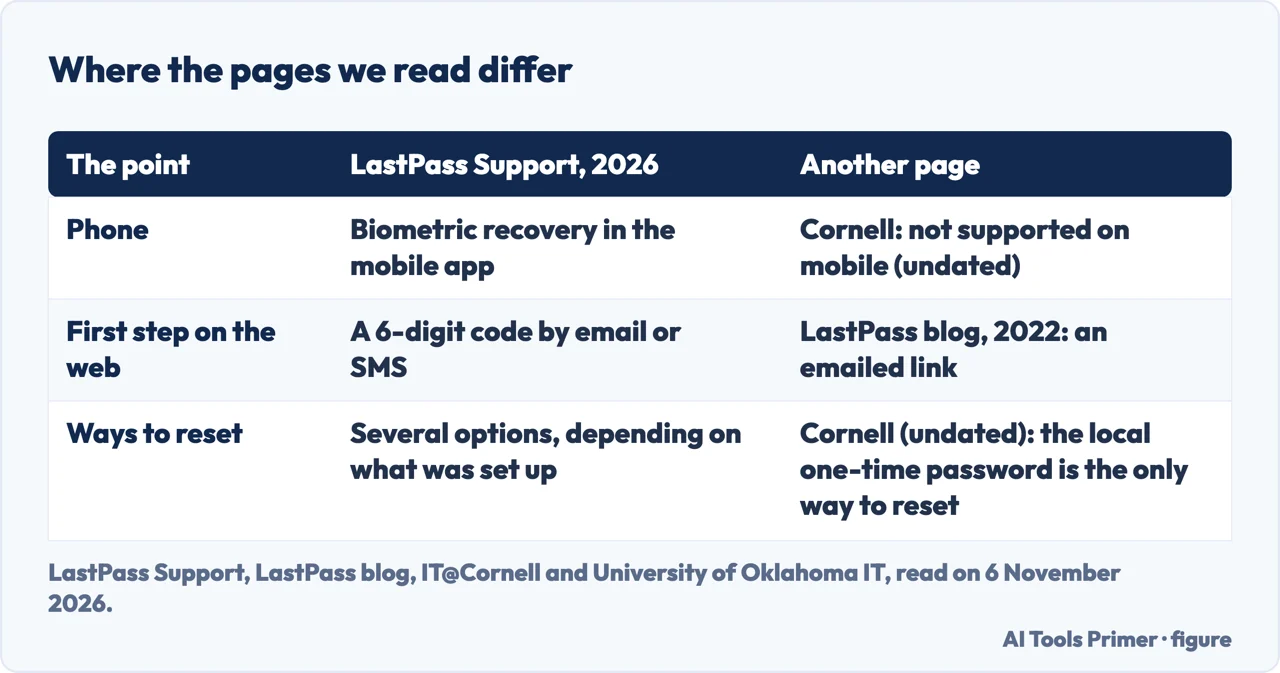
We use the blog post for that principle and for its preparation advice, not for its steps. It describes an emailed link that activates a local recovery password, while the 2026 support page describes a 6-digit verification code. The post is more than three years old, so where the two differ, the support page is the one we follow.
What the warning means for a reader who has just lost the password is narrow: LastPass cannot send the password or change it for you. Most of the ways back described below use something that already exists on a device you have used, or something you set up earlier; the two exceptions are an administrator on a Business or Teams account and the reset itself.
The order the pages give
LastPass Support describes the web flow in four moves. You open the account recovery page and enter your email address. A 6-digit verification code is then sent to the address you log in with; to a security email, if you enabled one; or to your phone, if you earlier set up text verification for account recovery. You enter the code. LastPass then checks whether automatic recovery is available for that combination of device and browser. If you have logged in from that combination before, the page says automatic recovery succeeded and, after a multifactor prompt if you use one, you can change the master password. If it was not available, you must use an option you set up previously.
The same support page lists those options as questions: did you turn on recovery with your face or fingerprint in the mobile app; did you generate a one-time password beforehand; did you log in on a different device and browser combination; did you set a hint; did you change the master password in the last 30 days. If they all fail, it offers two last moves, resetting the account to an empty state with the same username, or creating a new account under a new username. The University of Oklahoma guide runs through almost the same list, also as questions, and ends with the reset as the very last and only option available.
Cornell’s guide for its own users gives an order of attempts, and it asks you to start at step one and proceed through each step in order. First, try the LastPass website, and if you can sign in there, reinstall the browser extension. If login works only now and then, type the master password into a text document and copy it from there to rule out typos, and check whether Caps Lock is on. Next, have the hint emailed. Then use the account recovery page to activate the local one-time password, which the guide says works only if you have logged in on that computer before and should be tried on every browser and computer you have used. After that, if the password changed within 30 days, revert to the old one. The guide also warns against choosing the restore option without first speaking to LastPass support. The guide is undated and written for Cornell accounts, so we read it as one university’s order, not as LastPass’s.
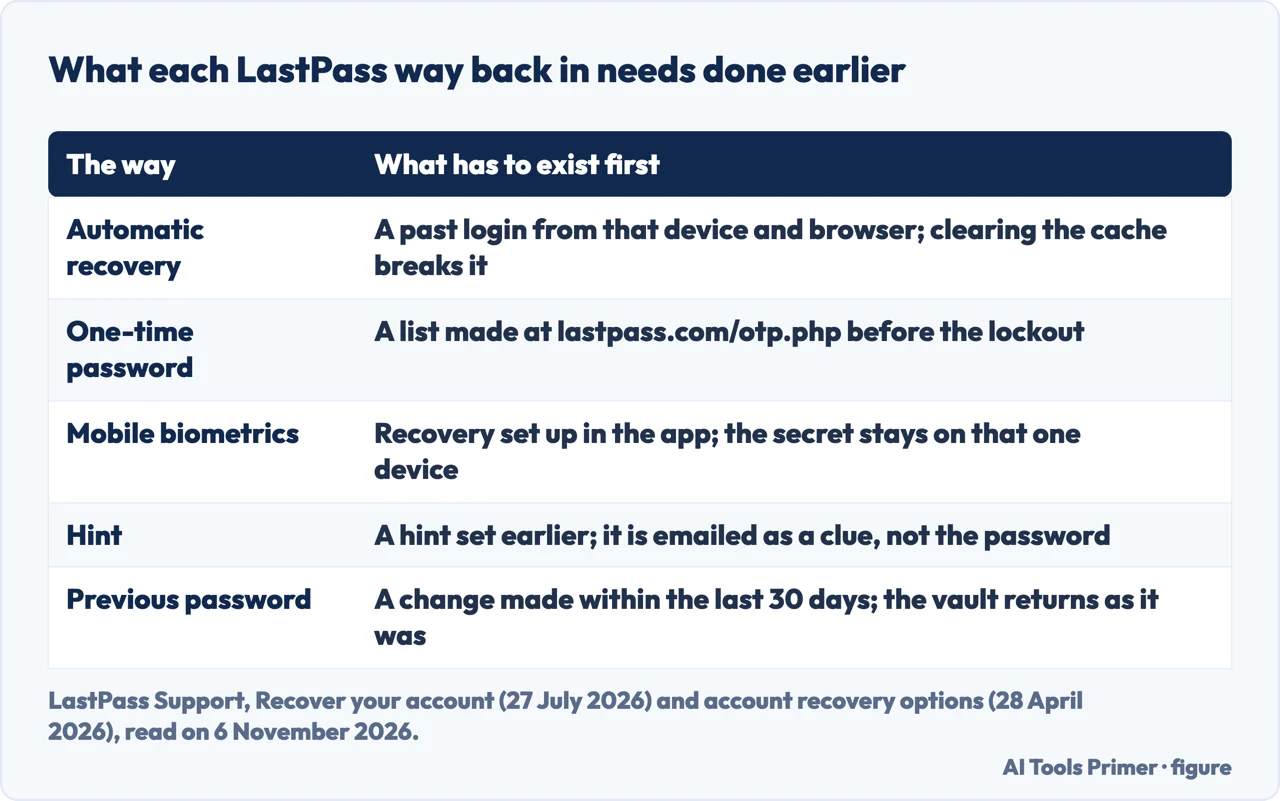
What each way needs to have been done earlier
Most of the ways need something in place before the password was forgotten. Automatic recovery, according to LastPass Support’s page of 28 April 2026, relies on a secure secret, previously called a recovery one-time password, that LastPass creates when you log in to the browser extension or the vault on the website. You cannot see it. The page says to log in on as many browsers and trusted devices as you can, on any browser where you do not expect to clear the cache, and on browsers you rarely use, since those are less likely to be cleared. Clearing the cache invalidates the secret, and logging in again recreates it. On a device that has never been used to log in, automatic recovery is not available. Every secure secret is derived from the master password, so changing the password in any way, even by going back to the old one, invalidates them.
One-time passwords are the manual version. You generate a list after logging in, at the one-time password page of the LastPass website, and the page says it is safe to write them on paper or in a text file. LastPass Support cannot provide them. To use one you need a list made in advance, a failed automatic recovery for that browser and device, and the list within reach. After you revert to a previous master password, the page of 12 August 2026 says all earlier ones are invalidated because the vault is re-encrypted, so new ones must be generated.
The hint is a keyword or phrase that is emailed to you as a clue. LastPass strongly recommends setting one. Cornell’s guide adds that it is a reminder, not the password itself.
On a phone the secure secret lives on the device behind biometrics. LastPass Support says it is local to each instance of the app on each mobile device, is not portable, and must be switched on before the password is forgotten. Here the pages differ. Cornell’s guide says account recovery is not supported on mobile devices or apps, while LastPass Support describes biometric recovery in the app and the Oklahoma guide lists it first of its questions. Cornell’s guide has no date and the LastPass page is from 2026, so the support page is the better guide to the current app.
Going back, or starting over
Reverting. If you changed the master password within the last 30 days, LastPass Support’s page says you can go back to the previous one. You ask for it at the revert page of the LastPass website with your email address; the link in the email it sends is valid for up to two hours. The vault comes back exactly as it was at the last master password change, so anything added or edited since is lost. You must have logged in to the browser extension at least once. Afterwards the page advises logging out of every trusted device and back in to recreate secure secrets, clearing the cache on public browsers, and generating new one-time passwords.
Resetting the account. The page of 12 August 2026 says resetting should be your very last resort. You keep the same email address and create a new master password, and the vault is empty. Permanently deleted: passwords, notes, form fill items, identities and approved trusted devices, and also your emergency access contacts, who would have to be set up again. Shared folders you created are on the page’s list of deleted items too. Kept: preferences, history, multifactor options already set, access to shared folders created by other users, and recovery keys for admins. Your account status, including a trial or paid plan, does not change.
The steps are to open the account reset page, select Reset and answer No when asked whether you know your master password. The warning that follows encourages exporting the vault first, but the page notes that this needs a login, so it is not possible if you do not know the password. Then enter your email, select Send Email and follow the link in the message to create a new master password. Selecting Send Email only sends instructions, so you can ignore the message if you change your mind. If you had exported the vault or kept a backup in another password manager, you can import it afterwards.
Business and Teams. LastPass Support says to consider contacting your company’s LastPass admin before any recovery step: the admin may be able to reset the master password, and a company policy named Prohibit account recovery means you cannot perform any recovery yourself, so only the admin can help.
How Bitwarden and 1Password answer the same day
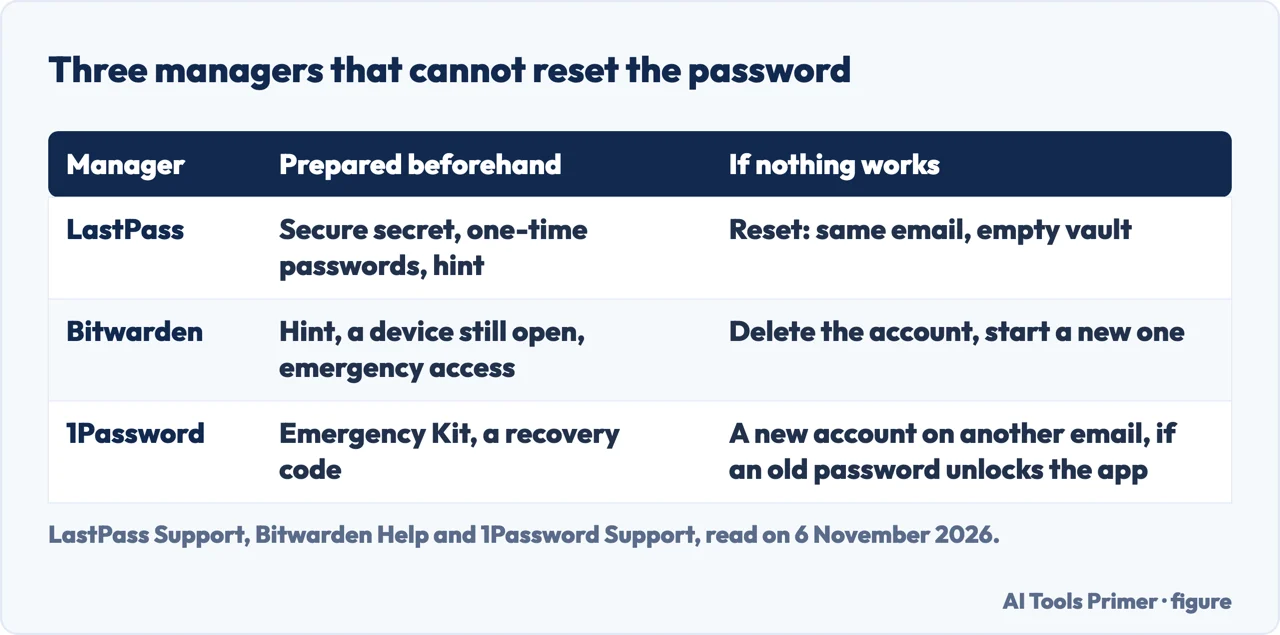
Bitwarden’s help page opens with the same limit: it uses zero-knowledge encryption, and Bitwarden cannot access, retrieve or reset the master password. Its list is different from LastPass’s. It starts by checking that you have the right server region, US or EU, because an account exists only where it was created. If you are still logged in on another Bitwarden app with a PIN or biometrics, you can unlock it, copy your data by hand into a .csv file and import it into a new account. Other routes are the master password hint, emergency access, account recovery by an administrator if your organization uses it, Log in with device from a known browser, and a passkey with encryption support. If those routes fail, the page says there is no way for Bitwarden to recover the account or its data and you must delete it and create a new one; deleting removes the items you own, with their attachments, and a premium subscription can be reapplied by contacting Bitwarden.
1Password’s support page says the account password is never known to 1Password and is the only way to decrypt your data, which is why it says the password cannot be reset. It points first to the Emergency Kit, if you prepared one, and to a recovery code, if you generated one, or a family or team member who can recover the account. If the app unlocks with an older password but the account will not sign in, you can still reach your data locally; the page says to sign up for a new account with a different email address and copy your items across.
All three vendors say they cannot recover the password. What differs is the safety net you build before, and the end of the road: LastPass resets to an empty vault under the same username, Bitwarden asks you to delete and start again, and 1Password’s page ends by telling you to contact 1Password Support to start over, with a new account on a different email address if an older password still unlocks the app. We did not read an independent comparison of the three, so we do not rank them. Our pages on whether Bitwarden is safe and on the 1Password Secret Key go further on each.
What we did not use, and what the pages leave out
Each statement on this page is traced to the sources listed below, and the quotations were matched word for word against them. We did not read the account recovery, forgotten password and account reset forms on the LastPass website, which hold little more than a form and a pointer. The Cornell, Oklahoma, Bitwarden and 1Password pages carry no date in the text we read, so we cite them as read on 6 November 2026.
The pages we read do not say how many people lose a vault or how many recoveries succeed, and they do not say how long the 6-digit code is valid; the only validity period given for a code or link in the LastPass text we read is the two-hour life of the revert link. They do not say how to choose between ways when more than one is open.
For the next time, LastPass gives its own advice for a master password: at least 12 characters, longer if possible, unique, not your email address or personal details, no sequences, never reused, and for the most security a randomly generated one. The 2022 blog suggests a long passphrase you can remember, SMS and mobile recovery switched on, the extension installed on the browsers you use, and Emergency Access so a trusted contact can recover your vault. It also warns that cleaning or security software may delete the local data that recovery uses. See also forgotten passwords on Google, Apple and Microsoft, how to create a strong password and backup codes.
Where to start
Four ways in.
- “In what order do I try things?”
- The order the pages give — order
- “Why does recovery fail?”
- What each way needs to have been done earlier — setup
- “What does a reset delete?”
- Going back, or starting over — reset
- “What about Bitwarden and 1Password?”
- How Bitwarden and 1Password answer the same day — others
Other managers
The same limit, with a different safety net.
Before and after
Locked out, and what to set next.
Questions people also ask
What happens if I forgot my master password for LastPass?
LastPass Support says it has no knowledge of the password and cannot reset it. You can try account recovery: a 6-digit code, then automatic recovery, an option you set up earlier, or a revert within 30 days. The last resort is a reset, which empties the vault.
What to do if you forgot your master password?
For LastPass, Cornell’s guide says to check typos and Caps Lock, ask for the hint, then use account recovery. Bitwarden and 1Password each say they cannot reset it and list their own routes, such as emergency access or an Emergency Kit.
My LastPass master password isn’t working. What can I do?
Cornell’s guide says to type it into a text document and copy it from there, check Caps Lock, and try the website. On a phone it says to reinstall the app, and that special characters in the password can cause trouble.
How do I use account recovery to reset my master password?
Open the account recovery page, enter your email and the 6-digit code. If you have logged in from that device and browser before, automatic recovery lets you change the password. If not, use an option you set up earlier.
Not covered here. Each statement on this page is traced to the sources listed below, and the quotations were matched word for word against them. The statements come from four LastPass Support pages, a LastPass blog post, guides from Cornell and the University of Oklahoma, and pages from Bitwarden and 1Password, all read on 6 November 2026.
The search measurement behind this page is an Ubersuggest reading of 5 November 2026, inside the 60 days the site normally allows; it is not a Semrush reading, and a Semrush check is still to be made.
Sources
- LastPass Support — Recover your account (updated 27 July 2026) — support.lastpass.com, read 6 November 2026.
- LastPass Support — About account recovery options in LastPass (28 April 2026) — support.lastpass.com, read 6 November 2026.
- LastPass Support — Revert to your previous master password (12 August 2026) — support.lastpass.com, read 6 November 2026.
- LastPass Support — Reset your LastPass account (12 August 2026) — support.lastpass.com, read 6 November 2026.
- LastPass blog — Forgot Your Password? Your Guide to LastPass Account Recovery (24 March 2022) — blog.lastpass.com, read 6 November 2026.
- IT@Cornell — LastPass Master Password Forgotten or Doesn’t Work — it.cornell.edu, read 6 November 2026.
- University of Oklahoma IT — Recover Your Lost Master Password for LastPass Premium — itsupport.ou.edu, read 6 November 2026.
- Bitwarden Help — Forgot My Master Password — bitwarden.com, read 6 November 2026.
- 1Password Support — If you forgot your 1Password account password or you can’t unlock the app — support.1password.com, read 6 November 2026.
Written by Alberto Gulotta
Founder and editor of AI Tools Primer, writing from Palermo, Italy. Thirty-five years of taking computers apart, starting with a Commodore 64 — the long version is on the about page.
Something wrong on this page? Write to aitoolsprimer@gmail.com and it gets fixed.
Written on 6 November 2026.
Independence and limits
No affiliate links and no paid placements anywhere on this site. Nobody pays to appear here, and no company has seen this page before you did.
This is general information, not professional advice. Where a page touches money, health, safety or the law, it names its source and the date it was read — and your situation may still differ. See the privacy page and the cookie policy.