
Password · guide
Best security key: ports, fingerprints and a spare to weigh
By Alberto Gulotta · Updated · 15 min read
The pages we read do not name a best security key. They give the questions that decide it: the ports on your devices, whether a phone needs NFC, whether you want a fingerprint sensor, which services accept the key, and a spare, which Yubico and Consumer Reports both advise.
| Question | Answer | Where it comes from |
|---|---|---|
| Which key is best? | The pages we read do not name one or give a price | All the pages read |
| How does a key connect? | Google names USB, Bluetooth and NFC; Consumer Reports names USB-A, USB-C, Lightning and NFC | Google, Consumer Reports |
| Does a key need to be from one company? | Google says any key that supports the FIDO 2 open standard can be used for Advanced Protection | |
| Does a fingerprint key work on a phone? | Yubico’s selection page advises against it for now; its technical manual says it depends on the phone’s system and browser | Yubico |
| How many keys? | Yubico says to always buy a spare; Consumer Reports says to register both at the same time | Yubico, Consumer Reports |
What a security key is, and what it is not
Google describes a security key as a physical key that you use to sign in to your account, just as you would have one for your house or car. When you sign in with it, you plug in or touch the key to your device. The name is also used for something else: the network security key that a Wi-Fi setting asks for is a different thing from the hardware key described here, and our page on what a network security key is covers that one.
FIDO Alliance says that FIDO security keys have contained device-bound passkeys since 2019, when FIDO2 added support for passwordless sign-ins through discoverable credentials with user verification, and that all the client platforms and browsers already support security keys natively. It separates passkeys that sync between a person’s devices through a cloud service, which it calls synced passkeys, from those that never leave a single device, including the ones on FIDO security keys, which it calls device-bound passkeys. In its words, device-bound passkeys in modern hardware security keys offer the “highest security assurance.” Our page on passkeys explains the key pair behind both kinds.
FIDO also makes a point about everyday use. A USB security key with a PIN and a single touch, it says, can be simpler than a flow that depends on a smartphone, because it needs no app install, no Bluetooth pairing, no biometric sensor, no camera positioning and no cloud sync account. It adds that enrollment may still need care, but daily use can be straightforward.
The port decides the shortlist
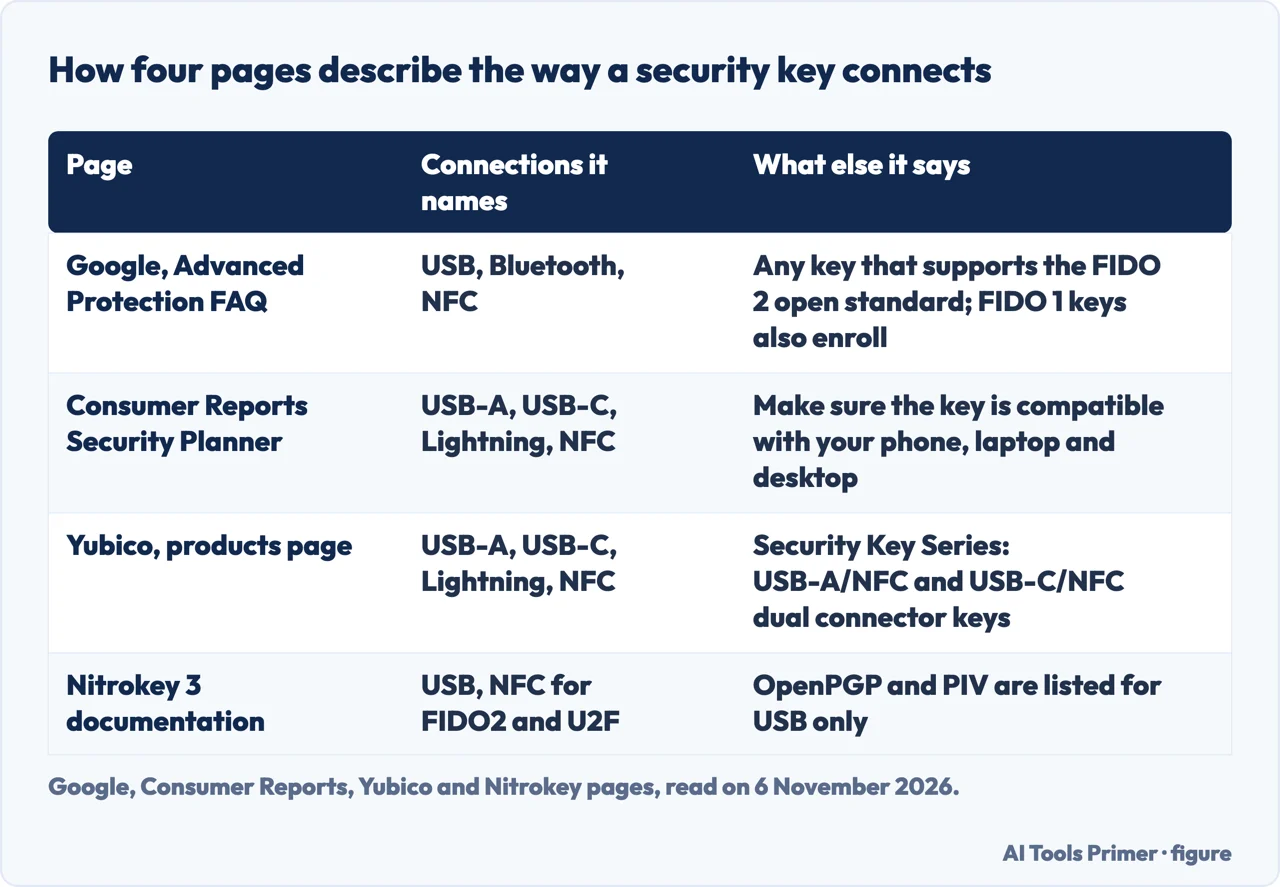
Google lists three ways a key reaches a device: you might plug a USB key into it, keep a Bluetooth key nearby, or hold an NFC key close to it when you sign in. Consumer Reports names the connectors instead. For desktop and laptop computers, it says, you may need a key with a USB-A or USB-C connector; for mobile devices, a USB-C or Lightning connector; and you can also get a key with NFC, near field communication, to connect to a phone wirelessly. It tells you to make sure the key is compatible with your phone, laptop and desktop computer. The Consumer Reports page does not mention Bluetooth, and Google’s FAQ does not mention Lightning, so the two lists differ.
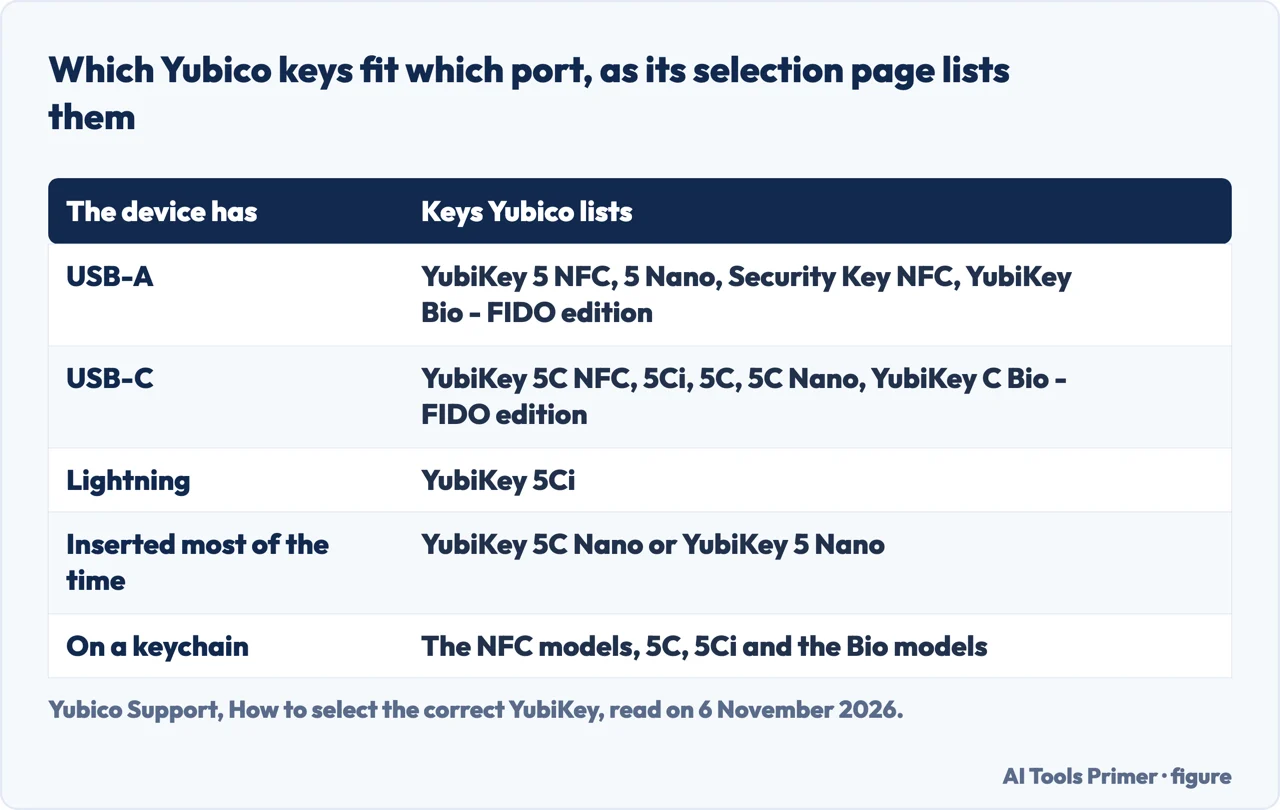
Yubico’s selection page turns the same question into a list of its own keys. It asks which USB ports the devices you want to protect have, and sorts the models by the answer, as the first table below shows. It also asks which form factor you prefer: the Nano models, the YubiKey 5C Nano and the YubiKey 5 Nano, are for a key you want inserted in the device most of the time, while the other models suit a keychain. Consumer Reports adds a warning about the Nano size: if you buy a Nano YubiKey, you may accidentally trigger it to type one-time passwords when you tap it, which it says can be easily disabled.
Nitrokey’s documentation for the Nitrokey 3 gives the same kind of detail from another company. It lists FIDO2 and U2F over USB and NFC, and lists OpenPGP card, S/MIME and PIV, among other functions, for USB only. The second table below puts the four pages side by side.
One company, four series
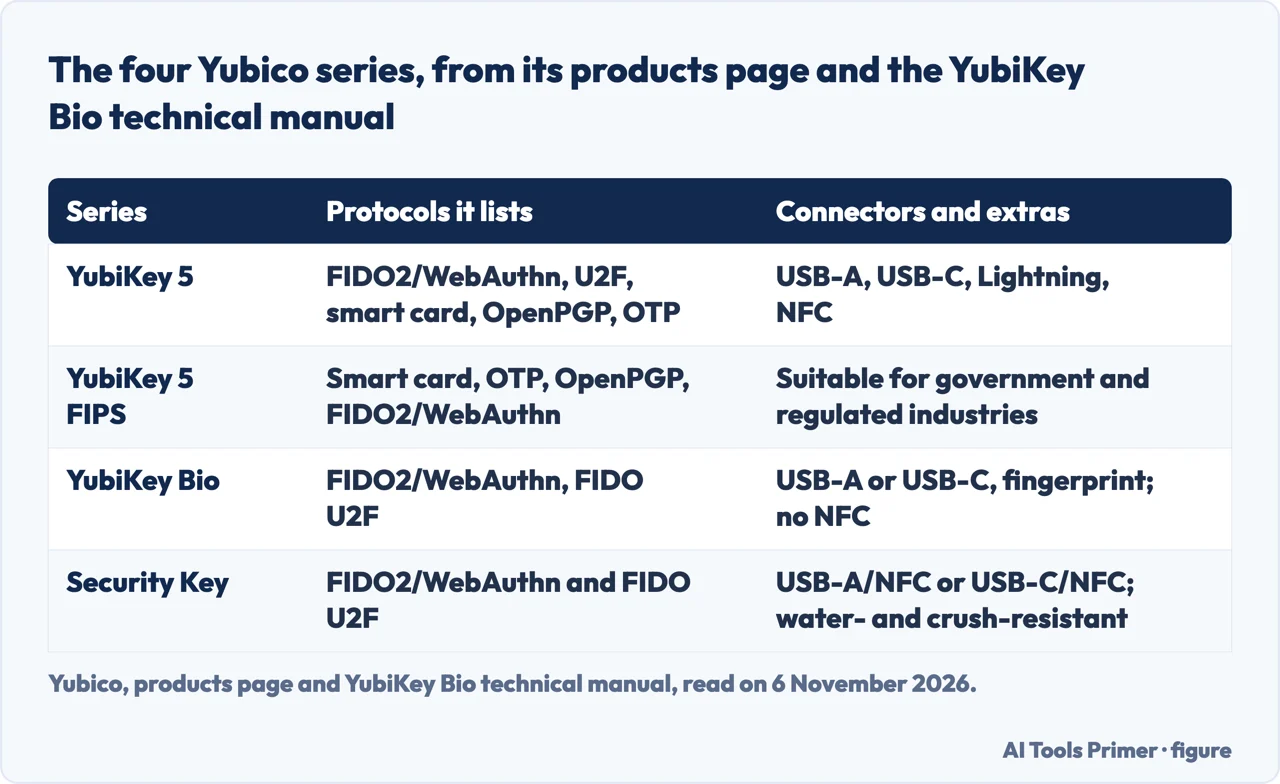
Yubico’s products page describes four series of keys. The YubiKey 5 Series lists FIDO2/WebAuthn, U2F, smart card, OpenPGP and OTP, with USB-A, USB-C, Lightning and NFC. The YubiKey 5 FIPS Series is described as suitable for government and regulated industries. The YubiKey Bio Series supports fingerprint recognition. The Security Key Series is described as FIDO-only, with dual connector keys, USB-A/NFC and USB-C/NFC, and with water- and crush-resistance.
The selection page explains what the Security Key Series gives up. Its models support only FIDO2 and passkeys and FIDO U2F, and some services do not support the FIDO protocols. A few popular functions, including computer login tools and Yubico Authenticator, need a key from the 5 Series. If the Security Key models are not compatible with the services you want to protect, Yubico says to choose a YubiKey from the 5 Series instead. For mobile use, it says the 5 Series offers the most functionality and the widest range of supported use cases, and that a Security Key Series device is also possible for FIDO-only use.
On the 5 FIPS Series, the selection page says that most businesses will not need a FIPS-validated key and that it is primarily used by companies working in or with regulated industries, usually federal or government agencies. Our page on how a YubiKey works covers what the key does at sign-in.
Fingerprint keys and the phone question
The Bio Series replaces the PIN with a fingerprint at sign-in. Yubico’s technical manual says that in both passwordless and second-factor sign-ins the fingerprint is used in place of the PIN, the way biometrics are used on a smartphone, and that the PIN is still required for some things, such as enrolling or managing fingerprints. The only chance to type the PIN at sign-in is after three unsuccessful attempts to match an enrolled fingerprint. The manual recommends creating a PIN before adding fingerprints, as a backup to the fingerprint. Yubico’s product page says the fingerprint templates are stored in the secure element on the key, and that the series works out of the box with Windows, macOS, ChromeOS, Linux, Chrome and Edge, in USB-A and USB-C. The Bio page also lists the key as IP68 rated and crush resistant.
Where Yubico’s pages differ is the phone. The selection page says the Bio models are optimized for desktop use and do not support NFC. They work best with desktop operating systems, browsers and applications that support CTAP 2.1, and are “not intended to be used with mobile devices at this time”, because the mobile experience may be inconsistent given limited CTAP 2.1 support. The technical manual is gentler: the Bio can be used with mobile, it says, but that depends on the mobile operating system and on browser support for the FIDO protocols. It also says Firefox and Safari have limited CTAP 2.1 implementation and typically prompt for the PIN even when the key is not blocked, and that when the key needs the PIN to unblock biometrics you might have to use a computer.
The Bio page itself points a different way for anyone who needs more: it asks whether you are looking for more form factors, protocols and NFC support, and says you may prefer the YubiKey 5 Series. The manual also gives a capacity: a Bio key can hold up to 25 discoverable credentials on firmware 5.5 and 5.6, or 100 on firmware 5.7 and later, and deleting a credential for a service you stop using frees the space.
Where a key works, and what role it plays
The same key plays a different part depending on the service. GitHub’s documentation says you set up two-factor authentication with a TOTP app on mobile or desktop or by text message first, and then add security keys as alternate methods. It strongly recommends a TOTP app for 2FA and security keys as backup methods instead of SMS. It also says that because a security key only verifies user presence, it counts only as a second factor and must be used with your password. The steps it gives are to open Settings, choose Password and authentication, click Add next to “Security keys,” register a new key, type a nickname and activate the key, and then confirm you have downloaded your recovery codes. If you lose the key, it says, your phone’s code still signs you in.
Google asks for more. To enroll in the Advanced Protection Program you need at least one passkey or one security key, and Google says accounts that use passkeys or security keys are much safer from attacks than accounts with only a password. It also says FIDO 1 keys can be used to enroll, but you still enter your password when signing in. Google names its Titan Security Key as one you can buy, alongside any key that supports the FIDO 2 open standard.
Microsoft’s page, which is about Microsoft Entra ID, has a sign-in step where the user selects a passkey that is on the same device, or a cross-device one through a QR code or a FIDO2 security key, and then unlocks the private key with a biometric or PIN gesture. It says that when attestation is enabled, only device-bound passkeys are allowed and synced passkeys are excluded. It recommends FIDO2 security keys for highly regulated industries or users with elevated privileges, and says they can increase costs for equipment, training and helpdesk support, especially when users lose their keys and need account recovery. For most users, it says, synced passkeys are a convenient, low-cost alternative.
Consumer Reports lists what to expect when you register. It is easier to do on a computer, and some services do not let you register a key in their mobile apps, though you can use the key with the apps once it is set up. Others allow keys only in a browser, and may ask for authenticator codes in the app. Some sites ask for the key every time you log in, while others ask when you change your password, log in from a new computer or change account details. Yubico adds that its Works with YubiKey catalog may not list every compatible service, and that a service missing from it may still support the key, so its advice is to ask that service’s own support. Our page on setting up a key goes through the accounts to start with.
Why the pages ask for two keys
Yubico’s selection page calls it best practice to always buy a spare key, in case you lose your main one. The spare does not need the same form factor, but it should come from the same product family: if the main key is from the YubiKey 5 Series, the backup should be too. Consumer Reports gives a different angle. The easiest way to avoid being locked out, it says, is to have at least one backup security key and to register the main key and the backup at the same time. It says to store the backup somewhere secure, such as a locked safe, and the main key somewhere accessible, such as a keychain.
Consumer Reports also lists recovery routes that many sites offer in case you lose a key: authenticator apps, text-message-based recovery keys and backup codes, which are one-time recovery codes you store somewhere. They need to be set up ahead of time as well. Our pages on backup codes and authenticator apps cover two of them.
Google describes what a loss looks like. If you lose your passkey or security key and are still signed in on one of your devices, you visit account.google.com to add or replace a key. Otherwise you submit a request to recover your account, and Google says it may take a few days to verify it is you and restore your access. FIDO Alliance describes the reverse case: when a person has lost access to all the devices where synced passkeys were stored, a FIDO security key can act as a recovery credential. It also says that environments with particular compliance needs may be required to guarantee only one copy of the cryptographic key exists, and that passkeys on FIDO security keys suit them.
What the pages do not say
The pages we read do not rank keys, give a price or compare the companies that sell them; the one superlative is Yubico’s own products page, which calls its YubiKey 5 Series “the world’s #1 multi-protocol security key”, a claim by the seller and not a ranking by a third party. Consumer Reports names Yubico, Google and Nitrokey as companies that sell keys and has a buy line for each; it does not say which to choose. Google’s FAQ mentions the Titan Security Key only as an example of a key you can buy. The pages we read do not mention OnlyKey. We did not read any review of individual models, so what a tester concluded about any model is not here.
Where to start
Four ways in.
- “Which port do I need?”
- The port decides the shortlist — ports
- “Should it read my fingerprint?”
- Fingerprint keys and the phone question — bio
- “Where does a key work?”
- Where a key works, and what role it plays — where
- “Why two keys?”
- Why the pages ask for two keys — spare
Keys and passkeys
The key itself, how it is set up, and the passkey behind it.
If the key is lost
The other ways in, set up ahead of time.
Questions people also ask
Is anything better than YubiKey?
The pages we read do not compare Yubico with other companies. They describe what differs between keys: ports, NFC, fingerprint, protocols. Google says any key that supports the FIDO 2 open standard can be used for Advanced Protection.
What is the best security key in 2026?
The pages we read do not name one or give a price. They give questions that narrow the choice: the ports on your devices, NFC for a phone, a fingerprint sensor, the services you use, and a spare.
Are security keys a good idea?
Google says accounts that use passkeys or security keys are much safer from attacks than accounts with only a password. Consumer Reports calls security keys an even stronger option than texted codes, because a criminal with your password still cannot sign in. Microsoft recommends FIDO2 keys for regulated industries or elevated privileges.
Which is better, YubiKey or OnlyKey?
The pages we read do not mention OnlyKey and do not compare companies. Yubico’s selection page does compare its own series: the Security Key Series supports only FIDO2 and U2F, and some functions need the YubiKey 5 Series.
Not covered here. For ranking and prices, which the pages we read do not give, this page has nothing to add; for the setup itself see our page on setting up a key. The statements come from pages by Yubico, FIDO Alliance, Google, GitHub, Microsoft, Consumer Reports and Nitrokey, read on 6 November 2026.
The search difficulty behind this page comes from an Ubersuggest reading of 5 November 2026, not from Semrush; a Semrush check has not been made yet.
Sources
- Yubico — YubiKeys (products) — www.yubico.com, read 6 November 2026.
- Yubico Support — How to select the correct YubiKey — support.yubico.com, read 6 November 2026.
- Yubico — YubiKey Bio Series — www.yubico.com, read 6 November 2026.
- Yubico — YubiKey Bio technical manual — docs.yubico.com, read 6 November 2026.
- FIDO Alliance — Passkeys — fidoalliance.org, read 6 November 2026.
- Google — Advanced Protection Program FAQ — landing.google.com, read 6 November 2026.
- GitHub Docs — Configuring two-factor authentication — docs.github.com, read 6 November 2026.
- Microsoft Learn — Passkeys (FIDO2) in Microsoft Entra ID — learn.microsoft.com, read 6 November 2026.
- Consumer Reports Security Planner — Use a Security Key — securityplanner.consumerreports.org, read 6 November 2026.
- Nitrokey Documentation — Nitrokey 3 overview — docs.nitrokey.com, read 6 November 2026.
Written by Alberto Gulotta
Founder and editor of AI Tools Primer, writing from Palermo, Italy. Thirty-five years of taking computers apart, starting with a Commodore 64 — the long version is on the about page.
Something wrong on this page? Write to aitoolsprimer@gmail.com and it gets fixed.
Written on 6 November 2026.
Independence and limits
No affiliate links and no paid placements anywhere on this site. Nobody pays to appear here, and no company has seen this page before you did.
This is general information, not professional advice. Where a page touches money, health, safety or the law, it names its source and the date it was read — and your situation may still differ. See the privacy page and the cookie policy.