
Scams · guide
What happens if you click a phishing link, and what the FTC says
By Alberto Gulotta · Updated · 18 min read
What happens if you click a phishing link depends on what happens next, not on the click alone. Guardio and Guardian Digital say a click does not always compromise a device or an account. The FTC sorts its steps by what was handed over: a password, access to a computer or phone, or a card number.
| Question | Answer | Where it comes from |
|---|---|---|
| Does the click alone mean I was hacked? | Not always: Guardio and Guardian Digital say what you did after the click matters; NordVPN says it is possible that no damage was done if nothing was entered | Guardio, Guardian Digital, NordVPN |
| What do I do first? | Close the tab, enter nothing, and leave any downloaded file unopened | Guardio, NordVPN, Guardian Digital |
| I typed a password. Now what? | Set a new password, change it anywhere it was reused, turn on two-factor authentication | FTC, Guardio |
| Something downloaded or I gave access? | Update the security software, run a scan, delete what it flags | FTC |
| Where do I report it? | Forward the email to reportphishing@apwg.org, forward the text to 7726, and report the attempt to ReportFraud.ftc.gov | FTC |
What the click itself does
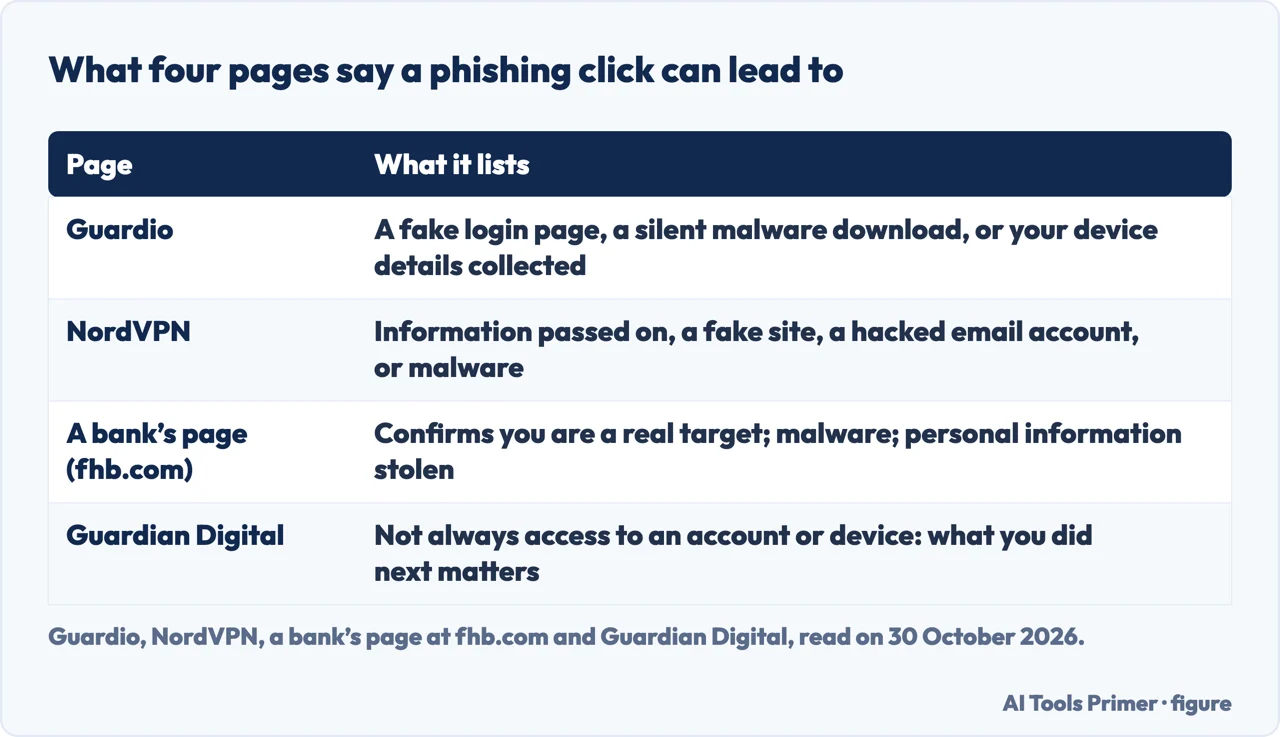
Guardio’s page, updated on 25 August 2026, says a phishing link generally tries one of three things. It can send you to a fake login page that copies a real site, such as a bank, Google, Microsoft or PayPal, and captures the username and password you type. It can silently trigger a download or exploit a browser vulnerability to install spyware, ransomware or a keylogger. Or it can collect your IP address, browser fingerprint, device type and approximate location the moment the page loads. Guardio says the severity depends on what you did after clicking, and that a click alone does not always mean the device or accounts are instantly compromised.
Guardian Digital’s page, dated 23 October 2026, puts it in similar terms: clicking does not always mean someone has gained access to an account or device, and what you did next matters. It asks you to write down what happened, meaning whether you entered a password, shared personal information, downloaded a file, gave the site a permission or sent money, and to follow the steps that match. NordVPN lists four things a click may lead to: information passed to the attackers, a redirect to a phishing site, a hacked email account and malware. It says that sometimes, if the browser has security loopholes, just landing on a fraudulent site may start a download, which it calls a drive-by download.
The pages weigh a click with nothing entered differently. For a click where no details were typed, NordVPN says it is possible that no damage was done, and still tells you to follow its steps because a click or a redirect carries a risk of malware infection. For an iPhone it says no harm has likely been done if nothing was entered, because iOS asks for permission before installing software. A bank’s page at fhb.com, posted on 28 February 2025, is more guarded: it says a click confirms to the attacker that you are a real person with current contact information, can relay basic information about your device, and that malware may (likely) get loaded. The FTC’s pages do not put a level of risk on a click alone, and the pages we read do not give a percentage of clicks that end in an infection.
The first minutes: stop, disconnect, look at the address
All three security pages start by telling you to stop interacting. Guardio says not to click any buttons, fill in any fields or download anything the page prompts, and to close the tab, or the whole browser if you are unsure; if a file started to download automatically, do not open it. NordVPN adds that interacting includes clicking other links or accepting cookies. Guardian Digital says to resist going back for another look, to leave the site’s phone number and any cleanup offer alone, and to save the original message and log the time you clicked and what happened next.
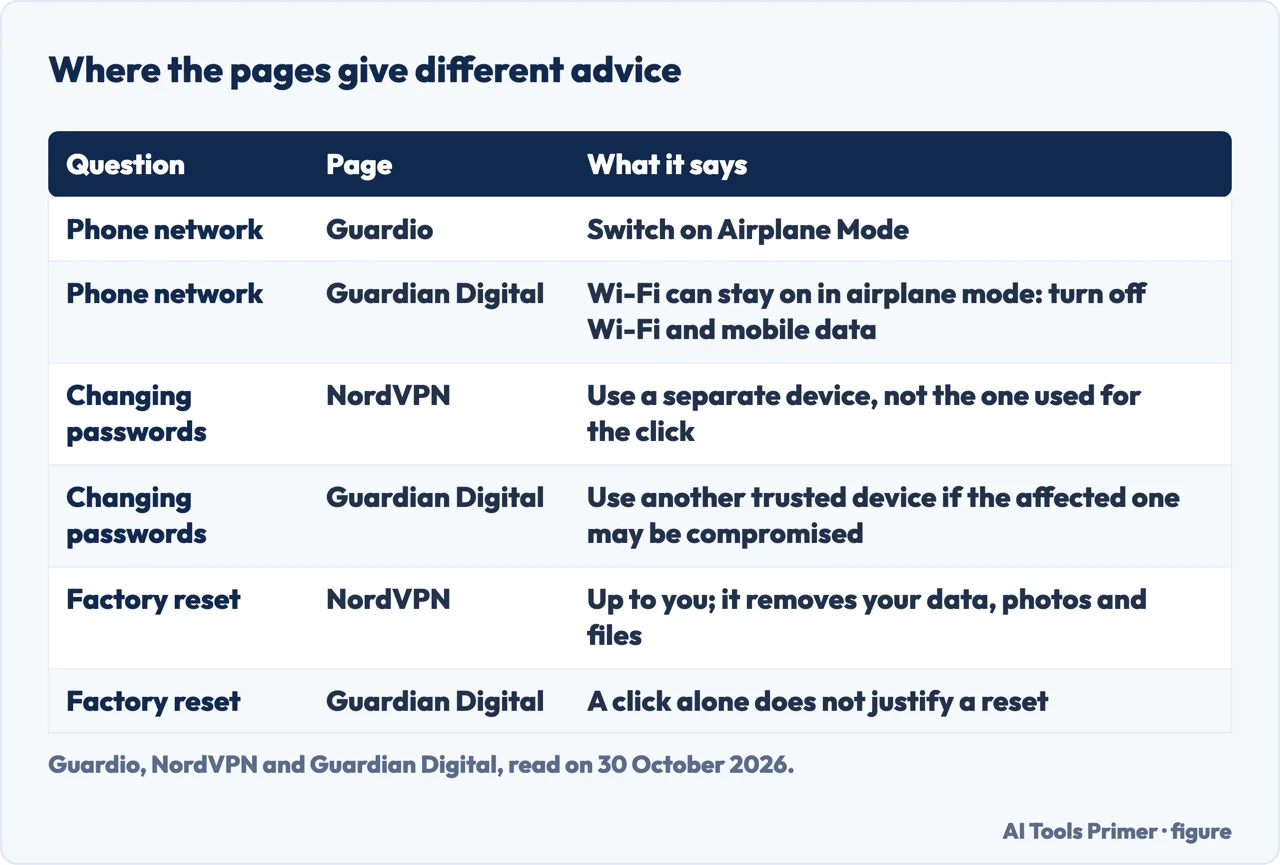
On the network, the pages part ways. Guardio says disconnecting matters most if you suspect malware, for example after an automatic download or if the device starts showing pop-ups, slowness or a flickering webcam light; on a phone it says to switch on Airplane Mode, on a computer to turn off Wi-Fi or unplug the cable, and to reconnect after the scan. NordVPN gives the same two options, Wi-Fi off or Airplane Mode, and says going offline interrupts whatever is happening behind the scenes. Guardian Digital reserves it for a case where malware has been run or the device seems hacked, and warns that Wi-Fi can remain on in airplane mode, so on a phone it says to check that both Wi-Fi and mobile data are off. It adds that being offline may restrict what malware can send but does not stop every harmful action or end access to an account that was already exposed. The two FTC pages we read do not mention disconnecting.
Guardio also says to look at the address. It gives paypa1.com against paypal.com as a misspelling, a subdomain such as paypal.com.verify-login.net as another warning, and asks whether the connection is https with a valid certificate, adding that a site looking legitimate does not make it legitimate. Guardian Digital agrees on the padlock: https can be used by a scammer’s site, so it does not verify the organization. It shows that in account.example.com.signin.example.net the domain is example.net, whatever the opening looks like.
If you typed a password or a code
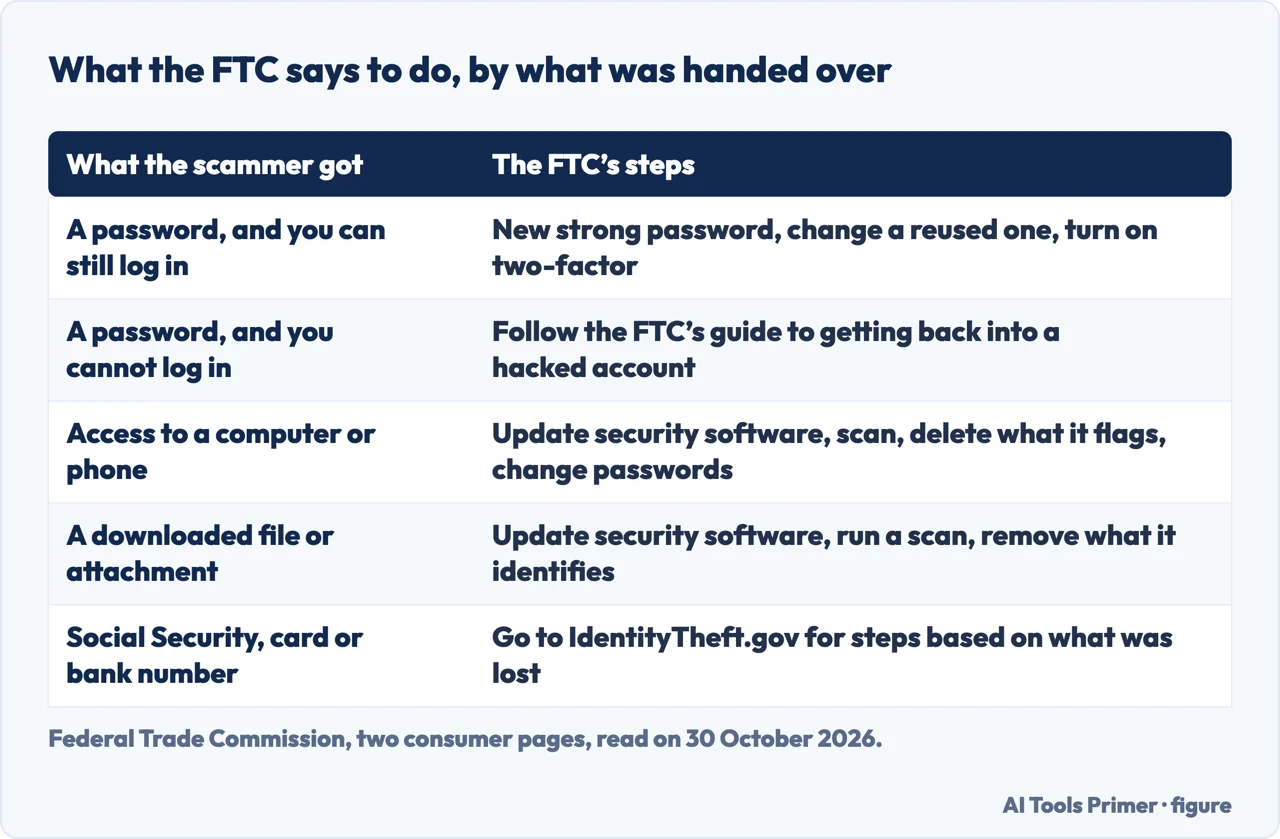
The FTC’s page on what to do if you were scammed covers the case of a password handed over. If you can still log in, it says to create a new, strong password for that account, to change it on any other account where you used the same one, and to turn on two-factor authentication. If you can no longer log in, it points to its guide on getting back into a hacked account and then to its page on what to do after you take back control. It lists what a scammer might do with personal information: steal your identity and impersonate you, open credit or utility accounts in your name, and hack into your email or social media accounts.
Guardio gives an order for changing passwords: email accounts first, because it says attackers use email access to reset everything else, then banking and financial accounts, work accounts, social media, and any account sharing the password you may have exposed. It says to turn on two-factor authentication everywhere, and that an authenticator app is more secure than SMS, though SMS is better than nothing. It then says to log in from a clean, trusted device and look at sent mail, forwarding rules, connected apps, recent bank transactions and active sessions, ending any session you do not recognize. For a work account it says to alert the IT or security team.
Guardian Digital goes further into what an attacker could leave behind. It says to set a new password on the exposed account and anywhere the password was reused, even if you only typed or autofilled it without pressing Submit. Changing the password may leave some existing sessions active, so it also lists checking active sign-ins, recovery email addresses and phone numbers you do not know, apps with permission to read mail or files, and the mailbox itself for forwarding, inbox rules and delegation. It says to remove unfamiliar verification methods before setting up multi-factor authentication, and prefers a passkey or security key because those are bound to the genuine service and resist fake login pages. It also says a request to approve a sign-in or enter a device code can expose an account even on the genuine provider’s page.
The pages differ on where to do all this. NordVPN says to change passwords on a separate device, not the one used for the click, which it says should stay disconnected. Guardian Digital says to use another trusted device if the affected one may be compromised. The FTC pages we read do not say which device to use. On two-factor authentication, the FTC mentions it for an account whose password was given away, Guardio says everywhere, and Guardian Digital prefers passkeys or security keys.
If something downloaded, or an app asked for permission
The FTC’s page on phishing has the shortest version. If you think you clicked a link or opened an attachment that downloaded harmful software, update your computer’s security software, run a scan and remove anything it identifies as a problem. Its page on what to do if you were scammed adds, for a scammer who got access to a computer or phone, that if you have no security software you can download it and take recommendations from independent review sites, friends and family, and then delete what the scan flags, change your passwords and turn on two-factor authentication. For help finding or removing malware it names tech support from the manufacturer or a company you know and trust, or a knowledgeable friend or family member.
Guardio says to run a full scan even if you saw no download, because some drive-by downloads are silent, and to check the Downloads folder on a computer for files you do not recognize and delete them before opening. If nothing was entered and nothing seemed to download, its FAQ calls the risk relatively low. NordVPN puts the scan before the backup: back up to an external encrypted device only after removing the malware, so the infection stays out of the copy. On a Windows PC, Guardian Digital names Windows Security, then Virus & threat protection and Quick scan.
On phones the pages split by system. Guardio says iOS is generally more sandboxed but credential phishing still works, and that Android is more exposed to apps installed from outside the store: if you were asked to install an app or “enable” something, scan and check your installed apps for anything unfamiliar. NordVPN says on an iPhone that if you accepted a download you should delete the files and scan with an antivirus program, and on Android to open Settings and Manage apps, sort by storage and delete apps you do not remember installing. Guardian Digital says to update iOS, review unfamiliar apps and look under Settings, General, VPN & Device Management for a configuration profile you do not know, and to contact Apple Support before changing settings you do not understand. It says desktop-style antivirus cannot inspect an entire iPhone from within an app, and on Android points to Play Protect, under the profile icon in the Play Store.
On resetting the phone (our page on signs a phone is hacked sorts the signs), NordVPN says whether to do a factory reset is up to you: it is another way to remove malware, but it also removes your data, photos and files, so save them first. Guardian Digital says that a click alone does not justify a reset and that every click does not warrant one on an iPhone; for an unfamiliar app, profile or problem that persists, it says to talk to IT or official support first. The FTC pages we read do not mention a factory reset.
Alerts that keep appearing
Guardian Digital and Chrome’s help page deal with notification permissions. Guardian Digital says that after a click you should check the browser’s downloads list, leaving any unfamiliar file unopened, and look through permissions for notifications, the camera and the microphone. If a site shows a “remove virus” button, it says to remove the site’s permission through browser settings instead of pressing it. An alert that keeps appearing afterward may come from a notification permission the site received; it says to revoke it through settings and leave the alert alone.
A page that tells you your phone is hacked or infected is not a diagnosis, Guardian Digital says. Do not call the number on it, pay for a fix or install the app it recommends; leave the page and check through your phone’s own settings or support. On an Android phone it points to Settings, Site settings, Notifications in Chrome and notes that menu labels may differ. Our page on stopping pop-up ads separates a pop-up, a notification permission and an installed app, which is the same split.
Google’s Chrome Help page for computers gives the route: open Chrome, select More and Settings, then Privacy and security, Site Settings and Notifications. To block a site, select Add next to “Not allowed to send notifications” and enter the site’s address. Another section of the page, written for people who want a site’s notifications, says to go to the site, click View site information and turn on Notifications; it describes that as a way to allow them, so the page we read gives no blocking step there. The page adds that by default Chrome alerts you whenever a site, app or extension wants to send notifications, and that Chrome automatically blocks notifications from sites with intrusive or misleading ones.
Report it, then watch the accounts
The FTC’s phishing page gives three routes: forward a phishing email to the Anti-Phishing Working Group at reportphishing@apwg.org, forward a phishing text to SPAM (7726), and report the attempt to the FTC at ReportFraud.ftc.gov. If you think a scammer has your Social Security, credit card or bank account number, it sends you to IdentityTheft.gov, where the steps depend on the information that was lost. Its test for a message is a question: do you have an account with the company, or know the person? If not, it could be phishing, so report the message and delete it; if so, contact the company with a phone number or website you know is real, not the details in the message. Our page on where to report scams covers the routes in more detail, and the steps for a mailbox are on reporting phishing in Outlook.
The security pages add their own routes. Guardio adds the FBI’s IC3 at ic3.gov if you lost money or data, and the company’s own fraud team if the message impersonated one. NordVPN says to report after you have made sure the device is safe, and names the Federal Trade Commission in the US and the National Cyber Security Centre in the UK. Guardian Digital says to contact the bank or payment provider right away, using a known number or its app, if you paid or shared bank details, before the device checks. Guardio’s FAQ says that if you shared financial or personal information with a phishing site, a fraud alert and a credit freeze are worth considering: an alert tells lenders to verify your identity before opening new credit and lasts one year, while a freeze blocks new credit applications until you lift it, and both are free at Equifax, Experian and TransUnion. Our page on credit freezes covers the freeze in more detail.
The watching goes on after the first response. Guardio says damage can come within seconds if you entered credentials, because attackers often use automated tools to test stolen logins, and that data harvested without your noticing may be sold and used weeks or months later, which is why it says to monitor in the weeks that follow. Guardian Digital says to review sign-ins, recovery methods, app access, mailbox rules and transactions again, and that a clean scan, a changed password, an empty Sent folder or no alerts cannot by themselves establish recovery.
Where to start
Four ways in.
- “Was I hacked by the click alone?”
- What the click itself does — click
- “I typed my password.”
- If you typed a password or a code — password
- “Should I reset my phone?”
- If something downloaded, or an app asked for permission — device
- “Where do I report it?”
- Report it, then watch the accounts — report
Spotting the message
The email, the text and the parcel notice that came before the click.
After the click
Where to report it and what a code you did not ask for means.
Questions people also ask
What should you do if you accidentally click a phishing link?
The pages we read start the same way: stop interacting, close the tab and open nothing that downloaded. Guardio, NordVPN and Guardian Digital then differ on the network and the device used for new passwords, while the FTC sorts its steps by what was handed over.
Can someone steal your info if you click a link?
Guardio says a fake login page captures what you type and that device details can be collected when the page loads. Guardio and Guardian Digital say a click alone does not always compromise an account or device, and the FTC lists what a scammer might do with personal information.
Should I reset my phone if I clicked on a phishing link?
NordVPN says a factory reset is your choice and removes your data, photos and files. Guardian Digital says a click alone does not justify one. The FTC pages we read do not mention a factory reset.
Can I get fired for clicking on a phishing link?
The pages we read do not address whether a click has consequences for a job. Guardian Digital says that for a work account or device you should tell the IT or security team right away and explain what happened, even if some details are unclear.
Not covered here. We tested nothing on a device. The statements come from two Federal Trade Commission pages, Google’s Chrome Help page on notifications, and pages from Guardio, NordVPN, Guardian Digital and a bank, all read on 30 October 2026. Guardio, NordVPN and Guardian Digital sell security products; the bank’s page is used only as one example.
We did not read the Reddit thread or the articles from Elder Life Financial, Abusix, Cybersierra, Altafiber and LifeLock , so nothing on this page rests on them. Menus for browsers other than Chrome are not described here.
The search volume and difficulty behind this page come from a Semrush reading of 29 August 2026, older than the 60 days the site normally allows.
Sources
- Federal Trade Commission — How To Recognize and Avoid Phishing Scams (September 2022) — consumer.ftc.gov, read 30 October 2026.
- Federal Trade Commission — What To Do if You Were Scammed — consumer.ftc.gov, read 30 October 2026.
- Google Chrome Help — Use notifications to get alerts (computer) — support.google.com, read 30 October 2026.
- Guardio — Clicked phishing link, what to do — guard.io, read 30 October 2026.
- NordVPN — Clicked on phishing link — nordvpn.com, read 30 October 2026.
- Guardian Digital — What to do if you clicked on a Phishing link on any device — guardiandigital.com, read 30 October 2026.
- First Hawaiian Bank — What Happens When You Click a “Phishing” Link? — www.fhb.com, read 30 October 2026.
Written by Alberto Gulotta
Founder and editor of AI Tools Primer, writing from Palermo, Italy. Thirty-five years of taking computers apart, starting with a Commodore 64 — the long version is on the about page.
Something wrong on this page? Write to aitoolsprimer@gmail.com and it gets fixed.
Written on 3 November 2026.
Independence and limits
No affiliate links and no paid placements anywhere on this site. Nobody pays to appear here, and no company has seen this page before you did.
This is general information, not professional advice. Where a page touches money, health, safety or the law, it names its source and the date it was read — and your situation may still differ. See the privacy page and the cookie policy.