
Scams · guide
Tech support scam: the call, the remote access and the money
By Alberto Gulotta · Updated · 18 min read
A tech support scam call begins with someone saying they found a problem on your computer. The FTC, Microsoft and the University of Michigan describe the same next step: the caller asks for remote access. This page follows what is said, what the access shows, what gets asked for, and what the pages say to do afterwards.
| Question | Answer | Where it comes from |
|---|---|---|
| Will a real company call to say there is a problem? | The FTC says legitimate tech companies won’t; Microsoft says it won’t call to offer support unless you contacted it first | FTC, Microsoft Support |
| What does the caller ask for? | Remote access to your computer, so they can pretend to scan or fix it | FTC, Microsoft Support, Michigan |
| Which programs do they use? | Of the pages we read, only Wikipedia names them: TeamViewer, AnyDesk, LogMeIn, Supremo Control and GoToAssist | Wikipedia |
| How do they ask to be paid? | Gift cards, transfers, cryptocurrency or a payment app, or card charges and a recurring fee | FTC, Wikipedia, Secret Service |
| If I gave them access? | The FTC says update security software, scan, change passwords and turn on two-factor authentication | FTC |
The call starts with a problem the caller says they found
The FTC says tech support scams often begin with a bogus warning about a problem with your computer, such as a fake pop-up that urges you to call a number, and that other tech support scams might begin with a call or text message from a scammer who pretends to be a computer technician from a well-known company. This page follows the call. The pop-up version has its own page, on fake security alerts. The Secret Service describes the cold call the same way: a caller posing as a technician with a well-known company says they have detected an anomaly on your computer and that it needs to be fixed at once. In most cases, it says, the victim is then tricked into calling a phone number for tech support that the scam organization operates.
Microsoft’s page says the phone calls usually take the form of a tech support agent who pretends to be from a trusted company like Microsoft or Amazon, and that these callers are professionals who will often sound quite convincing. The University of Michigan names Microsoft and Dell. Microsoft says that whether you call from a pop-up or they call you, the story is the same: the caller has spotted something wrong with your machine or your account and wants you to let them fix it.
How a caller knows to ring you is a question Malwarebytes raises. It says tech support scammers may buy personal information from data brokers that have identified people as potentially vulnerable targets, and it asks how a legitimate company would know that you have a problem with your computer, or even that you own one. Malwarebytes sells security software, so we use its page for the facts it reports and not for its products.
The call can also come after you reach out. In a 2019 FTC consumer alert about a lawsuit against a company called Elite IT Partners, the FTC says the company bought keywords on Google aimed at people searching for how to recover lost passwords. You would fill out an online form with your contact details, then telemarketers would call and ask for online access to your computer, supposedly to check for problems. The FTC describes this as what the complaint says, and the case is more than seven years old, so we give it as a dated example of the pattern and not as a picture of today.
Both the FTC and Microsoft give a plain rule for the call itself. The FTC says legitimate tech companies won’t contact you by phone, email or text message to tell you there is a problem with your computer. Microsoft says that unless you contact it first, it won’t call you to offer tech support, and that if you get a call offering unsolicited tech support you should hang up. The University of Michigan’s page says the same in two words, hang up, and the FTC’s 2019 alert gives the same instruction for an unexpected call that says there is a problem with your computer.
The minute they ask for access
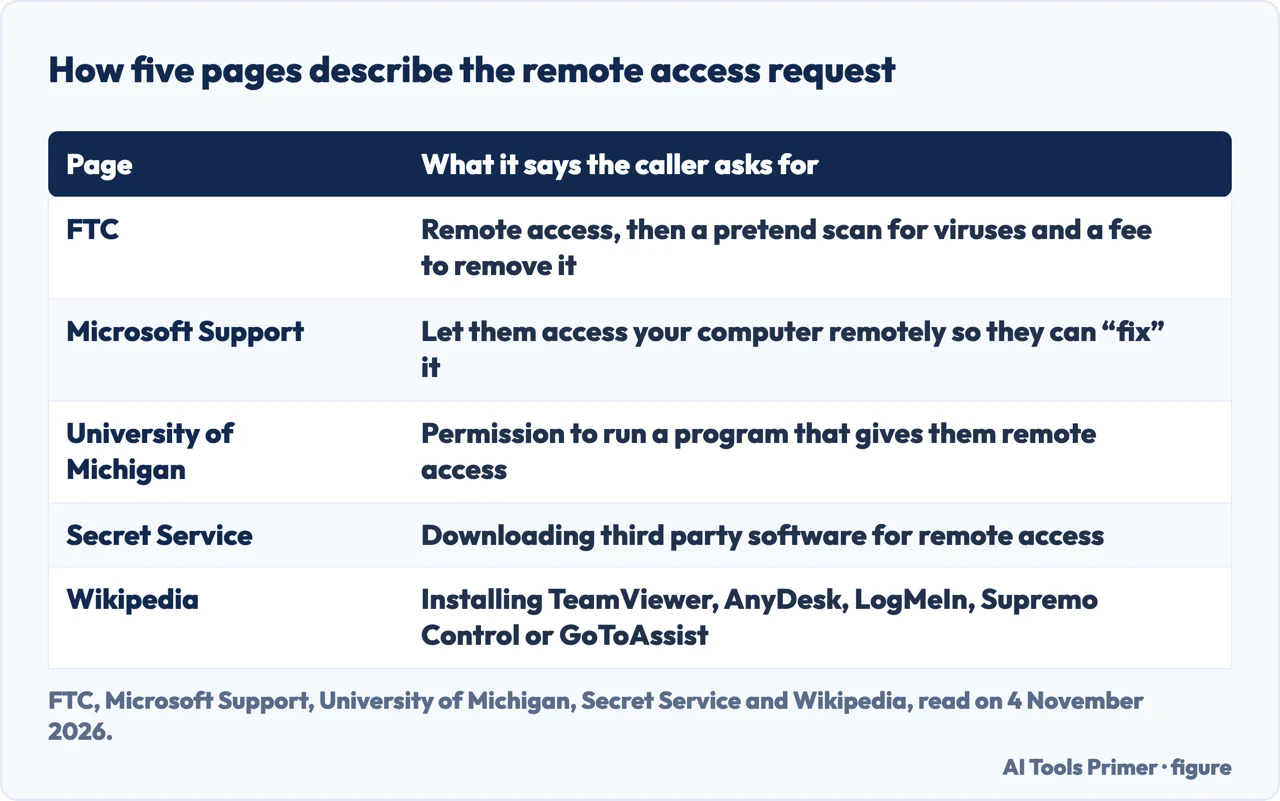
The sources agree on the pivot. The FTC says that if one of these impersonators gets you on the phone, they ask for remote access to your computer and pretend to scan it for viruses, then claim to find a malicious program and offer to remove it for a fee. Microsoft says they will want you to let them access your computer remotely so they can “fix” it, and that while they pretend to fix it they are actually stealing your information or installing malware. The University of Michigan says the callers may try to convince you to give them permission to run a program that gives them remote access. The Secret Service says the victim is sometimes tricked into downloading third party software that gives the scammer remote access, which can let the scammer exploit the computer for sensitive saved passwords and credit card numbers, or simply pretend to install antivirus updates in exchange for payment. Malwarebytes says that with remote access the scammer may gain access to all of your files, folders and the information they contain.
The pages differ on how much they name. The FTC, Microsoft, Michigan and the Secret Service say remote access or third party software and stop there. Wikipedia’s article is the page we read that names programs: it says the victim is usually instructed to download and install a remote access program such as TeamViewer, AnyDesk, LogMeIn, Supremo Control or GoToAssist. It adds that the caller will not say they are using remote control software; they will say the step is for connecting you to a secure server, or that they are going to give you a secure code, which in reality is just the ID number used by the remote desktop software. Wikipedia is an encyclopedia and not an investigator, so we use it for the names and for this wording and attribute it as Wikipedia’s article.
Once in, Wikipedia says the caller uses ordinary Windows tools as evidence. It describes multiple normal and trivial error messages, such as Error 8193: VSS, presented as proof of a problem, and the caller opening Event Viewer, which logs events for system administrators, and claiming that its warnings and errors are system corruption that must be fixed for a fee. Wikipedia lists other staged proofs too: Command Prompt listings such as tree or dir /s presented as a search for malware and hackers, and the netstat tool, whose network addresses the caller says belong to hackers in foreign countries. It says the software sold to repair or clean the computer is either malicious or does nothing at all. The FTC’s version is shorter: the claim of a malicious program, then the offer to remove it for a fee. The Secret Service adds only that the scammer may simply pretend to install antivirus updates in exchange for payment. The pages we read from Microsoft, Michigan and Malwarebytes do not describe this stage in detail.
What they ask for once they are in
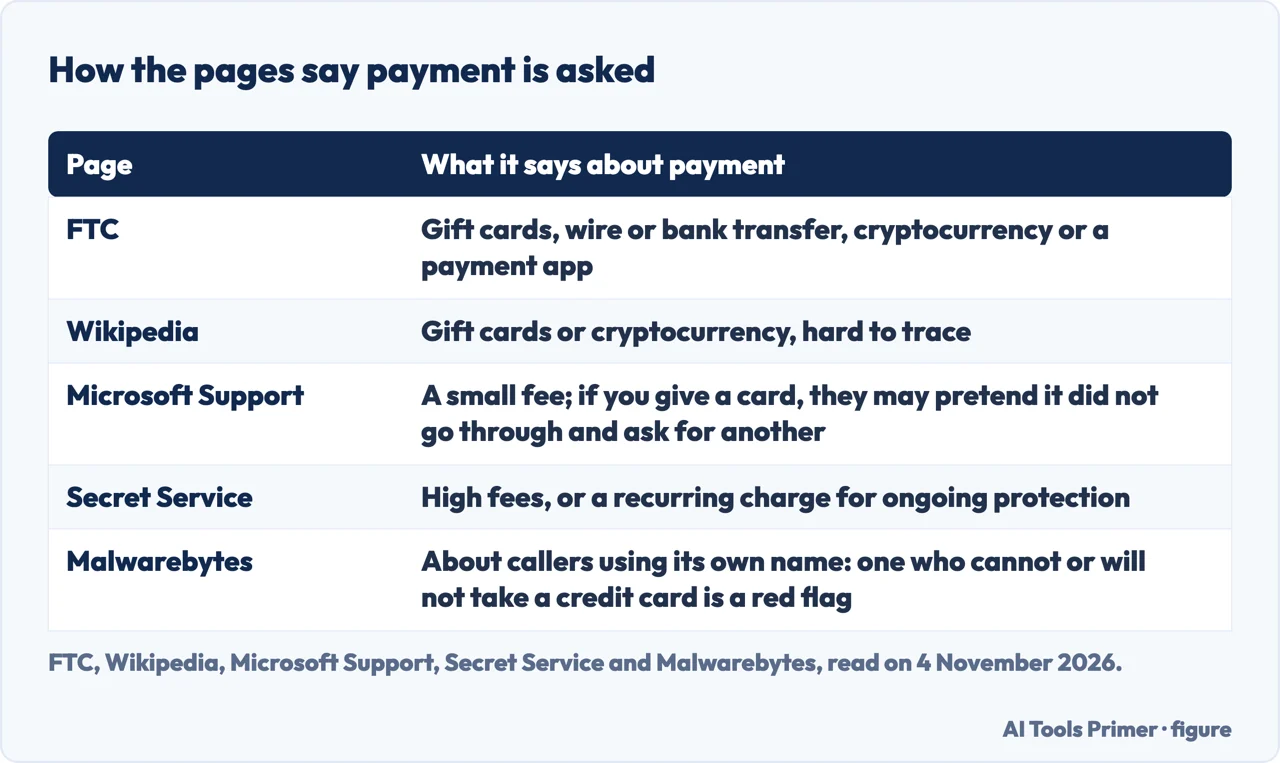
On payment the pages tell two different stories. The FTC says the callers often insist on gift cards, a wire transfer, a bank transfer, cryptocurrency or a payment app, because each is like using cash and, once you pay, it is hard to get your money back. Wikipedia likewise says payment is made by gift cards or cryptocurrency, which it calls hard to trace with few consumer protections, and adds a higher-loss risk: victims persuaded to log in to online banking, or to move large sums to a safe account to protect it from hackers. Wikipedia describes the online banking case as the more dangerous one: the caller persuades the victim to connect with password and two-factor authentication while the caller is watching and able to act, sometimes blanking the victim’s screen, and the victim may be told they are connected to a “secure server” with no human able to see what is done. That is the one thing remote access adds that a plain phone call cannot (Wikipedia, so treat it as secondary).
Microsoft and the Secret Service describe card payments instead. Microsoft says the caller will often try to charge a small fee to fix the non-existent problem; if you give a credit card number, they may pretend the card did not go through and ask for a different one, to see if they can collect several cards. It also lists the personal information they may ask for to fix your account: name, address, username, passwords, social security number, birthday and more. The Secret Service says scammers often require exorbitant fees or charge the victim’s credit card a recurring fee for ongoing system protection or the like.
Malwarebytes turns the point into a test. Among its signs of a fake Malwarebytes is a caller who cannot or will not accept payment by credit card, which it calls a red flag, because card processors screen the companies they work with and cards carry consumer fraud protections. Malwarebytes writes this about its own name being used by impersonators, so it is a vendor’s view. If the victim refuses to pay or to follow instructions, Wikipedia says scammers have been known to insult and threaten them.
Two longer scripts the FTC describes
The FTC’s page describes two variants that run past the first call. In the first, the fake tech support specialist with remote access to your computer pretends to scan it and claims to discover that someone hacked your accounts, or that your name is linked to serious crimes like money laundering or drug trafficking. The caller then transfers you to someone who supposedly works for the government, who may give you a badge number or open a case number. The FTC says both are fake. The new voice says your money is at risk and that you must protect it at once, and may tell you to withdraw money from your account, to deposit money in a “federal safety locker”, or to buy gold or get cash and give it to someone. The FTC says someone who works for the government will never tell you to do these things, and of the locker it says there is no such thing. The Secret Service makes a related point: government agencies will not call to threaten you with arrest, and official notification from them will almost always begin with a letter sent by regular mail.
The second variant starts with a message and not a call. The FTC says you might get an email or text saying you were charged hundreds of dollars to renew a tech support subscription, using names like Geek Squad, McAfee and Norton, with a number to call within 24 hours to dispute it. If you call, the scammers ask for remote access, take you to a spoofed website to enter your bank or card details for a refund, then claim they refunded too much and insist you pay the difference back with gift cards, a transfer, cryptocurrency or a payment app. The FTC’s check is to look at your card or bank account: if there is no transaction for a tech support subscription, the message was a scam, and if you think it might be real you should contact the company on a number you know is real and not the one in the message.
If it has already happened, in the order the pages give
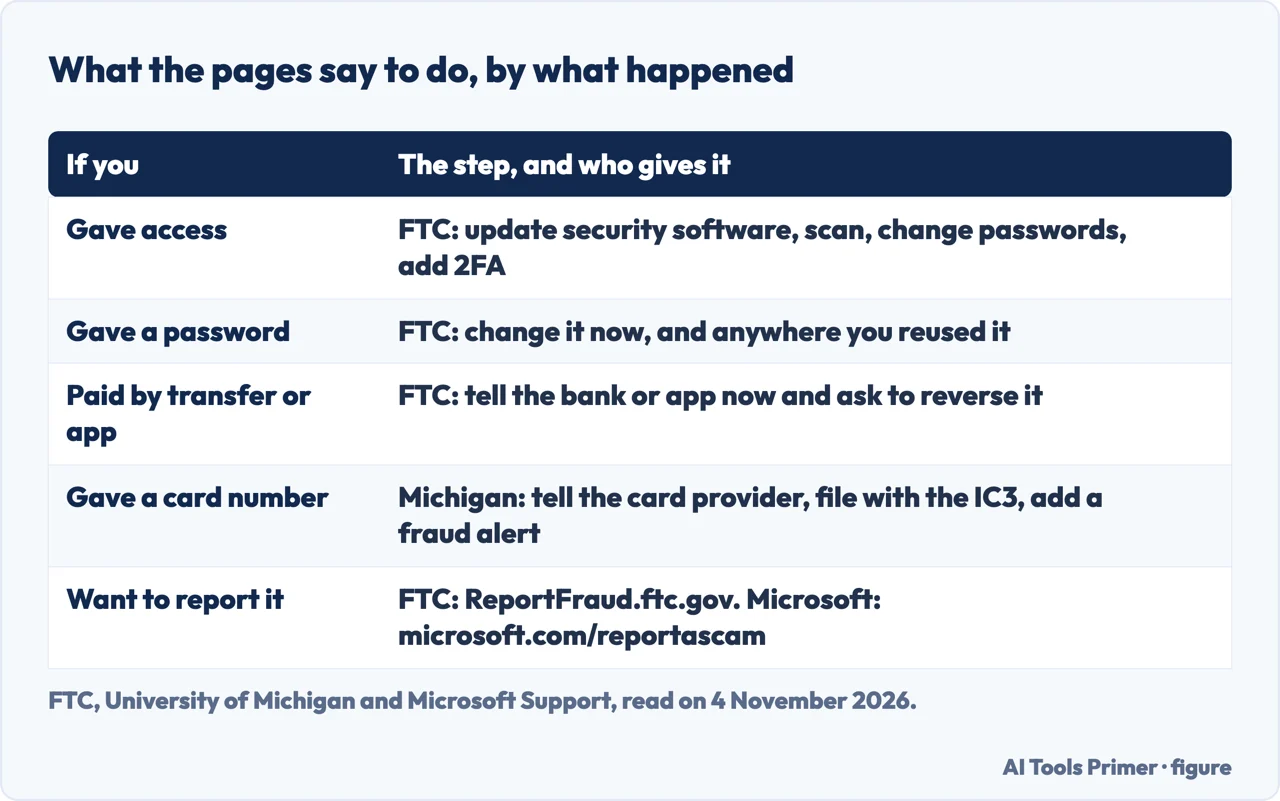
You gave access. The FTC’s page on what to do says to update your security software, and to download some if you have none, taking recommendations from independent review sites, friends and family; run a scan and delete anything it identifies as a problem; change your passwords and turn on two-factor authentication; and, if you need help finding or removing malware, get tech support from the manufacturer or a company you know and trust, or help from a knowledgeable friend or family member. Malwarebytes adds a reason to scan: if scammers accessed your computer, they may have installed a backdoor that lets them return later. It also says to watch your cards and bank accounts for unexpected payments and to be wary of suspicious emails and text messages, because you may now look like a target.
You gave a password. The FTC says to change it right away, and to change it on every other account or site where you use the same one. The University of Michigan’s page says to change your password too, with steps for its own university accounts and a report to its IT security team that apply only to its own users.
You paid. The FTC says that if you paid with Zelle or a bank transfer, a payment app, a wire, a credit card or a debit card, you should tell the bank, app or card issuer right away and ask them to reverse the payment. It adds that your money might be gone already, but that it is always worth asking. Malwarebytes also says to contact your card company or bank, and to file a complaint with the FTC or contact local law enforcement. If you gave out a card number, the University of Michigan says to notify the card provider, which may mean a replacement card, to file a complaint with the Internet Crime Complaint Center, and to put a fraud alert or hold on your credit report.
You want to report it. The FTC asks for reports at ReportFraud.ftc.gov and says it uses them to build cases against scammers and to spot trends. Microsoft asks for the attempt to be reported at microsoft.com/reportascam, and says not to be afraid to warn friends and family.
What the pages we read do not say is how to end a remote session or remove the program the caller had you install, or whether Windows needs to be reinstalled afterwards. We do not guess at either; the FTC’s steps above are what it gives, and for malware it points to a company you trust or a knowledgeable friend. Microsoft, for a worry that your device may have a real problem, says to call a trusted advisor or family member.
Numbers, dates and what we did not use
The figures on how common these scams are reach us second-hand. Wikipedia’s article reports that the FBI’s Internet Crime Complaint Center logged tens of thousands of complaints of tech or customer support fraud in its 2025 annual report, with reported losses of more than two billion dollars, and that a YouGov survey for Microsoft across 16 countries in July 2021 found about six in ten participants had been exposed to a tech support scam in the previous 12 months, with victims reporting an average loss of 200 dollars. We did not read the FBI’s own report or the survey, so we give these as Wikipedia’s account. The article also says tech support scams started no later than 2008.
We tested nothing on a computer. We did not read the FBI’s page on tech support scams: it loaded as an empty shell. We did not read the PC Matic page, a credit union’s blog or a firm’s blog on the same subject. The Microsoft address we read carries the name of a page about tech support scams, but the text that came back is headed “Protect yourself from online scams and attacks”, so we cite its section on tech support scams. The FTC’s page carries a September 2025 date.
Where to start
Four ways in.
- “How does the call start?”
- The call starts with a problem the caller says they found — call
- “They want remote access.”
- The minute they ask for access — access
- “What will they ask me to pay?”
- What they ask for once they are in — money
- “I already did it.”
- If it has already happened, in the order the pages give — after
Calls and the numbers behind them
The call, the caller and the card.
Alerts, clicks and voices
The same trick through other doors.
Questions people also ask
What is a technical support scam?
The University of Michigan says scammers impersonate tech support staff and claim to know that something is wrong with your computer, offer to fix it, usually for a fee, and instead steal money, infect the computer or steal personal information. The FTC adds that they ask for remote access and pretend to scan.
Is tech support legit?
It can be, but the FTC says legitimate tech companies won’t contact you by phone, email or text to tell you there is a problem with your computer. It adds that many software companies offer support online or by phone, and stores that sell computers offer it in person.
Is ask tech support a scam?
The pages we read do not examine a service called Ask Tech Support. What they do give is a test for any call: Microsoft says it won’t call to offer support unless you contacted it first, and the FTC says legitimate tech companies won’t call about a problem.
Can you give me an example of a tech support scam?
The FTC gives two. In one, a caller with remote access claims your accounts were hacked and passes you to a fake official who asks you to move money. In the other, a message says a tech support renewal was charged, and the refund call ends with a request to pay back too much.
Not covered here. We tested nothing on a computer. The statements come from three FTC pages, Microsoft Support, Malwarebytes, the University of Michigan, the Secret Service and Wikipedia, all read on 4 November 2026.
The search volume and difficulty behind this page come from a Semrush reading of 29 August 2026, older than the 60 days the site normally allows.
Sources
- FTC — How To Spot, Avoid, and Report Tech Support Scams — consumer.ftc.gov, read 4 November 2026.
- FTC — What To Do if You Were Scammed — consumer.ftc.gov, read 4 November 2026.
- FTC consumer alert (2019) — Keep tech support strangers out of your computer — consumer.ftc.gov, read 4 November 2026.
- Microsoft Support — Protect yourself from online scams and attacks (section on tech support scams) — support.microsoft.com, read 4 November 2026.
- Malwarebytes — Tech support scams look different now (2 September 2026) — www.malwarebytes.com, read 4 November 2026.
- University of Michigan — Tech Support Scams — safecomputing.umich.edu, read 4 November 2026.
- U.S. Secret Service — Tech Support Scams — www.secretservice.gov, read 4 November 2026.
- Wikipedia — Technical support scam — en.wikipedia.org, read 4 November 2026.
Written by Alberto Gulotta
Founder and editor of AI Tools Primer, writing from Palermo, Italy. Thirty-five years of taking computers apart, starting with a Commodore 64 — the long version is on the about page.
Something wrong on this page? Write to aitoolsprimer@gmail.com and it gets fixed.
Written on 4 November 2026.
Independence and limits
No affiliate links and no paid placements anywhere on this site. Nobody pays to appear here, and no company has seen this page before you did.
This is general information, not professional advice. Where a page touches money, health, safety or the law, it names its source and the date it was read — and your situation may still differ. See the privacy page and the cookie policy.