
Scams · guide
How to stop spam calls on Android: the phone first, then the carrier
By Alberto Gulotta · Updated · 17 min read
How to stop spam calls on Android: the pages we read describe two layers, the Phone app and the tool a phone company runs on its network. The FCC says to follow the steps for both. Google turns caller ID and spam protection on by default; Verizon, T-Mobile and AT&T each have their own switch and limits.
| Question | Answer | Where it comes from |
|---|---|---|
| Where are the spam settings in the Phone app? | More options, Settings, Caller ID and spam, then “See caller ID & spam” | Google Help |
| Is the protection already on? | Google says caller ID and spam protection is on by default | Google Help, android.com |
| What does “Filter spam calls” change? | Filtered calls give no missed-call or voicemail alert, but stay in the call history | Google Help |
| Can the phone company filter too? | Yes: Verizon Call Filter, T-Mobile ScamShield and AT&T ActiveArmor each have their own switch | Verizon, T-Mobile, AT&T |
| Does anything stop every spam call? | Google says spam cannot be eliminated completely; Verizon does not promise to detect all of it | android.com, Verizon |
Two layers, not one
The FTC page, from July 2023, starts from a fact about scammers: they do not care whether you are on the National Do Not Call Registry, so the page calls call blocking and call labeling the best defense. The two are different. Blocking stops the call. Labeling lets it ring through with a word such as “spam” or “scam likely” on the screen, and you decide whether to answer. The FTC also warns that blocking services might block some calls you want to get.
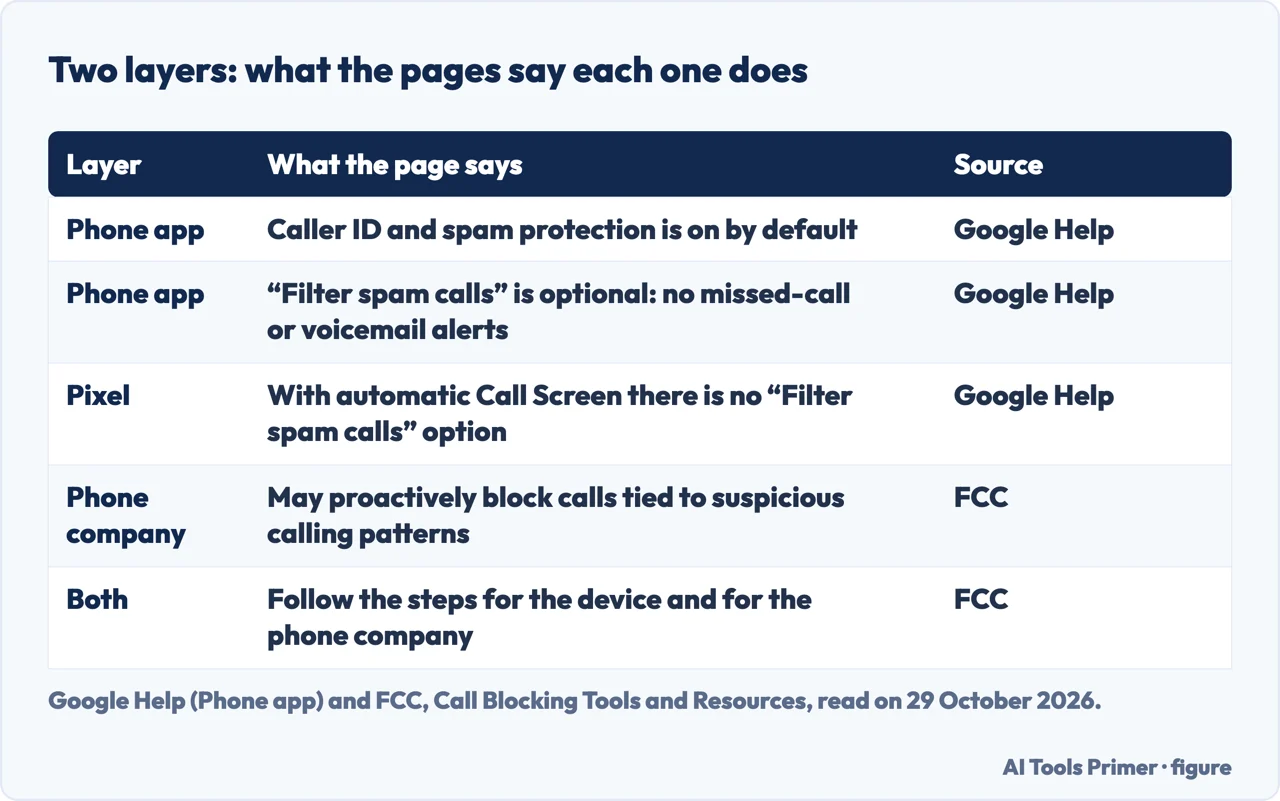
The FCC page on call blocking, reviewed on 16 September 2026, adds where the blocking happens. Phone companies may proactively block calls connected to suspicious calling patterns, and many let customers block more by enrolling in a service or installing an app. You can also adjust settings on your phone. To have both the phone’s built-in tools and the company’s services turned on, the FCC says to follow the steps in the guide for your device and in the one for your phone company.
That is the order of this page: the Phone app first, from Google Help and android.com, then the phone company’s tool, from the support pages of Verizon, T-Mobile and AT&T. The menu names below are the ones the pages use, and they do not all agree.
The phone: caller ID, the spam filter and Call Screen
Google’s Phone app Help page says that with caller ID and spam protection on, you can get information about callers or businesses outside your contacts, or warnings about potential spam callers. It is on by default, and android.com says the same. To reach the switch, Google Help says to open the Phone app, tap More options, then Settings, then Caller ID and spam, and turn “See caller ID & spam” on or off. android.com calls the same screen “Caller ID & Spam” and names the switches “See caller ID” and “Filter spam calls”. Google Help notes that some of its steps only work on Android 6.0 and up.
The protection has a cost in data. Google says your phone may need to send information about your calls to Google: when someone outside your contact list calls you, or you call them, that number is sent to Google to find a business name or decide whether the call is spam. The same page says Google does not get phone numbers from your contact list.
“Filter spam calls” is a separate, optional switch. Google Help says that with it on you do not get missed call or voicemail notifications for filtered calls, but they stay in your call history and you can check your voicemail. A phone with automatic Call Screen has no such option: Google says spam autoblocking is one of the automatic Call Screen options, equal to the Basic protection level on Pixel 6 and higher, and to the “Silently decline” choice for the spam category on Pixel 5 and lower.
A further feature in the same app is fake call detection, which alerts you if a caller hides their identity or impersonates a contact. Google lists what it needs: Android 12 or higher, the Phone by Google, Contacts and Google Messages apps, and RCS turned on in Google Messages.
To report a call, Google Help says to open the Phone app, tap Home, tap the call and tap “Block or Report spam”. A caller ID of “Suspected spam caller” or “Spam” means the call might be spam, and you can answer it or block and report the number. If a call from someone you know was marked as spam, tap Recent calls, tap that call, then “Not spam” and “Unblock”; Google says future calls from the number will not be marked as spam. android.com gives a shorter version of the reporting steps, through the call history and a “Report spam” option, and in its caller ID feedback steps it says “Recents” where Google Help says “Home”.
android.com also describes “Block unknown/private numbers”, which it says stops those numbers from ringing while the missed calls stay in the history. In the next sentence the same page says calls from numbers not on your contact list “will not be affected by this feature”. We do not settle that between the two sentences. Our page on blocking a number on Android has the steps for blocking by hand and for that setting.
Call Screen. Google Help says Call Screen finds out who is calling and why before you pick up, and works on the device without Wi-Fi or mobile data. On Pixel phones it runs automatically in Australia, Canada, Ireland, the UK and the US, and manually in eleven countries; in the US and Canada, manual Call Screen is also on selected Android devices. To set up the automatic kind, tap More, Settings, then “Spam and Call Screen” or “Call Screen”, and choose Maximum, Medium or Basic protection. On Pixel 7 and above the page lists three kinds of call to screen: spam, possibly faked numbers and first-time callers.
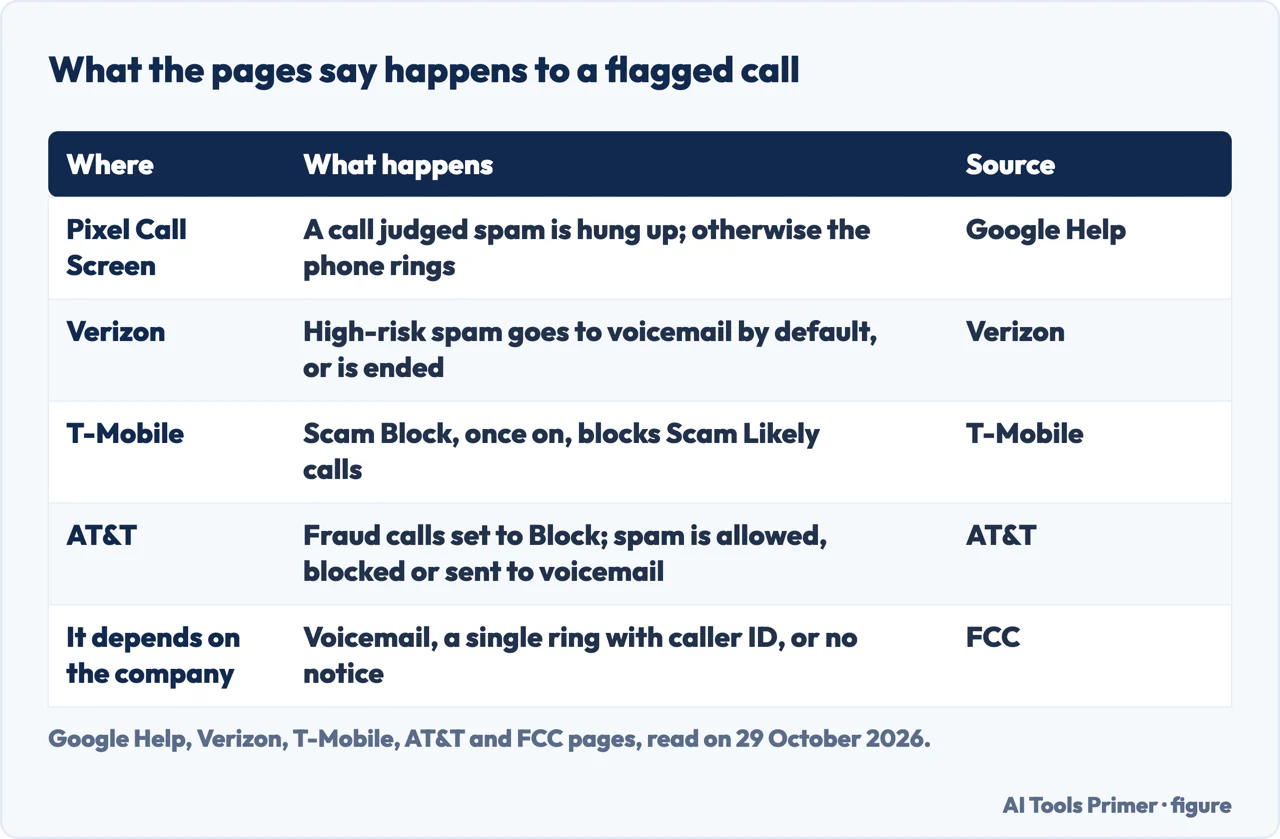
When a call is screened, you get a silent “Screening unknown number” or “Screening suspicious call” notification and a live transcript. The assistant asks who is calling and why. If it decides the call is spam, the phone hangs up; if not, the phone rings and shows how the caller answered. The page adds limits: Call Screen does not work with third-party call recording apps, it may stop your media while it screens, and it does not screen automatically during roaming. It uses your stored contacts to decide, so a number you do not want screened should be saved as a contact. The page also says that not all spam calls and robocalls can be detected.
The network: what the phone company does
The FCC page lists what a voice service provider may block without the customer’s consent: calls from unassigned, unallocated or invalid numbers, and calls from numbers on the Do Not Originate list. A provider may also block calls it views as unwanted by analyzing call data, but customers must be able to opt out of that kind. The same page says companies can enroll customers in call blocking automatically, and that you can opt out if you worry about missing wanted calls. What you notice depends on the company: a blocked call may go straight to voicemail, you may hear a single ring and see the caller ID, or you may get no notice at all.
The FCC’s other page, on robocalls, lists what the agency has done: it allowed phone companies to block numbers not on a customer’s contact list when the customer opts in, required caller ID authentication, and mandated blocking of illegal international robocall traffic. The call blocking page also lists tools by name, among them AT&T ActiveArmor, T-Mobile ScamShield and Verizon Call Filter, and says the FCC does not endorse them. We read the three company pages below.
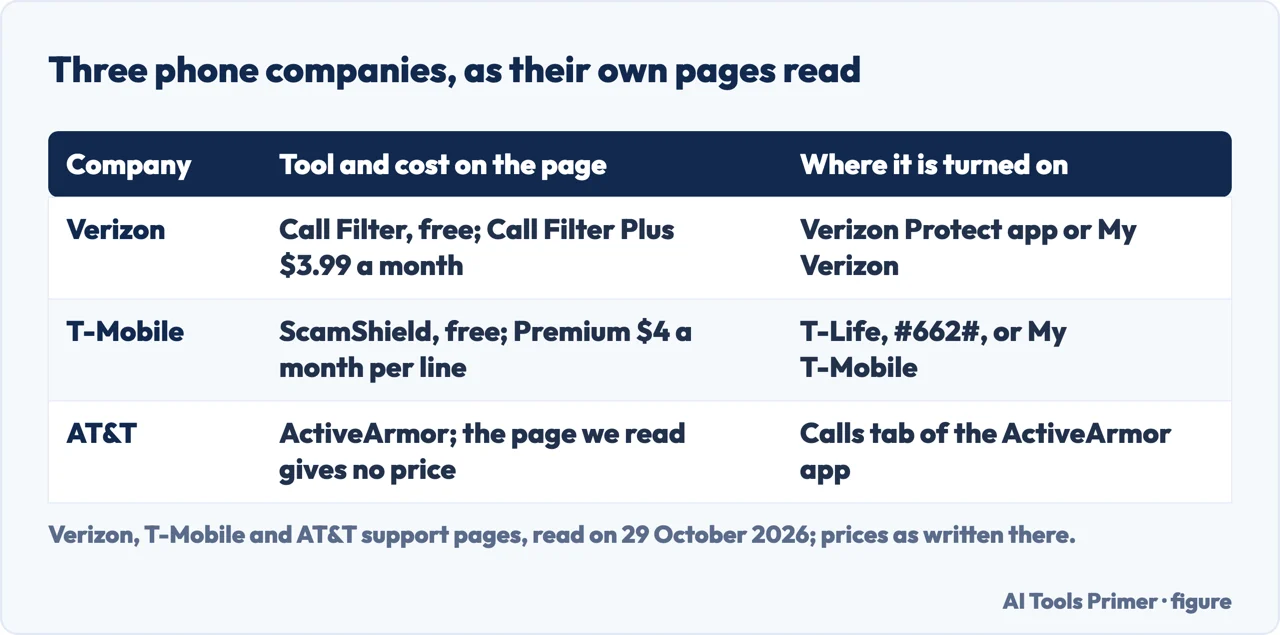
Verizon. The Call Filter FAQ says the free version is included on standard monthly and prepaid plans with a compatible device, with spam detection, a spam filter, a log of spam and blocked calls, allowed numbers and spam reporting. It is managed in the Verizon Protect app, which the page says is preloaded on most Android phones and needs Android 10.0 or higher, or in Call Filter in My Verizon. Call Filter Plus costs $3.99 a month, or $10.99 a month for three or more lines, as the page read on 29 October 2026, and adds caller ID, spam lookup, a personal block list and blocking by category. The page marks the free version with “Data usage applies”. In the free version every spam call is labeled “Potential Spam”. Spam calls go to voicemail by default, or are ended if you choose that in the app or in My Verizon.
Verizon is open about the limits. It does not guarantee that all spam calls are detected. Deleting the Verizon Protect app does not turn off spam filtering. A number on your allowed list may still be blocked by another app or service on the device, and the page suggests adding wanted callers to your contacts as well.
T-Mobile. The ScamShield page says the free tools for T-Mobile customers are Scam Likely, Scam Block, personal number blocking, Potential Spam identification, spam calls sent to voicemail, Callback Protection and Safe Web Browsing, managed in the T-Life app. T-Mobile’s support page lists several ways to turn on Scam Block, among them the free app, dialing #662# from a T-Mobile device, or logging in to T-Mobile.com or T-Life. The ScamShield page warns that Scam Block might block calls you want, and that you can disable it any time.
The labels mean different things. Scam Likely is a caller label for a call T-Mobile identifies as a likely scam. Potential Spam is described as unwanted solicitation from numbers not specifically intended for you, different from Scam Likely calls, which the page calls usually fraudulent. Callback Protection plays an audible warning if you call back a number on T-Mobile’s Scam Likely list. ScamShield Premium costs $4 a month per line, as written on 29 October 2026, and sends categorized call types to voicemail, adds reverse number lookup and transcribes voicemails. The same page lists personal number blocking among the free features and, in its Premium answer, among the features Premium “can include”; the two statements differ and we leave them as they stand. For a phone with no blocking options, the support page offers Family Allowances, which blocks calls and texts from specific numbers.
AT&T. The ActiveArmor page, updated on 15 June 2026, puts the call controls on the Calls tab. My Block List is a personal list you fill from the call log, by typing a number or from your contacts. Fraud calls are set to Block automatically. Spam calls are labeled when possible, and you can allow them, block them or send them all to voicemail, or choose Custom to route by category: Telemarketers, Political, Account services, Nonprofits, Surveys and Other. Private callers, those who hid their number, can also be allowed, blocked or sent to voicemail. “Always allow contacts” keeps your contacts from being blocked or sent to voicemail. The page warns that without an active voice mailbox, calls from numbers not on your contact list will not go through.
What neither layer stops
Faked numbers. The FTC says call blocking sometimes stops scammers whose fake names or numbers show on caller ID, but not all scam calls get flagged. The fakes often pose as an agency such as the Social Security Administration or the IRS. It also describes “neighbor spoofing”: a caller ID number with your area code, often matching the first six digits of your own number, and often belonging to a real person who has no idea. Verizon’s Neighborhood Filter is an answer built for this. It forwards calls from your own area code and prefix to voicemail, for up to 5 area codes in the free version and 10 in Call Filter Plus, and Plus on Android with the app can block an entire area code. Verizon says this blocks all calls from the code or prefix you entered, not only spam, so wanted calls may be blocked. If you think a call is spoofed, the FCC says to hang up, and to check by calling an official number from an account statement or the company’s website. Our pages on caller ID spoofing and on unknown numbers go further.
The Do Not Call Registry. The FTC describes it as a list that tells registered telemarketers which numbers not to call. Being on it will not stop scammers, but the FTC says it should reduce the calls you get and make scam calls easier to spot. The FCC says you can register for free at donotcall.gov.
Robocalls. The FTC says a robocall that tries to sell you something is illegal unless the company has your written permission, and that some robocalls might still get through blocking. Its advice for an illegal robocall is to hang up, not press a number, not call back, and report it. The FCC adds that AI-generated voice calls are illegal unless the consumer has agreed to receive them or the caller is exempt.
The promise itself. android.com says you cannot completely eliminate spam calls, only manage and reduce them, by blocking and reporting every time, reviewing your blocked list, and keeping Android and the Phone app updated. The pages we read do not mention a share of calls stopped. Verizon’s page says a number on its allowed list may still be blocked by another app or service on the device; the pages we read do not say which layer wins.
When a wanted call disappears, and where to report
The cautions are in the sections above: blocking can stop calls you want, and a filtered call gives no alert on the phone. Where the pages give a fix, it is small: a mistake in Google’s spam labels is reported with “Not spam” and “Unblock”, Verizon has an allowed list and a feedback page, and AT&T has “Always allow contacts”. android.com adds a check of the blocked list, to remove any legitimate contact blocked by accident.
For reporting, the FTC splits two cases. If you did not lose money and only want to report a call, use DoNotCall.gov. If you lost money to a phone scam, or have information about the company or scammer, use ReportFraud.ftc.gov. The page asks for the number that received the call, the number on your caller ID even if it may be fake, any number you were told to call back, and the date and time. The FTC says it releases reported phone numbers to the public each business day, which helps phone companies working on blocking and labeling.
The FCC takes complaints too. Its robocall page says to choose the “unwanted calls” category and to note if your number is being spoofed, blocked or mislabeled. It also says the FCC does not resolve individual complaints but uses them to guide policy and possible enforcement.
What we did not use
We tested nothing on a phone, so no menu here was checked against a screen. The pages we read do not say whether the same menus exist on a Samsung or another maker’s version of Android. The FCC names Samsung’s Smart Call, Google Voice, Hiya, First Orion, Nomorobo, TNS Call Guardian and YouMail, and we did not open their pages, so we say nothing about them. We also did not read the smaller phone companies or the donotcall.gov site itself, and every step above comes from the pages named in the sources.
Where to start
Four ways in.
- “Where are the settings?”
- The phone: caller ID, the spam filter and Call Screen — phone
- “What does my carrier do?”
- The network: what the phone company does — network
- “Will it stop everything?”
- What neither layer stops — gaps
- “A call I wanted never rang.”
- When a wanted call disappears, and where to report — wanted
On the phone itself
Blocking by hand, and the other system.
When a number gets through
Faked numbers, strangers and texts.
Questions people also ask
How To Block Spam Calls On Android?
Google Help says to open the Phone app, tap Home, tap the call and tap “Block or Report spam”. Turning on “Filter spam calls” also blocks spam calls, with no missed-call or voicemail alert; filtered calls stay in the call history. The phone company’s tool is a second layer.
Does dialing 662 stop spam calls?
On T-Mobile, dialing #662# from a T-Mobile device turns on Scam Block, which T-Mobile’s page ties to Scam Likely calls and warns might block calls you want. The pages we read do not tie that code to any other phone company.
Where are spam settings on Android?
Google Help gives the Phone app, More options, Settings, Caller ID and spam. android.com writes “Caller ID & Spam”, and Call Screen sits under “Spam and Call Screen” or “Call Screen”, so names can differ from one phone to the next.
How to automatically block spam calls?
In the Phone app, Google says “Filter spam calls” blocks spam, or on a Pixel with automatic Call Screen the spam option of Call Screen does. At the phone company, Verizon has a spam filter, T-Mobile has Scam Block and AT&T sets fraud calls to Block by default.
Not covered here. We tested nothing on a phone. The statements come from two Google Help pages, android.com, two FTC pages, two FCC pages and the support pages of Verizon, T-Mobile (two) and AT&T, all read on 29 October 2026.
The search volume and difficulty behind this page come from a Semrush reading of 29 August 2026, older than the 60 days the site normally allows.
Sources
- Google Help — Use caller ID & spam protection (Phone app) — support.google.com, read 29 October 2026.
- Google Help — Screen your calls before you answer them — support.google.com, read 29 October 2026.
- Android — How to Stop and Block Unwanted Spam Calls — www.android.com, read 29 October 2026.
- FTC — How To Block Unwanted Calls — consumer.ftc.gov, read 29 October 2026.
- FTC — Five ways to help you cut down on unwanted calls — consumer.ftc.gov, read 29 October 2026.
- FCC — Call Blocking Tools and Resources — www.fcc.gov, read 29 October 2026.
- FCC — Stop Unwanted Robocalls and Texts — www.fcc.gov, read 29 October 2026.
- Verizon — Call Filter FAQs — www.verizon.com, read 29 October 2026.
- T-Mobile — ScamShield — www.t-mobile.com, read 29 October 2026.
- T-Mobile — Block unwanted calls — www.t-mobile.com, read 29 October 2026.
- AT&T — Use the AT&T ActiveArmor app — www.att.com, read 29 October 2026.
Written by Alberto Gulotta
Founder and editor of AI Tools Primer, writing from Palermo, Italy. Thirty-five years of taking computers apart, starting with a Commodore 64 — the long version is on the about page.
Something wrong on this page? Write to aitoolsprimer@gmail.com and it gets fixed.
Written on 29 October 2026.
Independence and limits
No affiliate links and no paid placements anywhere on this site. Nobody pays to appear here, and no company has seen this page before you did.
This is general information, not professional advice. Where a page touches money, health, safety or the law, it names its source and the date it was read — and your situation may still differ. See the privacy page and the cookie policy.