
Temp mail · guide
addy.io limits: what each plan allows and what happens past them
By Alberto Gulotta · Updated · 15 min read
addy.io forwards mail sent to your aliases on to a real inbox. Its Free plan allows 10 active aliases on a shared domain plus unlimited standard ones. Replying or sending from an alias needs Lite or Pro, bandwidth is capped at 10MB a month on Free, and some limits are given differently on different pages.
| Question | Answer | Where it comes from |
|---|---|---|
| What does Free include? | Unlimited standard aliases, 10 active aliases on a shared domain, 1 recipient, 10MB of bandwidth a month | addy.io pricing |
| Can Free reply or send from an alias? | No: that needs Lite or Pro | addy.io pricing and help |
| What does mail to an off alias do? | A deactivated alias discards it silently; a deleted one makes the sender get a 550 rejection | addy.io FAQ |
| Why might a sender never deliver again? | After a rejection, a sender may put the address on a suppression list | addy.io FAQ |
| Do the pages agree on the limits? | The 2020 blog post and a 2024 review give different numbers from the pricing page | addy.io blog, review |
What addy.io is, as its pages and Privacy Guides describe it
The FAQ explains the name: addy is short for address, internet slang for an email address. The service gives you aliases, which are addresses that forward to a real inbox you have added as a recipient. The FAQ lists reasons to use it, among them a different address for every site, switching off an alias that attracts spam, and changing where mail is forwarded without editing each site. The home page calls the service free and open source, lists an audit by Securitum, and claims more than five million aliases created. Those are the site’s own figures, and they change. The features page also lists encryption of forwarded mail with your own OpenPGP key, with an option to hide the subject line. The pricing page says addy.io is open source and can be self-hosted. The FAQ says emails are stored only after a failed delivery, and only if you switch that option on.
There are two kinds of alias. A standard alias lives on your username subdomain, an additional username or a domain of your own. The help article says it is created the first time mail arrives, as long as catch-all is on, which is the default. A shared-domain alias lives on a domain many users share, such as anonaddy.me. It has to be created in advance, and it counts toward the limit on active shared-domain aliases. Random-character, UUID and random-word aliases on your own username or domain do not count toward that limit.
Privacy Guides lists addy.io as one of two providers in its email aliasing recommendations, the other being SimpleLogin. It says addy.io lets you create 10 aliases on a shared domain for free, or unlimited standard aliases, and it warns that standard aliases on one domain can be tied together by the domain name alone. It also says Securitum audited addy.io in September 2023 and found no significant vulnerabilities. The text we read shows two bare dates, 21 August 2026 and 16 March 2024, without saying what they mean, so we give the page as read on 3 November 2026. On the same worry, the addy.io FAQ says random-character or random-word aliases are on a shared domain and cannot be linked to a user.
What each plan includes, on the pricing page
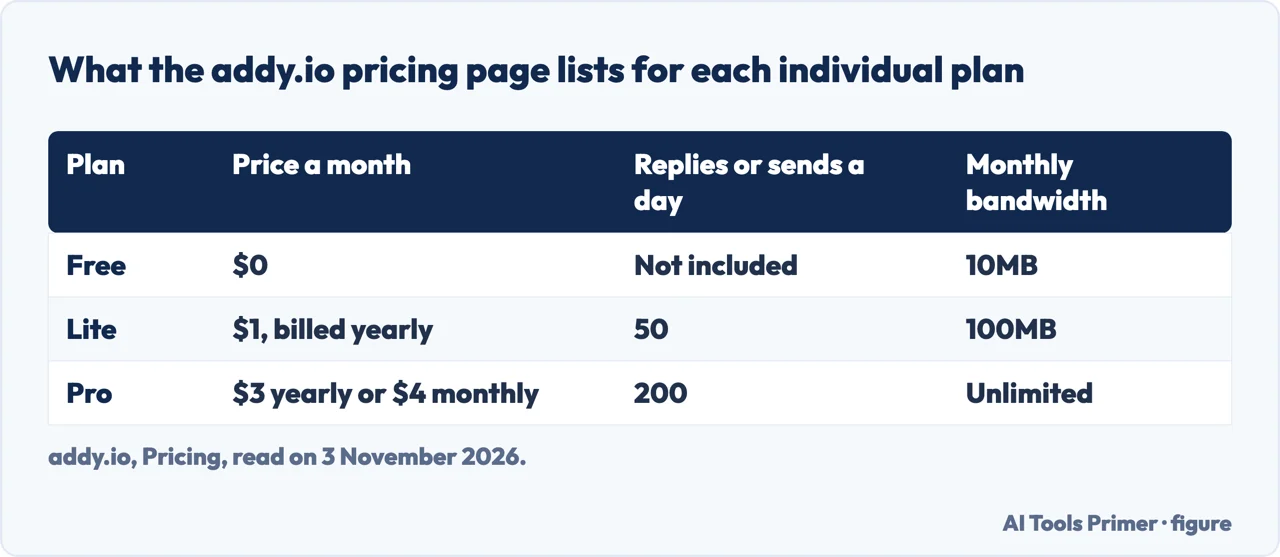
The pricing page lists Free, Lite and Pro for one person. Free has unlimited standard aliases, 10 active aliases on a shared domain, 1 recipient, 2 alias domains and 10MB of bandwidth a month. Lite costs $1 a month billed yearly and adds 1 custom domain, 5 recipients, 5 extra usernames, tracking-pixel blocking and 100MB of bandwidth, with 50 active shared-domain aliases. Pro costs $3 a month billed yearly, or $4 billed monthly, and has unlimited shared-domain aliases and bandwidth, 20 custom domains, 20 extra usernames and 30 recipients. The table puts the daily replies and sends and the bandwidth side by side.
Duo and Family are priced at $4.50 a month billed yearly or $6 monthly for two members, and $7.50 yearly or $10 monthly for five. The page says each member gets full Pro on an independent account. The FAQ adds that members who already have their own paid subscription must cancel it before accepting an invite.
If you cancel, the FAQ says the plan stays active until the end of the billing period. After that, custom domains and additional usernames are deactivated, recipients beyond the first are deactivated, and shared-domain aliases beyond 10 are deactivated. Catch-all is turned back on for the account username if it was off, and blocklist entries stop blocking. Resubscribing within 90 days reverts those changes automatically. The pages we read do not mention a refund.
Creating aliases has its own throttle. The FAQ gives 10 new aliases an hour on Free, 20 on Lite and 50 on Pro, and says mail is deferred above that. It also says each user is throttled to 200 forwarded emails an hour.
Replying and sending from an alias
The help article is plain that sending from an alias requires Lite or Pro and is not included on Free. The FAQ gives a reason: outbound mail from aliases is frequently abused for spam, phishing and bulk signups, and even a small free allowance would attract bad actors and could damage the reputation of the service’s mail servers. Three conditions apply. You send from a verified recipient, because mail from any other address is not sent from the alias and comes back to you as if from an outside sender. That recipient must be allowed to reply and send, which is the default. And the alias must exist, or be creatable when the message goes out, because a deactivated or deleted alias makes the send fail.
You write in your usual email client. In the To field you put an address that encodes the alias and the person you are writing to. The help article’s example is an alias shop@johndoe.addy.io writing to hello@store.com, which becomes the To address shop+hello=store.com@johndoe.addy.io. The Send from button in the dashboard composes it for you. The blog post of 12 February 2020 says the idea was taken from VERP, a technique in which each recipient gets a different return path. The person who receives the message sees the alias. Your own Sent folder still shows your real address, and the help article warns against putting identifying details, such as your real name or personal email, in the message body or signature; the FAQ gives similar advice for replies, naming your full name.
There are no SMTP credentials for writing from aliases in your own client. The largest message is 25MB including attachments, and attachments count toward your bandwidth. Two errors are described. The rejection 550 5.1.1 Address does not exist means the alias was deleted, or was never created and catch-all is off. The notification Attempted reply/send from alias has failed is usually, the FAQ says, a verified recipient on your own domain that has no DMARC policy; it adds that recipients at Gmail, Outlook, Tutanota, Mailbox.org and ProtonMail already have one.
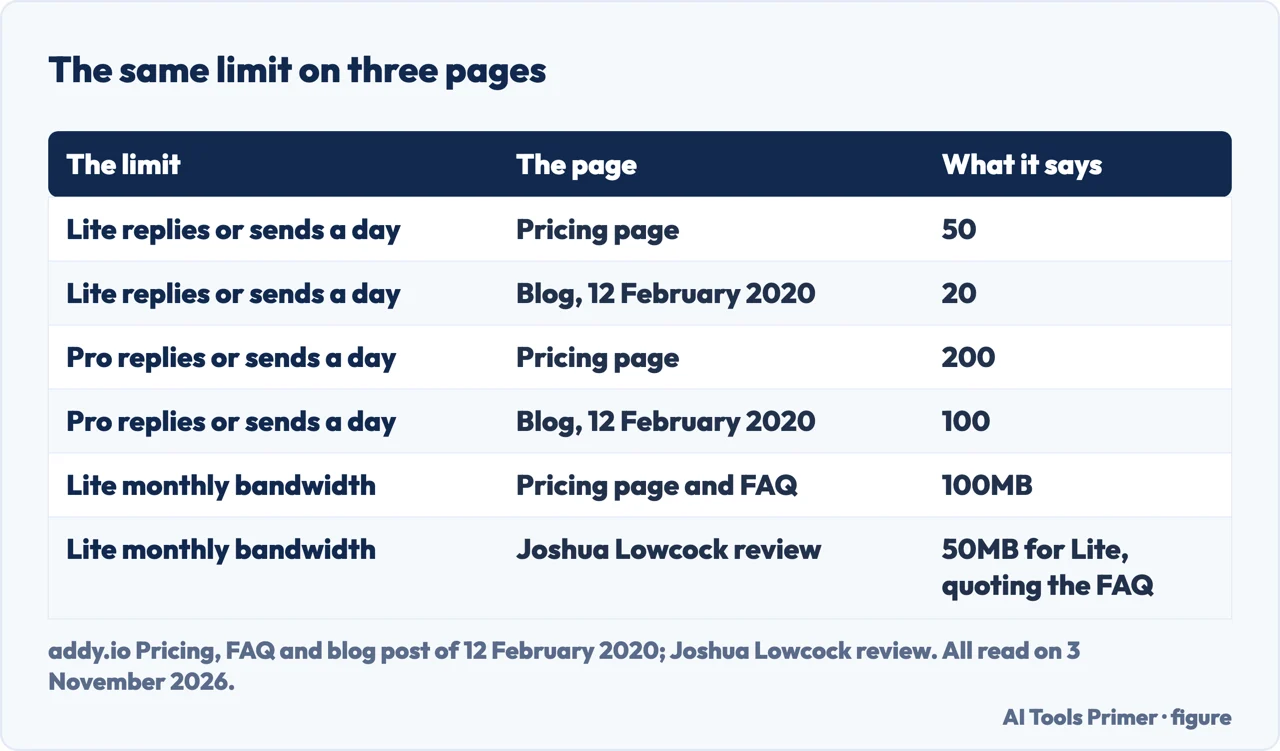
The pricing page gives 50 replies or sends a day on Lite and 200 on Pro. The blog post of 12 February 2020 gave 20 and 100, shared between replies and sends in any mix, as the table shows. The 30 October 2026 changelog adds that a custom domain can now limit replies and sends on new aliases to the recipients attached to that alias.
Bandwidth, and what happens past it
The FAQ says bandwidth is the size in bytes of each email forwarded or reply sent, and that it resets to zero at the start of each calendar month, not on a rolling 30 days. Blocked mail, such as mail to an inactive or deleted alias, does not count. You get an email when you pass 80 percent. To estimate, the FAQ takes an average email of about 75KB, which makes the 10MB allowance around 140 emails and Lite’s 100MB almost 1,400.
The review differs on two points. It questions the 75KB average, says a random sample of the reviewer’s inbox came closer to 100KB, and puts newsletters at 250KB to 500KB. And where the FAQ says 100MB for Lite, the review quotes the FAQ with 50MB for Lite and almost 700 emails. The review is dated 2024 and updated in 2025; the pricing page and FAQ we read give 100MB.
Past the limit the FAQ gives three outcomes. On Free, the server answers delivery attempts with 552 5.2.2 User over quota until the next calendar month or an upgrade. On Lite, the first time you reach 100MB in a calendar year, usage is reset to zero automatically; the next time, new mail is deferred with 452 4.2.2 and the sender keeps retrying, usually for a few days, and you can buy a one-off reset for $5, 5 euros or 5 pounds, wait for the next month or move to Pro. On Pro there is no monthly limit. The review says there is no way to buy extra bandwidth; the FAQ describes a paid reset on Lite, and the changelog list shows a 28 August 2026 entry headed Lite bandwidth resets (one free per year, then paid).
Off, deleted, forgotten, and the sender who never tries again
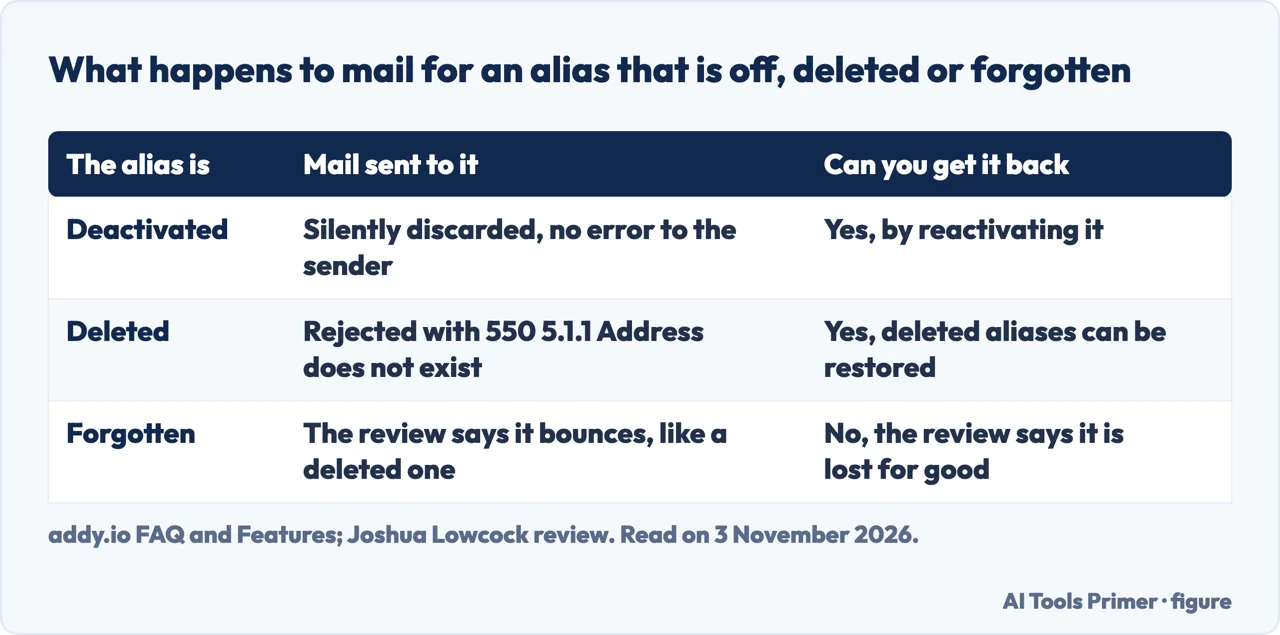
The Features page says to deactivate an alias to silently discard mail, or to delete it so senders get a bounce. The FAQ agrees: mail to a deactivated alias, custom domain or additional username is silently discarded, with no rejection and no error, while mail to a deleted alias is rejected with the 550 message. The review adds a third state. A deleted alias can be restored, and one you forget is gone for good. The review calls the words confusing and suggests picking delete if in doubt, and says both options bounce received mail. The 30 October 2026 changelog adds a Forget all deleted button on the aliases page, after filtering to Deleted only.
The FAQ spells out a trap. A sender that receives a rejection, either from a deleted alias or from a Free account over its bandwidth, will often put the address on a suppression list, also called a bounce list, and stop trying even after the alias works again. Because the sender never tries, nothing reaches addy.io and nothing shows in your failed deliveries. To check, send a test email from another address. The FAQ gives two fixes, a new alias or asking the sender to remove the address, and says that if you might want an alias later you should deactivate it instead of deleting it. It adds that some senders clear these entries after a while and many keep them until someone removes them.
On spam, the FAQ says you must not mark mail forwarded by addy.io as spam, because that can damage the reputation of the mail servers and is against the terms; repeated marking gets the account disabled. If an alias receives spam it says to deactivate or delete it. The catch-all setting matters here: it is on by default for usernames and custom domains, and the FAQ says bots and spammers try addresses such as contact@ or admin@, which creates aliases you did not make. It does not mean the account was compromised. On Lite and Pro you can turn catch-all off or use a pattern. The review adds that catch-all on a custom domain risks using up bandwidth.
Last, the review warns that an additional username, once deleted, is lost and still counts toward the limit.
Where the pages stop
The pages we read do not say how long a sender keeps a rejected address on a suppression list; the FAQ says only that some clear entries after a while and many do not. They do not give the time zone in which the daily count of replies and sends resets. They do not give a typical number of messages a mailbox receives; the only estimate is the 75KB average, which the review disputes. And they give different figures for daily replies and sends and for Lite bandwidth, as the table shows. For current numbers we used the pricing page and the FAQ.
We tested nothing on an account. We did not read the Chrome Web Store, App Store or Google Play listings or the Trustpilot page that Google listed, and the review is one person’s experience on the Lite plan. If you are choosing between services, our pages on SimpleLogin and Firefox Relay are read in the same way, with the prices and limits dated.
Where to start
Four ways in.
- “What do I get for free?”
- What each plan includes, on the pricing page — plans
- “Can I reply from an alias?”
- Replying and sending from an alias — send
- “What if I go over?”
- Bandwidth, and what happens past it — bandwidth
- “What if I delete one?”
- Off, deleted, forgotten, and the sender who never tries again — off
Other aliases
Three more services that forward to your real inbox.
Throwaway and trick addresses
Addresses that are not an alias service.
Questions people also ask
Addy.io Alternative: Should You Switch?
The pages we read do not rank services. Privacy Guides lists SimpleLogin beside addy.io in its email aliasing recommendations, and the addy.io FAQ lists its own reasons to choose it, among them open-source code, no adverts and generous bandwidth.
Is Addy.io a disposable email domain?
The pages we read never call addy.io a disposable-address service. The FAQ describes aliases that forward to a recipient you verify and can deactivate or delete. Whether a site accepts one is separate: the review says some sites block disposable and relay addresses, and Privacy Guides says standard aliases help where a shared domain might be blocked.
What is an email addy?
The addy.io FAQ says addy is short for address and is internet slang for an email address.
What is the best anonymous email service?
The pages we read do not name a best one. Privacy Guides recommends addy.io and SimpleLogin as email aliasing providers, which is a narrower thing than an anonymous mailbox.
Not covered here. We tested nothing on an addy.io account. The statements come from pages of addy.io (pricing, FAQ, two help articles, features, the home page, the changelog of 30 October 2026 and a blog post of 12 February 2020), Privacy Guides and a review by Joshua Lowcock, all read on 3 November 2026.
The search volume and difficulty behind this page come from a Semrush reading of 29 August 2026, older than the 60 days the site normally allows.
Sources
- addy.io — Pricing — addy.io, read 3 November 2026.
- addy.io — FAQ — addy.io, read 3 November 2026.
- addy.io — Sending email from an alias — addy.io, read 3 November 2026.
- addy.io — Creating new email aliases — addy.io, read 3 November 2026.
- addy.io — Features — addy.io, read 3 November 2026.
- addy.io — Home page — addy.io, read 3 November 2026.
- addy.io — Changelog for October 30th, 2026 — addy.io, read 3 November 2026.
- addy.io — Sending email from an alias and updated replies (blog, 12 February 2020) — addy.io, read 3 November 2026.
- Privacy Guides — Email Aliasing — www.privacyguides.org, read 3 November 2026.
- Joshua Lowcock — Review: addy.io (formerly AnonAddy) a Private Email Relay Service — www.joshualowcock.com, read 3 November 2026.
Written by Alberto Gulotta
Founder and editor of AI Tools Primer, writing from Palermo, Italy. Thirty-five years of taking computers apart, starting with a Commodore 64 — the long version is on the about page.
Something wrong on this page? Write to aitoolsprimer@gmail.com and it gets fixed.
Written on 4 November 2026.
Independence and limits
No affiliate links and no paid placements anywhere on this site. Nobody pays to appear here, and no company has seen this page before you did.
This is general information, not professional advice. Where a page touches money, health, safety or the law, it names its source and the date it was read — and your situation may still differ. See the privacy page and the cookie policy.