
Software · guide
Apple TV remote volume not working: the fixes Apple lists, in order
By Alberto Gulotta · Updated · 10 min read
Apple TV remote volume not working has an order in Apple’s help: restart the remote, change the Volume Control setting, then teach it your TV. Which setting fits depends on whether sound reaches a sound bar over HDMI or an optical cable. This page puts Apple’s pages together and marks where the guides go further.
| Question | Answer | Where it comes from |
|---|---|---|
| What does Apple try first? | Restart the remote: hold the TV/Control Center and Volume Down buttons together for about 5 seconds | Apple Support, 2 October 2025 |
| What next? | Settings, Remotes and Devices, Volume Control: pick a different setting, such as TV via IR instead of Auto | Apple Support |
| Does an optical cable matter? | Yes: CEC volume control is an HDMI feature and is not supported with optical cable setups | Apple Support |
| Is the remote the problem? | Apple lists pairing, signal strength, 30 minutes of charging and a tvOS update | Apple Support, 30 March 2026 |
| Will the buttons always work? | Apple says not all audio setups support them | Apple Support |
Apple’s first step: restart the remote
Apple’s page on volume buttons that stop working starts here: press and hold the TV/Control Center button and the Volume Down button at the same time, for about 5 seconds or until the status light on the Apple TV turns off and on again. Release them, wait 10 to 15 seconds for a Remote Disconnected notification on the TV, then press any button; you can use the remote after the Remote Connected notification appears. The page for a remote that does not work at all gives the same restart with a wait of 5 to 10 seconds.
This is the step the forum threads circle around. An Apple Discussions thread started on 11 August 2023, about an Apple TV remote that stopped controlling a sound bar, has a top reply from 19 January 2024 that says to hold the TV and Volume Down buttons for 6 seconds, and calls it a fix for the volume buttons. A thread from 7 May 2025 says the poster had already restarted the remote and changed the volume setting without result. Community content may not be verified or up to date.
The Volume Control setting
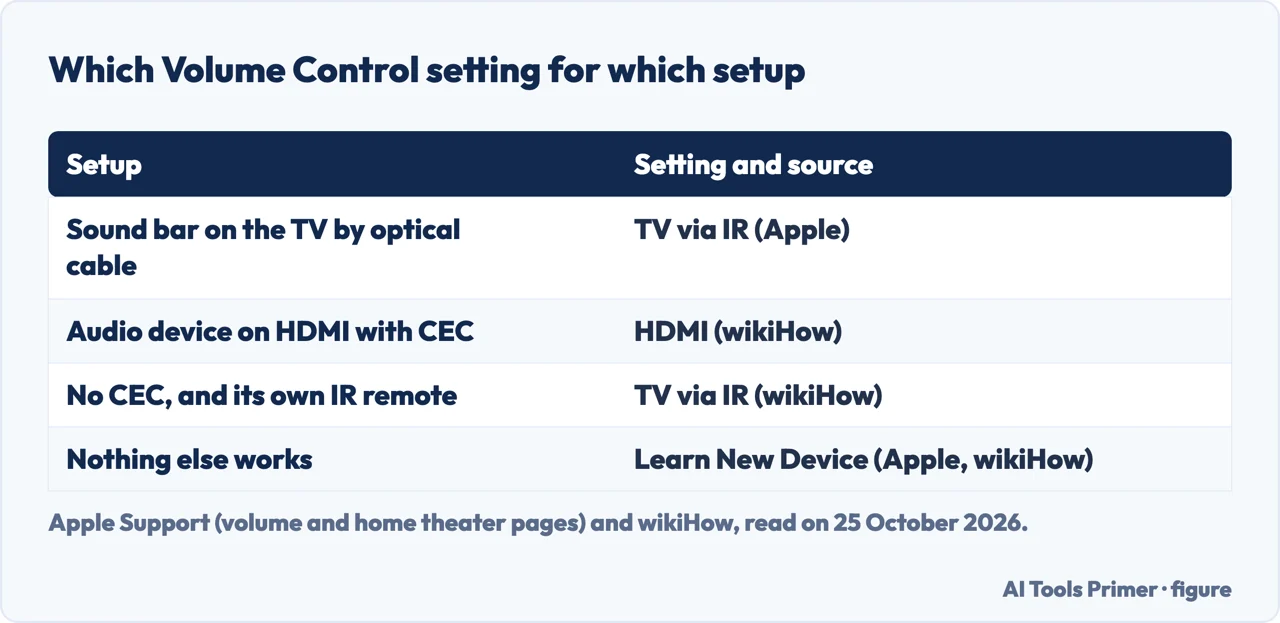
Apple’s next step is on the Apple TV: Settings, Remotes and Devices, Volume Control, then select a different setting and try the volume buttons again, for example TV via IR instead of Auto. Apple explains why: with CEC volume control you can adjust the volume of all HDMI-connected devices with a single remote, but it is an HDMI feature and is not supported with optical cable setups. If a sound bar or audio system is connected to the TV by an optical cable, Apple says to switch volume control to TV via IR, to try another IR setting if one is available, or to use the remote that came with the audio system.
wikiHow, updated on 14 October 2026, describes the same menu: Auto as the default that works in most situations, HDMI for an audio device on HDMI that supports CEC, and TV via IR for a device without CEC that has its own IR remote or is connected by optical cable. Apple’s home theater page and wikiHow both end with Learn New Device, which teaches the remote to control the volume of your TV. Apple’s home theater page gives the path: Settings, Remotes and Devices, Volume Control, Learn New Device, then the on-screen instructions.
HDMI-CEC, and the names it hides under
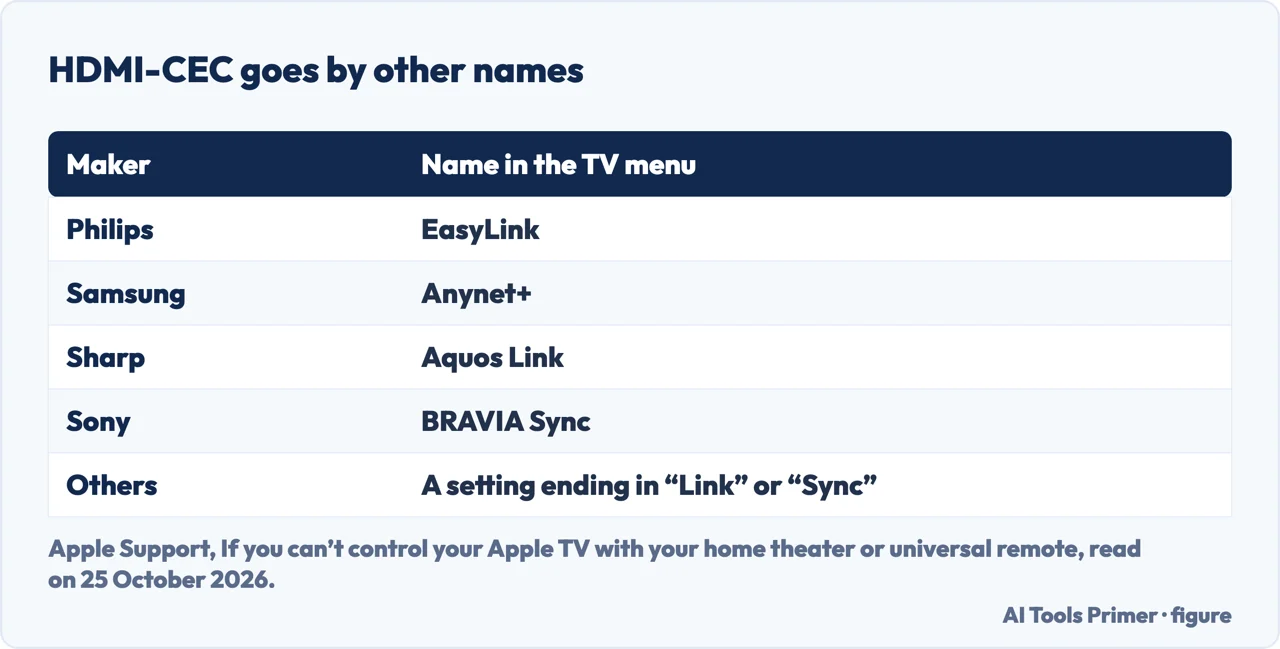
Apple’s page on home theater and universal remotes says volume normally works through the IR sensor on the front of your TV or receiver, so the path between the remote and the front must be clear; some receivers use HDMI-CEC instead, and then you do not need a clear path. For CEC it says to make sure the TV or receiver supports it, that the Apple TV is plugged into an HDMI port that supports it, and that it is turned on in the TV’s menu with the remote that came with the equipment. Because makers use different names, it says to look for a setting that ends in “Link” or “Sync”, and gives Philips EasyLink, Samsung Anynet+, Sharp Aquos Link and Sony BRAVIA Sync.
If the remote itself is the problem
Apple’s page for a Siri Remote or Apple TV Remote that is not working, published on 30 March 2026, starts with pairing: point the remote at the Apple TV from about three inches away, hold the Back (or Menu) button and Volume Up for five seconds, and place the remote on top of the Apple TV if asked. On tvOS 18.0 or later you can check the signal strength under Settings, Remotes and Devices, Remote; if it is weak, or there is no indicator, move within 20 feet and clear anything between the remote and the front of the Apple TV, television, receiver and sound bar. Apple also lists charging the remote for 30 minutes and updating tvOS, and says that if it still does not work you might need service.
Apple’s page on using the remote adds a limit: for the mute and the volume up and down buttons it says not all audio setups support them, and you might need the volume controls on the remote that came with your TV. For the same kind of problem on other devices, see the pages on a TV remote, a Roku remote and a Firestick remote.
What the guide adds
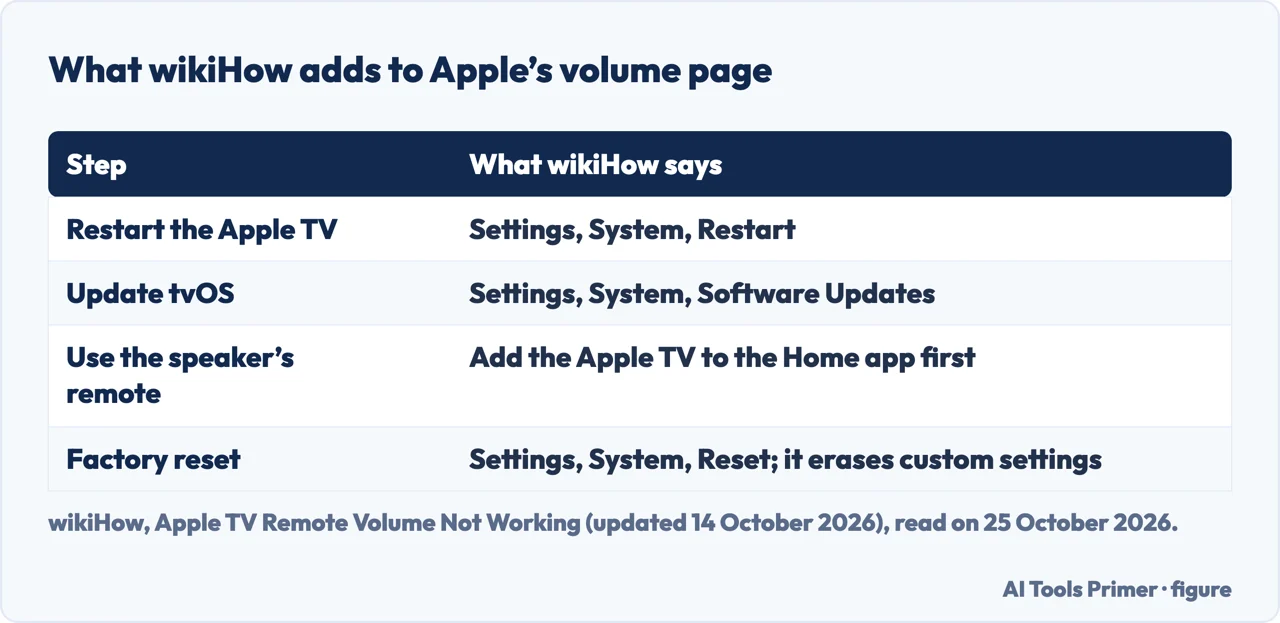
wikiHow lists nine steps and goes past Apple’s volume page in four places: restarting the Apple TV through Settings, System, Restart; updating tvOS through Settings, System, Software Updates; adding the Apple TV to the Home app so that the speaker’s own remote can control it; and a factory reset through Settings, System, Reset, which it says erases custom settings and which it says many users on Reddit found fixed the problem. The Reddit reports are not something we read, and Apple’s volume page does not list a factory reset, so treat that last step as a final resort rather than as Apple’s advice.
Where to start
Four ways in.
- “What do I press first?”
- Apple’s restart — restart
- “Which setting do I pick?”
- Volume Control — setting
- “I have a sound bar.”
- HDMI-CEC and optical — cec
- “Nothing helped.”
- The remote and the guide — remote
Remotes that stop answering
The checks that apply to most of them.
Questions people also ask
How to resync Apple TV remote to control volume?
Apple’s page says to restart the remote with the TV/Control Center and Volume Down buttons, then change the Volume Control setting, and its home theater page adds Learn New Device. To pair the remote, hold Back (or Menu) and Volume Up for five seconds.
How do I reset my Apple TV remote?
Apple calls it a restart: hold the TV/Control Center and Volume Down buttons for about 5 seconds, release, and wait for the Remote Connected notification. Among the pages we read, a factory reset appears only on the wikiHow page, for the Apple TV itself.
Why is the volume button not working on my remote?
Apple lists a remote that needs a restart, a Volume Control setting that does not fit, CEC that is not supported with an optical cable, and audio setups that do not support the buttons.
Why can’t I hear the volume on my Apple TV?
The Apple pages we read are about controlling the volume with the remote, not about missing sound, so we do not answer that.
Not covered here. We did not test an Apple TV remote. The statements come from four Apple Support pages (volume buttons, 2 October 2025; home theater and universal remotes, 18 December 2024; a remote that is not working, 30 March 2026; using the remote), a wikiHow page updated on 14 October 2026, and two Apple Discussions threads dated 11 August 2023 and 7 May 2025, read on 25 October 2026. Menus change with the tvOS version.
Reddit and MacPowerUsers were not read. The Apple TV Remote in Control Center, a universal remote, and the older aluminium or white Apple Remote are not covered.
The search volume and difficulty behind this page were read in Semrush on 29 August 2026.
Sources
- Apple Support — If the volume buttons on your Apple TV remote aren’t working (2 October 2025) — support.apple.com, read 25 October 2026.
- Apple Support — If you can’t control your Apple TV with your home theater or universal remote (18 December 2024) — support.apple.com, read 25 October 2026.
- Apple Support — If your Siri Remote or Apple TV Remote isn’t working (30 March 2026) — support.apple.com, read 25 October 2026.
- Apple Support — Use your Siri Remote or Apple TV Remote with Apple TV — support.apple.com, read 25 October 2026.
- wikiHow — Apple TV Remote Volume Not Working? 9 Easy Fixes (updated 14 October 2026) — www.wikihow.com, read 25 October 2026.
- Apple Discussions — Apple TV Remote stopped controlling soundbar volume (11 August 2023) — discussions.apple.com, read 25 October 2026.
- Apple Discussions — Why is my Apple TV remote volume button not working? (7 May 2025) — discussions.apple.com, read 25 October 2026.
Written by Alberto Gulotta
Founder and editor of AI Tools Primer, writing from Palermo, Italy. Thirty-five years of taking computers apart, starting with a Commodore 64 — the long version is on the about page.
Something wrong on this page? Write to aitoolsprimer@gmail.com and it gets fixed.
Written on 25 October 2026.
Independence and limits
No affiliate links and no paid placements anywhere on this site. Nobody pays to appear here, and no company has seen this page before you did.
This is general information, not professional advice. Where a page touches money, health, safety or the law, it names its source and the date it was read — and your situation may still differ. See the privacy page and the cookie policy.