
Software · guide
How to delete account in Google Chrome: which of four things you mean
By Alberto Gulotta · Updated · 10 min read
How to delete account in Google Chrome can mean four different things, and Google documents them on different pages: signing out of Chrome, removing a profile from the computer, removing Chrome access remotely, or deleting the Google Account. Only the last one deletes the account. This page puts the steps and costs together.
| What you want | Where Google puts it | What it costs |
|---|---|---|
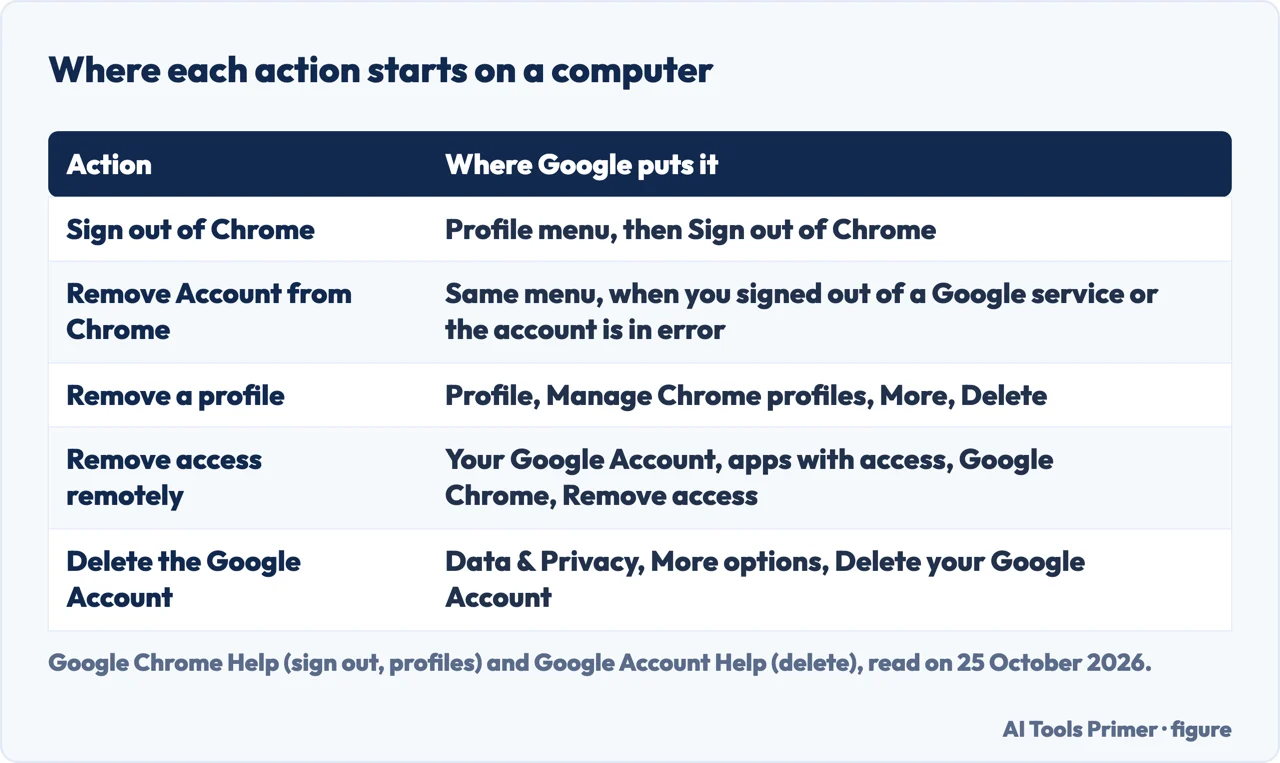
| Chrome to stop using the account on this computer | Profile menu, Sign out of Chrome; Remove Account from Chrome in some cases | The page lists the steps, not what is deleted |
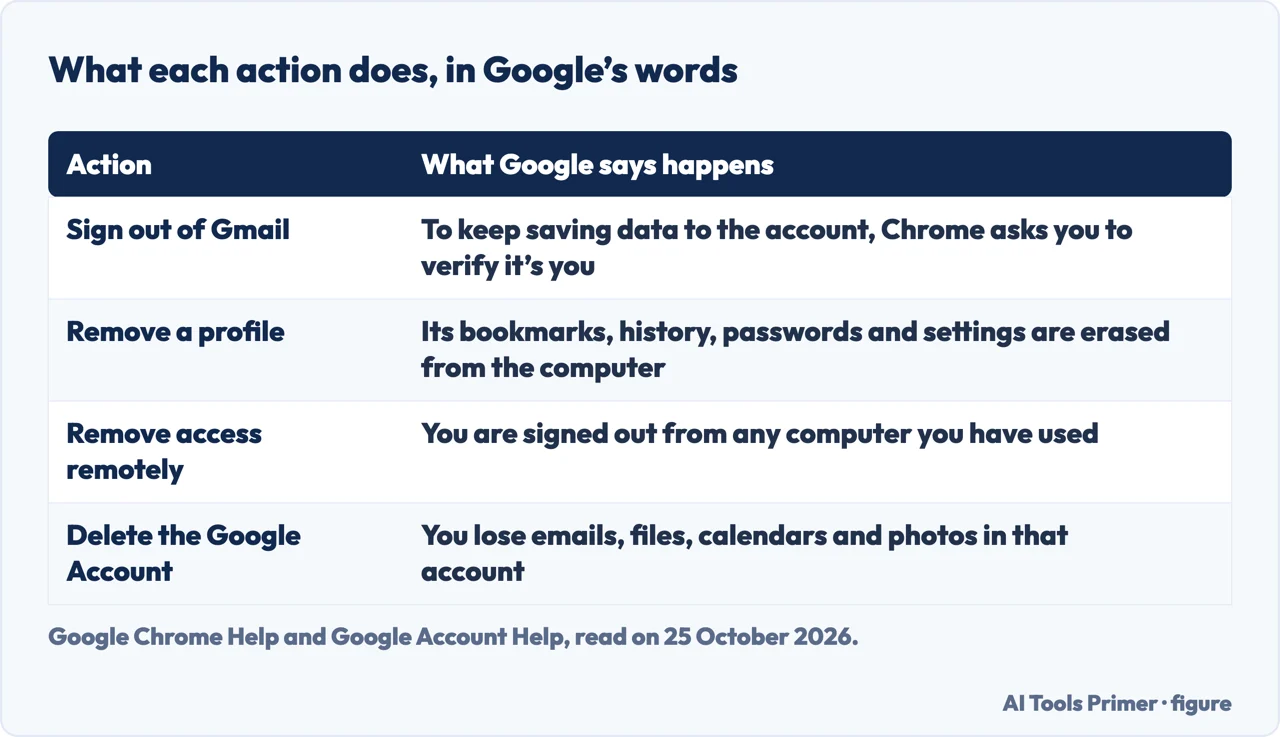
| A whole Chrome profile gone | Profile, Manage Chrome profiles, More, Delete | Its bookmarks, history, passwords and settings are erased from the computer |
| Chrome removed from a computer you cannot reach | Your Google Account, apps with access, Google Chrome, Remove access | You are signed out from any computer you have used |
| The Google Account itself deleted | Data & Privacy, More options, Delete your Google Account | You lose the emails, files, calendars and photos in that account |
Signing out of Chrome, and the other Remove Account button
Google’s page on signing out of Chrome gives one path on a computer: open Chrome, select the Profile icon at the top right, then Sign out of Chrome. Its tip adds a second button for two cases: if you signed out of a Google web service like Gmail, or your Google Account is in an error state, select Remove Account from Chrome. The page says that after you sign out of a Google web service like Gmail, you will need to verify it’s you in order to keep saving new data to your Google Account.
Signing in to Chrome is optional, according to the same page. It lets you set the sign-in permission under Google Services Settings: sign in when you sign in to a Google service, stay signed out of Chrome, or have Chrome ask every time. Google’s sign-in page says you need a Google Account to sign in to Chrome, and that to use more than one account or to share the computer you add a profile. Neither of those pages lists what Chrome deletes when you sign out, so we do not say.
Removing a profile
This is the one that deletes something on the computer. Google’s page on Chrome profiles says profiles keep your bookmarks, history, passwords and other settings separate, and that after you remove a profile they are “erased from the computer”. The steps: open Chrome, select Profile at the top right, under Other Chrome profiles select Manage Chrome profiles, select the profile you want to remove, then More and Delete, and confirm with Delete. The page describes one selected profile at a time; it does not describe a way to delete all of them at once.
Google’s page says Chrome profiles are ideal for sharing a computer or for keeping work and personal accounts apart. It also warns that if someone has your device, they can switch to any other Chrome profile on it and see things such as the websites you visited.
From another computer, or before you give one away
Google’s sign-out page says you can remove your Google Account from one of your devices even if you do not have it with you; you are then signed out from any computer you have used before, including the one you are using. The steps: open Chrome, go to your Google Account to manage apps with access, and under Google apps select Google Chrome, then Remove access.
Another Google Account page covers what to do with a device that is not yours or that you will give away. On someone else’s device it recommends browsing in private and closing all browser windows; if you did not, you can clear the browser’s cache and cookies; and if you left the account signed in on a device you no longer have, sign out remotely. For a device you plan to give away or throw away it recommends clearing all data and applications from it.
Deleting the Google Account itself
Google’s page says you can delete your Google Account at any time, and that if you change your mind you might be able to recover it, but only within a certain amount of time. It has three steps. First, learn what deleting means: you lose all the data and content in the account, such as emails, files, calendars and photos, you cannot use Google services where you sign in with it, and you lose subscriptions and content bought with it on YouTube or Google Play. On a Chromebook you cannot use any Chrome apps or extensions for the deleted account. Second, review and download your account info, and add a new email address to any service where you used the Gmail address. Third, go to Data & Privacy, scroll to Your data & privacy options, select More options and Delete your Google Account, and follow the instructions.
Two other lines from the page matter here. If you have more than one Google Account, “deleting one won’t delete the others”. And for an account that has been hacked, it suggests using Security Checkup before you delete it, because afterwards you can no longer review that account’s activity. Deleting only Gmail is a different route, covered in the page on deleting a Gmail account; Google’s page says deleting the Gmail account does not delete the entire Google Account.
What the blogs add
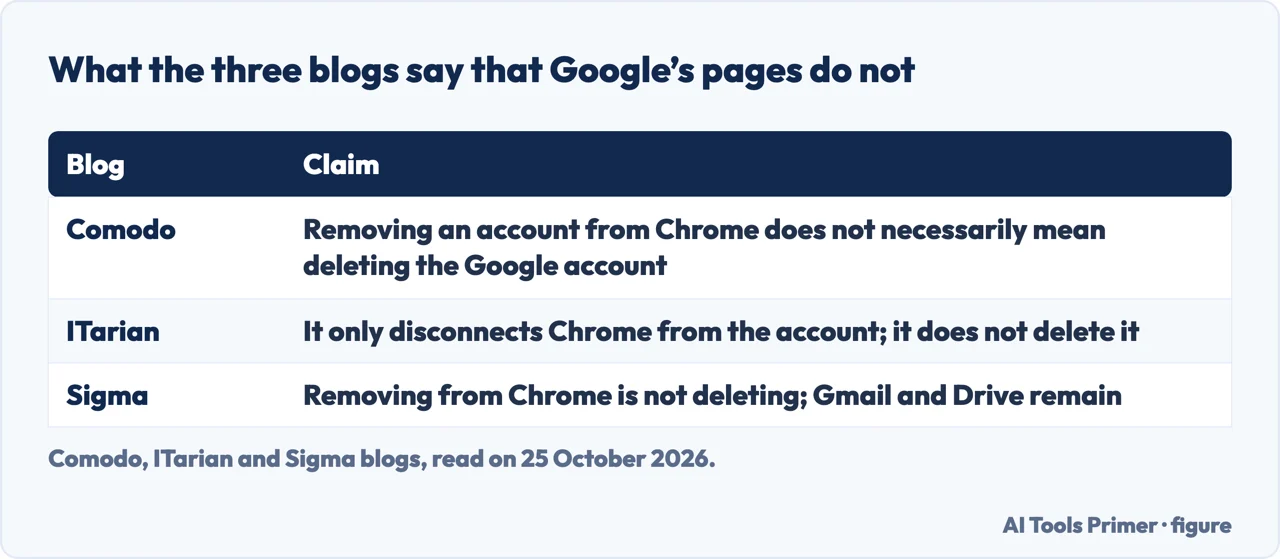
Comodo’s and ITarian’s blogs, published by security and IT-management vendors, and the blog of the Sigma browser all make the same point: removing an account from Chrome is not the same as deleting the Google Account. ITarian says it only disconnects Chrome from the account. Sigma separates four cases: signing out of Chrome, removing a profile, removing an account from an Android device and deleting the Google Account, and says Gmail, Drive and the other services remain unless you delete the account. The AI box in Google’s results answers both questions in one box, which is why this page keeps them apart.
None of the three gives the consequences that Google’s own pages list for each action, so the table above is the one to check.
Where to start
Four ways in.
- “I just want it off this computer.”
- Sign out and Remove Account — signout
- “I want the profile gone.”
- What is erased — profile
- “I no longer have that computer.”
- Remote removal — remote
- “I want the account itself gone.”
- Google’s three steps — account
Chrome, when it asks for more
Settings that live in one place, and the ones that live in two.
The Google account behind it
Deleting Gmail, and getting into the account.
Questions people also ask
How do I delete unwanted Google accounts?
It depends on which you mean. To delete the account itself, Google’s page has three steps and ends at Data & Privacy, More options, Delete your Google Account. To remove one from Chrome on a computer, the sign-out page gives the Profile menu and Sign out of Chrome.
How do I remove an account from a browser?
On a computer, Google’s Chrome Help says to select Profile and then Sign out of Chrome, or Remove Account from Chrome if you signed out of a service like Gmail or the account is in an error state. We did not read pages for other browsers.
How do I delete unwanted accounts?
Google’s deletion page covers one Google Account at a time: if you have more than one, deleting one does not delete the others. To take an account out of Chrome without deleting it, use the sign-out steps above.
How do I delete all Chrome accounts at once?
The Chrome Help page we read describes removing a profile one selected profile at a time. It does not describe a way to remove them all together.
Not covered here. We did not delete or remove any account to test this. The statements come from Google Account Help (deleting the account, and deleting account information from a device) and Google Chrome Help (signing out, profiles, signing in), read on 25 October 2026, and from three blogs used for what they claim: Comodo, ITarian and Sigma. The steps are those Google gives for Chrome on a computer; the Android and iPhone versions are on separate Google pages that we did not read, and menu wording may change.
Reddit, Stack Exchange and Super User threads in the results were not read. Managed work or school profiles, Chromebooks beyond the lines quoted, and other browsers are not covered.
The search volume and difficulty behind this page were read in Semrush on 29 August 2026.
Sources
- Google Account Help — Delete your Google Account — support.google.com, read 25 October 2026.
- Google Chrome Help — Sign out of Chrome (Computer) — support.google.com, read 25 October 2026.
- Google Chrome Help — Manage Chrome with multiple profiles (Computer) — support.google.com, read 25 October 2026.
- Google Account Help — Delete your Google Account information from a device — support.google.com, read 25 October 2026.
- Google Chrome Help — Sign in to Chrome — support.google.com, read 25 October 2026.
- Comodo — Delete Google Account on Chrome Safely — blog.comodo.com, read 25 October 2026.
- ITarian — How To Delete Google Account from Chrome Easily (3 October 2025) — www.itarian.com, read 25 October 2026.
- Sigma — How to Remove a Google Account from Chrome Safely — www.sigmabrowser.com, read 25 October 2026.
Written by Alberto Gulotta
Founder and editor of AI Tools Primer, writing from Palermo, Italy. Thirty-five years of taking computers apart, starting with a Commodore 64 — the long version is on the about page.
Something wrong on this page? Write to aitoolsprimer@gmail.com and it gets fixed.
Written on 25 October 2026.
Independence and limits
No affiliate links and no paid placements anywhere on this site. Nobody pays to appear here, and no company has seen this page before you did.
This is general information, not professional advice. Where a page touches money, health, safety or the law, it names its source and the date it was read — and your situation may still differ. See the privacy page and the cookie policy.