
Software · guide
How to enable cookies on Chrome: two settings, two places
By Alberto Gulotta · Updated · 15 min read
To learn how to enable cookies on Chrome, start from Google’s path: Settings, Privacy and security, Third-party cookies, Allow third-party cookies. That covers cookies from the services a page embeds. The data a site saves for itself is a second setting, On-device site data, and Google says sites may not work as expected when it is off.
The sections below take the two settings in turn, then a single site, Android, iPhone and iPad, Incognito, the message that says cookies are off, work and school devices, what happened to Google’s plan to remove third-party cookies, and the menu older guides describe.
| Setting | Where, on a computer | Where, on Android | What it decides |
|---|---|---|---|
| Third-party cookies | Settings, Privacy and security, Third-party cookies | Settings, Site settings, Third-party cookies | Cookies set by the services a page embeds |
| On-device site data | Settings, Privacy and security, Site settings, Additional content settings | Settings, Site settings, On-device site data | Whether the site you visit can save data at all |
| Sites allowed to use third-party cookies | Third-party cookies, Add | Third-party cookies, Add site exception | One site, in normal and Incognito windows |
| The switch in the address bar | Third-party cookies blocked | Page info, Cookies and site data | The site you are on, for now |
Third-party cookies: the setting Google names first
Google’s help page for Chrome on a computer gives the path: open Chrome, select More at the top right, then Settings, then Privacy and security, then Third-party cookies, and choose Allow third-party cookies or Block third-party cookies. Google’s Account Help gives the same steps for anyone who has been told to turn cookies on to use a Google account. Google’s developer page for Chrome Enterprise points users to the address chrome://settings/cookies to add a site to the list of exceptions described below.
The choice matters because of what these cookies are. Google describes first-party cookies as created by the site you visit, the one shown in the address bar, and third-party cookies as created by different sites whose images, ads or text the page embeds. Any of those embedded sites, Google says, can use third-party cookies to personalize content and ads and to learn about what you do elsewhere on the web. Blocking them means all third-party cookies are blocked unless the site is on your exceptions list, and Google warns that if you don’t allow sites to save cookies, sites may not work as expected.
The University of Virginia’s help desk gives a second route on a Mac, through Site settings, where Third-party cookies sits under Content. Either way you reach the same choice.
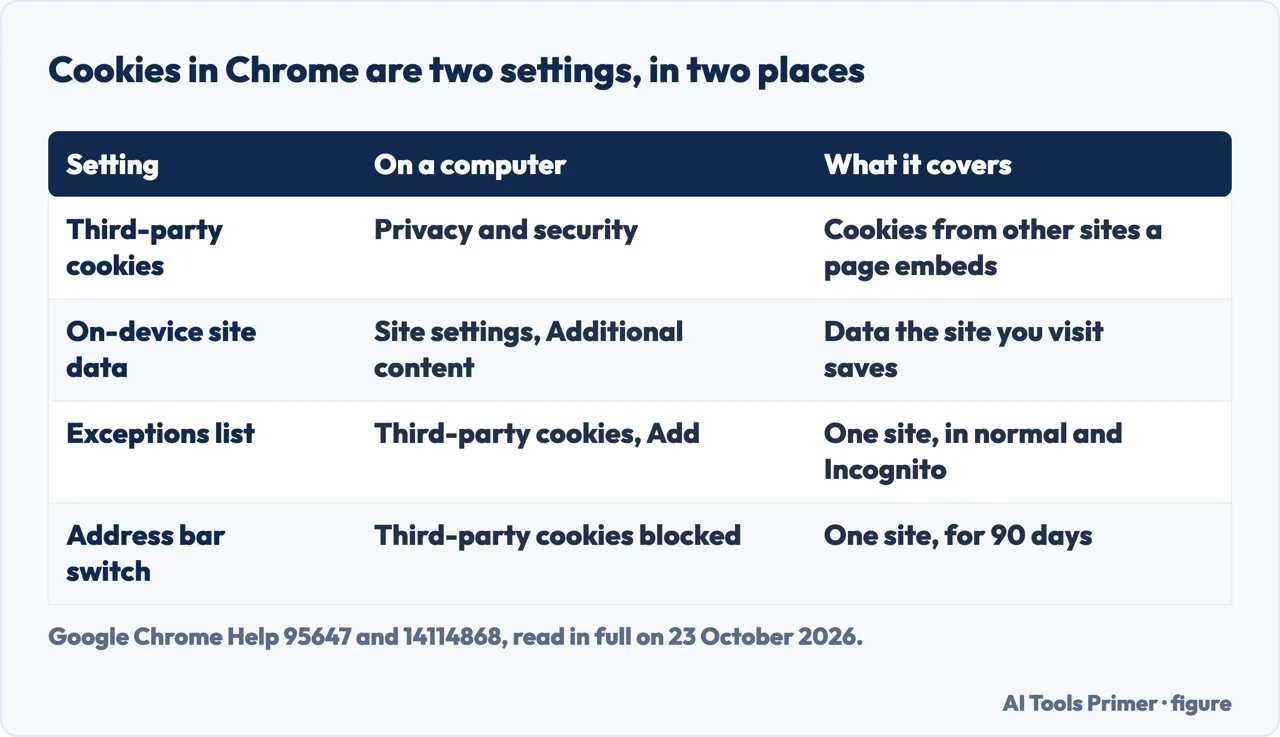
The cookies of the site itself are a different setting
On the cookie page, Google sends anyone who wants to manage first-party cookies somewhere else: to a feature it calls on-device site data. Google’s Account Help says first-party cookies are a type of on-device site data. The page for it offers three choices: allow sites to save data on your device, delete the data sites have saved when you close all windows, and “Don’t allow sites to save data on your device (not recommended)”. Of the last, Google says sites may not work as you expect.
On a computer the setting is under Settings, Privacy and security, Site settings, Additional content settings, On-device site data, where you select a default behavior. If a site says cookies are off while third-party cookies are allowed, this is the next place to look. Of the seven results Google showed us for this question, only Google’s own two pages mention it, each as a link to another page.
Allowing cookies for one site only
You can keep third-party cookies blocked and still let one site use them. On a computer, Google’s steps are: Settings, Privacy and security, Third-party cookies, then under “Sites allowed to use third-party cookies” select Add and enter the web address. To cover a whole domain, Google says to put [*.] before the domain name, so [*.]google.com matches drive.google.com and calendar.google.com. Sites on this list can use third-party cookies in both regular and Incognito browsing modes. Northern Illinois University gives the same steps to its students for one address, its Blackboard site.
There is also a shorter route for the site you are on. In the address bar, select Third-party cookies blocked and turn on Third-party cookies; the page reloads, and the address bar then says Third-party cookies allowed. In regular browsing, Google says, the site is added to your exceptions list and keeps third-party cookies for 90 days or until you turn the setting off. In Incognito it lasts only for that session.
On an Android phone or tablet
Google’s Android page puts the main choice under Settings, Site settings, Third-party cookies, with the same two options. Its steps for a single site go through Privacy and security, Third-party cookies, then + Add site exception, so the same help page names two different routes into the setting. For the site you are on, tap Page info at the left of the address bar, then Cookies and site data, and turn Third-party cookies on. Google adds that a temporary permission given this way carries over into Incognito and can’t be reset from there.
The data the site itself saves has its own switch on Android too: Settings, then under Advanced, Site settings, On-device site data, which you turn on or off.
On an iPhone or iPad
Google’s cookie page for Chrome on iPhone and iPad describes one task: deleting cookies, under Settings, Privacy and Security, Delete Browsing Data, Cookies, Site Data. It has no section on allowing or blocking them. Lifewire, in an article updated on 24 June 2025, says that on iOS “Chrome automatically enables cookies, and they cannot be disabled”.
Two university guides point somewhere else. Northern Illinois University and the University of Arkansas for Medical Sciences tell students to open the iPhone’s own Settings app, select Chrome, and turn on Allow Cross-Website Tracking. Google’s page does not mention that switch, and we did not check it on an iPhone. ITarian describes a Cookies and Site Data screen with an Allow All Cookies option inside Chrome; Google’s iPhone page does not show one.
In an Incognito window
Google says third-party cookies are blocked by default in Incognito mode, and that sites which rely on them may not work as expected there. In our reading, that is why a site can work in a normal window and fail in an Incognito one. The exceptions list is the fix that lasts: Google says sites on it can use third-party cookies in both regular and Incognito modes. A temporary permission given inside an Incognito window ends with the session. What Incognito keeps and deletes is on Incognito mode.
When a site says cookies are turned off
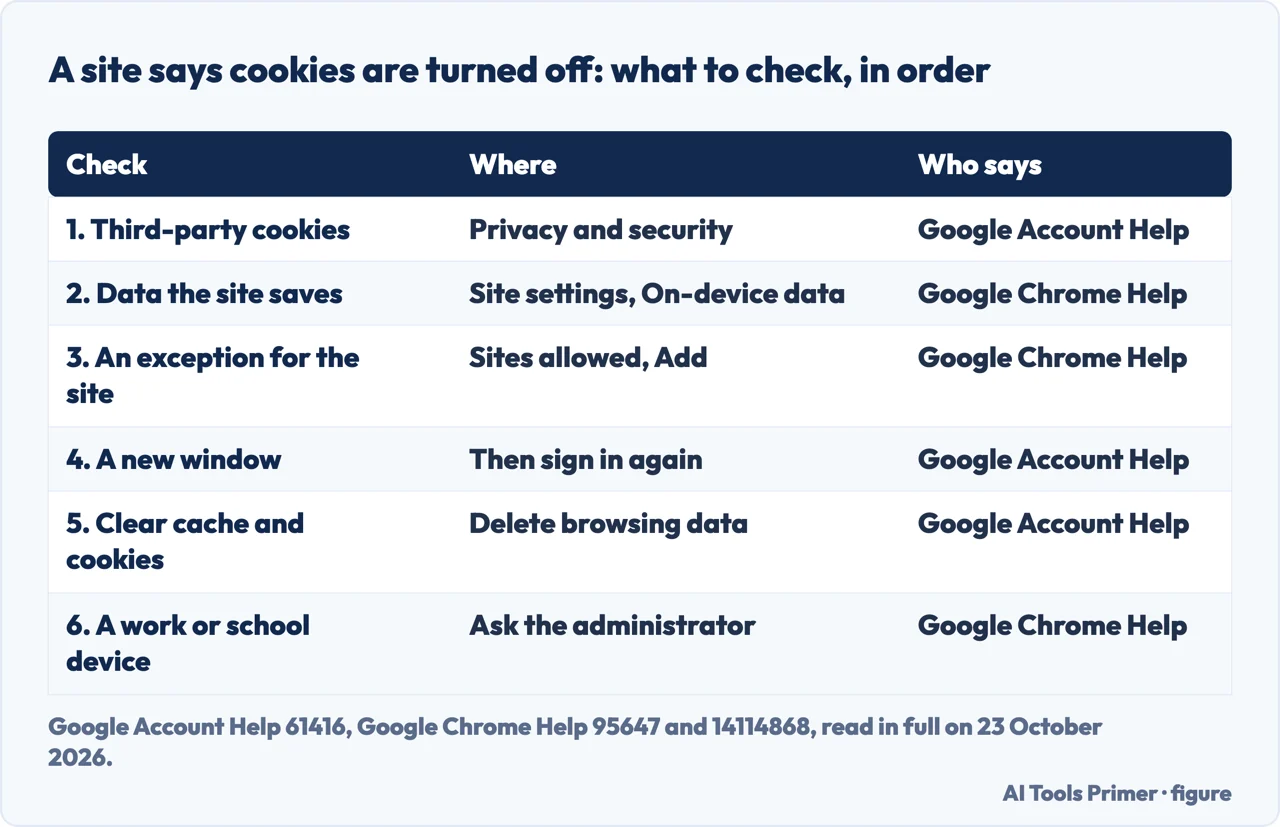
Google’s Account Help is blunt about its own message: “If you get a message that cookies are turned off, you need to turn them on to use your account.” Its order is to turn them on with the steps above, try signing in again, and if the message stays, to open a new browser window, clear the browser’s cache and cookies, browse in private, or change the browser’s privacy settings, trying to sign in after each.
Put together with the Chrome pages, the checks run, in our reading, in this order: the third-party cookie setting, then on-device site data, then an exception for the one site that complains. Embedded services are where third-party cookies matter, and Google’s cookie page gives an example: a class portal with Google Docs inside it, where Google Docs asks for permission to use what it has saved about you. That connection, Google says, lasts for 30 days or as long as you remain active.
On a work or school device
On a managed Chrome the choice may not be yours. Google’s page warns that on a Chromebook used at work or school you might not be able to change the setting, and sends you to your administrator. Google’s developer page on Chrome Enterprise explains why: administrators can set a policy called BlockThirdPartyCookies. Enabled, it prevents third-party cookies from being set; disabled, it allows them and prevents users from blocking them from chrome://settings; left unset, they are allowed by default and users can block them. A second policy, CookiesAllowedForUrls, allows them for listed sites only. That page was written around Google’s test on 1% of users and was last updated in December 2023.
What happened to the plan to remove third-party cookies
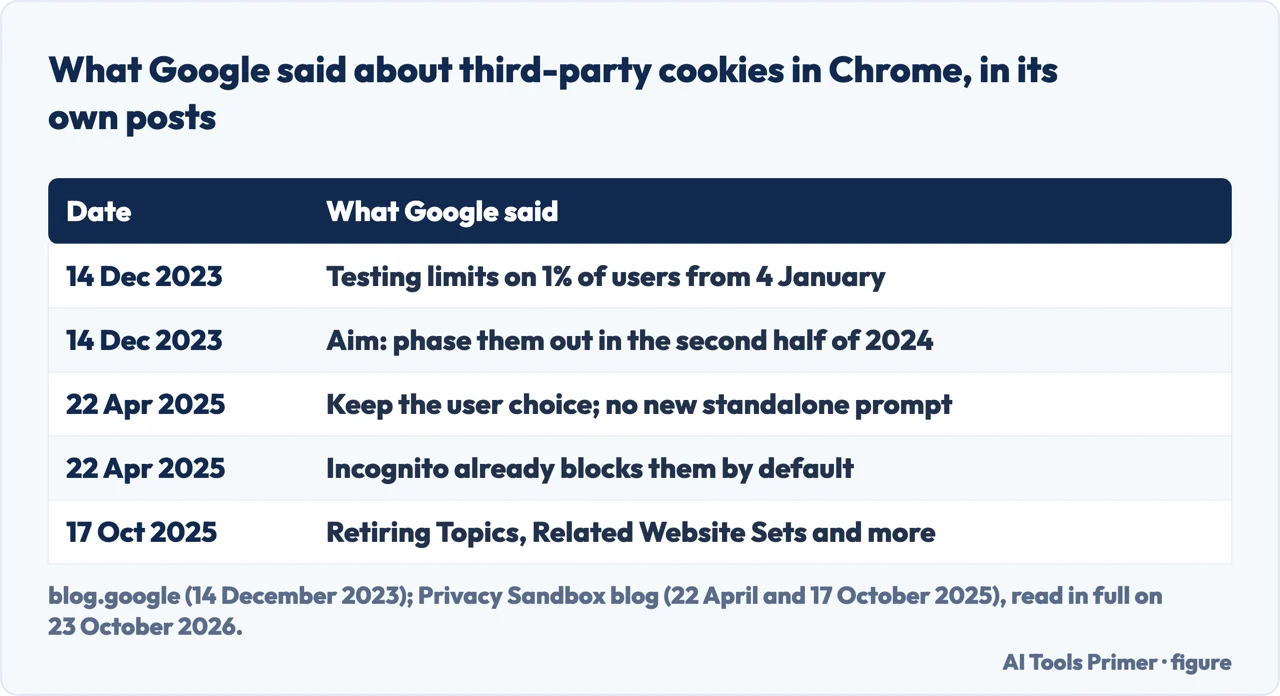
Google’s own posts tell what happened to its plan in three steps. On 14 December 2023, Google announced it would start testing Tracking Protection on 4 January, restricting third-party cookies by default for 1% of Chrome users, as a step towards phasing them out for everyone in the second half of 2024, subject to the UK’s Competition and Markets Authority.
On 22 April 2025, Google’s Privacy Sandbox blog said Chrome would keep its current approach of offering users a choice, and “will not be rolling out a new standalone prompt for third-party cookies”. Users can make the choice in Chrome’s Privacy and Security settings, and Incognito already blocks them by default. On 17 October 2025, the same blog said Google would retire most of the Privacy Sandbox technologies built to replace them, Topics and Related Website Sets among them, while keeping CHIPS and FedCM. Chrome’s cookie help page, read on 23 October 2026, still describes a switch for related sites, Allow related sites to see your activity in the group.
Where to start
Five ways in.
- “A site says cookies are off.”
- The checks in order — message
- “Only for one site.”
- The exceptions list — one site
- “I’m on a phone.”
- Android first — android
- “It works, but not in Incognito.”
- Blocked by default — incognito
- “The menu isn’t there.”
- The old name — old menu
More on Chrome
The pages next to this one: the other site-by-site switch, the graphics setting, extensions and tabs.
What a browser keeps about you
Private windows, the padlock, and the cookies to delete when one site stops working.
Questions people also ask
Why are cookies not working in Chrome?
Two settings can cause it. Third-party cookies may be blocked under Privacy and security, or the site may not be allowed to save data under Site settings, On-device site data. Google also says third-party cookies are blocked by default in Incognito, and that a work or school administrator can lock the setting.
How to allow cookies on Chrome on iPhone?
Google’s help page for Chrome on iPhone and iPad documents deleting cookies, not allowing them. Lifewire says Chrome on iOS enables cookies automatically and they cannot be disabled. Two university guides point to a switch in the iPhone’s own Settings app, under Chrome, which we did not check.
Why are cookies disabled?
Because a setting blocks them: third-party cookies blocked in Chrome’s settings or in an Incognito window, on-device site data set to Don’t allow, or a policy set by an administrator. Google’s Account Help says a cookies-off message has to be fixed by turning them on before you can use your account.
How can I enable cookies in Chrome?
On a computer: Settings, Privacy and security, Third-party cookies, Allow third-party cookies. Then check Site settings, On-device site data, and allow sites to save data. On Android the first setting is under Site settings. To allow one site only, add it under Sites allowed to use third-party cookies.
How do I know if cookies are enabled on Chrome?
Open Settings, Privacy and security, Third-party cookies to see which option is selected, and Site settings, On-device site data for the site’s own data. On a site, the address bar shows Third-party cookies blocked when they are blocked, and Third-party cookies allowed after you turn them on for that site.
Not covered here. We did not change these settings on a computer, a phone or a tablet for this page. The steps are Google’s, from its Chrome Help and Account Help pages read on 23 October 2026; the dates and decisions about third-party cookies are from Google’s own blog posts. Lifewire, Northern Illinois University, the University of Virginia and the University of Arkansas for Medical Sciences are guides, attributed where they are used; CookieYes, ITarian and CookieScript sell cookie or IT software and are cited only for the menu they describe.
The switch in the iPhone’s Settings app that two university guides describe was not checked. Google’s Chrome Help pages do not say whether third-party cookies are allowed or blocked by default outside Incognito, and this page does not say either. The videos in the results were not watched.
The search volume and difficulty behind this page were read in Semrush on 29 August 2026.
Sources
- Google Chrome Help — Delete, allow, and manage cookies in Chrome (Computer) — support.google.com, read 23 October 2026.
- Google Chrome Help — Delete, allow, and manage cookies in Chrome (Android phone & tablet) — support.google.com, read 23 October 2026.
- Google Chrome Help — Delete, allow, and manage cookies in Chrome (iPhone & iPad) — support.google.com, read 23 October 2026.
- Google Chrome Help — Learn about on-device site data in Chrome (Computer) — support.google.com, read 23 October 2026.
- Google Chrome Help — Learn about on-device site data in Chrome (Android) — support.google.com, read 23 October 2026.
- Google Account Help — Turn cookies on or off — support.google.com, read 23 October 2026.
- Google blog — The next step toward phasing out third-party cookies in Chrome (14 December 2023) — blog.google, read 23 October 2026.
- Privacy Sandbox blog — Next steps for Privacy Sandbox and tracking protections in Chrome (22 April 2025) — privacysandbox.google.com, read 23 October 2026.
- Privacy Sandbox blog — Update on Plans for Privacy Sandbox Technologies (17 October 2025) — privacysandbox.google.com, read 23 October 2026.
- Privacy Sandbox — Chrome Enterprise third-party cookie policies (last updated 21 December 2023) — privacysandbox.google.com, read 23 October 2026.
- Lifewire — How to Enable Cookies in Popular Web Browsers (updated 24 June 2025) — www.lifewire.com, read 23 October 2026.
- Northern Illinois University — Enable Third-Party Cookies (Blackboard) — www.niu.edu, read 23 October 2026.
- University of Virginia LTS Help — How do I enable cookies in my browser? (updated 30 October 2025) — lts-help.its.virginia.edu, read 23 October 2026.
- University of Arkansas for Medical Sciences — How to Enable Third-Party Cookies in Your Browser — educationaldevelopment.uams.edu, read 23 October 2026.
- CookieYes — How to enable cookies in Google Chrome? (a seller of cookie consent software) — www.cookieyes.com, read 23 October 2026.
- ITarian — How to Allow Cookies on Chrome Safely and Easily (15 October 2025; a seller of IT software) — www.itarian.com, read 23 October 2026.
- CookieScript — How to enable cookies in Chrome? (18 March 2025; a seller of cookie consent software) — cookie-script.com, read 23 October 2026.
Written by Alberto Gulotta
Founder and editor of AI Tools Primer, writing from Palermo, Italy. Thirty-five years of taking computers apart, starting with a Commodore 64 — the long version is on the about page.
Something wrong on this page? Write to aitoolsprimer@gmail.com and it gets fixed.
Written on 23 October 2026.
Independence and limits
No affiliate links and no paid placements anywhere on this site. Nobody pays to appear here, and no company has seen this page before you did.
This is general information, not professional advice. Where a page touches money, health, safety or the law, it names its source and the date it was read — and your situation may still differ. See the privacy page and the cookie policy.