
Web · guide
What error 400 means, for a visitor and for the server’s owner
By Alberto Gulotta · Updated · 12 min read
An error 400 is the status a server sends when it cannot or will not process a request because of something it perceives as a client error, as the HTTP standard defines it. MDN says clients should expect the same request, repeated unchanged, to fail with the same error; in our reading, something has to change first.
| Who | What the page read says |
|---|---|
| RFC 9110 (June 2022), section 15.5.1 | Examples of a perceived client error: malformed request syntax, invalid request message framing, deceptive request routing |
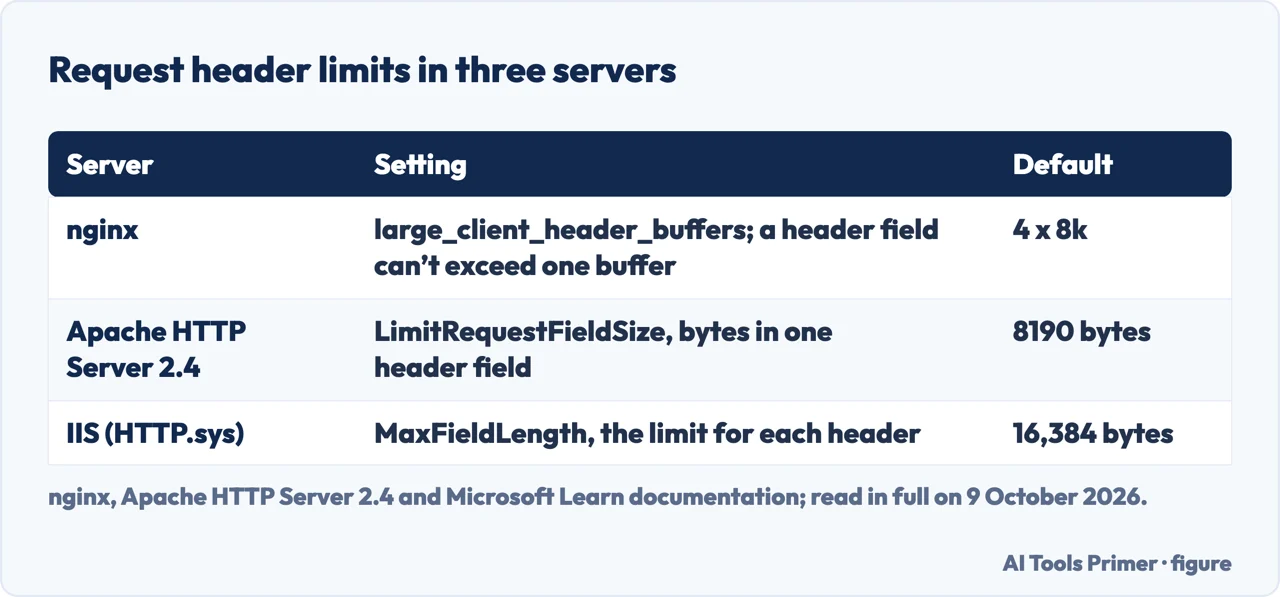
| nginx, large_client_header_buffers | A request header field larger than one buffer gets 400; a request line larger than one buffer gets 414. Default: 4 buffers of 8k |
| Apache HTTP Server 2.4 | Under the default HttpProtocolOptions Strict, a request line without CRLF gets 400; with StrictHostCheck on (2.4.49 and later), so does a hostname not listed in ServerName or ServerAlias |
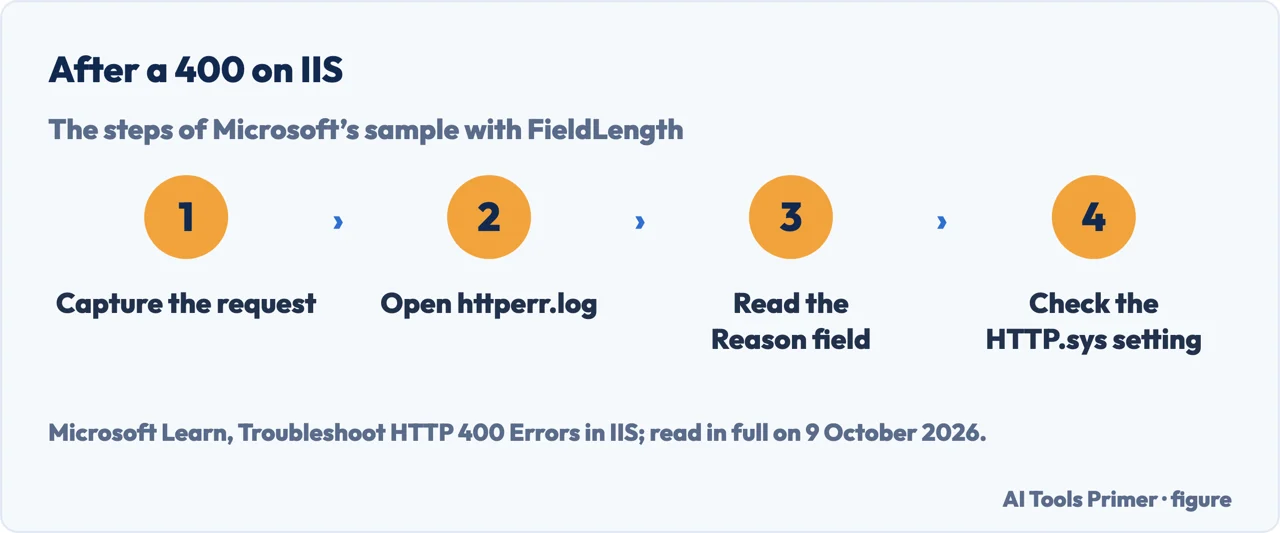
| IIS and HTTP.sys | Requests that break the HTTP parsing rules, exceed time limits or fail other rules HTTP.sys enforces get 400; the reason is written in httperr.log. MaxFieldLength defaults to 16,384 bytes |
| Microsoft account sign-in | Usually a sign-in request with a password that couldn’t be processed; this can happen after too many attempts in a row, or with an issue in the app, browser, device or network |
Two readers. If the error is on someone else’s site, the four steps below are the part for you. If the server is yours, the limits are further down, server by server. Whether the connection is encrypted is a separate matter, in HTTP and HTTPS.
What the code says, and what it leaves out
The standard. RFC 9110, the HTTP Semantics specification of June 2022, puts 400 in the 4xx class, the codes for a client that seems to have erred. Its examples for 400 are malformed request syntax, invalid request message framing and deceptive request routing. For the whole class it asks the server, except for a HEAD request, to explain the error situation and whether it is temporary or permanent, and the browser to display that explanation.
Repeating it. MDN’s page on 400 says that clients receiving one “should expect that repeating the request without modification will fail with the same error”. In our reading, reloading the same page with the same address and the same cookies sends the same request again.
The neighbours. A server that has erred sends a 5xx code instead, covered in 500 internal server error; a site that gives no answer at all is in this site can’t be reached, and a browser that refuses the certificate is in your connection is not private.
For a visitor: what to change before reloading
The order is ours. The steps come from RFC 9110, a Google Chrome Community answer, Google’s Chrome Help and Microsoft Support, and each one says whose it is.
- Read the address. RFC 9110 names malformed request syntax as an example of a 400. In a thread on the Google Chrome Community, a Platinum Product Expert lists a malformed URL or invalid characters among the common causes, and says to make sure there are no extra characters, spaces or symbols in it.
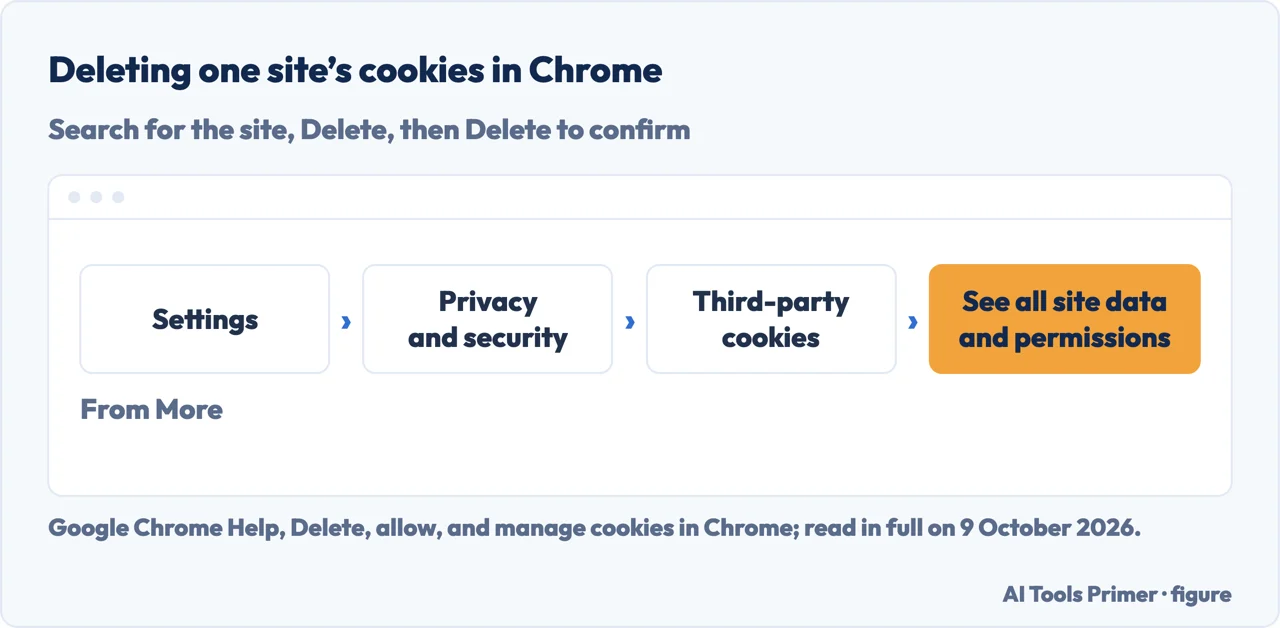
- Delete that site’s cookies. Google’s Chrome Help, on a computer: More, Settings, Privacy and security, Third-party cookies, See all site data and permissions, search for the website’s name, Delete beside it, and Delete again to confirm. Google warns that deleting cookies may sign you out of sites that remember you.
- Try an Incognito window. The same Product Expert says that if the site works there, the issue is likely with extensions or cookies, and suggests disabling extensions temporarily to check whether one is causing the problem.
- If it was a Microsoft sign-in. Microsoft’s page on Error 400 when signing in gives four numbered steps: Other ways to sign in at the prompt; for a Microsoft app, delete or uninstall it and reinstall the latest version; another phone, tablet or computer; and the other network (Wi-Fi to mobile data, or vice versa).
Why the cookies, and why only one site
What nginx documents. nginx reads a request header into a buffer of 1K by default, and its documentation says a request with long cookies may not fit; it then allocates larger buffers, set by large_client_header_buffers, by default four of 8K each. A request header field that cannot fit into one of those buffers gets a 400, and a request line that cannot fit gets a 414 instead.
Our reading. Cookies travel in a request header, so a site that has piled up enough of them can make the next request too large for its own server, and the server then answers 400 to every page of that site. That is a deduction from the nginx page, which names long cookies only as a reason a request may not fit into the first 1K buffer. It is also why the fix starts with that one site’s cookies rather than all of them.
What deleting costs. Google’s page on clearing cache and cookies says some settings on sites get deleted: for example, if you were signed in, you’ll need to sign in again. A wider clean-up, all sites and a time range, is More, then Delete browsing data, in the same Help Center.
For the server’s owner: which limit refused it
A 400 that every visitor gets on one page points at the request the page makes; a 400 that only some visitors get points at what those visitors carry, such as cookies or an authentication header. That split is our reading; the limits below are the servers’ own documentation.
If it is your server: the limit that refused the request
nginx. The directive is large_client_header_buffers number size, in the http or server context. The page says the limits are similarly applied in HTTP/2 and HTTP/3 connections, where the size of one buffer limits a request header field compressed with HPACK and QPACK respectively. If the directive is set at server level, the value from the default server can be the one used.
Apache HTTP Server 2.4. LimitRequestFieldSize sets the bytes allowed in one request header field, 8190 by default, and Apache says SPNEGO authentication headers can be up to 12,392 bytes; it adds that under normal conditions the value should not be changed. The page gives three examples of a 400. HttpProtocolOptions, available in 2.2.32 or 2.4.24 and later and Strict by default, answers 400 to a request line missing its CRLF, which is why OpenSSL’s s_client needs -crlf; with its Require1.0 option, which removes the default support for HTTP/0.9 requests, the page’s example of an unsupported HTTP version gets 400 too. StrictHostCheck, added in 2.4.49 and off by default, returns 400 for a hostname not listed by ServerName or ServerAlias in the virtual host that best matches the connection; Apache says it has no effect in non-default virtual hosts.
IIS. Microsoft’s troubleshooting article says HTTP.sys blocks requests that break its parsing rules before IIS sees them, and logs the reason to httperr.log in C:\Windows\System32\LogFiles\HTTPERR. In its sample, the reason is FieldLength, a field length limit exceeded, and the prime candidate is MaxFieldLength, whose default is 16,384 bytes; to reproduce the error, Microsoft had set it to 2. A 400 with no entry there is technically possible, although not very likely, Microsoft says: an ISAPI filter or extension or an HTTP module in IIS can set it, or a proxy or other network device between the client and the server.
Kerberos on IIS. On a site that uses Windows Integrated Authentication, Microsoft says HTTP 400 - Bad Request (Request header too long) may occur if the user is a member of many Active Directory groups, because the Kerberos token in the header grows with the number of groups. Its two numbered workarounds are fewer groups, or MaxFieldLength and MaxRequestBytes set to (4/3 × T) + 200 bytes, T being the token size, under HKEY_LOCAL_MACHINE\System\CurrentControlSet\Services\HTTP\Parameters on Windows Server 2016 and later, then a restart of the HTTP service and of related services such as IIS. It also gives maximum values for the two keys and, depending on the environment, using NTLM instead of Kerberos, which it considers less secure. Microsoft says changing these keys should be considered extremely dangerous: larger HTTP packets may make Http.sys use more memory, which can increase the computer’s vulnerability to malicious attacks.
An application that answers 400. MDN’s example is a POST to a REST API whose JSON body has unescaped line breaks: the server answers 400, and the response body carries a message field explaining what could not be read, so the client can retry with a properly formed request. Microsoft’s IIS article notes that a website can also return 400 because of its own code logic or runtime configuration, such as ASP.NET, and suggests the Failed Requests Tracing feature in IIS when the earlier steps don’t resolve it.
Which versions. RFC 9110 dates from June 2022. MDN’s page was last modified on 28 August 2026. The Apache directives are from the HTTP Server 2.4 documentation, with the versions given above. Microsoft’s Kerberos page is article 2020943, for Windows Server 2016, last updated 24 March 2025, and its IIS troubleshooting article was last updated 8 January 2025. A slow answer rather than a refused one is a different problem, in slow DNS lookup.
Where to start
Five ways in.
- “What does 400 mean?”
- What the code says — what it says
- “It’s someone else’s site.”
- The four steps — if you are visiting
- “Why delete cookies?”
- The header limit — why cookies
- “It’s my server.”
- nginx, Apache, IIS — if it is your server
- “It’s my API.”
- The application — api
Other errors a browser shows
A server that has erred, no answer at all, a certificate the browser refuses, and a slow name lookup.
Questions people also ask
How do I fix a 400 server error?
Change the request before sending it again: MDN says clients should expect a request repeated unchanged to fail with the same error. As a visitor, check the address and delete that site’s cookies. On your own server, find the limit that refused it: large_client_header_buffers in nginx, the HttpProtocolOptions rules in Apache, or the reason field in httperr.log on IIS.
How to resolve error code 400?
When it appears while signing in to a Microsoft account, Microsoft’s page says: “Error 400 usually means your sign-in request with a password couldn’t be processed.” It gives four steps: Other ways to sign in, the latest version of the app, another device, another network. Anywhere else, the code alone doesn’t name the cause.
Is a 400 error temporary?
The code doesn’t say. RFC 9110 asks the server to explain in its response whether the condition is temporary or permanent, and MDN says clients should expect the same request, repeated unchanged, to fail again. In our reading, a 400 goes away when the request changes; Microsoft’s sign-in page also lists too many attempts in a row.
How to clear a 400 bad request?
In Chrome on a computer, Google’s steps for one site are More, Settings, Privacy and security, Third-party cookies, See all site data and permissions, the site’s name, Delete, and Delete again to confirm. Google warns that deleting cookies may sign you out of sites that remember you. Then reload the page; that step is ours.
Not covered here. It does not cover a specific application framework, a hosting control panel, or the 4xx codes other than 400.
Sources
- RFC 9110, HTTP Semantics (June 2022) — sections 15.5, 15.5.1 and 15.6 — www.rfc-editor.org, read 9 October 2026.
- MDN Web Docs — 400 Bad Request — developer.mozilla.org, read 9 October 2026.
- nginx documentation — Module ngx_http_core_module — nginx.org, read 9 October 2026.
- Apache HTTP Server 2.4 documentation — core — httpd.apache.org, read 9 October 2026.
- Microsoft Learn — Troubleshoot HTTP 400 Errors in IIS — learn.microsoft.com, read 9 October 2026.
- Microsoft Learn — HTTP 400 Error Responses to HTTP Requests (article 2020943) — learn.microsoft.com, read 9 October 2026.
- Microsoft Support — Error 400 when signing in — support.microsoft.com, read 9 October 2026.
- Google Chrome Help — Delete, allow, and manage cookies in Chrome (computer) — support.google.com, read 9 October 2026.
- Google Account Help — Clear cache & cookies (computer) — support.google.com, read 9 October 2026.
- Google Chrome Community — I continually get the following message (June 2025) — support.google.com, read 9 October 2026.
Written by Alberto Gulotta
Founder and editor of AI Tools Primer, writing from Palermo, Italy. Thirty-five years of taking computers apart, starting with a Commodore 64 — the long version is on the about page.
Something wrong on this page? Write to aitoolsprimer@gmail.com and it gets fixed.
Written on 9 October 2026.
Independence and limits
No affiliate links and no paid placements anywhere on this site. Nobody pays to appear here, and no company has seen this page before you did.
This is general information, not professional advice. Where a page touches money, health, safety or the law, it names its source and the date it was read — and your situation may still differ. See the privacy page and the cookie policy.