
Software · guide
How to fix gps not working on Android and iPhone
By Alberto Gulotta · Updated · 11 min read
How to fix gps not working: Google, Apple and Verizon point to location on, the map app allowed to use it, battery saving off, and Wi-Fi or mobile data on; the order is ours. GPS.gov says buildings, bridges and trees degrade accuracy, and Google says a fully charged phone with no signal under a clear sky may need repair.
| What to look at | Android | iPhone |
|---|---|---|
| Location on | Location services on (Google Maps Help) | Settings › Privacy & Security › Location Services |
| The map app allowed | Google Maps’ location permission | Apple Maps: While Using the App or Widgets; Google Maps: While Using the App or Always |
| Battery saving off | Battery saver mode off | Low Power Mode off (Verizon) |
| A connection | Mobile data or Wi-Fi on, Airplane mode off | Cellular data or Wi-Fi on |
| Date and time | Not in the Android pages read | Settings › General › Date & Time, Set Automatically |
| Extra signals | Improve Location Accuracy, under Location Accuracy | Location Services also uses Bluetooth where available, Wi-Fi hotspots and cell towers |
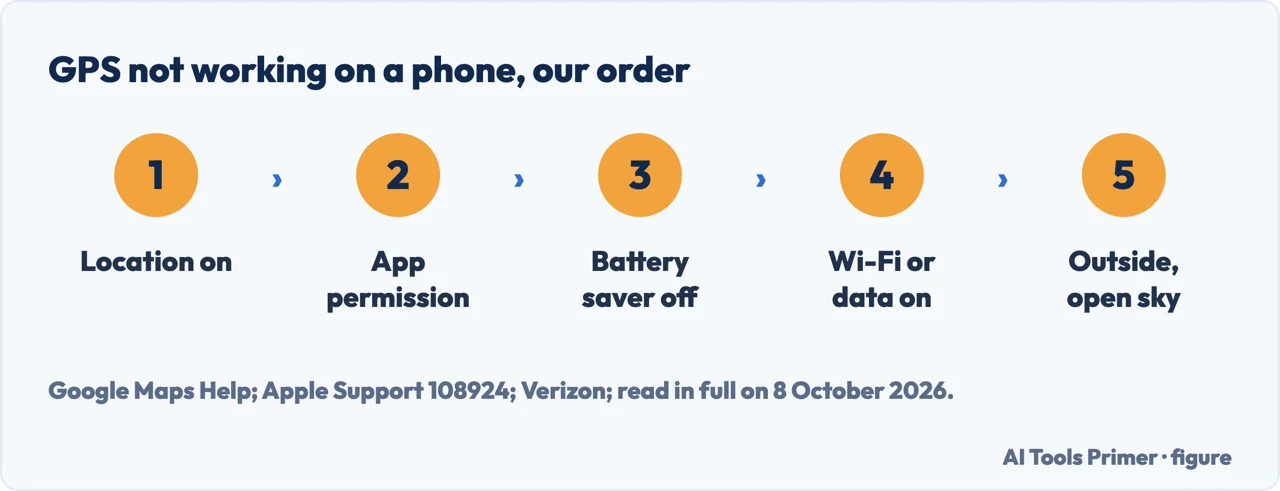
- Turn location on and allow the app. On Android, Google Maps Help says that when the location button is red with a question mark, turning on Location services lets Maps find you. On an iPhone, Apple’s steps for Apple Maps: Settings › Privacy & Security › Location Services, Location Services on, and Maps set to While Using the App or Widgets; Google’s for Google Maps end with While Using the App or Always. Google adds that if Google Maps can get your location only under specific conditions, it may report GPS Signal Lost during navigation at other times.
- Turn off battery saving. Google says to turn off Battery saver if your location jumps around on the map, and that some phones turn off GPS when the battery is low, some only in particular situations, such as when the screen is also off or Maps is in the background. Verizon lists Low Power Mode on an iPhone and Power Saver on Android among the settings that disable GPS services.
- Turn on Wi-Fi or mobile data. Google and Apple both say to turn on mobile data or Wi-Fi, and Google to turn off Airplane mode. Verizon says most GPS apps need a stable internet connection.
- Set the date and time. On an iPhone, Apple says to set the date, time and time zone correctly, with Set Automatically on if possible, under Settings › General › Date & Time.
- Restart. Apple says to close Maps and reopen it, and that you can also try restarting the iPhone; Google says the Android phone can be restarted if the location is still wrong. Verizon adds updating the apps and the phone’s software.
- Test outside. Move to an open place with a clear view of the sky, which Verizon says is where GPS works best. If a fully charged phone cannot get a GPS signal outdoors under a clear sky, Google says it may need to be repaired.
Where GPS cannot reach
How close it gets. GPS.gov, the US government’s site on the system, says smartphones with GPS are typically accurate to within 4.9 metres (16 feet) under open sky, and that accuracy gets worse near buildings, bridges and trees. The common causes of a wrong position it gives include signals blocked by buildings, bridges and trees, use indoors or underground, and signals reflected off buildings or walls, called multipath.
In a car. Google says some glare-reducing car window films have a metallic base that blocks GPS signals from reaching a phone inside the car.
Indoors and underground. Google says GPS signals are not available indoors or underground, so a GPS Signal Lost message there may be expected; if it happens too often, Google says it may indicate a problem, such as low battery or a fault in the phone or its GPS unit.
What the blue dot in Google Maps says
The circle. When Maps is not sure of your location, a light blue circle shows around the blue dot, and you could be anywhere inside it; the smaller the circle, the surer Maps is. A grey dot, or none, means Maps cannot find you and shows the last location you visited.
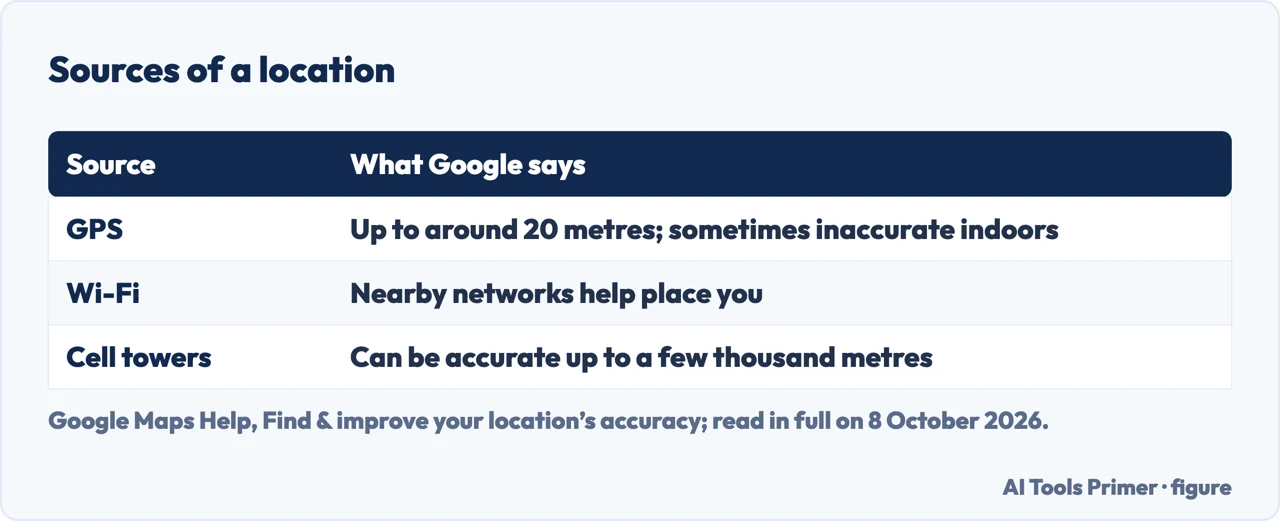
Where the location comes from. Google says Maps uses sources such as satellites for GPS, which places you up to around 20 metres and is sometimes inaccurate inside buildings or underground; nearby Wi-Fi networks; and the mobile connection to cell towers, which can be accurate up to a few thousand metres.
Calibrating. If the beam of the blue dot is wide or points the wrong way, Google says to calibrate the compass by moving the phone in a figure 8 until the beam narrows. Outside, the blue dot’s Calibrate option uses the camera, depending on Street View availability.
Is it Maps or the GPS? Google suggests a third-party GPS status app rather than another navigation app, particularly on Android, because another navigation app might use non-GPS location signals. Maps showing your location when you are not navigating doesn’t necessarily mean the phone has a GPS signal: Google says Maps needs a GPS location for active navigation.
Location Accuracy on Android
What it is. On Android devices with Google Play services, Location Accuracy uses Wi-Fi access points, cell towers and sensors such as the accelerometer and gyroscope as well as GPS, to find the location faster, which Google says matters indoors or near tall buildings.
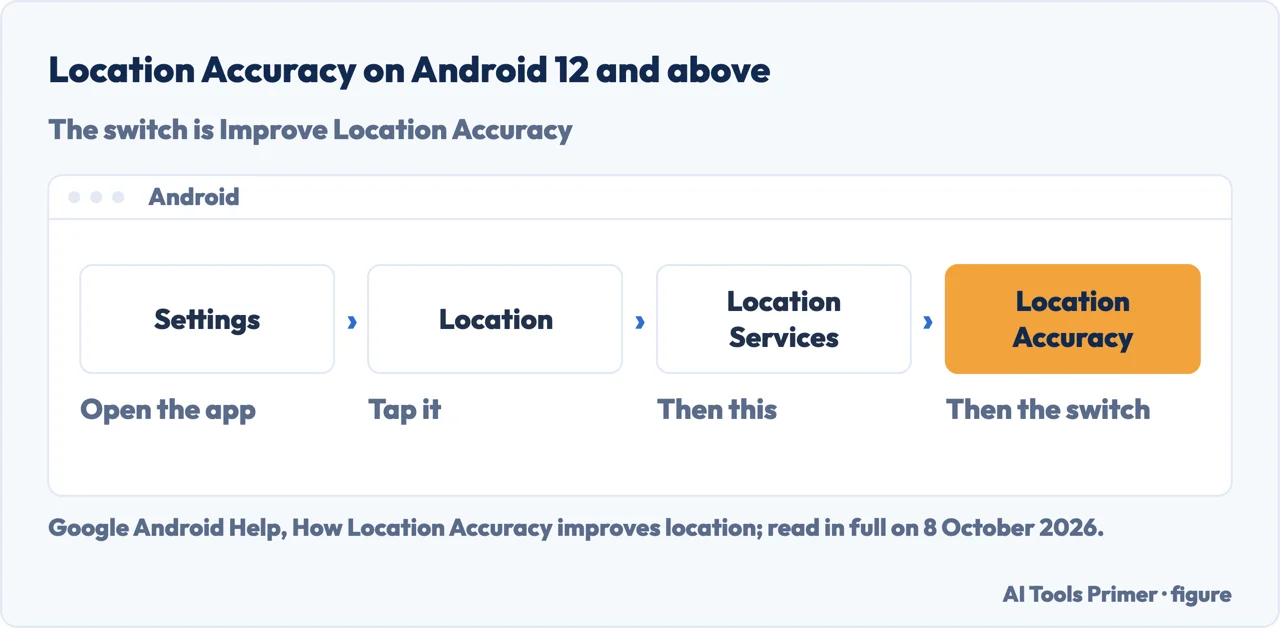
Where it is. On Android 12 and above: Settings › Location › Location Services › Location Accuracy, then Improve Location Accuracy. On Android 11 and lower: Settings › Location › Advanced › Location Accuracy, then Improve Location Accuracy.
When it is off. Google says that, when available, only GPS and the phone’s sensors are used, which makes it harder for apps and services such as Google Maps. When it is on, Google periodically collects data about wireless signals with a rotating identifier that it says is not tied to a person or account.
On an iPhone
What Location Services uses. Apple says Location Services uses GPS and Bluetooth where available, together with crowd-sourced Wi-Fi hotspots and cell towers, to find the approximate location. GPS and cellular location are available on iPhone and on iPad Wi-Fi + Cellular models.
Per app. In Settings › Privacy & Security › Location Services, an app can be set to Never, Ask Next Time Or When I Share, While Using the App, or Always, though Apple says some apps might offer only two options. In iOS 14 and later, some apps can use Precise Location, and it can be turned off per app to share only an approximate location, which an app that needs an exact position may not work well with: that last part is our reading, not Apple’s.
Which phones. The Android steps come from Google’s help for Google Maps and for Android devices with Google Play services, with separate paths for Android 12 and above and Android 11 and lower; the iPhone steps from Apple’s support pages published in January and May 2026, and Apple says Maps features vary by country and region. Verizon’s answers come from its support FAQ for a phone whose GPS isn’t working.
Other location questions. What the iPhone keeps on when location is off is in how to turn off location on iPhone, and sharing a position with someone in sharing your location. Coordinates stored inside photos are in metadata in photos, a missing phone in how to find lost iPhone, and battery saving in why is my battery draining so fast.
Where to start
Five ways in.
- “Where do I start?”
- The checks in order — the checks in order
- “It fails in the car.”
- Where GPS cannot reach — where gps cannot reach
- “The dot is wrong.”
- The blue dot — the blue dot
- “It is an Android.”
- Location Accuracy — location accuracy on android
- “It is an iPhone.”
- On an iPhone — on an iphone
More on location
The settings around the position of a phone.
Questions people also ask
Why is my GPS suddenly not working?
Verizon lists location turned off, power saving on, mobile data or Wi-Fi off or Airplane mode on, and app permissions. Google adds that some phones turn GPS off when the battery is low, and that some car window films with a metallic base block GPS signals.
How do I reset my GPS?
None of the Google and Apple pages read for this guide describes a GPS reset. Steps they do give: restart the phone; calibrate the compass in Google Maps by moving the phone in a figure 8; on an iPhone, check Location Services and the date and time, and close and reopen Maps.
How do I get my GPS working on my phone?
From Google, Apple and Verizon: turn on location, give the map app permission, turn off battery saving, and turn on Wi-Fi or mobile data with Airplane mode off. Google suggests Location Accuracy for a more accurate blue dot; Apple adds setting the date and time, automatically if possible. Verizon says GPS works best under a clear sky.
How to fix no GPS signal?
Google says GPS signals are not available indoors or underground, and lists limited location permissions, which may bring a GPS Signal Lost message, battery savers that turn GPS off, and metallic car window films. If a fully charged phone outside under a clear sky still gets no signal in a GPS status app, Google says it may need repair.
Not covered here. It does not cover car navigation units, GPS watches, or an address that the map does not know; Verizon says to check that the address exists on the map when the route cannot be found.
Sources
- Google Maps Help — Troubleshoot persistent GPS Signal Lost notifications in Google Maps: permissions, car window films, battery savers and a GPS status app — support.google.com, read 8 October 2026.
- Google Maps Help — Find & improve your location’s accuracy in Google Maps (Android): the blue dot, battery saver, calibration and the sources of a location — support.google.com, read 8 October 2026.
- Google Maps Help — Find & improve your location’s accuracy in Google Maps (iPhone & iPad): the location permission and compass calibration — support.google.com, read 8 October 2026.
- Google Android Help — How Location Accuracy improves location: what it uses and where the setting is — support.google.com, read 8 October 2026.
- Apple Support — If Maps isn’t working on your Apple device (published 15 May 2026): Location Services, date and time, a connection — support.apple.com, read 8 October 2026.
- Apple Support — Turn Location Services and GPS on or off on your iPhone, iPad, or iPod touch (published 14 January 2026) — support.apple.com, read 8 October 2026.
- GPS.gov — GPS Accuracy: smartphones under open sky, and what degrades a position — www.gps.gov, read 8 October 2026.
- Verizon — GPS not finding location: the settings that disable GPS, and an address the map does not know — www.verizon.com, read 8 October 2026.
Written by Alberto Gulotta
Founder and editor of AI Tools Primer, writing from Palermo, Italy. Thirty-five years of taking computers apart, starting with a Commodore 64 — the long version is on the about page.
Something wrong on this page? Write to aitoolsprimer@gmail.com and it gets fixed.
Written on 8 October 2026.
Independence and limits
No affiliate links and no paid placements anywhere on this site. Nobody pays to appear here, and no company has seen this page before you did.
This is general information, not professional advice. Where a page touches money, health, safety or the law, it names its source and the date it was read — and your situation may still differ. See the privacy page and the cookie policy.