
Software · guide
How to reset PRAM on Mac: Apple’s keys, timing and the SMC
By Alberto Gulotta · Updated · 10 min read
How to reset PRAM on Mac means holding Option, Command, P and R from startup on an Intel-based Mac; Apple says to release after about 20 seconds, and that the steps are not needed with Apple silicon. This page sets out the steps, the timings that differ, the SMC reset and where the guides differ.
| Question | Answer | Where it comes from |
|---|---|---|
| What is PRAM? | Apple calls it NVRAM (or PRAM): a small amount of memory for settings such as sound volume, display resolution, startup disk and time zone | Apple Support |
| How is it reset on an Intel-based Mac? | Shut down, turn on, then immediately hold Option, Command, P and R for about 20 seconds | Apple Support |
| And on a Mac with Apple silicon? | The steps do not apply and are not needed | Apple Support |
| What may change afterwards? | Settings that were reset, which you may have to adjust | Apple Support |
| Does resetting the SMC reset PRAM? | No: resetting the SMC does not affect NVRAM or PRAM | Apple Support |
Apple’s steps, and what the memory holds
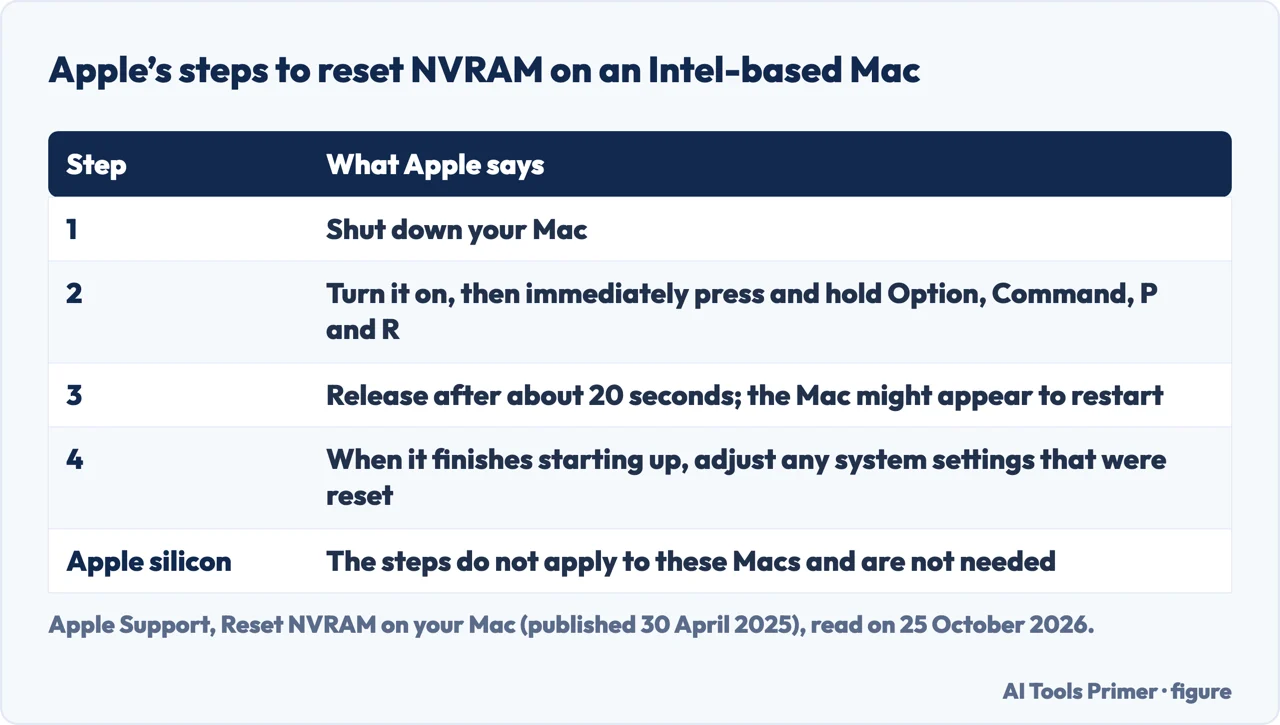
Apple’s article, published on 30 April 2025, says NVRAM (or PRAM) is a small amount of memory that your Mac uses to store and quickly access certain system settings such as sound volume, display resolution, startup-disk selection and time zone. Normally you manage these settings in System Settings, without resetting NVRAM. If one or more settings still don’t work as expected, resetting might help, and Apple recommends it as the final step before you sell, give away, trade in or recycle an Intel-based Mac. Its steps for an Intel-based Mac are: shut down your Mac; turn it on, then immediately press and hold Option, Command, P and R; release the keys after about 20 seconds, during which your Mac might appear to restart, for example with the startup sound heard more than once or the Apple logo seen more than once. When the Mac finishes starting up, you might need to adjust any system settings that were reset.
Apple’s page on startup key combinations, published on 13 March 2025, lists Option-Command-P-R as the combination that resets NVRAM or PRAM. If your Mac doesn’t seem to recognise it during startup, Apple points to its guidelines for using startup key combinations. If a desktop Mac loses settings such as sound volume or time zone every time you shut down and unplug it, Apple says it might need service to replace the small battery that NVRAM uses. After a reset, a Mac with a Redundant Array of Independent Disks (RAID) scheme may not start up; Apple says to hold the Option key while restarting, select your startup disk at the prompt, then choose it in Startup Disk settings.
How long to hold the keys
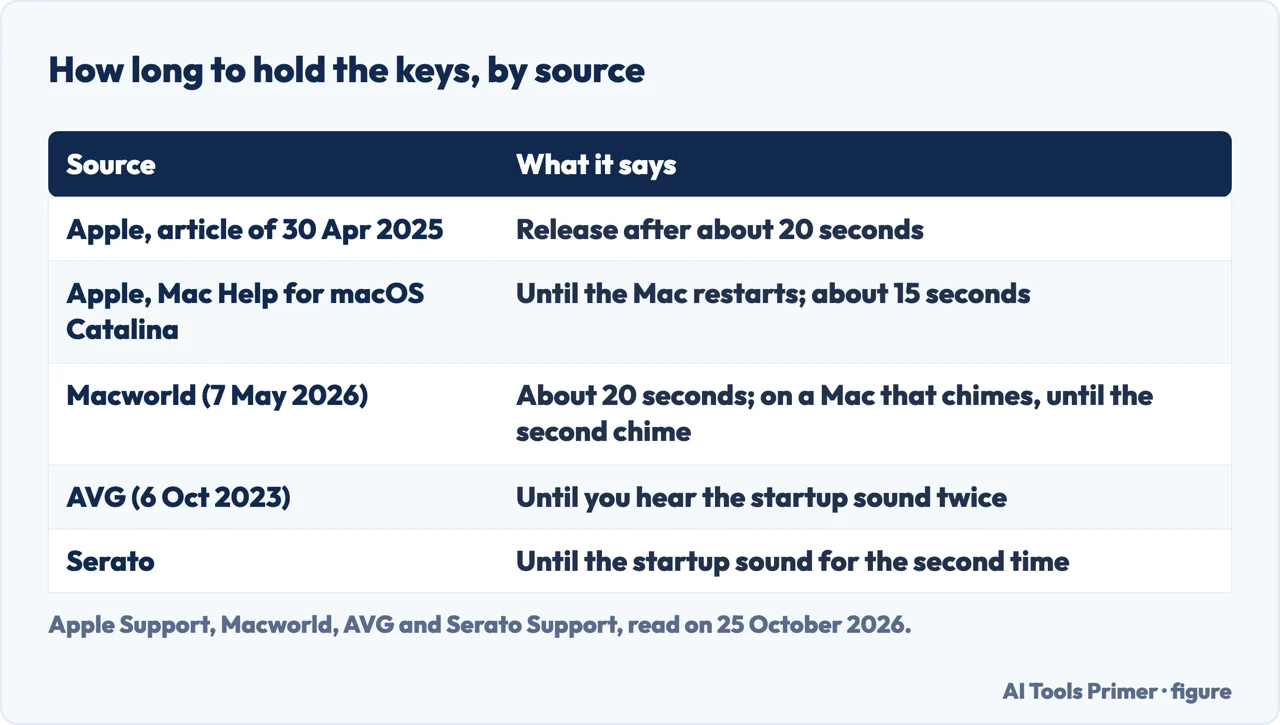
The sources give different stopping points. Apple’s article of 30 April 2025 says to release after about 20 seconds. The Mac Help guide for macOS Catalina 10.15 says to press the keys immediately, before the black screen with the Apple logo appears, and to continue until the Mac restarts, about 15 seconds. Of the guides, Macworld, in an article dated 7 May 2026, and Avira, in a blog dated 4 December 2023, give about 20 seconds, and Macworld adds that on an older Mac that chimes at boot you hold the keys until the second startup chime. AVG, in a guide dated 6 October 2023, says to hold until you hear the startup sound twice, or to see the Apple logo appear and disappear twice on a Mac without a startup sound. Serato’s support page says to press before the grey screen appears and hold until the startup sound is heard a second time.
Purple Computing, in a page we could not date, says that on a Mac that plays a startup sound you can release after the second one, and on a Mac with the Apple T2 Security Chip after the Apple logo appears and disappears for the second time. None of the guides we read gives the 15 seconds of the older Apple guide. Apple’s current article uses the sound and the logo as examples of what you might see during those 20 seconds.
Apple silicon: no key combination
Apple says the steps to reset NVRAM don’t apply to Mac computers with Apple silicon and aren’t needed on them. The guides add reasons that differ. Macworld says that on M-series Macs the NVRAM is tested during startup and the Mac resets it if it detects a need, there is no key combination, and if you want the system to inspect it you shut the Mac down completely, wait a few seconds and power it up. OWC’s blog of 1 March 2022 says M1 Macs don’t need NVRAM cleared and that on reboot they run a sequence to make sure it is right. Avira says something stronger: M1 and M2 Macs don’t have PRAM or NVRAM, or an SMC. Apple’s wording is only that the steps are not needed, and its SMC article says the SMC resets automatically on a Mac with Apple silicon, so the guides’ claim that the memory does not exist is Avira’s, not Apple’s.
The SMC: a separate reset
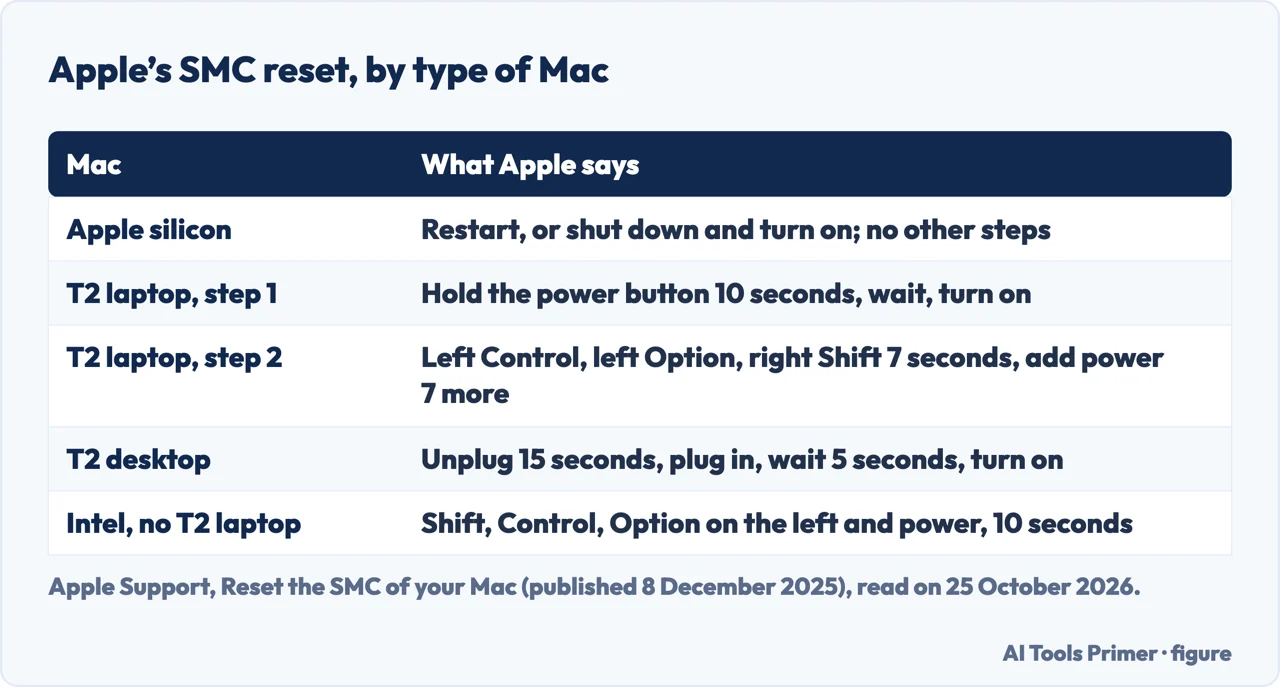
Apple’s article on the SMC, published on 8 December 2025, opens by saying you most likely do not need to reset it, though it may help on Intel-based Macs when the battery isn’t charging, the Mac isn’t turning on, the fans run fast, a Mac laptop gets too warm or the built-in camera isn’t working. It lists what the SMC controls, including power button behaviour, battery and charging, USB port power, fans, lid behaviour and sensors, and says resetting the SMC does not affect NVRAM or PRAM. On Apple silicon, restart or shut down and turn on again; no other steps are needed. On a Mac with the T2 chip, first shut down and hold the power button (or Touch ID) for 10 seconds, wait, and turn it on; if the issue persists, shut down and hold left Control, left Option and right Shift for 7 seconds, add the power button, and keep all four held for another 7 seconds. A T2 desktop, or a desktop without T2, is shut down and unplugged for 15 seconds, plugged in, and turned on after 5 seconds. For a laptop without Apple silicon or T2, hold left Shift, Control and Option, add the power button, keep all four for 10 seconds, release and press the power button.
Is it safe?
Apple says only that resetting may change some system settings, so you might have to adjust them. AVG, in its guide of 6 October 2023, says it is safe to reset PRAM or NVRAM but that many system features will go back to their original factory settings, and to back up important data first. For a Mac that does not start after a reset, see Apple’s RAID note above. For a Mac that will not turn on at all, see a MacBook that will not turn on but is charging, and for one that is slow to start, slow boot on a Mac.
Where to start
Five ways in.
- “Just the keys.”
- Apple’s steps — steps
- “How long?”
- The timings — timing
- “I have an M-series Mac.”
- Apple silicon — silicon
- “And the SMC?”
- A separate reset — smc
- “Is it safe?”
- What changes — safe
Mac startup and power
Pages on starting, restarting and charging a Mac.
Questions people also ask
Is it safe to reset PRAM on Mac?
Apple says it may change some settings, such as sound volume, display resolution and startup disk, which you may need to adjust. AVG adds that many features return to factory settings and advises a backup.
How do I reset the PRAM and SMC on my Mac?
They are two resets. PRAM or NVRAM: hold Option, Command, P and R from startup on an Intel-based Mac. SMC: the steps depend on whether the Mac has Apple silicon, a T2 chip or neither, as Apple lists.
How do I reset my PRAM?
Shut down, turn on, and immediately hold Option, Command, P and R for about 20 seconds on an Intel-based Mac, as Apple says. Apple silicon Macs do not need it.
How do I reset the SMC on my MacBook?
On Apple silicon, restart. On a T2 laptop, hold the power button for 10 seconds, then, if needed, left Control, left Option and right Shift for 7 seconds plus the power button for 7 more.
Not covered here. We did not reset the memory on a Mac. The statements come from Apple Support (reset NVRAM, published 30 April 2025; the Mac Help guide for macOS Catalina 10.15; the startup key combinations, 13 March 2025; the SMC article, 8 December 2025), and from guides by Macworld (7 May 2026), AVG (6 October 2023), Avira (4 December 2023), OWC (1 March 2022), Serato and Purple Computing, used for what they claim. Key combinations depend on the Mac and the macOS version.
The Apple community thread of 2018 in the results was not used. The Intel-based and Apple silicon distinction is Apple’s; we did not check which model you have.
The search volume and difficulty behind this page were read in Semrush on 29 August 2026.
Sources
- Apple Support — Reset NVRAM on your Mac (published 30 April 2025) — support.apple.com, read 25 October 2026.
- Apple Support — Reset NVRAM or PRAM on Mac (Mac Help, macOS Catalina) — support.apple.com, read 25 October 2026.
- Apple Support — Mac startup key combinations (published 13 March 2025) — support.apple.com, read 25 October 2026.
- Apple Support — If you can’t start up your Mac after resetting NVRAM or PRAM — support.apple.com, read 25 October 2026.
- Apple Support — Reset the SMC of your Mac (published 8 December 2025) — support.apple.com, read 25 October 2026.
- Macworld — How to reset NVRAM, PRAM, and SMC on a Mac (7 May 2026) — www.macworld.com, read 25 October 2026.
- AVG — How to Reset Your Mac’s PRAM, NVRAM, or SMC (6 October 2023) — www.avg.com, read 25 October 2026.
- Avira — Reset the PRAM/NVRAM and SMC on your Mac (4 December 2023) — www.avira.com, read 25 October 2026.
Written by Alberto Gulotta
Founder and editor of AI Tools Primer, writing from Palermo, Italy. Thirty-five years of taking computers apart, starting with a Commodore 64 — the long version is on the about page.
Something wrong on this page? Write to aitoolsprimer@gmail.com and it gets fixed.
Written on 25 October 2026.
Independence and limits
No affiliate links and no paid placements anywhere on this site. Nobody pays to appear here, and no company has seen this page before you did.
This is general information, not professional advice. Where a page touches money, health, safety or the law, it names its source and the date it was read — and your situation may still differ. See the privacy page and the cookie policy.