
iPhone · guide
How to see blocked numbers on iphone, and unblock them
By Alberto Gulotta · Updated · 9 min read
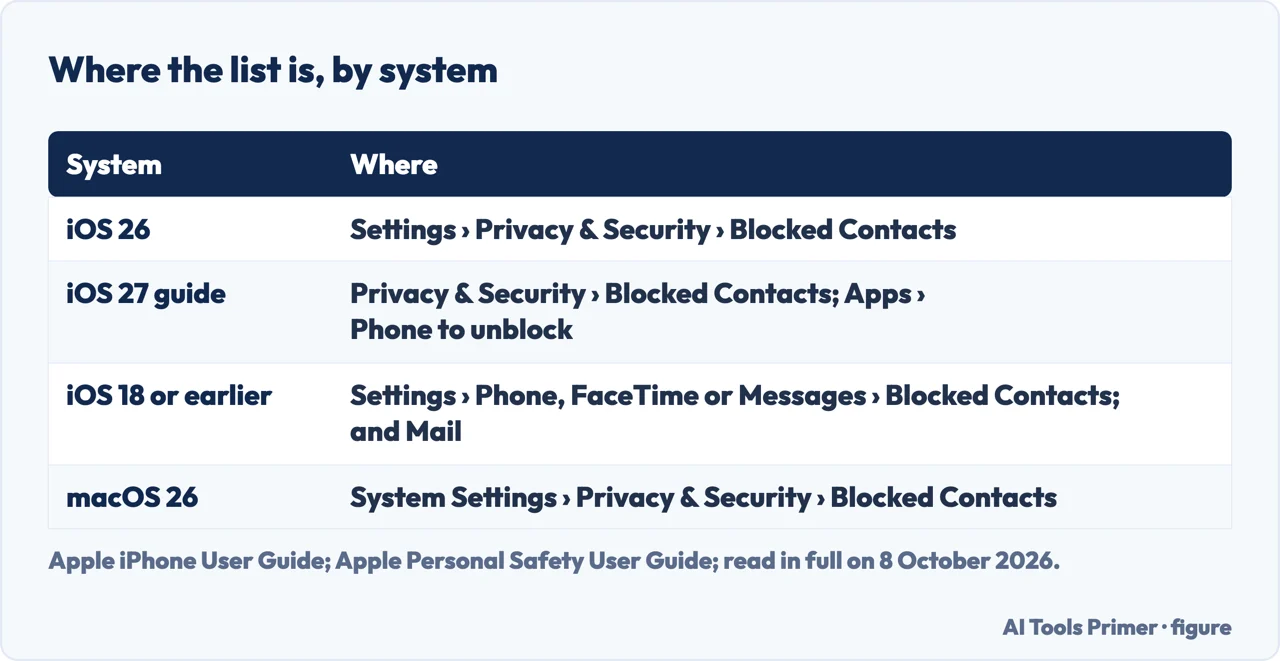
How to see blocked numbers on iphone in iOS 26: Settings › Privacy & Security › Blocked Contacts, a single list. In iOS 18 or earlier, Apple puts it under Settings › Phone › Blocked Contacts, and also under FaceTime and Messages. Unblocking is in the same list; a blocked number can still leave a voicemail, with no notification.
| System | Where the list is | What it covers |
|---|---|---|
| iOS 26 | Settings › Privacy & Security › Blocked Contacts | One list, which Apple calls centralised |
| iOS 27 (Apple’s guide) | The same, and Settings › Apps › Phone › Blocked Contacts to unblock | Phone, Messages and FaceTime |
| iOS 18 or earlier | Settings › Phone › Blocked Contacts; also under FaceTime and Messages | A block in one of the four apps covers all four |
| iOS 18 or earlier, Mail | Settings › Mail, under Threading › Blocked | Blocked senders |
| macOS 26 | System Settings › Privacy & Security › Blocked Contacts | The same Apple Account |
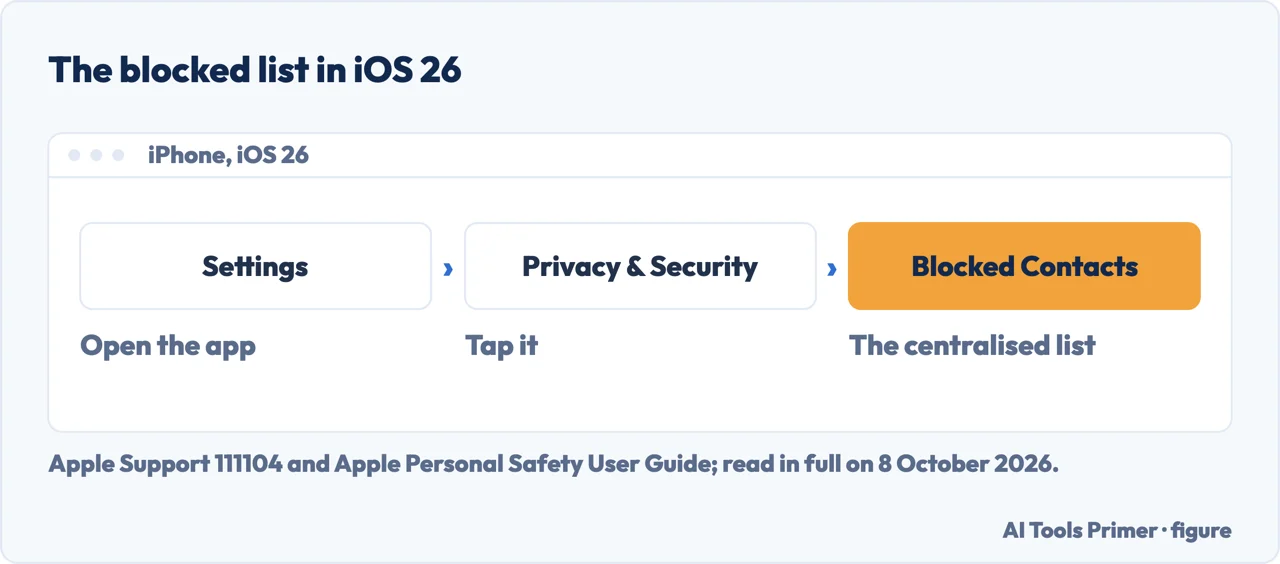
- Open Settings. Apple’s Personal Safety User Guide says to check the version first, in Settings › General › About: the place of the list changed with iOS 26.
- Tap Privacy & Security. By our reading, in iOS 26 the list moved here from the settings of each app.
- Tap Blocked Contacts. This is the list: numbers, contacts and email addresses blocked on the iPhone. Apple lists the centralised list among the iOS 26 changes to blocking.
- To unblock, Apple’s support article for iOS 26 gives Edit, the delete button next to the contact, then Unblock. Apple’s iPhone User Guide for iOS 27 gives a second way: select a blocked contact, scroll down, then tap Unblock Contact.
- Add Blocked Contact adds one, in the same list; Apple says unknown numbers and email addresses can be added too.
iOS 18 or earlier: the list in each app’s settings
Four places, one block. Before iOS 26, Apple’s Personal Safety User Guide says the blocked contacts are managed from any of the four apps that block: Phone, FaceTime, Messages and Mail. Blocking a contact in one blocks them in all four, and unblocking in one unblocks in all four.
The paths. Phone: Settings › Phone › Blocked Contacts. FaceTime: Settings › FaceTime, then Blocked Contacts under Calls. Messages: Settings › Messages, then Blocked Contacts under SMS/MMS. Mail: Settings › Mail, then Blocked under Threading.
On a Mac with macOS 26. System Settings › Privacy & Security › Blocked Contacts. Apple says blocking someone on one device blocks them on every Apple device signed in to the same Apple Account.
What a blocked number can still do
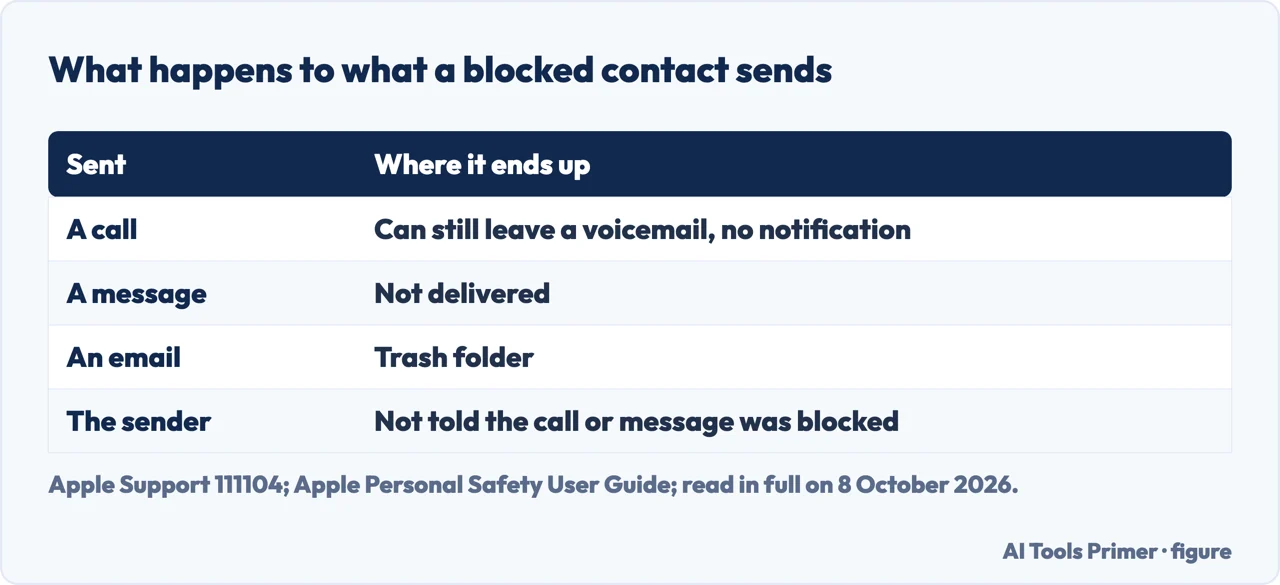
Voicemail. Apple’s support article: a blocked number or contact can still leave a voicemail, but there is no notification. Messages sent or received are not delivered, and the contact is not told that the call or message was blocked. Email from a blocked address goes to the trash folder, says the same article; the Personal Safety User Guide lists this among the iOS 26 considerations.
Group conversations. In a group conversation in Messages you can still be with someone you blocked: you will not see their messages, and they will see yours. Outgoing calls and emails to a blocked contact are still allowed.
Sharing. In iOS 26, Apple says location sharing with people in Find My stops at once when you block a contact, unless the contact is in a Family Sharing group with you, who can still see the location of your devices, and a blocked emergency contact is removed as an emergency contact.
Lists that are not the blocked list
Unknown Callers and Spam. Apple’s iPhone User Guide for iOS 27 describes two filters in Settings › Apps › Phone: Unknown Callers removes calls from unknown numbers from Recents into a list of their own, and Spam silences calls the carrier identifies as potential spam or fraud, sends them to voicemail and moves them to the Spam list. They are seen in the Phone app, under Calls or Recents depending on the layout. By our reading, these numbers are filtered, not blocked.
The carrier’s block. The FCC says phone companies may block calls with suspicious patterns, and many let customers block more by enrolling in a service or installing an app; depending on the provider a blocked call may go to voicemail, ring once, or leave no notice. That those blocks do not appear in Blocked Contacts on the iPhone is our reading of Apple’s and the FCC’s pages, not a sentence of either.
A contact that looks blocked. Apple, among its iOS 26 considerations: if a contact appears blocked and you did not block them, consider verifying whether they share an email address or a phone number with someone you have blocked.
Other settings for unwanted calls. Blocking itself, and what it does not stop, is in how to block a number on iPhone; the four spam settings are in how to stop spam calls on iPhone; screening every unsaved number is in silence unknown callers; texts are in spam texts, and the same list on the other system in blocking a number on Android.
Where to start
Four ways in.
- “I have iOS 26.”
- The single list — in ios 26
- “My iPhone is older.”
- iOS 18 or earlier — ios 18 or earlier
- “They still reach me.”
- What gets through — what still gets through
- “The number is not on the list.”
- Other lists — other lists
More on unwanted calls
Blocking, screening and filtering are separate settings.
Questions people also ask
Where do I find my blocked list?
In iOS 26, Settings › Privacy & Security › Blocked Contacts. In iOS 18 or earlier, Settings › Phone › Blocked Contacts, and also under FaceTime and Messages. On a Mac with macOS 26, System Settings › Privacy & Security › Blocked Contacts. The version is in Settings › General › About.
How do I view the contact block list on my iPhone?
Open Settings and check the version under General › About. With iOS 26, tap Privacy & Security, then Blocked Contacts: Apple describes it as a centralised list. With iOS 18 or earlier, the list is in the settings of Phone, FaceTime and Messages, and a contact blocked in one of them is blocked in all.
How do I unblock contacts on my iPhone?
In iOS 26: Settings › Privacy & Security › Blocked Contacts › Edit, the delete button next to the contact, then Unblock. Apple’s guide for iOS 27 gives selecting the contact, scrolling down and Unblock Contact. Before iOS 26, unblocking in Phone, FaceTime, Messages or Mail unblocks in all four.
How do I find contacts I blocked?
Blocked Contacts lists them, under Privacy & Security in iOS 26 or under Phone in iOS 18 or earlier. If a contact looks blocked and you did not block them, Apple’s iOS 26 notes say to consider checking whether they share a phone number or an email address with someone you did block.
Not covered here. It does not cover blocking in third-party apps, which Apple says is done in each app, or the carrier’s own blocking services, which the FCC says to ask the phone company about.
Nor does it cover finding out who blocked you: none of the pages read here describe a way.
Sources
- Apple Support — Block phone numbers, contacts, and emails on your iPhone or iPad: the routes, iOS 26 settings, and what a block lets through, published 29 May 2026 — support.apple.com, read 8 October 2026.
- Apple iPhone User Guide for iOS 27 — Prevent contacts from communicating with you on iPhone: Blocked Contacts in Privacy & Security — support.apple.com, read 8 October 2026.
- Apple iPhone User Guide for iOS 27 — Screen and block calls on iPhone: Unknown Callers, Spam, and unblocking in Settings › Apps › Phone — support.apple.com, read 8 October 2026.
- Apple Personal Safety User Guide — Block, screen, and filter communications: the iOS 26 changes, the lists in iOS 18 or earlier, and macOS — support.apple.com, read 8 October 2026.
- Federal Communications Commission — Call Blocking Tools and Resources: blocking by phone companies and apps — www.fcc.gov, read 8 October 2026.
Written by Alberto Gulotta
Founder and editor of AI Tools Primer, writing from Palermo, Italy. Thirty-five years of taking computers apart, starting with a Commodore 64 — the long version is on the about page.
Something wrong on this page? Write to aitoolsprimer@gmail.com and it gets fixed.
Written on 8 October 2026.
Independence and limits
No affiliate links and no paid placements anywhere on this site. Nobody pays to appear here, and no company has seen this page before you did.
This is general information, not professional advice. Where a page touches money, health, safety or the law, it names its source and the date it was read — and your situation may still differ. See the privacy page and the cookie policy.