
Code · guide
Supabase RLS: what Supabase, PostgreSQL and DesignRevision say
By Alberto Gulotta · Updated · 17 min read
Supabase RLS is Row Level Security, rules inside the database that decide which rows a request can reach. Supabase says a table in an exposed schema without it can be read and written by any role with a grant. This page sets out how to check, in the order the pages we read give it.
| Question | Answer | Where it comes from |
|---|---|---|
| What is it? | Rules that run inside the database and decide which rows a request can reach | Supabase Docs |
| What if a table has no RLS? | Any role with a grant on it can read and write it | Supabase Docs |
| Does adding a policy remove the grants? | Supabase says adding policies does not take the grants back | Supabase Docs |
| Is RLS on for a new table? | Supabase says yes from the Dashboard; DesignRevision says off by default | Supabase Docs, DesignRevision |
| Where do I look without SQL? | Database, Policies in the Dashboard, and the Security Advisor | Supabase Docs |
| Where should I not test? | DesignRevision says the SQL Editor bypasses RLS | DesignRevision |
What RLS does, in plain words
PostgreSQL’s documentation starts from the situation before any rule exists. By default, it says, tables do not have any policies, so a user who has access privileges to a table can query or update every row in it. Row security changes that. Once it is enabled on a table, all normal access for selecting or changing rows must be allowed by a row security policy. If the table has RLS on and no policy, PostgreSQL applies what it calls a default-deny policy, meaning that no rows are visible or can be modified. It adds that operations that apply to the whole table, such as TRUNCATE and REFERENCES, are not subject to row security.
Supabase describes Row Level Security as granular authorization rules that run inside the database, and tells you to think of a policy as a WHERE clause added to every query. Its example is a policy on a table of to-do items: a signed-in user may select the rows whose user_id column matches the user making the request. Supabase says the rules are written in SQL, so a rule can express whatever access logic an app needs, and that because RLS is a Postgres feature it also protects the data when it is reached through third-party tooling, which it calls “defense in depth”.
Some roles never meet the rules. PostgreSQL says superusers and roles with the BYPASSRLS attribute always bypass row security, and that table owners normally do too, unless the owner chooses otherwise with FORCE ROW LEVEL SECURITY. Only the owner can switch RLS on or off or add policies. When several policies apply to one query, PostgreSQL combines permissive ones, the default, with OR, and restrictive ones with AND.
Why a table without RLS gives rows away
DesignRevision, a guide from a publisher that was updated on 2 July 2026, says every Supabase project ships with a public API, so anyone with the project URL and the anon key can query the database, and it calls the anon key the public one. Supabase’s Row Level Security page, updated on 3 November 2026, puts the same risk in one line: a table in an exposed schema without RLS is readable and writable by any role with a grant on it. Its page on securing the API says the same of tables and views exposed through the Data API, which it describes as access by any role with matching grants.
The wording about grants matters, because Supabase describes two checks, not one. Grants decide whether a role can run an operation on a table at all; policies decide which rows that operation applies to. For existing projects, Supabase says a new table in the public schema starts with every privilege already granted to three roles: anon, authenticated and service_role. The list is select, insert, update, delete, truncate, references and trigger, plus maintain on Postgres 17. Adding policies, it says, does not take those grants back, and a table protected only by policies still hands the anon role a way to insert if the grant was never revoked.
Supabase maps every request to one of two roles: anon is a request that is not authenticated, and authenticated is a signed-in user. The third role in its table of default grants, service_role, bypasses RLS, which is why Supabase says to keep it server-side. A policy written to anon using (true) gives every unauthenticated visitor read access to every row the role can already reach through its grants, and Supabase says to use it only for data meant to be public. It also separates the anon role from an anonymous user in Supabase Auth, who takes the authenticated role.
Two other objects sit outside a table’s policies. Supabase says views bypass RLS by default because they are usually created by the postgres user, so a view over a protected table hands out every row its policies were meant to withhold. From Postgres 15 it sets security_invoker = true on the view; for older versions it says to revoke access from anon and authenticated or to put the view in an unexposed schema. Functions are the other: the Securing your API page says RLS does not apply to them, so grant execute only to the roles that need to call them, and review every security definer function carefully.
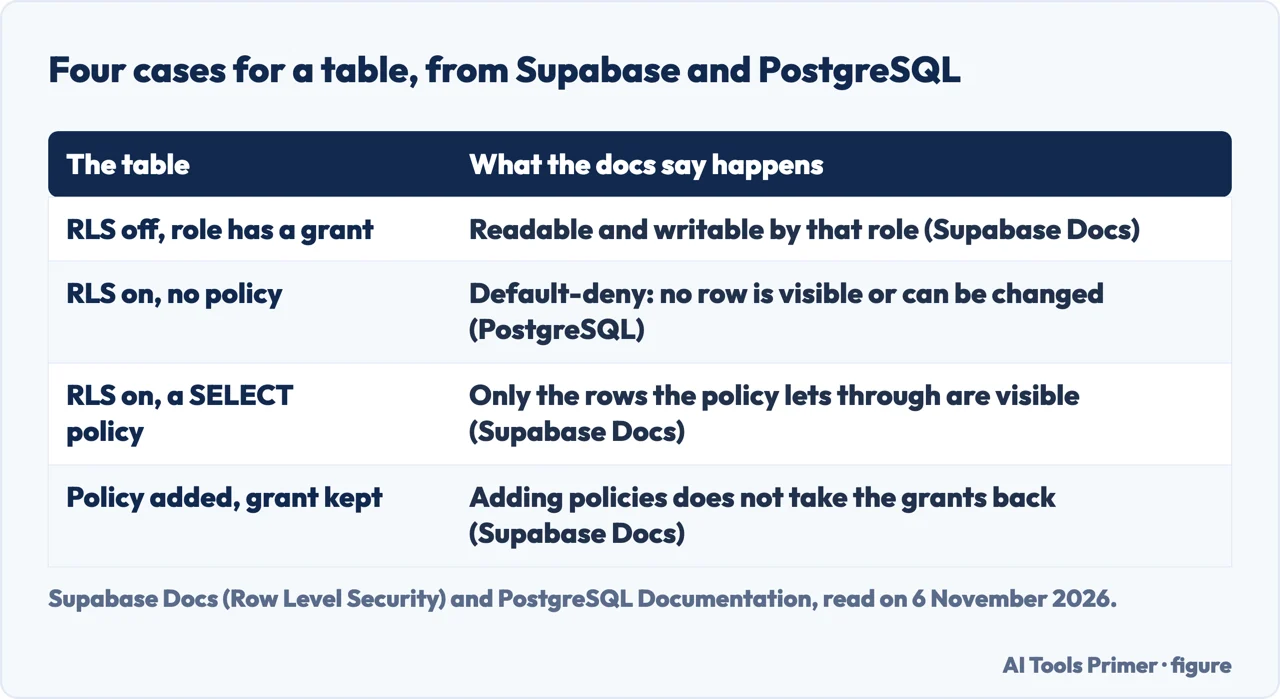
What changed in 2026, and what the pages say about new tables
Two pages answer whether a new table has RLS, and they read differently. Supabase’s Securing your API page, updated on 22 October 2026, says tables created through the Supabase Dashboard have RLS enabled by default, and that for tables created in the SQL Editor or through another tool you enable it yourself. DesignRevision says RLS is disabled by default on new tables, in a sentence that does not name the Dashboard. The two fit together if the answer depends on how the table was made; DesignRevision’s list of mistakes does speak of a table created through the SQL Editor or a migration, but its default sentence is general, so the safe reading is to check each table.
A second change concerns grants, not RLS. In a changelog entry dated 28 April 2026, Supabase says new tables in the public schema will no longer be exposed to the Data API automatically. The entry gives dates: from that day a new project could opt in when it was created, from 30 May 2026 the setting starts to become the default for new projects in a gradual rollout over a few weeks, and on 30 October 2026 it would be applied to all existing projects. After that, a new table needs an explicit grant before the Data API can see it. Existing tables keep their current grants and stay reachable, and the entry says RLS behavior remains unchanged. An app that talks to Postgres over a direct connection is not affected, the entry says.
The reason it gives is about who creates tables. When Supabase launched, a human reviewed each schema change and turned on RLS as they went; today, it says, agents, CLI scripts and AI platforms create tables too, and many of those operations have no human reviewing the diff. The entry adds that the Security Advisor would flag affected tables, and lists earlier changes in the same series, among them a Data API exposure badge in the Dashboard and an RLS-on-by-default toggle.
We did not check whether or how the 30 October change reached any project, yours included. The Securing your API page says default privileges differ between projects, depending on when a project was created and on its Data API settings. It points to the option called Automatically expose new tables in the Data API settings, which revokes the privileges the Data API uses, and gives a query on pg_default_acl that shows which privileges new objects receive. It adds that new functions are callable by every role, because Postgres grants execute to PUBLIC through a global default.
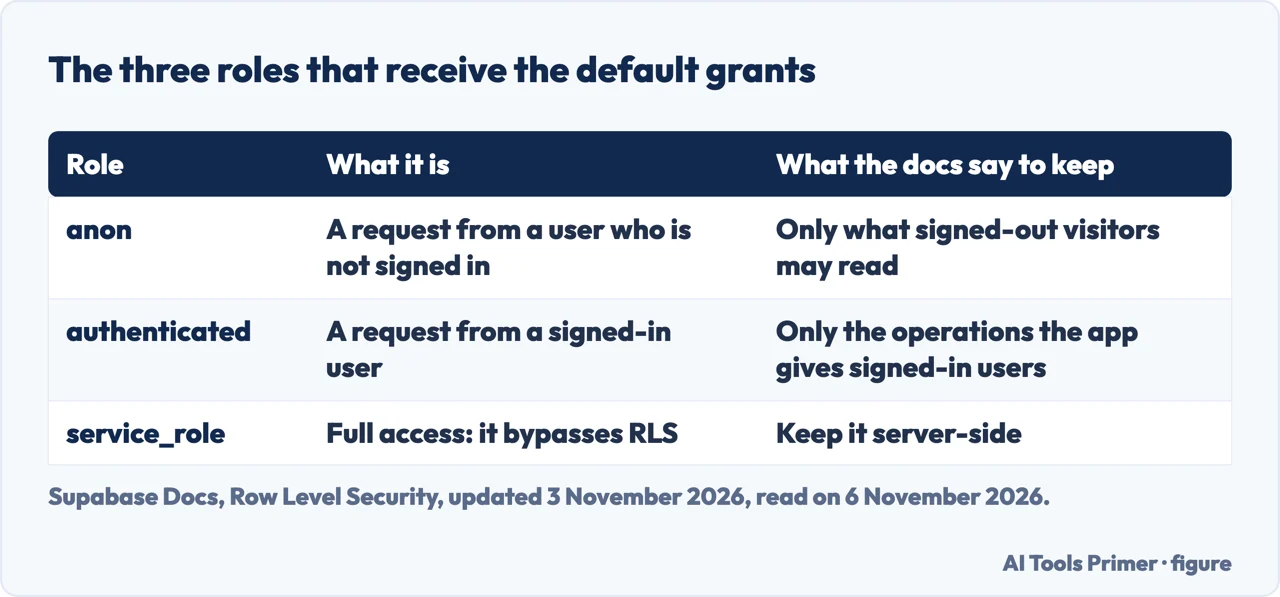
How to check a project, with and without SQL
The pages offer two routes that need no SQL. In the Dashboard, the Securing your API page sends you to the Database, Policies page, where you select Enable RLS for a table. DesignRevision describes the Table Editor: select the table, choose Edit Table and use the toggle named Enable Row Level Security. The Advisors page describes checks that ship with the platform and flag health, security and performance issues, such as misconfigured RLS policies. You or an agent can run them from the Security Advisor in Studio, from the MCP tool get_advisors with type set to security, from the CLI with supabase db advisors, or through the Management API.
The Advisors page lists the checks by name. Among the names on that list are rls disabled in public, policy exists rls disabled, rls enabled no policy and security definer view. We read the list of names and not the text of each rule, so we cannot say what each one tests beyond what its name says. The page also says some findings may be intentional, and that you should check them against your intended schema and access model before changing anything.
With SQL, DesignRevision gives a query that lists the tables of the public schema with a rowsecurity column from pg_tables, as a way to find tables without RLS, and a second route through the relrowsecurity column of pg_class. It also says to test policies from the client SDK, not from the SQL Editor, because the SQL Editor runs as the postgres role and bypasses RLS. Supabase’s own procedure for each table is longer: enable RLS and set the grants, write a policy for each operation, add a test file that asserts what anon and authenticated may and may not do for select, insert, update and delete, and run supabase test db. Until that suite passes, Supabase says, you do not know whether the policies do what you intended.
The pages differ on one point of order. Supabase’s procedure lists enabling RLS and the grants first and the policies second. DesignRevision, writing about a table that a live app already uses, says to create the policies before enabling RLS, because enabling it first leaves a window in which every query returns empty. Both agree on the result of an enabled table with no policy: Supabase says no data is accessible through the API with a publishable key until policies exist, and DesignRevision says queries return empty results. That empty answer is not an error message, and DesignRevision lists it as a common reason an app looks broken.
What to ask of the assistant that builds the app
The Supabase changelog addresses this reader directly. If an AI coding tool creates your tables, it says, update the tool’s system prompt or adopt the Supabase agent skill, which includes the grants step and which Supabase says it keeps updated. It also says agents can correct themselves from the error that PostgREST returns when a grant is missing, a permission denied error for the table with a hint that names the grant statement needed. The Row Level Security page adds that a missing grant raises that error before any policy runs, so when a request fails that a policy should allow, check the grants before changing the policy.
Read as a list of things to ask for, the Supabase pages come to this. Enable RLS on every table in an exposed schema, and set the grants to match what each role does in the app. Write a separate policy for select, insert, update and delete, because Postgres does not accept several operations in one for clause and a for all policy hides which operation each rule was meant to cover. Give an insert policy a with check expression so that a user cannot create a row belonging to someone else, and give an update policy both using and with check. An update also needs a matching select policy, or it will not work as expected. Make views obey the tables’ policies with security_invoker, and add a test file per table.
Keys are the other half. Supabase says to use a secret key only for administrative tasks that need to bypass RLS, and never in the browser or exposed to customers. A secret key authorizes access through the service_role Postgres role, which has the bypassrls attribute; the older JWT-based service_role key is a legacy alternative and Supabase prefers the secret key. It adds that the secret key bypasses RLS only when the request carries no user access token, because a request that carries one runs under that signed-in user’s policies. DesignRevision says the same from the other side: client code uses the anon key, server-side admin work uses the service_role key, and the service_role key does not belong in browser code or mobile apps.
A contrary view, and what the pages leave open
Paralect, a development company whose page also offers its services, argues against using RLS in a Supabase app built with AI tools. Its list of downsides says the auth and business logic is spread between the app and the database, that RLS can be misconfigured by later updates and suddenly expose data, that the rules are often not tracked in git, that they add query overhead and that database rules are harder to test than application code. Its alternative is to turn off the Data API, put a backend in front of the database, use the service key there and keep the public key for Auth and Realtime. It also cites an incident involving a vibe-coding tool that we did not check at its source, so we leave it out. The page grants one case where RLS makes sense: a multi-tenant app that wants a second layer of protection.
That alternative is a setting Supabase documents. The Securing your API page says that if an app never uses the Supabase client libraries, REST or GraphQL data endpoints, you can turn Enable Data API off, and then the auto-generated REST endpoints stop responding, whatever the grants or RLS. The two sets of pages still point different ways for an app that does use the client libraries: Supabase says to enable RLS on every exposed table, Paralect says to avoid it. The same page adds that RLS policies do not cover every API security requirement, and it describes pre-request checks for rate limits, extra API keys and quotas.
Supabase’s own example covers public data. A table that clients read but never write, such as an announcements feed, gets a select grant for anon and authenticated, RLS on, and a select policy using (true), with a test that anon holds no write grant. The Advisors page makes a similar point about findings that may be intentional.
The pages we read do not give a count or a share of projects that are exposed, so this page gives none. We read the list of Advisors checks and not the text of the one named rls disabled in public. We did not read other blog posts or forum threads on the subject, and we used Supabase’s presentation page for no fact. The pages we read treat the subject in SQL, and they do not explain the check in words for someone who does not write it, which is why this page does it from their steps. We do not describe how to use an open table.
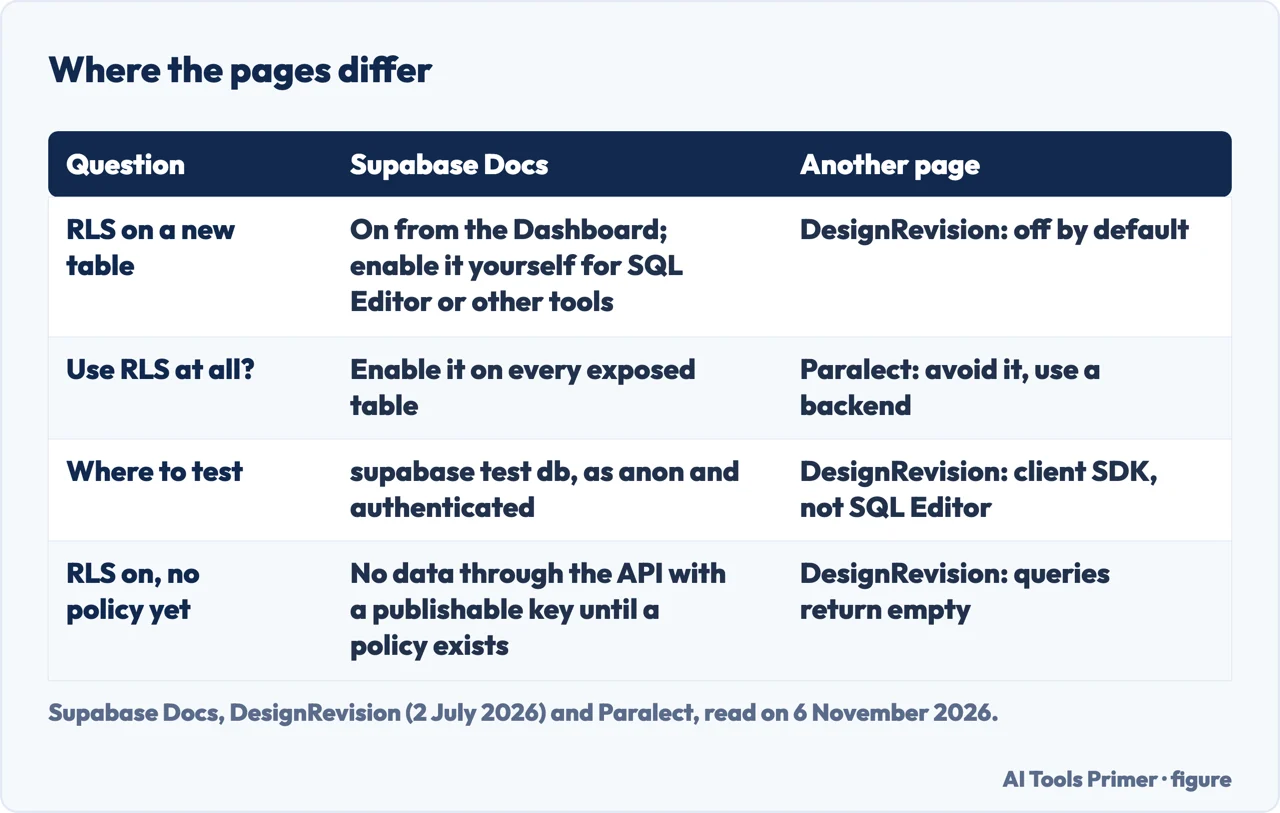
Where to start
Four ways in.
- “What does RLS do?”
- What RLS does, in plain words — meaning
- “What changed in 2026?”
- What changed in 2026, and what the pages say about new tables — changed
- “Is my table exposed?”
- How to check a project, with and without SQL — check
- “What do I tell the AI that builds it?”
- What to ask of the assistant that builds the app — assistant
Checking what a model built
Review, packages and agents.
Where the data lives and what it costs
A database made of sheets, no-code builders and the price of an app.
Questions people also ask
What does RLS do in Supabase?
Supabase says Row Level Security gives granular authorization rules that run inside the database. A policy acts like a WHERE clause added to every query, and a table in an exposed schema without RLS is readable and writable by any role with a grant.
Should RLS be enabled?
Supabase says to enable RLS on every table in an exposed schema. Paralect argues against RLS for AI-built apps and proposes a backend with the Data API turned off. The pages differ, and Supabase documents the setting for turning the Data API off.
Should I enable auto RLS Supabase?
The pages we read describe RLS being on by default for tables made in the Dashboard, and an event trigger option for enabling it automatically on every new table. The changelog also lists an RLS-on-by-default toggle without describing it.
What is RLS in a database?
PostgreSQL calls it row security: policies that restrict which rows a user can return, insert, update or delete. With it enabled and no policy, a default-deny policy applies and no rows are visible or can be modified.
Not covered here. The statements on this page come from the Supabase documentation (Row Level Security, Securing your API and Advisors), a Supabase changelog entry, the PostgreSQL documentation, a DesignRevision guide and a Paralect opinion page, all read on 6 November 2026.
The search volume and difficulty behind this page come from an Ubersuggest reading of 5 November 2026 on its free plan for the United States; no Semrush reading of this key has been made, and the site’s 29 August 2026 Semrush reading, older than the 60 days it normally allows, does not include it.
Sources
- Supabase Docs — Row Level Security — supabase.com, read 6 November 2026.
- Supabase Docs — Securing your API — supabase.com, read 6 November 2026.
- Supabase Changelog — Breaking Change: Tables not exposed to Data and GraphQL API automatically — supabase.com, read 6 November 2026.
- Supabase Docs — Advisors — supabase.com, read 6 November 2026.
- PostgreSQL Documentation — 5.9. Row Security Policies — www.postgresql.org, read 6 November 2026.
- DesignRevision — Supabase RLS Guide 2026: Policies That Actually Work — designrevision.com, read 6 November 2026.
- Paralect — Don’t use RLS in Supabase for your vibe-coded app (opinion) — www.paralect.com, read 6 November 2026.
Written by Alberto Gulotta
Founder and editor of AI Tools Primer, writing from Palermo, Italy. Thirty-five years of taking computers apart, starting with a Commodore 64 — the long version is on the about page.
Something wrong on this page? Write to aitoolsprimer@gmail.com and it gets fixed.
Written on 6 November 2026.
Independence and limits
No affiliate links and no paid placements anywhere on this site. Nobody pays to appear here, and no company has seen this page before you did.
This is general information, not professional advice. Where a page touches money, health, safety or the law, it names its source and the date it was read — and your situation may still differ. See the privacy page and the cookie policy.