
Software · guide
Yahoo Mail not working: website, app, sign-in and missing mail
By Alberto Gulotta · Updated · 10 min read
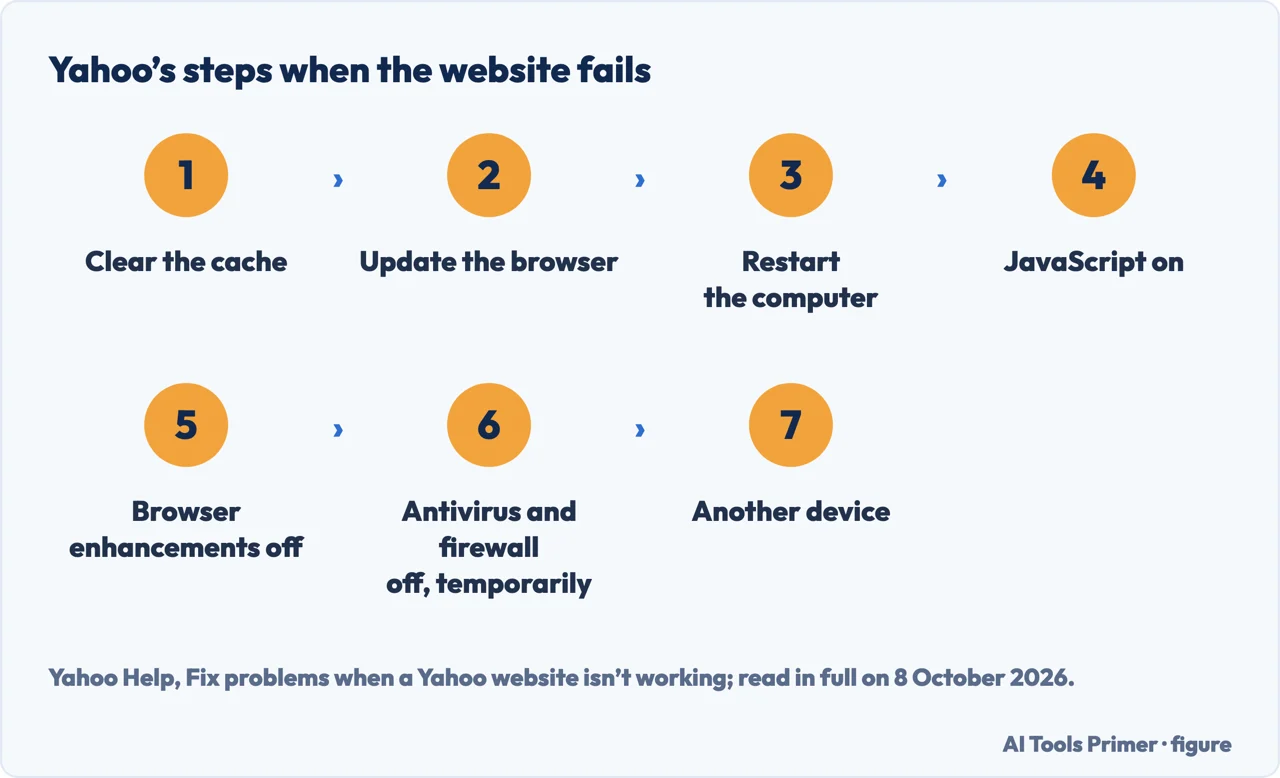
Yahoo Mail not working: for the website, Yahoo says to clear the browser cache, update the browser and test each step; for the app, update it, sign out and back in, or reinstall it. For missing mail it lists spam, filters and blocked addresses; Temporary error 15, it says, usually corrects itself within a few minutes to a few hours.
| Problem | What Yahoo says |
|---|---|
| Website, buttons or menus slow or not working | Use the latest version of a supported browser; clear the cache, update the browser, restart the computer |
| An ad blocker | It can negatively impact email performance and functionality; unblock ads on Yahoo Mail |
| Temporary error 15 | Usually corrects itself within a few minutes to a few hours |
| A locked account | Unlocks automatically after 12 hours; the Sign-in Helper gets back in sooner |
| Mail that does not arrive | Spam folder, filters, blocked addresses and domains, the reply-to address |
| The app gets no mail | Update the app, sign out and back in, or reinstall it |
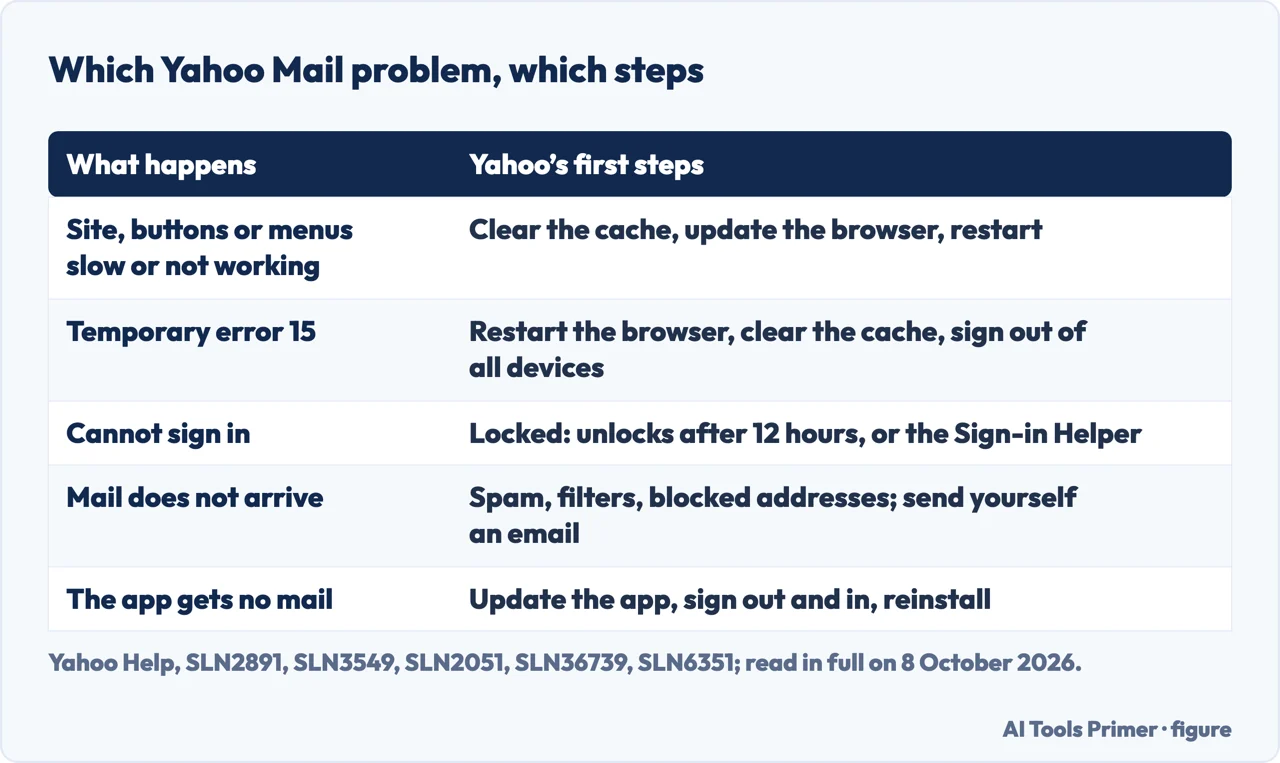
- Clear the browser’s cache. Yahoo says to work through its steps one at a time and test the site after each one. How to clear it on a Mac is in how to clear cache on Mac.
- Update the browser. Yahoo also says to use the latest version of a supported browser.
- Restart the computer.
- Check that JavaScript is enabled.
- Turn off browser enhancements. On its New Yahoo Mail fix page, Yahoo also says to disable ad blocking software for the Mail website: ad blockers add code to the browser that can negatively impact email performance and functionality.
- Turn off security software, temporarily. Yahoo’s step is to temporarily disable antivirus, antispyware and firewall products.
- Try another device. See if Yahoo works from another computer or a mobile device.
- Reset the browser. Yahoo’s last step is to reset the browser to its default settings.
Temporary error 15
What Yahoo says it is. An error that usually corrects itself within a few minutes to a few hours.
Possible causes, per Yahoo. A browser that Yahoo Mail does not support, the account open in two browsers at the same time, or open on several devices at once from more than one place.
Possible fixes. Restart the browser, clear its cache, use a supported browser and operating system, and sign out of all devices and back in. If it persists, Yahoo recommends an email app like its Yahoo Mail app for iOS and Android, or the native mail app on a smartphone or tablet.
When Yahoo Mail will not let you sign in
A forgotten password or Yahoo ID. Yahoo says to use the Sign-in Helper with the recovery mobile number or alternate email address.
Invalid ID or Password. Yahoo’s checks are Caps Lock and Num Lock, the browser’s saved passwords after a change, another browser (if that works, the problem is the browser, not the account), and the chance that someone else changed the password, which needs the Sign-in Helper and a review of the account.
A locked account. After too many unsuccessful attempts, Yahoo says the account may be locked, unlocks automatically after 12 hours, and can be opened at once with the Sign-in Helper. Repeated locks, it says, can follow a detected risk to the password, an IP address that is hidden or constantly changing, or sign-ins from different places in a short time.
A sign-in screen that loops. Click Not you?, enter the Yahoo ID and password again, and sign in; then, one at a time, clear cookies, restart the browser, try another supported browser or another Yahoo sign-in page. If the recovery information is wrong or out of reach, Yahoo says access may not be regained. 2-Step Verification, which Yahoo suggests once back in, is in two-factor and two-step.
Mail that does not arrive
The settings. Yahoo lists the reply-to address, a sender or a domain blocked by mistake, the spam folder, and filters that send mail to another folder.
A test. Sign in on a computer and send yourself an email. With no error, Yahoo says the account is working as expected; if the email does not arrive, it points to failed delivery messages; with an error message, the instructions to fix it should come with the message. If nothing is wrong on your side, Yahoo says the issue is with the sender, who should check the address and ask their own provider.
Recycled accounts. An inactive or recycled Yahoo address may not get password reset emails from other services; Yahoo says to sign in to the Yahoo account first. Mail that was there and has gone is in deleted emails.
On a phone
Computer first. When a phone gets no mail, Yahoo’s first check is the same mailbox on a computer: if mail is not arriving there either, it says the issue is with the account, not the device.
The Yahoo Mail app. Yahoo says an app that is not up to date may fail to connect to its servers, so its steps are to update it from the app store, sign out and back in, and uninstall and reinstall it.
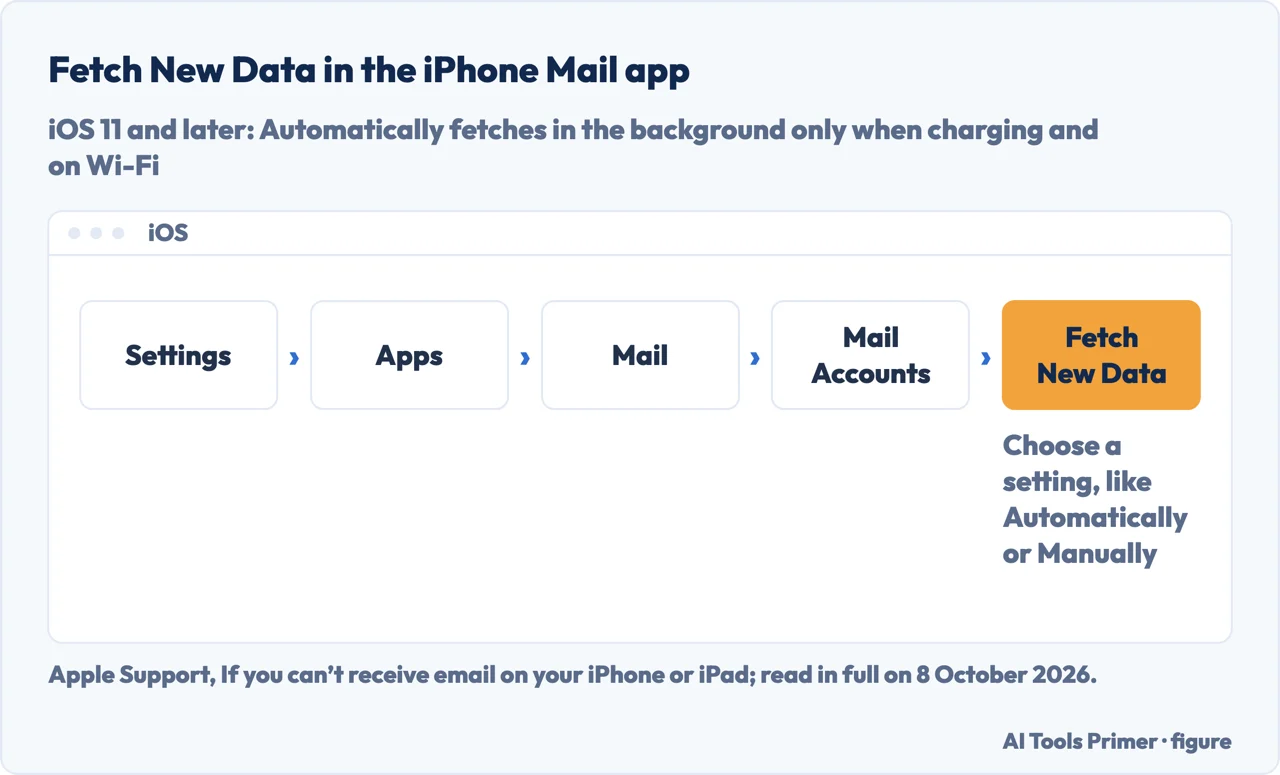
The iPhone Mail app. Yahoo says most problems there come from invalid settings or from the Yahoo account itself: send yourself an email from a computer and see if it arrives within 5 minutes, update iOS, remove Yahoo from Mail and add it back, or use the Yahoo Mail app. Apple adds that with iOS 11 and later, Fetch New Data set to Automatically gets new mail in the background only while the iPhone is charging and on Wi-Fi, and that deleting or changing the account settings might remove mail already downloaded, so check the mail is on the provider’s website or saved somewhere other than the device. A password that has stopped working in Mail is in a mail password that stopped.
Is it down for everyone? None of the Yahoo help pages read for this guide names a status page. Apple’s advice for any provider is to check with it, or its status webpage, for a service outage. Yahoo’s test for errors on your own account is the email sent to yourself from a computer.
Which versions. The steps here come from Yahoo’s New Yahoo Mail pages and its pages on websites, sign-in, error 15, the mobile app and iOS Mail. Apple’s page was published in May 2026 and its Fetch behaviour applies to iOS 11 and later.
Other mail questions. Outlook and Gmail mail that does not arrive is in why am I not receiving emails, and the iPhone Mail app on its own in not getting emails on iPhone.
Where to start
Five ways in.
- “The site will not load.”
- The website — the website
- “It says Temporary error 15.”
- Error 15 — temporary error 15
- “I cannot sign in.”
- Signing in — cannot sign in
- “Mail is not arriving.”
- Missing mail — mail not arriving
- “It is on my phone.”
- On a phone — on a phone
More on email
Other mailboxes and other missing mail.
Questions people also ask
Is there a problem with Yahoo Mail today?
This guide cannot say how Yahoo Mail is today, and none of the Yahoo help pages read for it names a status page. To check your own account for errors, Yahoo says to sign in on a computer and send yourself an email; Temporary error 15, Yahoo says, usually corrects itself within a few minutes to a few hours.
Why is my Yahoo email not working all of a sudden?
Yahoo names several reasons: an app that is not up to date may fail to connect to its servers, ad blockers can affect performance, and Temporary error 15 can come from an unsupported browser or the account open in two browsers or on several devices at once. Too many failed sign-ins may lock the account.
How do I get my Yahoo Mail back to normal?
For the website, Yahoo’s steps are to clear the cache, update the browser, restart the computer, check JavaScript, turn off browser enhancements and, temporarily, security software, try another device, and reset the browser. For the app: update it, sign out and back in, or reinstall it.
Why am I not getting my emails all of a sudden?
Yahoo says to check the spam folder, filters, blocked addresses and domains, and the reply-to address, then send yourself an email from a computer. On an iPhone with iOS 11 or later, Apple says Automatically, the default for Fetch New Data, gets mail in the background only while charging and on Wi-Fi.
Not covered here. It does not cover Yahoo Mail in Outlook or other POP and IMAP programs, AOL Mail, or a hacked account beyond the sign-in steps.
Sources
- Yahoo Help — Fix problems in New Yahoo Mail: ad blockers, browsers, sign-in and missing mail — help.yahoo.com, read 8 October 2026.
- Yahoo Help — Fix problems when a Yahoo website isn’t working: the steps one at a time — help.yahoo.com, read 8 October 2026.
- Yahoo Help — Temporary Error 15: causes and fixes — help.yahoo.com, read 8 October 2026.
- Yahoo Help — Fix problems signing into your Yahoo account: the Sign-in Helper, locks and loops — help.yahoo.com, read 8 October 2026.
- Yahoo Help — Emails are not received in New Yahoo Mail: settings, a test, the sender — help.yahoo.com, read 8 October 2026.
- Yahoo Help — Not receiving email on your mobile device: the Yahoo Mail app — help.yahoo.com, read 8 October 2026.
- Yahoo Help — Fix problems with Yahoo Mail in iOS Mail — help.yahoo.com, read 8 October 2026.
- Apple Support — If you can’t receive email on your iPhone or iPad (published 28 May 2026): Fetch New Data, a provider’s outage, removing an account — support.apple.com, read 8 October 2026.
Written by Alberto Gulotta
Founder and editor of AI Tools Primer, writing from Palermo, Italy. Thirty-five years of taking computers apart, starting with a Commodore 64 — the long version is on the about page.
Something wrong on this page? Write to aitoolsprimer@gmail.com and it gets fixed.
Written on 8 October 2026.
Independence and limits
No affiliate links and no paid placements anywhere on this site. Nobody pays to appear here, and no company has seen this page before you did.
This is general information, not professional advice. Where a page touches money, health, safety or the law, it names its source and the date it was read — and your situation may still differ. See the privacy page and the cookie policy.