
Study · guide
Zotero vs Mendeley: storage, Word and moving a library
By Alberto Gulotta · Updated · 17 min read
Zotero vs Mendeley comes down to what each site says about itself and what two university libraries say about both. Zotero lists 300 MB of free file storage and Mendeley lists 2 GB. Word, Google Docs, the history of Mendeley Desktop and moving a library each get their own section below.
| Question | Answer | Where it comes from |
|---|---|---|
| How much storage is free? | Zotero lists 300 MB for attached files; Mendeley lists 2 GB | zotero.org, mendeley.com |
| Does Zotero cap the library itself? | Zotero says syncing of items, notes and tags is free and unlimited; the quota is for attached files | Zotero sync page |
| What about Google Docs? | Zotero lists Word, LibreOffice and Google Docs; the Mendeley pages we read name only Word | Zotero, Mendeley, Belmont |
| Is Mendeley Desktop still there? | Mendeley ended new downloads from September 2022, then wrote in July 2025 that it is here to stay | Mendeley blog |
| Can a library move across? | Zotero imports an online Mendeley library; citations made with Mendeley Cite are not readable by Zotero | Zotero import page |
| Who is each said to suit? | The two libraries say Mendeley for mostly PDFs and Zotero for varied sources | Northwestern, Belmont |
Two tools, two ways of describing themselves
Zotero’s home page calls it “free, easy-to-use” and says it helps you collect, organize, annotate, cite and share research, on Mac, Windows, Linux, iOS and Android. It also says Zotero is open source and developed by an independent, nonprofit organization. Zotero’s storage page adds that the cost of developing, maintaining and supporting its services is funded by storage subscriptions from individuals and organizations.
Mendeley’s home page calls it “The free all-in-one reference manager”. It offers a download or Mendeley Web, mentions 2GB of free storage, and points to LeapSpace, which it describes as an AI research companion. Both descriptions come from the programs’ own pages.
Northwestern University Libraries, in a guide updated on 22 September 2026, says that EndNote, Mendeley and Zotero can all store references in one place, export citations from databases, format them in MLA, APA, Chicago and other styles, keep reading notes linked to sources, and insert citations into Word. The guide says you cannot go wrong with any of the tools. Belmont University Medical Library, in a guide updated on 15 November 2024, lists similar shared abilities and adds working offline and sharing references with a group. EndNote is a third option on both guides; this page compares only Zotero and Mendeley.
Storage: 300 MB and 2 GB are not the same kind of number
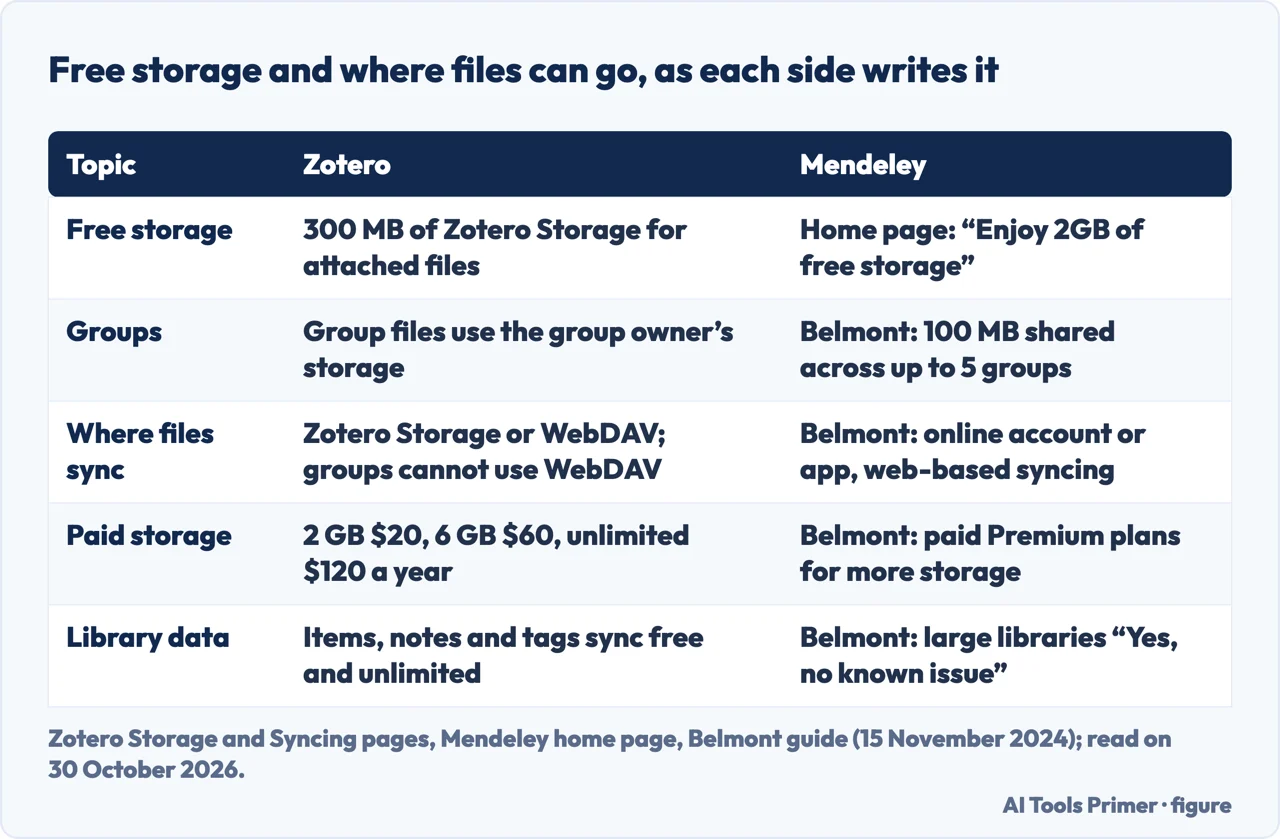
Zotero’s storage page, read on 30 October 2026, lists 300 MB of Zotero Storage for free. The paid tiers on it are 2 GB for 20 US dollars a year, 6 GB for 60 and unlimited for 120. Zotero’s documentation page on individual storage, last updated in 2017, lists the same prices. Mendeley’s home page says “Enjoy 2GB of free storage”. Belmont’s table gives the same pair: 300 MB cloud storage for Zotero, and for the free version of Mendeley 2 GB of personal storage.
The two figures do not measure the same thing. Zotero’s sync page splits syncing in two. Data syncing covers library items, notes, links and tags, everything except attachment files, and the page says it “is free and unlimited”. The 300 MB is for the attachments: PDFs, audio and video files, images. Belmont’s table adds limits on the Mendeley side that a headline of 2 GB leaves out: its free version allows 5 groups of up to 25 collaborators, with 100 MB of shared storage across all groups. On the Zotero side, Zotero says group file storage always draws from the storage account of the group owner.
Zotero describes a second route for files. Instead of Zotero Storage you can use WebDAV, a standard protocol, for your personal library; the page says group libraries cannot use it. Zotero also warns against one shortcut. Keeping the Zotero data directory inside a cloud storage folder, it says, is “extremely likely to corrupt” the database. For people who want their own file sync, it names two alternatives: copying the whole data directory by hand with Zotero closed, or using linked files kept in an externally synced folder. Mendeley’s home page and Belmont’s table describe its storage as an online account, or a local app with web-based syncing.
Belmont’s table also lists, for both programs, working offline: yes for Zotero and, for Mendeley, yes with Mendeley Reference Manager. Among Zotero’s weaknesses the same table lists limited free storage. The pages we read do not say how many PDFs fit in 300 MB or in 2 GB, so the comparison stops at the numbers each page prints.
Writing: Word, LibreOffice and Google Docs
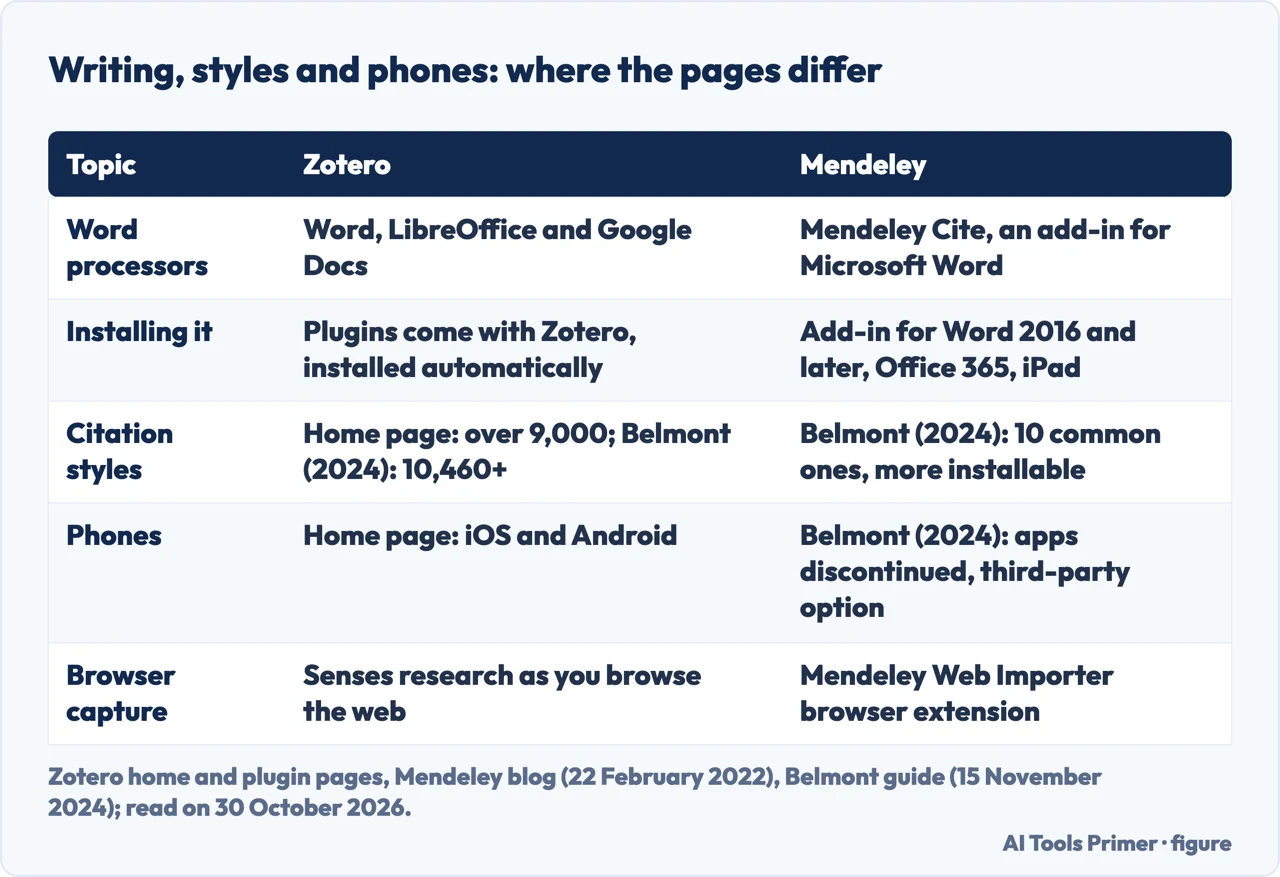
Zotero’s home page says it creates references and bibliographies for any text editor, and directly inside Word, LibreOffice and Google Docs, with support for “over 9,000 citation styles”. Its page on word processor plugins, last updated in July 2023, says the plugins for those three programs create dynamic bibliographies: insert a new in-text citation and the bibliography updates, and correct an item’s title in the library and a click carries the change into your documents. The plugins are bundled with Zotero and installed automatically when it first starts, and they can be reinstalled from the Cite pane of the preferences. The page adds that third-party plugins exist for other word processors.
For Mendeley, the page we read in most detail is Mendeley’s own blog post of 22 February 2022, which carries a notice that it is outdated. It describes Mendeley Cite, an add-in for Microsoft Word, as compatible with Office 365, Word 2016 and newer, the Word app for iPad and Word for the web. The post says the whole document stays visible while you find and insert references, and that, because the library is stored in the cloud, Mendeley Cite works even without the desktop version installed. Belmont’s table of 2024 lists Word 2016 and above, Office 365 and the Word app for iPad for Mendeley, without Word for the web. Mendeley’s own pages and the Belmont table name only Word for Mendeley; Paperguide, a company page, says Mendeley Cite works with Word and LibreOffice and lacks Google Docs, while Zotero’s pages name Google Docs.
Styles and phones are where the dates matter. Zotero’s home page gives over 9,000 styles; Belmont’s table of 2024 gives a figure above ten thousand for Zotero and says Mendeley comes with the 10 most common styles and lets you install more. The two counts come from different pages written at different times, and the pages we read do not reconcile them. On phones, Zotero’s home page lists iOS and Android. Belmont’s 2024 table says the Apple app is from Zotero’s developer and the Android apps are third-party, and says apps from Mendeley were discontinued, with a third-party solution. Zotero’s home page carries no date, while Belmont’s table is from November 2024.
For collecting sources, Zotero’s home page says it senses research as you browse the web, and names JSTOR, arXiv, a news story and a library book as examples. Mendeley’s 2022 post describes Mendeley Web Importer as a browser extension for building a library while you search online, with one-click access to full text where it is available.
What happened to Mendeley Desktop
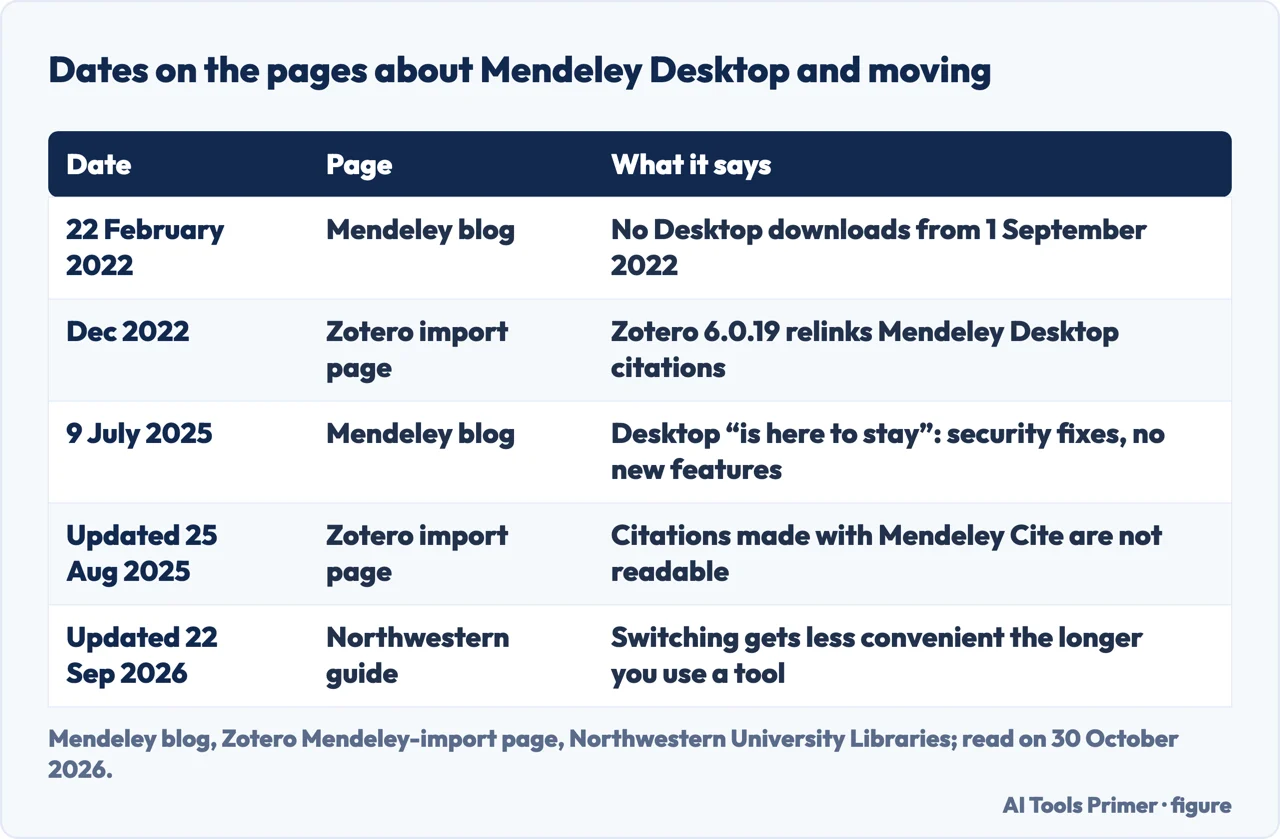
Two dated posts on Mendeley’s blog tell the story, and they point in different directions. On 22 February 2022, Mendeley introduced Mendeley Reference Manager, an app for desktop and web with collections, tags, a notebook for annotations and private groups, alongside Mendeley Cite and Mendeley Web Importer. The post says Reference Manager will replace Mendeley Desktop in the long run. From 1 September 2022, it says, users could no longer download and install Mendeley Desktop, while existing users could keep signing in, using and syncing. It adds that once Mendeley was confident the new app met users’ needs, it would begin the process of stopping all sign-ins to Mendeley Desktop, with plenty of notice.
On 9 July 2025 a second post is titled “Mendeley Desktop is Here to Stay”. It says many users told Mendeley they were not ready to switch, and that although there will be no new feature development for Mendeley Desktop, Mendeley will keep providing essential maintenance support, including critical security issues. It links a download again and names 1.19.8 as the latest version. It also says Mendeley will focus its future updates on Mendeley Reference Manager, that transitioning is not risky, and that you should sync your Mendeley Desktop library to the cloud before signing in to the new app.
Zotero describes the same history from the other side. Its page on importing from Mendeley says Elsevier began encrypting the local Mendeley database in 2018, a few months after Zotero announced work on a local importer. It says the export formats Mendeley supports do not contain folders, some metadata fields or PDF annotations, and it calls Mendeley Reference Manager “a wrapper around the website”. Mendeley’s 2022 post, by contrast, speaks of “identical desktop and web versions” and of automatic sync that backs up your latest changes in the cloud. These are Zotero’s words about Mendeley and Mendeley’s words about its own product, and we report them as claims. We opened neither program.
Moving a library between them
Zotero’s page on importing from Mendeley, updated on 25 August 2025, says Zotero can directly import all data, including the full folder structure, from an online Mendeley library. Before you start, all data and files must be synced to Mendeley’s servers. With Mendeley Reference Manager they already are; with Mendeley Desktop the page says to check your sync settings and confirm you can open your PDFs in your online Mendeley library. Then, in the latest Zotero, choose File, Import and the Mendeley Reference Manager option labelled “online import”. You log in to Mendeley to allow the import, and Zotero says your Mendeley password is never seen or stored.
The page lists what does not come across cleanly. Group libraries cannot be imported directly: copy the group’s items to a collection in your own Mendeley library first, then create a Zotero group and drag the imported collections into it. Fields that are not valid for a given item type are placed in Zotero’s Extra field. A Mendeley account that needs institutional credentials may need a separate personal account linked to the institutional one. For people who cannot use the online import, the page names an alternative: installing an old version of Mendeley Desktop from before the local database was encrypted, with the same requirement that everything be synced first.
Documents already written in Word are a separate question. Zotero says its Word and LibreOffice plugins can read citations created by Mendeley Desktop and relink them to the imported items. Citations created with Mendeley Cite, it says, are not readable by Zotero. Before Zotero 6.0.19, released in December 2022, the Desktop citations were readable but not linked; the page says anyone who imported with an earlier version must repeat the import once and select “Relink Mendeley Desktop citations”.
Zotero’s general page on moving lists import from EndNote, Citavi, BibLaTeX and JabRef, and says other tools, such as Reference Manager, RefWorks and Papers, can be brought in by exporting to RIS, BibTeX or CSL JSON. The pages we read give no steps for importing a Zotero library into Mendeley; Zotero’s import page only says that Mendeley Desktop had imported data from Zotero’s own open database since 2009. Northwestern’s guide says switching between tools is possible, but becomes less convenient the longer you use one and the more file attachments you collect.
What the libraries and the sellers say
Northwestern gives each program a reason. For Mendeley: if your research content is mainly PDF files, it has an integrated PDF viewer and can create citation records with its browser extension, and the guide calls its website and community platform the strongest. For Zotero: if your content is diverse, it is the easiest way to gather records for sources that are not PDFs. The guide says Zotero’s single-click capture works with more databases, catalogs and websites than Mendeley’s browser extension, that you can enable retrieval of PDF metadata so that dragging a PDF in creates a record, and that Zotero is open source and cannot be acquired by a company.
Belmont reaches the same split two years earlier. It calls Mendeley a great choice if your research content is mainly PDF files, with PDFs easy to drag in and good annotation features, and notes that the free version is limited to sharing five groups at a time; its weaknesses row for Mendeley adds that PDFs can only be shared when sharing an entire library, and that organization is limited to Group Sets and Groups. For Zotero it lists open source and unlikely to be bought or sold, easy sharing of PDFs in a group, archiving web pages and collecting varied non-article sources, automatic metadata when you drag a PDF in, and free use now and after graduation.
Two pages from companies that sell their own software also compare the pair. Paperguide’s post of 22 May 2026 carries a disclaimer that Paperguide offers research software that may compete with the products mentioned. It concludes that Zotero is the better overall reference manager for most researchers in 2026, citing its open-source ecosystem, citation support, Google Docs integration, Linux compatibility and offline use, and says Mendeley stands out mainly for AI-powered reading and library analysis. Paperpile, which publishes a reference manager of its own, updated its comparison on 10 September 2026; its section headings say Mendeley offers more cloud storage than Zotero on its free plan, Zotero has more sophisticated search and more flexible sharing, and Mendeley has a more user-friendly interface. We use both as readings from a party with something to sell, not as measurements. Paperpile’s score table lost its check marks when we read it, so we took nothing from it.
Put side by side, the pages turn on two questions. One is which word processor you write in, which is where Zotero’s plugin pages and Mendeley’s own pages, which name only Word, differ. The other is whether your sources are mostly PDFs or a mix of web pages, books and articles, which is where both libraries split. The pages we read do not say which of the two has the better citation insertion.
What we did not read
We installed neither program and moved no library. We did not open the Reddit thread, the Zotero forum thread or the blog and comparison pages from Effortless Academic and Casrai. Four support pages on Elsevier’s help site, about Mendeley’s account, installation and migration, reached us as empty shells, and Mendeley’s export guide reached us as a very short page, so we left those pages out and give no Mendeley paid-plan prices. The two Mendeley blog posts reached us with a loading placeholder in their text, so we do not say what they leave out. We did not open the other tabs of the Northwestern guide, among them the one on switching among tools, and we read the Belmont table’s developer row as unreliable and skipped it.
Where to start
Five ways in.
- “Which one gives more storage?”
- Storage: 300 MB and 2 GB are not the same kind of number — storage
- “Does it work in Google Docs?”
- Writing: Word, LibreOffice and Google Docs — writing
- “Is Mendeley Desktop still supported?”
- What happened to Mendeley Desktop — desktop
- “Can I move my library?”
- Moving a library between them — moving
- “Which suits my sources?”
- What the libraries and the sellers say — libraries
Lists and files
The reference list, the file format and the note at the bottom of the page.
Citing what you read
A web source, and two of the styles a reference manager formats it into.
Questions people also ask
What are the disadvantages of Zotero?
Belmont’s table of November 2024 lists limited free storage, limited apps, accessibility, customer service and interface among Zotero’s weaknesses. Zotero itself warns against keeping its data folder inside a cloud storage folder, which it says is extremely likely to corrupt the database. The pages we read do not measure the other points. Belmont lists Mendeley’s own weaknesses separately.
Is Mendeley outdated?
Mendeley’s blog post of 22 February 2022 carries its own notice that it is outdated. That post ended new Mendeley Desktop downloads from 1 September 2022; a post of 9 July 2025 says Mendeley Desktop is here to stay with maintenance and security fixes but no new features, and that future updates go to Mendeley Reference Manager.
Which is better, Mendeley Zotero or EndNote?
Northwestern says you cannot go wrong with any of the three, and gives each a reason: EndNote for advanced features, Mendeley for mostly PDF content, Zotero for diverse content. Belmont gives similar reasons. We did not read EndNote’s own pages, so this page compares only Zotero and Mendeley.
What’s better than Zotero?
Northwestern says you cannot go wrong with any of its three tools and names Mendeley for mostly PDF content and EndNote for advanced features. Belmont names Mendeley for mostly PDF content. Paperguide, which sells research software, ends by pointing readers who want more than reference management to its own AI workflows.
Not covered here. We tested neither program. The statements come from pages of Zotero and Mendeley and from guides by Northwestern University Libraries and Belmont University Medical Library, with two company pages read as one-sided accounts, all read on 30 October 2026.
The search volume and difficulty behind this page come from a Semrush Keyword Overview reading of 30 October 2026.
Sources
- Zotero — home page — www.zotero.org, read 30 October 2026.
- Zotero — Storage — www.zotero.org, read 30 October 2026.
- Zotero Documentation — Individual File Storage — www.zotero.org, read 30 October 2026.
- Zotero Documentation — Syncing — www.zotero.org, read 30 October 2026.
- Zotero Documentation — Word Processor Plugins — www.zotero.org, read 30 October 2026.
- Zotero Documentation — How do I import a Mendeley library into Zotero? — www.zotero.org, read 30 October 2026.
- Zotero Documentation — Importing from Other Reference Managers — www.zotero.org, read 30 October 2026.
- Mendeley — home page — www.mendeley.com, read 30 October 2026.
- Mendeley Blog — Introducing Mendeley Reference Manager (22 February 2022) — blog.mendeley.com, read 30 October 2026.
- Mendeley Blog — Mendeley Desktop is Here to Stay (9 July 2025) — blog.mendeley.com, read 30 October 2026.
- Northwestern University Libraries — How to Choose: EndNote, Mendeley, or Zotero — libguides.northwestern.edu, read 30 October 2026.
- Belmont University Medical Library — Select a Citation Manager — medlib.belmont.edu, read 30 October 2026.
- Paperguide — Zotero vs Mendeley (a company page, read as one-sided) — paperguide.ai, read 30 October 2026.
- Paperpile — Zotero vs Mendeley (a company page, read as one-sided) — paperpile.com, read 30 October 2026.
Written by Alberto Gulotta
Founder and editor of AI Tools Primer, writing from Palermo, Italy. Thirty-five years of taking computers apart, starting with a Commodore 64 — the long version is on the about page.
Something wrong on this page? Write to aitoolsprimer@gmail.com and it gets fixed.
Written on 3 November 2026.
Independence and limits
No affiliate links and no paid placements anywhere on this site. Nobody pays to appear here, and no company has seen this page before you did.
This is general information, not professional advice. Where a page touches money, health, safety or the law, it names its source and the date it was read — and your situation may still differ. See the privacy page and the cookie policy.