
Study · guide
Footnote citation: inserting one, and what goes in it
By Alberto Gulotta · Updated · 10 min read
A footnote citation is two separate problems that get searched as one. The first is mechanical — how to make the little raised number appear and the note attach itself to the right page. The second is editorial: what actually belongs down there. They are asked as one question and answered as two, so this guide does both, in that order.
| Situation | Where the number goes | Source |
|---|---|---|
| After a full stop, a comma or a semicolon | After the punctuation mark, “following any punctuation mark apart from a dash” | Purdue OWL, APA |
| At a dash | Before it: “a footnote callout should precede the dash” | Purdue OWL, APA |
| Inside brackets | Only “if it directly pertains to the material inside” | Purdue OWL, APA |
| In a heading | Never: “a footnote callout should never occur in a heading” | Purdue OWL, APA |
| The space before it | There is none | Purdue OWL, APA |
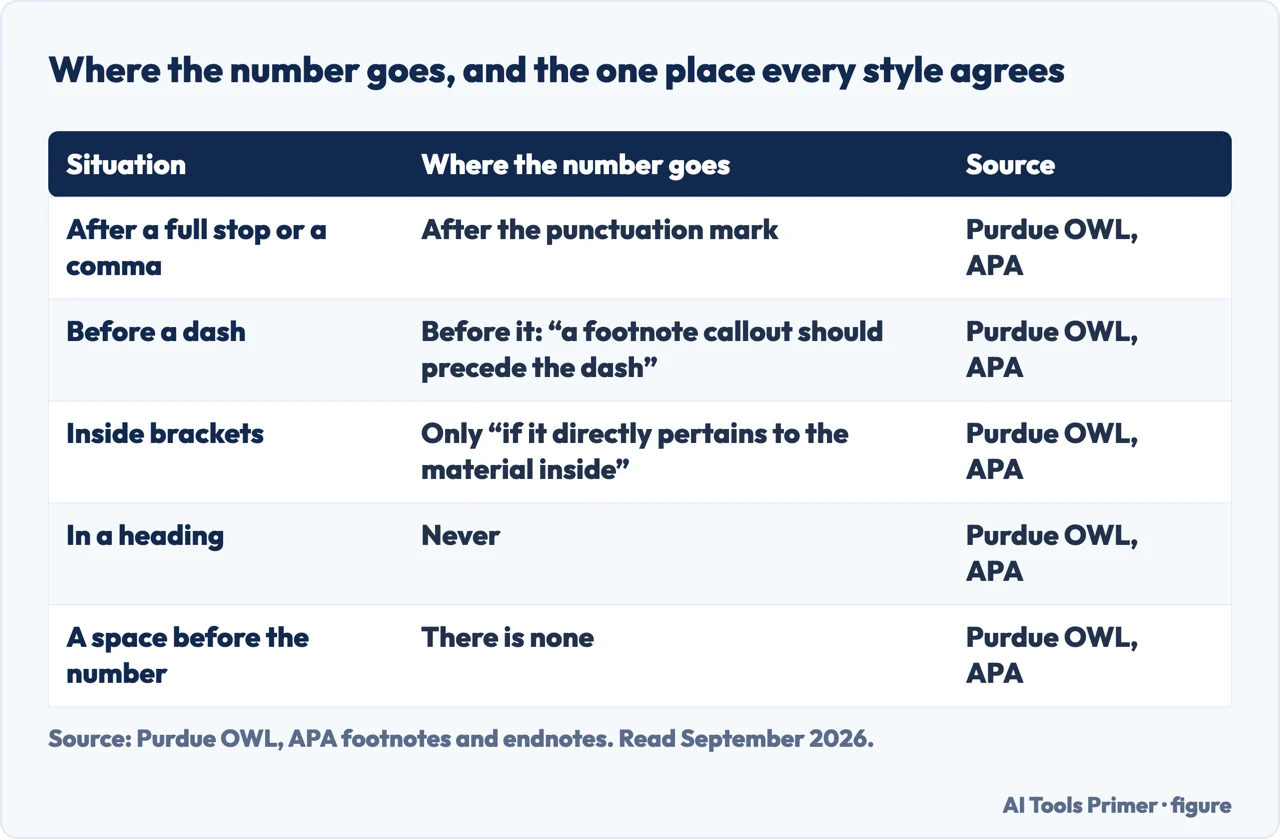
It is one of the formatting jobs that live behind a menu rather than on the toolbar, like striking a line through text: easy once you know where, and looked up every time until then.
In Microsoft Word
Microsoft: “On the References tab, select Insert Footnote or Insert Endnote.” The numbering is automatic — “A number or symbol on the footnote or endnote matches up with a reference mark in the document”.
“Footnotes appear at the bottom of the page and endnotes come at the end of the document.” To get back to where you were: “double-click the reference mark at the beginning of the note”.
In Google Docs
Same idea, different menu, and the numbering is handled for you in the same way.
One trap worth knowing before you start. Google: “If your document is in pageless format, footnotes will all appear together at the end of your document.” In pageless mode a footnote is not at the foot of anything — which matters if the person marking it expects notes on the page.
- Put the cursor where the number belongs. After the punctuation, except at a dash, where it goes before.
- Use the command, not the keyboard. In Word: References › Insert Footnote. The application numbers the note, renumbers everything when you insert one in the middle, and moves the note when you move the text.
- Write the note at the bottom of the page. Word puts the cursor there for you.
- Check what you have written is not an argument. If the reader needs it to follow you, it belongs in the text; a footnote is for what must be traceable but not read.
- Leave the numbering alone. Typed numbers do not renumber, and the first insertion in the middle of the draft turns them all into a lie.
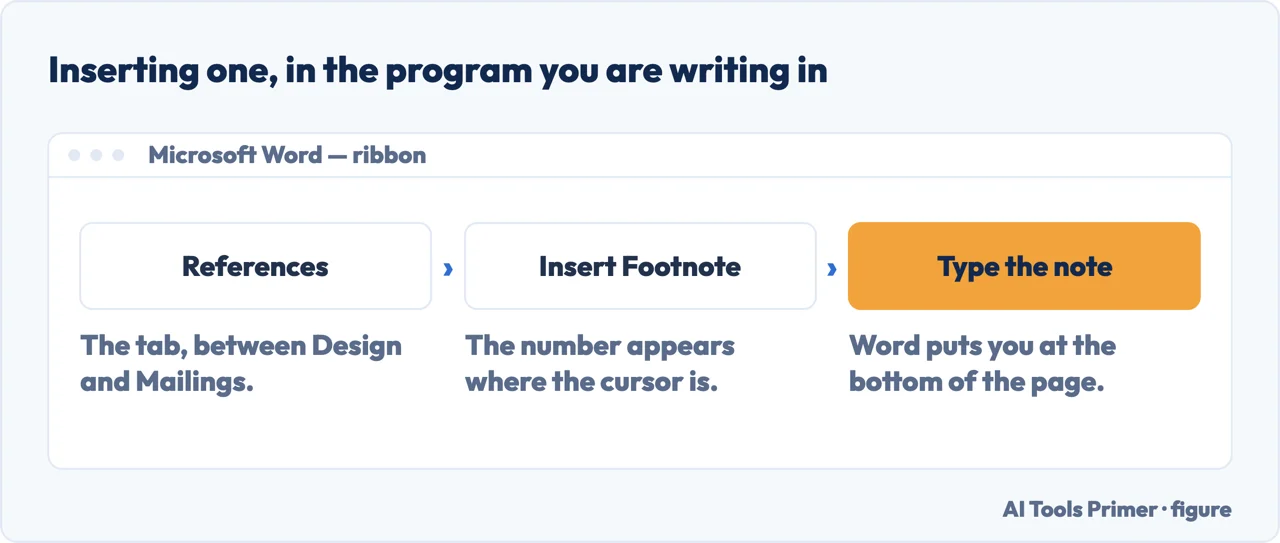
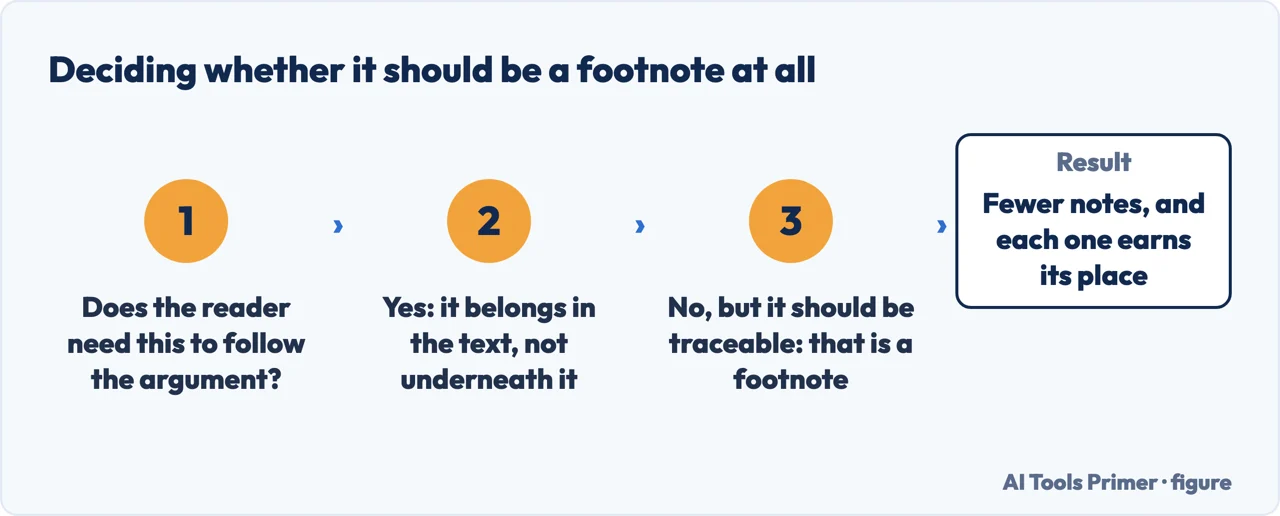
Both applications number the notes for you, renumber them when you insert one in the middle, and move them when you move the text. Typing the numbers yourself is the single commonest way this goes wrong, and it goes wrong silently — everything looks correct until a paragraph is cut and every number after it is one out.
What goes in the note, when it is a citation
Chicago’s notes-bibliography system, from its free Citation Quick Guide, read 21 August 2026.
- The first time you cite a source
- 1. Charles Yu, Interior Chinatown (Pantheon Books, 2020), 45.
- Every time after that
- 3. Yu, Interior Chinatown, 48.
- And once, in the list at the end
- Yu, Charles. Interior Chinatown. Pantheon Books, 2020.
The shortened form is the part people miss, and it is what keeps a heavily referenced chapter readable. A document where every note repeats the full publication details is not more rigorous — it is harder to read, and it is not what the style asks for.
The first is about names. Chicago works through an example where “the author’s name follows Eastern order (family name first) rather than Western order (family name last); the author is therefore referred to as ‘Liu’ in a shortened note, and the name is not inverted in a bibliography entry.” Two departures from the default in one citation — the short form takes the family name that is already first, and the bibliography line does not flip it. A tool that mechanically inverts every name gets both halves wrong.
The second is about where you read the thing. “To cite a book consulted online, include either a URL or the name of the database. For downloadable ebook formats, name the format; if no fixed page numbers are available, cite a section title or a chapter or other number in the note (or simply omit).” Chicago’s own examples end with the medium attached — “chap. 6, Kindle” for one, “92, EBSCOhost” for another — which is the part people leave off, and the part that tells a reader why there is a chapter number where a page number should be.
If you are writing to a word limit, check what your software counts. Google states it plainly: “Unless you select a section of the document, word count applies to everything except headers, footers, and footnotes.”
So an essay with substantial notes can be well over a limit that the counter in the corner says you are comfortably under — or, if your department excludes notes too, comfortably under one you thought you had exceeded. Either way the number on screen is not the number being marked, and finding that out the night before is worse than finding it out now.
On the editorial half, the thing worth understanding is that a footnote is not automatically a citation. Styles that use notes for references — Chicago’s notes-bibliography system is the most common — put the source down there. Styles that do not, such as APA and MLA, put the source in the sentence and leave notes for genuine asides. Using footnotes for references in a style that does not want them is a formatting error rather than a stylistic choice, and it is one the software will happily let you make.
The searches around this one come from both halves. Footnote citation and how to cite in a footnote are people who already know they need notes and want the form. How to add footnotes in word and how to insert a footnote are the mechanical question. And footnote vs endnote is the small decision in between: same content, different location, and usually a matter of what the department or the publisher asks for rather than of preference.
One practical habit closes the gap between the two halves. Insert the note at the moment you use the source, not at the end. Notes added afterwards, from memory or from a browser history, are where wrong page numbers and half-remembered editions come from — and a wrong page number in a note is harder to spot and more damaging than an untidy one.
Where to start
Four ways in.
- “Footnote or endnote?”
- That is notes and styles
- “My word count looks wrong.”
- Read counting and limits
Notes and styles
Which styles use notes for citations and which do not. Getting this wrong is common and entirely avoidable.
Counting and limits
The practical consequence of having notes at all, and the one that shows up at submission.
Questions people also ask
Where do you put a footnote number?
After the punctuation, with one exception: at a dash it goes before. Purdue’s summary of the APA rule is “insert a number formatted in superscript following any punctuation mark apart from a dash (—). A footnote callout should precede the dash.”
Does a footnote number go inside or outside a comma?
Outside — after it. The same holds for a full stop and a semicolon. Inside brackets it goes only “if it directly pertains to the material inside”, otherwise it goes after the closing bracket.
Do you put a space before a footnote number?
No. “There should not be a space before a footnote callout.” The number sits directly against the punctuation or the word before it.
Can a heading have a footnote?
No: “a footnote callout should never occur in a heading.” If a heading needs a source, the note belongs on the first sentence underneath it.
Not covered here. It will not tell you to type note numbers by hand. Both applications do it properly and both fix themselves when the text moves.
It will not treat a footnote as decoration. In some styles it is where the citation lives; in others it is a formatting error, and the guide says which is which.
And it will not guess your word limit rules. What the software counts is documented and quoted here; what your department counts is a question only they can answer, and it takes one line to ask. What holds instead is simple: the instructions here are quoted from Microsoft, Google and the Chicago Manual of Style.
Step 5 of 5 in a term of coursework
The order a student meets these in, from the lecture to the reference list.
- Before this
- How to write a bibliography, and whether you need one
The night the reference list is due
Which style you were told to use decides everything below it.
- The same job, in the other places it comes up
- Chicago style citation: two systems, not one
- APA in text citation: the two forms it takes
- MLA format: the one template it all runs on
- How to cite a website when the three styles disagree
Sources
- Microsoft Support — Insert footnotes and endnotes in Word (the note that footnotes appear at the bottom of the page and endnotes at the end of the document, that a number or symbol on the note matches a reference mark in the document, the References tab route with Insert Footnote and Insert Endnote, and that a double click on the reference mark returns you to the document) — support.microsoft.com, read 6 September 2026.
- Google Docs Editors Help — Add footnotes, including the pageless format behaviour — support.google.com, read 21 August 2026.
- The Chicago Manual of Style Online — Citation Quick Guide, notes-bibliography samples — www.chicagomanualofstyle.org, read 21 August 2026.
- Google Docs Editors Help — Count the words in a document — support.google.com, read 21 August 2026.
- Purdue OWL — APA footnotes and endnotes: where the callout goes relative to punctuation, the dash exception, brackets, headings and the space that should not be there — owl.purdue.edu, read 3 September 2026.
Written by Alberto Gulotta
Founder and editor of AI Tools Primer, writing from Palermo, Italy. Thirty-five years of taking computers apart, starting with a Commodore 64 — the long version is on the about page.
Something wrong on this page? Write to aitoolsprimer@gmail.com and it gets fixed.
Written on 21 August 2026 · last checked 3 September 2026.
Independence and limits
No affiliate links and no paid placements anywhere on this site. Nobody pays to appear here, and no company has seen this page before you did.
This is general information, not professional advice. Where a page touches money, health, safety or the law, it names its source and the date it was read — and your situation may still differ. See the privacy page and the cookie policy.