
Video · guide
AI video generators: what each page states, and what has closed
By Alberto Gulotta · Updated · 15 min read
AI video generators state their limits in different places and different numbers. Google and Canva say eight seconds, Kling says up to 30, and the Runway page gives no figure. OpenAI’s Sora, which said 20, has been discontinued. Watermarks, rights and closing dates also differ, so each page and its date matter.
| Question | Answer | Where it comes from |
|---|---|---|
| How long can a clip be? | Google says 4, 6 or 8 seconds; Canva up to eight; Kling 4.0 from 3 to 30; Runway gives no figure | Google, Canva, Kling, Runway |
| Which resolutions? | Google says 720p, 1080p or 4k, with 1080p and 4k only at 8 seconds | |
| Is the video marked? | Google says SynthID; Runway says C2PA credentials; Kling says free exports generally carry a watermark | Google, Runway, Kling |
| Who has the rights? | Runway says the work is yours; Canva says the rights may not be exclusive; Kling says commercial use is for eligible outputs under paid terms | Runway, Canva, Kling |
| What has closed? | Sora’s web and app on 26 April 2026 and its API on 24 September 2026; the Veo 3.1 previews in the Gemini API on 22 October 2026 | OpenAI, Google |
| How long does Google keep a video? | Two days on its server, then it is removed |
How long a clip can be depends on whose page you read
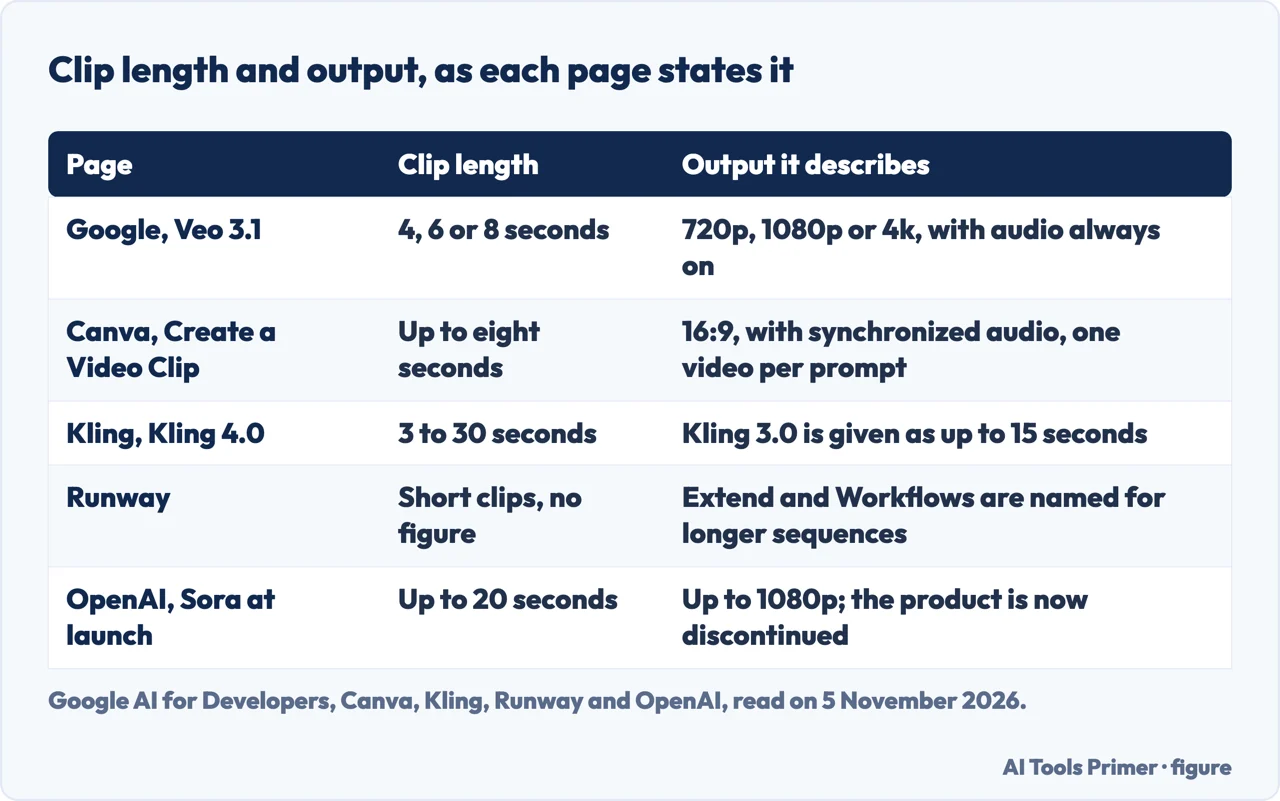
Google’s documentation for Veo 3.1 in the Gemini API describes the model as one for generating 8-second videos at 720p, 1080p or 4k with natively generated audio. Its parameter table is a little wider than that sentence: the duration can be 4, 6 or 8 seconds, but it must be 8 when you use extension, reference images or the 1080p and 4k resolutions. The same table gives a frame rate of 24 per second and one video per request.
Canva’s page for Create a Video Clip, which it says is powered by Google’s Veo-3, gives the same ceiling in different words: a text prompt produces a 16:9 video of up to eight seconds, with synchronized audio that includes dialogue, sound design and music, and one video per prompt. Canva says the feature is open to Pro, Business, Enterprise and Nonprofit users, for a limited number of clips per month. The two pages agree on eight seconds, but they are two pages describing two products, and a limit on one does not change the other.
Kling’s page gives the largest figure we read. It says Kling 4.0 supports clips from 3 to 30 seconds per generation and Kling 3.0 supports clips of up to 15, and that earlier versions may have different limits. For longer projects it points to a feature it calls Continuous Timeline Creation. Runway gives no figure. Its FAQ says single generations are short clips, and that to build a longer sequence you use Extend to stretch a clip and Workflows to chain generations together.
Of the pages we read, Google is the only one that puts a number on stretching. Its extension feature adds 7 seconds at a time, up to 20 times. The input must be a video that Veo generated, no longer than 141 seconds, at 720p, and the result is a single video of up to 148 seconds. That is a chain of short generations, not one long one, and the page limits it to Veo 3.1 and Veo 3.1 Fast, not Veo 3.1 Lite. OpenAI’s launch announcement for Sora, dated 9 December 2024, said videos could be up to 20 seconds long and up to 1080p; the product it described has since closed, as the section on closures below sets out.
Resolution, sound and the wait
Google’s page attaches several conditions to resolution. It lists 720p, 1080p and 4k, says 4k is not available for Veo 3.1 Lite, and says the higher the resolution, the higher the latency, with 4k videos also costing more according to its pricing page. It gives the request latency as a minimum of 11 seconds and a maximum of 6 minutes during peak hours. Audio is listed as always on for the Veo models in its table. The page also warns that Veo 3.1 will sometimes block a video from generating because of safety filters or processing issues with the audio, and says you are not charged when a video is blocked.
Kling’s page speaks of native audio with dialogue, sound effects and ambient sound, and says Kling 4.0 supports dialogue in 9 languages. It ties its 4K claim to Kling Video 3.0 in its introduction. Runway’s page lists Kling O3 as a model with audio, keyframes and up to 4K output, and says dialogue and music can be generated during generation on supported models, or added to a clip afterward. Zapier’s roundup, which we use for its dates and a few statements and not for its ranking or prices, says the apps on its list export from 720p at worst to 4k at best.
On what a generation costs before you press the button, the pages differ in what they promise. Runway’s FAQ says the Free plan includes 125 one-time credits, that each model charges per image, per second or per 6 seconds of conversation with a Character, and that it shows the total cost before you generate; it also warns that the listed rates are not the total cost of a single generation in some cases. Kling’s FAQ says you can check your credit balance and the cost of a generation before creating a video, and that some models, higher resolutions and advanced features require a membership or additional credits. We give no prices here, because this page is about stated limits and dates, and a price would need a dated source.
Marks, rights and people in the picture
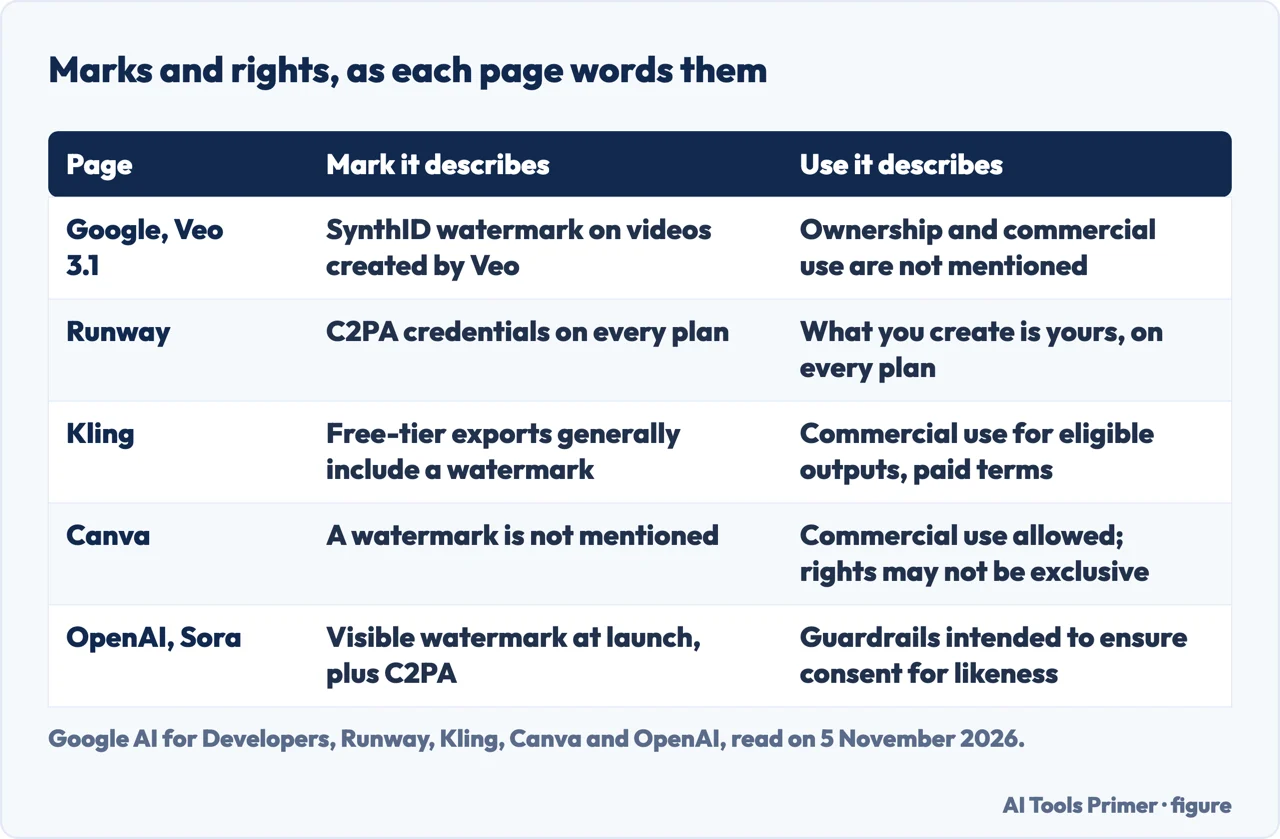
Each page describes a different kind of mark. Google says videos created by Veo are watermarked using SynthID, its tool for watermarking and identifying AI-generated content, and that they can be checked on the SynthID verification platform. Runway says outputs from its own models carry C2PA content credentials on every plan. Kling says free-tier exports generally include a watermark and that removing it is a membership benefit; the word generally is the page’s own. OpenAI, writing about Sora 2, described both visible and invisible provenance signals, with a visible watermark on all outputs at launch and C2PA metadata embedded in every video. The Canva page we read does not mention a watermark. Runway’s answer about the Free plan says images made there carry a small Runway watermark, and the page does not say whether the same holds for video.
The rights wording runs in three directions. Runway says what you create is yours, on every plan, including the Free plan. Canva says you can use designs generated with Canva AI for any purpose, personal or commercial, as long as you follow its terms, and then adds that you may not have exclusive rights to AI-generated designs, that it is your responsibility to decide whether permission is needed to depict works of art, photographs, trademarks or logos, and that Canva does not guarantee the results are cleared for use. Kling says commercial use is permitted for eligible outputs under the applicable paid-service terms, and asks you to make sure you have the necessary rights to any reference images, music, logos or other third-party material. Google’s page, for its part, does not mention ownership or commercial use. For how these terms read for a text prompt, see our page on text to video, and for a still picture set in motion, image to video.
People are treated separately. Google says that in the EU, the UK, Switzerland and MENA locations, allow_adult is the only allowed value for generating people, and that Veo 3.1 accepts up to 3 reference images of a person, character or product to preserve the subject’s appearance. OpenAI said, in the Sora 2 announcement, that it has guardrails intended to ensure that the likeness captured in characters is used with the consent of the person who creates them. Zapier, describing Adobe Firefly, says Adobe trains it on licensed Adobe Stock, openly licensed content and public domain material, and that the contractual IP indemnification requires buying the appropriate entitlement. We could not read Adobe’s own page, so that is Zapier’s statement and not Adobe’s.
What the vendors say has closed
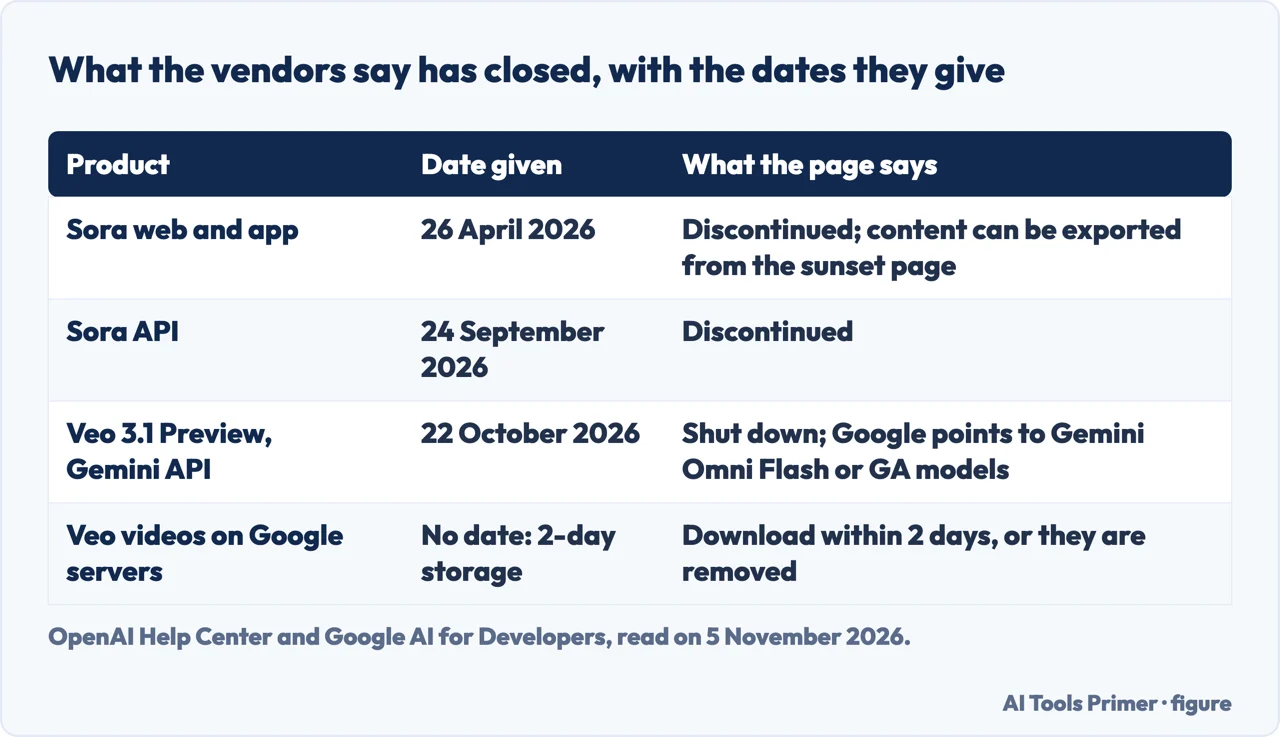
Two of the names in this subject now come with a closing date. OpenAI’s Help Center page on the Sora discontinuation, which showed an update of two days earlier when we read it on 5 November 2026, says the Sora web and app experiences were discontinued on 26 April 2026 and the Sora API on 24 September 2026. It says content can be exported at sora.chatgpt.com/sunset, that an email follows when the export is ready, that after the discontinuation and any final export window the data associated with your use of Sora will be permanently deleted, and that purchased ChatGPT and Sora credits can still be used for Codex. OpenAI’s page on launching Sora responsibly now opens with a line saying the Sora product is no longer available as of that April date, above the safety text written for the launch.
Google’s Veo documentation carries a warning of its own at the top. The Veo 3.1 previews in the Gemini API, named there as the generate, fast and lite preview models, were shut down on 22 October 2026, and the page tells readers to migrate to Gemini Omni Flash or to the GA models available through the Gemini Enterprise Agent Platform. The same page keeps the full guide to Veo 3.1 below the banner, with parameters and limits, so a reader who stops at the guide misses what the banner says.
A shorter clock runs on every video made through the Gemini API. Google says generated videos are stored on its server for 2 days and then removed, so a copy has to be downloaded within 2 days. A video used for an extension gets its timer reset, and the extended video is treated as newly generated. The pages of Runway, Canva and Kling that we read do not give a retention period.
What the pages do not say, and why there is no ranking
Some gaps are specific enough to list. The Runway page we read gives no maximum number of seconds for a clip. Its watermark answer is about images on the Free plan. Canva says a limited number of clips per month and does not give the number. The vendor pages we read for Runway, Canva and Kling do not say when a model will be retired; the closing dates above come from Google and OpenAI, and they were written after the closures. Each page also describes its own product, so the numbers in the figures sit side by side only because we put them there. The same model name can sit behind more than one page: Canva says its clip feature is powered by Google’s Veo-3, and Runway’s page lists Veo 3.1 and Kling 3.0 among the models you can use there, so a limit stated for a model by its maker is not automatically the limit a reseller page promises.
The dates on Zapier’s roundup show why a date on a page needs reading. The article, credited to Miguel Rebelo, carries October 9, 2026 under its headline. Its footer says it was originally published in March 2023, last updated by an app tester in February 2026, and last reviewed in October 2026. We used it for its dates and for the statements about Adobe Firefly, and not for its ranking or its prices.
The pages also call themselves the best. Canva’s says its clip feature is one of the best text-to-video generators, Kling’s calls Kling one of the leading generators, and Runway’s says the best model depends on the clip and the style. Those are the vendors’ descriptions of themselves, so this page does not rank anyone. We made no video with any of these tools. We did not read the Adobe Firefly page, which would not load as text, the Invideo and Higgsfield pages, the Google Play listing or the DeepMind page on Veo.
Where to start
Four ways in.
- “How long can a clip be?”
- How long a clip can be depends on whose page you read — length
- “Which resolution, and with sound?”
- Resolution, sound and the wait — quality
- “Can I use it commercially?”
- Marks, rights and people in the picture — marks
- “Is Sora still there?”
- What the vendors say has closed — retired
Video from a description
Text or a still picture.
Other things AI makes
Pictures, music and how they work.
Questions people also ask
How much do AI video generators cost?
We give no prices. Runway says its Free plan includes 125 one-time credits and shows the total cost before you generate. Canva says Pro, Business, Enterprise and Nonprofit users get a limited number of clips per month. Kling says you can check the cost of a generation first, and that some models and resolutions need a membership.
What are the ethical considerations of AI video generators?
The pages raise provenance, consent and rights. Google describes SynthID, Runway C2PA credentials, and OpenAI described visible and invisible signals and consent for likeness characters. Canva says the rights may not be exclusive and are not guaranteed cleared. Google limits people generation to allow_adult in some regions.
What are the different types of AI video generators?
By input, the pages describe text, image and video. Runway lists text to video, image to video and video to video. Kling lists text and image, with up to 15 reference assets. Google’s table lists text, image and video inputs for Veo 3.1, and text and image for Veo 3.1 Lite.
How do AI video generators work?
The pages we read describe what goes in, not how the models work inside. Runway says you start from a prompt, an image or a clip, refine, then extend, upscale and export. Kling describes a prompt plus references, then Generate and download. Google describes a prompt with up to 3 reference images.
Not covered here. We made no video with any generator. The statements come from Google AI for Developers, Canva, Runway, Kling, three OpenAI pages and a Zapier roundup, all read on 5 November 2026.
The search volume and difficulty behind this page come from an Ubersuggest reading of 5 November 2026 (United States), which gives search volume and its own SEO difficulty score, not Semrush’s; a Semrush check is still to be made.
Sources
- Google AI for Developers — Generate videos with Veo 3.1 in Gemini API — ai.google.dev, read 5 November 2026.
- Canva — AI Video Generator: Text to Video AI Tool — www.canva.com, read 5 November 2026.
- Runway — AI Video Generator — runway.com, read 5 November 2026.
- Kling AI — AI Video Generator from Text and Images — kling.ai, read 5 November 2026.
- OpenAI Help Center — What to know about the Sora discontinuation — help.openai.com, read 5 November 2026.
- OpenAI — Sora is here (9 December 2024) — openai.com, read 5 November 2026.
- OpenAI — Launching Sora responsibly — openai.com, read 5 November 2026.
- Zapier — The 16 best AI video generators in 2026 — zapier.com, read 5 November 2026.
Written by Alberto Gulotta
Founder and editor of AI Tools Primer, writing from Palermo, Italy. Thirty-five years of taking computers apart, starting with a Commodore 64 — the long version is on the about page.
Something wrong on this page? Write to aitoolsprimer@gmail.com and it gets fixed.
Written on 5 November 2026.
Independence and limits
No affiliate links and no paid placements anywhere on this site. Nobody pays to appear here, and no company has seen this page before you did.
This is general information, not professional advice. Where a page touches money, health, safety or the law, it names its source and the date it was read — and your situation may still differ. See the privacy page and the cookie policy.